Cutting-Edge Developer Tools Landing Page Template
Deploy is a split-screen landing page template built for dev tools startups. It unifies a live dashboard screenshot, stat-driven proof sections, a bento-grid feature layout, and a frictionless CLI install call to action in one dark-mode interface. Styled in Midnight Blue with electric cyan accents and JetBrains Mono typography, it speaks directly to senior engineers and DevOps leads who need signal, not decoration.
by Rocket studio
Quick Summary
Deploy is the deploy high performance dev tools landing page template designed for DevOps startups, infrastructure tools, and observability platforms. It uses a 50/50 split-screen layout, a terminal-dark Midnight Blue color system, and a Stats-First Impact creative direction to move engineers from scroll to CLI install without friction. Every section earns its place the same way good code does: by doing exactly one job well.
Who This Template Is For
This landing page is purpose-built for technical founders and growth-focused engineering teams who need a high converting landing page without spending weeks on custom design. It is not a generic marketing page dressed up in dark mode. It is a focused, single page built around how developers actually evaluate tools.
- Senior backend engineers who need to present an observability or deployment platform to skeptical peers
- DevOps leads managing microservice fleets who want a landing page that reflects the quality of their infrastructure
- Startup CTOs building their first public-facing product page and looking for a perfect starting point that does not require deep technical expertise to customize
What Problem This Template Solves
Most dev tools startups face the same landing page problem. The product is genuinely powerful, but the page looks like a recycled SaaS marketing template with stock photos and vague copy. That mismatch destroys trust before a single line of code is evaluated. This page template solves that gap by leading with real performance data and a live product screenshot instead of abstract promises.
- Engineers scroll past pages that feel like they were built for a sales team, not for them. This template speaks their language from the first pixel.
- Founders waste weeks in the development process trying to wire together disparate design elements into something coherent. This template gives them a structured, credible starting point immediately.
- Conversion drops when a landing page buries the install command behind a form or a pricing wall. This page template removes that friction entirely by placing the CLI command front and center.
What You Get With This Template
This page template delivers a complete, production-ready layout with every major section already structured. You get the design elements, section order, typography choices, and animation concepts pre-assembled so your development process can focus on content and customization rather than layout decisions. It is a fantastic starting point for any dev tools product that needs to convert visitors quickly.
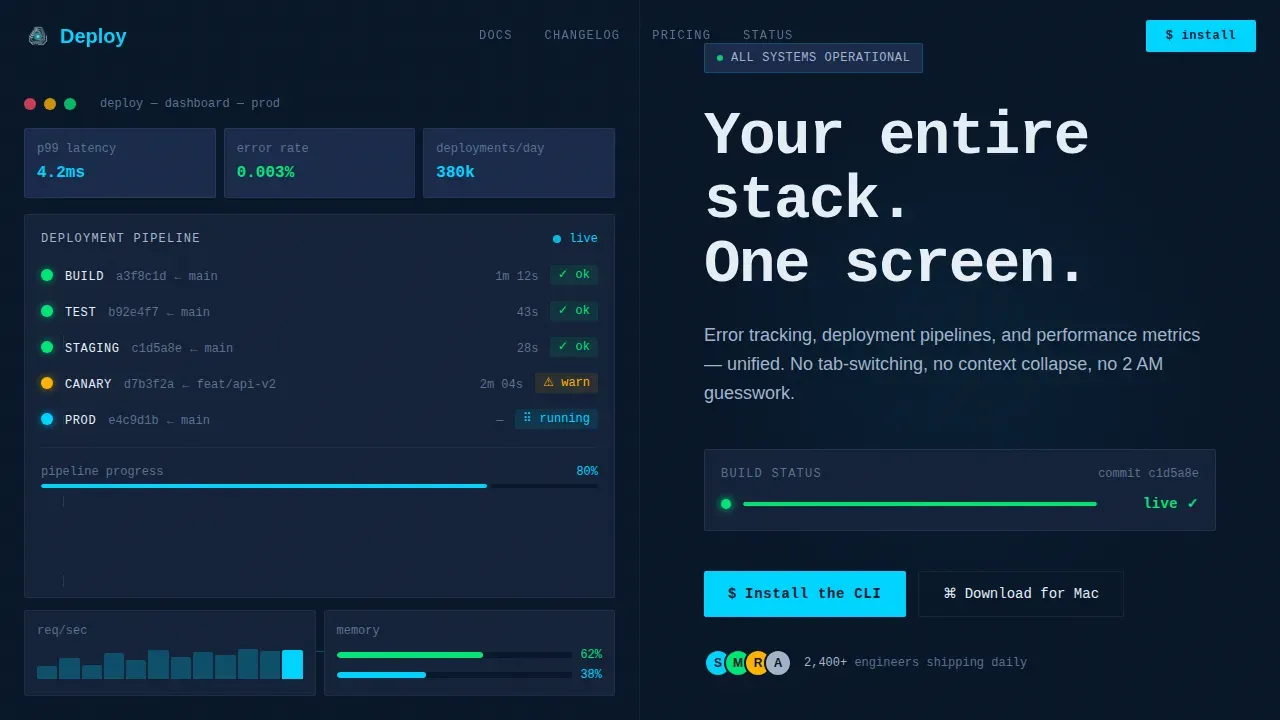
- A full 50/50 split-screen hero with a live dashboard screenshot on the left and a headline-plus-build-status-animation block on the right
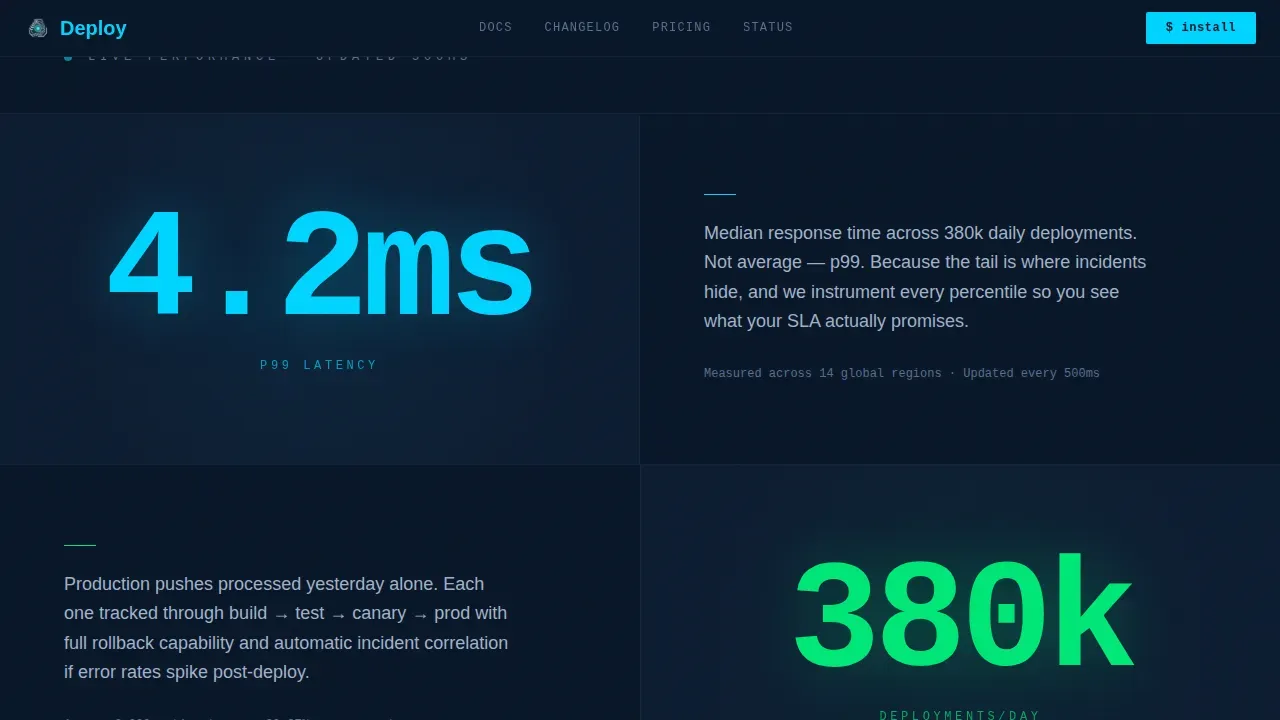
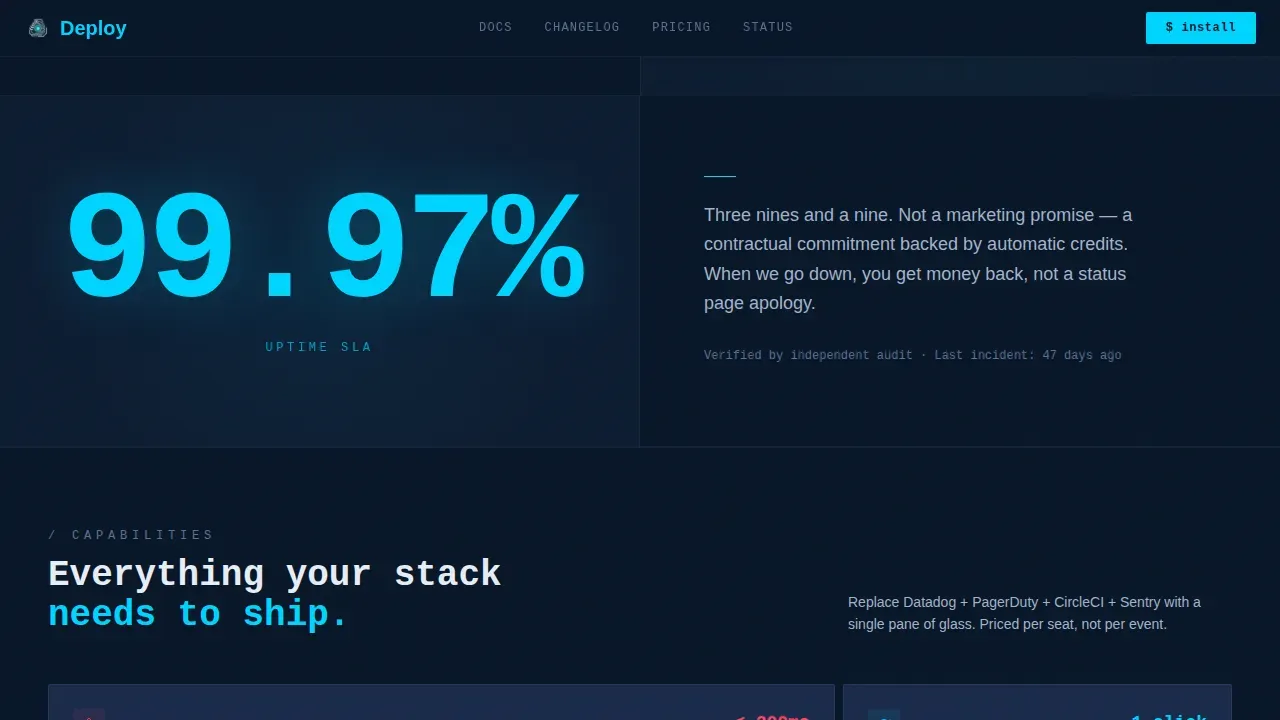
- A Stats-First Impact scroll sequence featuring scroll-triggered stat counters, alternating split-screen proof sections, and typographically dominant numbers like "4.2ms," "380k," and "99.97%"
- A bento-grid features section, an engineering-focused social proof block, and a zero-friction CLI install call-to-action section with a styled code block and a Mac download button
Feature List
This page template is built around six core capabilities that reflect both the design direction and the conversion goal.
Split-Screen Hero with Live Dashboard
The hero occupies the full viewport and divides it equally. The left half renders the actual application dashboard at native resolution, showing a live deployment timeline with green success nodes, one amber warning, and real commit hashes. The right half presents a single monospaced headline and a build status animation that ticks from "deploying" to "live," with the cyan accent pulsing on completion. This "Code Hero" approach replaces generic stock imagery with a live product embed, immediately communicating the value proposition to a technical visitor's attention.
Stats-First Impact Scroll Sequence
Every section below the fold opens with a massive, typographically dominant number before any explanatory text appears. The layout alternates split-screen sides as the visitor scrolls, creating a zigzag reading pattern that mirrors scanning a metrics dashboard. Scroll-triggered stat counters animate into view, turning passive visitors into engaged readers and reinforcing the product's credibility with proof rather than narrative. This is a key differentiator for developer-tool landing pages where engineers respond to data over marketing copy.
Bento-Grid Features Section
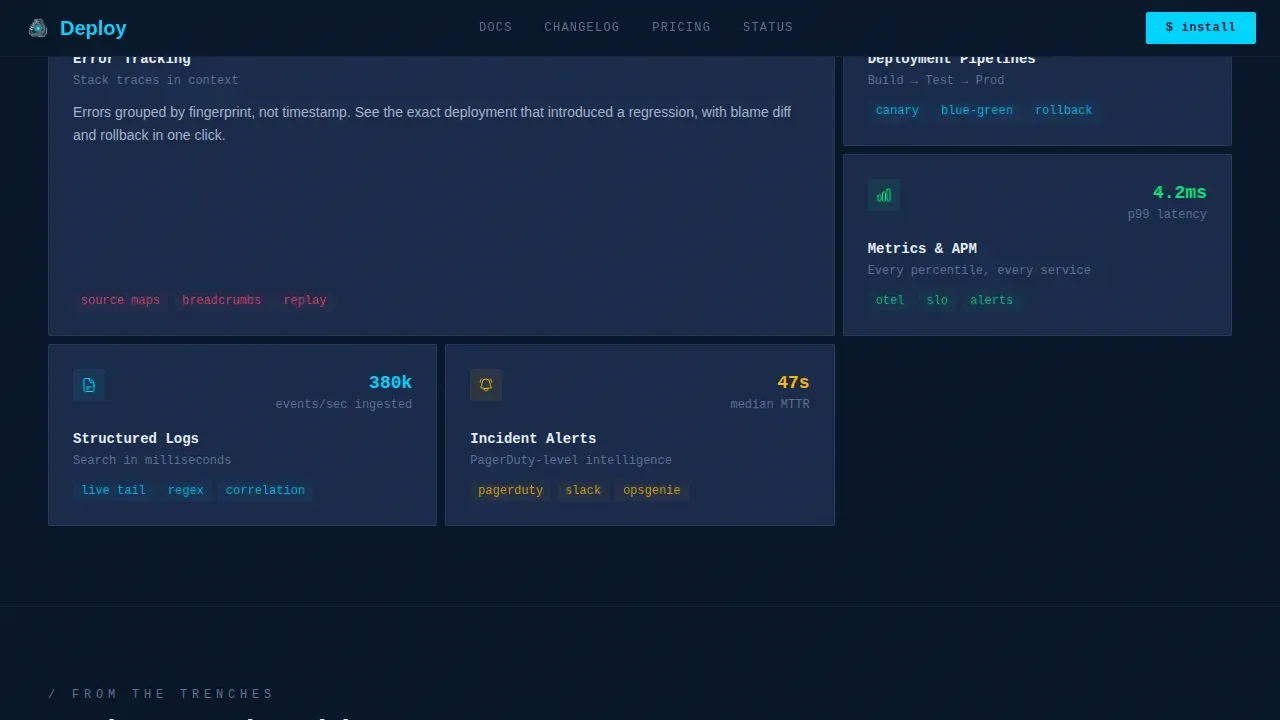
The features section uses an asymmetric bento grid with varied card sizes to present error tracking, deployment pipeline views, and performance metrics in a condensed, grid-like layout. Each card is sized to reflect the relative importance of the capability it describes. This layout is ideal for complex tools with multiple capabilities and keeps the visitor's attention moving without overwhelming the page with long paragraphs.
Engineering-Focused Social Proof Block
The social proof section uses named engineers at real-feeling companies paired with specific incident resolution outcomes. Developer-friendly social proof of this kind, built around concrete engineering results rather than vague endorsements, builds trust far more effectively than generic star ratings. This block is structured to hold the visitor's attention just long enough to remove the last objection before the install call to action.
Zero-Friction CLI Install Section
The primary call to action reads "Install the CLI" and sits beside a styled terminal code block displaying a one-click copy-to-clipboard command. A secondary "Download for Mac" button sits adjacent. There are no contact forms, no email gates, and no pricing tables between the visitor and the install. This frictionless approach reflects best practice for developer-tool landing pages: the primary call to action is the command to install or try the tool.
Animated Deployment Nodes and Build Status Ticker
The template includes high-animation concepts throughout: a build status ticker in the hero, pulsing cyan accents on active states, scroll-triggered staggered reveals, and animated deployment nodes in the pipeline view. These interactions reinforce the "live terminal" aesthetic and keep the page feeling dynamic without sacrificing loading speed or distracting from the single conversion goal.
Page Sections Overview
| Section | Purpose |
|---|---|
| Split-Screen Hero | Full-viewport dashboard screenshot with headline and animated build status |
| Stats Impact Row | Scroll-triggered dominant numbers alternating split-screen sides |
| Bento Features Grid | Asymmetric cards for error tracking, pipelines, and metrics |
| Social Proof Block | Named engineer testimonials with specific engineering outcomes |
| CLI Install Section | Styled terminal command block with Mac download and zero friction |
| Minimal Dev Footer | GitHub-style developer footer with clean link structure |
Design & Branding System
The visual identity follows a terminal-dark aesthetic that feels like a live trading terminal at 3 AM: all signal, no decoration. The Midnight Blue color system is applied consistently across every surface. JetBrains Mono handles monospaced headline and code typography, while DM Sans covers body text and labels, creating a clear typographic hierarchy that supports both brand identity and scannability.
- Color palette: deep terminal navy (#0A1628) as the primary background, desaturated slate (#1B2A4A) for card surfaces and secondary panels, cool silver (#A4B3C8) for body text and secondary labels, and electric cyan (#00D4FF) as the sole accent for live data points, active states, and call-to-action elements
- Typography: JetBrains Mono for monospaced display headlines and code blocks; DM Sans for body copy, supporting labels, and navigation; the combination reinforces the terminal-native professional design without feeling cold or inaccessible
Mobile & Speed Optimization
Developers have high-performance expectations, and page speed is a significant trust signal in this audience segment. The template is designed desktop-first for senior engineers working on large monitors, but it includes responsive layouts that adapt cleanly to smaller screens. Fast loading speed is built into the design decisions: minimal decoration, purposeful use of imagery, and a structure that supports lazy loading for non-critical assets.
- The desktop-first responsive design ensures the split-screen layout, stat counters, and bento grid degrade gracefully on mobile devices, maintaining readability and usability across screen sizes
- Performance optimization is supported through the template's lean structure: semantic HTML, component-level separation of static and animated elements, and a layout that minimizes unnecessary render-blocking design elements
How This Template Helps You Convert
A high converting landing page for a dev tool does one thing above all else: it removes every reason to leave before the visitor reaches the install command. This template is built around that single goal. The page earns the install by showing real performance data first, then reducing friction to a single paste into a terminal.
- The Stats-First Impact layout captures the visitor's attention immediately with credible, specific numbers and holds it through alternating split-screen proof sections, keeping the scroll journey focused on evidence rather than persuasion
- The zero-friction CLI install section eliminates the form submissions and email gates that typically interrupt conversion, placing the one action that matters, pasting a command into a terminal, directly in front of the user at exactly the right moment
Other Information About This Template
This template is a valuable starting point for any team launching a dev tools product page, whether you are releasing an open-source observability agent, a commercial deployment platform, or an infrastructure-as-code tool. It is equally well-suited to APIs, software development kits (SDKs), libraries, and infrastructure tools, making it part of a diverse collection of use cases within the developer tooling space.
- The underlying code follows clean code quality standards with semantic HTML and a structure that supports screen readers and helps pages perform well with search engines over time, supporting organic traffic growth
- The template is built with Tailwind CSS, giving developers a familiar build tool and utility-first class structure. Tailwind CSS enables rapid customization without large-scale code changes, and the source code is well-organized for teams with varying levels of technical expertise
- Template files are delivered as a zip file containing all assets, ready to drop into your preferred setup process. You can connect a custom domain, run through install dependencies in minutes, and adapt the visual builder or underlying code to match your brand identity
- For teams exploring no-code or low-code workflows, drag-and-drop editor platforms can be used to restyle the layout. No-code platforms enable users to create landing pages without needing extensive technical skills, allowing for faster deployment and iteration. Many teams use a drag-and-drop editor to make surface-level adjustments before handing the underlying code to a developer for deeper customization
- AI-powered tools can significantly streamline the landing page development process when layered on top of a structured template like this one. Using pre-built templates in no-code platforms can accelerate the landing page creation process, allowing users to focus on landing page content rather than design decisions
- The template supports CMS integration for teams that want to manage copy updates through a content management system. Form submissions can be handled through any third-party service. Payment integration, if needed for a premium tier, can be wired in through standard embed patterns. A free tier offer can be surfaced cleanly in the stats section or the install call-to-action block
- This is a premium template designed for a specific niche. However, many teams start here and treat it as a stepping stone into a broader set of landing page templates as their product line grows. If your next project requires building landing pages for multiple products, this template provides a visual and structural foundation to build from
- Free templates and free landing page options exist across the marketplace, and this template draws design inspiration from the same terminal-dark aesthetic those pages favor. However, this page template goes further by combining Stats-First Impact creative direction with a conversion-focused install flow that free landing page alternatives rarely include
- Tailwind templates in this style, including tailwind CSS-based layouts like this one, are well-suited to deployment on static site hosts. Vercel, Netlify, and GitHub Pages are recommended platforms for deploying static sites built on responsive landing page templates like Deploy. A responsive landing page deployed to a fast static host can approach sub-one-second loading speed on desktop, which is a game changer for developer-tool credibility
- Building blocks for the page, including the hero, stats row, bento grid, social proof, and install section, are each self-contained. This makes it straightforward to adapt multiple layouts or reorder sections for A/B testing. Understanding user behavior through analytics tools helps teams make data-driven decisions about which building blocks to keep, reorder, or replace
- For small businesses and solo founders without a dedicated design team, the template's professional design and clear structure serve as a valuable set of landing page components to work from. The setup process is documented with step by step instructions, so teams do not need deep web development knowledge to get the page live with a custom domain
- The page template structure supports search engines by following semantic HTML conventions and maintaining fast loading across devices. A well-structured, fast loading page with clear landing page content and strong social proof is better positioned to earn organic traffic over time, giving your product page a simple landing page foundation that also performs technically
Theme
Dashboard Pro
Creative direction
Stats-First Impact
Color system
Midnight Blue
Direction
App Download
Page Sections
Split-screen Hero with Dashboard Screenshot
Stats-first Impact Scroll Sections
Asymmetric Bento Features Grid
Engineering Social Proof Block
Zero-friction CLI Install Section
High-animation Interaction Layer
Related questions
Who is this landing page template designed for?
Can I customize the colors and typography?
Does this template include a way to capture emails or leads?
Is this template suitable for APIs or open-source tools?
What do I receive when I purchase this template?