Maritime Law Firm Website Template
Admiralty is a dashboard-style landing page built for maritime law firms. It presents collision claims, cargo disputes, charter party conflicts, and Jones Act cases as structured data modules inside an industrial dark-grid layout. The design communicates authority through evidence, guiding fleet managers, P&I club correspondents, and offshore contractors toward a single clear action: requesting a case assessment.
by Rocket studio
Quick summary
Admiralty is a single-page, click-through landing page template for maritime law firms. It uses a dashboard and data grid layout to present case categories, jurisdiction reach, and resolution metrics as a structured intelligence report. The visual identity is built on an Industrial Raw theme with a Fire and Earth color system, making every section feel operational and credible.
Who this template is for
This template is designed for maritime law practices that handle complex, high-stakes disputes across multiple jurisdictions. It speaks directly to the people those firms need to reach.
- Fleet operations managers dealing with vessel detention notices and port authority disputes
- Protection and Indemnity (P&I) club correspondents coordinating multi-jurisdictional casualty claims
- Offshore contractors facing personal injury lawsuits under the Jones Act
What problem this template solves
Maritime legal clients do not respond to generic law firm brochures. They need structured proof of capability before they make contact. This template solves the credibility gap with dense, evidence-led design.
- Case metrics, jurisdiction data, and resolution timelines are presented as dashboard cards, not paragraphs
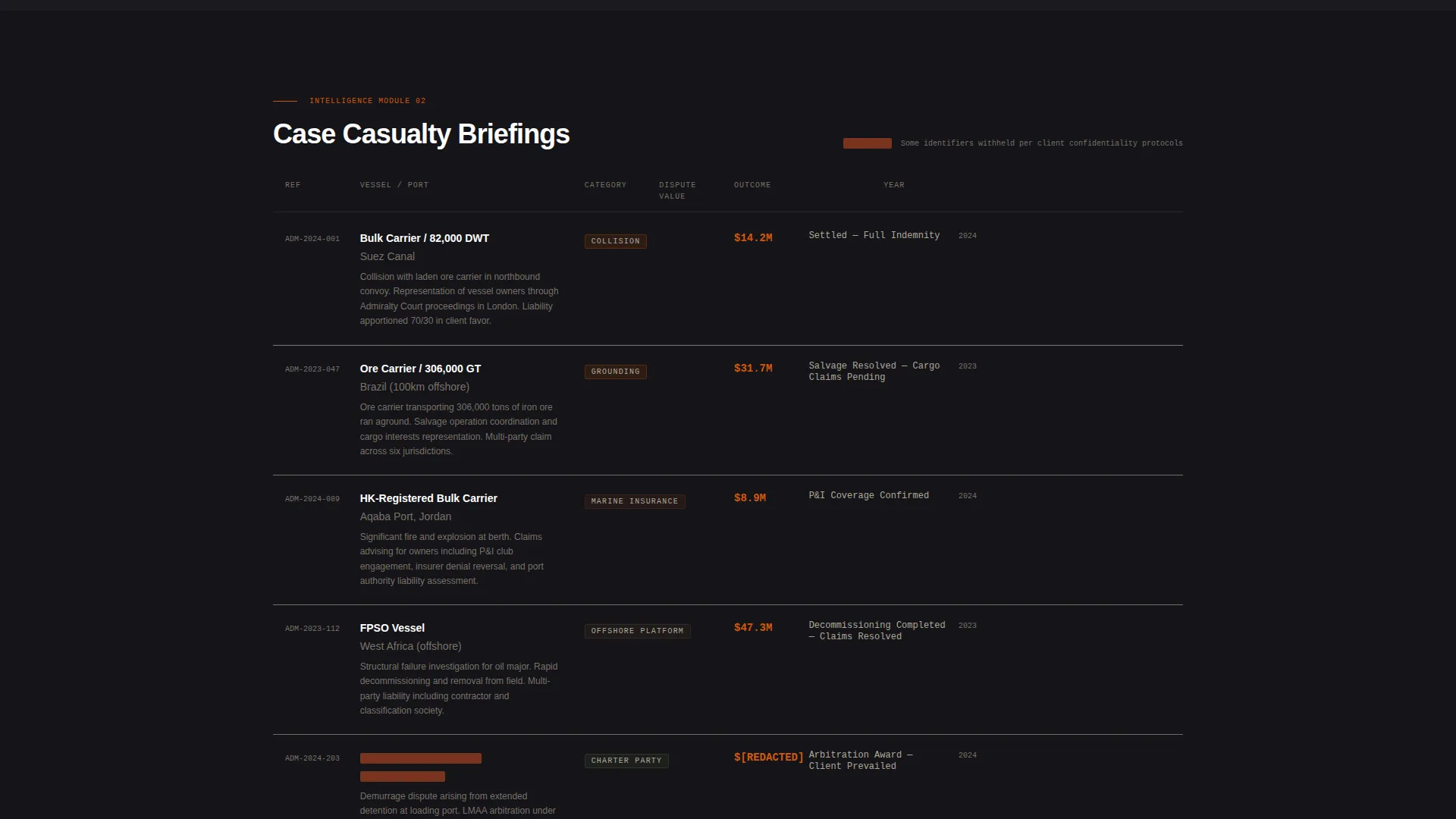
- Redacted-style case summaries show real dispute types without revealing confidential details
- The click-through funnel removes the form from this page entirely, so the firm earns the click through demonstrated expertise
What you get with this template
The template delivers a complete, single-page click-through landing page structured like a maritime casualty briefing. Every section is purpose-built to build authority and move the visitor toward one decision.
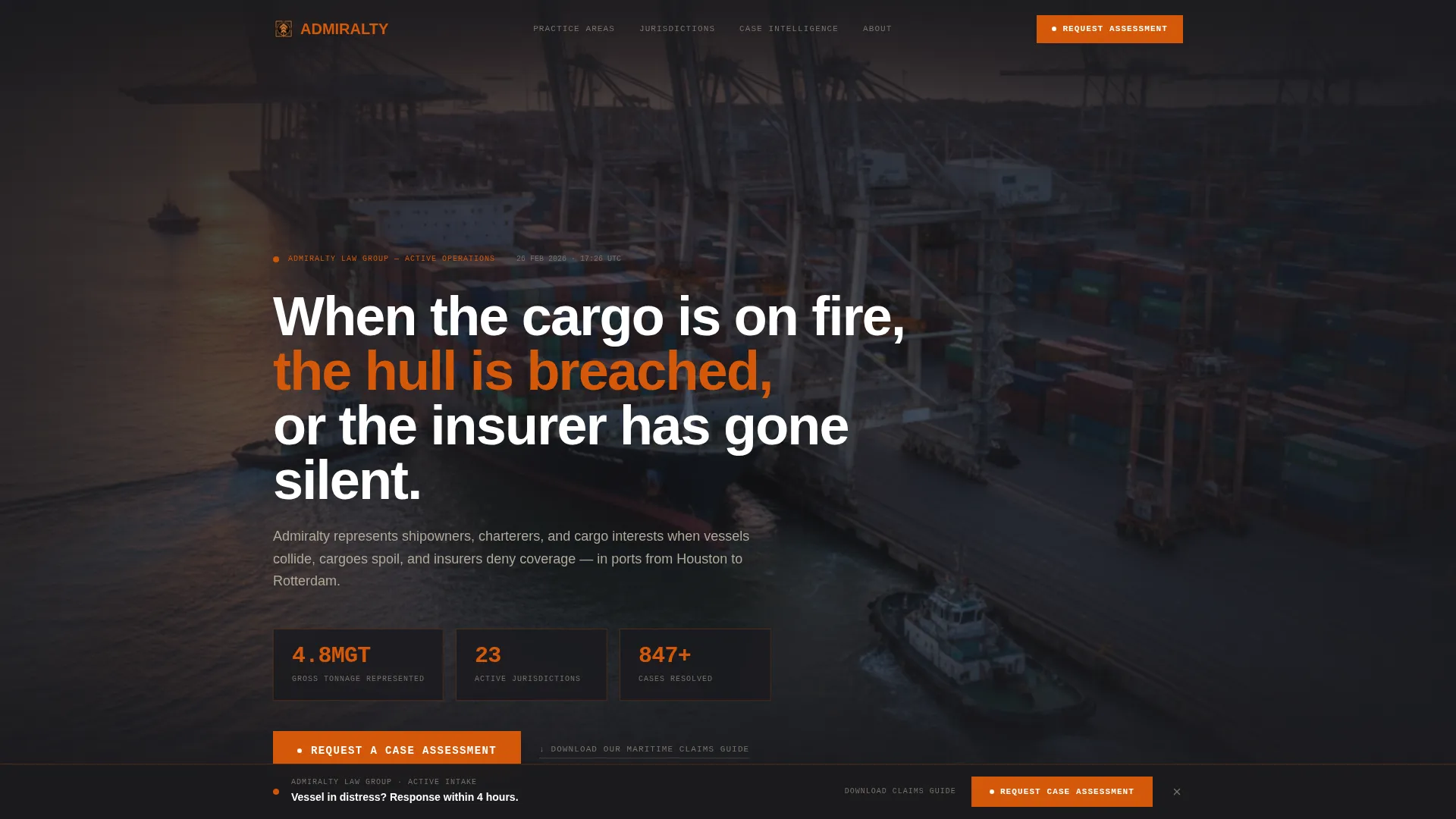
- A full-viewport panoramic header with a port photograph, atmospheric overlays, and three live-formatted statistics rendered in furnace orange
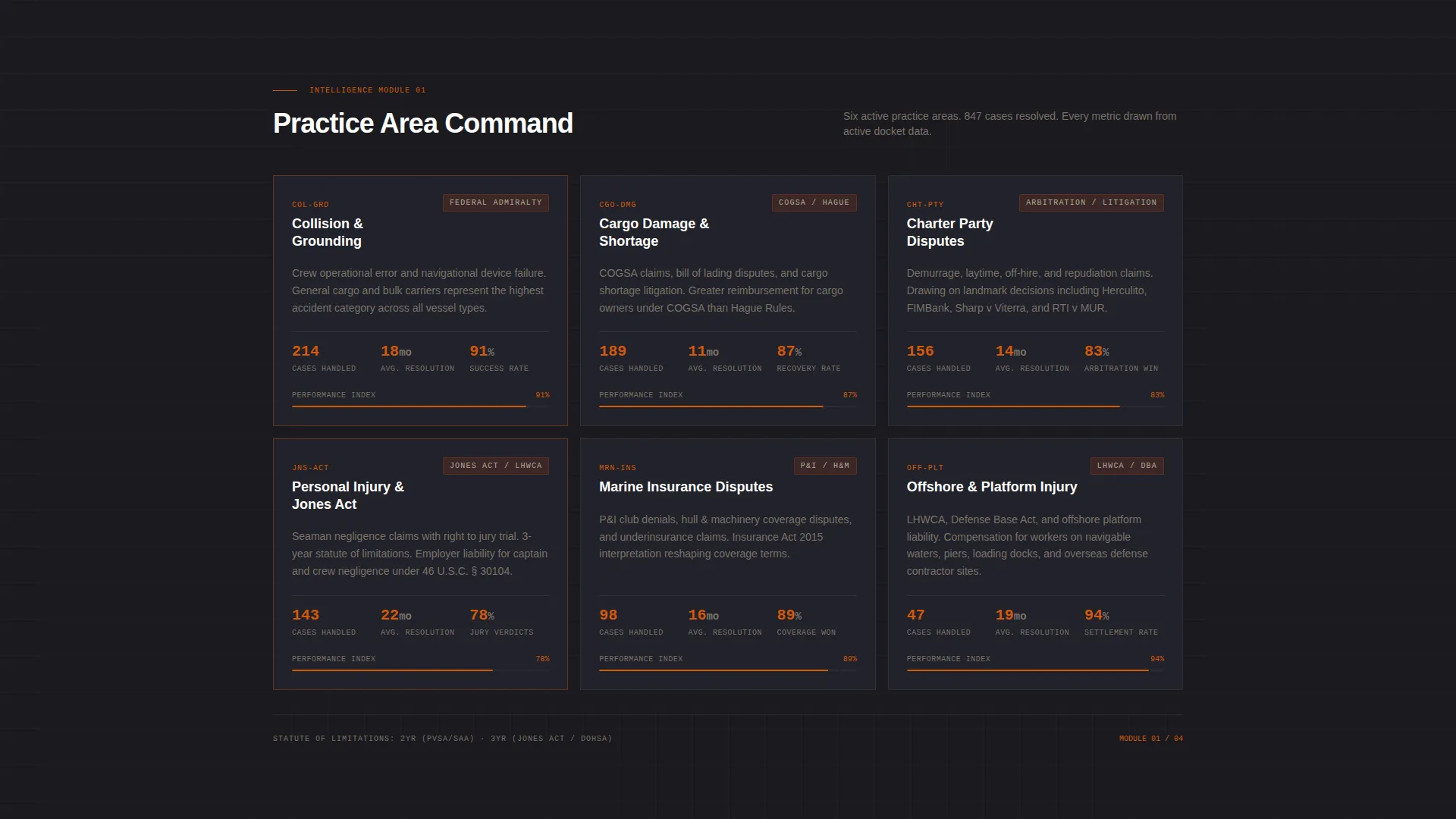
- Four data grid modules covering collision and grounding claims, cargo damage and shortage, charter party disputes, and personal injury cases
- A persistent bottom-bar call to action (call to action) that activates after the second scroll module, plus a full-width call to action block after the final jurisdiction map
- A secondary text link for an earlier-stage prospect offer: "Download Our Maritime Claims Guide"
Feature list
This section describes the core functional and design components that the Admiralty template delivers.
Full-Viewport Panoramic Header
The header uses a full-width atmospheric photograph of a container port taken from elevation. Cranes are mid-operation and a vessel is being guided in by tugs. The image desaturates toward the edges, drawing focus to a central data overlay with three key statistics in furnace orange. A headline fades in below the overlay panel.
Dashboard and Data Grid Case Modules
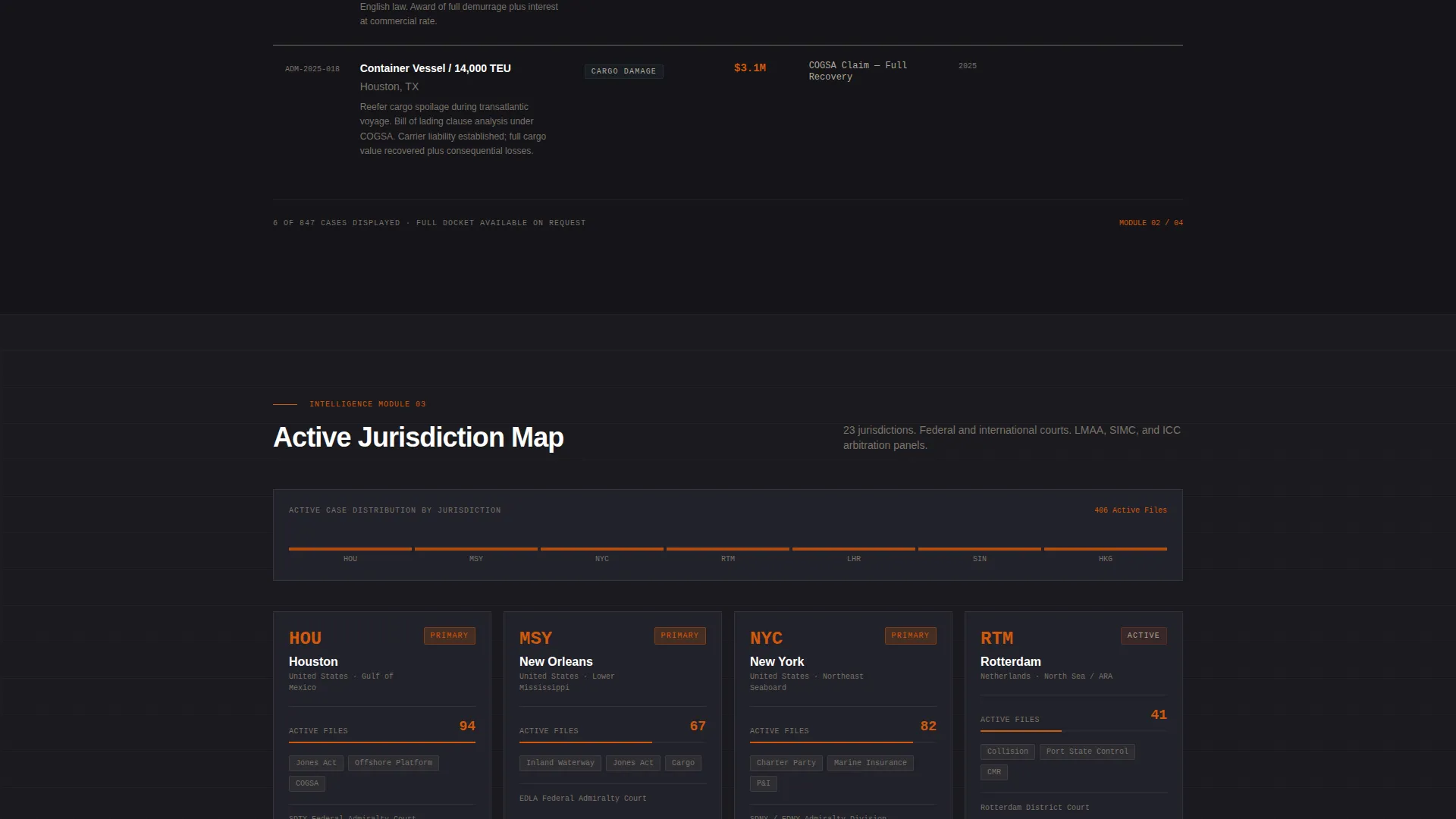
Four sectioned grid modules each represent a distinct practice area: collision and grounding, cargo damage and shortage, charter party disputes, and personal injury including Jones Act claims. Each module displays case volume metrics, average resolution timelines, and jurisdiction maps as dashboard cards, giving visitors an at-a-glance measure of firm capability.
Redacted Case Summary Briefs
Between the main data modules, single-sentence case summaries appear in a redacted-style brief format. Each entry shows vessel type, port, dispute value, and outcome. These entries function as proof points without revealing confidential information, and they reinforce the intelligence-report reading experience as the visitor scrolls.
Two-Stage Click-Through call to action System
The primary call to action, "Request a Case Assessment," appears first as a persistent bottom bar after the second scroll module. It then reappears as a full-width block after the final jurisdiction map. No form exists on this page. The design earns the click-through by accumulating evidence before the button is ever needed.
Secondary Prospect Capture Link
A secondary text link, "Download Our Maritime Claims Guide," is positioned to capture visitors who are researching rather than actively litigating. It gives the firm a way to engage earlier-stage prospects without diluting the primary conversion path.
Industrial Raw Visual Identity
The Fire and Earth color system uses furnace orange (#D4580A), hull plate black (#1A1A1E), dry dock rust (#8B3A1F), and ballast water gray (#B0A999). Orange drives every interactive element and data point highlight. Black dominates grid backgrounds. Rust anchors section dividers and case category tags. Gray carries body text and secondary labels throughout.
Page sections overview
| Section | Purpose |
|---|---|
| Panoramic Port Header | Sets authority with atmospheric photograph, statistics overlay, and faded headline |
| Collision and Grounding Module | Presents case volume and resolution data for collision and grounding claims |
| Cargo Damage Module | Displays shortage and spoilage case metrics in a grid card layout |
| Charter Party Module | Shows dispute volume and timeline data for charter party conflicts |
| Personal Injury Module | Covers Jones Act and offshore injury case data with jurisdiction map |
| Redacted Case Briefs | Builds trust between modules using anonymised vessel and port summaries |
| Persistent Bottom Bar | Keeps the primary call to action visible after the second data module as visitor scrolls |
| Full-Width call to action Block | Delivers the final "Request a Case Assessment" call to action after the jurisdiction map |
| Secondary Download Link | Captures early-stage prospects with the Maritime Claims Guide offer |
Design & branding system
The design language is Industrial Raw. Every visual decision reflects the weight and precision of maritime operations, not the polish of a corporate marketing site.
- The color system pairs hull plate black (#1A1A1E) grid backgrounds with furnace orange (#D4580A) for all interactive elements, data highlights, and key statistics
- Dry dock rust (#8B3A1F) anchors section dividers and case category tags, while ballast water gray (#B0A999) carries body text and secondary labels
- Typography uses a condensed industrial sans-serif to reinforce the dashboard and data grid aesthetic throughout
Mobile & speed optimization
The template is structured with a grid-based layout designed to adapt across screen sizes without losing the data-dense visual hierarchy that defines the experience.
- Dashboard card modules and redacted case brief rows are structured for vertical stack behavior on smaller viewports
- The persistent bottom-bar call to action is designed to remain visible and functional across device sizes, keeping the primary conversion path intact on mobile
How this template helps you convert
The Admiralty template is built on a deliberate conversion logic: present so much structured evidence of capability that the visitor has already made their decision before the call to action appears.
- The data grid modules accumulate authority section by section, using case volume metrics, resolution timelines, and jurisdiction maps to answer the visitor's core question before they ask it
- The two-stage call to action system, a persistent bottom bar followed by a full-width block, creates two natural conversion moments without repeating the same message in the same format
- The secondary "Download Our Maritime Claims Guide" link captures research-phase visitors who are not ready to request an assessment, broadening the funnel without weakening the primary path
Other information about this template
This template is well suited for established maritime law practices looking to position their firm as an operational authority rather than a conventional legal services provider. It is also a strong fit for firms launching a dedicated practice area page focused on casualty response, cargo claims, or offshore injury litigation.
- The Industry Report creative direction means the page reads as a briefing document, not a brochure, which aligns with how maritime professionals prefer to receive information
- The Click-Through landing page direction keeps the intake process clean by routing the visitor to a separate dedicated page for case submissions
- The template works as a standalone landing page for paid media campaigns targeting fleet operators, marine insurers, and offshore energy contractors
Theme
Industrial Raw
Creative direction
Industry Report
Color system
Fire & Earth
Style
Dashboard/Data Grid
Direction
Click-Through
Page Sections
Full-viewport Panoramic Port Header
Four Practice Area Data Grid Modules
Redacted-style Case Summary Briefs
Two-stage Call to Action Conversion System
Secondary Prospect Capture Link
Industrial Raw Fire and Earth Color System
Related questions
Does this template include a contact form?
Who is the primary visitor this template is designed for?
Can the statistics in the header overlay be updated with real firm figures?
What makes this different from a standard law firm landing page?
Is this template suitable for a firm focused on a single practice area?