College Planning Consultancy Landing Page Template
The Admit Expert-Led College Planning Consultancy landing page template is designed for institutional decision-makers who want to present admission strategy services with boardroom authority. Built on a split-screen layout with a Charcoal and Amber color system, this consultant landing page converts visitors through expert panels, outcome metrics, and a dual-path partnership form before asking for a single detail.
by Rocket studio
Quick summary
This landing page template helps college planning consultancies present their bench of specialists with quiet, institutional confidence. It is designed for Partnership and B2B conversion, leading visitors through expert credentials and measurable outcomes before reaching a clear call to action. The professional layout earns trust first, then asks for the handshake.
Who this template is for
This consultant landing page is perfect for organizations that sell admission strategy at an institutional level. It suits business consultants, coaches, and advisory practices that serve schools or high-net-worth families.
- Private school heads and college counselors managing large student caseloads
- Wealth advisors and family office managers whose clients expect white-glove guidance
- Independent college planning consultants ready to grow their partner network
What problem this template solves
Many consultants struggle to communicate deep expertise on a single page without overwhelming visitors. A high-converting landing page for a college planning consultancy must balance authoritative expertise with a clear user experience. This page template solves that tension directly.
- Advisors lose leads because their websites look generic rather than authoritative
- Decision-makers need proof of outcomes before they will send a partnership inquiry
- Parents and Gen Z students who feel overwhelmed by the college search process need clear, benefit-driven services
What you get with this template
This page template is a fully formatted, section-led single page designed for institutional partnership sales. It is created to display expertise, capture qualified leads, and start meaningful conversations with the right clients.
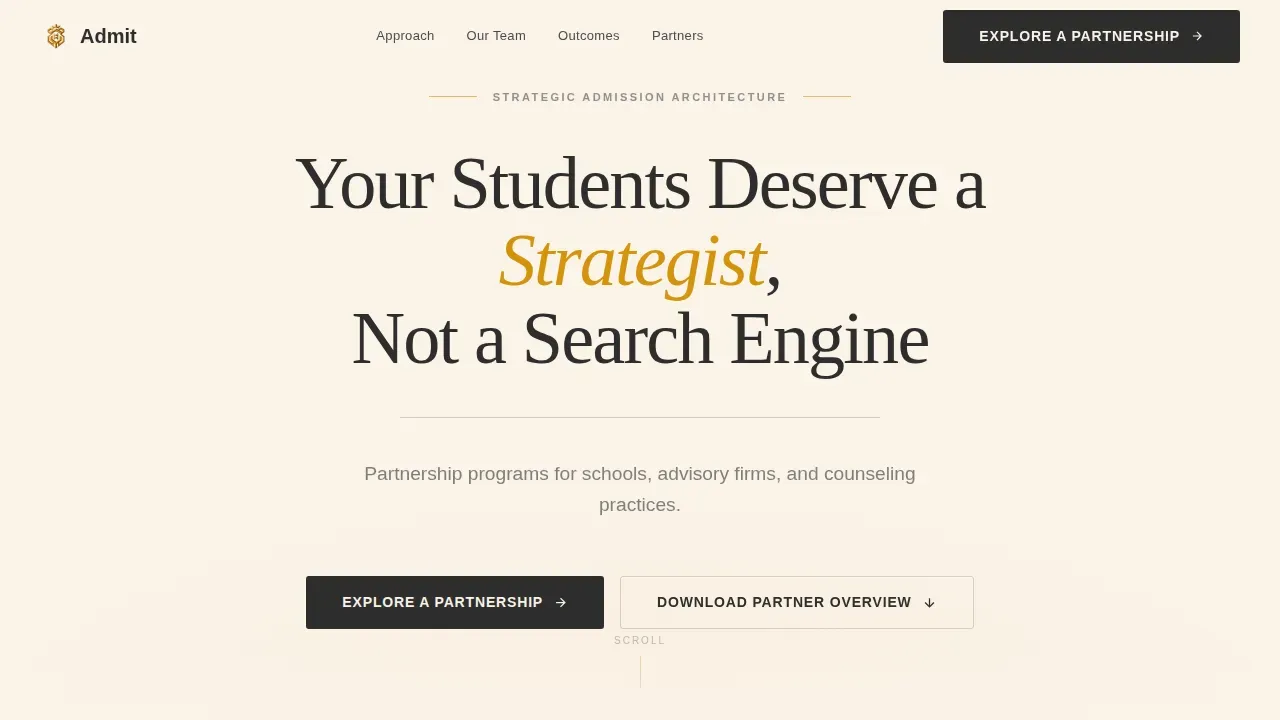
- Giant Headline hero section with amber-accented serif typography on parchment cream
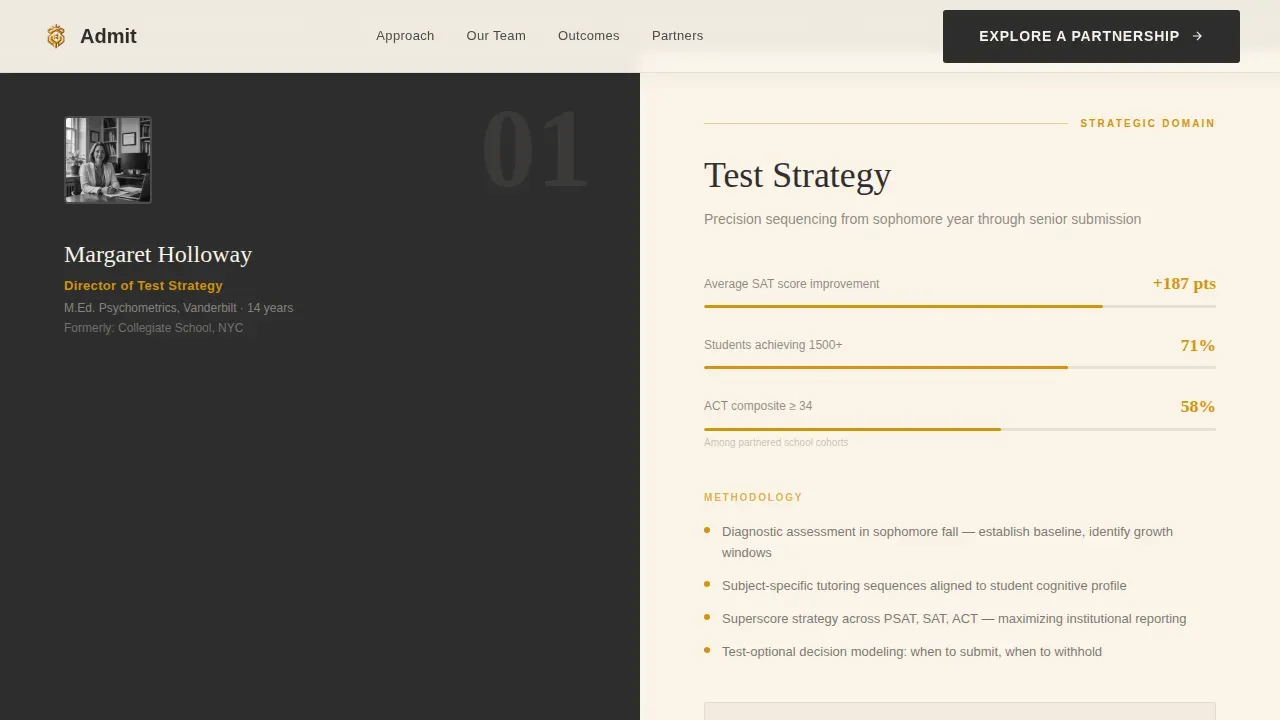
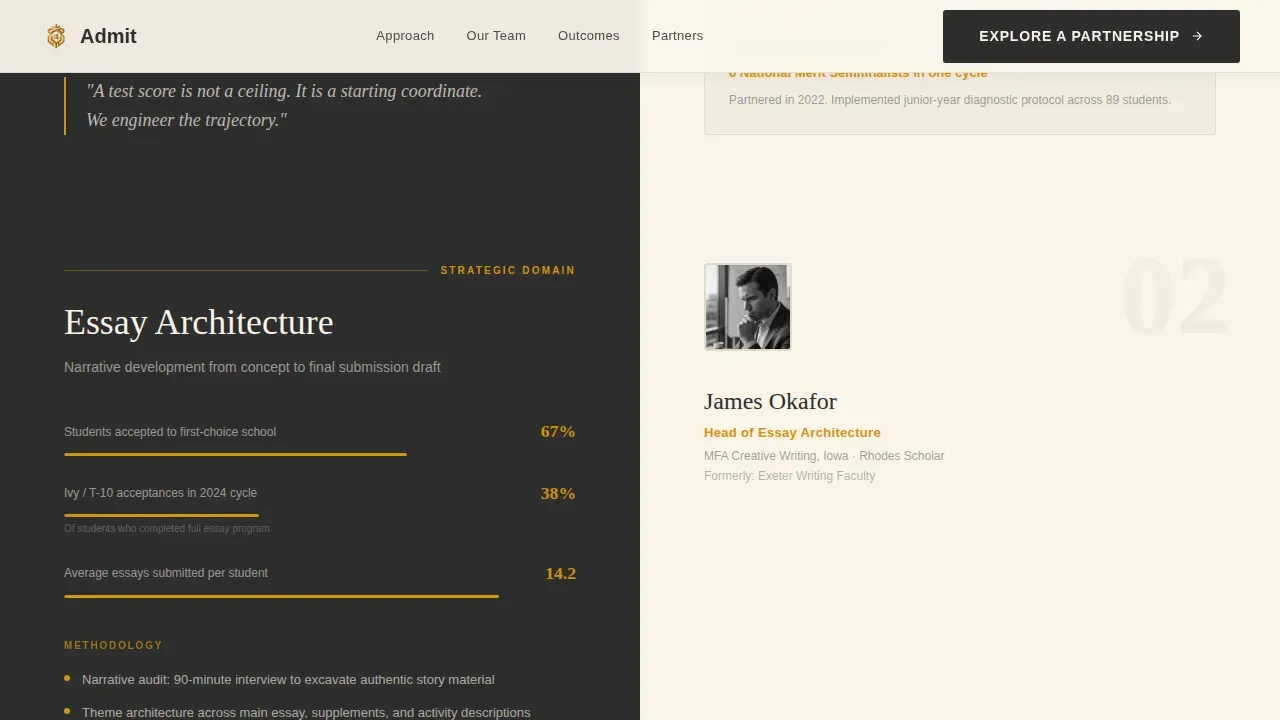
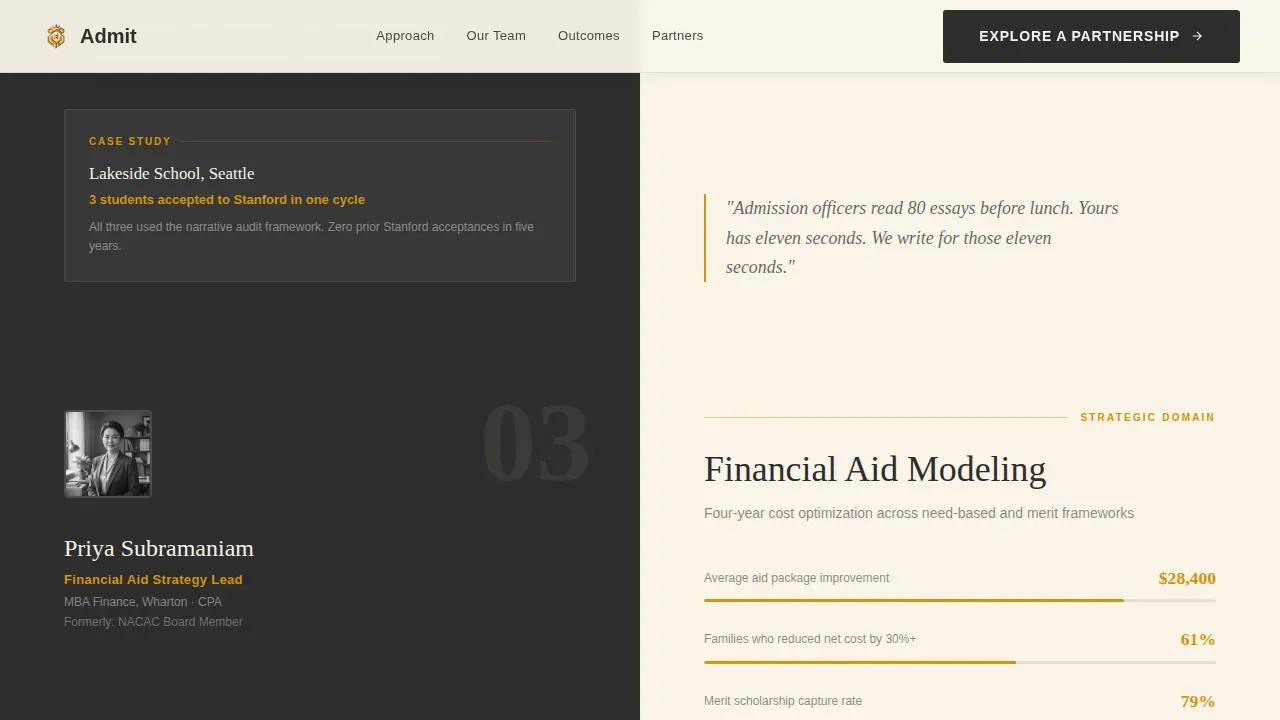
- Three split-screen Expert Panel sections covering test strategy, essay architecture, and financial aid modeling
- Dual-path conversion section with a partnership inquiry form and a gated PDF download path
Feature list
This template includes essential building blocks designed to convert institutional visitors into partnership inquiries. Each section is clean, structured, and built to display authority at every scroll point.
Split-Screen Expert Panels
Each of the three advisor panels splits the screen 50/50. The left side displays a headshot, name, title, and credential line. The right side shows strategic methodology, admission rate data, and case study outcomes. Using a professional photo of lead consultants creates an immediate human connection and establishes authority.
Outcomes Metrics Bento Grid
An amber-highlighted bento grid section presents placement data and cycle-over-cycle statistics in a scannable format. Data visualizations are formatted to stand out clearly, so visitors absorb proof points quickly before reaching the call to action.
Dual-Path Partnership Form
The inquiry form captures organization name, partner type, approximate student volume, and one open field. A secondary path offers a gated PDF download for decision-makers still building internal buy-in. Lead forms with focused essential fields reduce friction and support conversions.
Giant Headline Hero Section
The hero features a single oversized serif headline on a stark parchment background. The word "Strategist" is accented in amber. A thin charcoal rule and a qualifying line complete the section. No images compete; the typography is the credential.
Scroll-Triggered Animation System
Scroll-triggered fade-ups, stagger reveals, amber underline draws, and subtle parallax effects on expert panels keep visitors engaged as they move through the page. This medium-animation approach rewards attention without slowing the experience.
Page sections overview
| Section | Purpose |
|---|---|
| Hero Headline | Establishes authority and qualifies the audience immediately |
| Expert Panel One | Showcases test strategy advisor with credentials and data |
| Expert Panel Two | Presents essay architecture expertise and case outcomes |
| Expert Panel Three | Displays financial aid modeling depth and cycle results |
| Outcomes Metrics Grid | Reinforces proof with amber-highlighted placement statistics |
| Partnership Inquiry Form | Captures qualified partner leads with low-friction fields |
| PDF Download Gate | Supports decision-makers building internal buy-in |
| Minimal Footer | Linear single-row footer with clean brand sign-off |
Design & branding system
The Executive Suite theme uses a Charcoal and Amber color system that feels like a leather portfolio opened under a banker's lamp. Typography pairs Fraunces serif display headings with DM Sans for body and user interface text. The result is a professional layout that feels warm where it matters and authoritative everywhere else.
- Boardroom charcoal (#2D2D2D) and brushed graphite (#4A4A4A) for structure and type
- Parchment cream (#FAF3E8) as the primary background for open, readable pages
- Aged amber (#D4930D) reserved for data highlights, hover states, and key metrics
Mobile & speed optimization
This template is built desktop-first to match how institutional decision-makers review partner proposals in an office context. It remains fully responsive for tablet review. Server Components handle static content to keep client-side JavaScript minimal.
- Scroll-triggered animations are designed to load progressively, avoiding heavy upfront payloads
- Clean section structure and minimal client JavaScript support fast page rendering
- Responsive grid adapts the 50/50 split panels gracefully on smaller screens
How this template helps you convert
This consultant landing page is designed to present proof before it asks for anything. The page earns the click by building trust section by section.
- Expert panels and outcome metrics establish credibility before visitors ever touch a form field, reducing resistance at the point of action.
- The dual-path conversion section lets decision-makers choose between a direct partnership inquiry or a PDF download, so no visitor leaves without a next step.
Other information about this template
This template sits within a broader collection of professional landing page templates designed for consultants, coaches, and agencies across a range of industries. It can be adapted beyond college planning to suit any corporate business that needs to display specialist expertise and drive B2B conversions through a clean, professional consultant landing page.
- The template is designed to be easy to update; swap in your own images, upload advisor headshots, and set your brand colors quickly
- Tags and metadata fields are pre-formatted so you can sign off on launch-ready pages in minutes
- This page template is part of a growing set of consultant landing page templates that start from a professional baseline and can be customized to look unique to your business
- The Admit expert-led college planning consultancy landing page template demonstrates how a focused, single-purpose page can grow partnership pipelines for specialty consulting practices
Theme
Executive Suite
Creative direction
Expert Panel
Color system
Charcoal & Amber
Style
Split Screen (50/50)
Direction
Partnership/B2B
Page Sections
Split-screen Expert Panels
Outcomes Metrics Bento Grid
Dual-path Partnership Conversion
Giant Serif Hero Section
Scroll-triggered Animation System
Minimal Single-row Footer
Related questions
Who is this landing page template designed for?
Do I need web design experience to use this template?
Can I adapt this template for a different consulting niche?
What conversion paths does this page template include?
Is this template suitable for desktop and tablet viewing?



