Buyer's Agent Landing Page Template
Advocate is a single-page landing page template built for buyer's agents who work with serious homebuyers. It pairs an asymmetric 60/40 grid with an interactive buying-power calculator, a scroll-driven Before/After savings reveal, and a five-question market-readiness quiz. The Executive Suite visual theme and Navy Authority color system give every section the weight and credibility that first-time buyers and relocating professionals expect.
by Rocket studio
Quick summary
Advocate is a strategic landing page template designed for single-family home buyer's agents. It combines an interactive readiness calculator, a scroll-based financial reveal, and a progressive five-question quiz into one cohesive page. The result is a confident, data-forward presentation that turns hesitant visitors into booked consultations.
Who this template is for
This template is built for buyer's agents who serve clients making high-stakes decisions under real time pressure. It speaks directly to agents who want their page to do more than look professional, it should actively qualify and convert visitors.
- Agents working with dual-income couples who are ready to leave renting behind
- Agents serving relocating executives who need to close within sixty days
- Agents guiding first-time buyers through competitive bidding environments
What problem this template solves
Most buyer's agent pages list credentials and hope visitors call. They don't show value before asking for a commitment. Advocate flips that dynamic by leading with interactive tools that give visitors real insight before any form is submitted.
- Buyers often leave without understanding their actual purchasing position
- Agents lose credibility when their page looks generic in a market that rewards expertise
- First-time buyers in particular need reassurance before they trust someone with a six-figure negotiation
What you get with this template
This template delivers a fully structured single-page layout built around three working interactive zones. Each zone earns trust through demonstrated value rather than passive description.
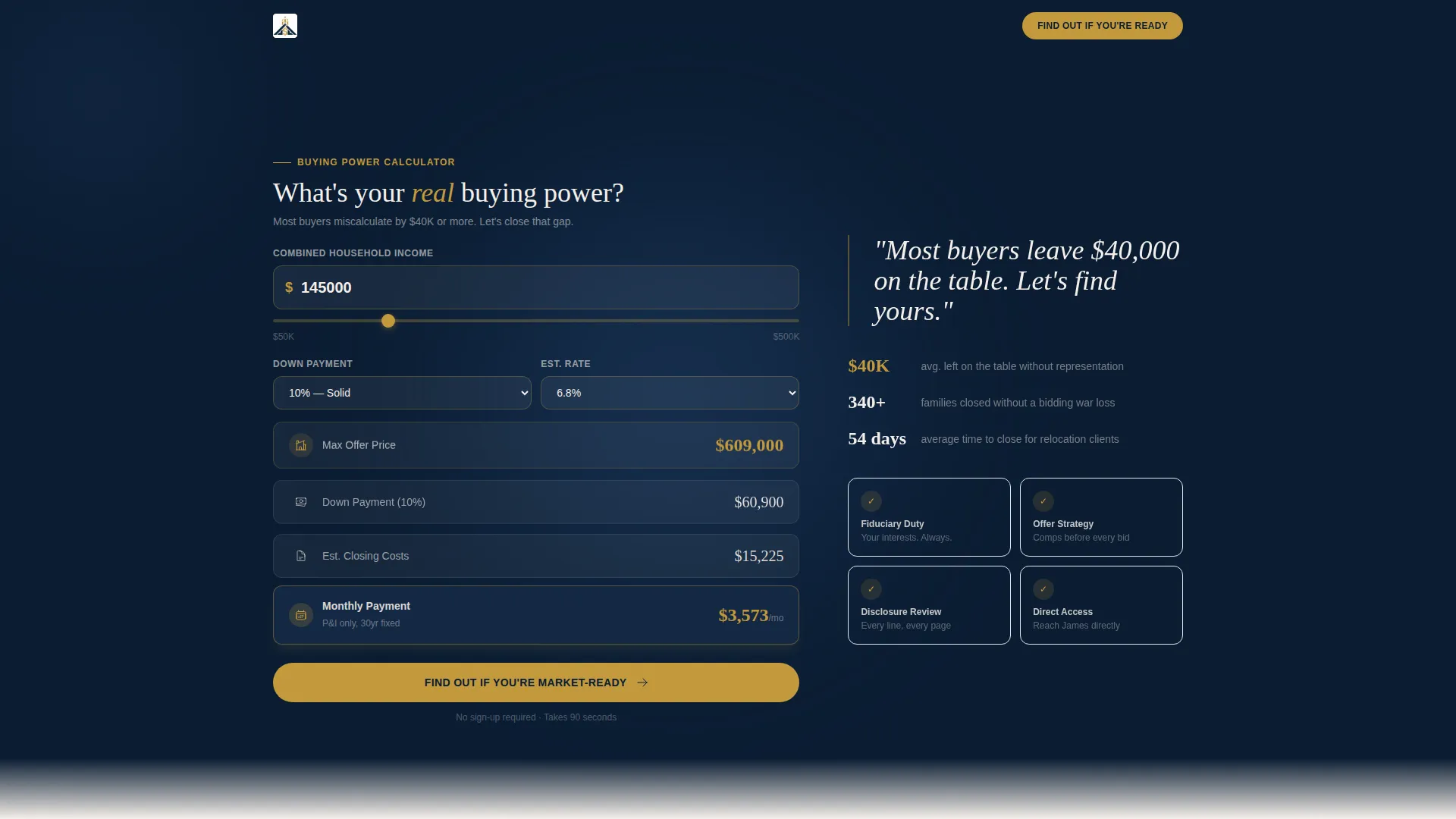
- An asymmetric 60/40 grid header with a live buying-power calculator showing projected offer, closing costs, and monthly payment
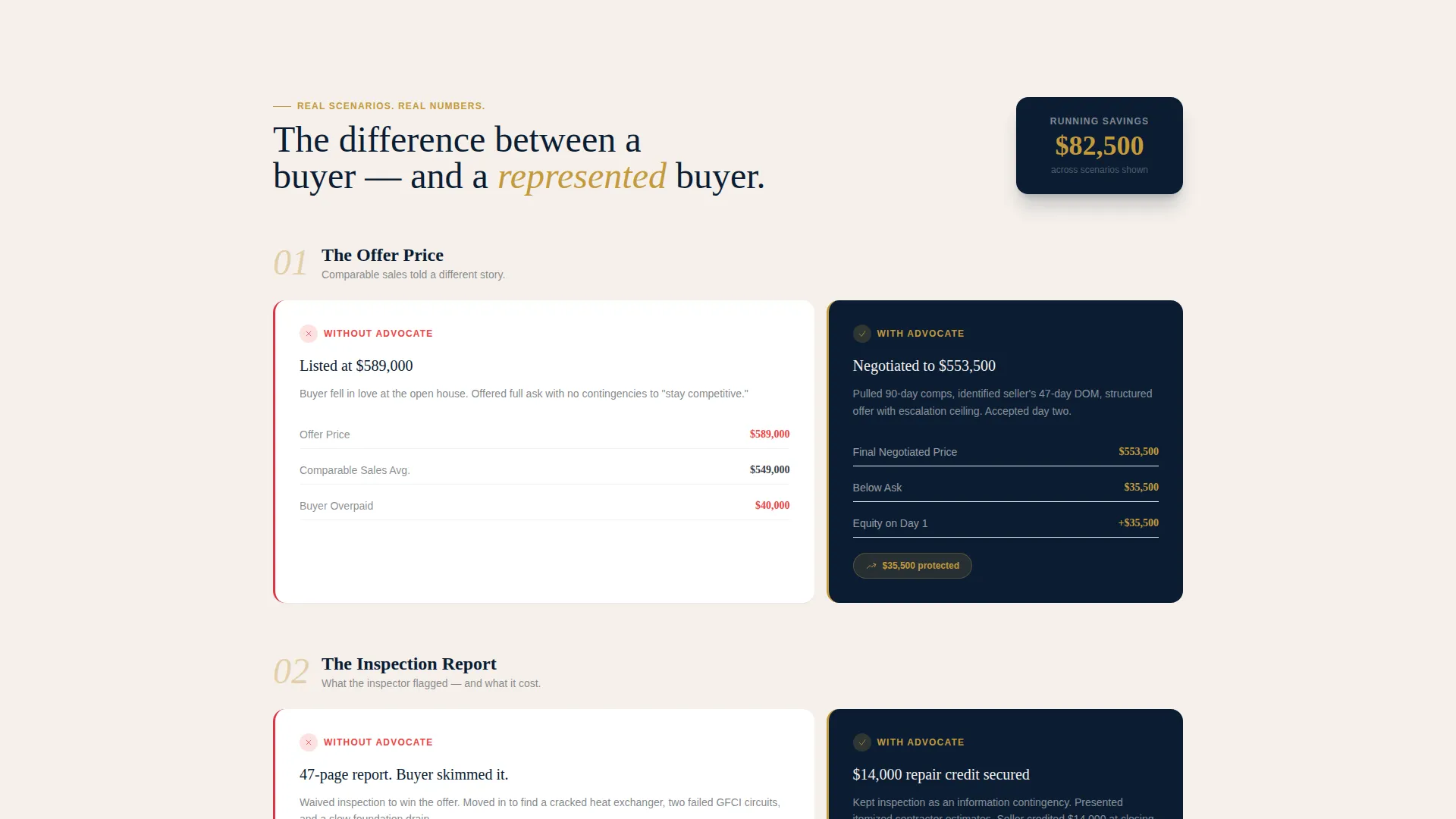
- A scroll-driven Before/After reveal across three real negotiation scenarios with a cumulative savings counter
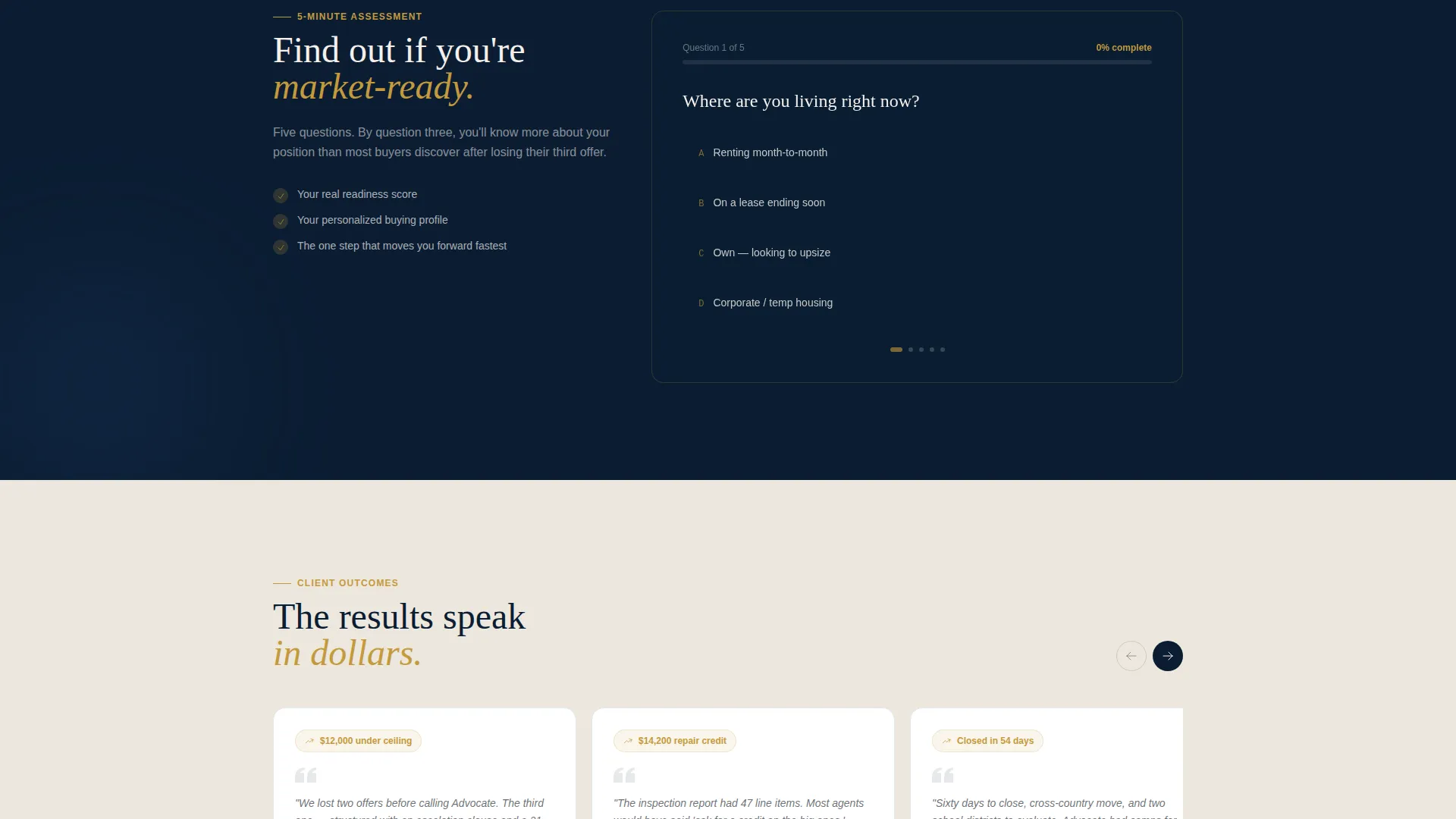
- A five-question progressive quiz leading to a personalized buying profile and a calendar-embedded strategy session booking prompt
Feature list
This template includes purpose-built components that move a visitor from curious to committed. Each feature is grounded in a specific moment in the buyer's decision process.
Interactive Buying-Power Calculator
The header's 60-column leads with a single provocative question: "What's your real buying power?" A salary input auto-populates a projected maximum offer, estimated closing costs, and monthly payment. The numbers fan out like cards being dealt, making financial clarity the hero of the page.
Before/After Financial Reveal Sections
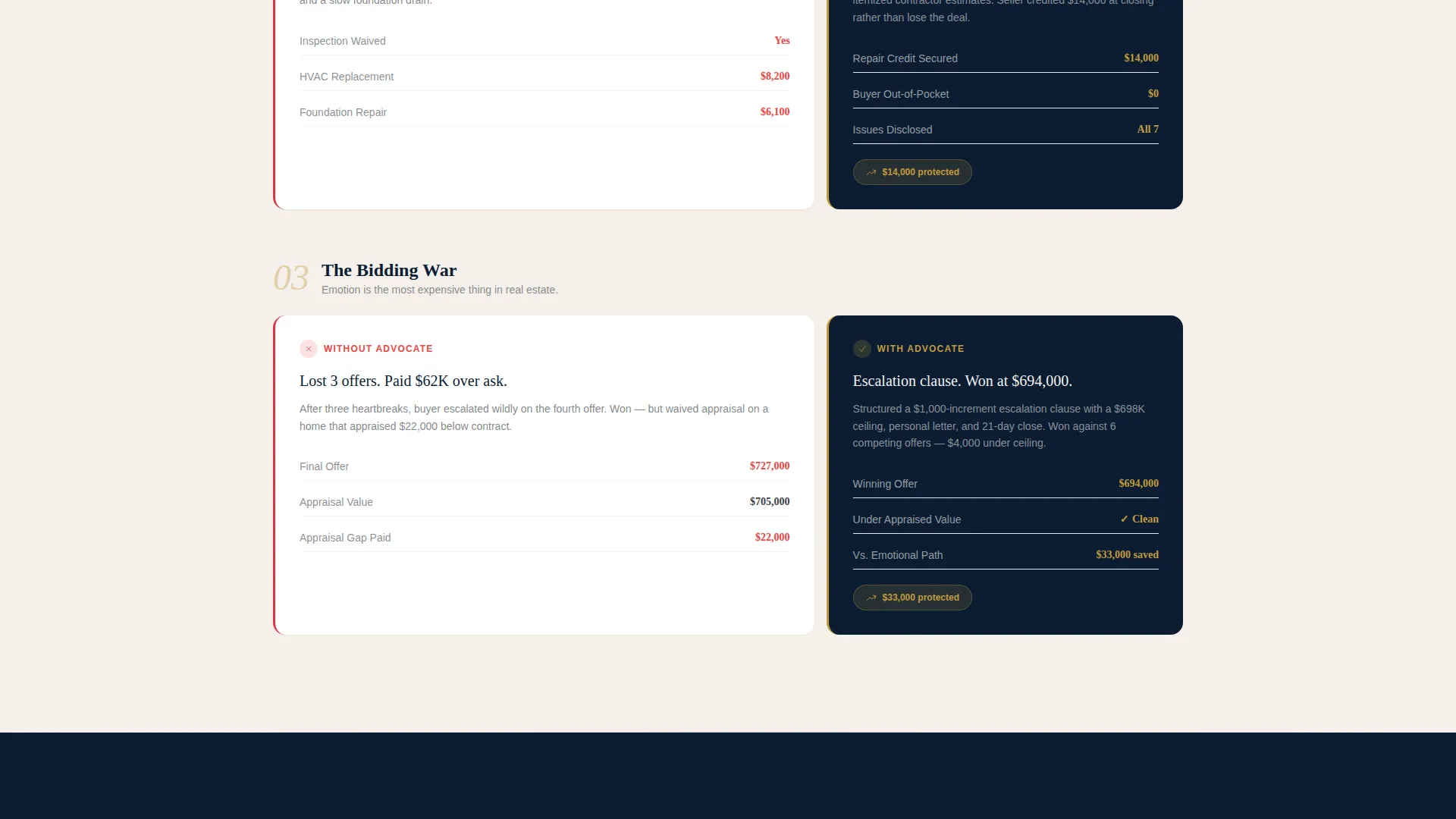
Three scroll sections each split the grid between a real buyer scenario and the agent's intervention. Section one shows a negotiated purchase price against an overpayment scenario. Section two surfaces a $14,000 repair credit from a missed inspection flag. Section three contrasts an emotional bidding war with a strategic escalation clause.
Cumulative Savings Counter
A persistent counter in the corner of the page grows with each scroll reveal. It converts abstract negotiation expertise into a running total of dollars saved. By the time a visitor reaches the quiz, they already understand the financial stakes.
Five-Question Market-Readiness Quiz
The quiz is the primary call to action. It asks about current living situation, pre-approval status, target neighborhoods, timeline urgency, and biggest concern. Each answer adjusts a real-time readiness score displayed in the gold accent color, so the visitor gains clarity while the agent gains qualification data.
Personalized Buying Profile Output
On quiz completion, the visitor receives a personalized buying profile. This output gives the interaction a concrete result before any booking commitment is required. It earns the secondary call to action: "Book Your Strategy Session."
Calendar-Embedded Strategy Session Booking
A calendar embed appears at the end of the quiz flow showing available thirty-minute slots. The transition from profile result to booking is direct and low-friction. The visitor books from a position of informed confidence rather than cold inquiry.
Page sections overview
| Section | Purpose |
|---|---|
| Header Calculator Zone | Introduces buying-power tool and anchors the financial value proposition |
| Scenario Reveal One | Shows negotiated price versus overpayment with agent intervention result |
| Scenario Reveal Two | Surfaces inspection repair credit and flags missed red flags |
| Scenario Reveal Three | Contrasts emotional bidding with strategic escalation clause outcome |
| Savings Counter Strip | Accumulates total dollars saved across all three reveal sections |
| Quiz Assessment Flow | Qualifies visitors across five questions with a live readiness score |
| Buying Profile Output | Delivers personalized result and transitions to booking call to action |
| Strategy Session Booking | Presents calendar embed for thirty-minute consultation scheduling |
Design & branding system
The visual identity follows an Executive Suite theme built on the Navy Authority color system. Every color choice carries deliberate meaning: the navy signals fiduciary weight, the gold signals results, and the ivory gives the layout room to breathe.
- Deep boardroom navy (#0B1D33) and polished charcoal (#3A3F47) form the structural foundation of the layout
- Ivory contract paper (#F5F0EB) acts as the primary background tone, mimicking the white space of a well-drafted offer letter
- Decisive gold (#C49A3C) is reserved strictly for buttons, progress indicators, readiness score displays, and key financial figures
Mobile & speed optimization
The asymmetric 60/40 grid is structured to reflow cleanly on smaller screens without losing the visual hierarchy that makes the financial data readable. Interactive zones are designed to remain usable on touch devices.
- The calculator input and quiz flow are built for thumb-friendly interaction on mobile screens
- The Before/After reveal sections maintain their split-column logic while stacking gracefully on narrow viewports
- The cumulative savings counter remains visible as a fixed element across scroll, preserving its persuasive context on all screen sizes
How this template helps you convert
This template is built on a give-first conversion model. Visitors receive tangible value before being asked to book or share contact details. That sequence reduces resistance and increases the quality of leads who do complete the flow.
- The calculator answers the visitor's first unspoken question about buying power, creating immediate personal relevance and extending time on page.
- The three financial reveal sections build credibility through specific dollar figures and real negotiation scenarios, shifting the visitor's trust from skeptical to convinced before the quiz even begins.
- The quiz earns the booking click by delivering a personalized profile first, so the "Book Your Strategy Session" prompt feels like a natural next step rather than a cold ask.
Other information about this template
This template is suited to agents operating in competitive single-family home markets where buyers face bidding wars, appraisal gaps, and inspection negotiations. The page is particularly effective for professionals who want to communicate expertise through financial specificity rather than generic testimonials or listing galleries.
- The template fits within a broader real estate and property category, specifically the single-family home buyer's agent niche
- The asymmetric grid and Executive Suite theme distinguish the page from standard real estate templates that rely on property photography
- The no-photography approach, where numbers and scenarios replace stock house images, creates a differentiated visual identity that feels more like a financial advisory page than a typical agent site
- The template is designed as a standalone single-page layout, making it straightforward to launch without building a multi-page site structure
Theme
Executive Suite
Creative direction
Gallery Walk
Color system
Navy Authority
Style
Gallery + Detail
Direction
Direct Sales
Page Sections
Interactive Buying-power Calculator
Before/after Financial Reveal Sections
Cumulative Savings Counter
Five-question Market-readiness Quiz
Personalized Buying Profile Output
Calendar-embedded Strategy Session Booking
Related questions
Does this template include the calculator and quiz as ready-to-use components?
Can I update the financial figures shown in the Before/After reveal sections?
Is this template a good fit for agents who work primarily with first-time buyers?
What does a visitor see after completing the five-question quiz?
Does this template require property photography to work effectively?



