Child Custody Lawyer Landing Page Template
Advocate is a split-screen landing page template built for child custody law practices. It pairs an authoritative seal badge with an attorney portrait, cycles institutional credentials through a logo wall, and funnels every visitor toward a two-step booking modal. The result is a page that earns trust before it ever asks for anything.
by Rocket studio
Quick summary
Advocate is a single-page template designed for family law attorneys who handle child custody cases. It opens with a 50/50 split-screen hero, builds credibility through a scrolling logo wall, and closes with a two-step intake form tied to a live consultation calendar. Every section is calibrated to move a frightened parent toward booking a free case review.
Who this template is for
This template was designed for solo family law attorneys and small family law practices that focus on child custody work. It suits practitioners who want a polished, trust-first web presence without hiring a custom development team.
- Parents navigating divorce, custody modifications, or relocation disputes are the end visitors this template is designed to reach.
- Attorneys who rely on consultation bookings as their primary client intake method will find the two-step modal and persistent call-to-action button directly useful.
- Family law specialists who hold board certifications, court recognitions, or media credentials will benefit most from the logo wall authority section.
What problem this template solves
Parents searching for a child custody lawyer are often in crisis. They are scared, confused, and making high-stakes decisions late at night on a desktop screen. Most law firm pages either overwhelm them with legal jargon or feel too corporate to trust. Advocate solves both problems.
- It replaces cold, transactional design with a warm civic authority aesthetic that feels reassuring rather than intimidating.
- It removes friction from the first step by leading with a free, no-obligation case review offer before any fee or retainer discussion appears.
- It converts scrolling uncertainty into a scheduled appointment through a two-step intake form that asks only what matters: custody situation type and calendar availability.
What you get with this template
Advocate delivers a complete, ready-to-customize landing page structured around trust-building and appointment conversion. Every section has a defined job, and every design choice serves the visitor's emotional state.
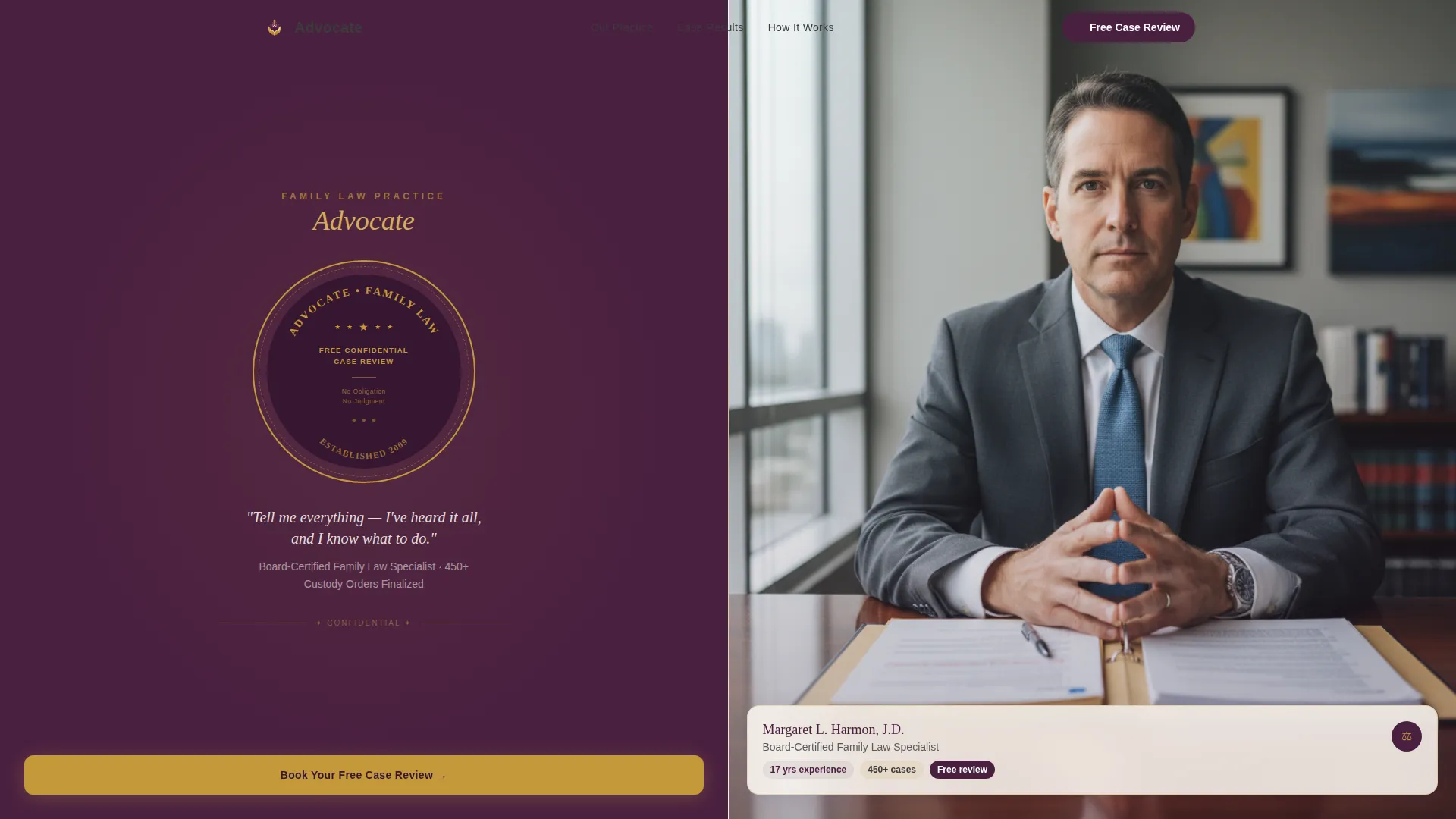
- A split-screen hero with a burnished gold seal badge on the left and an attorney portrait slot on the right.
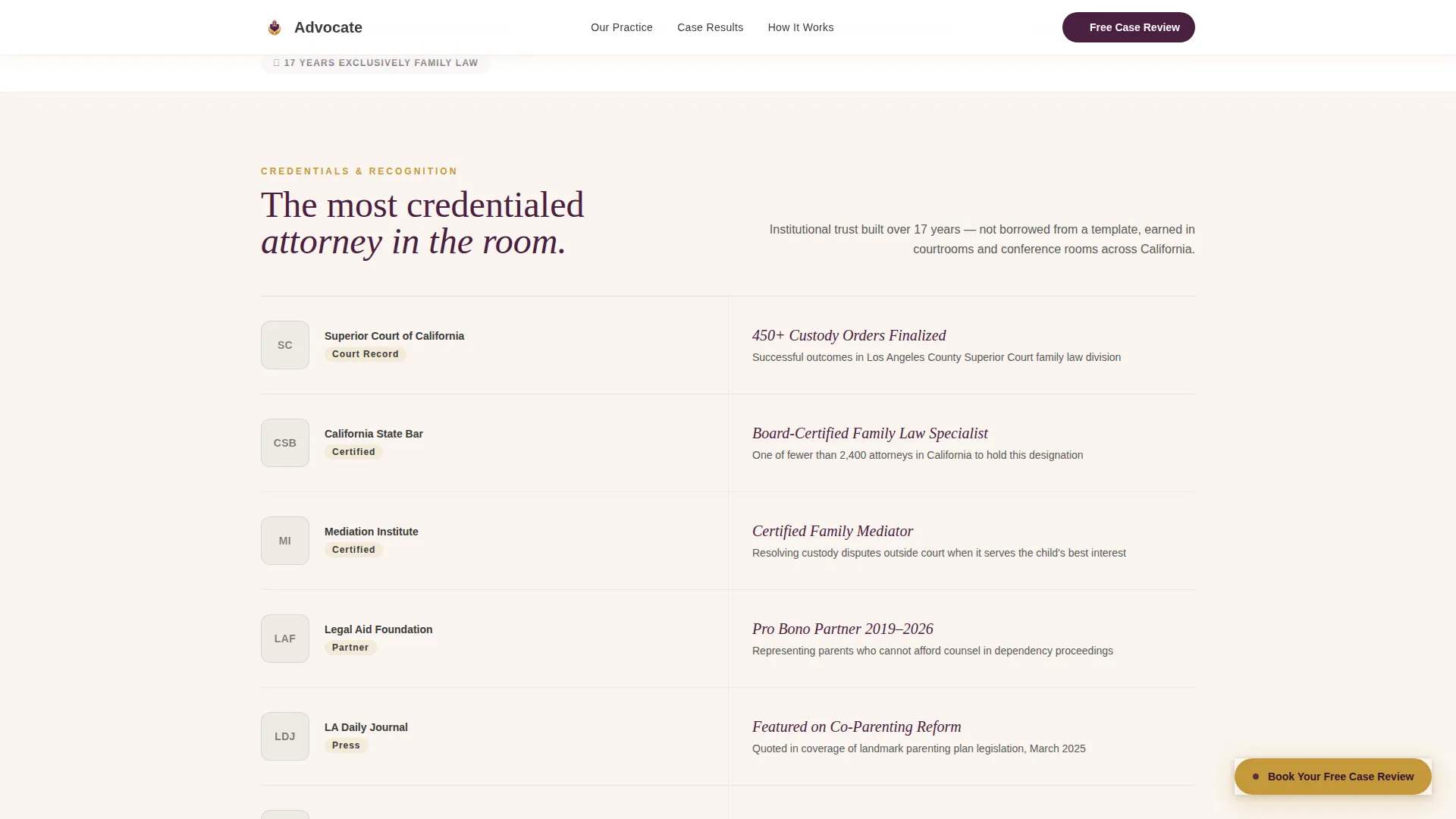
- A scrolling logo wall that pairs institutional credential logos with matching case outcome statements.
- A persistent "Book Your Free Case Review" button and a two-step booking modal with a live 30-minute consultation calendar.
Feature list
This section covers the core built-in capabilities that make Advocate functional and conversion-ready out of the box.
Split-Screen Hero with Seal Badge
The header divides the viewport evenly. The left panel displays a large, seal-style badge in burnished gold on deep plum, styled with a notary border and arched firm name text. The right panel holds an attorney portrait with natural window lighting. Together they establish authority and human presence in a single glance.
Logo Wall Authority Section
After the hero, the left panel cycles through institutional logos: county superior court, state bar association, mediation certification boards, legal aid partnerships, and media outlets. Each logo renders in desaturated charcoal at rest and blooms into full color on hover. The right panel mirrors each logo with a specific credential or case outcome statement.
Two-Step Booking Modal
Clicking the primary call-to-action opens a focused two-step intake flow. Step one captures the custody situation type and whether the visitor has been served papers. Step two reveals a live calendar showing available 30-minute consultation slots. No retainer discussion appears at any point in the flow.
Persistent Call-to-Action Button
A burnished gold "Book Your Free Case Review" button is pinned to the page and follows the visitor as they scroll. It remains visible throughout every section so the path to booking is never more than one click away.
Case Outcomes and Social Proof Section
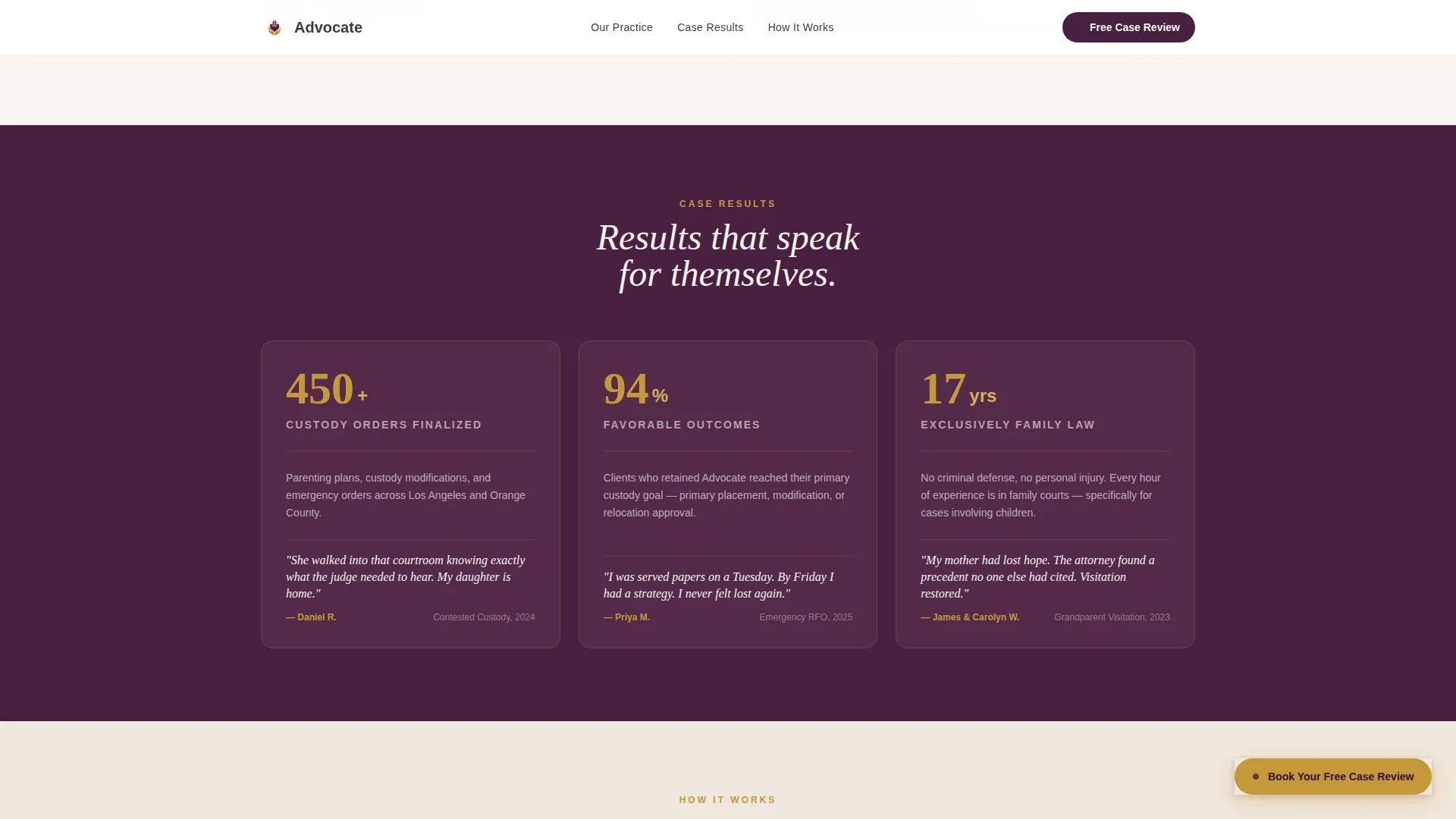
A dedicated section presents specific results with supporting metrics and attributed client voice. Sample anchors include figures such as "450+ custody orders finalized" and credentials such as "Board-Certified Family Law Specialist." Counter animations bring the numbers to life as visitors scroll past.
Three-Step Process Overview
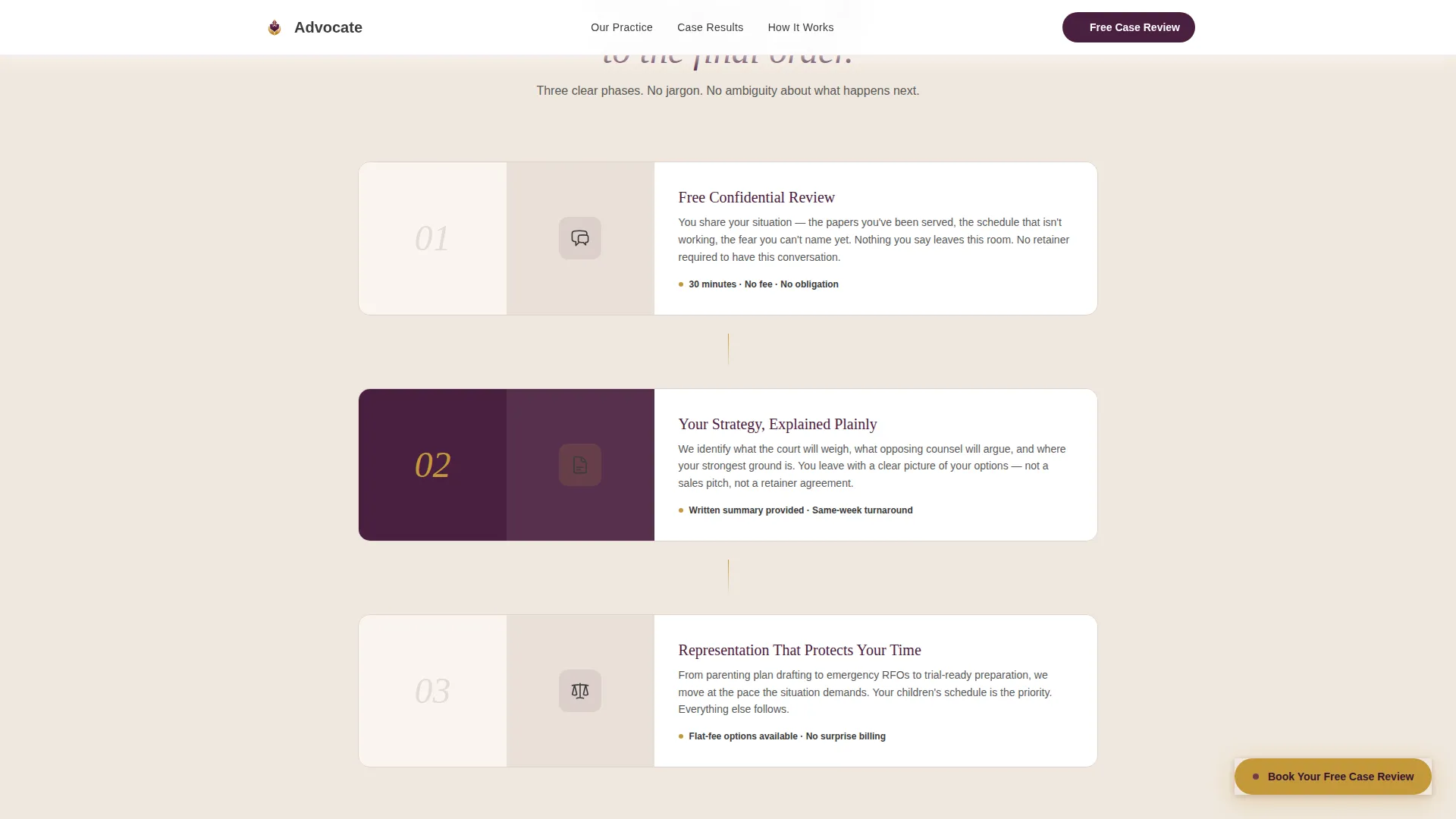
A clear "How It Works" section walks visitors through the firm's process in three stages: Review, Strategy, and Resolution. This section reduces uncertainty by showing exactly what happens after a visitor books their first call.
Page sections overview
| Section | Purpose |
|---|---|
| Split-Screen Hero | Establish authority and trust with seal badge and attorney portrait |
| Logo Wall Credentials | Build institutional credibility row by row with logos and outcomes |
| Case Outcomes | Present specific results, metrics, and client voice |
| How It Works | Explain the three-step process from review to resolution |
| Booking Call to Action | Capture intake details and schedule a 30-minute consultation |
| Linear Footer | Provide firm contact and navigation in a clean single-row layout |
Design & branding system
Advocate uses a Civic Service visual identity built around the Plum Executive color system. The palette is deliberately serious without feeling cold, and authoritative without feeling intimidating. Typography pairs Fraunces serif headlines with DM Sans body text for a blend of gravitas and readability.
- Core colors: deep plum (#4A2040) for primary backgrounds, muted charcoal (#3B3B3B) for body text, warm ivory (#FAF5EF) for page backgrounds, and burnished gold (#C4993B) reserved for badges, trust markers, and hover states.
- The logo wall uses a desaturate-to-color hover bloom effect powered by GSAP scroll reveals and counter animations on outcome figures.
- The overall aesthetic references civic and institutional design, evoking the weight of a legal reference volume without the sterility of a standard corporate template.
Mobile & speed optimization
Advocate is built desktop-first, reflecting the reality that most custody clients do their research late at night on a larger screen. Full mobile support is included so the experience remains functional and readable across all device sizes.
- Server Components handle all static sections to keep the client-side JavaScript bundle small and page load fast.
- The two-step booking modal and persistent call-to-action button are both optimized for touch interaction on mobile devices.
- GSAP animations are scoped to medium intensity so scroll reveals and logo bloom effects do not compromise performance on lower-powered devices.
How this template helps you convert
Every structural decision in Advocate is designed to reduce the distance between a visitor's fear and a booked appointment. The conversion path is deliberate and sequential.
- The hero section leads with the free, no-obligation case review offer so the visitor's first impression is a promise, not a sales pitch. Authority is established before any ask is made.
- The logo wall builds institutional credibility incrementally, row by row, so by the time a visitor reaches the booking section they already trust the attorney as the most credentialed professional they have encountered today.
- The two-step intake modal removes every remaining barrier: it asks only situation type and availability, never fee expectations, making it easy for a frightened parent to take that first step.
Other information about this template
Advocate fits naturally into the Legal and Compliance category under Family and Domestic Law. It is purpose-built for the child custody lawyer niche where emotional trust and institutional credibility are the two decisive conversion factors.
- The template style is Split Screen (50/50) with a Civic Service theme, a Guarantee Badge header concept, and a Booking and Scheduling landing-page direction.
- The footer follows a Linear Single-Row pattern, keeping the bottom of the page clean and uncluttered.
- Localization defaults are set for the United States market, using USD currency formatting and MM/DD/YYYY date display in the calendar modal.
Theme
Civic Service
Creative direction
Logo Wall Authority
Color system
Plum Executive
Style
Split Screen (50/50)
Direction
Booking/Scheduling
Page Sections
Split-screen Hero with Seal Badge
Logo Wall Authority Section
Two-step Booking Modal
Persistent Call-to-action Button
Case Outcomes and Metrics Section
Three-step Process Overview
Related questions
Can I customize the attorney portrait and firm name in this template?
Does the two-step booking modal connect to a real calendar?
Is this template suitable for grandparents seeking visitation rights?
Can I use this template if I am not a board-certified family law specialist?
Does this template work on mobile devices?