Specialist Fire Safety & Prevention Appointment Booking Website Template
Aegis is a residential fire safety landing page template built for companies that audit homes for smoke detector health, extinguisher pressure, sprinkler line condition, and escape route gaps. It uses a modular card grid, a sharp problem-to-solution arc, and a direct booking form to move anxious homeowners, landlords, and new parents from doubt to a scheduled inspection.
by Rocket studio
Quick summary
Aegis is a single-page fire safety template designed for residential inspection services. It guides visitors through a structured problem-to-solution card grid, surfaces the gaps most homeowners overlook, and closes with a clear booking path. The visual system is built around urgency and trust, minimal decoration, high contrast, and a single accent color that signals action.
Who this template is for
This template is built for fire safety professionals who serve residential clients. It speaks directly to the anxiety behind a missed inspection, an expired extinguisher, or a smoke detector that has never been tested.
- Residential fire safety companies offering multi-point home audits
- Independent inspectors serving homeowners, landlords, and rental property managers
- Fire protection businesses targeting clients flagged during insurance reviews
What problem this template solves
Many homeowners cannot name every fire safety component in their home, let alone confirm when each one was last checked. A generic service page does not communicate that gap in a way that creates urgency. Aegis frames that uncertainty as a real risk and positions the professional audit as the relief.
- Visitors leave before booking because the page never makes the stakes feel real
- DIY fire safety options feel "good enough" until a comparison breaks down exactly why they are not
- No clear next step exists for visitors who are curious but not yet ready to book
What you get with this template
You get a complete, ready-to-customize landing page that walks a visitor from awareness of risk all the way to a scheduled inspection. Every section earns its place.
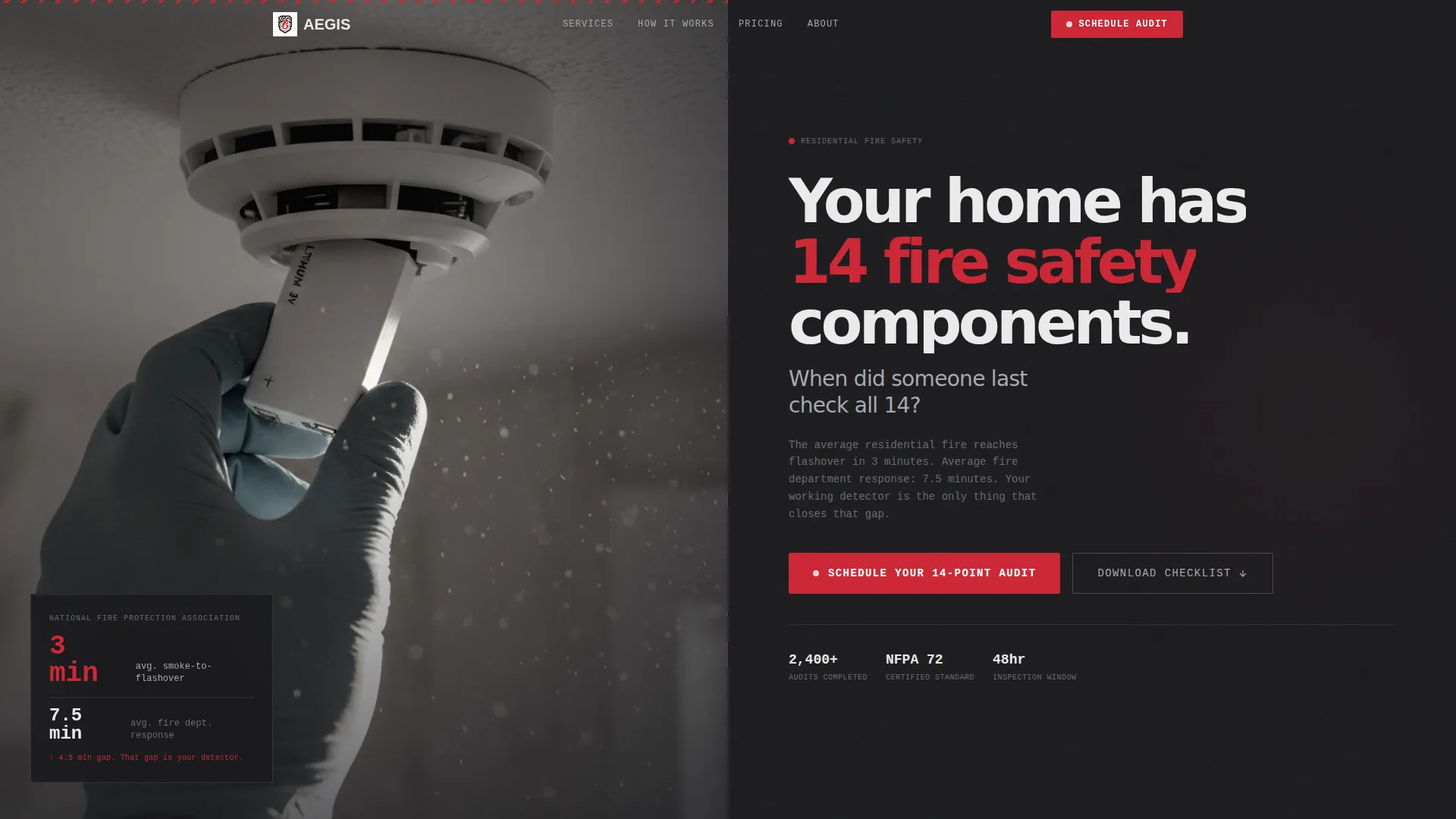
- A split-image header with a stark headline and a subline that states response time versus smoke-to-flashover time
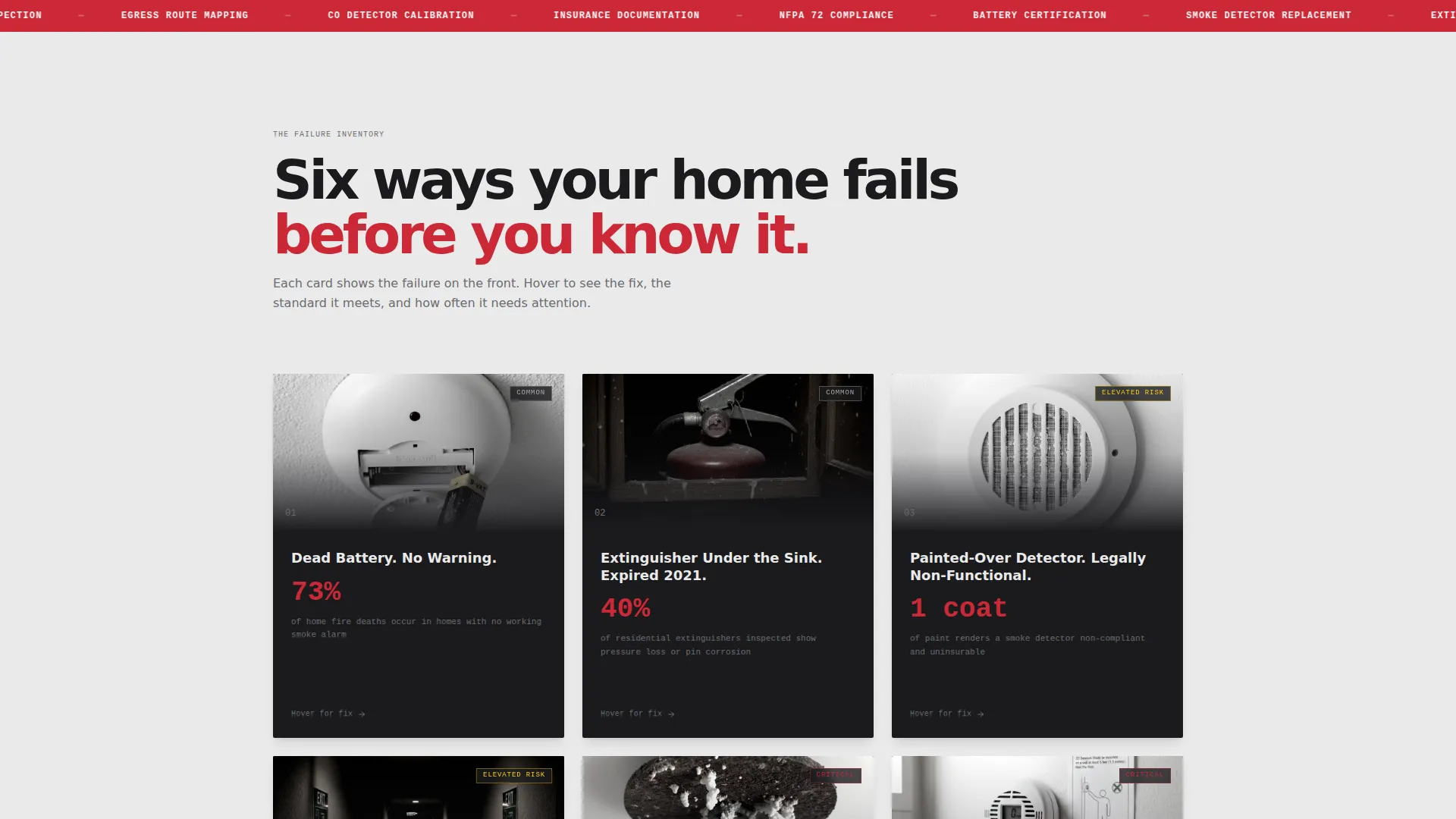
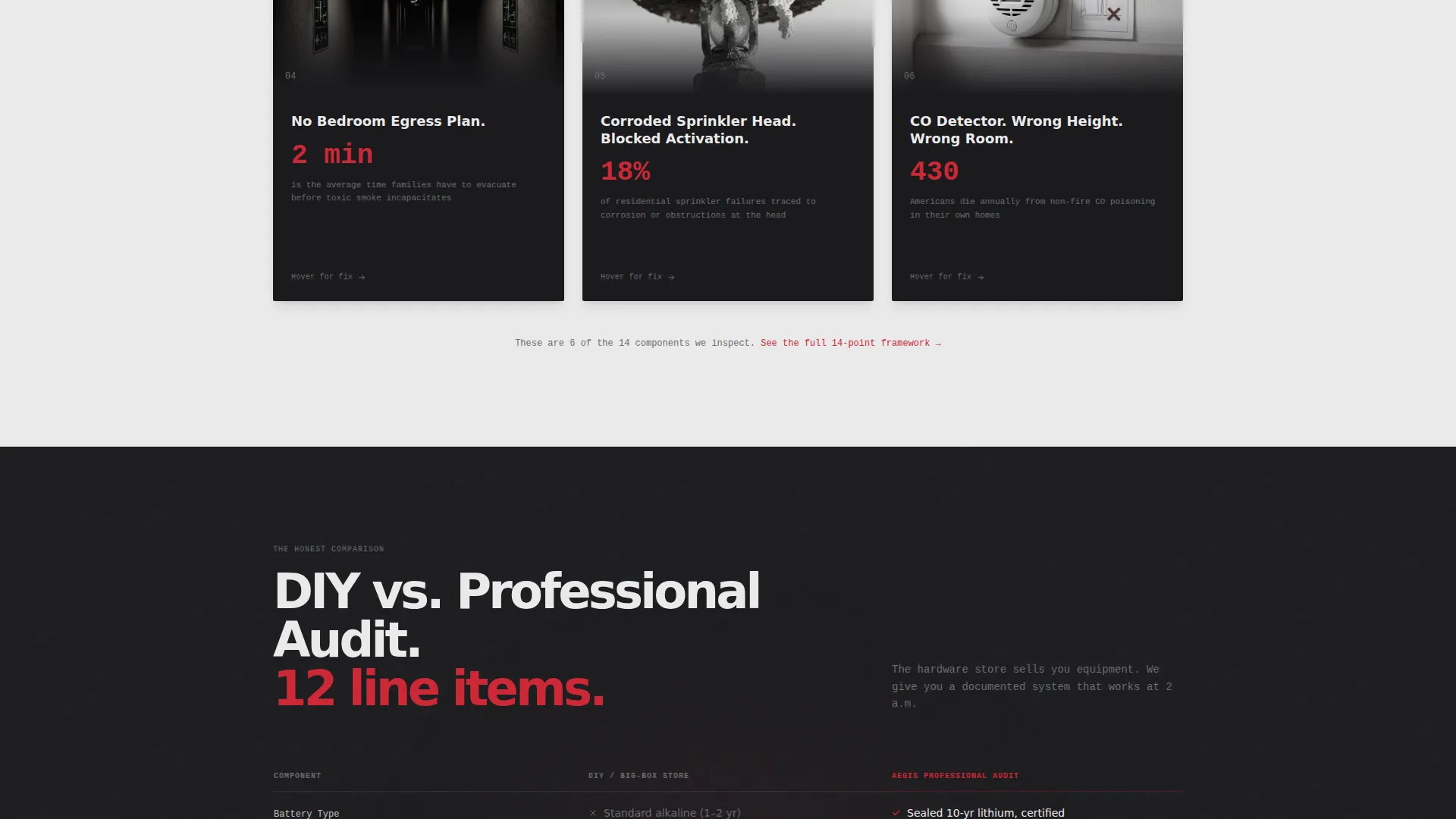
- A modular problem-and-solution card grid covering expired extinguishers, painted-over detectors, missing egress plans, and corroded sprinkler heads
- A mid-page comparison module, a booking form with home type and inspection window fields, and a secondary email-capture path for a downloadable checklist
Feature list
This section covers the core built-in components that define the Aegis template experience.
Split-Screen Header Section
The header divides into two halves. The left side holds a tightly cropped photo of a hallway smoke detector being serviced by a gloved technician in morning light. The right side carries a heavy sans-serif headline and a subline that frames the stakes using real residential fire response data.
Modular Problem-to-Solution Card Grid
Each card isolates one fire safety failure point with a real photo and a two-line stat on the problem face. The card then transitions to a corresponding service card showing the fix, the compliance standard met, and the recommended inspection interval. Cards escalate from common and inexpensive issues to rare and critical ones.
DIY Versus Professional Audit Comparison Table
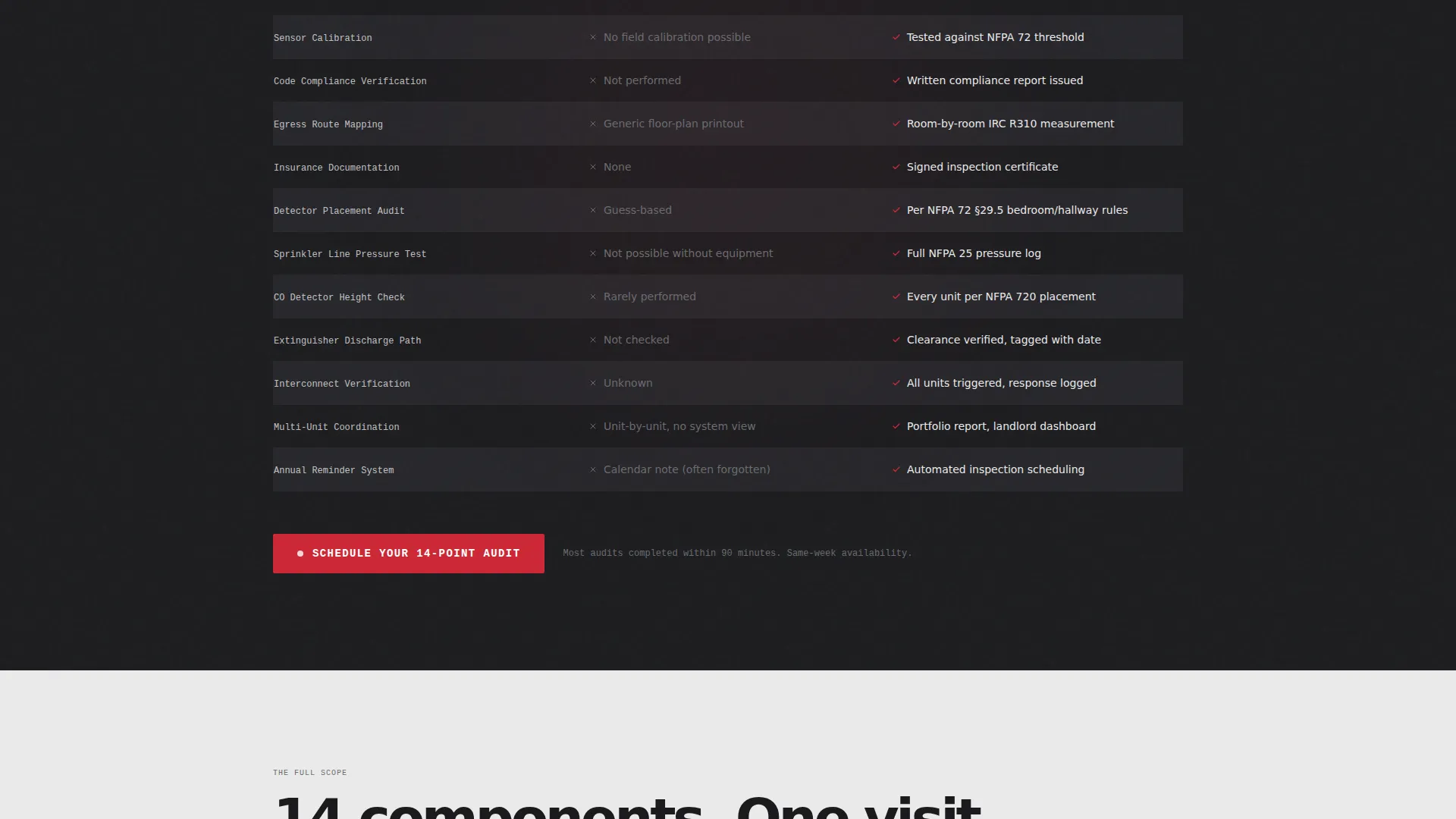
A persistent two-column module sits mid-page. It contrasts do-it-yourself approaches against a professional audit across twelve line items including battery type, sensor calibration, code compliance verification, escape route mapping, and insurance documentation.
14-Point Audit Booking Form
The primary call-to-action form collects home type (single-family, duplex, or multi-unit), approximate square footage, and preferred inspection window. It is placed at the header, after the comparison table, and as a sticky bottom bar on mobile screens.
Checklist Email Capture Path
A secondary conversion path offers visitors the 14-point audit framework as a downloadable PDF. This captures email addresses from visitors who are not yet ready to book, while giving them a document that shows exactly what a professional audit covers versus what a homeowner can realistically do alone.
Monochrome Steel Visual System
The layout uses a forge black and smoke white alternating background system across card rows. Emergency-pull red appears exclusively on calls-to-action and hazard callouts, making every instance of red visually dominant. The palette is spare and functional, with no decorative elements.
Page sections overview
| Section | Purpose |
|---|---|
| Split header hero | Establish stakes and primary call to action |
| Problem card grid | Surface common fire safety failures |
| Solution card grid | Show professional fixes and standards |
| DIY versus. audit comparison | Justify professional service over self-inspection |
| Audit booking form | Capture ready-to-book visitors |
| Checklist email capture | Capture early-stage visitors via PDF offer |
| Sticky mobile call to action bar | Persistent booking prompt on mobile |
Design & branding system
The Aegis visual identity follows a Service Utility theme built around a Monochrome Steel color system. The palette feels like the inside of a fire panel box: stamped, purposeful, and undecorated. Every color choice has a functional role.
- Forge black (#1B1B1E) and smoke white (#EAEAEA) alternate as card-row backgrounds, with brushed aluminum (#A8A9AD) used for body text on dark surfaces and forge black used on light surfaces
- Emergency-pull red (#CC2936) is reserved exclusively for calls-to-action and hazard callouts, appearing sparingly so that every instance commands immediate attention
- Typography uses heavy sans-serif for headlines to reinforce urgency, with clean body type that keeps technical service information readable at a glance
Mobile & speed optimization
The template is structured so the most urgent conversion elements stay visible and accessible on small screens. The sticky bottom bar keeps the primary call-to-action reachable at all times on mobile without interrupting the reading flow.
- The modular card grid adapts to a single-column layout on mobile, preserving the problem-to-solution escalation without horizontal scrolling
- The sticky mobile call to action bar displays the "Schedule Your 14-Point Audit" prompt persistently as the visitor scrolls through the page
How this template helps you convert
Aegis is built to move three distinct visitor types toward one of two clear actions: booking an audit or downloading the checklist. The page structure does not rush the decision but does not let the visitor stay comfortable either.
- The problem-card escalation builds a quiet inventory of unchecked risks in the visitor's mind, making inaction feel more costly than scheduling an inspection
- The DIY versus professional comparison module removes the "I can handle this myself" objection by laying out twelve specific gaps that a big-box store purchase cannot close
- The secondary checklist capture path keeps lower-intent visitors inside the funnel by giving them a useful document that reinforces the value of a professional audit every time they look at it
Other information about this template
Aegis is designed for lead generation and works equally well for solo inspectors and multi-crew residential fire safety companies. The layout is single-column in flow structure but opens into a modular card grid for the service content, making it straightforward to customize individual cards without redesigning the full page.
- The template is suited to the residential fire safety and home protection services market, including companies serving landlords managing multi-unit properties and homeowners responding to insurance inspection flags
- The 14-point audit framework embedded throughout the page (header headline, comparison table, call to action text, and checklist offer) creates a consistent narrative thread that reinforces service depth without requiring long-form copywriting
- Page direction is lead generation, making every section accountable to one of two conversion outcomes: a booked inspection or a captured email address
Theme
Medical Clarity
Creative direction
Stats-First Impact
Color system
Navy Authority
Style
Single Column Flow
Direction
Lead Generation
Page Sections
Split-screen Header with Stakes Subline
Problem-to-solution Card Grid
DIY Versus. Professional Audit Comparison
Point Audit Booking Form
Checklist PDF Email Capture
Monochrome Steel Color System
Related questions
Can I use this template for a multi-unit or rental property inspection service?
How many calls-to-action does the template include?
What information does the booking form collect?
Is the comparison module easy to customize?
Who is the secondary checklist capture path designed for?