Real Estate Agency Complete Professional Website Template
Vouch is a Tech Glass real estate landing page template built for data-driven brokerages. It puts a live agent comparison widget front and center, lets visitors toggle verified performance metrics, and converts analytical buyers with a slim lead capture drawer. Every section rewards scrutiny, from animated benchmark charts to frosted agent spec sheets packed with transaction data.
by Rocket studio
Quick summary
Vouch is a single-page, comparison-first real estate landing page template designed for brokerages that compete on transparency. Visitors arrive to a live interactive widget already showing two agent profiles side by side. They toggle metrics, explore verified listings data, and submit only an email and zip code when ready. The entire process from first impression to captured lead is built around earning trust before asking for anything.
Who this template is for
This template speaks directly to brokerages and real estate agents who believe the best pitch is a proof point. It is built for teams whose differentiation lives in the numbers, not in marketing copy.
- Re-listing home owners who have already gone through a failed sale and are now interviewing agents with hard questions about days on market and list-to-sale ratios.
- Relocating executives and corporate buyers whose organizations vet real estate agencies the same way they vet vendors, by documented performance across multiple properties and listings.
- Real estate investors who compare brokers the way they compare return metrics on a spreadsheet, and who walk away from any landing page that hides the data behind a sign-up wall.
What problem this template solves
Most real estate landing page designs ask visitors to trust the brand before showing any proof. Sellers, buyers, and investors with prior bad experiences arrive skeptical. A page full of stock photos and testimonial quotes does not answer the questions they actually have.
Vouch solves this by treating every real estate agent's track record as a public specification sheet. The page gives away the comparison engine completely free. By the time a visitor hits any call to action, they have already spent real time interacting with verified data, watched embedded videos, and built their own shortlist. That earned attention converts far better than an aggressive lead capture form placed above the fold.
Key problems this template addresses:
- Skeptical sellers who dismiss agency websites that lead with polish over performance, and who need plain data on verified sale prices, average days on market, and transaction volume before they will trust any agent.
- Analytical buyers and investors who abandon landing pages that cannot show comparable real estate market benchmarks or MLS-sourced stats alongside individual agent profiles.
- Brokerages struggling to differentiate in a crowded real estate market where most landing pages look identical and make the same unverifiable promises about services.
What you get with this template
This template delivers a complete, one page conversion experience structured around progressive data disclosure. Each scroll depth adds a layer of granularity, rewarding thorough research while still capturing leads at the right moment.
You get a fully designed real estate landing page built from these core components:
- Interactive hero comparison widget with two pre-loaded agent profiles, toggleable metric columns, drag-to-reorder functionality, and click-through to supporting testimonial video clips, no sign-up required to use it.
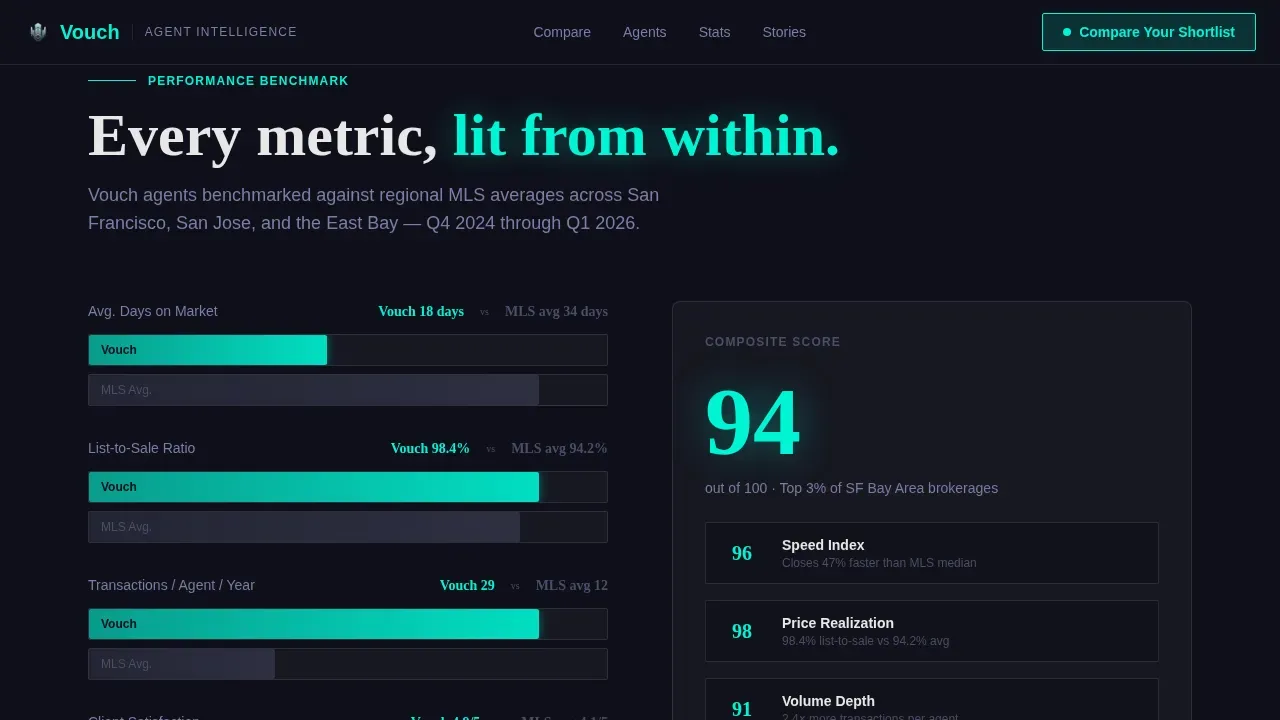
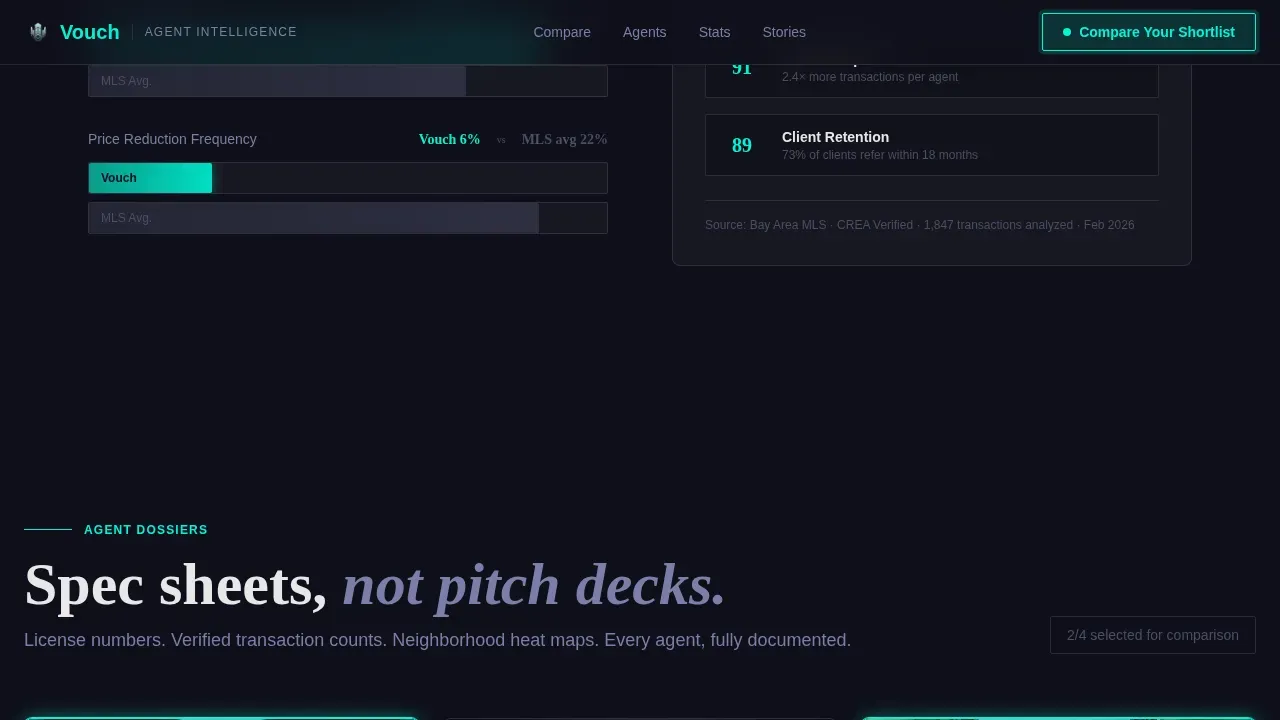
- Animated benchmark section with bar charts comparing the brokerage's composite stats against regional MLS averages, helping visitors understand relative performance across the real estate market at a glance.
- Agent spec sheet cards presented as frosted-glass dossiers, each containing a headshot, license number, neighborhood coverage map, transaction volume data, and a 30-second embedded client video.
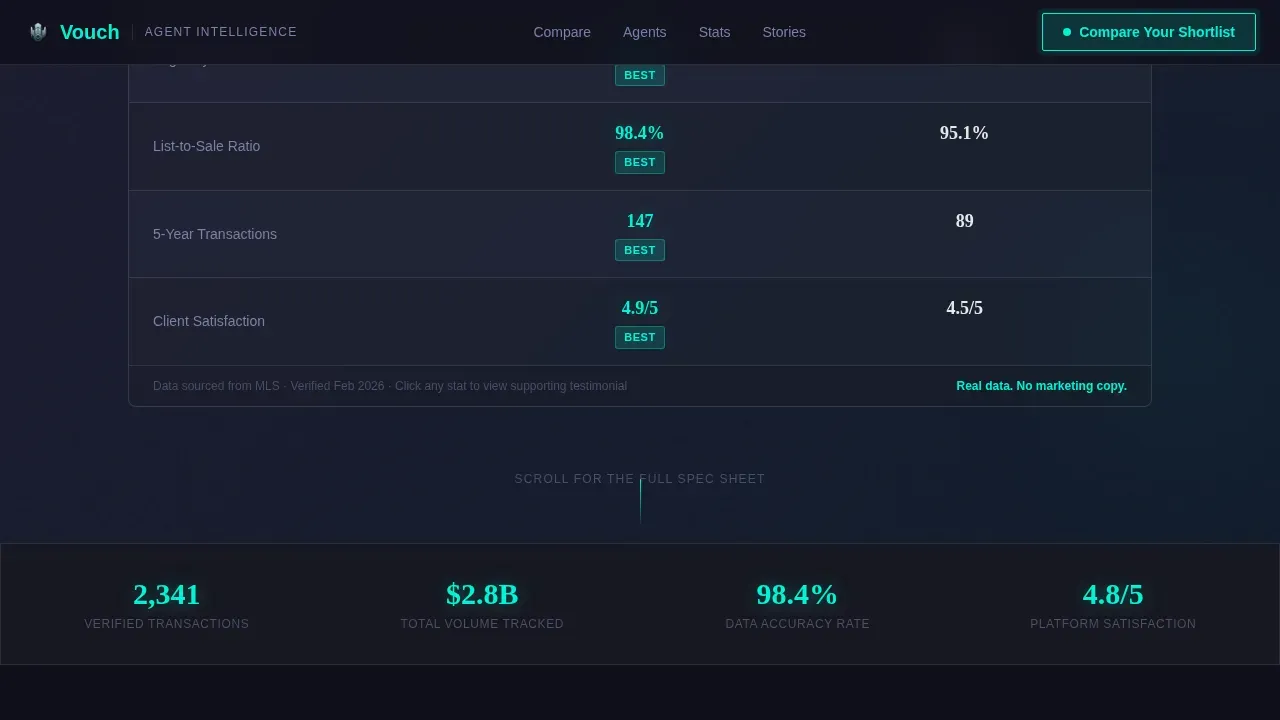
- Full four-agent comparison table with normalized metrics, checkbox selection for up to four agents, and a scroll-triggered reveal that layers in granularity as the visitor moves deeper into the page.
- "Compare Your Shortlist" lead capture drawer that opens after agent selection, collecting only email address and property zip code before generating a personalized match report.
- "Watch the Full Story" video expansion path that opens any testimonial video to fullscreen and ends with a soft address prompt for visitors who prefer story over statistics.
Feature list
This template is designed around key features that serve analytical buyers without compromising the visual clarity that all visitors expect from a professional real estate landing page.
Live Agent Comparison Widget
The hero widget loads with two anonymized agent profiles already populated. Visitors can toggle individual metrics on and off, drag columns to reorder by priority, and click any stat to view the supporting testimonial video clip. The widget is fully functional on arrival, no sign-up gate blocks access. This approach gives visitors immediate ownership of the comparison process, which is the most effective way to build trust before any call to action appears.
Animated MLS Benchmark Charts
The benchmark section displays the brokerage's composite performance metrics as animated bar charts set directly against regional MLS averages. Showing recent comparable sales and market trends alongside agent data justifies the positioning in the real estate market and establishes the agency as a data-driven authority. Visitors who are used to vague agency marketing find this section immediately credible because the reference point is independent market data, not internal claims.
Agent Spec Sheet Cards
Each agent is presented as a technical dossier inside a frosted-glass card. The card includes a professional headshot, license number, a neighborhood coverage map, cumulative transaction volume, and a 30-second embedded client video. This format lets potential buyers and sellers evaluate individual agents the way they would evaluate any professional service provider: through documented credentials and verified output, not through curated photos and rehearsed pitches.
Four-Agent Normalized Comparison Table
The full comparison table lets visitors select up to four agents and view every metric normalized side by side. Checkboxes control which agents are included. Scroll-triggered reveals add detail progressively, keeping the experience focused rather than overwhelming. This section is where analytical buyers spend the most time, and the design rewards that attention with increasing granularity across all key performance categories relevant to their listings and properties.
Slim Lead Capture Drawer
When a visitor locks their shortlist, a slim drawer opens requesting only an email address and property zip code. This minimal lead capture form is strategically placed after the visitor has already engaged with the comparison engine, not before. Prioritizing clarity and user empowerment over aggressive lead generation tactics means that the leads this template captures are already pre-qualified and genuinely interested in the specific agents they selected.
Fullscreen Video Testimonial Expansion
Any embedded client video can expand to fullscreen with one click. After the video ends, a soft prompt invites the viewer to share their property address. This secondary conversion path captures visitors who are more motivated by narrative and social proof than by raw statistics. Video content handles an important segment of potential clients who respond to emotional resonance rather than spreadsheet comparisons, while still moving them toward the same lead capture goal.
Page sections overview
| Section | Purpose |
|---|---|
| Hero Comparison Widget | Let visitors compare two pre-loaded agent profiles with live, toggleable metrics immediately on arrival |
| MLS Benchmark Charts | Animate brokerage composite stats against regional averages to establish data credibility |
| Agent Spec Sheet Cards | Present each agent as a frosted-glass dossier with license, map, volume, and embedded video |
| Full Comparison Table | Enable four-agent side-by-side metric comparison with checkbox selection and scroll reveals |
| Shortlist call to action Drawer | Open a slim lead capture drawer collecting email and zip after visitor shortlist is locked |
| Video Expansion Path | Expand any testimonial video to fullscreen and close with a soft property address prompt |
| Footer | Display a linear single-row footer with essential links and brand information |
Design & branding system
Vouch uses a Tech Glass visual identity built on a Carbon Fiber color system. The palette is deliberately restrained, saving its single accent color for the moments that demand attention from buyers and sellers alike.
- Color system: Deep carbon background at #1A1A2E, titanium mid-gray at #4A4E69 for body text and secondary elements, frosted glass white at #E8E8E8 at 85% opacity over blurred panel backgrounds, and electric teal at #00F5D4 for active states, hover lines, and selected-agent highlights across the comparison table and widget.
- Typography: DM Sans handles all data labels, metric readouts, and interface text for sharp on-screen legibility. Fraunces carries display headlines, bringing a considered editorial contrast to the otherwise technical visual space.
- Visual treatment: Frosted-glass blur panels layer content above a dark chassis so every card and data section appears to float. Text is always titanium on dark backgrounds or carbon on light panels, avoiding pure white to keep the screen-glare realism of an actual glass interface intact.
Mobile & speed optimization
The template is designed desktop-first to serve analytical buyers who prefer to compare data across a wide screen. A mobile fallback ensures the core experience remains functional for visitors who arrive on smaller devices.
- Desktop-first layout: The comparison widget, four-agent table, and benchmark charts are all optimized for wide-screen viewing, where buyers and investors typically do their most detailed real estate research.
- Mobile fallback structure: Key sections reflow gracefully on smaller screens so home owners and sellers who arrive via a link on a mobile device can still access agent cards, embedded videos, and the lead capture drawer without losing critical information.
- Performance approach: The template uses a static shell architecture for stable, fast-loading sections and reserves interactive client-side components for the comparison widget and the full comparison table, supporting faster initial load so visitors stay on the page.
How this template helps you convert
A real estate landing page only earns a lead when it earns trust first. Vouch structures the entire conversion journey around progressive trust, not immediate pressure. Landing pages that prioritize user empowerment consistently outperform those that gate content behind a sign-up wall.
- Visitors become users before they become leads. The comparison widget is fully functional the moment the page loads. Visitors interact with real data, toggle metrics, and watch videos without being asked to sign in or submit anything. By the time they hit the "Compare Your Shortlist" call to action, they have already invested attention and feel ownership over their selected agents, which dramatically increases the likelihood they will submit the lead capture form.
- Every data point reinforces the conversion goal. From the MLS benchmark charts to the individual agent spec sheets, each section is designed to answer the questions that skeptical sellers, relocating buyers, and investors actually ask. Plain language, unfiltered data, and verified social proof from embedded client videos address objections before they become reasons to leave. The result is that the single call to action, requesting only email and zip code, feels like a logical next step rather than a cold ask.
- The secondary video path captures a different buyer type. Visitors who respond to narrative rather than numbers can follow the "Watch the Full Story" path through fullscreen testimonial videos. The soft prompt at the end of each video asks only for a property address, keeping the ask light and contextually appropriate. This dual-path structure ensures the template converts across the full spectrum of potential clients, from spreadsheet-driven investors to emotional home owners searching for their next real estate partner.
Other information about this template
This template is built to support real estate businesses operating in a transparent, data-forward corner of the real estate industry. Here is additional context that helps frame how and where it fits within a broader digital marketing and real estate business strategy.
- Template style and niche: Vouch is classified as a Comparison Table landing page template within the Real Estate Agency Testimonials Page niche. The intersection of a Tech Glass theme, Spec Sheet creative direction, and Comparison/Versus landing page direction is intentional, it matches the decision-making style of the real estate market segment most likely to convert on a data-rich page.
- Positioning relative to traditional agent marketing: Transparent real estate agents differ from traditional agents primarily through their fee structures and commitment to data-sharing. Traditional agents typically charge 5 to 6 percent commission, while transparent agents often adopt flat-fee models or high-disclosure strategies. A landing page that surfaces license numbers, MLS-sourced stats, and verified transaction volume signals the same philosophy visually, the template design reflects the brand values of a transparency-first real estate business.
- Complementary tools in a real estate marketing stack: Agents and brokers building a full digital marketing workflow often pair their landing pages with dedicated tools. Email marketing platforms help nurture new leads after capture. Virtual tours created with immersive 3D tools like Matterport allow buyers to explore properties from anywhere. Design platforms enable real estate agents to create professional marketing materials to support listings across channels. Live MLS data integrations allow agents to surface current market data on their website. The Vouch template is designed to sit at the top of this stack as the primary landing page that captures the initial lead and directs follow up activity.
- Lead generation and follow up workflow: Once a visitor submits the lead capture form with their email and zip code, the personalized match report generated from their shortlist gives the sales team a warm, context-rich starting point for follow up conversations. This is more effective than capturing a cold lead from a generic real estate landing page with no prior engagement data.
- Budget and customization: This is a customizable landing page template, making it practical for real estate businesses across different budget levels. Teams can replace placeholder professional photos with their own agent headshots, swap in real transaction data, update neighborhood coverage maps, and adapt the brand color accents to match their own identity. The template is not dependent on stock photos, it is built to showcase the real team, real listings, and real data that make a brokerage credible.
- Blog and content integration: Brokerages that maintain a blog or resource section can link to market analysis posts from the benchmark section, adding further depth for visitors who want to explore the real estate market context behind the stats shown on the page.
- Platform reach: This template supports real estate agencies looking to sell more properties, convert more leads, and close more deals by giving potential buyers and sellers a reason to trust the agency before the first conversation. It is designed to function as a standalone page that can be connected to any existing real estate website or operated as a dedicated campaign landing page.
- Vouch transparent agent comparison real estate agency landing page template is the full product name, reflecting both the comparison-first structure and the transparent positioning that defines the template's core value.

Theme
Tech Glass
Creative direction
Spec Sheet
Color system
Carbon Fiber
Style
Comparison Table
Direction
Comparison/Versus
Page Sections
Live Interactive Comparison Widget
Animated MLS Benchmark Charts
Frosted-glass Agent Spec Sheets
Four-agent Normalized Comparison Table
Slim Shortlist Lead Capture Drawer
Fullscreen Video Testimonial Expansion
Related questions
Can I replace the placeholder agent data with my own team's real information?
Does the comparison widget require visitors to sign up before using it?
Is this template suitable for agencies that handle apartments and varied property types?
What makes this different from a standard real estate agency website?
How does the video testimonial section support lead generation?



