Orthodontist Directory & Provider Search Website Template
Align is a sidebar companion landing page template built for orthodontist provider directories. It pairs a FAQ-driven scroll with a persistent filter sidebar, an animated search bar, and a three-step booking modal. The design uses an Organic Flow visual system in a Teal Catalyst color palette, built to move anxious patients from first search to booked consultation.
by Rocket studio
Quick summary
Align is a single-page orthodontist directory template with a sidebar companion layout. It guides patients through real treatment questions, surfaces matched provider cards as living proof, and closes with a "Book a Free Consult" flow. The Teal Catalyst color system and Organic Flow design language make every section feel trustworthy, modern, and easy to act on.
Who this template is for
This template is built for teams and developers launching an orthodontist provider directory. It fits anyone who needs to match patients with local orthodontists through a search-and-book experience.
- Orthodontic marketing agencies building patient-facing directory products
- Healthcare startups creating a B2C patient-to-provider matching platform
- Independent directory publishers in the dental and orthodontic vertical
What problem this template solves
Patients searching for orthodontic care carry real anxiety. They do not know whether they need braces or clear aligners, what a first consultation costs, or how long treatment will take. Most directories drop them into a raw list with no context, and they leave without booking.
- No structured answer to common treatment questions before the booking ask
- No contextual filtering that updates as the visitor moves through the page
- No low-commitment secondary path for visitors still in research mode
What you get with this template
Align delivers a fully structured landing page with every major section pre-built and ready to customize. The layout combines a main content column with a persistent teal sidebar that travels with the visitor.
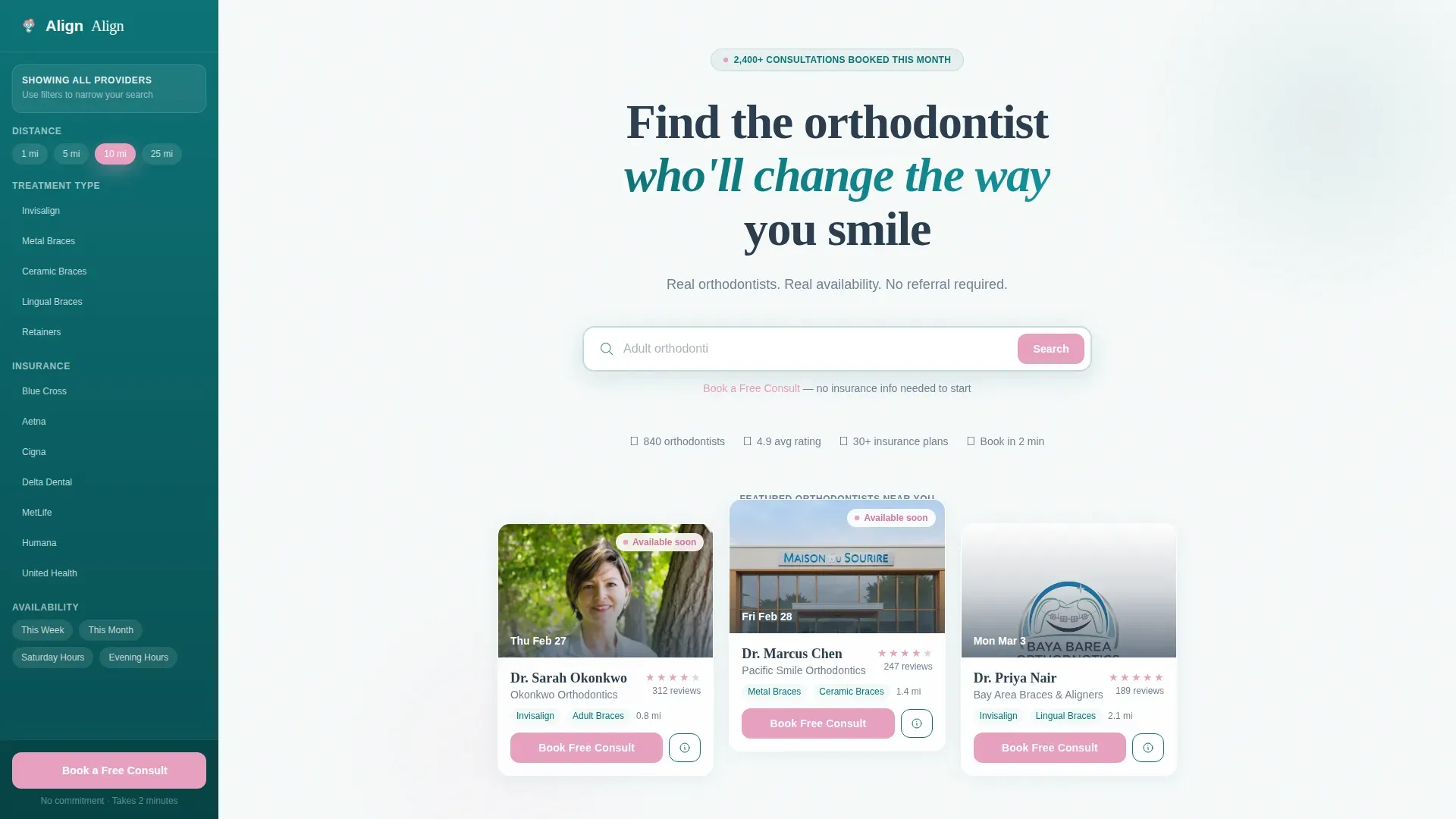
- A hero section with an animated, cycling-placeholder search bar and floating provider cards
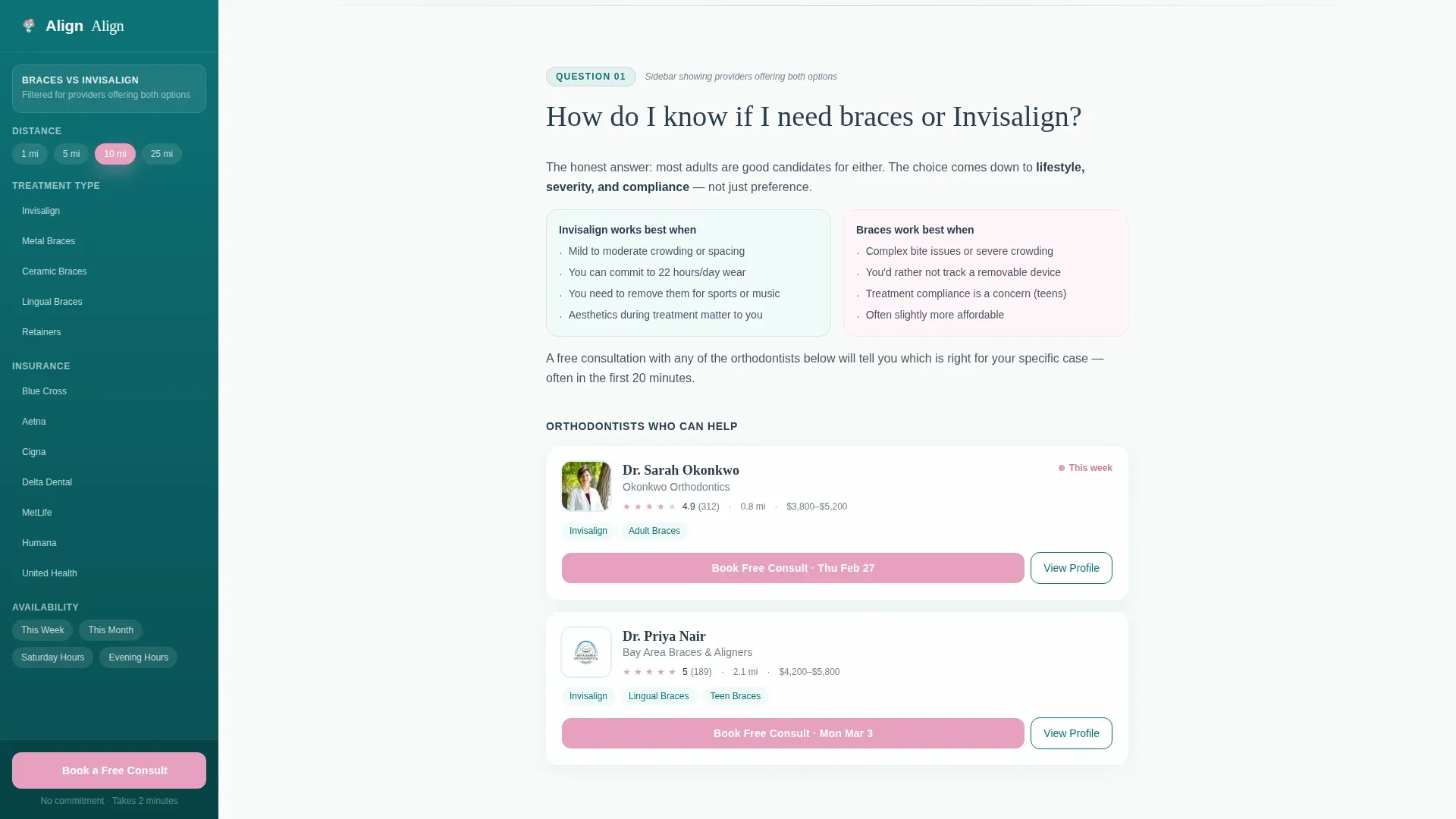
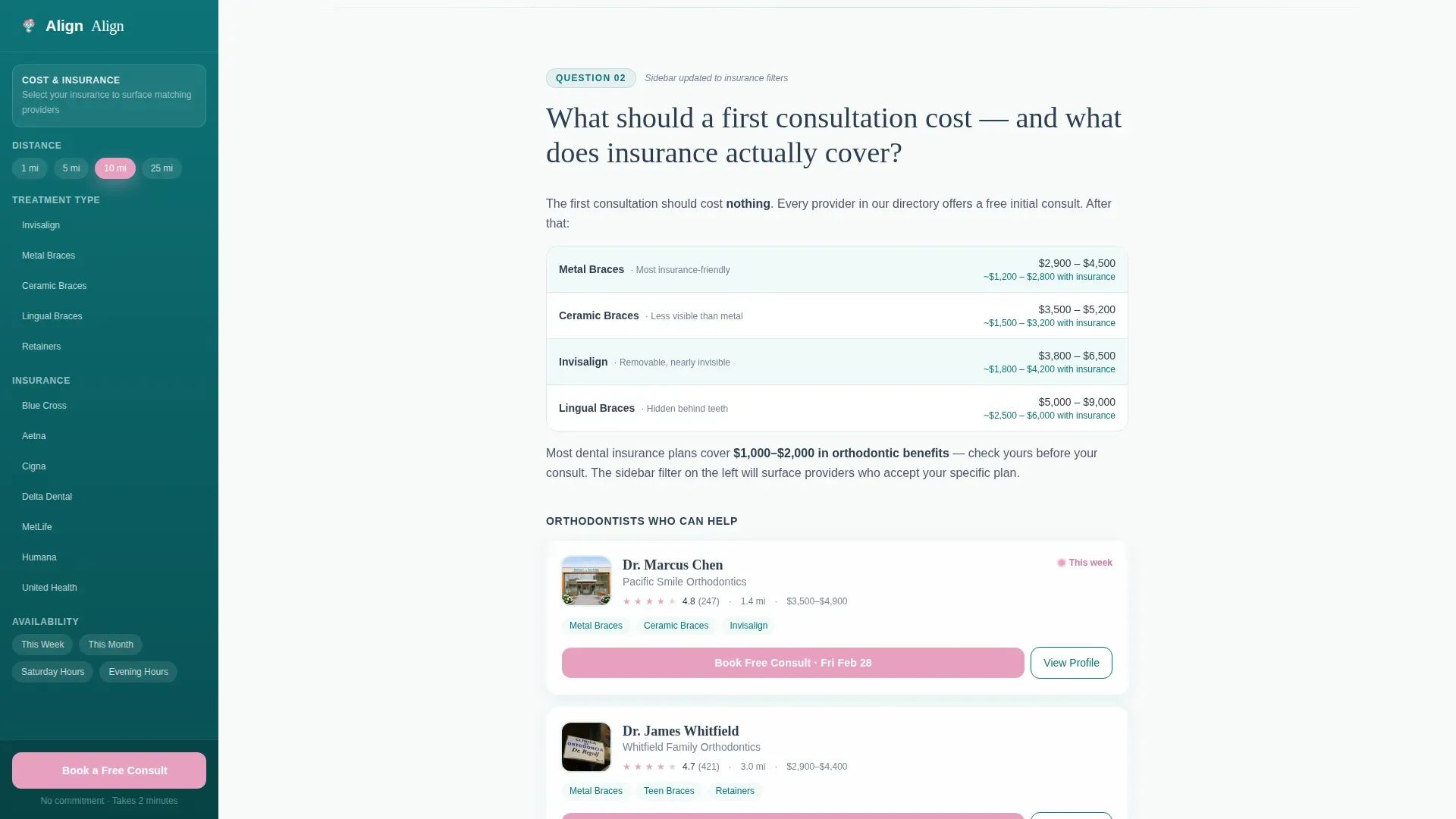
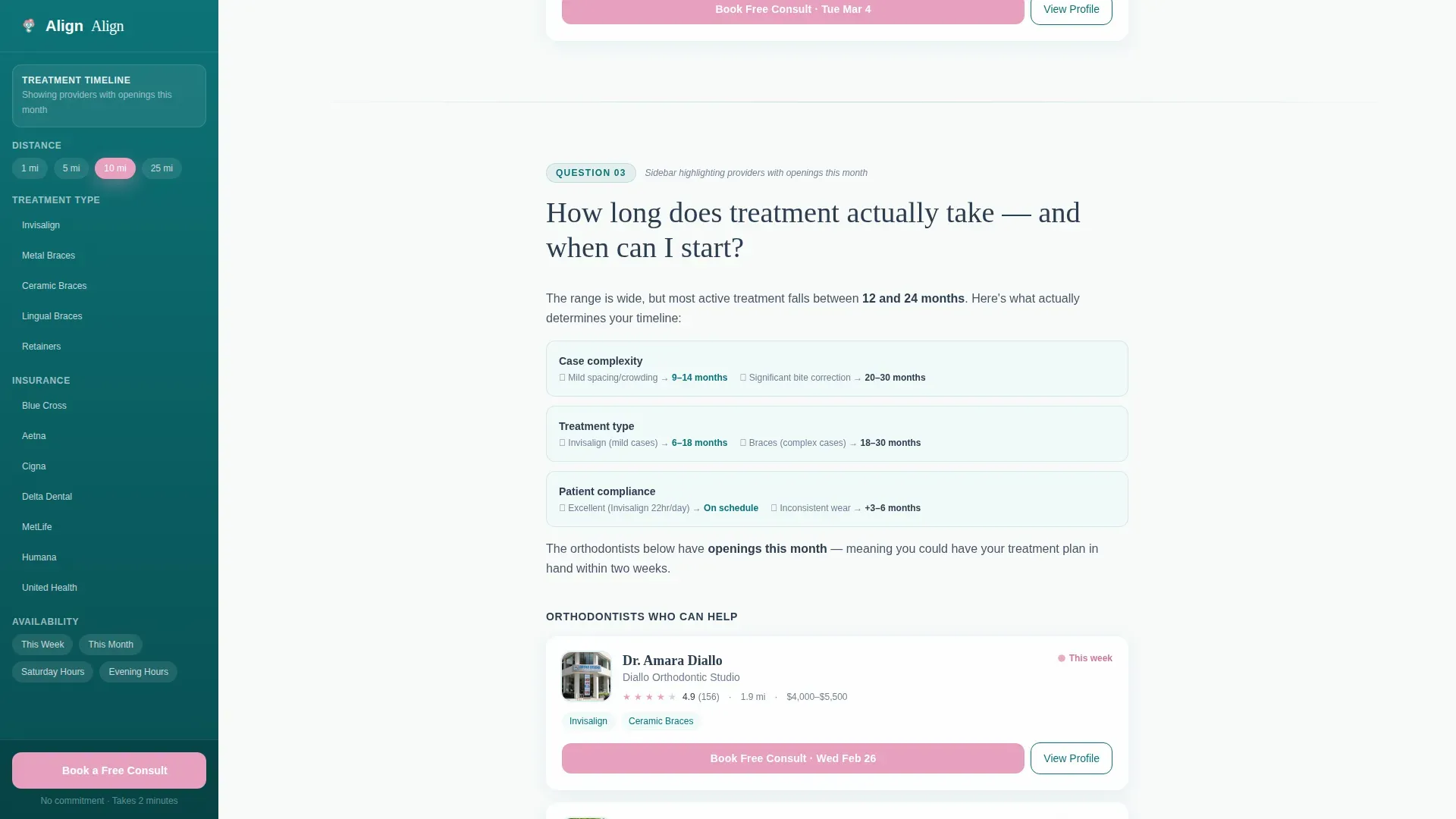
- Three FAQ sections covering treatment type, cost and insurance, and treatment timeline, each with embedded provider cards
- A social proof section, a three-step booking modal, and a linear single-row footer
Feature list
A brief overview of what makes this template work as a patient-converting directory page.
Animated Search Bar with Cycling Placeholders
The hero search bar pulses once on load and cycles through real patient queries such as "Invisalign near downtown" and "Adult orthodontics open Saturdays." It signals immediately that this directory understands what real patients are looking for.
Persistent FAQ-Driven Scroll
Each scroll section opens with a patient question in large type. Short, honest copy unfolds below, followed by embedded provider cards that act as living proof. The structure dissolves anxiety before asking for any commitment.
Contextual Filter Sidebar
The teal sidebar updates its content contextually as the visitor scrolls. During the insurance FAQ section it surfaces providers who accept specific plans. During the timeline section it highlights orthodontists with availability this month.
Three-Step Booking Modal
Clicking "Book a Free Consult" opens a focused three-step flow: zip code and insurance provider first, then a carousel of matched orthodontists with ratings, distance, and next-available slots, then a calendar picker with morning, afternoon, and evening toggles.
Secondary Email Capture Path
Visitors not ready to book see a single-field prompt: "Not ready? Get a checklist emailed." This captures research-mode visitors without friction and keeps them in the funnel.
Scroll-Triggered Reveals and Staggered Card Animations
Provider cards appear with staggered reveal animations as the visitor scrolls. FAQ sections animate into view using scroll-triggered transitions, keeping the page feel dynamic without overwhelming the content.
Page sections overview
| Section | Purpose |
|---|---|
| Hero with Search | Opens with a giant headline, animated search bar, floating provider cards, and visible sidebar |
| Braces versus. Aligners FAQ | Answers the treatment-type question with embedded provider cards as proof |
| Cost and Insurance FAQ | Addresses price anxiety and surfaces insurance-filtered provider matches |
| Treatment Timeline FAQ | Covers duration questions and highlights providers with current availability |
| Social Proof | Displays star ratings, patient review quotes, and a live consultations-booked counter |
| Final Call to Action | Reinforces the booking prompt with trust signals before the footer |
| Linear Footer | Single-row footer following Pattern 1 layout |
Design & branding system
The visual identity follows an Organic Flow theme. The palette feels like a modern orthodontic office that swapped fluorescent lights for skylights: still clinical, still trustworthy, but with room to breathe.
- Deep clinical teal (#0D7377) anchors the sidebar, navigation, and primary interactive elements
- Soft enamel white (#F7FAFA) fills the main content column backgrounds for openness and clarity
- Warm gum pink (#E8A0BF) appears as a targeted accent on hover states, the "Book a Free Consult" button, pulsing availability dots, highlighted review stars, and active filter toggles
- Charcoal root (#2C3E50) handles all body text for strong contrast against enamel white
- Typography pairs Fraunces serif headlines with DM Sans body text for a modern, organic feel
Mobile & speed optimization
The template is built desktop-first to support its sidebar companion layout, with a responsive collapse built in for smaller screens.
- The sidebar collapses cleanly on mobile so the main content column remains readable and uncluttered
- Smooth scroll behavior is handled through CSS scroll-behavior, and section reveals use Intersection Observer for lightweight, scroll-triggered animations
- The three-step booking modal and FAQ accordions remain fully functional on touch devices after the sidebar collapses
How this template helps you convert
Align earns the booking click by removing every common objection before the call to action appears. The structure is intentional: answer first, ask second.
- The FAQ-driven scroll addresses the three biggest patient hesitations (treatment type, cost, and timeline) with embedded provider cards, so visitors arrive at the booking call to action already informed and trusting.
- The persistent "Book a Free Consult" button stays fixed to the sidebar bottom throughout the scroll, making the primary action available at exactly the moment a visitor feels ready.
- The secondary email capture path ("Not ready? Get a checklist emailed") retains visitors in research mode with a single field, turning a potential exit into a low-friction touchpoint.
Other information about this template
A few additional details worth knowing before you build with Align.
- The template is localized for English-language audiences, US dollar pricing context, and US date formats
- Animation intensity is set to medium-high, with staggered card reveals, a pulsing search bar, cycling placeholder text, and scroll-triggered FAQ reveals all included by default
- The social proof section includes a live-style counter ("X consultations booked this week"), star rating displays, and patient review quote blocks
- The footer follows Pattern 1, a linear single-row layout suited to directory and service pages
- The template is categorized under Health and Medical, specifically the orthodontist website and orthodontic provider directory niche
Theme
Organic Flow
Creative direction
FAQ-Driven
Color system
Teal Catalyst
Style
Sidebar Companion
Direction
Booking/Scheduling
Page Sections
Animated Search Bar with Cycling Placeholders
Faq-driven Section Scroll
Contextual Filter Sidebar
Three-step Booking Modal
Secondary Email Capture Path
Scroll-triggered Animations and Card Reveals
Related questions
What type of page is this template?
How does the three-step booking modal work?
Can I edit the sidebar filter categories?
Is this template suitable for a healthcare startup or agency?
What happens to the sidebar layout on smaller screens?



