Reference Library Landing page Template
A sidebar companion landing page built for allergist practices that need a clinical reference library patients and physicians can actually use. Condition cards, treatment ladders, named specialist pull-quotes, and a persistent booking call to action give every visitor more actionable guidance in one scroll than most first appointments deliver, then ask for the next step.
by Rocket studio
Quick summary
This template is a clinical allergy reference library built as a sidebar companion landing page. It maps allergic conditions to their molecular triggers, walks visitors through treatment ladders, and ends every section with a clear path to book an evaluation. The design is authoritative and open, built around named allergists and real clinical depth.
Who this template is for
This template is designed for allergist practices that want a resource patients trust before they ever sit down in a waiting room. It serves three audiences with different needs but the same starting point: wanting answers.
- Newly diagnosed patients and parents seeking clear guidance on allergic conditions and next steps
- Adults who have managed symptoms informally and now need a structured clinical reference
- Referring primary care physicians who need a specialist resource to share directly with patients
What problem this template solves
Many patients arrive at an allergist appointment having read nothing authoritative about their condition. Many referring physicians have no single trusted page to hand across the desk. This template closes both gaps.
- No central resource that maps allergy symptoms to molecular triggers with clinical depth
- Condition information scattered across disconnected pages with no treatment pathway
- No persistent call to action connecting educational content to an actual appointment
What you get with this template
You get a fully structured sidebar companion landing page that works as a clinical reference library. The layout is desktop-first with a full mobile fallback, and every section is purpose-built to move a visitor from curiosity to consultation.
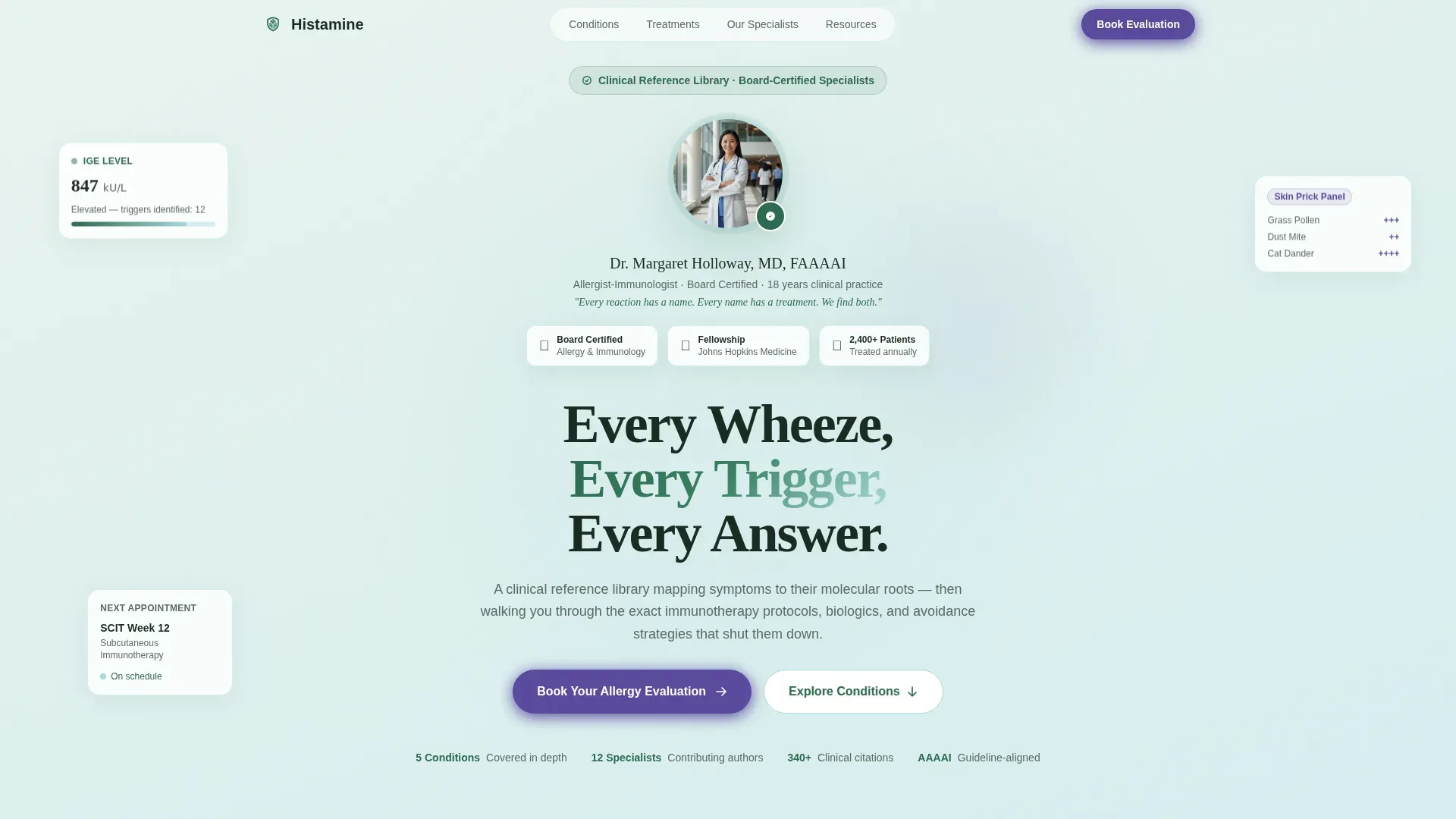
- A portrait-centered hero with board certification display and a philosophy statement in serif type
- Five condition deep-dive modules with expandable sidebar views, treatment ladders, and attributed physician pull-quotes
- A PDF guide download gate and a persistent booking button appearing at the close of every condition module
Feature list
This template includes purpose-built sections and interactive components drawn directly from the project brief. Each feature below reflects a concrete, deliverable part of the layout.
Portrait-Centered Allergist Hero
The header opens with a warmly lit, shoulders-up photograph of the lead allergist in a white coat against a soft-focus clinical backdrop. The allergist's name, board certifications, and a single philosophy sentence appear in clean serif type alongside the portrait. No stock imagery is used, one real face establishes trust before any condition is named.
Expandable Condition Card Grid
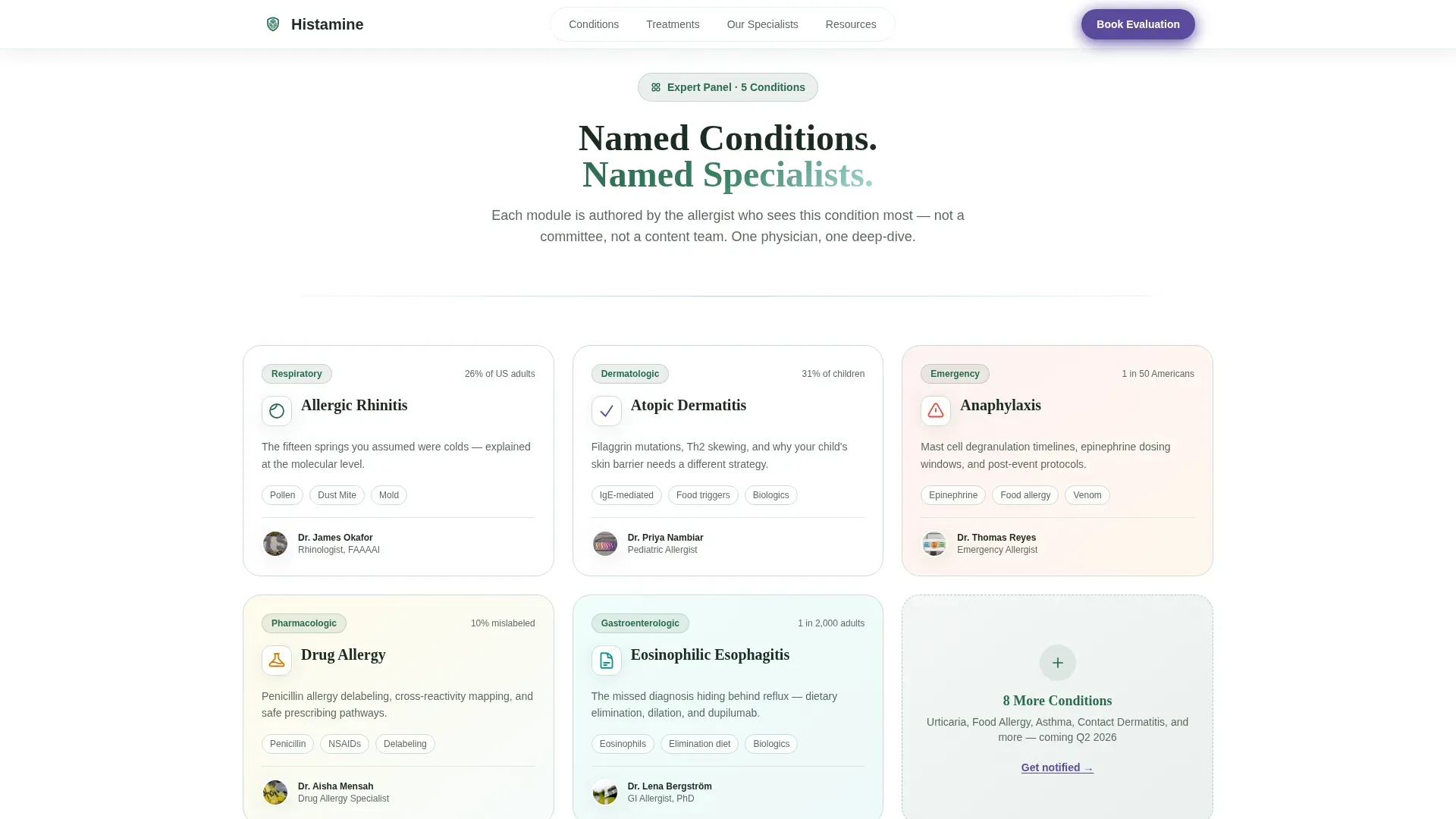
Five condition cards tile in a grid below the hero: Allergic Rhinitis, Atopic Dermatitis, Anaphylaxis, Drug Allergy, and Eosinophilic Esophagitis. Each card is fronted by a small circular portrait of the specialist who authored it. Clicking any card expands it into the sidebar companion view without navigating away from the page.
Sidebar Companion Deep-Dive Layout
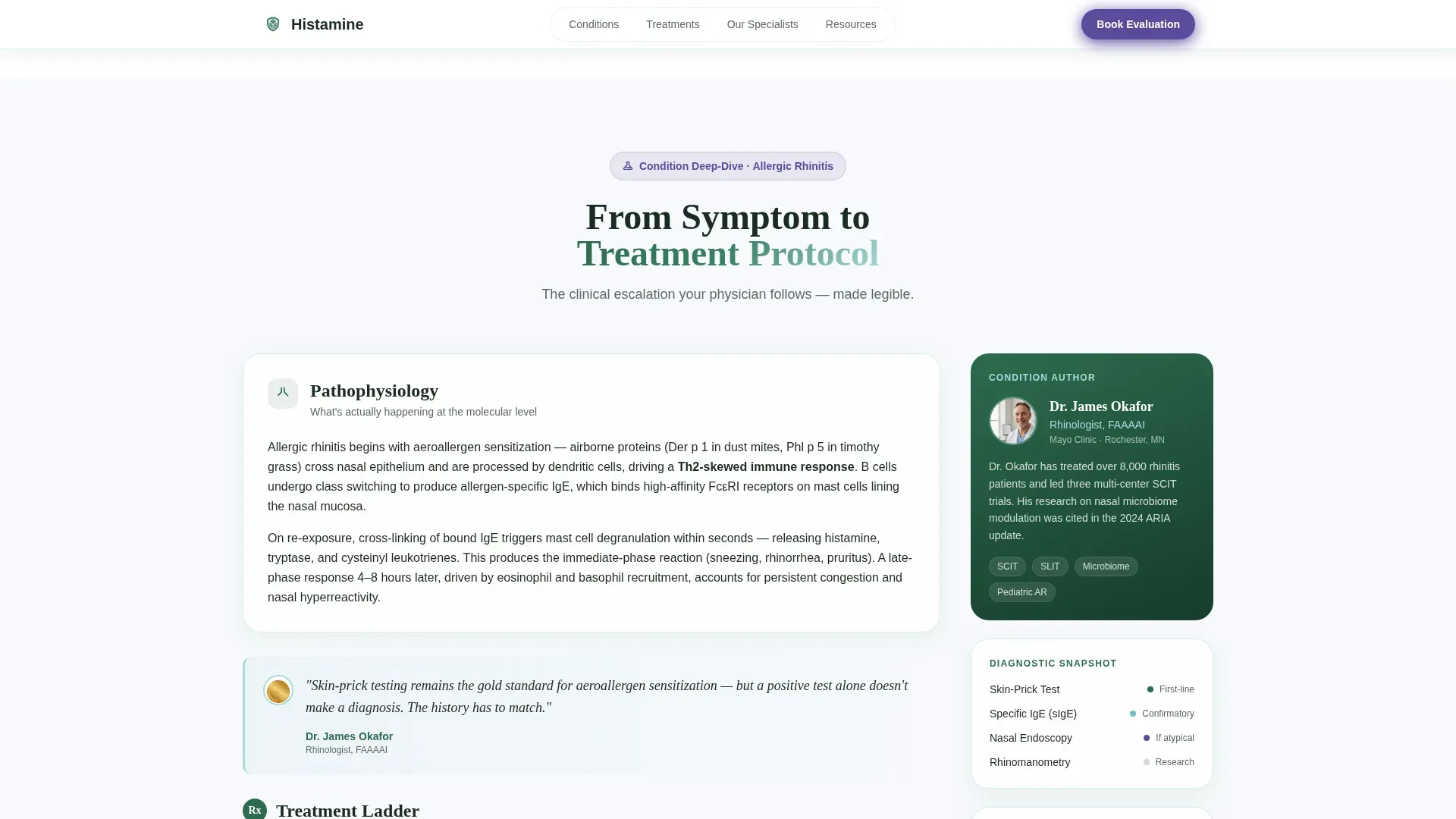
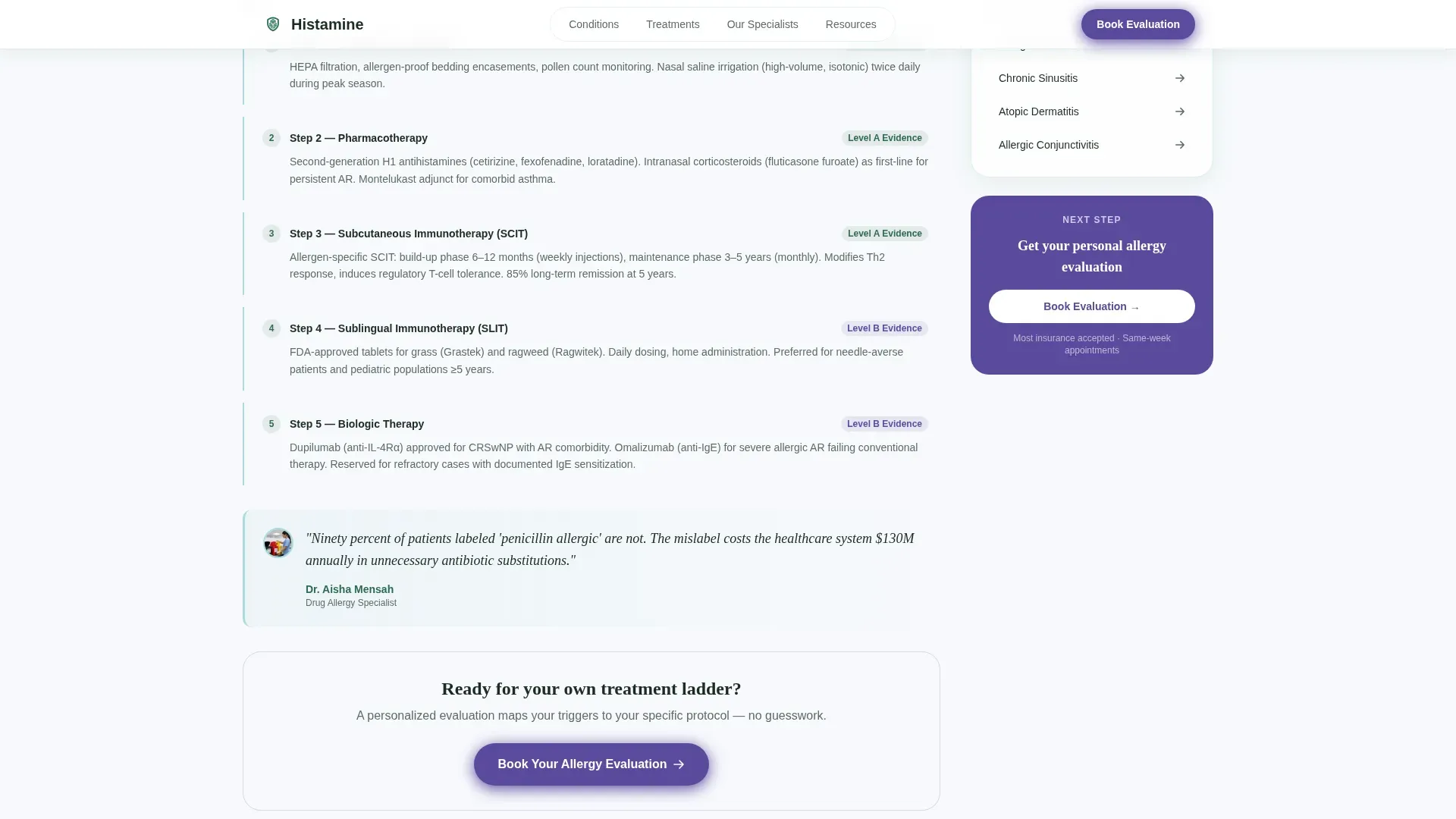
Each expanded condition section scrolls through a structured treatment ladder on the left side of the layout. The sidebar holds a sticky expert biography, related conditions, and a persistent call-to-action button. The rhythm escalates from symptoms to diagnostics to treatment, giving every section the feel of a progressive clinical consultation.
Named Physician Pull-Quotes
Throughout each condition module, pull-quote insights are attributed to named, board-certified physicians. These are not generic testimonials. They give the scroll the authority of a medical grand-rounds presentation and reinforce clinical credibility at every level of the treatment ladder.
Scrolling Social Proof Marquee
A dedicated social proof section displays patient testimonials and primary care physician endorsements in scrolling marquee columns. Board certification badges appear alongside testimonials to reinforce the expertise of the authoring specialists.
Dual Conversion Pathway
Every condition module closes with a gentian-violet "Book Your Allergy Evaluation" button routing to the scheduling platform. A secondary path offers a "Download Your Condition Guide" PDF gate that requires only a first name and email address to unlock.
Page sections overview
| Section | Purpose |
|---|---|
| Hero Portrait Header | Establish allergist trust with credentials and philosophy |
| Condition Card Grid | Surface five specialist-authored condition entry points |
| Condition Deep-Dive Sidebar | Deliver treatment ladder content in expandable companion view |
| Physician Pull-Quotes | Add named clinical authority throughout condition scrolls |
| Social Proof Marquee | Build confidence with patient and PCP testimonials |
| Booking Call to Action | Convert engaged visitors to scheduled evaluations |
| PDF Guide Gate | Capture leads through a low-friction condition guide download |
| Footer Linear Row | Close with single-row navigation and practice contact details |
Design & branding system
The visual identity follows an Educational Guide theme with an Alpine Fresh color system. The palette reads like a trail marker painted on stone above the tree line: clean, authoritative, and breathing with open space.
- Summit White (#F7F9FC) backgrounds with generous margins keep reading comfortable; the Evergreen (#2D6A4F) sidebar anchors navigation; Glacier Meltwater (#A8DADC) thin rules separate sections cleanly
- Gentian Violet (#5B4A9E) is reserved exclusively for active-state navigation, callout badges, and primary call-to-action buttons so the eye only travels to violet when a decision must be made
- Typography pairs Fraunces serif headings for clinical editorial weight with Manrope for body text and interface labels, maintaining readability at every scroll depth
Mobile & speed optimization
The template is built desktop-first to accommodate its sidebar companion layout. A full mobile fallback ensures the condition deep-dives and PDF gate remain functional on smaller screens.
- The sidebar companion view collapses into a stacked single-column layout on mobile, preserving the treatment ladder hierarchy without horizontal scrolling
- Scroll fade-and-blur reveals, float animations, marquee testimonials, orbit nodes, and a border beam on the call-to-action button are handled through client-side interactive components while static content uses server components for efficient delivery
How this template helps you convert
The page earns the click by demonstrating clinical depth before asking for anything. By the time a visitor reaches a call-to-action button, they have already received more structured guidance than most first appointments provide.
- Each condition module escalates from symptoms to diagnostics to treatment so visitors feel progressively more informed, not sold to, making the booking button feel like the logical next step rather than an interruption
- The dual conversion pathway lets visitors choose their own depth: book an evaluation immediately or download a condition guide first, both paths capturing intent at different levels of readiness
Other information about this template
This template is purpose-built for the Health and Medical category, specifically the Allergist Website subcategory and the Allergist Condition and Treatment Library niche. It is designed for United States medical context with English language copy and USD pricing assumptions.
- The animation profile is rated medium-high and includes scroll fade-and-blur reveals, float animations, marquee scrolling testimonials, orbit nodes, and a border beam effect on the primary call-to-action button
- The FAQ accordion component is included as an interactive element alongside the condition card expand-to-sidebar behavior and the PDF gate form
- The footer follows a linear single-row pattern with navigation and contact details in a clean horizontal layout
- The Intersection Match Score of 13 reflects a strong alignment between the template's creative direction, color system, header concept, and landing-page direction within the Health and Medical category
Theme
Educational Guide
Creative direction
Expert Panel
Color system
Alpine Fresh
Style
Sidebar Companion
Direction
Click-Through
Page Sections
Portrait-centered Allergist Hero
Expandable Condition Card Grid
Sidebar Companion Deep-dive
Named Physician Pull-quotes
Dual Conversion Pathway
Scrolling Social Proof Marquee
Related questions
Can I customize the five condition cards to match my practice's specialty focus?
Does the PDF guide download gate require a third-party form service?
Is this template suitable for a solo allergist practice or only for multi-physician groups?
How does the sidebar companion layout behave when a visitor clicks a condition card?
What does the social proof section include?



