Premium Manufacturing Processes Professional Website Template
Anvil is a single-page landing page template built for forging equipment manufacturers. It combines an Industrial Raw visual identity with a zigzag content layout that moves from machine-level specifications to full turnkey line capabilities. The design is engineered to attract forge shop owners, production engineers, and plant managers who need credible, data-led product presentation before committing to a conversation.
by Rocket studio
Quick summary
Anvil is a forging equipment landing page template that speaks the language of the forge floor. It pairs an exploded-view header, alternating data-and-photography sections, and two distinct lead capture paths into a single credibility-driven page. The visual identity runs on mill-scale black, forged steel gray, furnace amber, and slag white.
Who this template is for
This template is built for heavy industrial manufacturers who sell high-capital forging equipment to technically qualified buyers. It works best when your sales process requires credibility before a conversation can start.
- Forging equipment manufacturers selling hydraulic hammers, screw presses, and closed-die systems
- Sales and marketing teams targeting forge shop owners replacing aging production lines
- Industrial suppliers pitching to production engineers and plant managers in defense, aerospace, or automotive sectors
What problem this template solves
Generic industrial pages bury the engineering proof that serious buyers actually need. A forge shop owner evaluating a ten-thousand-ton press is not persuaded by stock photography and vague capability statements. They need tonnage data, repeatability figures, and material compatibility before they will fill out a form.
- Most industrial landing pages mix product marketing and contact forms too early, losing qualified visitors before trust is built
- Buyers specifying equipment for defense or aerospace contracts require evidence, not just claims, to move forward
- A single unfocused page fails to separate engineers still in the specification phase from buyers ready to talk capacity
What you get with this template
The template delivers a complete, ready-to-customize single-page layout structured around progressive qualification. Visitors move from raw machine specifications to full turnkey line capabilities before reaching either lead capture path.
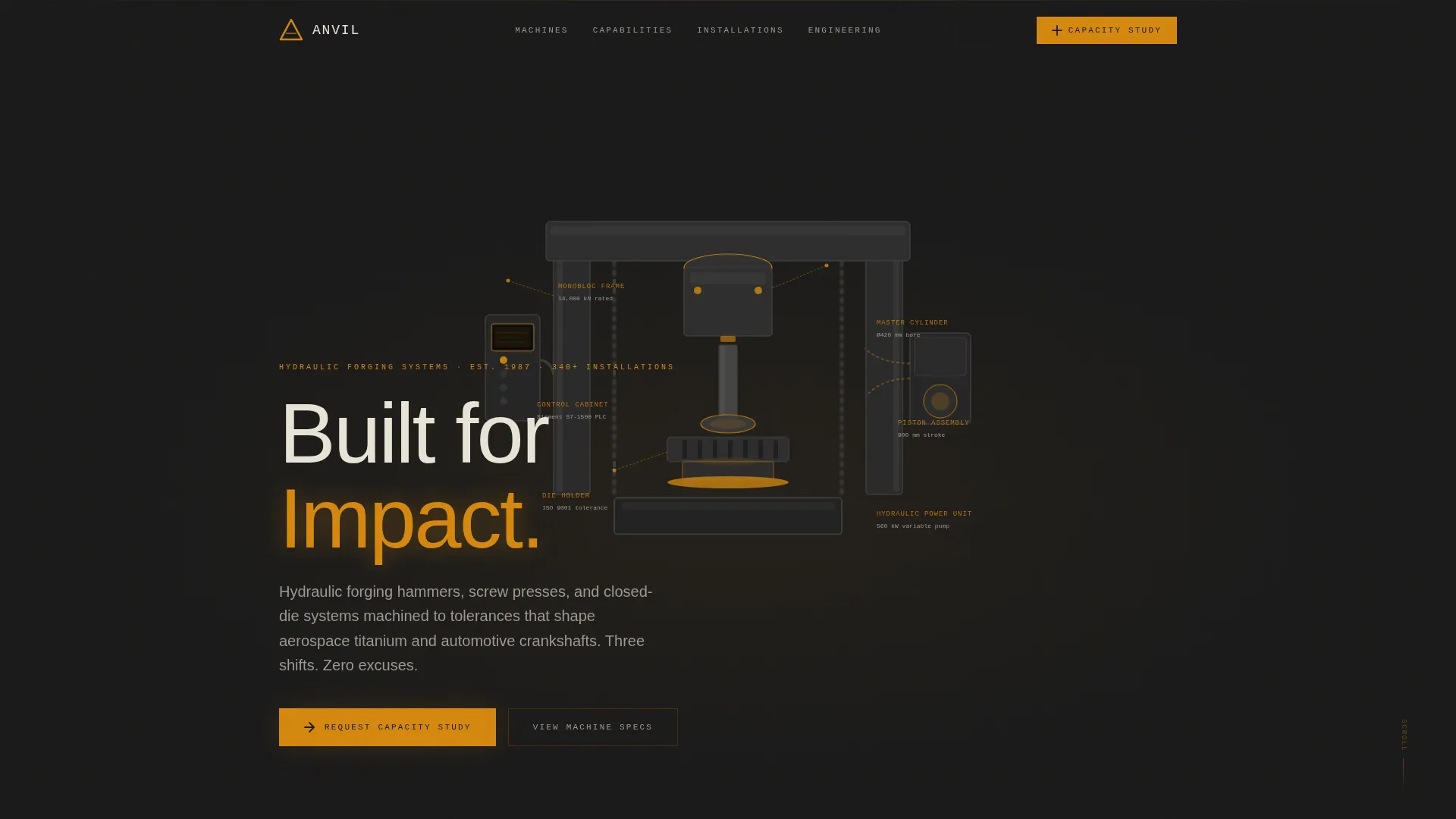
- An exploded-view header showcasing a hydraulic forging press with amber spec callouts and a mill-scale black background
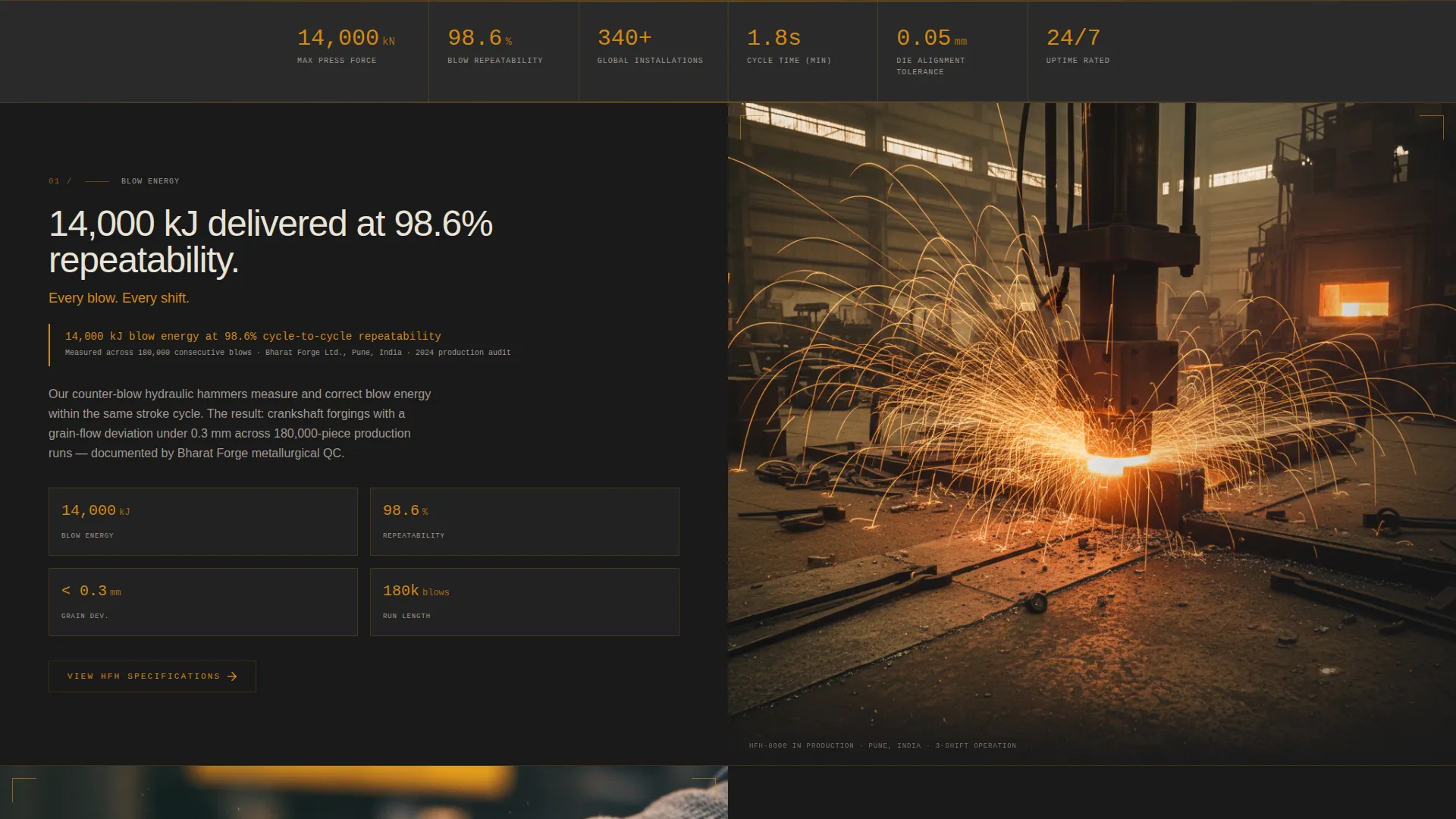
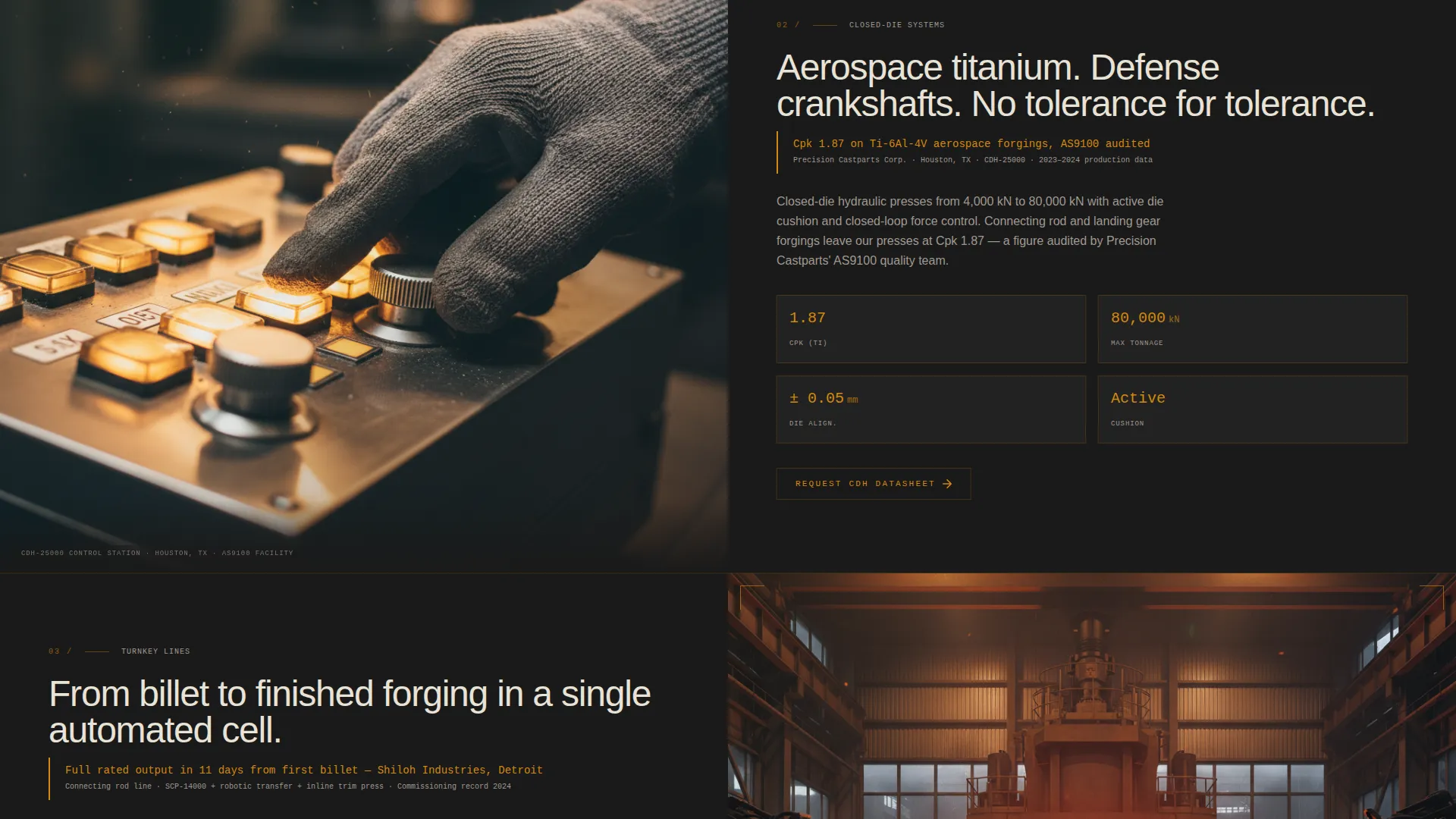
- A zigzag alternating section layout that pairs hard performance data with full-bleed forge-floor photography
- Two lead generation paths: a detailed "Request a Capacity Study" form and a gated PDF equipment catalog download
Feature list
This template is built around features that reflect how serious industrial buyers evaluate forging equipment.
Exploded View Technical Header
The header renders a hydraulic forging press deconstructed into its major assemblies, including frame, cylinder, piston, die holder, hydraulic power unit, and control cabinet. Each component floats on a mill-scale black background with thin amber leader lines connecting to spec callouts covering tonnage, stroke length, blow energy, and strokes per minute. The layout subtly responds to scroll, giving the impression of an engineering review the visitor can interact with.
Zigzag Alternating Section Layout
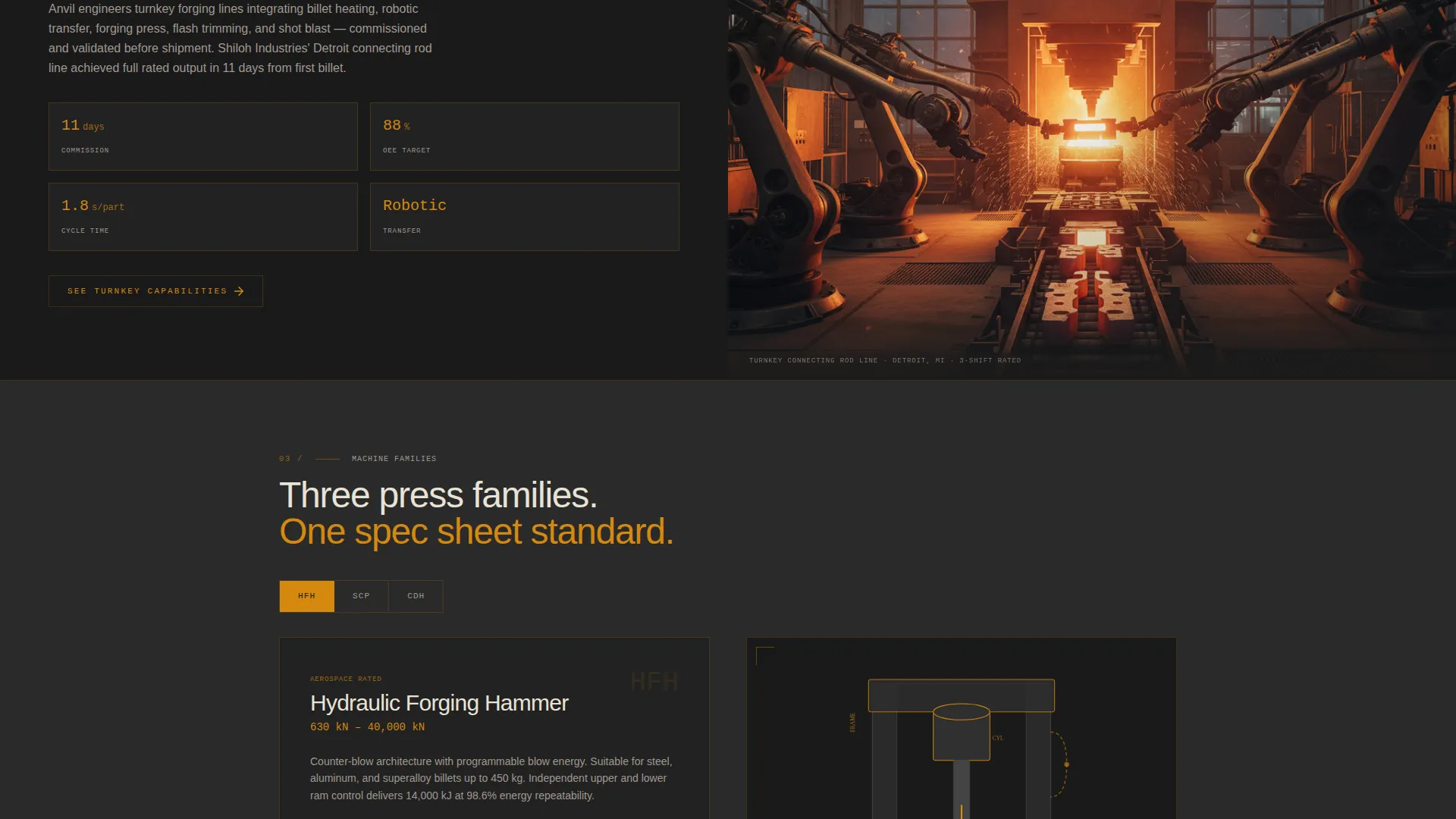
Each alternating section presents a single performance claim paired with supporting evidence such as metallurgical cross-sections, Cpk production data, or time-lapse commissioning footage. Hard data sits on one side while full-bleed forge-floor photography fills the other. The rhythm builds from individual machine specs toward full turnkey line capabilities before concluding with a global installation map marked in amber pins.
Qualified Lead Capture Form
The primary call to action, "Request a Capacity Study," appears after the third zigzag section. The form collects forging process type (open-die, closed-die, or ring rolling), required tonnage range, material family (steel, aluminum, titanium, or superalloy), and annual volume target. These fields are designed to filter casual visitors and surface only buyers who can self-qualify against real project requirements.
Gated PDF Catalog Download
A secondary conversion path offers a downloadable equipment catalog gated behind company name and email address. This path captures production engineers still in the specification phase who are not yet ready to speak with a sales team but are actively building a requirements document.
Industrial Raw Visual Identity
The color system runs on four values: deep mill-scale black (#1A1A1A) as the dominant background, forged steel gray (#3D3D3D) for structural user interface elements, furnace amber (#D4880F) on calls to action and data highlights, and slag white (#E8E2D6) for body text and section breaks. The palette is drawn directly from the visual language of hot-worked metal, giving the page an immediate material credibility that resonates with forge floor professionals.
Industry Report Content Rhythm
The page is structured like a technical white paper formatted as a website. Each section escalates the scope of the argument, moving from individual press specifications to system-level performance and then to global installation reach. This progression mirrors how a production engineer builds a specification document, keeping technically qualified visitors engaged through the full scroll depth.
Page sections overview
| Section | Purpose |
|---|---|
| Exploded View Header | Introduce the product with an annotated press diagram and key spec callouts |
| First Zigzag Block | Present the first single-machine performance claim with supporting data |
| Second Zigzag Block | Pair metallurgical or Cpk evidence with forge-floor photography |
| Third Zigzag Block | Escalate to system-level or multi-machine capability claims |
| Capacity Study call to action | Capture qualified leads with a detailed project-scoping form |
| Turnkey Line Showcase | Present full production line capabilities with escalating evidence |
| Global Installation Map | Build credibility with amber-pinned worldwide installation locations |
| PDF Catalog Gate | Offer a secondary download path for engineers in specification phase |
Design & branding system
The design language is drawn from the physical reality of hot metal forging. Every color, texture, and typographic choice references the forge floor rather than a generic industrial aesthetic.
- Color palette: mill-scale black (#1A1A1A) backgrounds, forged steel gray (#3D3D3D) structural elements, furnace amber (#D4880F) for calls to action and data highlights, and slag white (#E8E2D6) for readable body text
- Visual style: no lifestyle photography or stock images; the header relies on a detailed technical illustration or 3D render, while scroll sections use real forge-floor photography including frozen sparks, trimming operations, and operator close-ups
- Amber is used as a functional accent color throughout, appearing on spec callout leader lines, data figures, call to action buttons, and the global installation map pins to create visual consistency across the full page
Mobile & speed optimization
The template is designed so that the detailed technical content remains legible and usable on smaller screens without sacrificing the industrial visual weight that gives the page its credibility.
- The zigzag alternating layout collapses cleanly to a single-column stacked format on mobile, preserving the data-then-image rhythm in a vertical sequence
- The exploded view header is structured to remain functional on mobile, with spec callouts repositioning to stay readable at smaller viewport widths
- Section photography is treated as full-bleed with controlled cropping, so the most impactful forge-floor imagery fills the screen without requiring horizontal scroll
How this template helps you convert
The conversion architecture is built around trust before action. The page earns the right to ask for contact information by delivering engineering proof first.
- The exploded view header and the first three zigzag sections give technically qualified buyers enough detailed information to self-qualify before they reach any form, reducing friction and increasing form completion quality.
- The two-path lead structure separates buyers by readiness: the "Request a Capacity Study" form captures buyers with active projects, while the gated PDF catalog catches engineers who are still in specification and need to build a business case internally.
Other information about this template
This template is built for manufacturers whose sales cycles are long, whose buyers are technical, and whose products require proof rather than persuasion.
- The template style is Zigzag/Alternating, suited to presenting multiple distinct capability claims without the page feeling like a scrolling brochure
- The creative direction follows an Industry Report approach, meaning content is structured to feel authoritative and evidence-based rather than promotional
- The header concept is an Exploded View, a format familiar to engineers and production managers who work with technical drawings and assembly documentation
- The lead generation direction means every design and content decision supports moving visitors toward either the capacity study request or the catalog download, with no orphaned sections
- This template fits manufacturing categories including forging machinery, press manufacturers, industrial capital equipment suppliers, and related heavy manufacturing niches
Theme
Industrial Raw
Creative direction
Industry Report
Color system
Charcoal & Amber
Style
Zigzag/Alternating
Direction
Lead Generation
Page Sections
Exploded View Technical Header
Zigzag Alternating Section Layout
Qualified Capacity Study Form
Gated PDF Catalog Download
Industrial Raw Visual Identity
Global Installation Map Section
Related questions
Can I customize the spec callouts in the exploded view header?
Does the lead capture form support different forging process types?
Is this template suitable for manufacturers selling multiple press types?
How does the two-path lead capture structure work?
Can this template be used by manufacturers targeting international markets?



