Beekeeper Booking Landing Page Template
Apiary is a single-page landing page template built for professional beekeeper booking services. It combines a press-mentions header, a three-tier comparison table, and a transparent step-by-step process flow to help facilities managers, estate owners, and sustainability officers understand exactly what they are booking and why it is worth it.
by Rocket studio
Quick summary
Apiary is a lead generation landing page template for certified beekeeper dispatch services. It opens with a press-mentions ribbon and an editorial hero image, then guides visitors through a transparent three-tier service comparison, a post-booking timeline, and two conversion paths. Every section is designed to answer the unspoken executive question before the visitor has to ask it.
Who this template is for
This template is built for beekeeper booking services that serve high-value professional clients. The tone, layout, and conversion structure are calibrated for decision-makers, not hobbyists.
- Facilities managers handling swarm activity complaints on corporate campuses
- Estate owners who want productive, professionally managed hives on their property
- City sustainability officers fulfilling pollinator mandate requirements
What problem this template solves
Most beekeeper websites look rustic and informal. That works for backyard hobbyists, but it immediately loses the confidence of a corporate facilities director or a city sustainability officer reviewing vendors. This template closes that credibility gap.
- There is no clear scope of work, so institutional buyers cannot justify the spend internally
- There is no structured conversion path for visitors who need internal sign-off before booking
- There is no visible process, so clients cannot picture what actually happens after they pay
What you get with this template
You get a complete, professionally structured landing page that positions a beekeeper booking service at the level of a managed professional service. Every section is purposeful and ready to customize.
- A press-mentions ribbon, editorial hero section, and three-tier service comparison table
- A visual post-booking timeline covering site assessment through quarterly colony reporting
- Two lead capture paths: a direct booking form and a gated PDF download for internal review
Feature list
This template includes purpose-built sections and layout components drawn directly from the design brief.
Press Mentions Header Bar
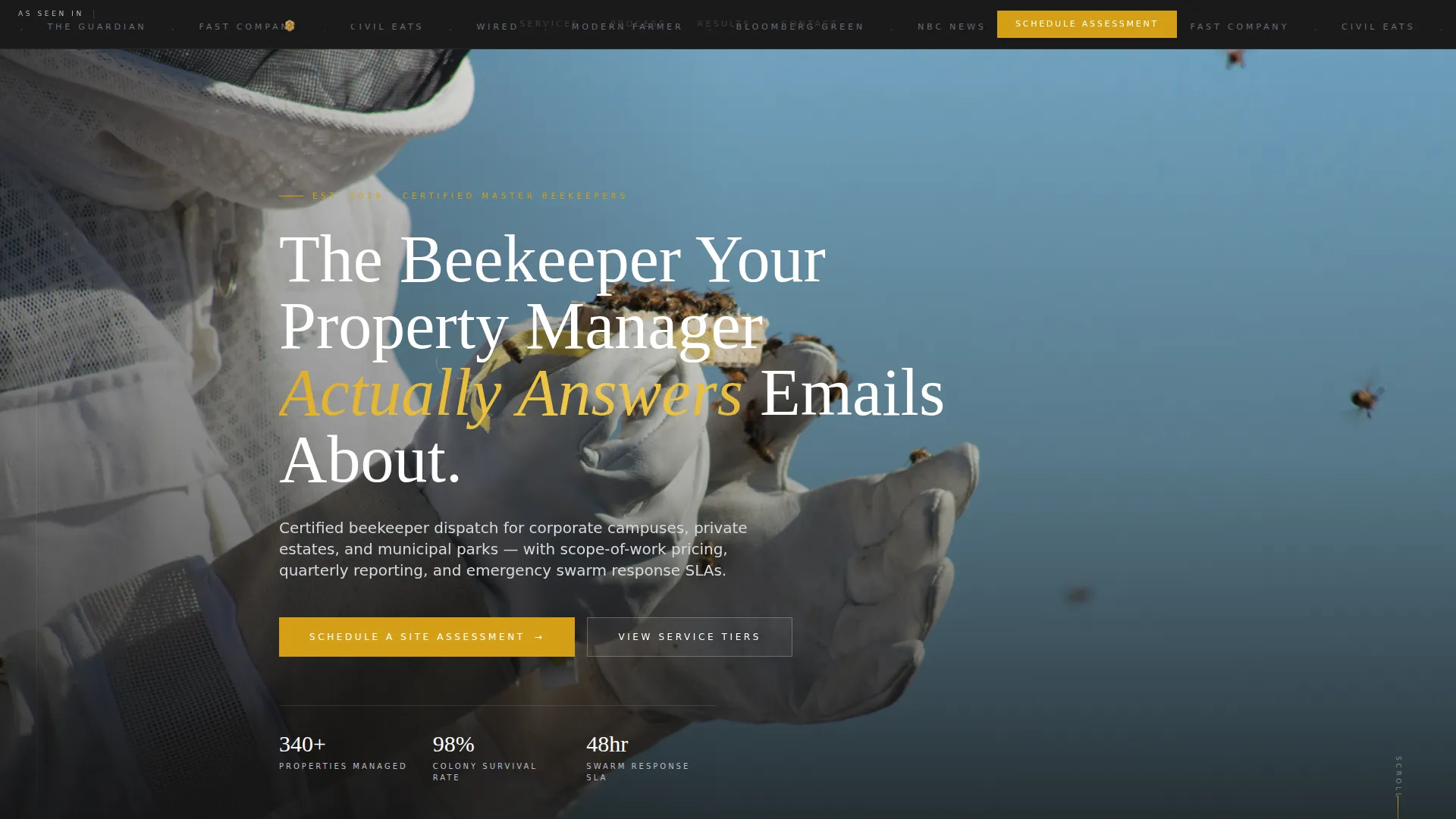
A slim, full-width ribbon sits above the hero image and displays grayscale media outlet logos. It establishes third-party credibility before the visitor reads a single word of body copy.
Three-Tier Comparison Table
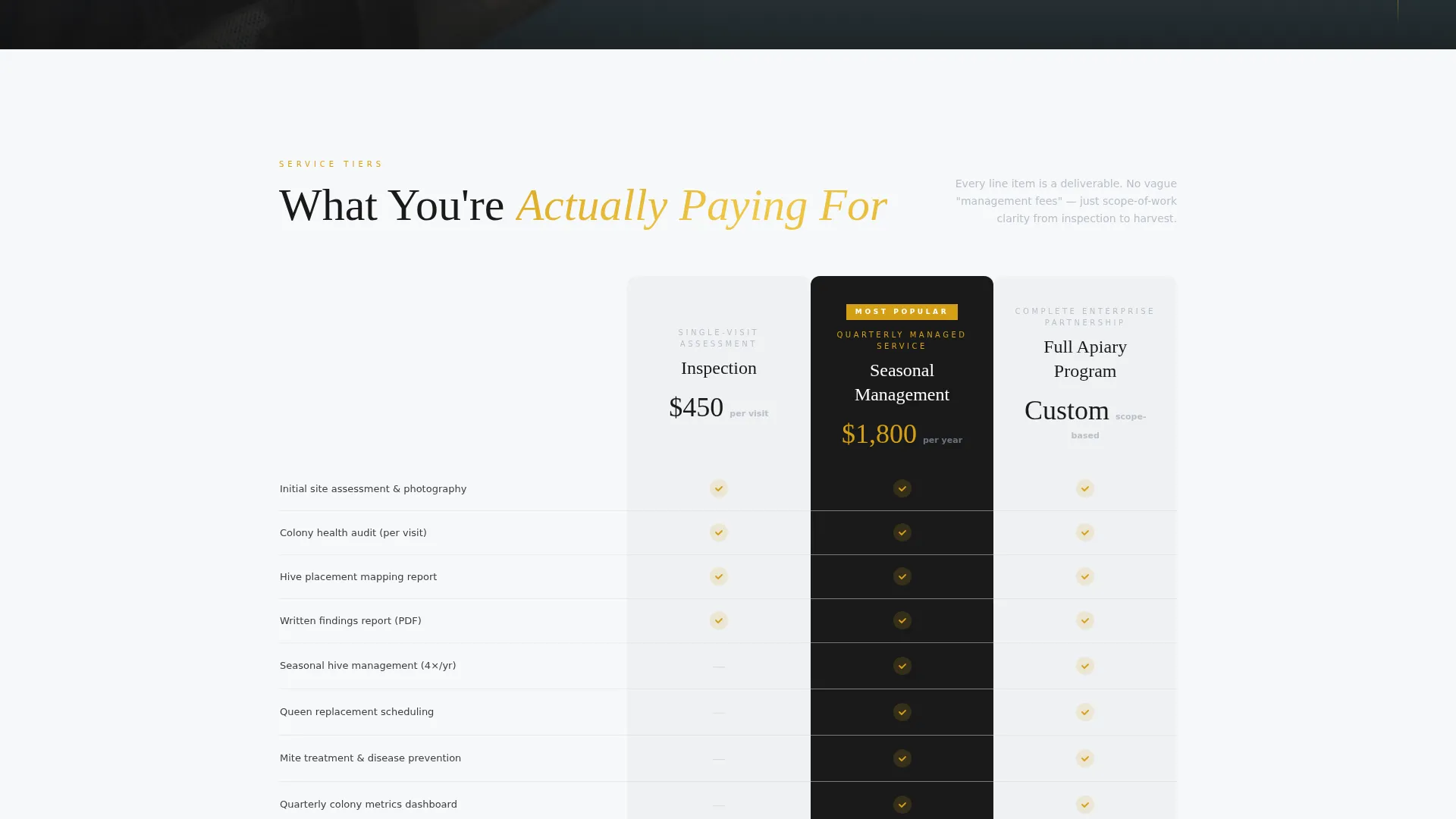
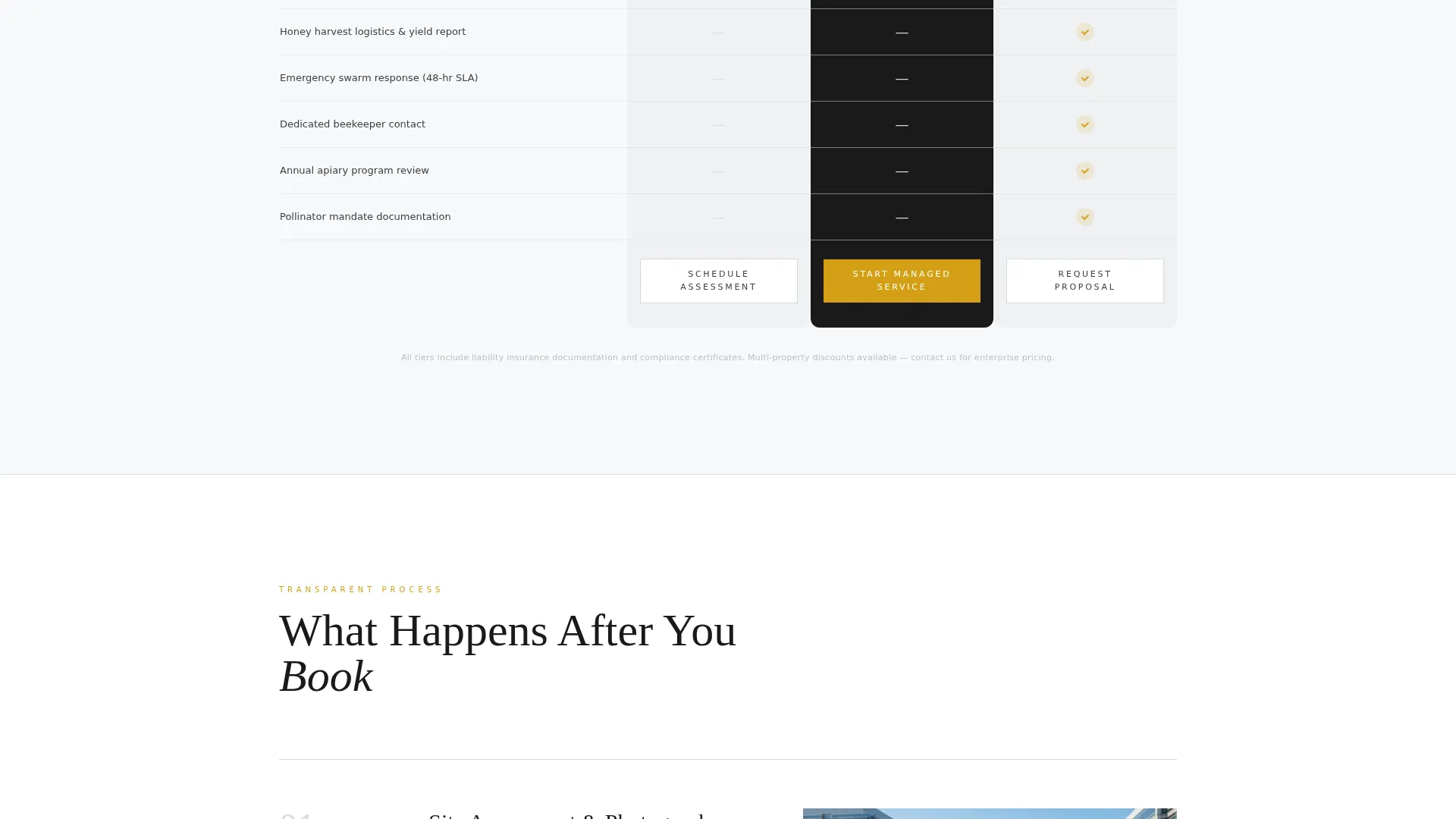
The comparison table spans three service tiers: Inspection, Seasonal Management, and Full Apiary Program. Each column reads like a scope-of-work document, with line items covering colony health audits, queen replacement schedules, honey harvest logistics, and emergency swarm response service level commitments.
Post-Booking Visual Timeline
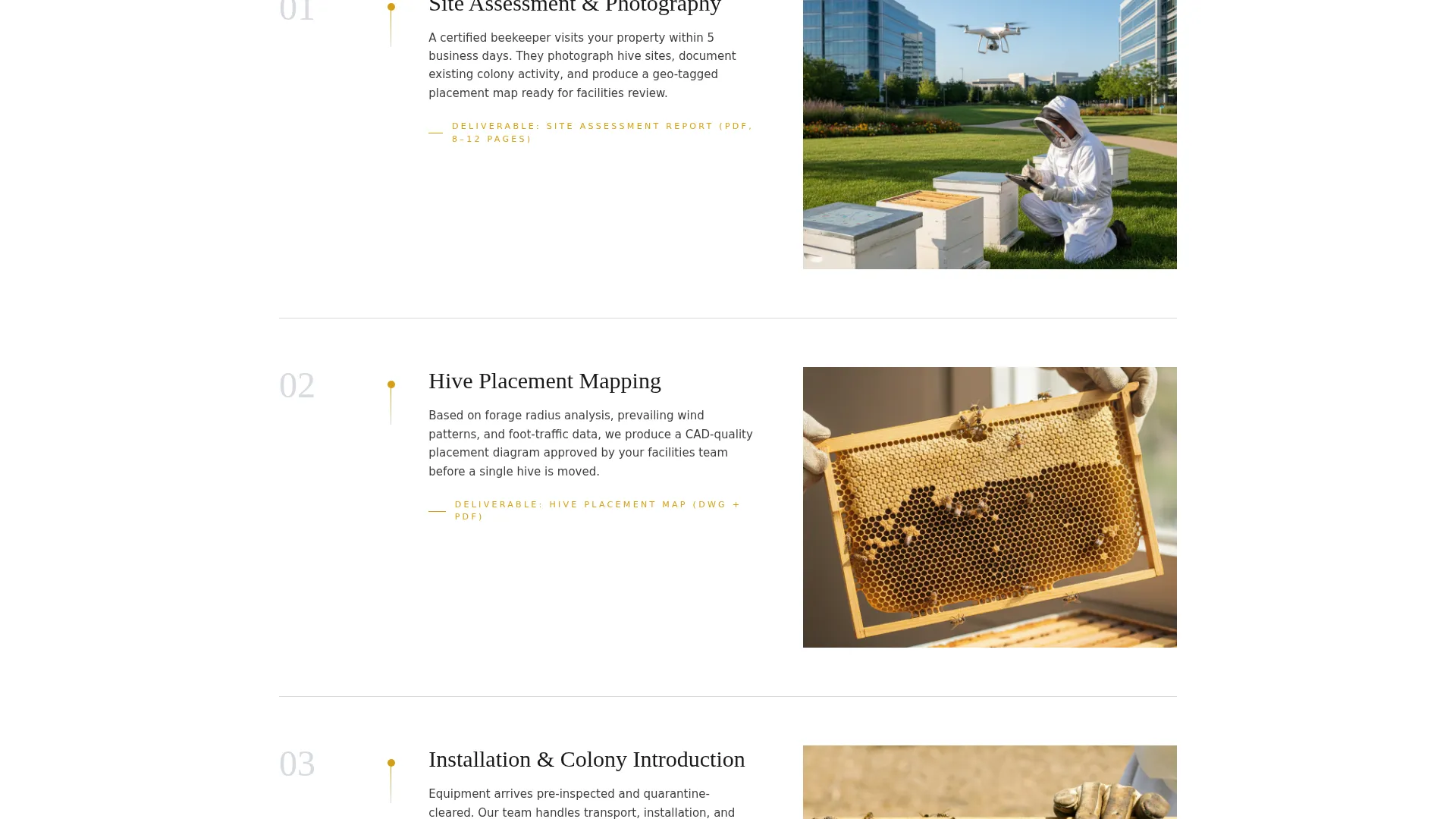
A scroll-through timeline walks the visitor through what happens after booking. It covers site assessment photography, hive placement mapping, and quarterly reporting dashboards showing colony metrics. This section directly addresses the executive need for process clarity.
Dual Lead Capture System
The primary call to action, "Schedule a Site Assessment," is locked to the bottom of each pricing column and reappears as a floating bar after the second scroll. A secondary path offers a downloadable service comparison document gated behind an email field.
Structured Booking Form
The lead form collects property type via dropdown, approximate acreage, current hive status via a yes or no toggle, and a preferred contact method. These fields help the service qualify leads before a single call is made.
Executive Suite Visual Identity
The Cloud Canvas color system uses boardroom white, soft graphite, pale cloud gray, and a single raw honeycomb amber accent. The amber is reserved strictly for calls to action, hover states, and pricing highlights, keeping the page authoritative and visually focused.
Page sections overview
| Section | Purpose |
|---|---|
| Press Mentions Bar | Establishes media credibility above the hero |
| Editorial Hero Image | Sets authoritative tone with professional beekeeper photography |
| Hero Headline | Delivers the core positioning statement over the hero image |
| Service Comparison Table | Breaks down three tiers with scope-of-work line items |
| Post-Booking Timeline | Shows the step-by-step process after a booking is confirmed |
| Primary Booking Form | Captures qualified leads with property-specific fields |
| Floating call to action Bar | Persists the primary call to action after the second scroll |
| PDF Download Gate | Captures emails from leads needing internal approval |
Design & branding system
The visual identity follows an Executive Suite theme built on the Cloud Canvas color palette. The result feels like a freshly printed annual report: precise, weightless, and punctuated by a single warm accent that earns attention.
- Boardroom white (#F7F8FA), soft graphite (#3D3D3D), and pale cloud gray (#D6DAE0) form the neutral base
- Raw honeycomb amber (#D4A017) is used exclusively for calls to action, hover states, and pricing highlights
- The hero uses one editorial-quality static photograph with no video or animation, keeping authority immediate and magazine-like
Mobile & speed optimization
The layout is built with a clean, section-led single-page structure that adapts naturally to smaller screens. Every visual and interactive element has a clear mobile purpose.
- The comparison table is structured for horizontal scrolling or vertical stack rendering on smaller viewports
- The floating call-to-action bar remains accessible at all screen sizes without obscuring key content
- The static hero photograph and grayscale logo ribbon keep the above-the-fold section lightweight and fast to render
How this template helps you convert
Every layout decision in this template is engineered to move a cautious, approval-driven buyer from skepticism to action. The page removes friction at each step of the decision journey.
- The press-mentions ribbon and editorial hero image establish credibility before the visitor reads the headline, lowering the initial trust barrier for institutional buyers.
- The comparison table and post-booking timeline answer scope and process questions that would otherwise stall a decision, reducing the need for follow-up calls before a lead is qualified.
- The dual conversion path captures both ready-to-book visitors and those who need to build an internal case, ensuring no qualified lead leaves the page empty-handed.
Other information about this template
This template is part of a professional services niche collection designed for service providers who sell to institutional and high-value private clients. A few additional details worth noting:
- The template style is a comparison table layout, which is particularly effective for services with tiered pricing and scope differentiation
- The creative direction is Transparent Process, meaning each scroll section is designed to reduce ambiguity and build confidence in the service provider
- The header concept is Press Mentions, which is suited to any professional service that has earned third-party media coverage
- The landing page direction is Lead Generation, with two distinct capture mechanisms built into the page structure
- This template fits within the beekeeper online presence subcategory and is specifically scoped to a beekeeper booking page use case
Theme
Executive Suite
Creative direction
Transparent Process
Color system
Cloud Canvas
Style
Comparison Table
Direction
Lead Generation
Page Sections
Press Mentions Credibility Ribbon
Three-tier Service Comparison Table
Post-booking Visual Timeline
Dual Lead Capture Paths
Structured Property Intake Form
Executive Suite Color System
Related questions
Can I customize the three service tiers to match my own pricing?
What fields does the lead capture form include?
Can I remove the PDF download section if I do not have a document to offer?
Who is this landing page template best suited for?
Does the floating call-to-action bar appear on mobile screens?



