Co-op Housing Real Estate Professional Website Template
Appraise is a split-screen landing page template built for co-op housing appraisers who need to convert mortgage brokers, real estate attorneys, and co-op board treasurers into appraisal orders. It leads with hard data, delivers a frictionless three-step order form, and wraps everything in a corporate-precision design that feels as authoritative as the reports the firm produces.
by Rocket studio
Quick summary
Appraise is a data-first landing page template for a co-op housing appraisal firm. It uses a 50/50 split-screen layout, front-loads credibility statistics, and drives visitors toward a three-step inline order form. The design echoes the weight of a freshly bound appraisal report: institutional navy, ledger white, and decisive gold.
Who this template is for
This template is built for co-op housing appraisal professionals who serve a professional buyer audience. The design and copy architecture assume that visitors arrive with a specific task already in mind.
- Mortgage brokers whose appraisal files have been rejected by conventional appraisers unfamiliar with co-op share structures
- Real estate attorneys who need defensible valuations for estate transfers, divorce proceedings, or legal settlements
- Co-op board treasurers managing refinance seasons or board-mandated revaluations
What problem this template solves
Conventional appraisal websites struggle to earn trust from professional buyers. Attorneys and brokers do not respond to generic copy. They respond to evidence. This template solves the credibility gap by leading with statistics before asking for commitment.
- Visitors see lender acceptance rates and turnaround figures before they read a single paragraph of marketing copy
- Professional prospects can download a sample report without committing to an order, lowering the barrier for first contact
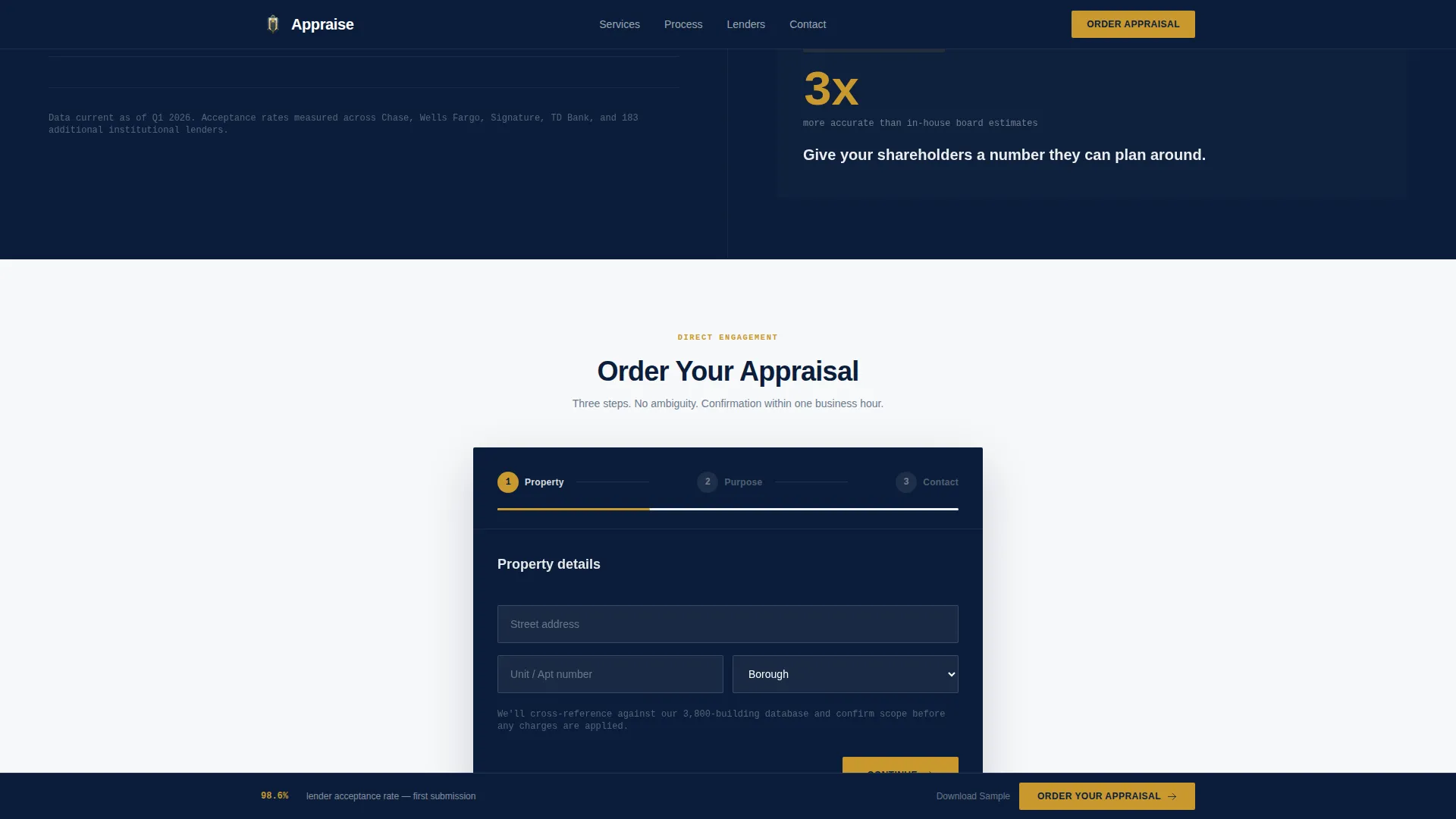
- The three-step inline form organizes the order process clearly so that busy professionals can complete it without friction
What you get with this template
This template delivers a fully structured, single-page layout with every section pre-built for the co-op appraisal niche. No placeholder content strategy is needed. The sections are organized to match the decision flow of a professional buyer.
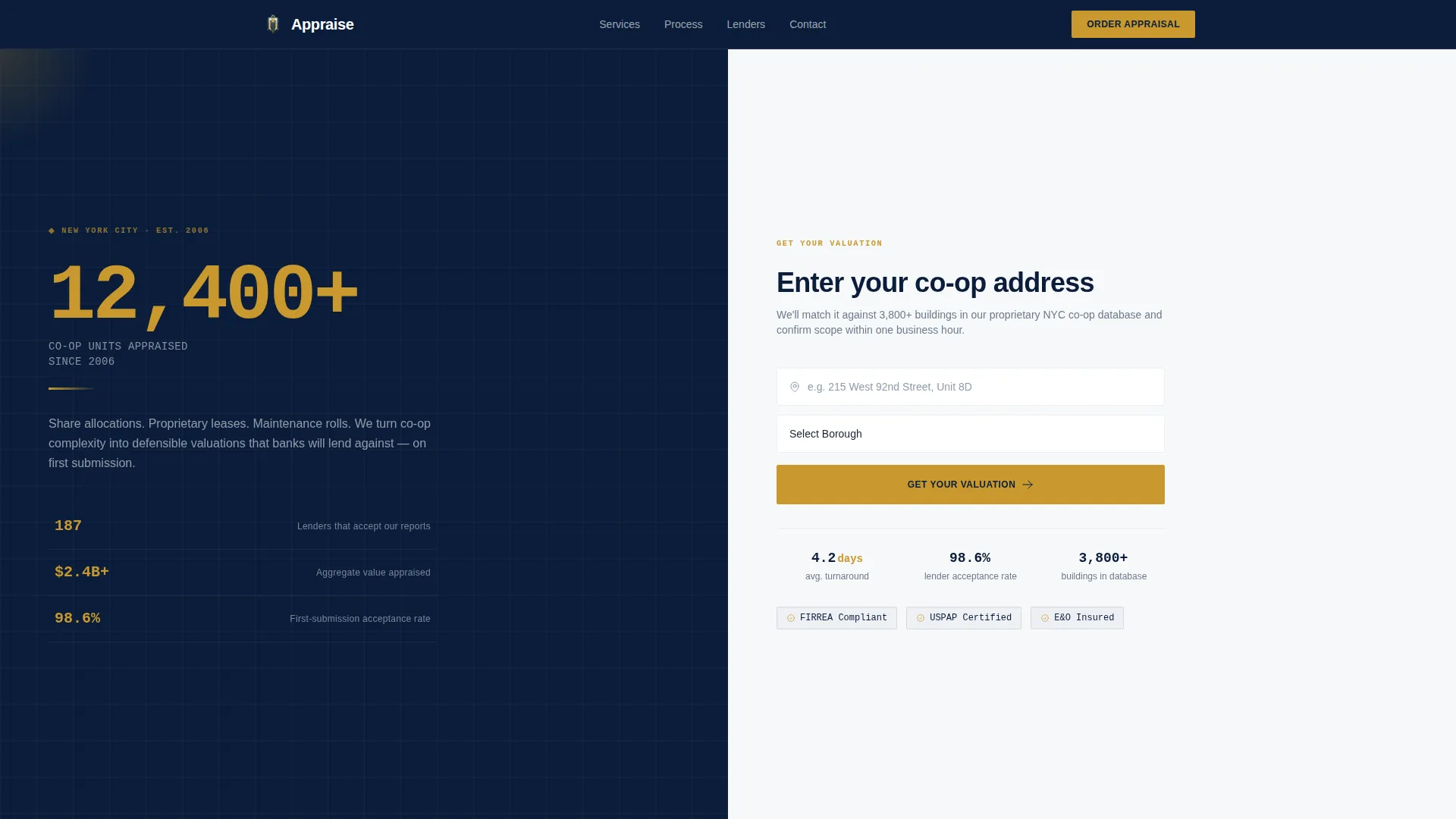
- A 50/50 split-screen hero section with a bold gold stat panel on the left and an address search field with borough dropdown on the right
- A sticky call-to-action bar that appears after the second scroll and persists throughout the session
- A three-step inline order form capturing address, appraisal purpose, and contact details across sequenced steps
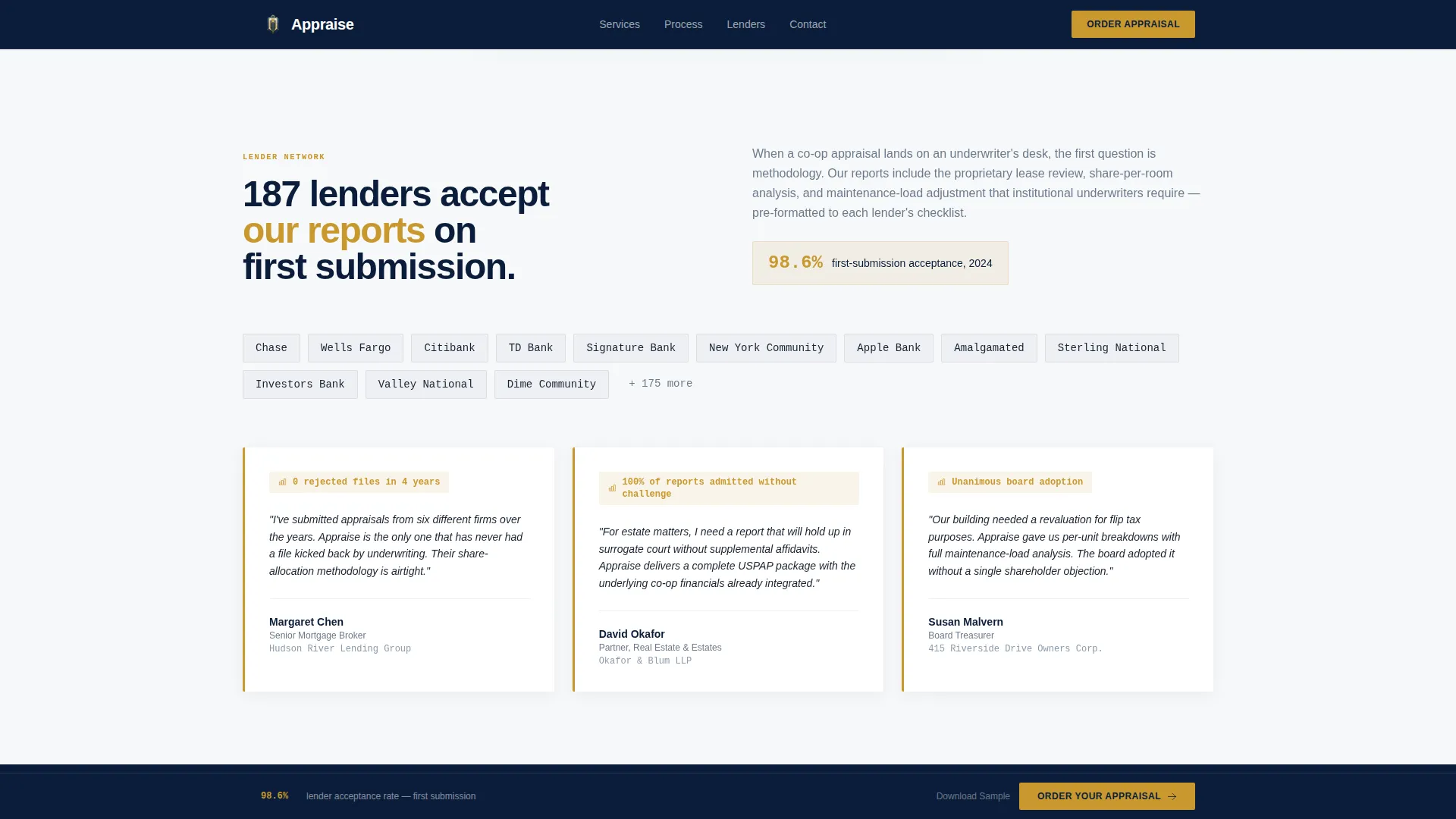
- A lender proof and testimonials section featuring an acceptance rate wall and named quotes from attorneys and brokers
- An email-gated sample report download for hesitant prospects who want to verify quality before ordering
Feature list
This template ships with purpose-built components designed around the workflow of professional appraisal clients. Each feature is grounded in the brief and reflects the niche it serves.
Split-Screen Hero with Address Search
The hero divides the viewport into two equal panels. The left panel displays a bold oversized stat in gold type. The right panel holds a clean address search field, a borough dropdown, and a gold call-to-action button. Three micro-stats appear below the search field in steel gray, showing turnaround time, lender acceptance rate, and database size.
Scroll-Locked Stat Ticker
A vertical stat ticker locks to the left panel as the visitor scrolls. It continuously surfaces total appraisals completed, banks that accept reports, and average delivery days. This keeps credibility data visible throughout the page without requiring the visitor to scroll back up.
Use-Case Cards with Bold Numbers
The right panel scrolls through individual use-case cards for refinance, estate settlement, divorce proceeding, and board-mandated revaluation. Each card opens with a bold number before a single explanatory sentence follows. The rhythm trains the visitor to trust the data before reading any pitch.
Three-Step Inline Order Form
The order form guides buyers through three clear steps. Step one captures the co-op address and unit number. Step two asks for the appraisal purpose and lender name if applicable. Step three collects contact details and preferred delivery timeline. Animated step transitions keep the experience smooth and professional.
Email-Gated Sample Report Download
A secondary conversion path offers a downloadable sample report in exchange for an email address. This gives attorneys and brokers a reason to engage without committing to an order. The gate triggers as a modal overlay, keeping the visitor on the page.
Lender Proof and Testimonials Wall
This section presents the 98.6% first-submission acceptance rate prominently, alongside named testimonials from real estate attorneys and mortgage brokers. The acceptance rate is the anchor claim. Everything else on the wall reinforces it.
Page sections overview
| Section | Purpose |
|---|---|
| Hero Split Screen | Launches address search with anchor stat and micro-data |
| Stat Ticker Panel | Keeps live credibility figures visible on scroll |
| Use-Case Cards | Maps each appraisal scenario to a specific bold outcome |
| Inline Order Form | Captures appraisal order through three guided steps |
| Lender Proof Wall | Displays acceptance rate and professional testimonials |
| Sample Report Gate | Converts hesitant visitors via email-gated PDF download |
| Footer Row | Provides single-row linear navigation and contact links |
Design & branding system
The visual identity follows a Corporate Precision theme. Every design decision reinforces permanence, fiduciary weight, and institutional authority. The palette and typography are drawn from the world of pre-war co-op buildings rather than modern SaaS design trends.
- Color system: deep navy (#0B1D3A) for headers and the left panel background, polished steel gray (#6B7B8D) for body text and secondary surfaces, ledger white (#F7F8FA) for right-panel backgrounds and data cards, and decisive gold (#C9982E) reserved exclusively for calls to action, stat highlights, and interactive hover states
- Typography: DM Sans is used for headlines to maintain clarity and authority, while IBM Plex Mono is applied to all numbers and statistics to reinforce precision and data integrity
- No stock photography is used anywhere on the page; numbers and structured data serve as the visual hero throughout
Mobile & speed optimization
This template is designed desktop-first, reflecting the professional context of its audience. Attorneys and brokers reviewing co-op files typically work at desks with full-screen displays. The layout prioritizes that experience while remaining functional on smaller screens.
- Server Components power all static sections such as the stat ticker, use-case cards, and testimonials wall, keeping those sections fast to load
- Client-side rendering is scoped only to interactive elements: the three-step order form, borough dropdown, sticky bar, and email gate modal
- Scroll-reveal animations and step-form transitions are set to a medium intensity, adding motion without slowing down the page experience
How this template helps you convert
This template is built around a specific conversion logic. Every scroll delivers more evidence before asking for a commitment. The structure mirrors how a professional buyer actually evaluates a service provider.
- The hero section front-loads the 98.6% lender acceptance rate and the address search interaction together, so the visitor's first action is already aligned with ordering
- The sticky call-to-action bar locks the order button into view after the second scroll, removing the need for the visitor to hunt for a next step
- The sample report gate provides a low-commitment entry point for prospects who need to verify report quality before placing an order, expanding the total conversion surface of the page
Other information about this template
This template is built specifically for the New York City co-op housing market. The borough dropdown, localization settings, and use-case framing all reflect the realities of NYC co-op appraisal work.
- Localization is set to English, United States dollar pricing, NYC borough identifiers, and the United States date format
- The footer uses a linear single-row pattern, keeping the page clean and avoiding unnecessary navigation complexity
- Animation intensity is set to medium throughout, with scroll-reveal effects for statistics and smooth transitions between order form steps
- The template accommodates the full range of co-op appraisal purposes: refinance, sale, estate settlement, legal proceedings, and board-mandated revaluation

Theme
Corporate Precision
Creative direction
Stats-First Impact
Color system
Navy Authority
Style
Split Screen (50/50)
Direction
Direct Sales
Page Sections
Split-screen Hero with Address Search
Scroll-locked Stat Ticker
Use-case Cards with Bold Numbers
Three-step Inline Order Form
Email-gated Sample Report Download
Lender Proof and Testimonials Wall
Related questions
Who is this landing page template designed for?
Can I customize the statistics shown in the hero and stat ticker?
What is the purpose of the email-gated sample report section?
How does the three-step order form work?
Is this template suitable for appraisers outside New York City?



