Living Room Interior Designer Landing Page
Arrange is a card grid landing page built for living room interior designers. It leads with a full-bleed photo header, a bold 30-day satisfaction guarantee, and a structured scroll that moves visitors from promise to proof to booking. Deep charcoal, warm amber, and soft linen give the page a grounded, residential warmth that earns trust before a single word is read.
by Rocket studio
Quick summary
Arrange is a single-page template designed for a living room interior designer who leads with a guarantee. The layout uses a modular card grid to guide visitors from a bold headline promise through layered proof, ending at a three-field scheduling form. The Charcoal and Amber palette and full-bleed photo header create an immediate sense of warmth and credibility.
Who this template is for
This template is built for independent living room interior designers who close clients through trust rather than portfolio size alone. It suits designers whose best sales tool is a clear guarantee and a transparent process.
- Interior designers serving first-time homeowners and young couples
- Design professionals targeting dual-income families ready to invest in their main living space
- Home designers who want a booking-focused page that handles objections before the consultation call
What problem this template solves
Many interior design pages bury the most convincing details deep in the scroll or ask visitors to commit before explaining what they will receive. Hesitation kills bookings. This template is structured around removing every reason to pause.
- Visitors often leave design pages because pricing and process feel vague or unpredictable
- First-time homeowners need reassurance that a designer understands their specific situation
- A disorganized page fails to show social proof at the right moment in the scroll
What you get with this template
You get a fully structured landing page layout ready to be customized with your own photography, copy, and consultation details. Every section has a clear job, and the card grid format keeps the page scannable and intentional.
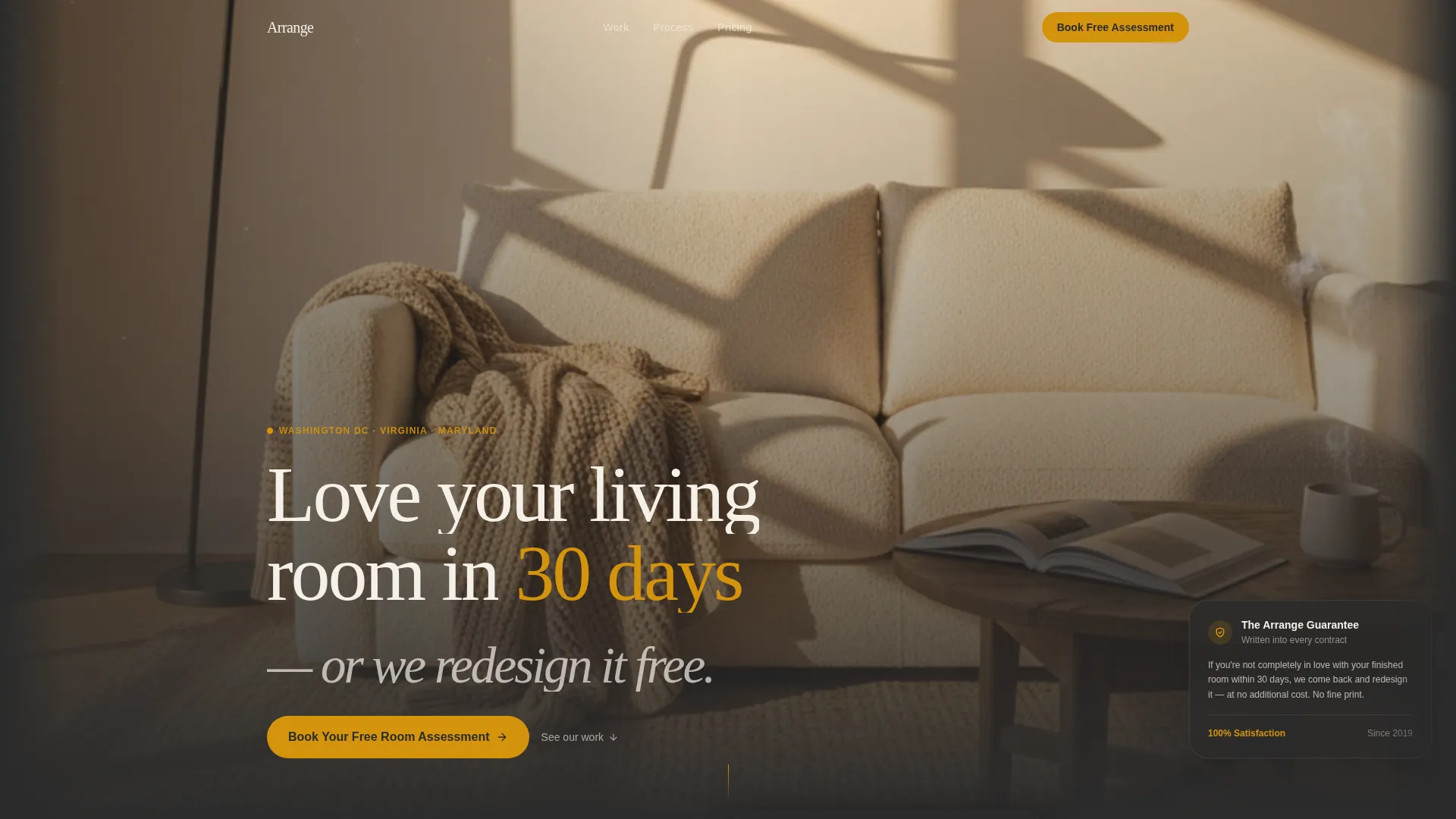
- A full-bleed photo header with a fade-in headline and the core 30-day guarantee statement
- Modular card rows covering the guarantee, before-and-after projects, video testimonials, and a four-step process breakdown
- A sticky amber booking button and a three-field scheduling form with zip code, room photo upload, and calendar picker
Feature list
This template is built around one goal: turning a living room designer's website visitor into a booked consultation. Every component below serves that goal directly.
Full-Bleed Photo Header
The header displays a wide-angle living room photograph at golden-hour lighting, with a headline that fades in over the image. The headline reads "Love your living room in 30 days, or we redesign it free," establishing the guarantee before anything else loads.
Modular Guarantee Card Row
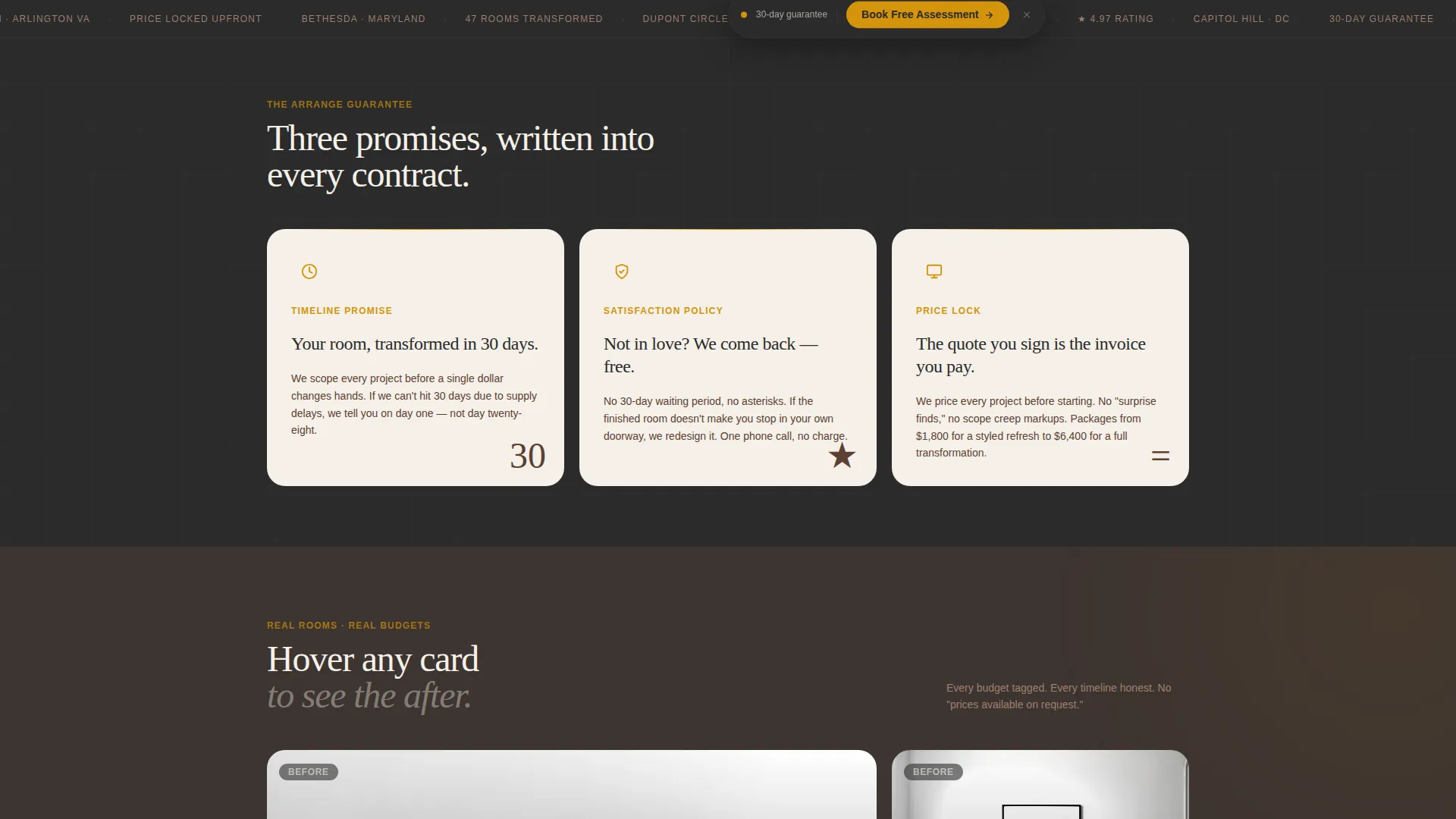
Three side-by-side cards present the core promise in concrete terms: the timeline commitment, the satisfaction redesign policy, and a transparent pricing lock. This row appears first in the scroll so the guarantee is the foundation, not an afterthought.
Before-and-After Project Cards
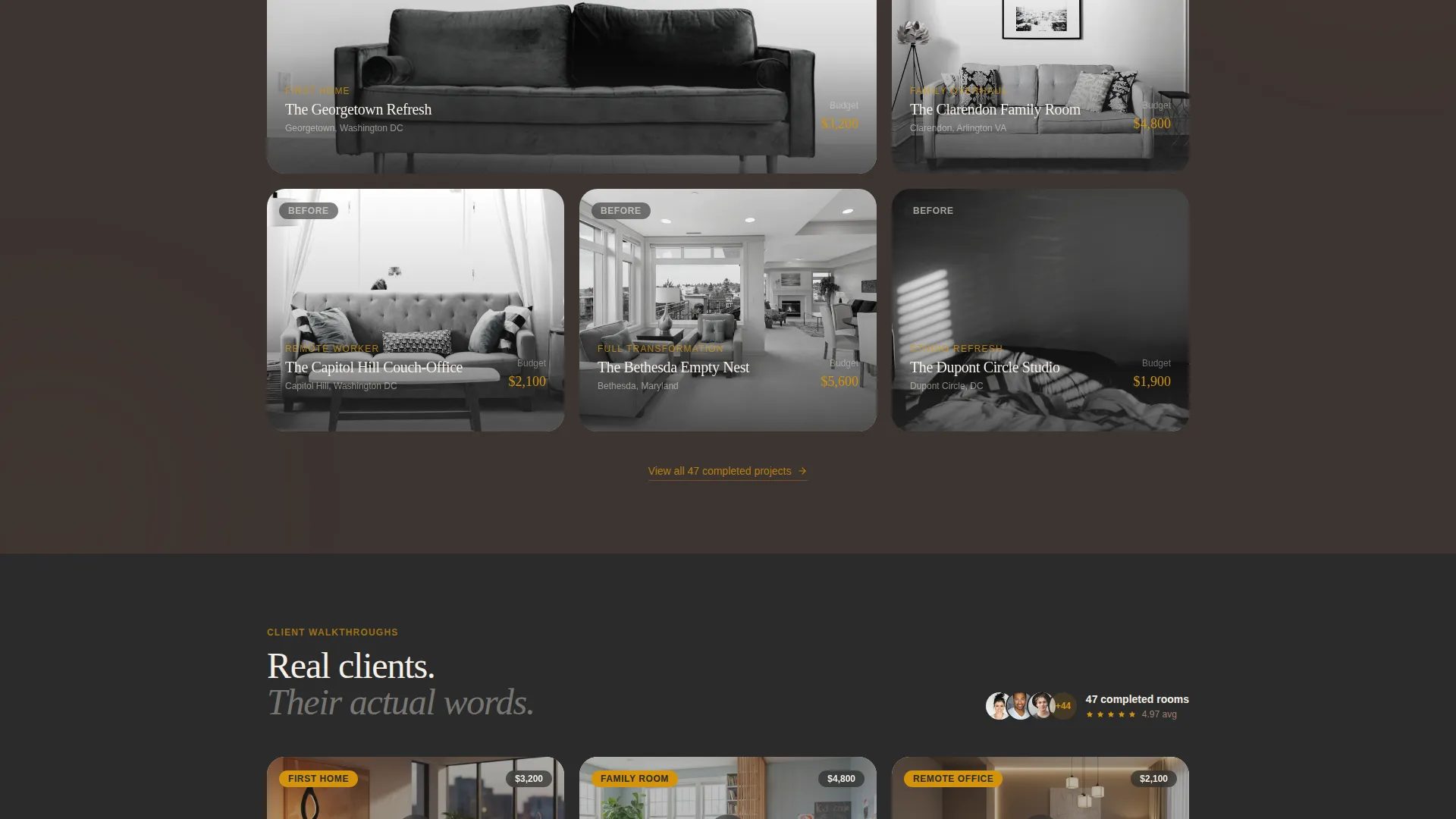
Each project card pairs a before photo with an after photo and tags the associated budget. Visitors can immediately see the quality of the work and the investment level required, which reduces pricing uncertainty before they reach the form.
Video Testimonial Cards
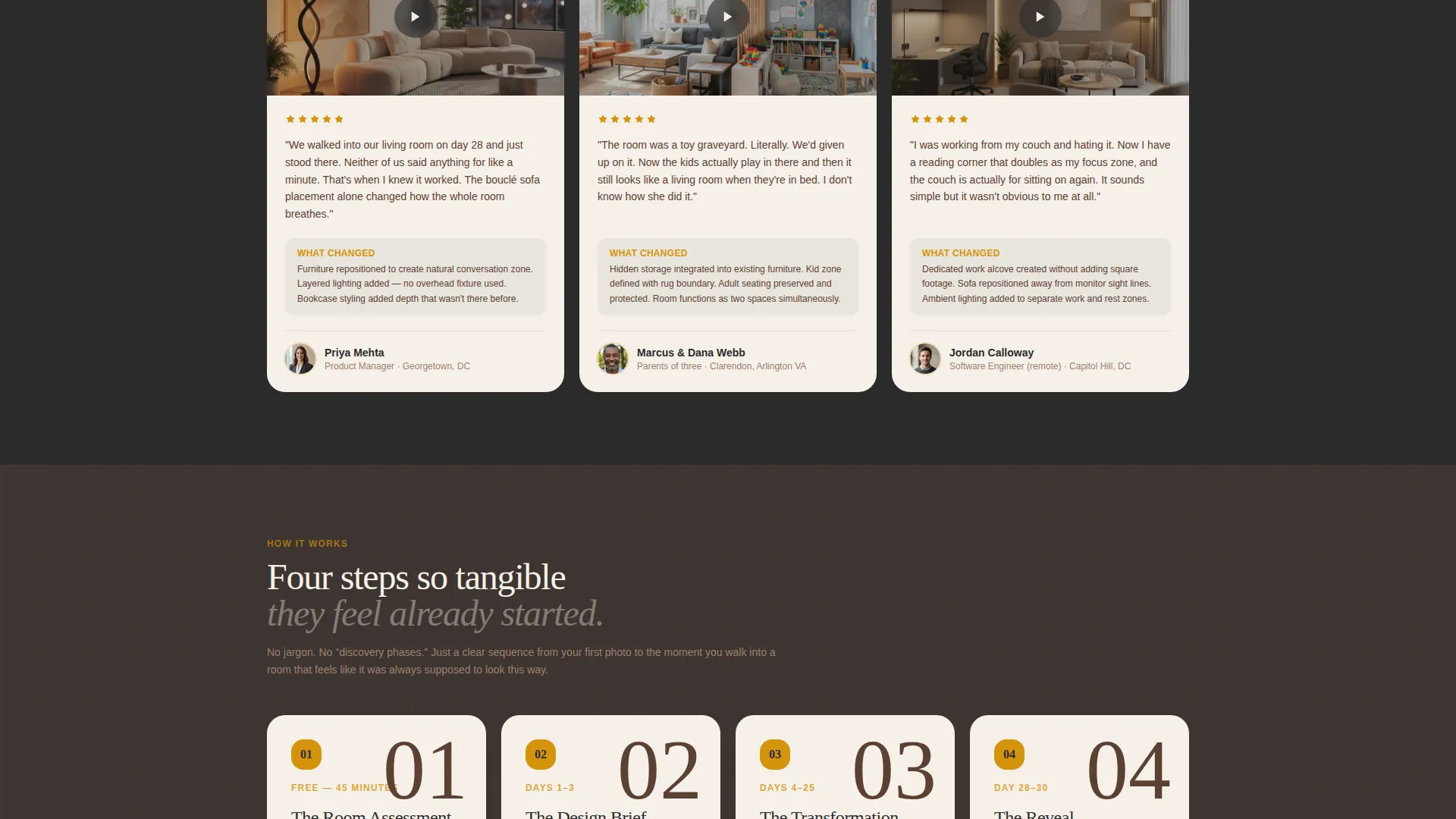
Client video cards show real homeowners walking through their finished rooms and narrating what changed. This format builds social proof with specificity that static quotes cannot match.
Four-Step Process Cards
A numbered card row breaks the designer's engagement process into four tangible steps. The sequence is clear enough that visitors feel the project has already started, lowering the psychological barrier to booking.
Sticky Booking Button and Scheduling Form
A sticky amber button labeled "Book Your Free Room Assessment" remains visible after the second card row. The form below it collects a zip code, a room photo, and a preferred consultation slot in that exact sequence to build visitor investment gradually.
Page sections overview
| Section | Purpose |
|---|---|
| Full-Bleed Header | Introduce designer and guarantee |
| Guarantee Card Row | Present three core promises |
| Project Cards Row | Show before-and-after proof |
| Video Testimonial Cards | Build trust with real client stories |
| Process Steps Row | Explain the four-step engagement |
| Sticky call to action Button | Keep booking action always visible |
| Scheduling Form | Capture zip, photo, and calendar slot |
| Pricing Text Link | Offer a secondary path for price-first visitors |
| Guarantee Banner | Reinforce promise above the form |
Design & branding system
The palette is built around deep charcoal and warm amber, with soft linen card surfaces and smoked walnut body text. The overall effect feels residential and grounded rather than trendy or corporate.
- Deep charcoal (#2B2B2B) fills the primary background, creating depth and contrast across all card rows
- Warm amber (#D4930D) colors all buttons and accent lines, making every call to action immediately visible
- Soft linen (#F5F0E8) surfaces each card, and smoked walnut (#5C4033) carries body text and secondary elements for a warm, readable contrast
Mobile & speed optimization
The card grid layout adapts naturally to smaller screens because modular cards stack vertically without losing their visual logic. The sticky button remains accessible throughout the scroll on both desktop and mobile.
- Card rows reflow into single-column stacks on narrow viewports, keeping each card readable and tappable
- The scheduling form fields appear in their intended sequence on mobile, maintaining the zip-then-photo-then-calendar investment flow
- The full-bleed header image scales to viewport width so the golden-hour composition remains impactful on any screen size
How this template helps you convert
The page is structured around a single conversion goal: a booked free room assessment. Every section earns the next click rather than asking for commitment before trust is established.
- The guarantee headline in the header removes the biggest objection immediately, so visitors scroll with curiosity rather than skepticism.
- The escalating proof sequence, guarantee cards first, then project cards, then video testimonials, gives visitors three distinct reasons to trust before they see the form.
- The three-field form builds commitment gradually: confirming service area with a zip code, creating personal investment with a photo upload, and then presenting a calendar so booking feels like a natural next step rather than a cold ask.
Other information about this template
This template is part of a broader set of living room renovation and home design resources available on the platform. It is a strong fit for designers who want a single focused page rather than a multi-page portfolio site.
- The template follows a Service Utility theme, meaning every visual and layout decision supports the practical goal of booking a consultation
- The Guarantee-Led creative direction makes this template particularly well suited to markets where homeowners have had disappointing experiences with vague design proposals
- The secondary "See Pricing Packages" text link provides a low-friction path for visitors who research costs before committing, without pulling focus from the primary booking call to action
Theme
Service Utility
Creative direction
Guarantee-Led
Color system
Charcoal & Amber
Style
Card Grid (Modular)
Direction
Booking/Scheduling
Page Sections
Full-bleed Photo Header with Fade-in Headline
Modular Guarantee Card Row
Before-and-after Project Cards with Budget Tags
Video Testimonial Cards
Four-step Process Card Row
Sticky Booking Button and Sequenced Scheduling Form
Related questions
Can I use my own living room photos in this template?
Does the scheduling form connect to a calendar tool?
Can I edit the guarantee headline and terms?
Is this template suitable for a designer who covers multiple room types?
What if a visitor is not in my service area?



