Asphalt — Expert Driveway Paving Landing Page Template
Tarmac is a precision-built landing page template for Toronto-area paving and asphalt contractors. It leads with animated data storytelling, honest comparison tables, and a three-panel expert flow that builds trust through transparency. The design uses a dark, high-contrast palette and drives visitors toward a free site assessment through a sticky call-to-action bar.
by Rocket studio
Quick summary
Tarmac is a single-page asphalt contractor landing page built for the Greater Toronto Area market. It opens with a live counter and an interactive project map, then walks visitors through cost breakdowns, process timelines, and real case studies. Every section is designed to convert property managers, homeowners, and municipal buyers into booked site assessments.
Who this template is for
This template is built for asphalt and paving contractors who serve a mix of residential, commercial, and municipal clients. It works especially well for established crews with a strong project record who want their expertise to do the selling.
- Paving companies targeting property managers with cracked parking lots and deferred maintenance
- Residential asphalt contractors whose clients face recurring spring heave damage
- Municipal and commercial paving contractors that need to demonstrate permit compliance and deadline reliability
What problem this template solves
Most paving contractor pages look identical. They list services, show a phone number, and hope the visitor calls. That approach fails buyers who are comparing multiple quotes and need a reason to trust one contractor over another.
- No easy way to show cost transparency or process detail before a sales call
- No structured path for research-stage visitors who are not yet ready to commit
- No visual proof format that works for both homeowners and procurement officers reviewing the same page
What you get with this template
This template gives you a fully structured, single-page layout built around three distinct buyer journeys. Each section is purposefully sequenced to move visitors from curiosity to confidence to conversion.
- An animated header with a live square footage counter and a GTA project location map with pulsing orange markers
- Three expert panel sections covering cost estimation, the paving process, and real project case studies with before-and-after aerials
- A primary call-to-action leading to a dedicated estimate page, plus a sticky bottom bar and a secondary gallery path for research-mode visitors
Feature list
A paragraph introduces each major capability built into this template.
Animated Data Header
The header opens on a dark full-bleed viewport. An animated counter tallies total square footage paved across Toronto since founding, ticking upward like an odometer. Below it, a simplified GTA map displays pulsing orange heat-dots at completed project locations, each labeled with project type and tonnage laid. The headline "4.2 Million Square Feet. Zero Callbacks." fades in over the map.
Honest Comparison Tables
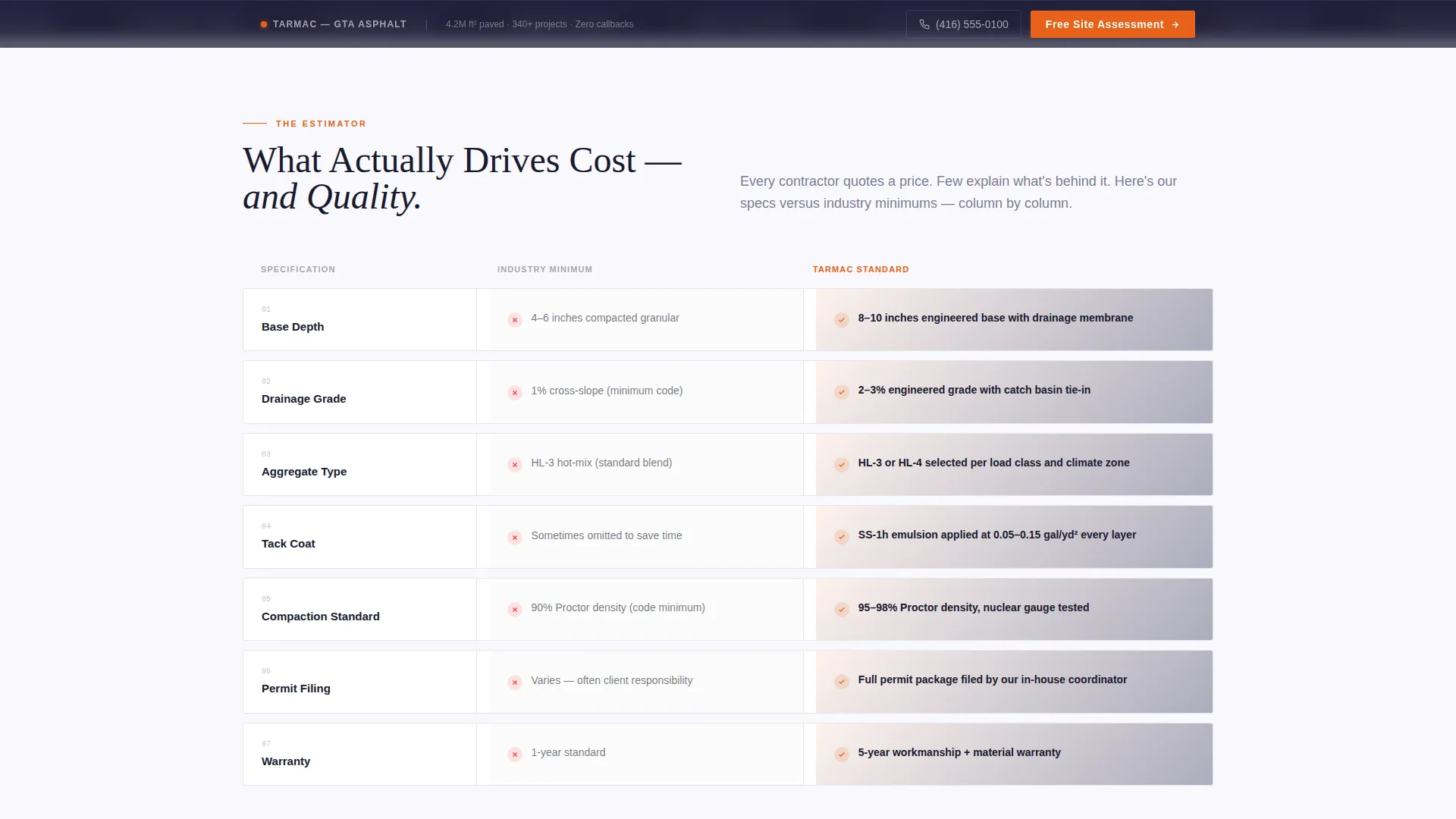
The estimator panel presents cost drivers in a structured, readable format. Each comparison table shows the contractor's own specifications alongside industry minimums, covering base depth, drainage grade, and aggregate type. This transparency removes the guesswork buyers face when comparing multiple quotes.
Expert Panel Sequence
Three authority voices appear in sequence as the visitor scrolls. The estimator covers cost, the foreman walks through a numbered process timeline, and the project manager presents municipal inspection scores alongside aerials. Each panel builds credibility through demonstrated knowledge rather than promotional language.
Process Timeline Section
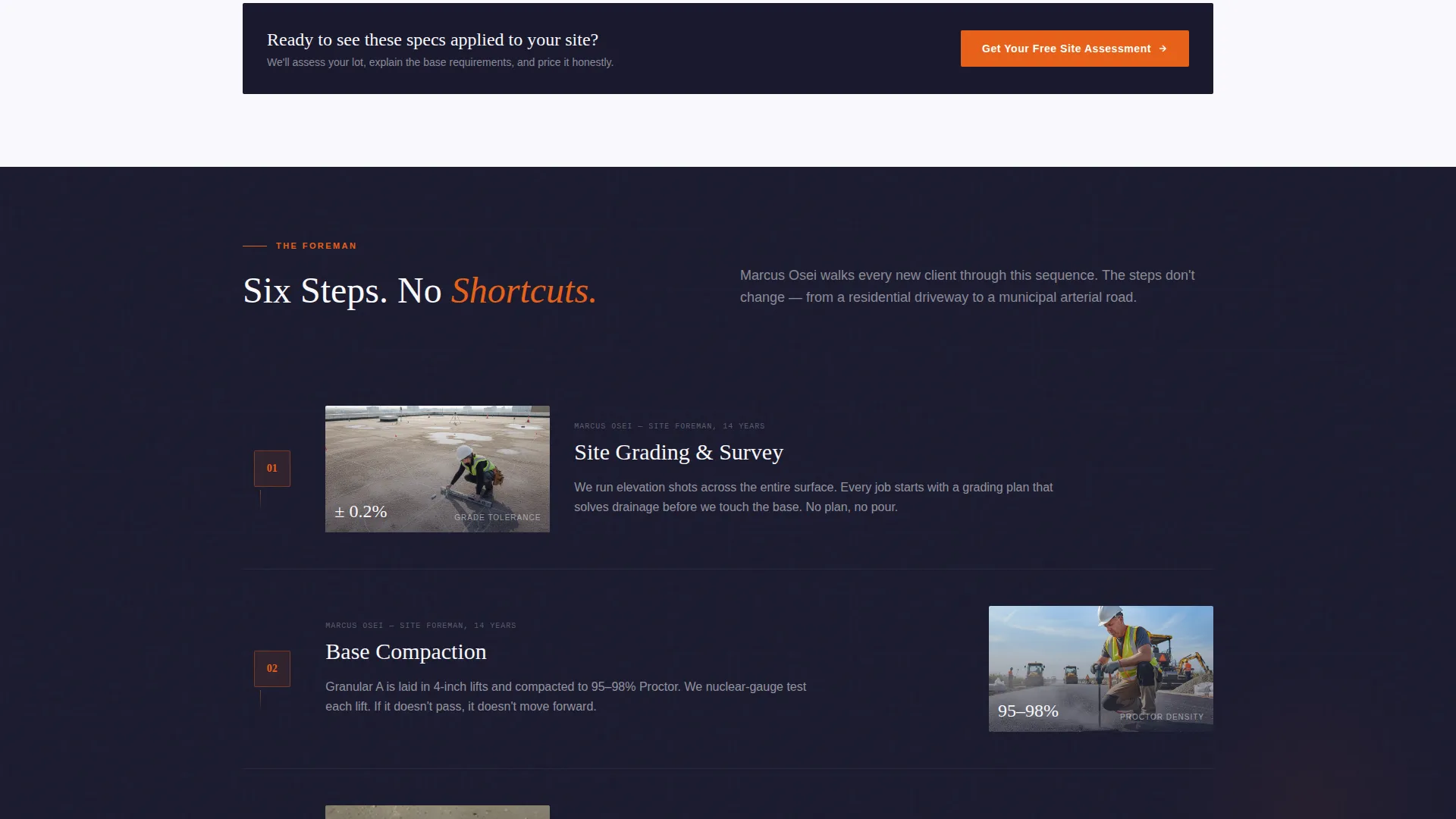
The foreman panel presents paving steps in a numbered timeline. Steps include site grading, base compaction, tack coat application, surface pour, rolling, and seal. This gives technical and non-technical buyers a clear picture of what a professional job actually looks like.
Case Study Display
The project manager panel features real project case studies with before-and-after aerial photography and municipal inspection scores. This format speaks directly to procurement officers and property managers who need documented proof of quality and compliance.
Sticky Call-to-Action Bar
After the first comparison table, a sticky bottom bar appears and follows the visitor down the page. The primary call-to-action, "Get Your Free Site Assessment," is present from the header onward. A secondary path, "See Full Project Gallery," catches visitors still in research mode and routes them back to the primary conversion path.
Page sections overview
| Section | Purpose |
|---|---|
| Animated Data Header | Opens with live counter and GTA project map |
| Primary call to action Block | Prompts free site assessment after header |
| Estimator Cost Panel | Breaks down pricing factors with comparison tables |
| Sticky call to action Bar | Anchors conversion prompt after first table |
| Foreman Process Timeline | Shows numbered paving steps in sequence |
| Project Manager Cases | Presents aerials and municipal inspection scores |
| Secondary Gallery Path | Catches research visitors, loops back to call to action |
| Estimate Destination Page | Collects address, lot size, and surface photos |
Design & branding system
The visual identity follows a Corporate Precision theme. The palette is built around deep asphalt black, fresh-pour charcoal, clean contract white, and survey-stake orange. The overall feel is like a well-organized project binder: crisp white pages, dense black type, and orange tabs that mark the sections that matter most.
- Colors: deep asphalt black (#1A1A2E), fresh-pour charcoal (#30305A), clean contract white (#F8F8FC), survey-stake orange (#E8611A) reserved for calls-to-action and data highlights
- Backgrounds alternate between white and charcoal sections; text lives in high-contrast pairs throughout
- Orange is used sparingly and with purpose, appearing only on calls-to-action, map markers, and comparison table highlights
Mobile & speed optimization
The layout is designed to stay readable and functional at every viewport width. The sticky call-to-action bar, comparison tables, and expert panels all adapt to narrower screens without losing their hierarchy or purpose.
- The sticky bottom bar remains accessible on mobile, keeping the primary call-to-action within reach at all times
- Comparison tables are structured for horizontal scrolling or stacked display on smaller screens
- The GTA project map and animated counter are scoped as header-section elements, keeping the initial load experience focused
How this template helps you convert
This template is built around a deliberate conversion sequence. Each section earns the visitor's attention before asking them to act.
- The animated data header establishes scale and credibility immediately, so buyers arrive at the first call-to-action already informed rather than skeptical.
- The comparison tables and expert panels answer the questions buyers bring to every paving quote, reducing friction before a conversation even starts.
- The sticky call-to-action bar and secondary gallery path ensure that no visitor leaves without a clear next step, whether they are ready to book or still doing research.
Other information about this template
This template is suited for asphalt and paving businesses operating in urban and suburban markets where competition is high and buyers are comparing multiple contractors before committing. The landing page format supports a range of service scopes, from residential driveways to large commercial pads and municipal road contracts.
- The estimate destination page is designed to collect address entry, lot size selection, and surface condition photo uploads, giving the contractor qualified lead data before the first call
- The three-panel expert layout can be adapted to reflect a single operator wearing multiple hats or a larger crew with dedicated roles
- The dark, heat-radiating visual tone is intentionally distinct from the clean pastel or stock-photo aesthetics common in the trades category, making the page stand out in the Toronto local services market


Theme
Editorial Magazine
Creative direction
Stats-First Impact
Color system
Navy Authority
Style
Sidebar Companion
Direction
Content/Resource
Page Sections
Animated Data Storytelling Header
Transparent Comparison Tables
Three-panel Expert Sequence
Numbered Paving Process Timeline
Before-and-after Case Study Block
Sticky Call to Action Bar and Dual Conversion Paths
Related questions
Who is this landing page template designed for?
Can I adapt the comparison tables to show my own specifications?
Does the template include the estimate destination page layout?
How does the sticky call-to-action bar work on the page?
Can the GTA project map be updated with my own project locations?



