Construction Manufacturing Cost Calculator Website Template
Assay is a dashboard-style landing page template built for construction quality testing labs. It combines an isometric lab illustration, a structured test-category data grid, an expandable compliance checklist, and an interactive turnaround calculator into one scroll that earns client trust before asking for anything. The design uses a charcoal and amber palette to feel as precise as the reports the lab produces.
by Rocket studio
Quick summary
Assay is a single-page template designed for construction materials testing labs. It presents services with the same rigor clients expect from a test report: every service in a data grid, every compliance step in a checklist, and a turnaround calculator that answers the scheduling question before it is asked. The industrial charcoal and amber design signals precision from the first scroll.
Who this template is for
This template is built for labs and testing firms that serve the construction industry in a business-to-business context. It speaks directly to technically minded buyers who need proof before they commit.
- General contractors who need American Society for Testing and Materials (ASTM) compliance documentation ready before a site inspection
- Civil engineers coordinating concrete break results, Proctor density tests, and rebar tensile reports across multiple projects
- Project managers juggling multi-site concrete pours who cannot afford a missed reporting deadline
What problem this template solves
Testing labs often lose potential clients not because of weak services, but because their web presence fails to communicate technical credibility at a glance. A generic services page does not answer the questions a contractor or engineer actually asks. This template solves that gap.
- Visitors cannot quickly find the ASTM standard, turnaround time, or a sample report for each specific test they need
- There is no structured compliance reference to show that the lab understands what an inspector actually reviews
- The path from "I need a test" to "I trust this lab enough to submit a request" has too many friction points
What you get with this template
The template ships as a complete, section-led landing page with interactive components that guide the visitor through a quality control workflow. Each section adds a new layer of proof without overwhelming the reader.
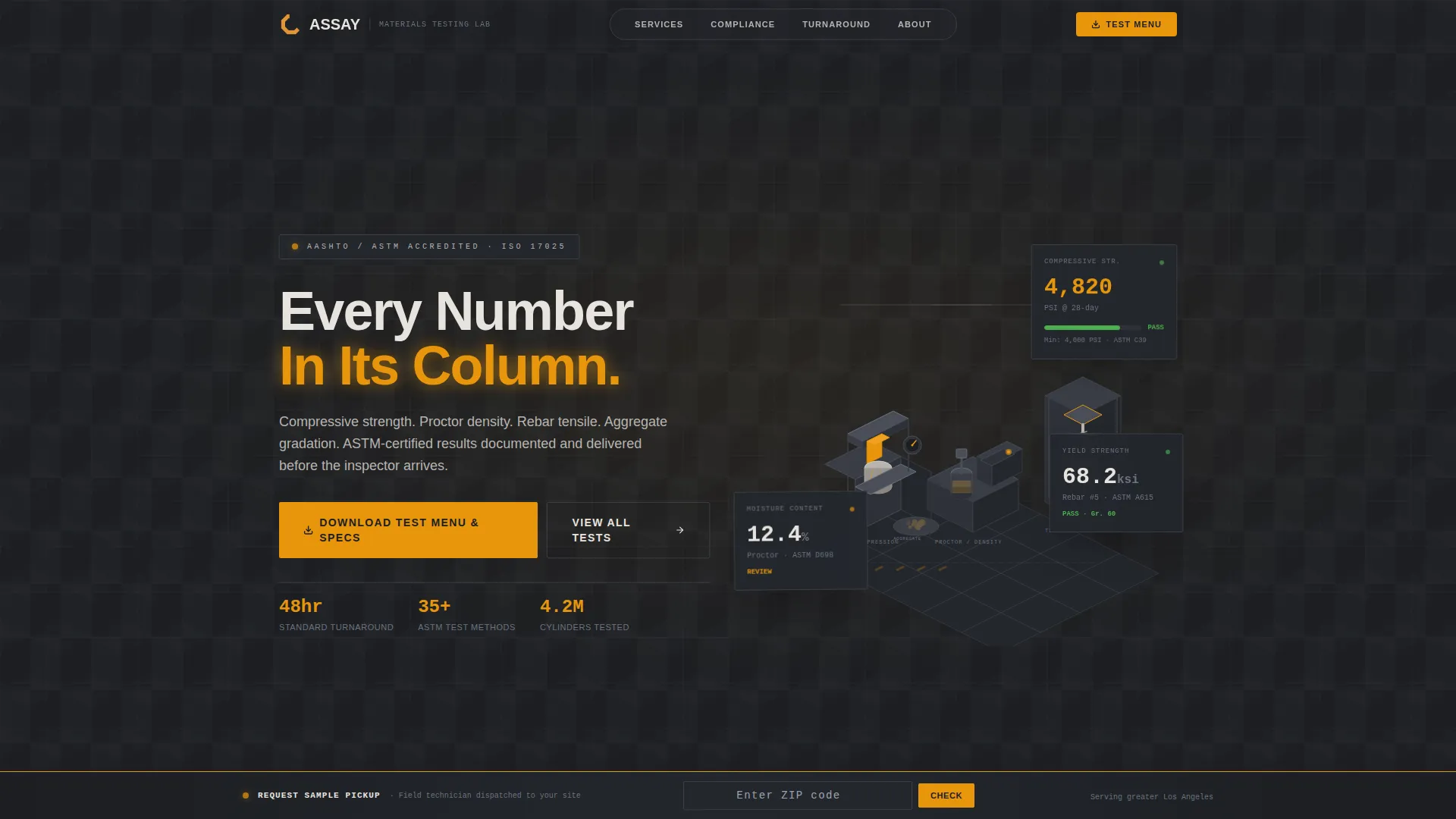
- A hero section with a vector isometric lab illustration and floating data cards showing live-looking pressure, moisture, and yield readouts
- A structured test-category data grid, an expandable compliance checklist, and an interactive turnaround calculator
- A progressive email gate for downloading the test menu, ungated sample report thumbnails beside each test category, and a persistent bottom bar with zip-code service area confirmation
Feature list
This section covers the core functional and design capabilities included in the template.
Isometric Lab Hero Illustration
The header features a clean vector isometric cutaway of a construction testing lab. Compression machines, a Proctor compaction mold, a tensile grip on rebar, and a soil moisture oven are arranged on an isometric grid. Floating data cards beside each station display PSI, moisture percentage, and yield strength values, giving the page an immediately technical feel without using photography.
Test Categories Data Grid
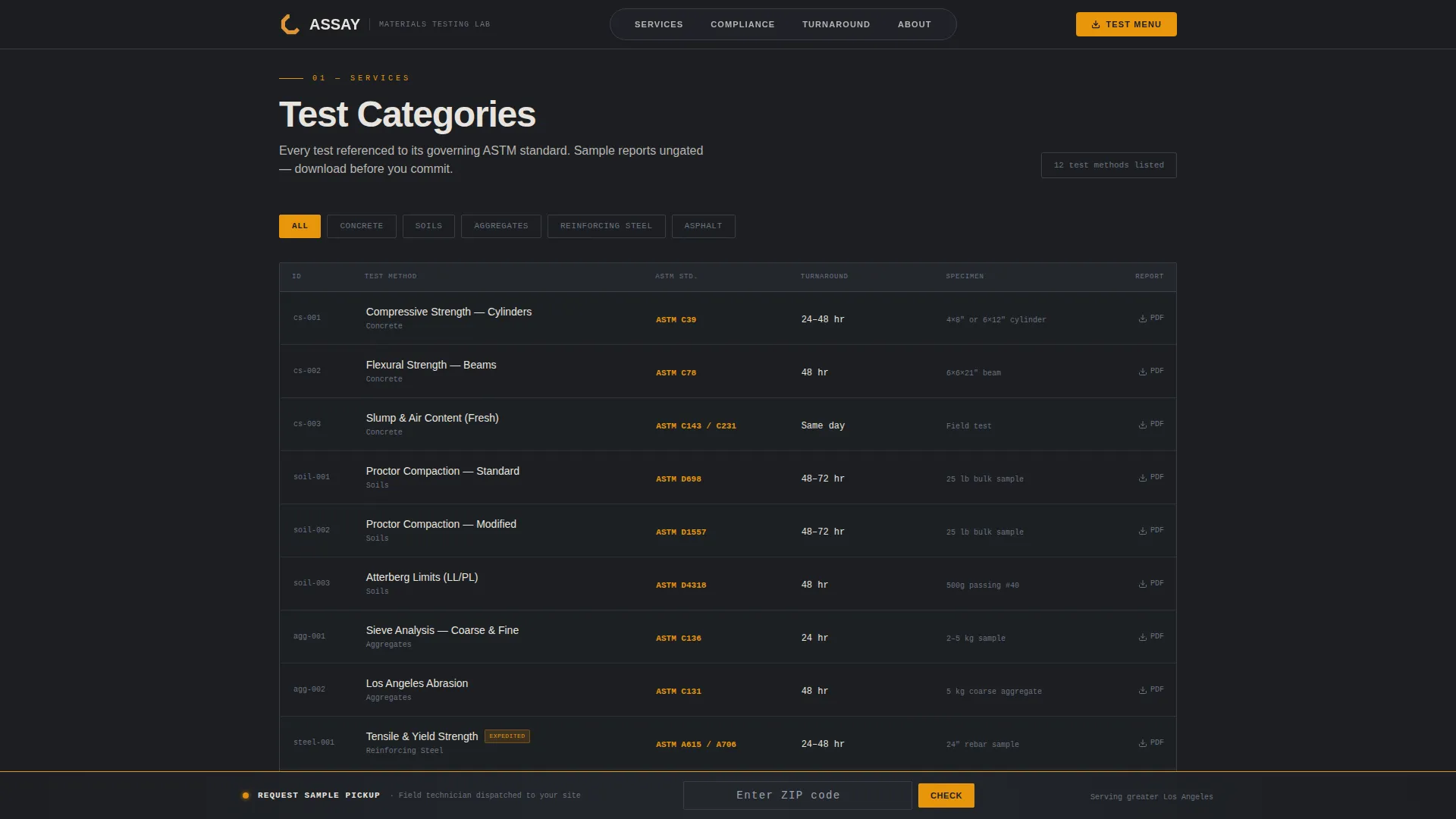
Services are displayed in a structured data grid where each row represents a test type: compressive strength, Proctor density, aggregate gradation, rebar tensile, and asphalt core. Columns show the applicable ASTM standard, typical turnaround time, and a downloadable sample report PDF thumbnail. This layout lets a contractor or engineer find what they need in seconds.
Expandable Compliance Checklist
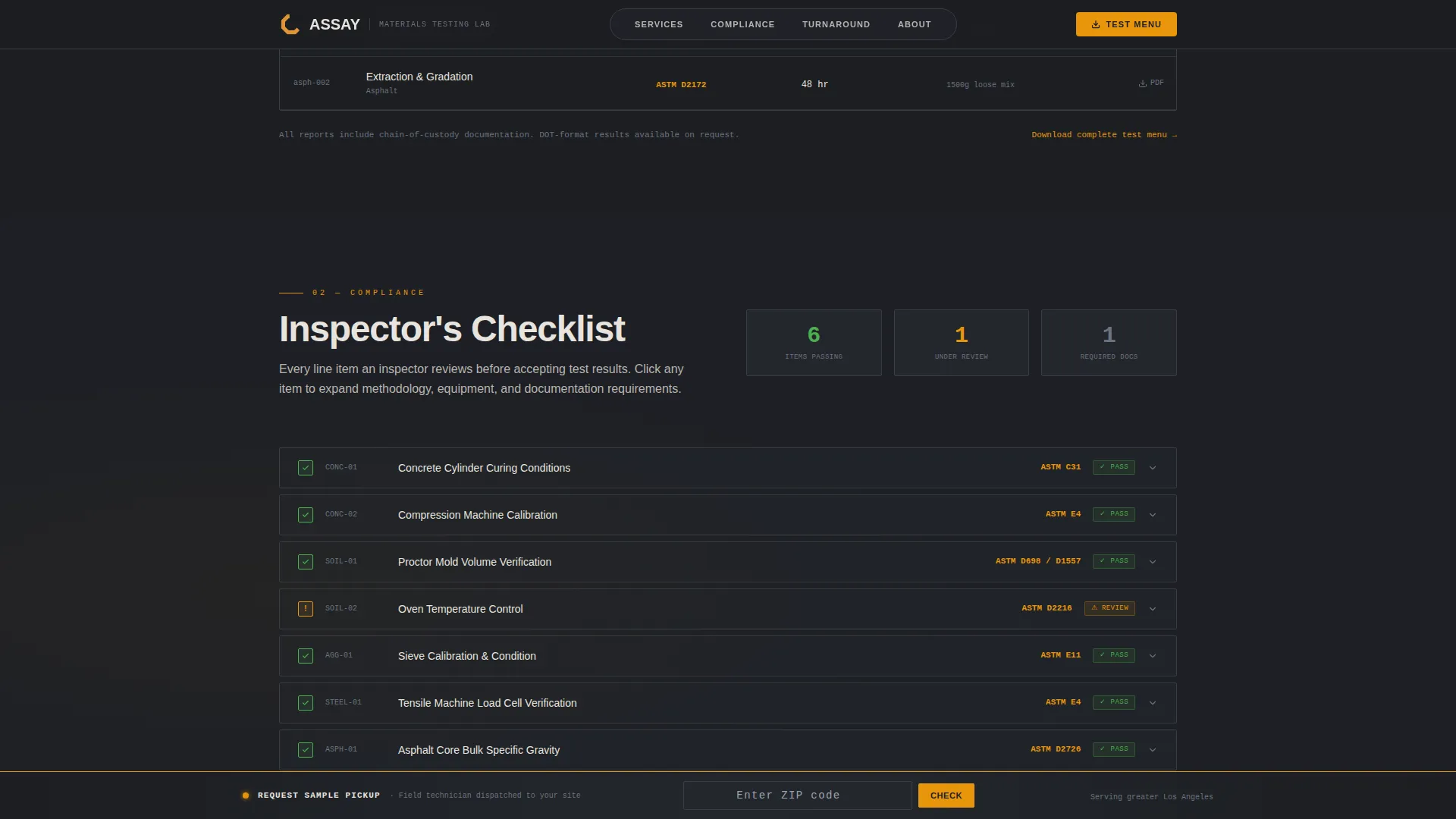
A compliance checklist mirrors the line items an inspector actually reviews on a construction site. Each item is clickable and expands to reveal methodology detail, so visitors can verify the lab's process without requesting a call. The checklist scroll reinforces a checklist and audit logic that rewards methodical readers.
Interactive Turnaround Calculator
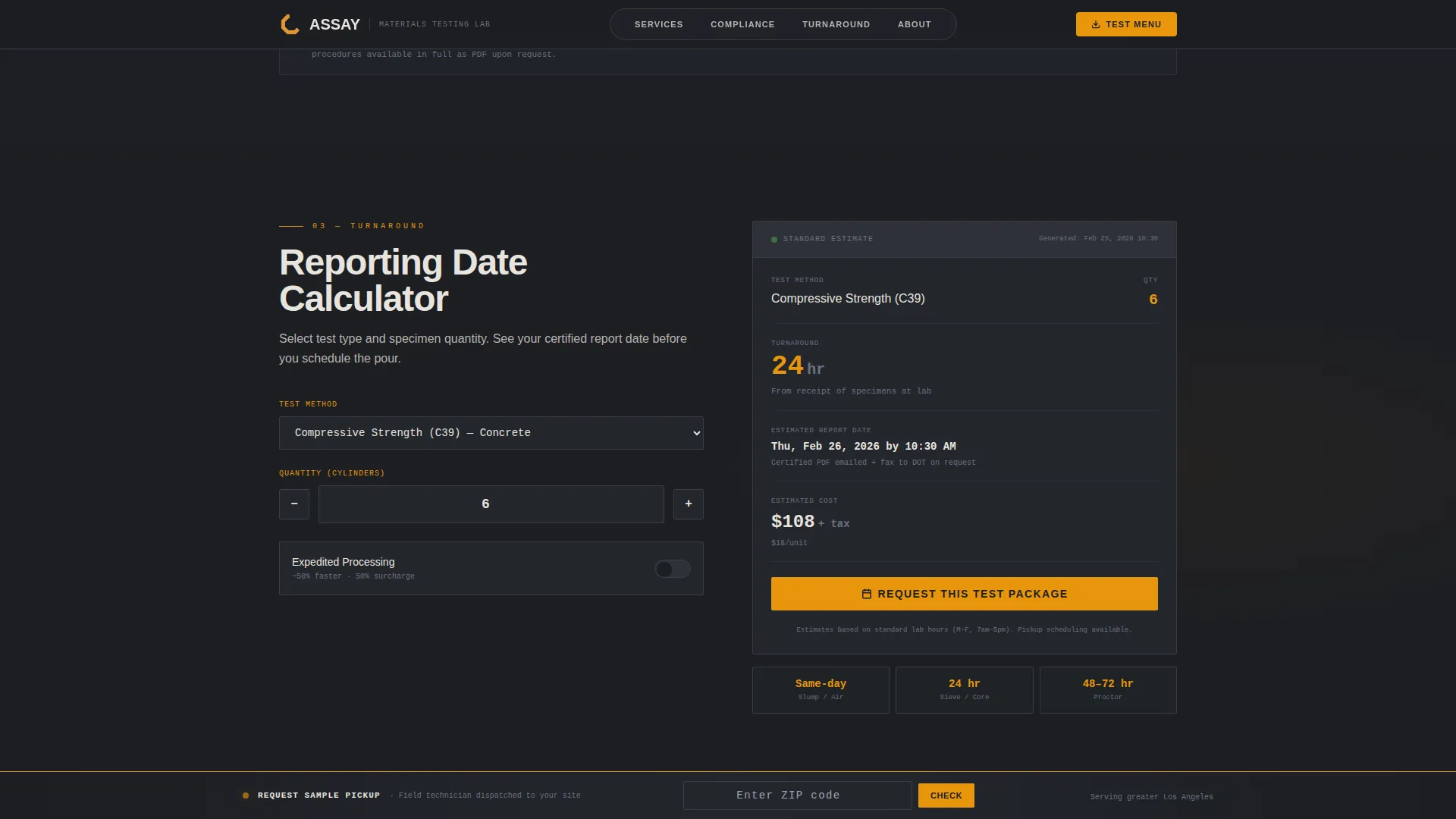
Visitors select a test type and quantity, and the calculator displays an estimated reporting date. This component answers the single most urgent scheduling question for project managers running multi-site pours. It reduces back-and-forth and moves buyers toward a request faster.
Progressive Email Capture Gate
The primary call to action is a gated download of the test menu and specifications. A single email field appears first. After entry, it expands to request company name and role, such as contractor, engineer, or owner's representative. This progressive disclosure reduces initial friction while collecting the context the lab needs.
Persistent Service Area Bottom Bar
A fixed bottom bar carries a "Request a Pickup" prompt with a zip-code field. Visitors entering their zip code receive instant confirmation of whether the lab serves their area. This removes a common objection for site teams that need on-site sample collection.
Page sections overview
| Section | Purpose |
|---|---|
| Hero with illustration | Establish technical credibility and introduce the primary email call to action |
| Test categories grid | Display each service with its ASTM standard, turnaround, and sample report link |
| Compliance checklist | Mirror inspector review logic with expandable methodology detail per line item |
| Turnaround calculator | Let visitors estimate reporting dates by test type and quantity |
| Stats and email gate | Show lab credentials and gate the full test menu behind an email capture form |
| Footer | Single-row linear footer with navigation and contact essentials |
Design & branding system
The visual identity follows an Industrial Raw theme. Every color decision references the physical environment of a materials testing bay: steel surfaces, fluorescent overhead light, and amber warning labels.
- Color palette: deep mill-scale black (#1C1E22) for backgrounds, cold galvanized gray (#4A4E57) for secondary surfaces, poured-concrete off-white (#E8E4DF) for data cells and body text, and caution-stripe amber (#E8960C) reserved for pass/fail indicators, callouts, and hover states
- Typography: Plus Jakarta Sans for interface labels and body copy, JetBrains Mono for all numerical data values, keeping the reading experience technical and legible
- No photography is used anywhere; all visual storytelling is handled through engineered vector geometry and data-style user interface components
Mobile & speed optimization
The template is designed desktop-first to serve engineers reviewing specifications at a desk, while maintaining full support for smaller screens. Interactive sections use a static-first approach where client-side components load only where interactivity is required.
- The hero illustration, data grid, compliance checklist, and calculator all reflow cleanly on mobile viewports
- Scroll reveal animations and floating card bounce effects are set to medium intensity, keeping the experience engaging without creating distraction on touch devices
How this template helps you convert
The page is structured as a content and resource hub that builds trust before asking for anything. Each section earns the next action.
- Ungated sample report thumbnails appear beside every test category, giving visitors real proof of the lab's output before any email is requested, lowering the perceived cost of engagement
- The progressive email gate releases the full test menu only after an email is entered, then gently collects company name and role, so the lab captures qualified leads with minimal friction at the point of highest intent
- The persistent bottom bar with a zip-code field keeps "Request a Pickup" visible throughout the entire scroll, meaning a visitor who is ready to act can convert at any moment without scrolling back to the top
Other information about this template
This template is categorized under Manufacturing and Industrial, with a specific focus on Construction Manufacturing and the Construction Quality Testing Lab niche. It is built for the United States market, with English copy, USD pricing context, and dates formatted in the MM/DD/YYYY convention used by US contractors and departments of transportation.
- The design system and section logic are optimized for desktop-first use, reflecting the reality that engineers and contractors typically review technical specifications at a workstation
- Animation intensity is set to medium: scroll reveals and floating card bounce effects add a sense of precision data activity without slowing down a task-focused visitor
- The template style is Dashboard and Data Grid, meaning the page communicates through structured rows, columns, and indicators rather than narrative paragraphs
- The header concept is Isometric, a deliberate choice to signal engineering rigor through technical illustration rather than lifestyle photography
- The creative direction is Checklist and Audit, meaning the scroll itself functions as a structured quality review that mirrors the mental model of the visitor
Theme
Industrial Raw
Creative direction
Checklist & Audit
Color system
Charcoal & Amber
Style
Dashboard/Data Grid
Direction
Content/Resource
Page Sections
Isometric Lab Hero Illustration
Test Categories Data Grid
Expandable Compliance Checklist
Interactive Turnaround Calculator
Progressive Email Capture Gate
Persistent Pickup Request Bar
Related questions
Who is this template designed for?
Can I customize the test categories in the data grid?
How does the progressive email gate work?
Does the turnaround calculator require an external system connection?
Is the Request a Pickup bar always visible while scrolling?



