Disability Arts Event Registration Landing Page
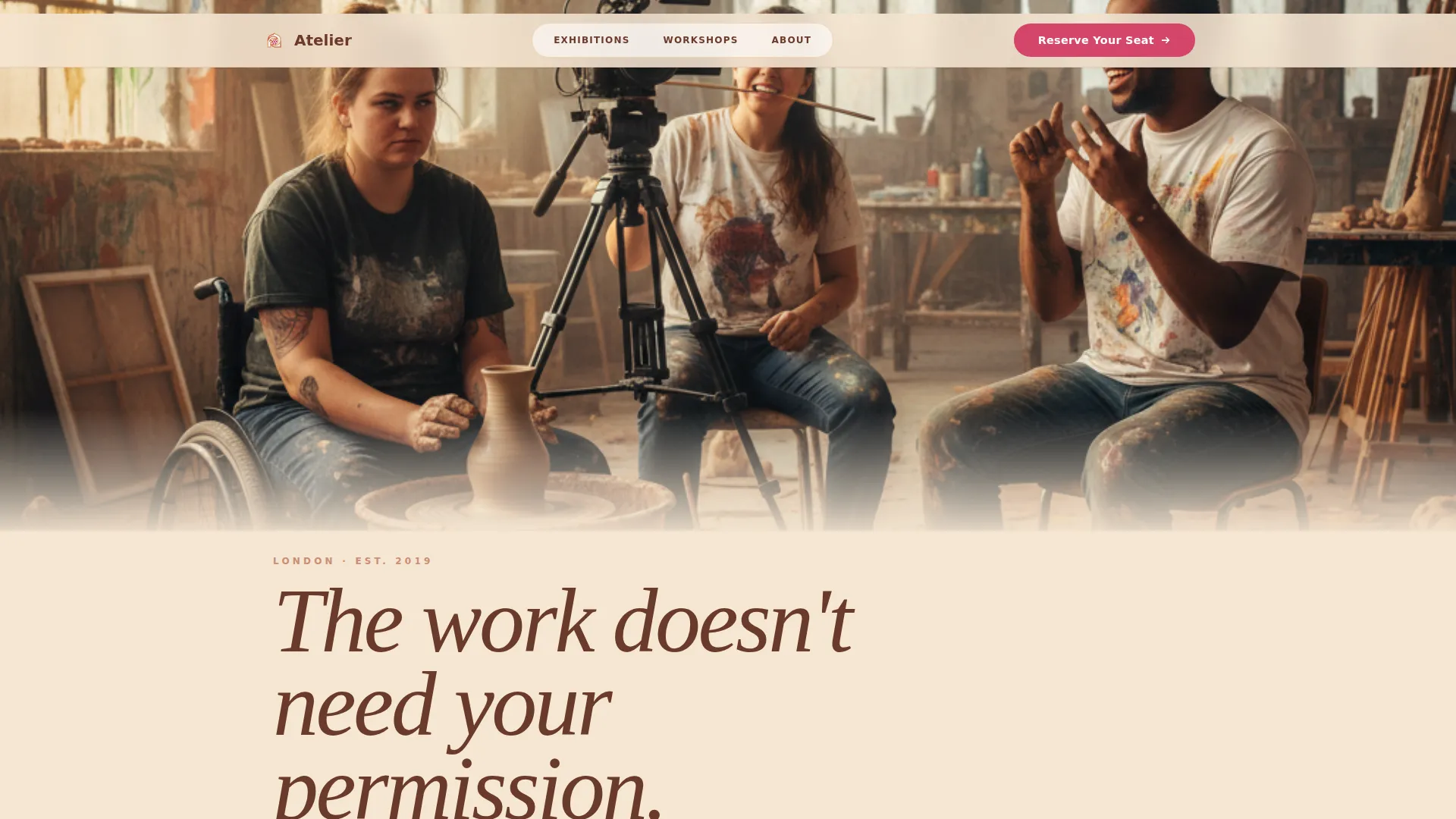
Atelier is a masonry-layout landing page built for a disability arts collective that stages exhibitions, workshops, and live performances. It guides visitors through an emotionally sequenced scroll, then moves them toward event registration through an access-first form. Warm desert tones, editorial typography, and a full-bleed studio header make the page feel like a gallery that was always meant for them.
by Rocket studio
Quick summary
Atelier is a single-page event registration template for a disability arts collective. It pairs a full-bleed candid studio header with a Hero's Journey masonry grid, carrying visitors from the problem through transformation to triumph. A sticky "Reserve Your Seat" button and an access-first registration form handle individual bookings, while a separate inquiry path serves educators and group coordinators.
Who this template is for
This template speaks directly to organisations and individuals at the intersection of disability and the arts. It is built for groups that put disabled artists at the centre of creative work, not at the edge of a caption.
- Disability arts collectives, cultural organisations, and nonprofits running events, exhibitions, or workshops
- Access coordinators scouting inclusive venues for touring productions
- Teachers building disability arts modules into General Certificate of Secondary Education curricula, and disabled creatives looking for a space that leads with their portfolio
What problem this template solves
Most arts event pages treat access as an afterthought buried in small print. They use stock images of disability rather than documentation of real creative work. Visitors who need specific access provisions are forced to hunt for contact details or explain themselves twice. This template changes that order of priority.
- The registration form surfaces access requirements before anything else, signalling that the organisation already expects and welcomes them
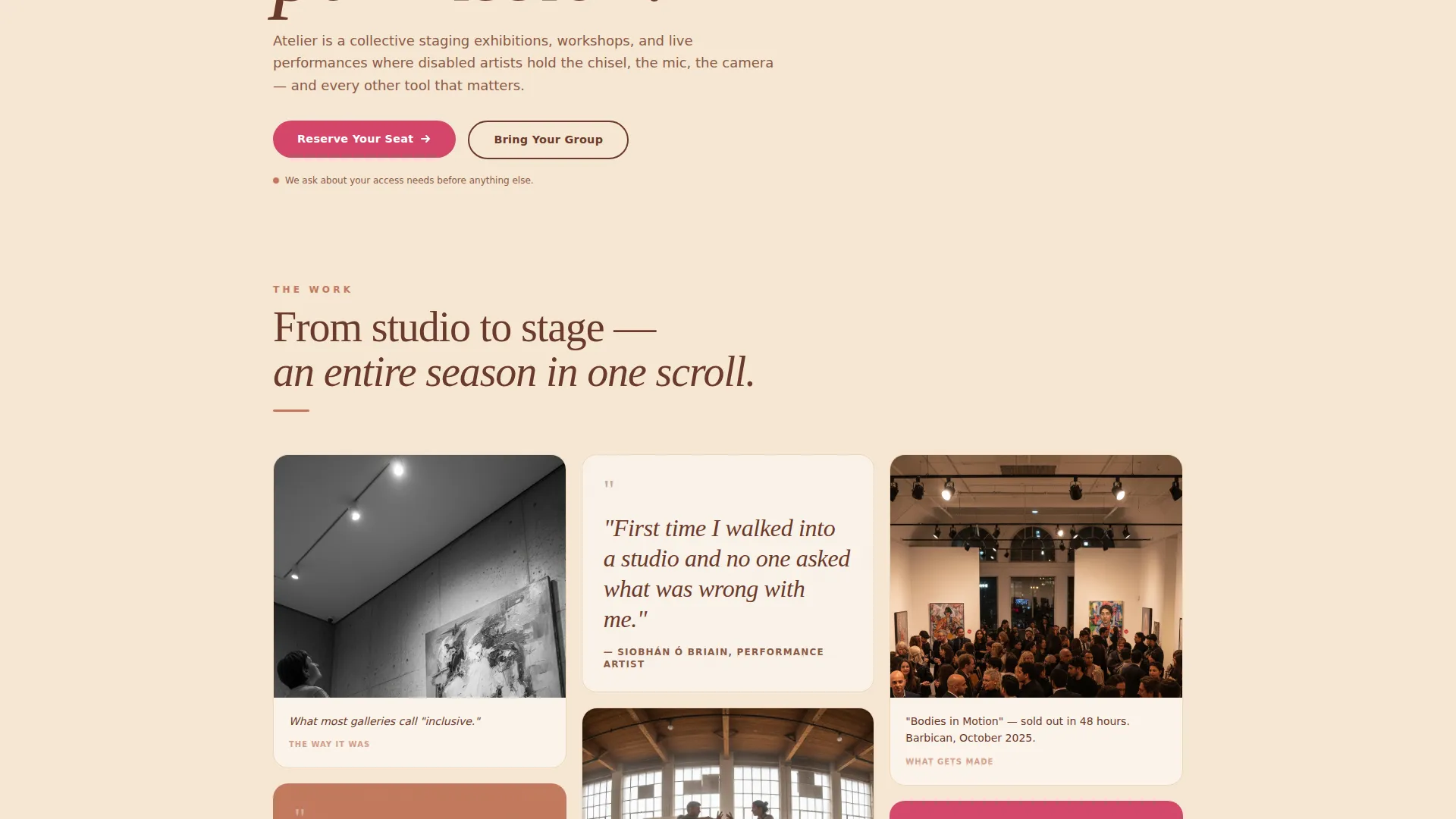
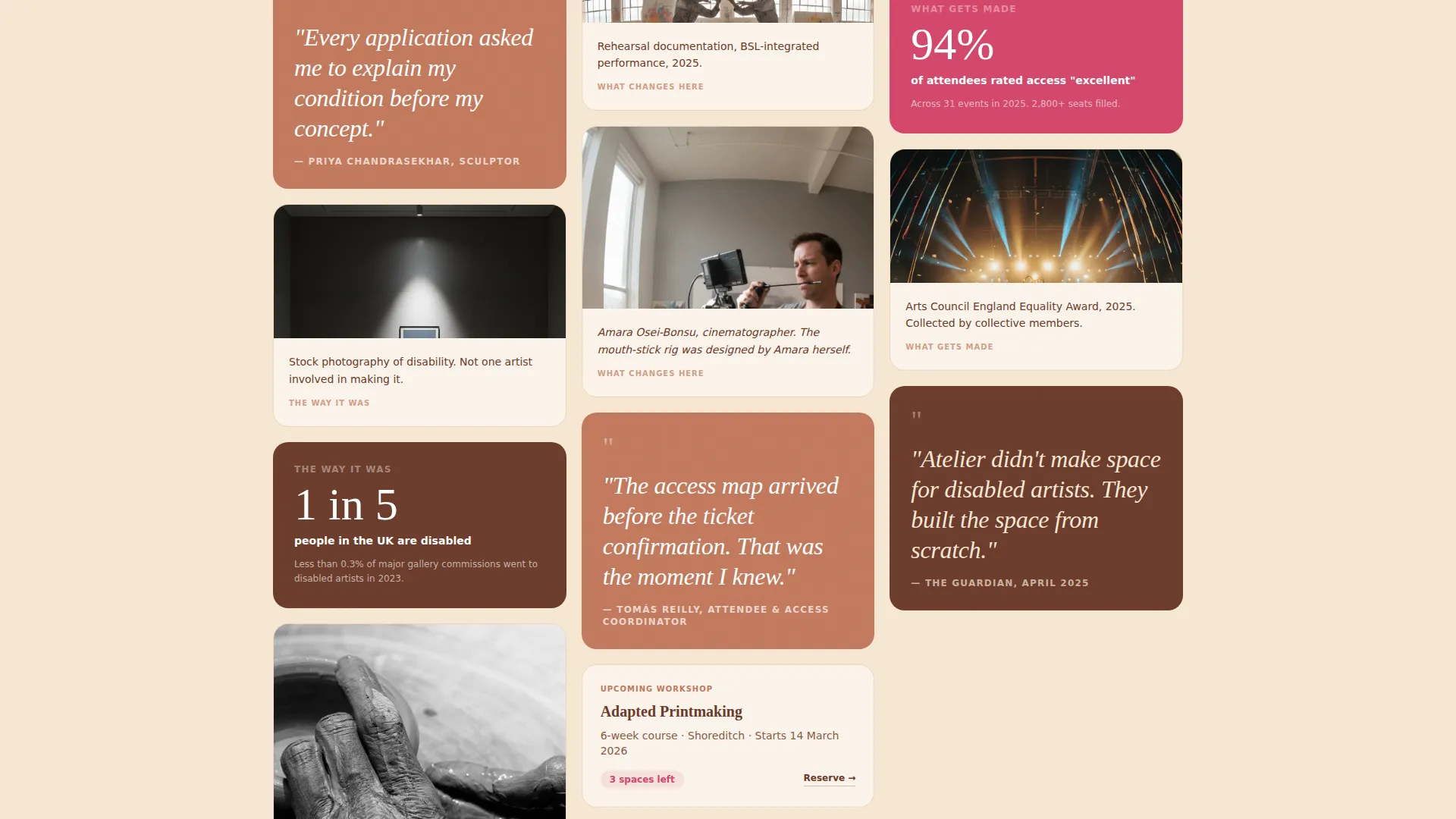
- The masonry grid replaces generic imagery with exhibition documentation, process shots, and artist testimonials, so the page shows authentic work rather than borrowed representation
- The group inquiry path separates institutional bookings from individual flow, keeping both journeys clean and uncluttered
What you get with this template
The template delivers a complete, single-page registration flow with a strong editorial identity. Every section has a defined purpose and a clear visual role within the Desert Rose colour system.
- A full-bleed team photo header with a typewriter-animated headline, followed immediately by the primary call to action
- A scroll-reveal masonry grid structured as a Hero's Journey, moving from problem cards through transformation pull-quotes to triumph documentation
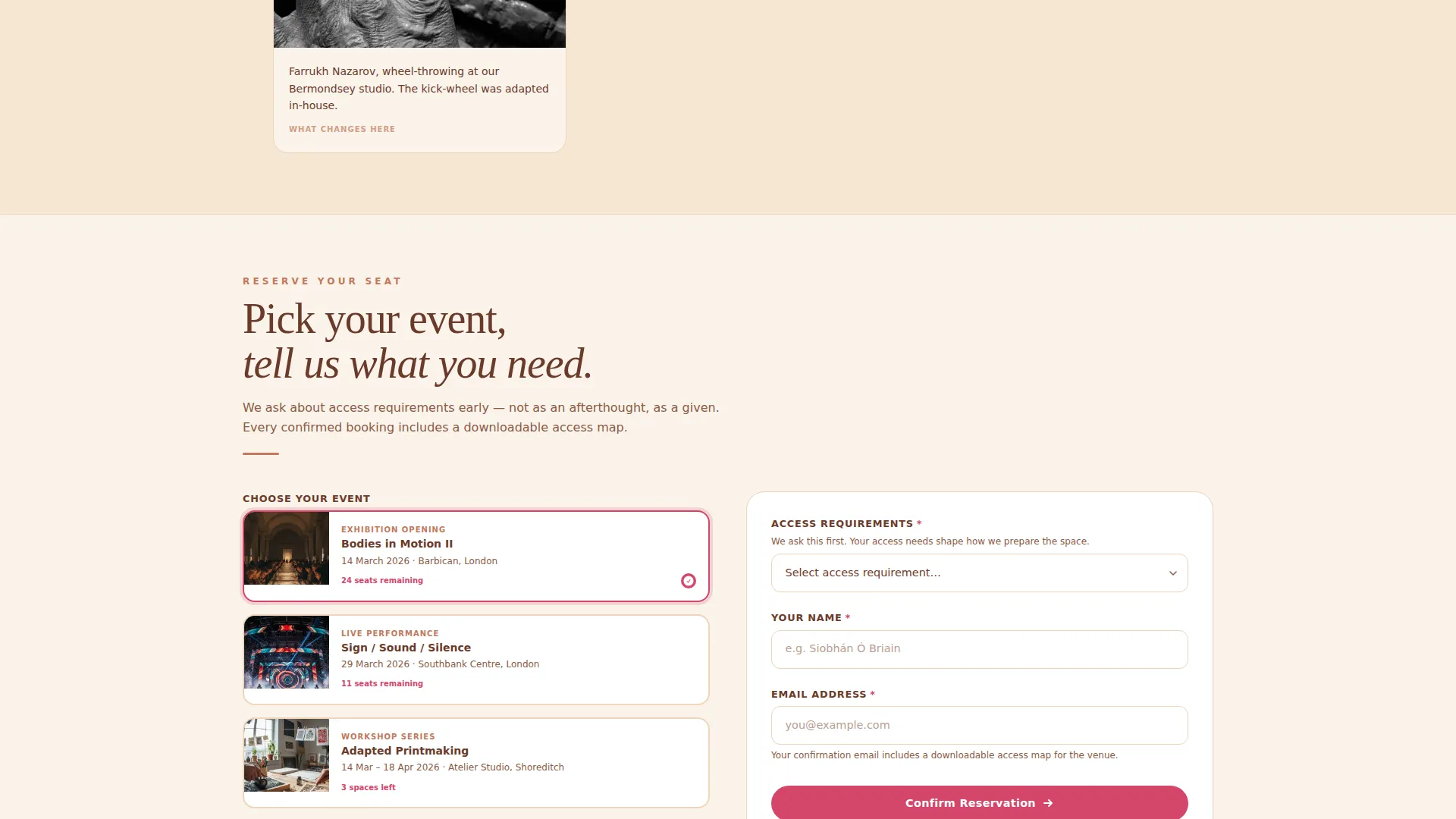
- An event registration section with a visual card picker, an access-needs dropdown, and a separate group booking inquiry form for educators and coordinators
Feature list
This section covers the key built-in components and interaction patterns that make Atelier work as an event registration landing page.
Access-First Registration Form
The form collects name, access requirements, event selection, and email in that deliberate order. The access dropdown includes options for British Sign Language interpreter, wheelchair space, audio description, captioning, none, and a free-text "other" field. Placing access needs second in the form sequence sends a clear organisational signal before the visitor has to ask.
Visual Event Card Picker
Events are displayed as selectable visual cards, each showing a thumbnail and date in DD/MM/YYYY format. Visitors choose their event by clicking a card rather than selecting from a plain dropdown. This keeps the registration experience gallery-like and consistent with the editorial design identity.
Hero's Journey Masonry Grid
The masonry grid is arranged emotionally, not chronologically. Opening cards frame the problem, middle cards carry process shots and pull-quote testimonials, and closing cards present sold-out show photography, press clippings, and award announcements. Scroll-reveal animation brings each row in progressively as the visitor moves down the page.
Sticky Registration Button
After the visitor scrolls past the third masonry row, a fixed "Reserve Your Seat" button remains visible at all times. It uses the prickly pear magenta accent colour to stay distinct from surrounding content and reachable without scrolling back to the top.
Group Booking Inquiry Path
A secondary "Bring Your Group" link opens a short inquiry form targeted at educators and institutional coordinators booking ten or more places. It qualifies group leads without interrupting the individual registration flow.
Confirmation with Access Map
After completing registration, visitors reach a confirmation page that includes a downloadable access map for the venue. This closes the access loop that the form opened, giving attendees everything they need before arrival.
Page sections overview
| Section | Purpose |
|---|---|
| Full-bleed hero | Introduce the collective with a candid studio photo and typewriter headline |
| Primary call to action | Place "Reserve Your Seat" immediately below the header |
| Masonry journey grid | Guide visitors emotionally from problem through transformation to triumph |
| Event registration | Capture bookings via access-first form and visual event card picker |
| Press and recognition | Build credibility with sold-out show photography, awards, and press clippings |
| Group booking path | Qualify educator and coordinator inquiries separately from individual flow |
| Split footer | Display logo and tagline on the left, navigation links on the right |
Design & branding system
The visual identity follows an Educational Guide theme expressed through the Desert Rose colour system. Typography pairs Fraunces as the display serif for headings with DM Sans as the body typeface, creating a contrast between editorial warmth and practical readability.
- Bleached sandstone (#F5E6D3) carries the background; deep mesa clay (#6B3A2A) anchors headings and navigation; sun-warmed terracotta (#C2785C) warms card borders and pull-quote tiles
- Prickly pear magenta (#D4456A) is reserved exclusively for interactive elements and registration buttons, so every call to action blooms visibly against the earth-toned layout
- Generous whitespace and unevenly lit studio photography keep the aesthetic editorial rather than corporate, matching the gallery sensibility the brief calls for
Mobile & speed optimization
The template gives equal design priority to desktop and mobile. Access coordinators typically browse on desktop, while disabled creatives are more likely to arrive on mobile, so both viewports are treated as first-class experiences.
- The masonry grid and event card picker reflow cleanly at smaller screen sizes, keeping the Hero's Journey sequence intact across devices
- The sticky registration button and access dropdown remain usable on touch screens, with tap targets sized for varied motor-control needs
- Static content sections use server-rendered components, while the interactive registration form and event card picker run as client components, keeping the interactive parts responsive without slowing the initial page load
How this template helps you convert
The page is built around a single primary conversion goal: individual event registration. Every structural and visual decision supports that goal without creating friction.
- The "Reserve Your Seat" call to action appears twice in quick succession at the top of the page, then stays fixed as a sticky button throughout the rest of the scroll, so the registration entry point is never more than one tap or click away
- The masonry grid builds emotional investment before the visitor reaches the form, moving them through a full arc of credibility, from real-work documentation to press recognition, so they arrive at registration already engaged
- The access-first form sequence reduces the hesitation that disabled visitors often feel on standard event pages, lowering the barrier to completion by asking about needs early rather than treating them as an afterthought
Other information about this template
Atelier is part of a growing family of nonprofit and community-sector templates built for organisations with specific audience needs and high accessibility expectations.
- The template is localised for UK English, using GBP pricing display, DD/MM/YYYY date formatting, and references suited to the General Certificate of Secondary Education curriculum context
- The footer follows an Arc Browser Split layout pattern, placing the logo and tagline on the left and navigation links on the right for a clean, editorial close to the page
- The typewriter headline animation and scroll-reveal masonry are set to medium animation intensity, keeping the page dynamic without overwhelming visitors who prefer reduced motion contexts
- This template sits in the Community and Nonprofit category, with a specific focus on the Disability and Inclusion Nonprofit subcategory and Disability Arts Organisation niche
Theme
Educational Guide
Creative direction
Hero's Journey
Color system
Desert Rose
Style
Masonry/Pinterest
Direction
Event Registration
Page Sections
Access-first Registration Form
Visual Event Card Picker
Hero's Journey Masonry Grid
Sticky Reserve Your Seat Button
Group Booking Inquiry Path
Confirmation Page with Access Map
Related questions
Can I customise the access needs dropdown options?
Does the template support group bookings separately from individual registrations?
What happens after someone completes registration?
Is the event card picker easy to update with new shows?
Who is this landing page template best suited for?



