Coworking Landing Page Template for Creative Spaces
Atelier is a creative coworking landing page template built for a converted stone mill space. It opens with a live Cost Estimator, guides visitors through a visual room-by-room gallery, and converts through a two-step trial day booking flow. The warm Pastoral Calm design feels handcrafted, unhurried, and immediately trustworthy to freelance creatives and small teams.
by Rocket studio
Quick summary
Atelier is a single-page coworking landing page template designed for a creative studio space inside a converted stone mill. It leads with an interactive Cost Estimator, moves through a spatial gallery of named rooms, and closes with a booking flow centered on a free trial day. The design feels warm, material, and grounded.
Who this template is for
This template is built for creative coworking spaces that want to attract members through atmosphere and honest pricing, not corporate-style feature lists. It works especially well for venues with distinct rooms, flexible memberships, and a community identity rooted in making things.
- Freelance illustrators, ceramicists, writers, and designers looking for a studio between leases
- Small creative agencies that have outgrown informal working arrangements
- Visiting artists and short-term residents who need a focused, community-oriented workspace for a week or a season
What problem this template solves
Most coworking landing pages list amenities like a hotel brochure. They fail to communicate atmosphere, honest pricing, or the feeling of actually working there. Visitors leave without booking because nothing made them feel welcome or certain about cost.
- There is no easy way to estimate cost before committing to a conversation with the space
- Generic gallery grids show rooms without context, dimensions, or the human detail that builds trust
- Booking flows ask for job titles and company names, which feels wrong for freelance creatives
What you get with this template
You get a complete, section-led landing page that takes a visitor from first impression to confirmed booking without ever feeling like a sales funnel. Every section has a specific job, and each one hands off naturally to the next.
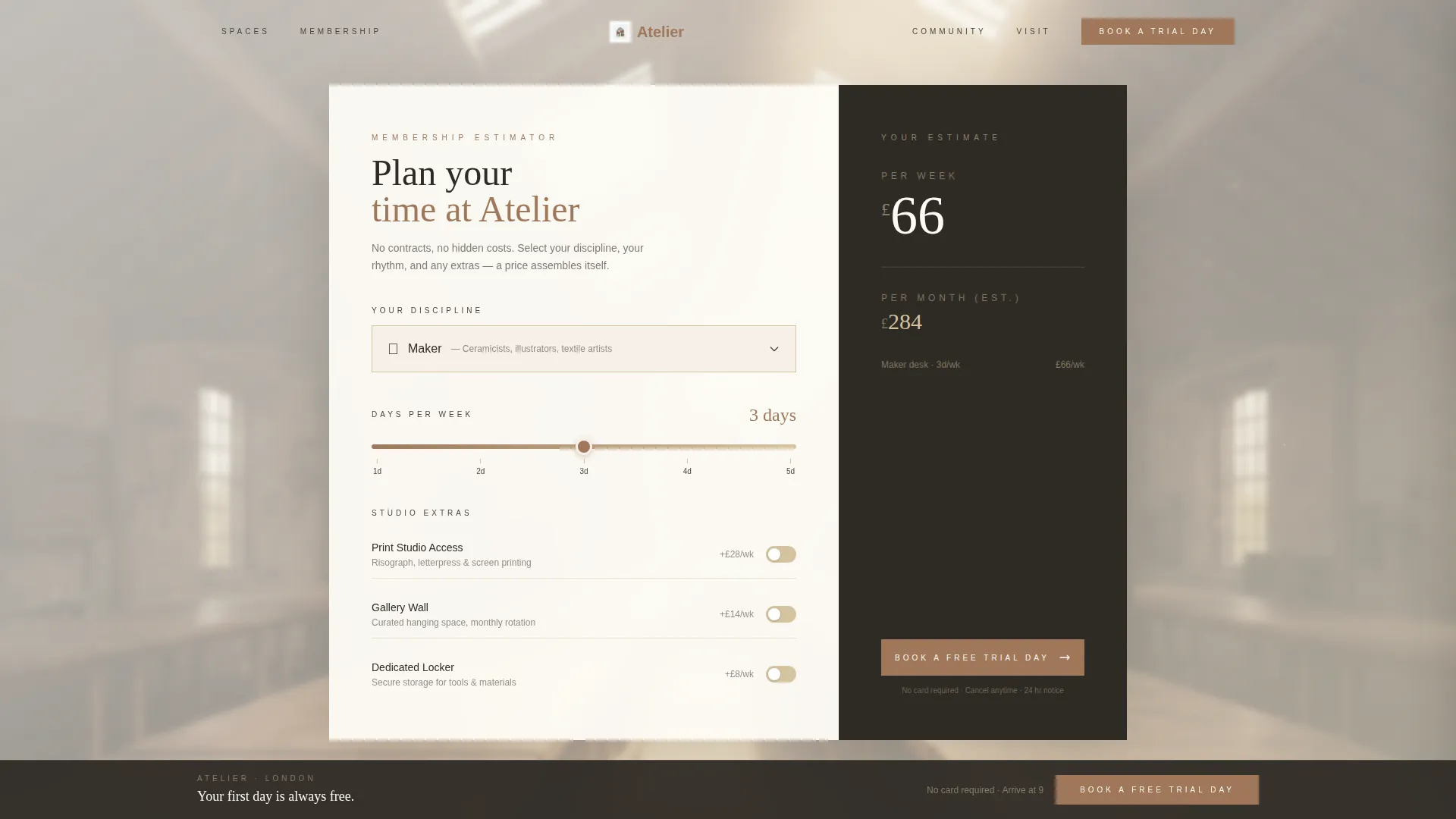
- A real-time Cost Estimator with discipline selector, day-slider, and toggleable extras
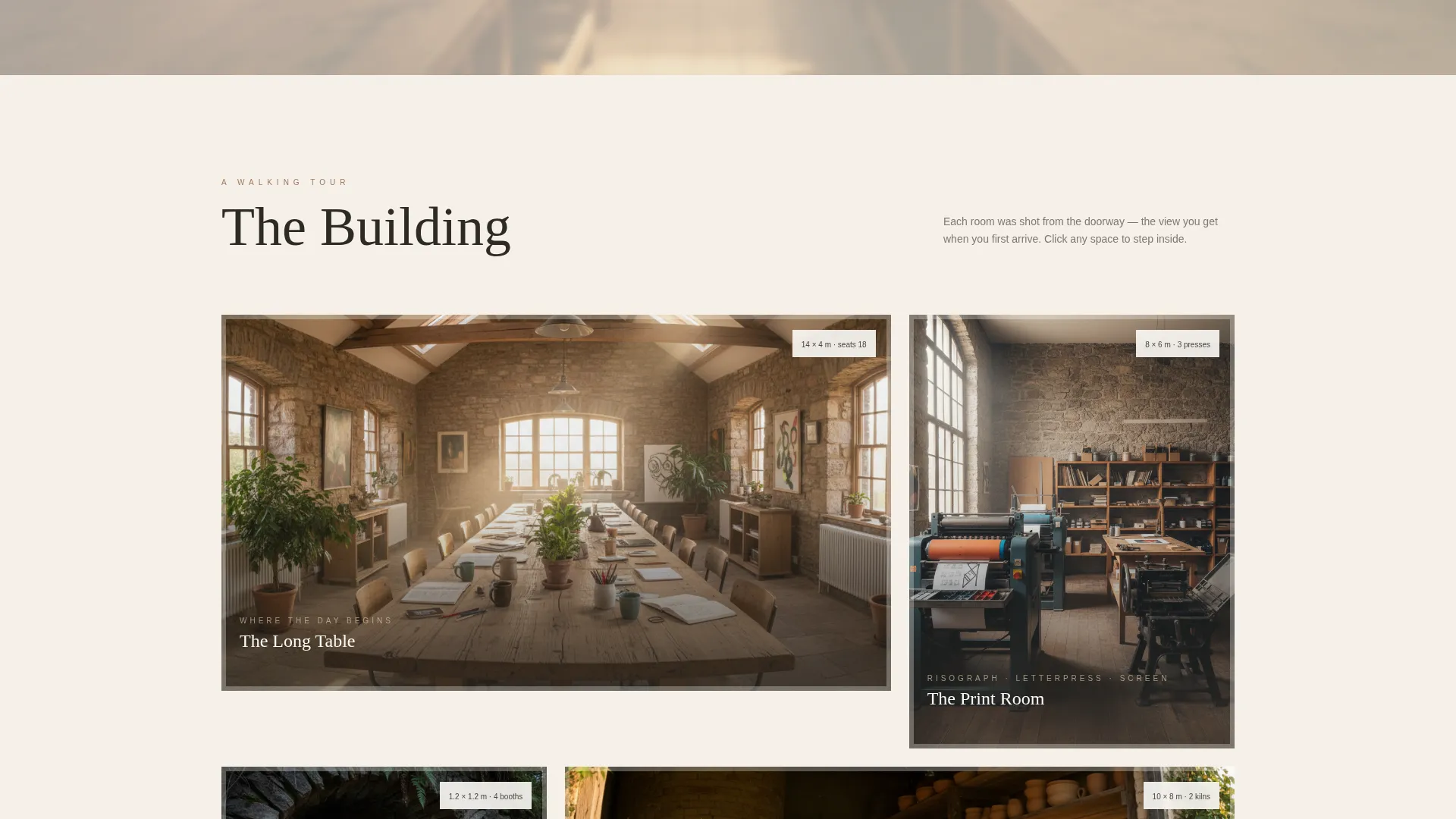
- A doorway-framed room gallery with detail panels showing dimensions, light notes, amenities, and a member quote per room
- A two-step booking flow with a live calendar and a single open question replacing the standard job title field
Feature list
This template is built around a small number of purposeful components. Each one is designed to do meaningful conversion work while staying true to the space's handmade character.
Real-Time Cost Estimator
The header section holds a warm, minimal calculator set against a softly blurred interior photograph. Visitors choose their discipline from an illustrated dropdown, set days per week on a slider styled like a wooden ruler, and toggle extras such as print studio access, a gallery wall, and a locker. The total price assembles in real time in large serif type, making cost feel like planning rather than checkout.
Illustrated Discipline Dropdown
The estimator's discipline selector uses illustrated options for maker, writer, designer, and team. This small detail signals immediately that the space understands how creative people identify their work, and it makes the pricing tool feel personal rather than transactional.
Doorway-Framed Room Gallery
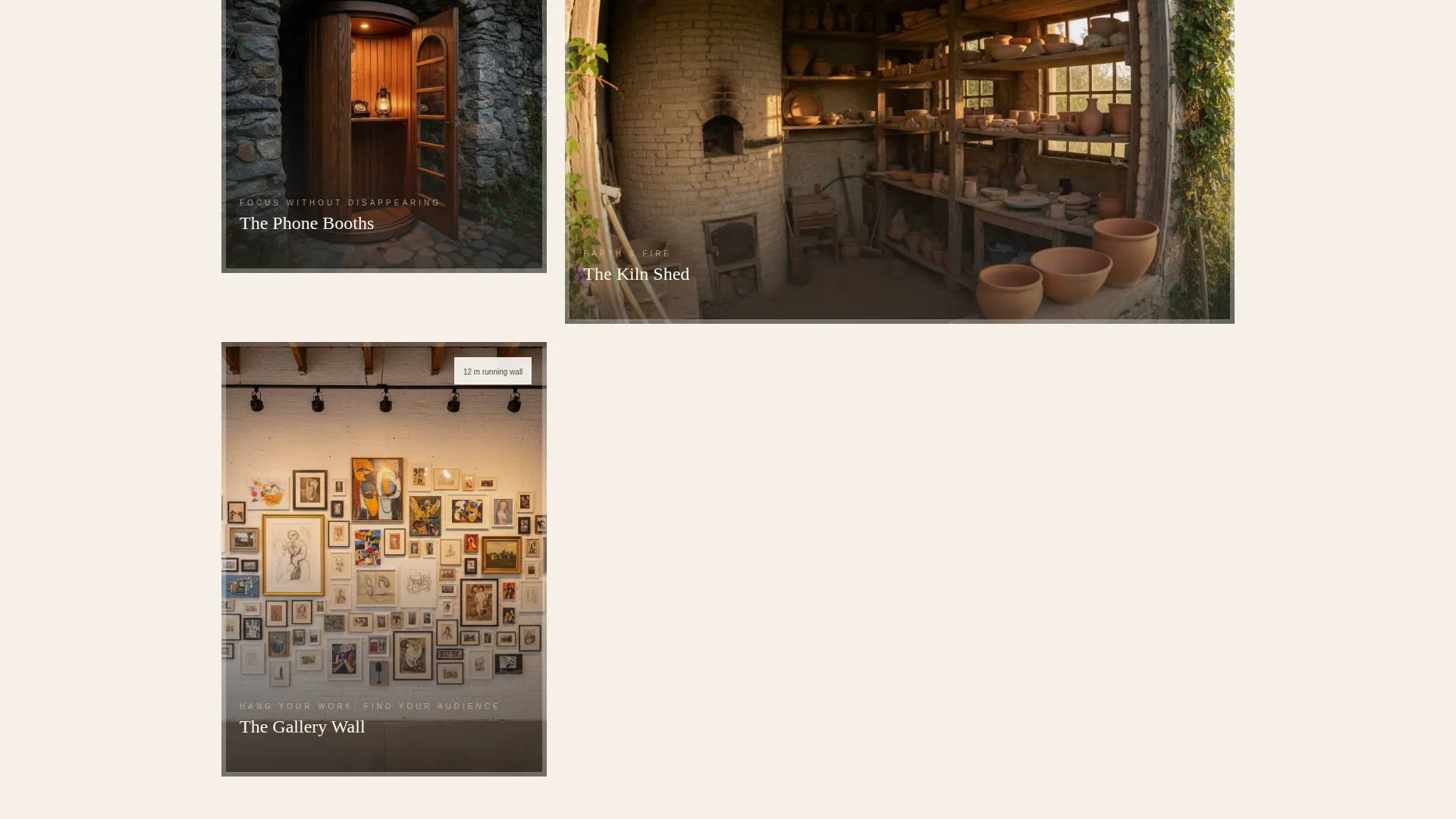
The gallery grid presents each named room as if the visitor is arriving at the threshold. Clicking any thumbnail opens a detail panel with the room's dimensions, available light description, included amenities, and a single quote from a member who works there. The architecture itself becomes the argument for joining.
Two-Step Trial Day Booking
The primary call to action, "Book a Free Trial Day," appears first inside the estimator results and again in a fixed bottom bar after the courtyard section loads. Clicking opens a two-step flow: a calendar showing real-time availability, followed by a short form asking for name, email, and the open question "What are you working on right now?"
Gift a Day Pass Path
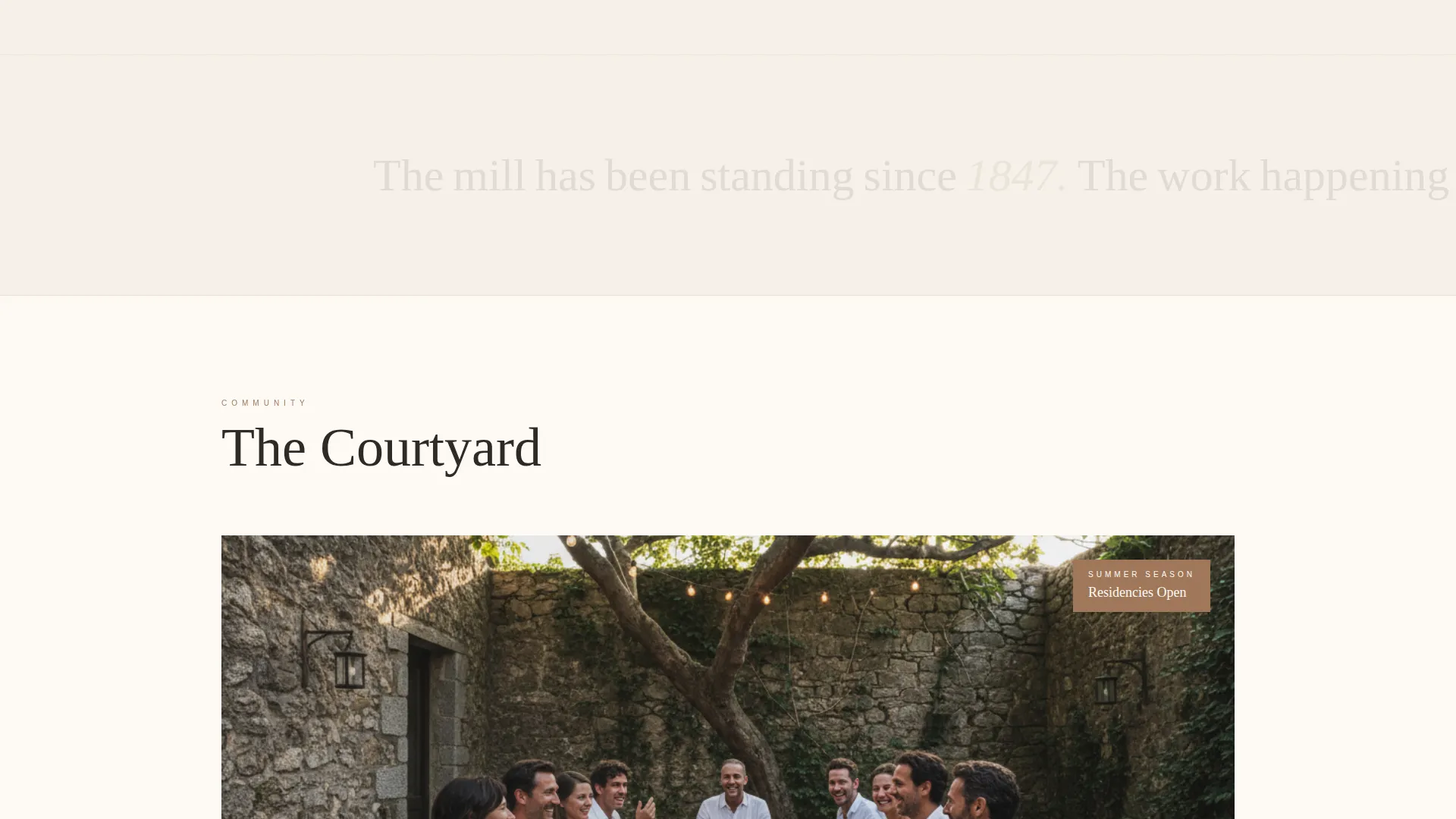
A secondary conversion path sits quietly inside the courtyard section. The "Gift a Day Pass" option lets existing members invite a collaborator or friend without friction, extending the community without requiring a separate campaign or page.
Fixed Bottom Booking Bar
After the courtyard reveal, a fixed bottom bar keeps the primary booking call to action visible as the visitor scrolls back through earlier sections. It appears only after the visitor has seen the full space, so it feels like a natural invitation rather than a persistent interruption.
Page sections overview
| Section | Purpose |
|---|---|
| Cost Estimator Header | Opens the page with real-time pricing against a blurred mill interior |
| Discipline & Extras Selector | Lets visitors personalise their estimated membership cost |
| Room Gallery Grid | Presents named spaces as doorway-entry thumbnails |
| Room Detail Panel | Shows dimensions, light, amenities, and a member quote per room |
| Courtyard Reveal | Closes the spatial tour with a communal, warmly lit outdoor section |
| Gift a Day Pass | Offers a secondary path for members inviting a friend |
| Fixed Booking Bar | Keeps "Book a Free Trial Day" visible after the courtyard section |
| Two-Step Booking Flow | Calendar date picker followed by a short, open-question intake form |
Design & branding system
The visual identity follows a Pastoral Calm direction built around natural, material textures. Every colour, type choice, and interactive state is drawn from the physical world of the mill itself, keeping the design quiet enough that photography does the heavy lifting.
- Colour palette: quarried limestone (#D5C4A1), kiln-fired clay (#A0785A), raw linen white (#F5F0E8), and deep charcoal ink (#2E2A25) for text, with muted sage (#8B9A7E) on hover states and active buttons
- Typography leans on confident serif type for pricing display and headings, keeping body copy light and readable against linen-to-limestone backgrounds
- Interactive states surface clay and sage only where a hand is expected: sliders, toggles, buttons, and dropdown selections
Mobile & speed optimization
The layout is designed to remain clear and usable at every screen size. The estimator, gallery, and booking flow each adapt to narrower viewports without losing their sense of calm and purpose.
- The cost estimator slider and dropdown remain fully operable on touch screens, with generous tap targets on the wooden-ruler-styled control
- Room gallery thumbnails reflow into a single scrollable column on mobile, and detail panels open as full-screen overlays rather than side drawers
- The fixed bottom booking bar is sized for one-thumb reach on mobile, keeping the primary call to action accessible throughout the scroll
How this template helps you convert
The page is structured so that every section either removes a reason not to book or adds a reason to say yes. There is no pressure, only progressive clarity.
- The Cost Estimator at the top removes price uncertainty before it becomes a barrier. Visitors know their likely cost before they have read a single line of copy about the space.
- The room-by-room gallery builds emotional investment incrementally. Each space has its own character, and the member quote in each detail panel provides peer validation without feeling like a testimonials wall.
- The open question "What are you working on right now?" in the booking form lowers the barrier to entry. It signals that the space is interested in the person and their project, not their professional credentials.
Other information about this template
This template is a single landing page, not a multi-page website. It is suited to spaces that want a focused, high-trust first impression rather than a deep content architecture. The page is built with the Real Estate and Property category in mind, specifically the coworking and shared office niche, and its spatial storytelling approach also maps well to co-living and co-working hybrid venues.
- The template style uses a spatial, architectural scroll direction rather than a split-screen or hero-first layout
- The linen-to-limestone background range is intentionally passive, ensuring that real photography of the space always reads as the dominant visual element
- The two-step booking flow is self-contained within the page and does not require a separate booking page or external redirect to complete the initial trial day request
- The "Gift a Day Pass" section is designed as a lightweight secondary path and requires no separate campaign infrastructure to function within the page
Theme
Corporate Precision
Creative direction
Spatial & Architectural
Color system
Sunset Mesa
Style
Split Screen (50/50)
Direction
Direct Sales
Page Sections
Real-time Cost Estimator
Doorway-framed Room Gallery
Two-step Trial Day Booking
Fixed Bottom Booking Bar
Gift a Day Pass Path
Related questions
Can I edit the room names and gallery images to match my actual space?
How does the Cost Estimator work without a live payment system?
Is the booking calendar connected to a real availability system?
Can this template work for a coworking space that is not in a historic building?
What is the 'Gift a Day Pass' section and how does it work?



