Space & Rental Platforms Booking Website Template
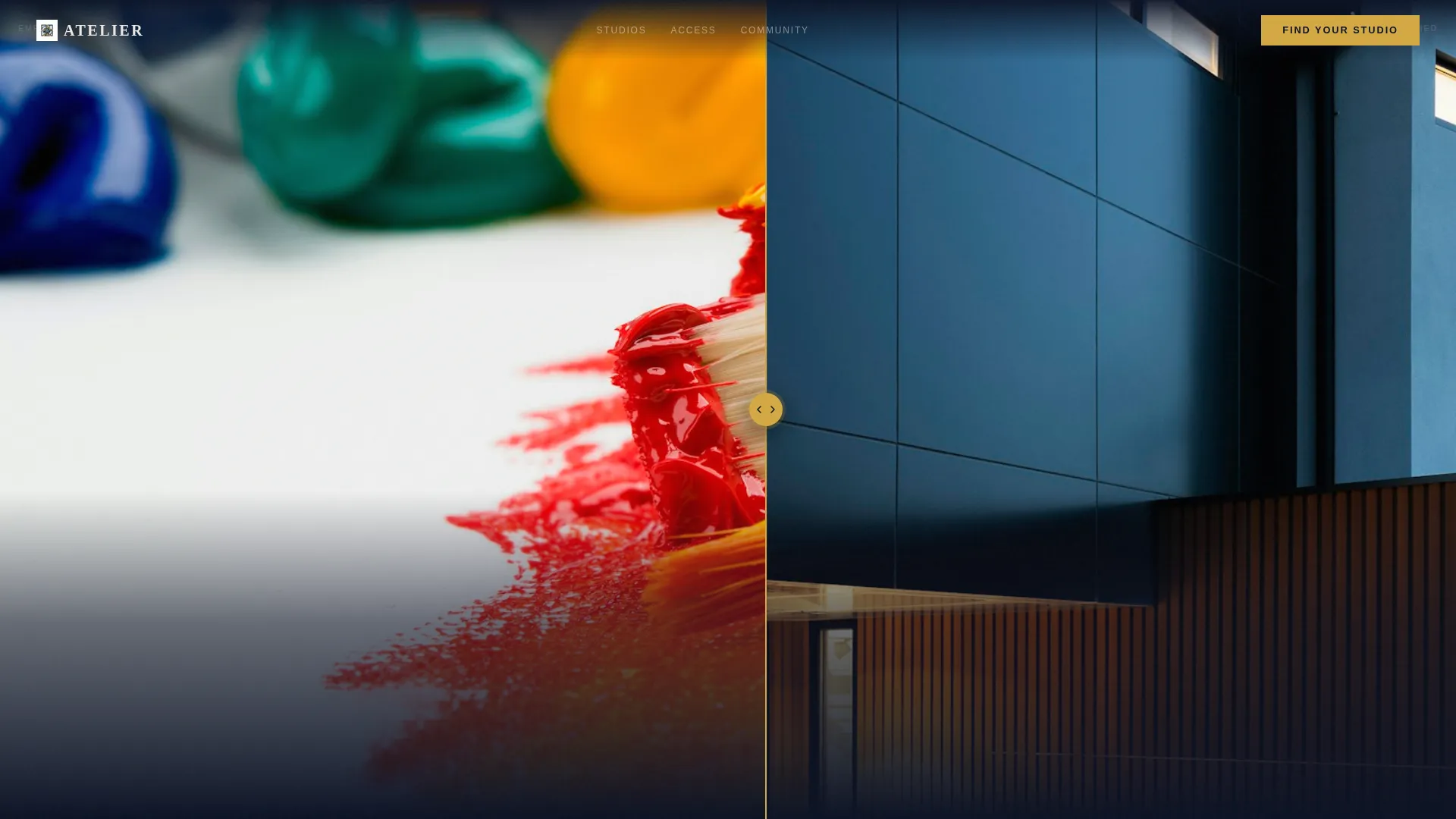
Atelier is a zigzag landing page template built for artist loft and studio rental spaces. It pairs a Before/After Slider header with a Gallery Walk scroll flow, guiding visitors through studio units as if walking a real exhibition. A five-step visual quiz helps each visitor find the right space, while a secondary "Book a Walkthrough" path keeps ready buyers moving fast.
by Rocket studio
Quick summary
Atelier is a single-page studio rental template designed for converted warehouse spaces that house painters, ceramicists, and photographers. The header drops visitors into a raw loft via an interactive Before/After Slider. A Gallery Walk zigzag flow then walks them through available units. The "Find Your Studio" quiz closes the loop by matching each visitor to a shortlist of units.
Who this template is for
This template is built for independent studio rental operators who lease creative workspaces to working artists. If you run a converted warehouse, loft building, or shared creative facility, this page speaks directly to your ideal tenants.
- Emerging painters who have outgrown apartment studios and need wall space they can use freely
- Ceramicists who require kiln access and landlord-free flexibility
- Freelance photographers booking a dedicated shooting space by the month
What problem this template solves
Most rental listing pages feel like classified ads. They show empty rooms, list square footage, and stop there. That approach fails artists, who need to feel a space before they commit to a lease.
- Visitors leave without a sense of what the studio could become for their specific practice
- Prospective tenants have no easy way to match their medium, size preference, and lease length to available units
- Operators lose warm leads because there is no guided path between interest and inquiry
What you get with this template
You get a fully structured landing page that combines immersive visual storytelling with a practical conversion flow. Every section is built around the source brief, so nothing needs to be invented or bolted on later.
- An interactive Before/After Slider header that lets visitors physically reveal the loft transformation
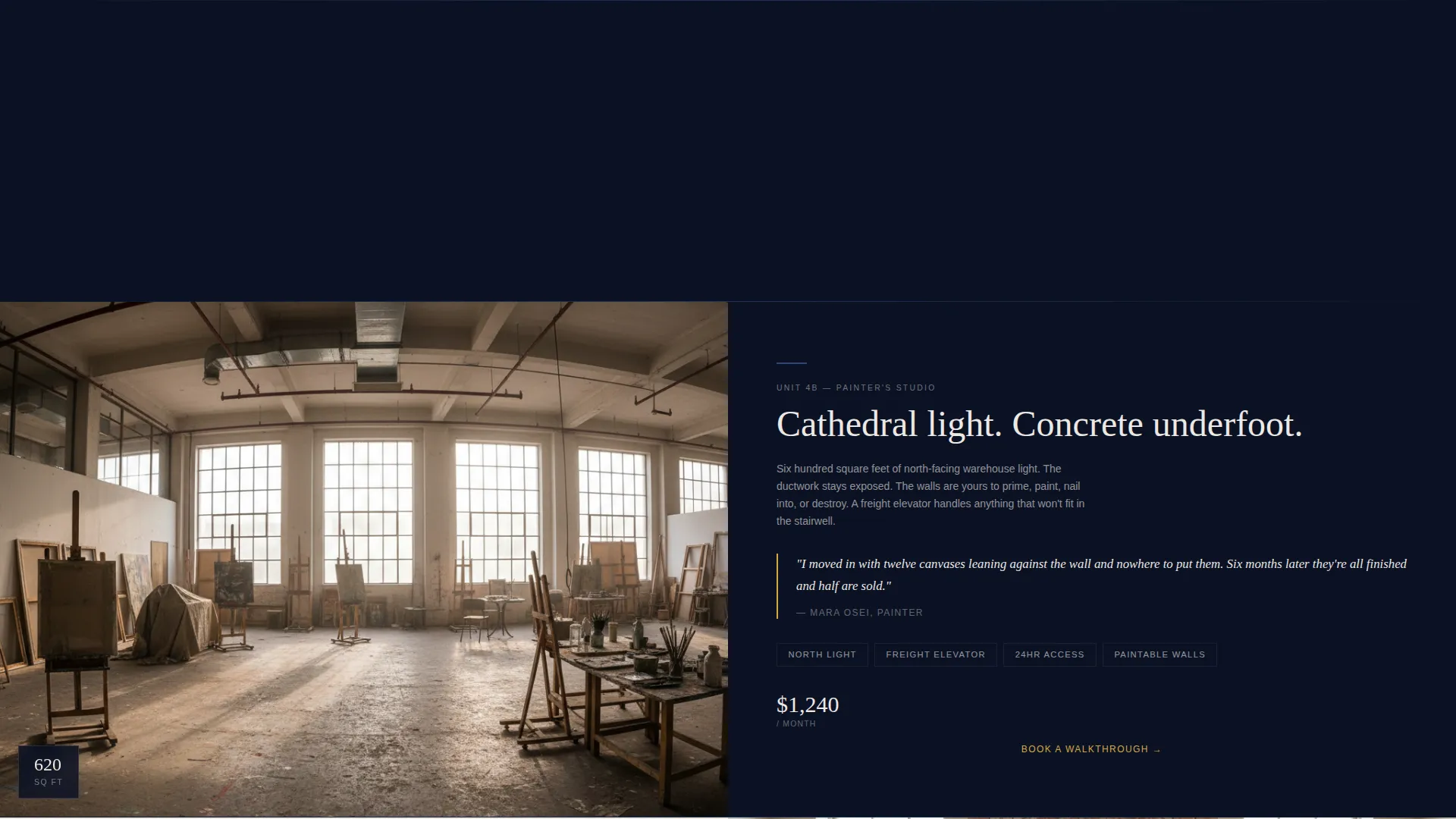
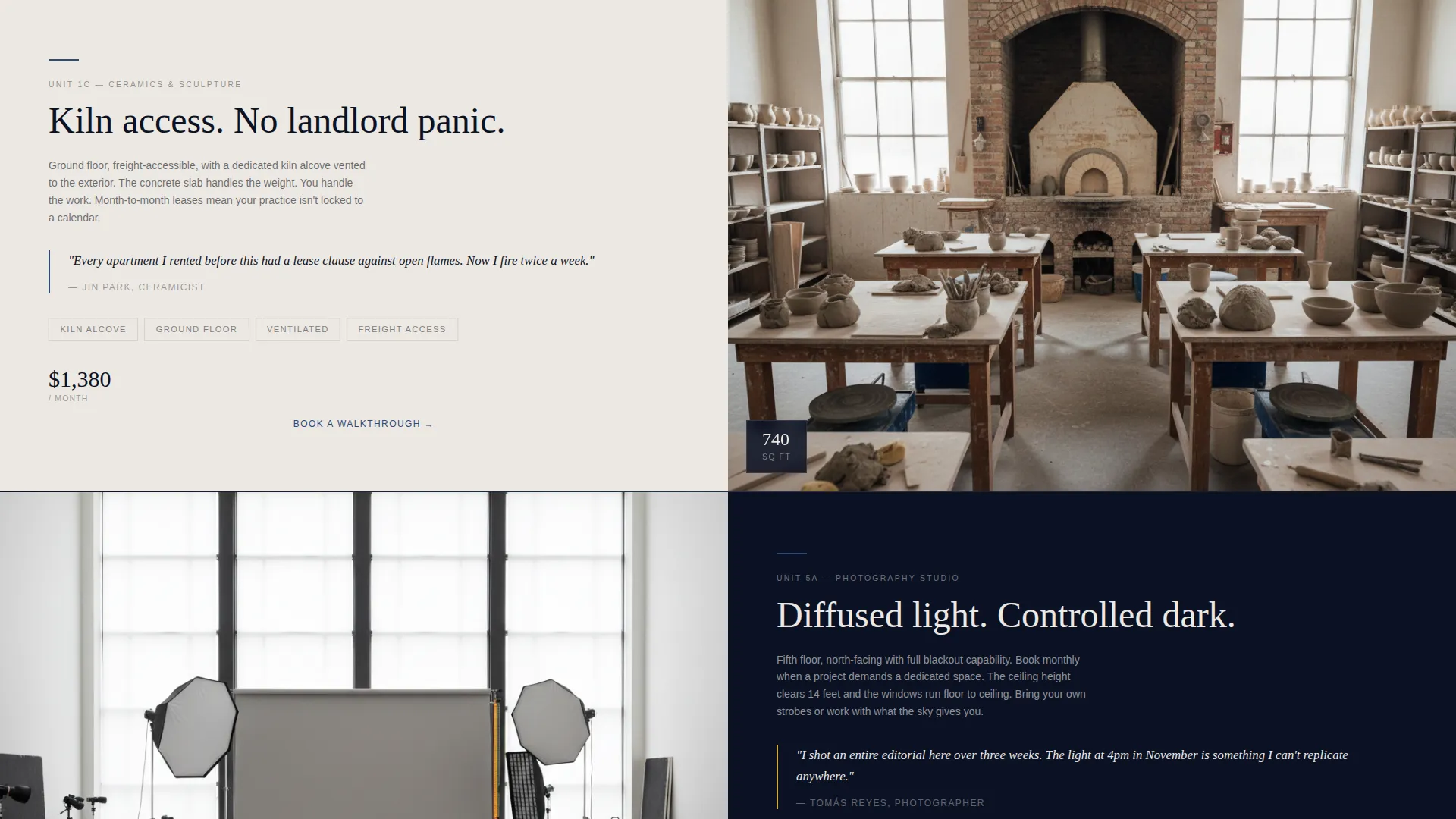
- A zigzag Gallery Walk body with alternating empty-space and artist-at-work imagery
- A five-step visual quiz that delivers a personalized unit shortlist based on medium, size, light, and lease preferences
Feature list
This template is built around five core features drawn directly from the brief. Each one serves a specific purpose in the rental discovery and conversion journey.
Before/After Slider Header
The header shows a single loft in two states side by side. The left side displays raw, gutted space with exposed ductwork and bare concrete. The right side shows the same unit occupied by a working artist mid-installation. Visitors drag the slider themselves, and a headline fades in after interaction: "Your studio is waiting."
Zigzag Gallery Walk Layout
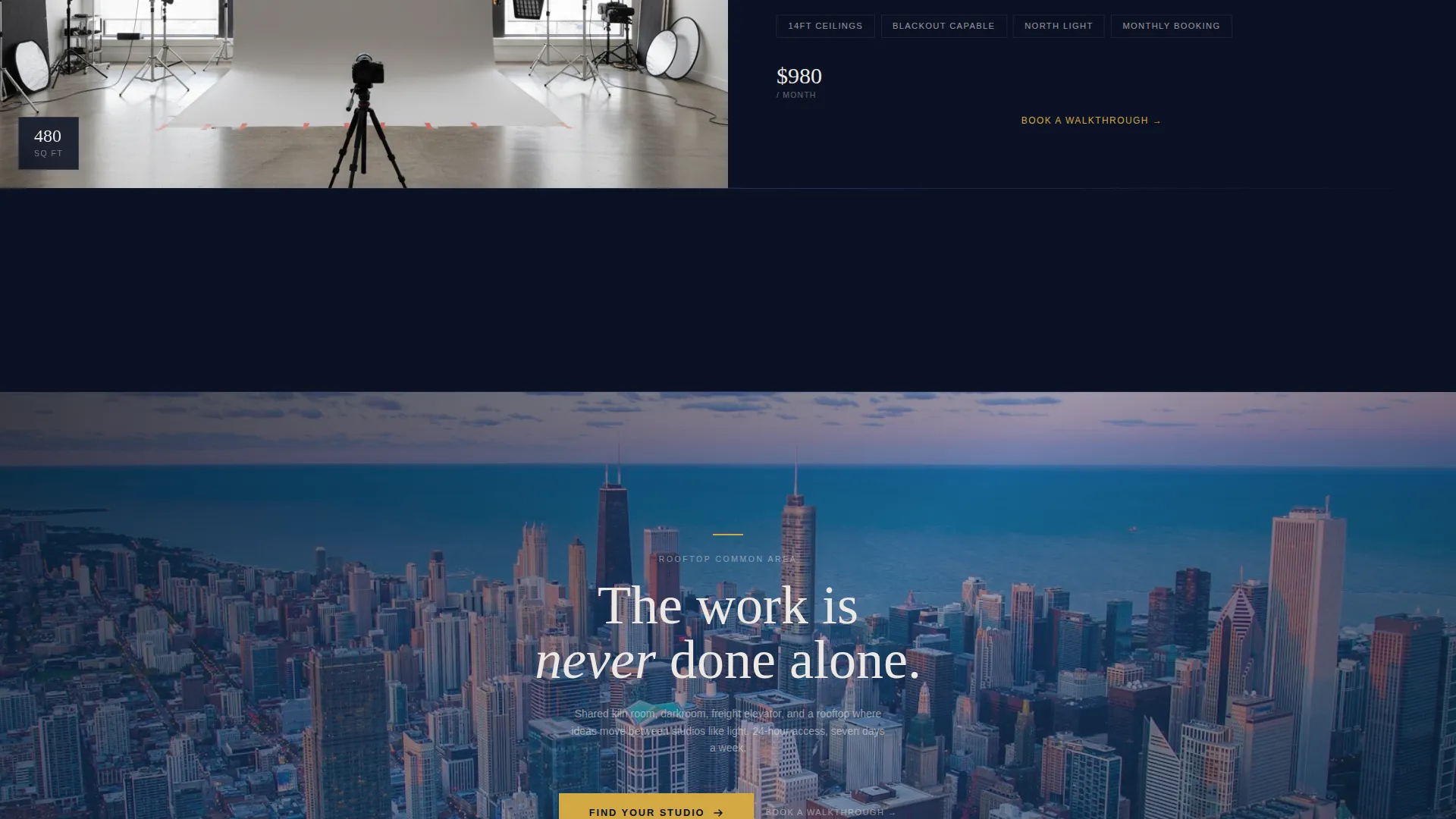
Each section presents a different studio unit in alternating left-right image placement, mimicking the rhythm of walking through a gallery. Left-image sections show empty space with dimensions and features. Right-image sections show that unit inhabited by an artist at work. The scroll builds from smaller units to larger ones, ending at the rooftop common area at golden hour.
Five-Step Visual Quiz
The "Find Your Studio" call to action launches a guided quiz. Step one asks for medium (painting, sculpture, photography, or mixed media). Step two presents preferred square footage as floorplan thumbnails. Steps three and four cover natural light priority and lease length. Step five collects name and email, then delivers a personalized shortlist of available units with pricing.
Secondary Walkthrough Path
Beneath each studio section, a "Book a Walkthrough" text link gives ready visitors a direct path to skip the quiz. This secondary conversion path catches tenants who already know what they want and do not need a discovery process.
Midnight Blue Color System
The palette uses deep indigo-black as the primary background and studio plaster white for content panels. Muted ultramarine appears on section dividers and typographic accents. Cadmium gold is reserved strictly for interactive elements and calls to action, giving the page a focused, studio-at-midnight atmosphere.
Page sections overview
| Section | Purpose |
|---|---|
| Before/After Slider | Immersive header reveals loft transformation |
| Studio Unit One | First gallery room, empty view and artist view |
| Studio Unit Two | Second gallery room, larger space and practice |
| Studio Unit Three | Third gallery room, growing sense of scale |
| Rooftop Common Area | Final section, golden hour shared space reveal |
| Find Your Studio Quiz | Five-step quiz matching visitor to available units |
Design & branding system
The visual identity follows an Atelier Studio theme built on a Midnight Blue color system. The palette is precise and intentional, with each color assigned a specific role so the page never feels cluttered or generic.
- Deep indigo-black (#0B1224) as the primary background, studio plaster white (#EDE8E3) for content panels, and muted ultramarine (#2E4A7A) on dividers and typographic accents
- Cadmium gold (#D4A843) used exclusively for interactive elements and calls to action to draw the eye at the right moment
- The overall tone evokes a studio at midnight, with warm light pooling across a dark workspace and blue hour pressing against tall windows
Mobile & speed optimization
The template is structured for clean rendering across screen sizes. The zigzag layout and slider components are designed to adapt without breaking the visual rhythm that makes the Gallery Walk feel intentional.
- The Before/After Slider interaction is built for touch and drag input, supporting both desktop and mobile visitors
- Floorplan thumbnails in the quiz step are sized for clear visibility on smaller screens without requiring zoom
How this template helps you convert
The page is built around two distinct conversion paths so visitors at different stages of readiness can both move forward without friction.
- The "Find Your Studio" quiz captures visitors who are still exploring. It walks them through five visual steps and ends with a personalized unit shortlist, so the follow-up feels relevant rather than generic.
- The "Book a Walkthrough" text link beneath each studio section gives decisive visitors a direct path to schedule a visit, without requiring them to complete the quiz first.
Other information about this template
This template is listed under the Real Estate and Property category, within the Space and Rental Platforms subcategory, and is specifically matched to the Artist Loft and Studio Rental niche. It carries an intersection match score of 9, reflecting a strong alignment between the template design and the target use case.
- The template style is Zigzag/Alternating, with a Gallery Walk creative direction that structures each section as a distinct room in a moving exhibition
- The header concept is a Before/After Slider, and the landing page direction is Quiz/Assessment, both of which are defined in the matched intersection row
- The theme is Atelier Studio, and the color system is Midnight Blue, making it visually distinctive within real estate and rental template categories
Theme
Atelier Studio
Creative direction
Gallery Walk
Color system
Midnight Blue
Style
Zigzag/Alternating
Direction
Quiz/Assessment
Page Sections
Before/after Slider Header
Zigzag Gallery Walk Layout
Five-step Visual Quiz
Secondary Walkthrough Path
Midnight Blue Color System
Related questions
Who is this landing page template designed for?
Can visitors skip the quiz and book directly?
How does the Before/After Slider header work?
How many studio sections are included in the template?
Does the quiz support different types of creative practices?



