New Construction Property Landing Page Template
Atlas is a precision-crafted landing page template built for new construction property showcases. It combines an interactive map header, a masonry listing gallery, and full detail views into one cohesive flow. Designed for real estate developers and sales teams, it turns site visits into qualified tour reservations using real listing data and two clear lead capture paths.
by Rocket studio
Quick summary
Atlas is a single-page new construction showcase template built for high-intent property buyers and investor audiences. It leads with a full-viewport interactive map, flows into a modular card gallery, and closes with friction-light lead capture. The design language draws from precision instrument interfaces, pairing deep navy backgrounds with cyan interactive accents for a confident, data-forward presentation.
Who this template is for
This template is designed for real estate developers, new construction sales teams, and property marketing agencies who need to present active building projects with clarity and authority. It speaks directly to buyers who want real data before they commit to a showing.
- Developers marketing multiple new construction sites to relocating professionals and dual-income households
- Investment groups evaluating cap rates and unit availability across several zip codes at once
- Real estate agencies representing builders who want a polished digital showroom rather than a generic listing page
What problem this template solves
Most property listing pages bury the most important information behind generic hero images and buried contact forms. Buyers arrive ready to compare, and the page makes them work too hard to get real answers. Atlas removes that friction by making data the design itself.
- Visitors cannot quickly locate pricing, availability counts, or completion timelines without clicking through multiple pages
- Generic listing layouts fail high-intent buyers like executives or investors who need fast comparative data
- Lead forms that appear before the buyer has seen real value create resistance instead of conversion
What you get with this template
Atlas delivers a complete single-page property showcase with every section purpose-built for new construction sales. Each component gives visitors a reason to stay, explore, and ultimately request a tour or download.
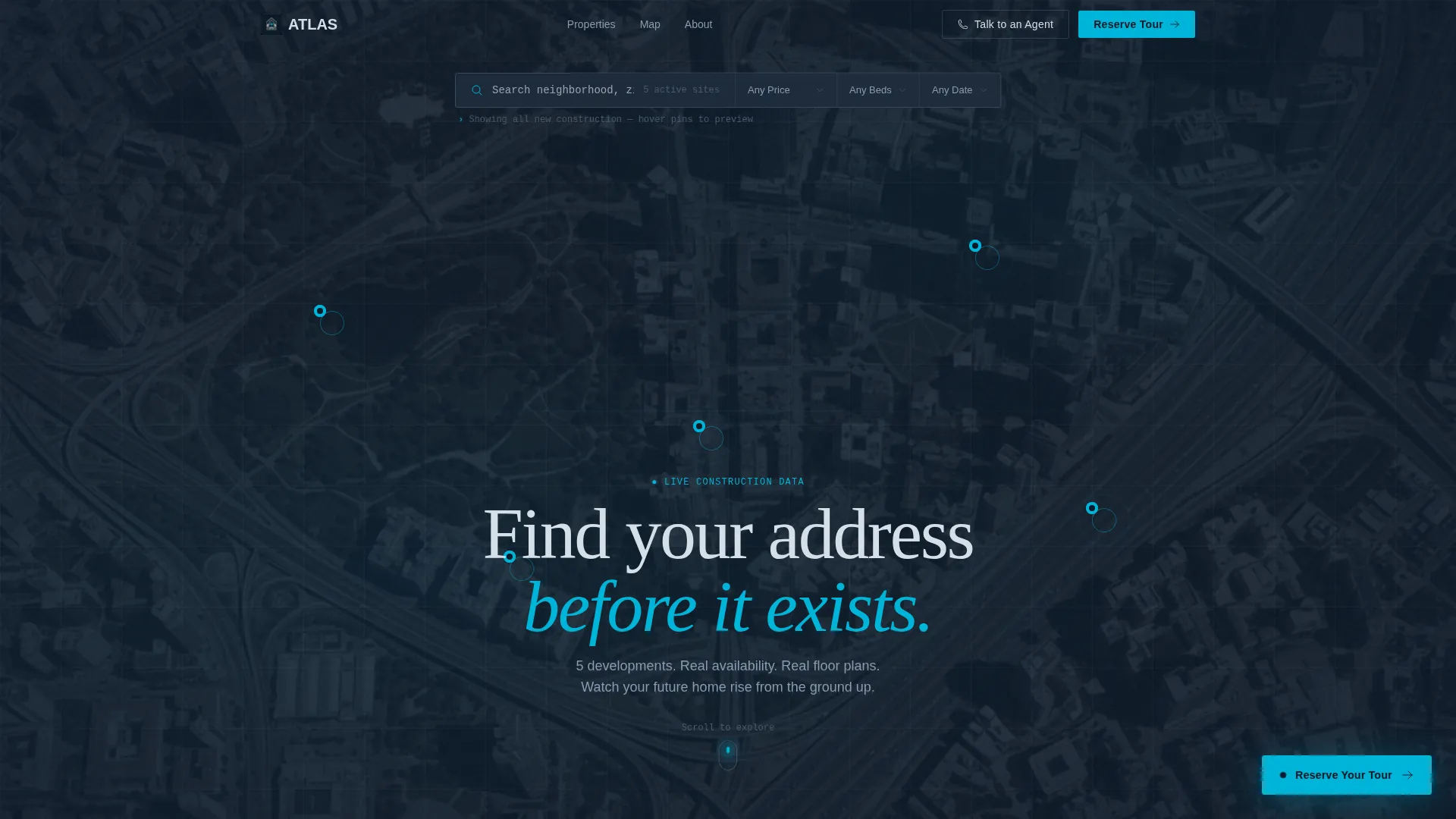
- A full-viewport interactive map header with pulsing location pins and hover-triggered micro-cards showing price, unit count, and estimated completion quarter
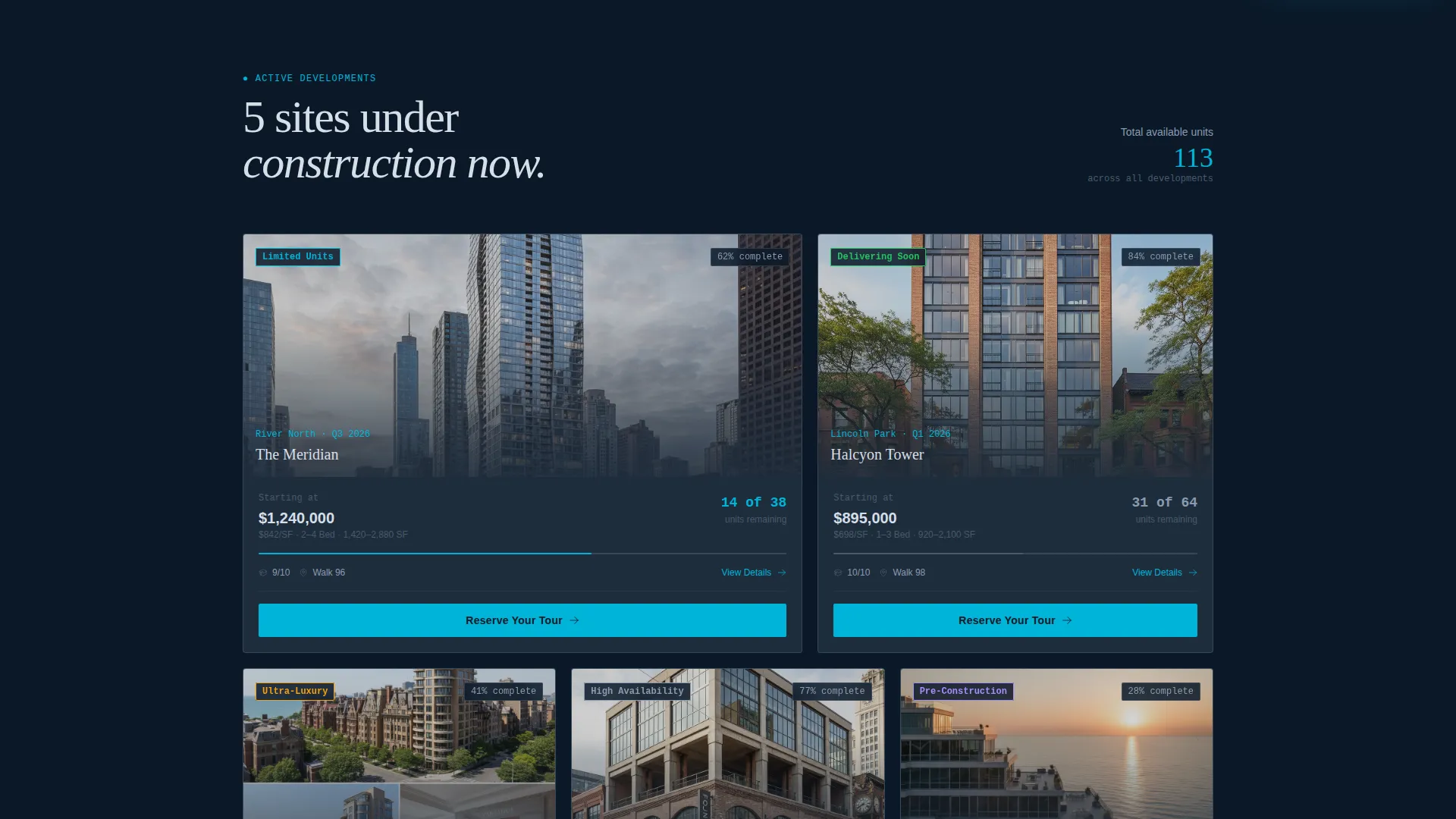
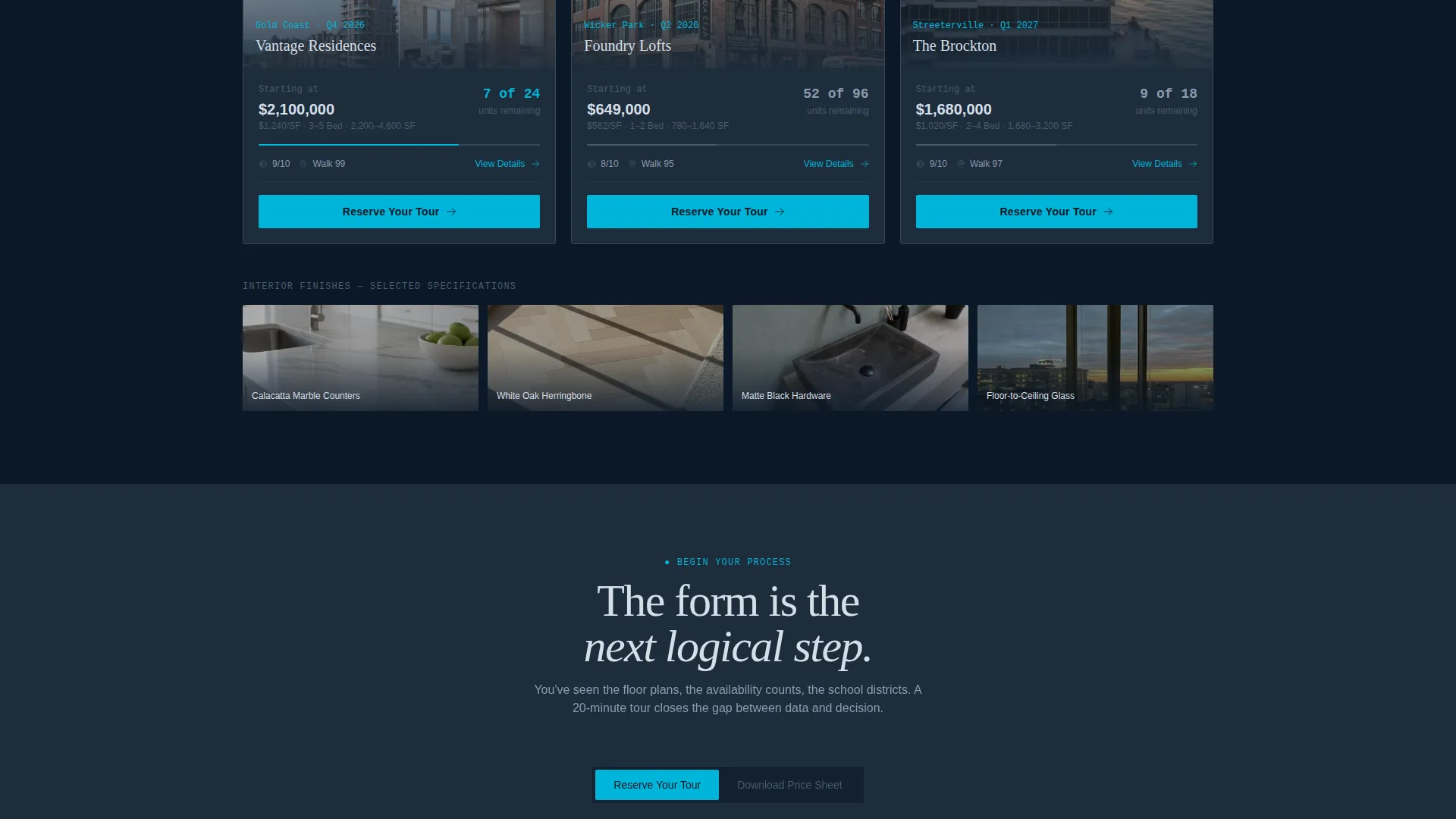
- A masonry card gallery alternating cinematic exterior renders with close-up finish photography, each card showing live availability as a fraction like "14 of 38 remaining"
- Expanded detail views per listing with floor plans, amenity breakdowns, a construction timeline with percentage-complete bars, and a neighborhood data panel covering walk scores, school ratings, and commute times
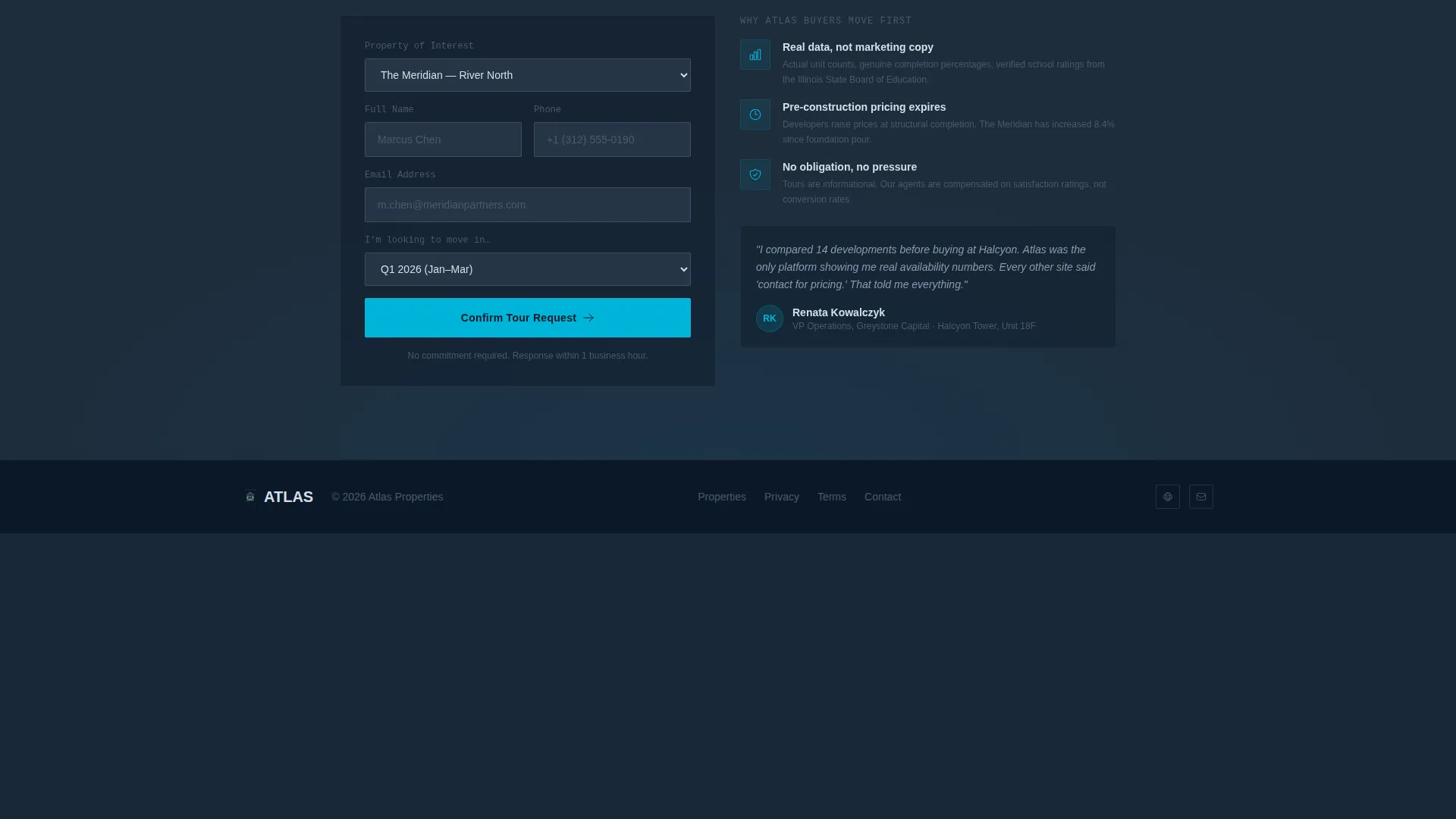
- Two lead capture paths: a "Reserve Your Tour" form pre-filled from the clicked listing, and a lower-friction "Download the Full Price Sheet" email capture delivering a branded PDF
Feature list
This template packages several distinct interactive and visual components into one cohesive landing page. Each feature is grounded in the brief and built to serve a specific buyer behavior.
Interactive Map Header
The header occupies the full viewport and functions as the primary navigation interface. Satellite-view topographic styling grounds each development in its real location. Cyan pins pulse slowly and reveal a hover micro-card showing a rendering thumbnail, starting price, unit count, and estimated completion quarter, giving visitors meaningful preference data before a single click.
Masonry Listing Gallery
Below the map, a responsive masonry grid alternates wide cinematic exterior renders with tight editorial detail shots. Each card lifts on hover, gains a 2-pixel cyan border, and displays unit availability as a fraction. The layout rewards visual scanning while communicating genuine scarcity at a glance.
Expanded Property Detail View
Clicking any gallery card opens a full detail view. It includes floor plan displays, a structured amenity breakdown, a construction timeline with percentage-complete progress bars, and a neighborhood data panel. The panel surfaces walk scores, school ratings, and commute times, precisely the information a relocating executive or comparing investor needs.
Dual Lead Capture System
Two conversion paths serve different buyer temperatures. The primary "Reserve Your Tour" button appears as a fixed element in the bottom-right corner after a visitor engages with any listing detail. It also appears inline at the end of each property card. The secondary path, "Download the Full Price Sheet," captures an email address only and delivers a branded PDF, qualifying warmer leads with minimal friction.
Command-Line Search Bar
A floating search bar sits at the top of the map header and filters listings by price range, bedroom count, and estimated completion date. The styling references a command-line interface, reinforcing the precision data aesthetic and making the tool feel native to a technical or analytical buyer.
Editorial Photography Framework
The visual system is built around two image types used in deliberate alternation: hyperreal architectural renders and construction-progress photography. Detail shots of veined quartz counters, matte black hardware, and white oak herringbone flooring are built into the card grid to anchor the lifestyle promise at the finish level.
Page sections overview
| Section | Purpose |
|---|---|
| Interactive Map Header | Primary navigation interface with pulsing listing pins and hover micro-cards |
| Floating Search Bar | Filters listings by price, bedroom count, and completion date |
| Masonry Card Gallery | Visual grid of renders and progress photography with availability fractions |
| Property Detail View | Floor plans, timelines, amenities, and neighborhood data per listing |
| Reserve Your Tour Form | Primary lead capture pre-filled from clicked listing card |
| Price Sheet Download | Secondary email-only capture delivering a branded PDF |
| Fixed call to action Button | Persistent tour reservation trigger after listing engagement |
Design & branding system
Atlas uses a Corporate Precision visual identity built around a Midnight Blue color system. The palette is deliberately narrow and purposeful, drawing authority from contrast rather than variety. Every color has a defined role, and none are used decoratively without function.
- Background and surface layers use deep terminal navy (#0B1929) and brushed graphite (#1E2D3D) to create depth without distraction
- Body text and thin dividing rules use platinum wire (#D6DFE8) for legibility against dark surfaces
- Signal cyan (#00B4D8) is reserved exclusively for interactive states, map pins, and call-to-action buttons, making every actionable element immediately identifiable
Mobile & speed optimization
The template is structured to maintain its precision aesthetic and functional hierarchy across screen sizes. The layout decisions that serve desktop users translate cleanly to smaller viewports without losing the data-forward experience.
- The masonry grid and card components reflow for tablet and mobile viewports, keeping availability fractions and hover states accessible on touch devices
- The fixed "Reserve Your Tour" button and floating search bar are positioned to remain usable without obscuring content on smaller screens
- Image presentation across the gallery prioritizes editorial impact at every viewport width, keeping renders and detail photography legible regardless of device
How this template helps you convert
Atlas earns the conversion by delivering real value before asking for anything in return. The lead capture moment arrives after the visitor has already seen floor plans, availability counts, and neighborhood data.
- The interactive map and gallery give visitors enough comparative information to develop a genuine preference, so the "Reserve Your Tour" prompt arrives at the right moment rather than as an interruption.
- Pre-filling the tour form with the property the visitor clicked reduces the steps between interest and submission, removing the most common point of abandonment in real estate lead flows.
- The "Download the Full Price Sheet" path offers a lower-commitment entry point that captures email addresses from visitors who are not yet ready to book, extending the reach of the lead funnel without adding friction to the primary path.
Other information about this template
Atlas is a single landing page template, not a multi-page property portal. It is intended for showcasing a curated set of active new construction projects within one cohesive scrolling experience. The template suits developers and agencies who want a premium digital presentation without the complexity of a full site build.
- The template style follows a Card Grid (Modular) structure, making it straightforward to add or remove individual property cards as projects launch or sell out
- The Creative Direction is classified as Interactive Explorer, meaning the interface rewards active engagement through hover states, map interaction, and expandable detail views
- The template is well suited to real estate property listing and portal use cases, particularly for new construction audiences who expect precision, transparency, and visual quality from the brands they consider
Theme
Atelier Studio
Creative direction
Interactive Explorer
Color system
Warm Stone
Style
Card Grid (Modular)
Direction
Quiz/Assessment
Page Sections
Interactive Map with Hover Micro-cards
Masonry Gallery with Availability Fractions
Full Property Detail View
Dual Lead Capture Paths
Command-line Floating Search Bar
Related questions
How many property listings can this template display?
Is this template designed only for new construction projects?
How does the dual lead capture system work?
What types of images work best in the gallery?
Can the fixed call to action button be repositioned or removed?



