Intelligent Environmental Assessment Landing Page Template
Inspector is a stats-first editorial landing page template built for environmental inspection professionals. It combines a cinematic dark hero, large-format credential numbers, a deposition-style FAQ layout, and a structured lead generation form. The result is a single-page presence that answers every serious buyer question before they think to ask it.
by Rocket studio
Quick summary
Inspector is a single-page editorial template designed for environmental inspection practices. It opens with a dark full-bleed hero and phases in hard credential numbers immediately. Every scroll stop leads with a large stat before any explanation appears. The page closes with a focused intake form that captures qualified assessment leads efficiently.
Who this template is for
This template is built for established environmental inspection firms that need to convert high-stakes professional buyers. The layout and tone are calibrated for B2B audiences who evaluate vendors the way they read a deposition transcript.
- Real estate attorneys who need Phase I or Phase II environmental site assessments before a transaction closes
- Facility managers and school district administrators responding to air quality concerns or regulatory pressure
- Environmental inspection practices that want a desktop-first professional presence built around credentials and speed
What problem this template solves
Most professional service pages bury the credentials. Buyers with urgent timelines and legal accountability cannot afford to dig. This template solves that by placing the most persuasive proof at the top and never letting the reader wonder whether the firm qualifies.
- Visitors arrive with two unspoken questions: "Are they qualified?" and "How fast can they move?" The template answers both before the form appears
- Generic service pages feel interchangeable; this layout uses large-format numbers and editorial rhythm to make the practice feel singular and authoritative
- Lead capture is weak on most inspector sites; the intake form here is structured around property type, concern category, and transaction timeline to qualify leads at the point of contact
What you get with this template
You get a complete, ready-to-customize editorial landing page with every major section built and sequenced. The structure moves from proof to context to conversion without detours.
- A cinematic hero section with delayed monospaced type phase-in, a dark full-bleed photograph concept, and a floating credential badge
- Five core content sections including a stats impact block, services FAQ layout, amber testimonial callout band, and lead generation form with a gated PDF checklist path
- A footer styled in the GitHub Developer Minimal pattern, completing the technical-authority aesthetic
Feature list
A brief note on what this template delivers as a designed system: every feature below is directly described in the source brief and represents a distinct, built-in capability of the Inspector template.
Stats-First Scroll Architecture
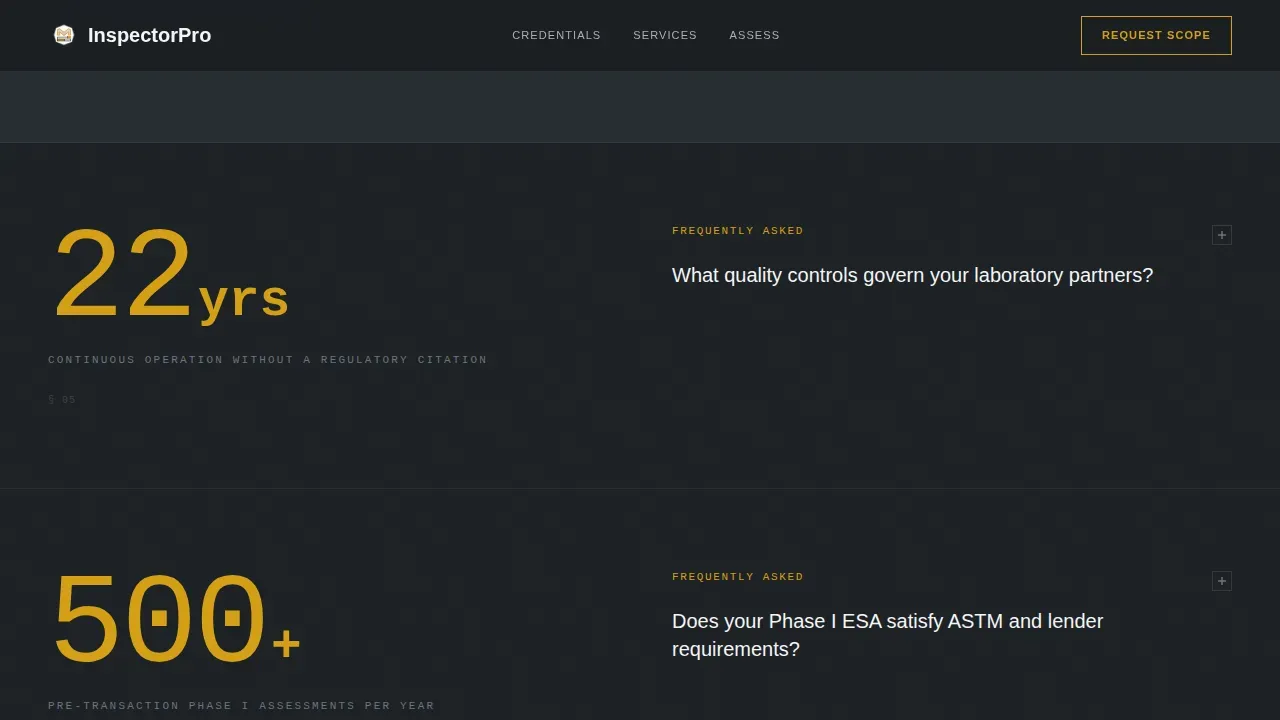
Every scroll stop opens with a large-format credential number before any supporting copy appears. The alternating full-width and two-column block layout creates a rhythm that holds attention and builds trust incrementally as the visitor moves down the page.
Deposition-Style FAQ Layout
The services FAQ section presents inspection-type answers in a precise, citation-ready editorial format. Each answer reads like a prepared expert-witness response: no filler, no hedging, one clear idea per block. This tone matches the expectations of legal and regulatory buyers.
Amber Testimonial Callout Band
A horizontal band breaks the steel palette midpage with an amber-bordered client quote from a real estate closing attorney. It is the only warm element on the page, which gives it the visual weight of a highlighted exhibit rather than a generic review.
Structured Lead Generation Form
The primary call to action is an assessment scope intake form. It includes a property address field, a pre-1980 or post-1980 building age toggle, concern type checkboxes covering asbestos, lead, mold, Phase I and Phase II assessments, and indoor air quality, plus a timeline selector with pre-transaction, regulatory response, and routine options.
Gated PDF Checklist Path
A secondary conversion path offers a downloadable pre-purchase environmental checklist. The download is gated behind an email address and firm name field, creating a lower-commitment entry point for visitors who are not ready to request a full assessment scope.
GSAP-Powered Stat Animations
The template includes medium-level animation driven by GSAP ScrollTrigger. Stat counters animate on scroll, the hero type phases in after a short delay, and content blocks reveal in a staggered sequence. This pacing reinforces the stats-first editorial rhythm without overwhelming the page.
Page sections overview
| Section | Purpose |
|---|---|
| Dark Full-Bleed Hero | Establishes authority with a cinematic photograph, delayed monospaced headline phase-in, and a floating credential badge |
| Stats Impact Blocks | Delivers large-format credential numbers in alternating full-width and two-column blocks, each followed by a concise FAQ-style explanation |
| Services FAQ Layout | Covers the scope of inspection types in an editorial format with deposition-style precision |
| Amber Callout Band | Breaks the page rhythm with an attorney testimonial quote in an amber-bordered horizontal band |
| Lead Generation Form | Captures qualified leads through a structured assessment scope intake with concern type checkboxes and a timeline selector |
| PDF Checklist Gate | Offers a downloadable pre-purchase environmental checklist gated behind email and firm name |
| Developer Minimal Footer | Closes the page with a clean, low-decoration footer pattern consistent with the technical-authority design |
Design & branding system
The visual identity follows an Executive Suite theme using a Monochrome Steel color system. Every palette choice reinforces the stainless-steel sampling-table aesthetic: sterile, load-bearing, and free of decoration.
- Core colors are deep gunmetal (#1B1F23) for backgrounds, brushed aluminum (#A8B0B8) for section dividers and secondary text, and clinical white (#F4F5F6) for body text against dark panels
- Regulatory amber (#D4A017) is used sparingly as the single accent color, reserved for callout numbers, hover states, call to action borders, and the testimonial band, so every appearance reads as a hazard flag rather than decoration
- Typography pairs JetBrains Mono for statistics and headlines with DM Sans for body copy, creating a contrast between machine-precision data and readable editorial prose
Mobile & speed optimization
The template is built desktop-first to match the working habits of its primary audience: attorneys and facility managers reviewing vendor options on large screens. Mobile support is included so the page remains functional across devices.
- Desktop-first layout ensures the alternating full-width and two-column stat blocks render with full visual impact on larger viewports
- Server Components handle static content sections to keep the rendered payload lean, with Client Components used minimally for interactive elements like the form toggles and the PDF gate modal
- GSAP ScrollTrigger animations are scoped to scroll events rather than load events, so the initial page render is not blocked by animation setup
How this template helps you convert
The conversion strategy is embedded in the page sequence. By the time a visitor reaches the form, the template has already answered every objection a qualified buyer would raise.
- The hero and stat blocks establish jurisdiction count, turnaround speed, and findings accuracy before any marketing language appears, so the form arrives as a logical next step rather than a cold ask
- The assessment scope intake form qualifies leads at the point of submission by capturing property address, building age, concern type, and transaction timeline, giving the inspector actionable context before the first call
- The gated PDF checklist creates a parallel conversion path for buyers in an earlier research phase, capturing firm name and email from contacts who are not yet ready to commit to a full scope request
Other information about this template
This template is part of the Inspector product line and is designed to sit at the intersection of editorial publishing aesthetics and professional services lead generation. A few additional points are worth noting for buyers evaluating fit.
- The template style is Editorial and Magazine, and the creative direction is Stats-First Impact, which makes it well suited to any practice that can lead with specific, verifiable performance numbers
- The theme is Executive Suite, which signals a senior-audience presentation layer rather than a consumer-friendly or startup-casual tone
- The header concept is Dark Full-Bleed with a tight amber glow, which requires a high-quality photograph of inspection fieldwork to execute correctly; the brief describes a specific concept involving a gloved hand, a bulk sample bag, and a chain-of-custody label under headlamp light
- The footer pattern is derived from the GitHub Developer Minimal style, reinforcing technical authority through restraint rather than decoration
- This is a single landing page template, not a multi-page website; it is designed to handle the full buyer journey from first impression to form submission within one scrollable session



Theme
Executive Suite
Creative direction
Stats-First Impact
Color system
Monochrome Steel
Style
Editorial/Magazine
Direction
Lead Generation
Page Sections
Stats-first Scroll Architecture
Deposition-style Services FAQ
Amber Testimonial Callout Band
Structured Assessment Intake Form
Gated PDF Checklist Download
GSAP Scrolltrigger Animations
Related questions
What types of inspection services does this template cover?
Who is the intended audience for this landing page template?
Does the template include more than one way to capture leads?
Can I update the credential statistics shown on the page?
What animation level should I expect from this template?



