Drain Cleaning & Sewer Service Landing Page Template
Auger is a hero-dominant landing page template built for drain cleaning and sewer service businesses. A stats-forward hero fills ninety percent of the viewport with animated metrics, while a spatial scroll takes visitors underground through each layer of a home's plumbing system. The layout is engineered for emergency leads: three-field form, floating call-to-action bar, and a secondary scheduling path.
by Rocket studio
Quick summary
Auger is a single-page lead generation template for drain cleaning and sewer service crews. The hero dominates the screen with three animated performance metrics. Below it, a spatial architectural scroll reveals each plumbing layer and its matching service. The form is stripped to three fields so someone standing in basement water can request a technician in under a minute.
Who this template is for
This template is built for service businesses that need fast, credible lead capture. It works best when the customer is already in crisis mode and needs to act immediately.
- Drain cleaning and sewer service companies handling residential and commercial calls
- Property managers and plumbing contractors who field emergency drain requests
- Restaurant and facility operators who need to communicate 24/7 availability
What problem this template solves
Most service pages bury the contact form under long paragraphs. When a homeowner has water on the floor, that friction costs a job. This template removes every unnecessary step between arrival and submission.
- Emergency visitors skip reading and need a visible, fast-loading action path
- Generic plumbing pages lack the proof and urgency cues that build instant trust
- Multi-step forms on mobile lose conversions before the address field is filled
What you get with this template
The template delivers a complete, single-screen lead funnel with layered visual storytelling below the fold. Every section is purposeful and tied directly to conversion.
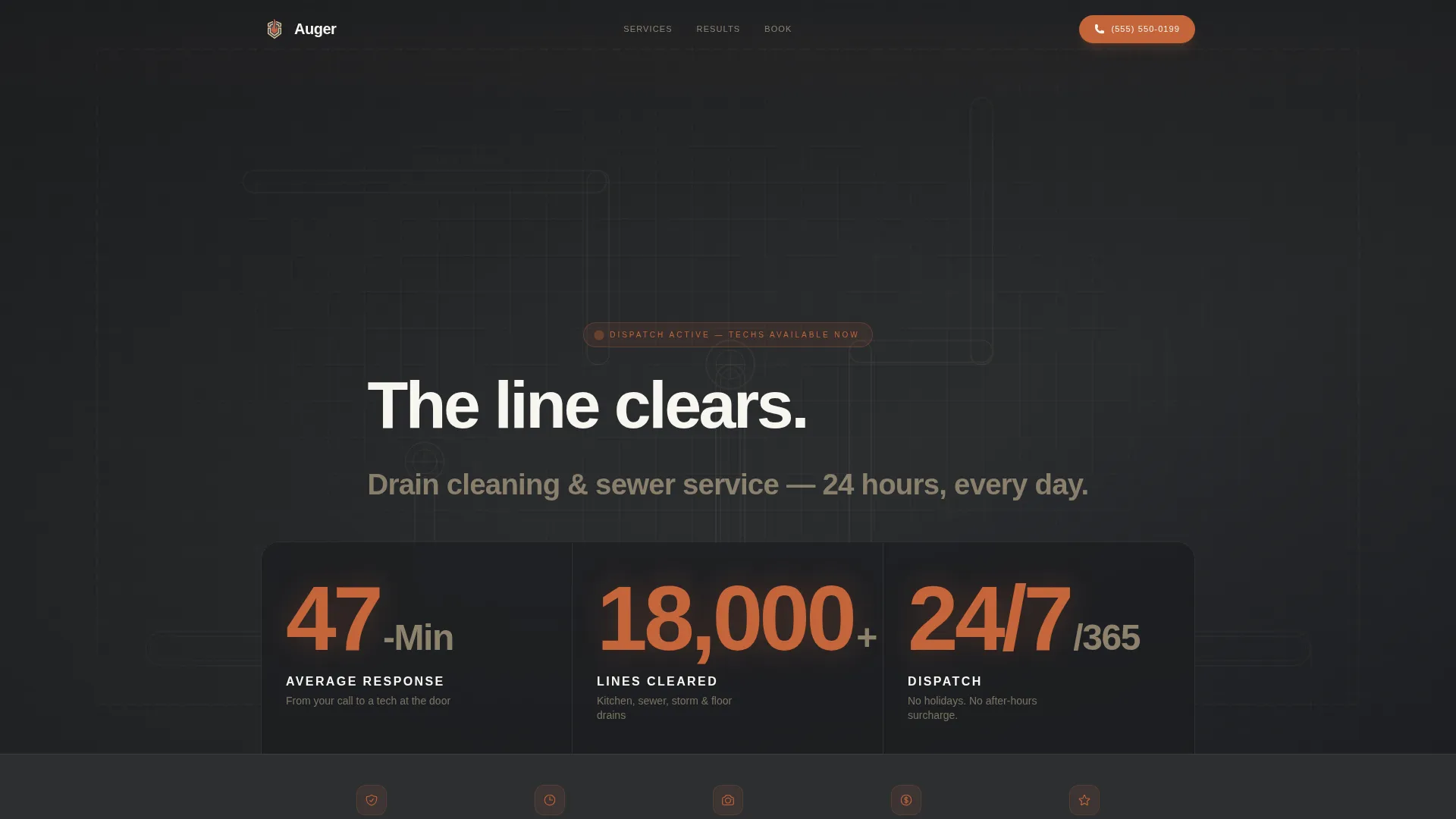
- A stats-wall hero with three animated metrics and a sewer blueprint background
- A spatial scroll layout that guides visitors through kitchen, bathroom, main lateral, and street connection sections
- A three-field lead form with address auto-complete, drain-type dropdown, and phone number input
Feature list
This template is built around a tight set of purposeful components. Each one earns its place by either building credibility or reducing friction.
Animated Stats Hero Wall
Three oversized metrics animate on page load inside a full-viewport charcoal field. The numbers use heavy condensed type, terracotta numerals, and sandstone labels. A thin-line sewer blueprint renders faintly behind the stats to give the section an architectural depth.
Spatial Underground Scroll
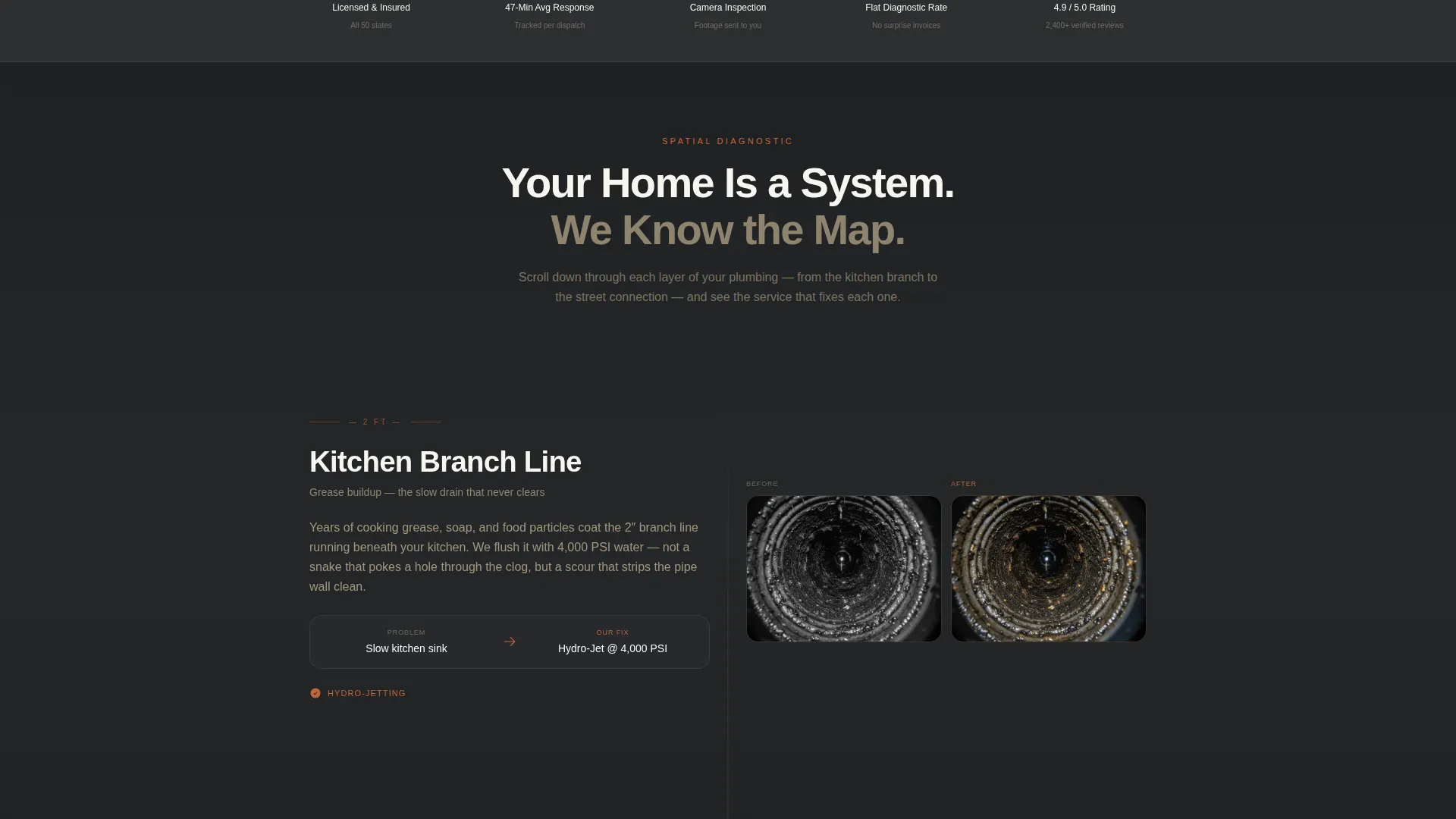
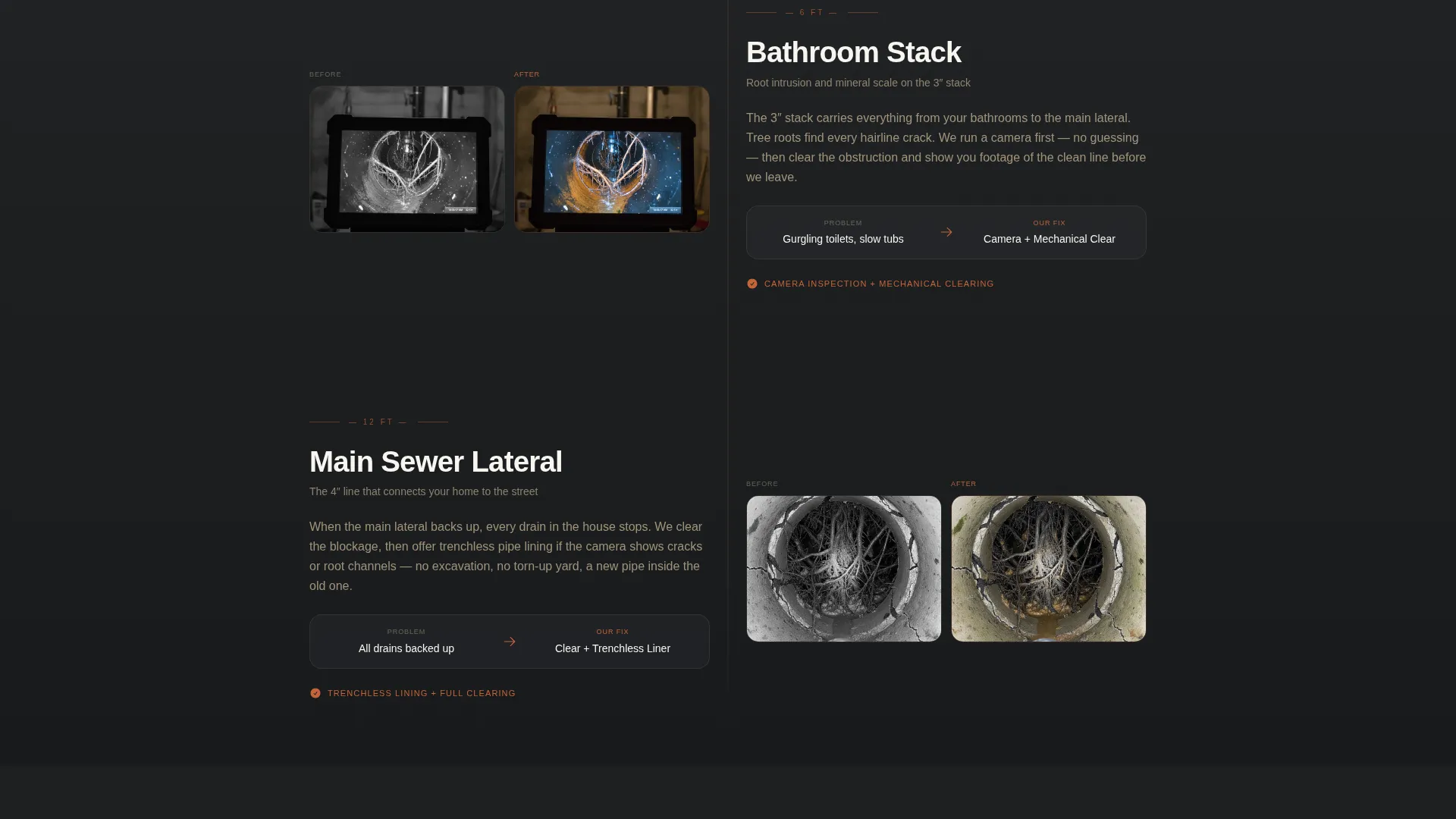
Each scroll section represents a layer of the home's plumbing system. Architectural cutaway diagrams highlight the problem zone in terracotta, and each layer pairs a service description with a before-and-after camera inspection visual. The descent builds a logical, visual argument for why the crew is needed.
Three-Field Lead Capture Form
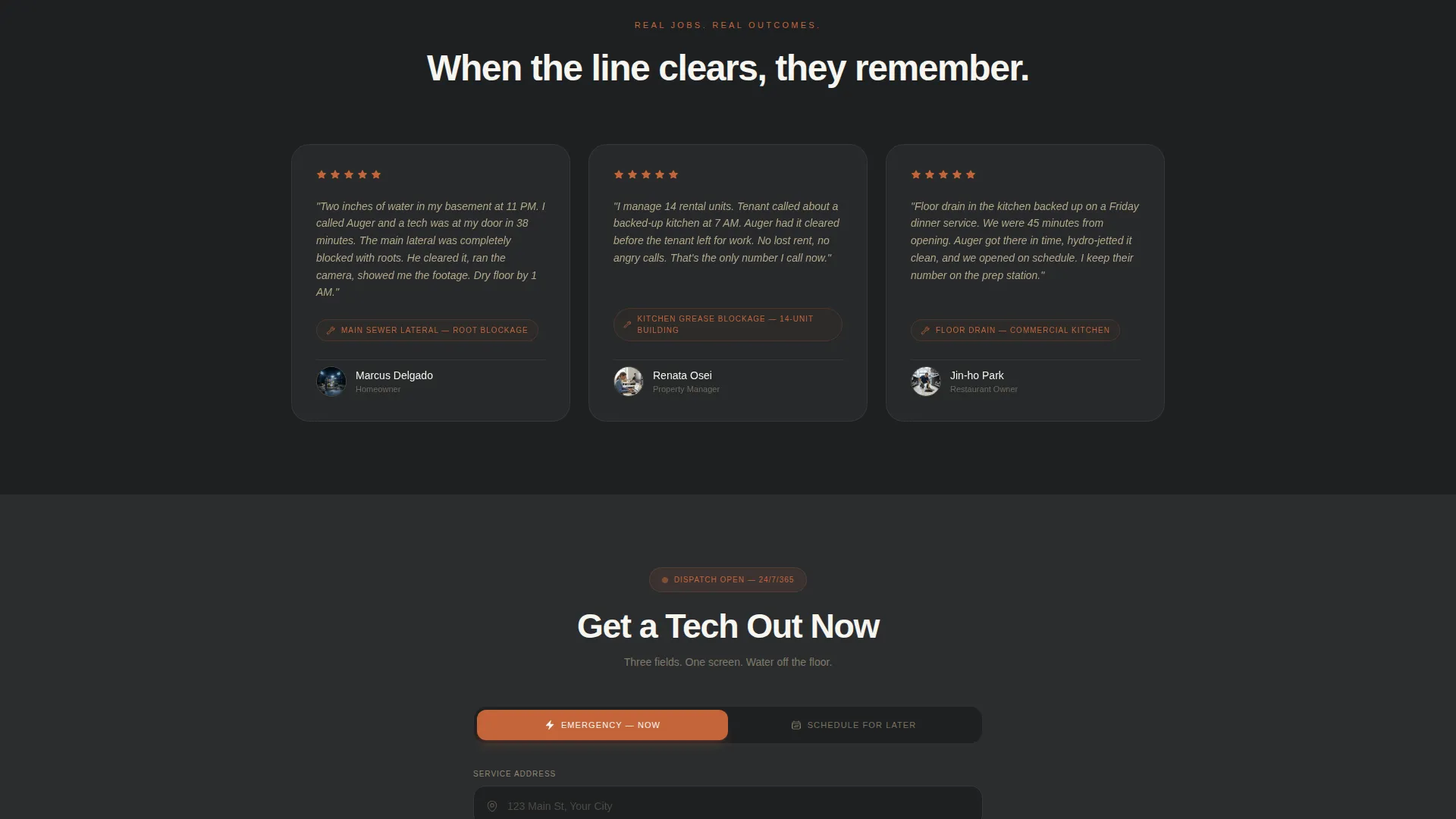
The form collects only what dispatch needs: a service address with auto-complete, a drain type from a preset dropdown, and a phone number. Fewer fields mean faster submissions, which matters most when urgency is high.
Floating Mobile Call-to-Action Bar
On mobile, the primary call-to-action button stays pinned at the bottom of the screen throughout the scroll. This keeps "Get a Tech Out Now" accessible at every point in the page without the visitor needing to scroll back up.
Secondary Scheduling Path
A "Schedule for Later" option opens a calendar picker for non-emergency bookings. This secondary path captures customers who are not in crisis but still need the service, broadening the template's conversion surface.
Service-Layered Section Architecture
Below the hero, each section frames a specific plumbing layer, from the kitchen branch to the street connection. Services like hydro-jetting, camera inspection, and trenchless repair are introduced at the relevant layer, making the offer feel precise rather than generic.
Page sections overview
| Section | Purpose |
|---|---|
| Stats hero wall | Front-loads proof with three animated performance metrics |
| Sewer blueprint background | Adds architectural credibility to the hero field |
| Kitchen branch layer | Introduces grease line and kitchen drain service |
| Bathroom stack layer | Presents bathroom drain and stack clearing service |
| Main lateral layer | Covers main sewer lateral inspection and jetting |
| Street connection layer | Addresses trenchless repair and street tie-in work |
| Lead capture form | Collects address, drain type, and phone for dispatch |
| Schedule for later | Opens calendar for non-emergency appointment booking |
| Floating call to action bar | Keeps the primary action visible on mobile screens |
Design & branding system
The Sunset Mesa color system drives every visual decision. The palette is warm enough to feel human and grounded enough to signal serious trade work.
- Deep charcoal (#2B2D2F) anchors the hero background and section overlays, sandstone tan (#D9C5A0) softens card backgrounds and dividers, and clean white (#F7F5F0) opens up text blocks
- Terracotta (#C4653A) fires every button, urgency badge, and metric numeral to direct the eye toward action points
- Heavy condensed typography sets the metric wall tone, while the thin-line blueprint illustration adds spatial detail without competing with the stats
Mobile & speed optimization
The template is structured specifically for mobile users in high-stress situations. Every layout decision reduces the number of taps between arrival and form submission.
- The floating terracotta call-to-action bar stays pinned at the bottom of mobile viewports throughout the entire scroll
- The three-field form is minimal by design, requesting only the information a dispatch team needs to respond
- Section layouts are single-column on small screens, keeping the spatial scroll readable without horizontal scrolling
How this template helps you convert
The page earns the lead by front-loading trust and removing every step that doesn't serve the customer's immediate need.
- The stats hero delivers proof in the first three seconds: response time, total lines cleared, and round-the-clock availability are visible before any scrolling begins.
- The spatial scroll builds a quiet case for expertise by walking the visitor through the actual plumbing system, matching each problem layer to the right service.
- The three-field form and persistent mobile bar eliminate the friction that causes emergency visitors to abandon and call a competitor instead.
Other information about this template
Auger is part of a Service Utility theme family designed for trade and field service businesses. A few additional details worth knowing before you build with it.
- The template follows a Hero-Dominant (90/10) layout ratio, meaning the hero section takes up ninety percent of the initial viewport
- The creative direction is Spatial and Architectural, so the scroll experience is visual and diagram-forward rather than text-heavy
- The Sunset Mesa color system is self-contained and ready to swap for your own brand palette if needed
- The header concept is a Stats and Metrics wall, making it best suited for businesses that have concrete performance numbers to display
Theme
Service Utility
Creative direction
Spatial & Architectural
Color system
Sunset Mesa
Style
Hero-Dominant (90/10)
Direction
Lead Generation
Page Sections
Animated Stats Hero Wall
Spatial Underground Scroll
Three-field Lead Capture Form
Floating Mobile Call-to-action Bar
Secondary Scheduling Path
Service-layered Section Architecture
Related questions
Can I edit the three animated metrics to match my own business numbers?
Does the form support both emergency and scheduled bookings?
Is this template suitable for commercial drain service clients, not just homeowners?
Can I add or remove plumbing layers in the spatial scroll section?
What makes this layout better than a standard plumbing service page?



