Instagram Content Professional Website Template
Aurora is a full-width immersive landing page template built for Instagram ad creatives. It hands solo creators and lean direct-to-consumer brands drag-and-drop layouts pre-wired with trending aspect ratios, motion presets, and caption-safe zones. The page uses a Northern Lights color system, kinetic type animation, and a seasonal campaign flow to drive app downloads in minutes.
by Rocket studio
Quick summary
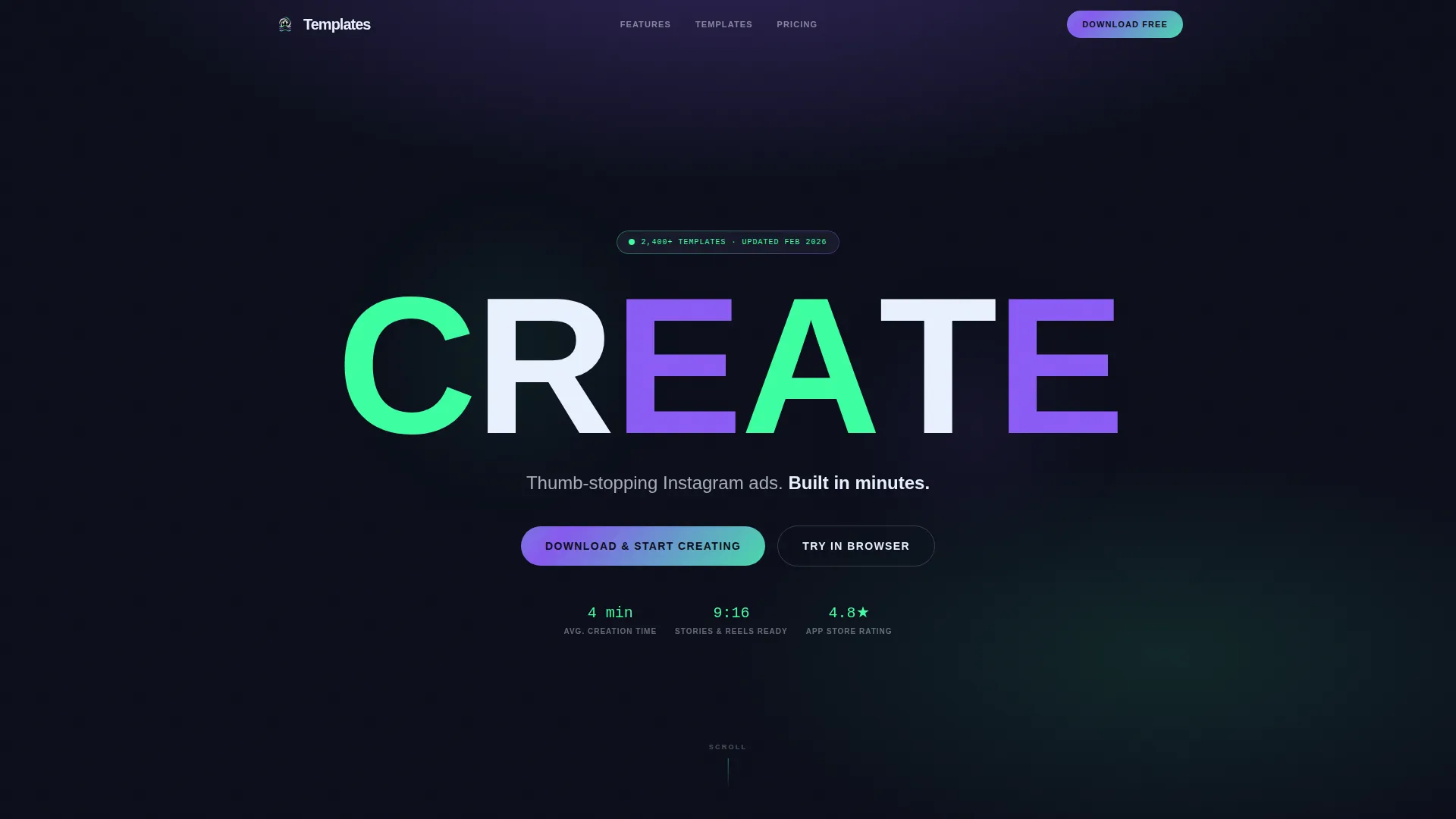
Aurora is a scroll-stopping Instagram ad creative landing page template. It combines a Festival Energy visual identity, kinetic header animation, and a seasonal campaign scroll flow to show creators and brand owners exactly what they can build. The page is designed to earn the app download before the call to action even appears.
Who this template is for
This template is built for people who move fast and need their ad designs to keep up. It is ideal for anyone running Instagram campaigns with real deadlines and real revenue goals.
- Solo creators whose product photography is strong but whose ad design workflow slows down their results
- Shopify founders running flash sales and direct-to-consumer brand managers handling multiple accounts
- Side-hustle operators and social media managers who need scroll-stopping output without a design team
What problem this template solves
Designing Instagram ads from scratch takes time that most creators and brand operators simply do not have. The gap between a great product and a great ad is usually a design bottleneck. This template closes that gap by delivering ready-to-use layouts built around the moments campaigns actually run.
- Pre-built layouts mean no blank-canvas paralysis before a flash sale or seasonal push
- Trending aspect ratios and caption-safe zones eliminate the risk of text or visuals getting clipped in Stories or Reels
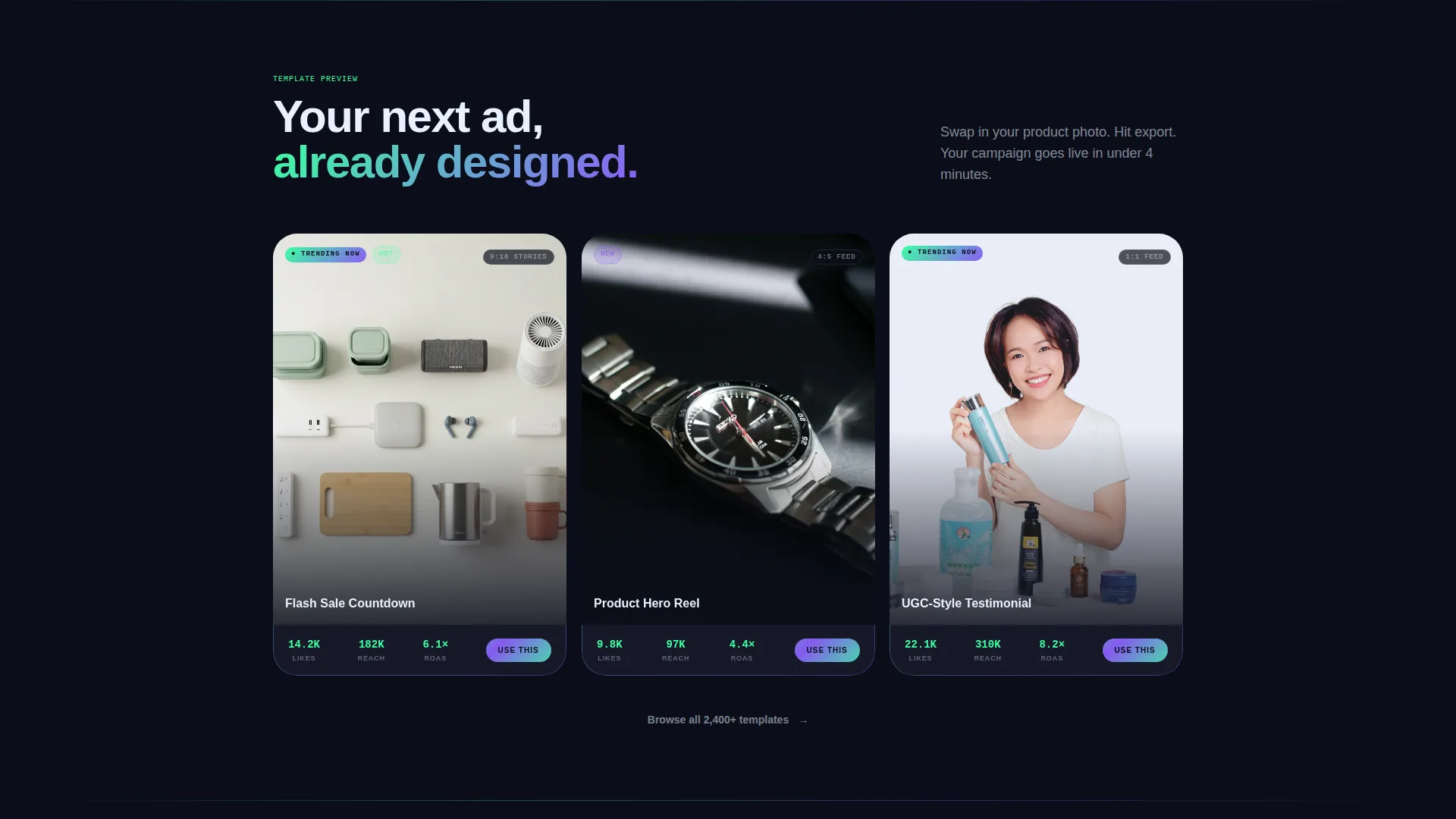
- Motion presets and scroll-animated previews let visitors see real output quality before committing to a download
What you get with this template
The template delivers a complete full-width immersive landing page experience. Every section is purpose-built to demonstrate the creative tool's value through live visual proof rather than static screenshots.
- A kinetic type header where the word "CREATE" animates letter by letter across the full viewport with spring physics
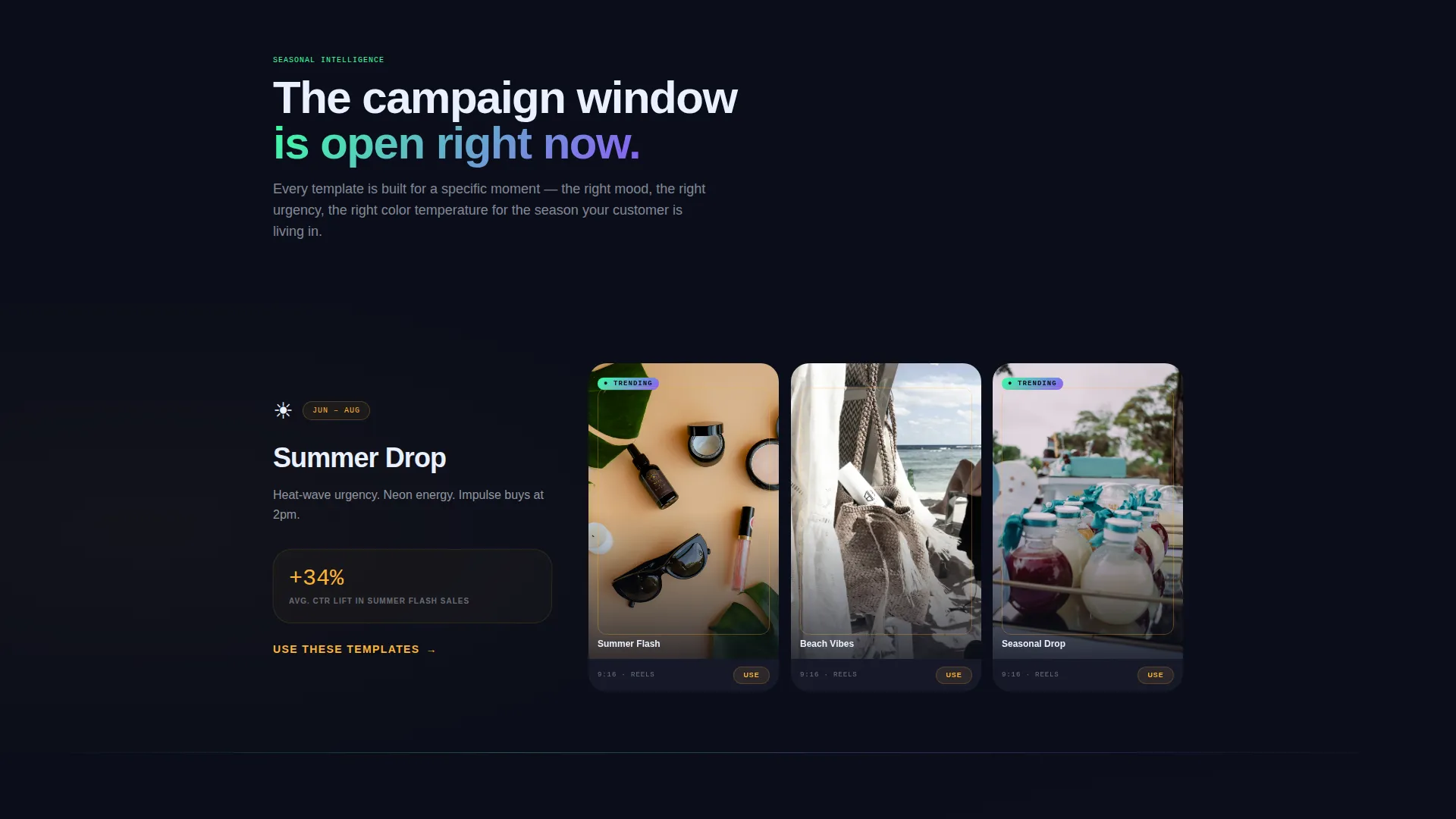
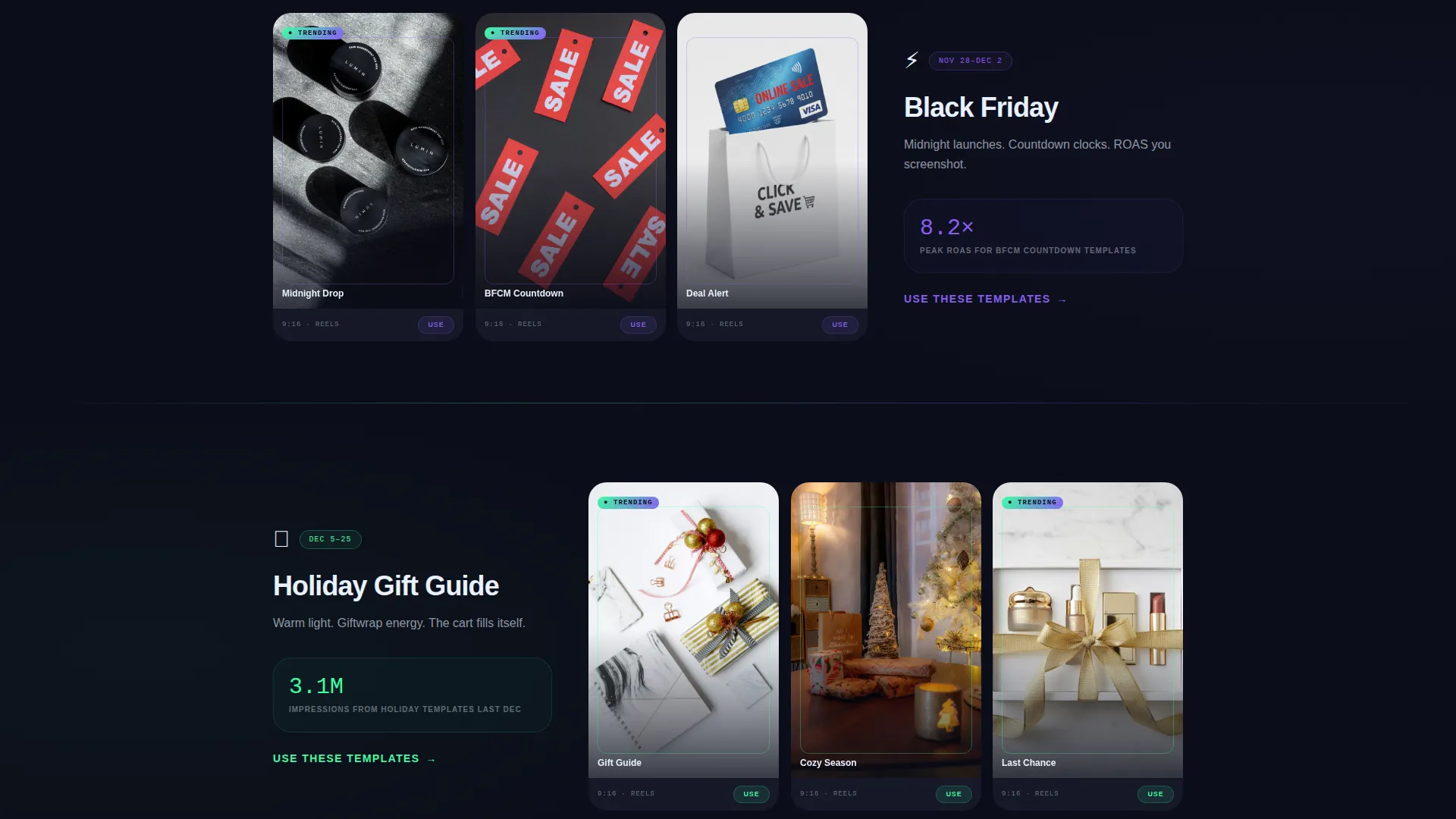
- A seasonal campaign scroll flow covering Summer Drop, Back to School, Black Friday, Holiday Gift Guide, and New Year Relaunch sections, each with three to four template previews
- A floating mobile call-to-action bar pinned to the bottom of the screen, an operating-system-aware app store routing link, and a secondary "Try in Browser" path for desktop visitors
Feature list
This section covers the core functional capabilities built into the Aurora template.
Kinetic Type Header Animation
The hero section opens with the word "CREATE" detonating letter by letter across the full viewport. Each character cycles through aurora green, violet, and white with spring physics, giving the impression the typography itself is a live design session.
Seasonal Campaign Scroll Flow
The page walks visitors through five distinct campaign moments across the calendar year. Each seasonal section displays three to four template previews that shift in color temperature and mood, with mock engagement metrics and a "trending now" badge on timely designs.
Caption-Safe Zone Layouts
Every pre-built layout is wired with caption-safe zones so body text and call-to-action copy never get clipped when published to Instagram Stories or Reels. Trending aspect ratios are baked in across all formats.
Scroll-Animated Template Previews
Three template previews animate on scroll with real product photos swapped in. Visitors see finished ad output before any download prompt appears, which builds confidence in the creative quality on offer.
OS-Aware App Download Routing
The primary call-to-action button detects the visitor's operating system and routes directly to the correct app store. A secondary path offers a browser-based trial for desktop visitors who prefer to test before downloading.
Floating Mobile Call-to-Action Bar
On mobile, the "Download and Start Creating" call to action is pinned as a persistent floating bar at the bottom of the screen. It stays visible throughout the scroll, keeping the conversion path open at every point in the journey.
Page sections overview
| Section | Purpose |
|---|---|
| Kinetic Type Header | Opens with animated typography to establish instant energy and brand identity |
| Hero Subline | Delivers the core value proposition beneath the animation |
| Summer Drop Section | Showcases warm-toned ad templates for summer campaign moments |
| Back to School Section | Displays campaign-ready layouts for back-to-school season |
| Black Friday Section | Highlights high-urgency templates built for peak sales events |
| Holiday Gift Guide Section | Presents festive ad layouts with seasonal color and mood shifts |
| New Year Relaunch Section | Closes the seasonal arc with fresh-start campaign previews |
| Scroll-Animated Previews | Demonstrates real output quality with live product photo swaps |
| App Download Bar | Pins the primary call to action as a floating bar on mobile |
| Browser Trial Path | Offers a secondary no-download entry point for desktop visitors |
Design & branding system
The visual identity channels Festival Energy through a Northern Lights color palette. The design feels like staring up at a winter sky cracking open with neon color, cold and electric at once.
- Deep arctic black (#0B0E1A) holds the dominant background so every template preview floats like a glowing artifact against dark space
- Aurora green (#3DFFA2) drives primary calls to action and hover states, while electric violet (#8B5CF6) threads through gradients and section transitions
- Shimmering ice-white (#E8F0FE) handles body text and secondary interface elements, with an oversized variable-weight sans-serif typeface carrying the kinetic header sequence
Mobile & speed optimization
The template is built with a mobile-first conversion path in mind. Every interactive element is sized and positioned for thumb-friendly use on a small screen.
- The floating call-to-action bar stays pinned at the bottom of the viewport on mobile so the download prompt is never more than one tap away
- OS detection routes visitors to the correct app store without extra steps, reducing friction at the final conversion moment
- Scroll-triggered animations on template previews fire progressively as the visitor moves down the page, keeping the experience smooth across devices
How this template helps you convert
Aurora earns the download by showing creative output before asking for anything. The page builds trust through demonstration rather than description.
- Scroll-animated template previews with real product photos prove the quality of the output early, so visitors arrive at the call to action already convinced
- Seasonal campaign sections with mock engagement metrics and trending badges create urgency layered on aspiration, making every scroll feel like a campaign window closing
- The persistent floating call-to-action bar on mobile and the repeated download prompt after every seasonal section keep the conversion path visible throughout the entire page journey
Other information about this template
Aurora sits inside the Media and Entertainment category under the Instagram Templates subcategory. It is purpose-built for the Instagram ad creative niche. A few additional details worth knowing:
- The template style is Full-Width Immersive, meaning it uses edge-to-edge layouts and full-viewport sections throughout
- The creative direction is Seasonal and Moment-driven, making it especially effective for time-sensitive campaign launches
- The header concept is Kinetic Type, which means the animated hero section itself serves as the primary product demonstration
- The landing page direction is App Download, so every design decision from color to layout hierarchy points toward a single conversion goal
Theme
Festival Energy
Creative direction
Seasonal/Moment
Color system
Northern Lights
Style
Full-Width Immersive
Direction
App Download
Page Sections
Kinetic Type Hero Animation
Seasonal Campaign Scroll Sections
Caption-safe Zone Pre-built Layouts
Scroll-animated Template Previews
Os-aware Download Routing
Floating Mobile Call-to-action Bar
Related questions
Who is Aurora built for?
What seasonal campaigns does the template cover?
Can desktop visitors try the template without downloading?
Does the template handle both Stories and Reels formats?
How does the app download call to action work on mobile?