Local Robotics & Automation Cost Estimator Website Template
This cobot precision collaborative robot manufacturer landing page template is built for industrial automation companies that need to convert engineers and operations directors into qualified leads. It pairs a dark foundry aesthetic with a modular card grid layout, an isometric work cell illustration, a 12-parameter comparison toggle, and a guided cost calculator, all designed to show every number before asking for anything.
by Rocket studio
Quick summary
This landing page template helps collaborative robot manufacturers present complex technical specs in a way that production managers, integration engineers, and operations directors actually trust. The modular card grid layout, isometric hero illustration, and interactive comparison module work together to move serious buyers from curiosity to a booked demo or cost comparison download.
Who this template is for
Collaborative robot makers need a landing page that earns credibility fast. This template is purpose-built for companies in industrial automation that sell to technical buyers who compare specs before they ever talk to sales.
- Production managers at mid-size manufacturers running mixed-SKU assembly lines who need throughput flexibility without retooling costs
- Integration engineers who want drag-to-program interfaces and clear specs on payload capacity, reach, and repeatability
- Operations directors comparing collaborative robot solutions against traditional industrial robots on total cell cost and return on investment
What problem this template solves
Most collaborative robot landing pages either bury the specs or skip the business case entirely. Engineers leave because the numbers are not there. Directors leave because the ROI is not clear. This template solves both problems at once.
- Visitors can compare cobots against industrial robots across twelve parameters without speaking to a salesperson first
- Assembly tasks, material handling applications, and quality inspection use cases are shown in dedicated card sections so each buyer type finds their scenario immediately
- The guided cost calculator outputs a downloadable savings projection, turning a browsing session into a qualified lead document
What you get with this template
This template packages a full modular landing page into a dark-themed, high-interactivity layout that feels engineered rather than marketed. Every section is designed to carry the weight of a technical sale.
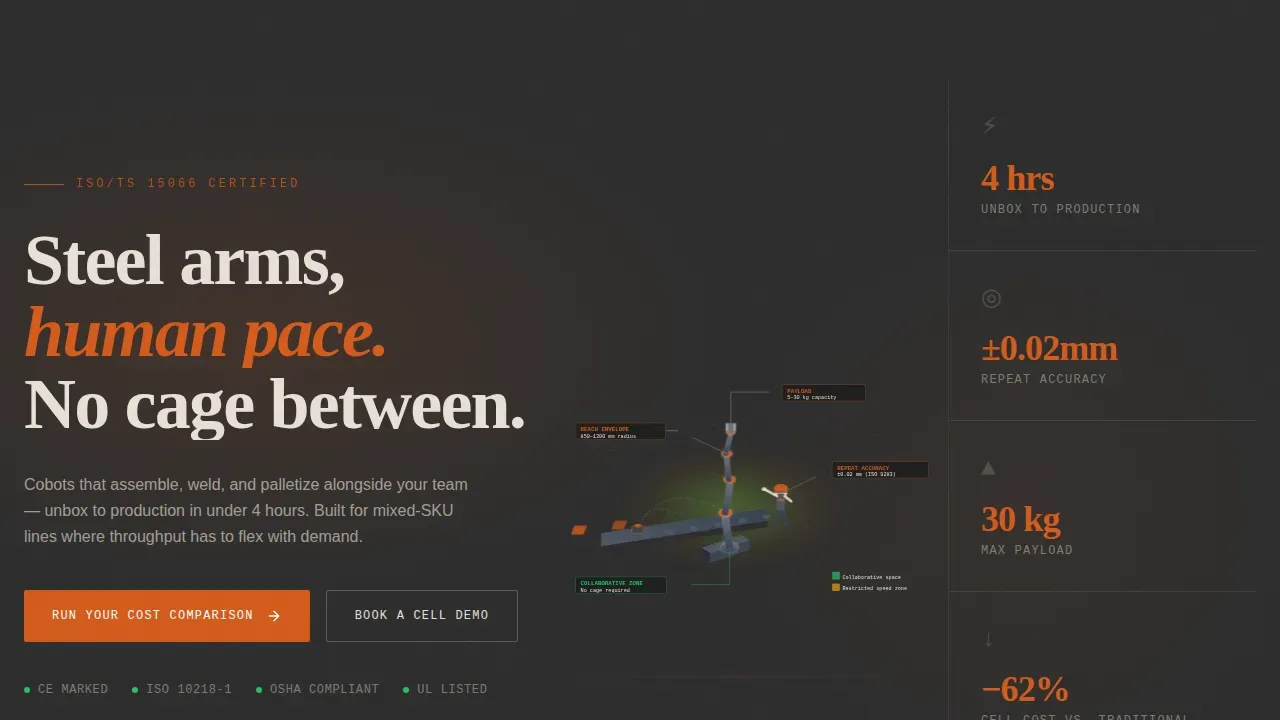
- An isometric hero illustration of a complete cobot work cell with labeled callout lines showing payload capacity, reach envelope, and repeat accuracy at ±0.03 mm
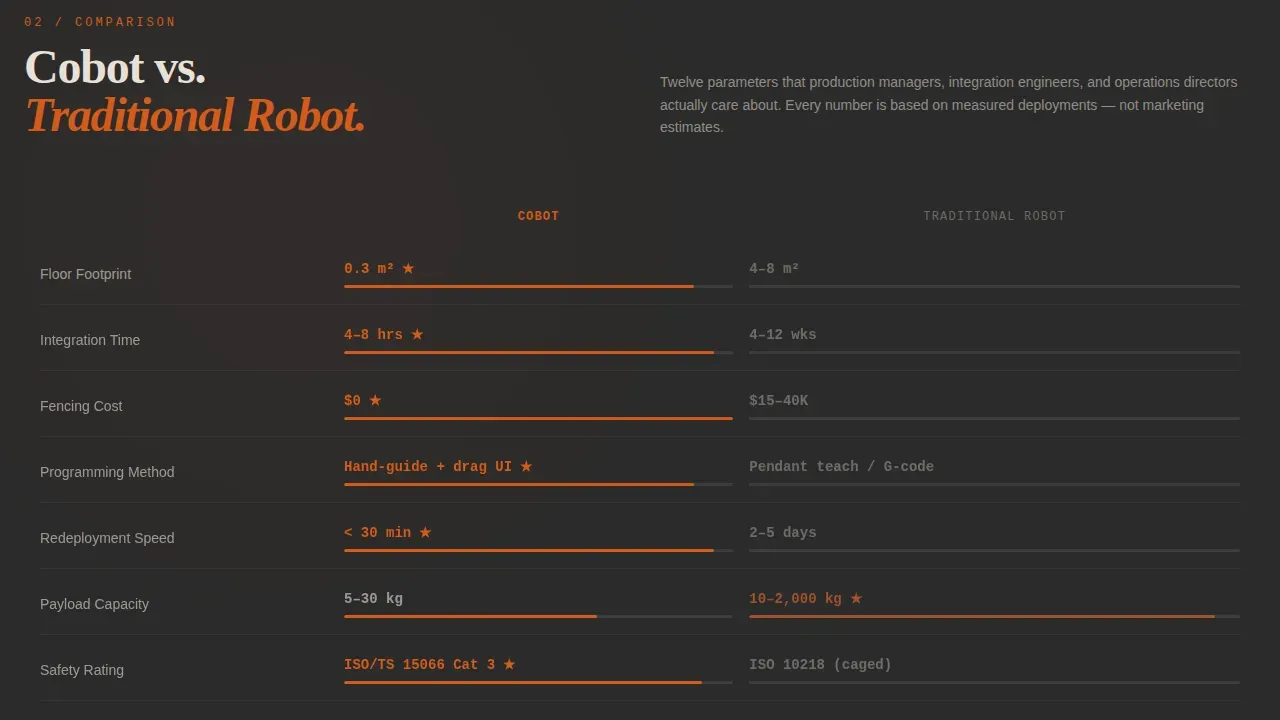
- A sticky 12-parameter comparison module letting visitors toggle between collaborative robot and traditional industrial robot specs, with animated winners highlighted in forge orange
- A layer-peel card sequence covering applications, hardware components, software programming tools, and integration timeline from unbox to production
Feature list
This template includes six purpose-built feature areas. Each one is drawn directly from the brief and serves a specific role in the buyer journey.
Isometric Work Cell Hero
The hero section uses a precise 30-degree isometric illustration of a full collaborative robot work cell. The arm, end effectors, conveyor, safety scanner perimeter, and a human operator appear together with labeled callout lines. Color-coded zones pulse to distinguish collaborative space from restricted speed zones, communicating safety features and precision before the visitor reads a word.
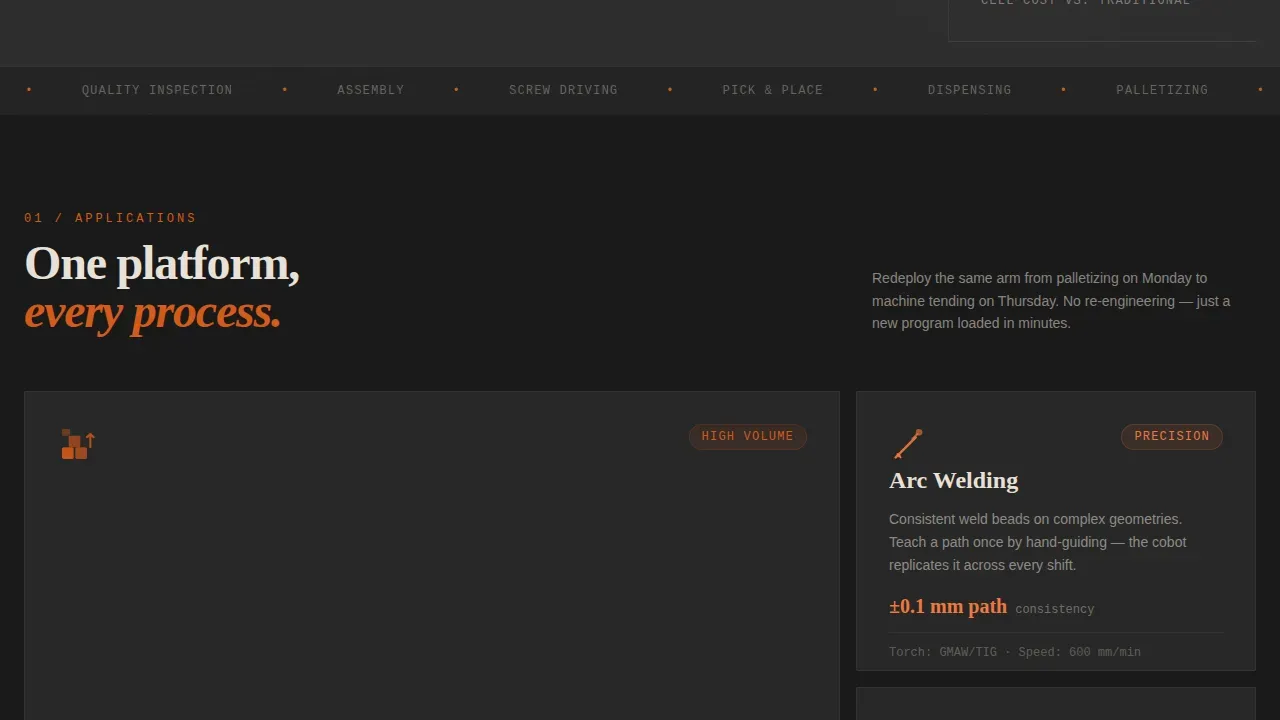
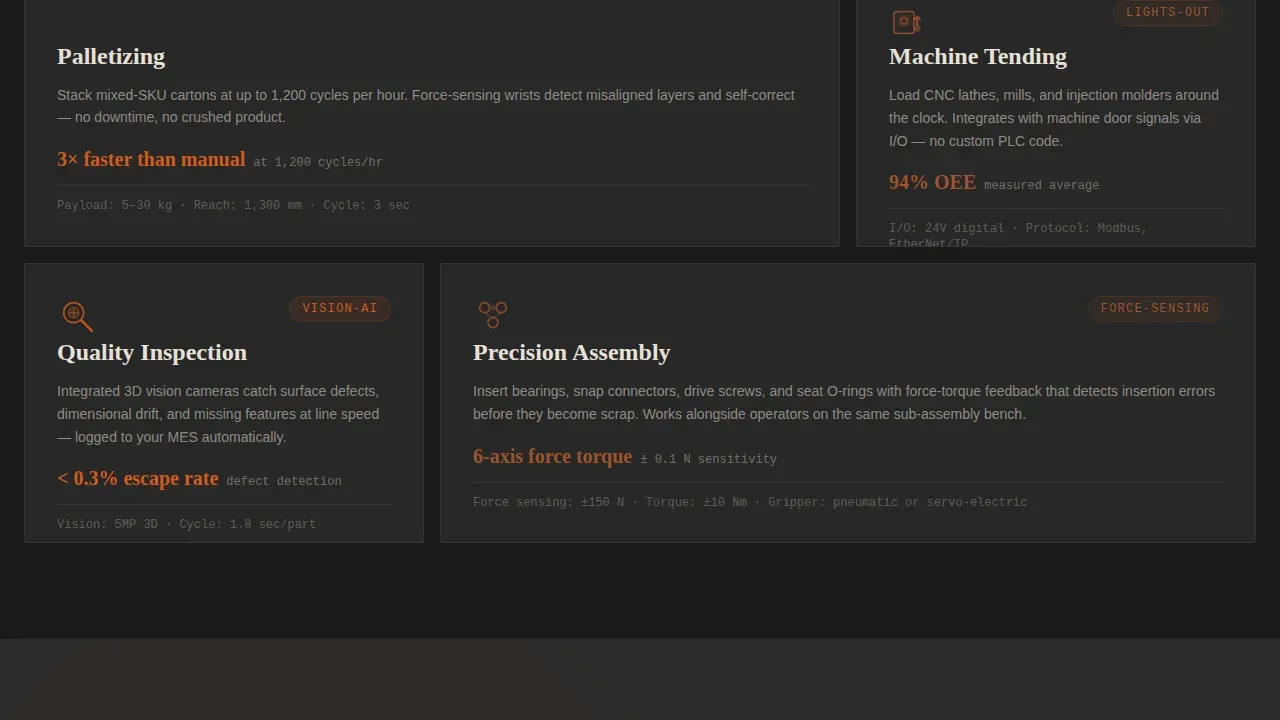
Applications Bento Card Grid
A modular bento layout presents the core application areas: palletizing, machine tending, welding, quality inspection, and assembly. Cards vary in size to reflect application priority. Each card expands to show specific use-case detail, helping manufacturers in diverse industries quickly identify with the scenarios that match their production needs.
12-Parameter Comparison Toggle
A persistent sticky module lets visitors toggle between a collaborative robot and a traditional industrial robot across twelve parameters. These include footprint, integration time, safety barriers cost, programming method, redeployment speed, payload, safety standards rating, energy draw, return on investment horizon, maintenance interval, downtime risk, and total cell cost. Each winning parameter animates in forge orange, giving human operators and decision-makers an immediate visual answer.
Layer-Peel Hardware and Software Cards
Four card rows peel back one layer of the cobot at a time. First come the applications, then the hardware components including joints, advanced sensors, and grippers, then the software covering the drag-to-program interface and force-feedback tuning, then the integration timeline. Cards flip and expand so visitors build a complete mental model of the robotic systems component by component.
Guided Cost Calculator Modal
The primary call to action opens a guided calculator asking for current cycle time, annual volume, labor rate, and application type. The calculator outputs a downloadable PDF with a side-by-side savings projection. This approach shows every number before asking for contact details, which is how technical buyers prefer to engage with industrial automation offers.
Calendar Demo Booking
A secondary call to action labeled "Book a Cell Demo" drops a calendar picker for on-site or virtual demonstration scheduling. This path gives integration engineers and operations directors a direct route to hands-on evaluation without forcing them through a lengthy form.
Page sections overview
| Section | Purpose |
|---|---|
| Isometric Hero | Introduce work cell with labeled specs and color-coded safety zones |
| Applications Bento | Showcase palletizing, welding, inspection, assembly, and machine tending |
| Comparison Toggle | Compare collaborative robot versus. traditional industrial robots on 12 parameters |
| Layer-Peel Cards | Reveal hardware, software, and integration timeline component by component |
| Cost Calculator call to action | Guide visitors through a savings projection and deliver a downloadable PDF |
| Demo Booking call to action | Let visitors schedule an on-site or virtual cell demonstration |
| Footer | Single-row linear footer with company links and contact paths |
Design & branding system
The visual identity follows an Industrial Raw theme grounded in a Fire and Earth color system. Every color decision reinforces the feeling of engineered precision rather than polished marketing.
- Forge orange (#D45A1B) drives primary calls to action and data callouts; foundry charcoal (#2B2B2B) dominates the background; kiln clay (#A0522D) marks secondary cards and dividers; slag white (#E8E0D8) carries body text
- Typography pairs Fraunces display serif for headlines, JetBrains Mono for specs and data, and DM Sans for body copy, matching the tone of an engineer reading a datasheet
- Animations include masked text reveals, parallax depth layers, card flip transforms, comparison parameter animations, and intersection observer stagger, all reinforcing the Transparent Process creative direction
Mobile & speed optimization
The template is built desktop-first to serve production floor decision-makers on workstations, with full mobile support layered in for field engineers and operations teams reviewing specs on the go.
- Server Components handle static sections to keep the initial render lean; Client Components power the interactive comparison toggle and cost calculator modal
- The card grid layout reflows cleanly across screen sizes, keeping assembly task cards and comparison parameters readable on smaller viewports
- The landing page is structured so critical information such as payload capacity, safety features, and the primary call to action appears above the fold on both desktop and mobile
How this template helps you convert
Every structural decision in this landing page is built around showing the numbers before asking for anything. That approach is unusually effective with technical buyers in industrial automation.
- The 12-parameter comparison module answers the most common objection, "is a collaborative robot actually better for my line?", without requiring a sales call, reducing friction early in the session
- The cost calculator modal turns a passive browser into an active participant by asking for their specific cycle time, volume, and labor rate, then delivering a personalized savings projection that gives them a reason to share contact details
- The "Book a Cell Demo" path converts visitors who want proof over paper, routing integration engineers and operations directors directly to a demonstration rather than a generic contact form
Other information about this template
This template is suited for collaborative robotics companies serving diverse industries including the automotive industry, electronics manufacturing, healthcare, and logistics. It is also well-matched for smaller businesses and medium sized enterprises that cannot justify the footprint or fencing cost of large systems.
- The layout supports real time monitoring data callouts and communication protocols details in the hardware card layer, giving integration engineers the depth they need
- Vision systems coverage is built into the quality inspection application card, reflecting how cobots use visual feedback for object detection and quality control
- The template is designed to bridge the gap between advanced technical specifications and tangible business ROI, a requirement for any high-converting landing page in the collaborative robot space
- Quality inspection, assembly lines coverage, and material handling use cases are each given dedicated card space, so visitors performing different tasks at their facilities can self-identify
- The comparison module addresses safety barriers, collision detection, and safety standards parameters directly, helping safety managers and plant managers find the reassurance they need without leaving the page
- Universal robots and other market leaders are implicitly addressed through the comparison framework, allowing the company using this template to position their collaborative robot offering on merit without naming competitors
- The Transparent Process creative direction means the landing page earns the click by showing consistent quality data, offering high precision spec callouts, and delivering the cost calculator output before capturing a lead
Theme
Industrial Raw
Creative direction
Transparent Process
Color system
Fire & Earth
Style
Card Grid (Modular)
Direction
Comparison/Versus
Page Sections
Isometric Work Cell Hero Illustration
Parameter Sticky Comparison Module
Applications Bento Card Grid
Layer-peel Hardware and Software Cards
Guided Cost Calculator with PDF Output
Demo Booking Calendar Integration
Related questions
Can this landing page support both technical and business buyer audiences?
Does the comparison module cover safety-related parameters?
How does the cost calculator work?
Is this template suitable for companies new to collaborative robotics?
What industries does this landing page design support?



