Low Income Finance Pricing Website Template
The Ledger zero fee business checking landing page template is built for sole proprietors and micro-businesses tired of losing cash to bank fees. It combines a live fee-comparison calculator, an industry data section, feature dashboard cards, and a personalized five-question quiz into one dark-charcoal, amber-accented landing page that proves the cost of banking before asking for a signup.
by Rocket studio
Quick summary
The Ledger template is a dashboard-style, single-page layout designed to convert micro-business owners into free checking account holders. It leads with a live fee-comparison calculator, moves through data-driven fee grids and account feature cards, and closes with a personalized savings quiz. The charcoal and amber color system gives every screen the look of a trusted financial terminal.
Who this template is for
This template is built for fintech brands and challenger banks targeting business owners who operate below the radar of traditional banking. It speaks directly to people who count every dollar and need proof before they act.
- Sole proprietors, mobile barbers, Etsy sellers, and food cart operators earning under $50,000 a year
- Fintech startups or neobanks launching a no-fee business checking account to an underserved market
- Marketing teams that need an interactive, data-rich landing page to build trust and drive signups fast
What problem this template solves
Small businesses and side-hustle operators rarely see themselves in standard bank marketing. When they finally open an account, hidden fees erode their cash balance before the first month ends. This template tackles that distrust head-on.
- Visitors cannot easily compare what a business owes in fees across different banks without digging through fine print
- Most landing pages ask for a signup before proving any value, which kills conversion for fee-sensitive audiences
- Micro-business owners need to see their own numbers, not generic claims, before they trust a new financial product
What you get with this template
The template delivers a fully structured, single-page layout that guides visitors from fee shock to account signup without a single detour. Every section earns the next click through data, not just promises.
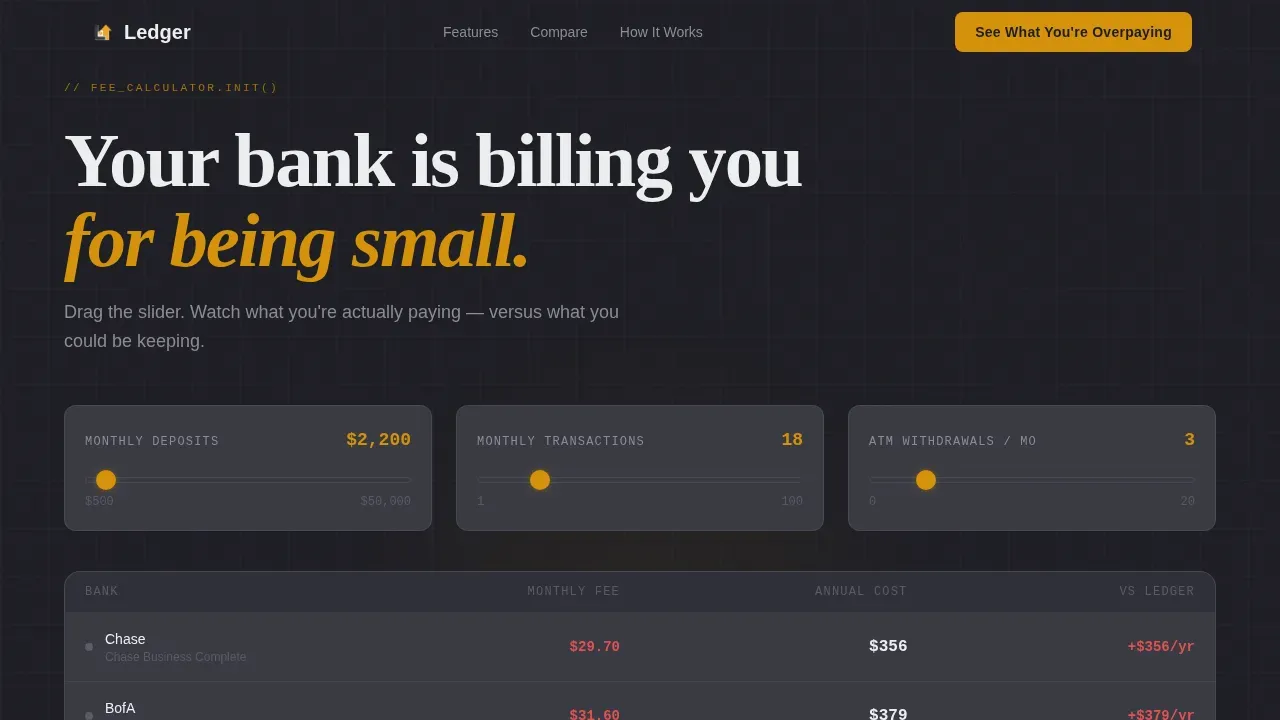
- A live fee-comparison calculator with a revenue slider, pre-loaded with real competitor figures, showing a running balance of savings
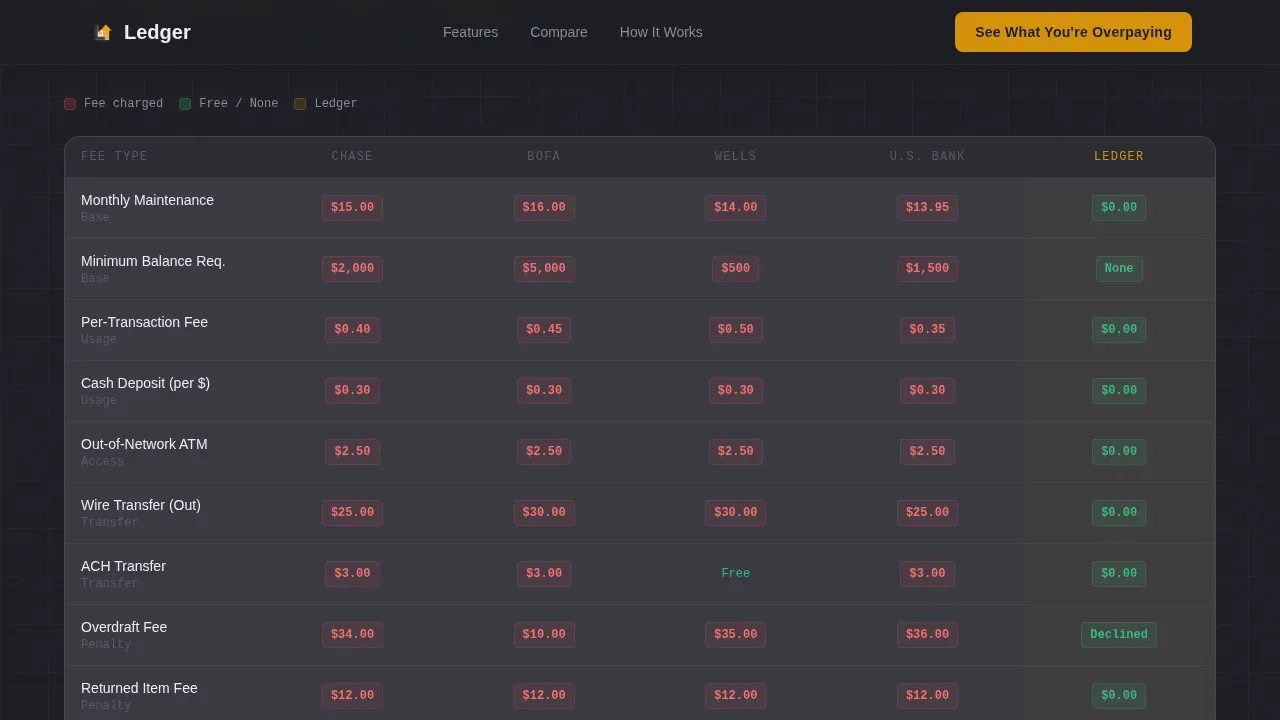
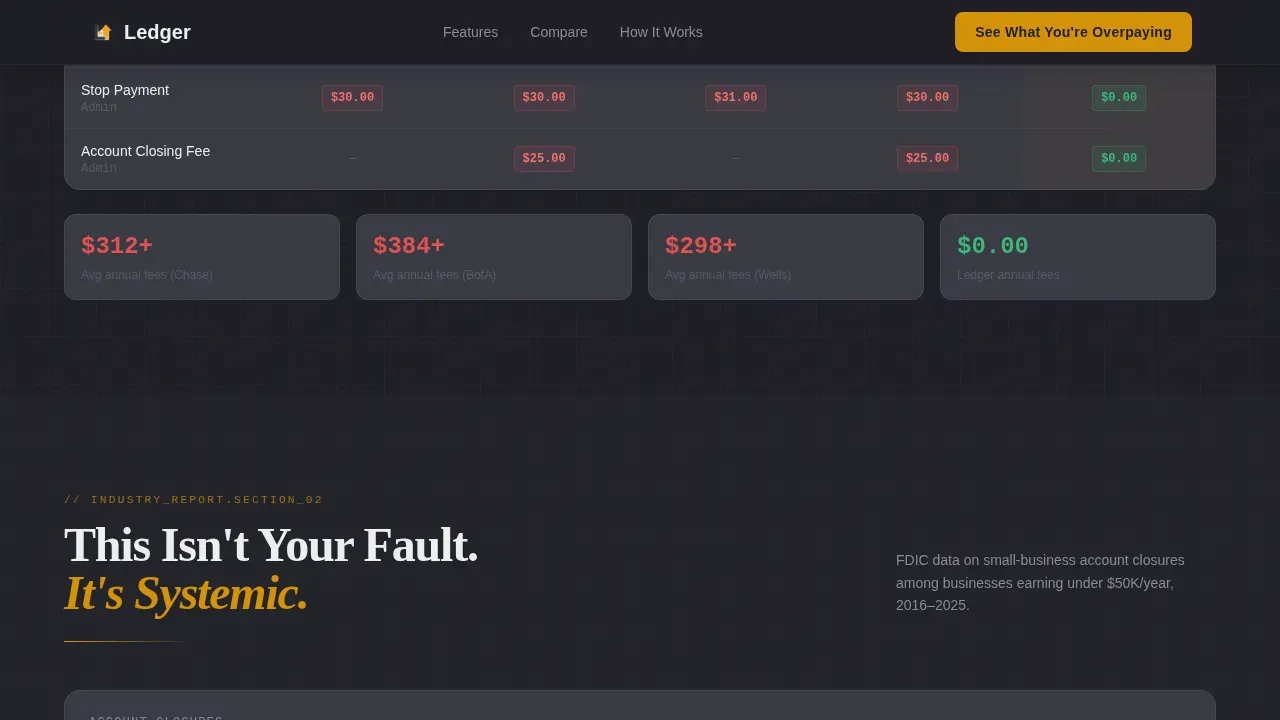
- A color-coded fee grid covering twelve common charges across five major banks, plus an FDIC data line chart framing the problem systemically
- A five-question personalized savings quiz that generates a custom estimate and pre-fills the signup call to action with the visitor's own answers
Feature list
This ledger template packs five interactive and data sections into one focused layout. Below is a closer look at each built-in capability.
Live Fee Comparison Calculator
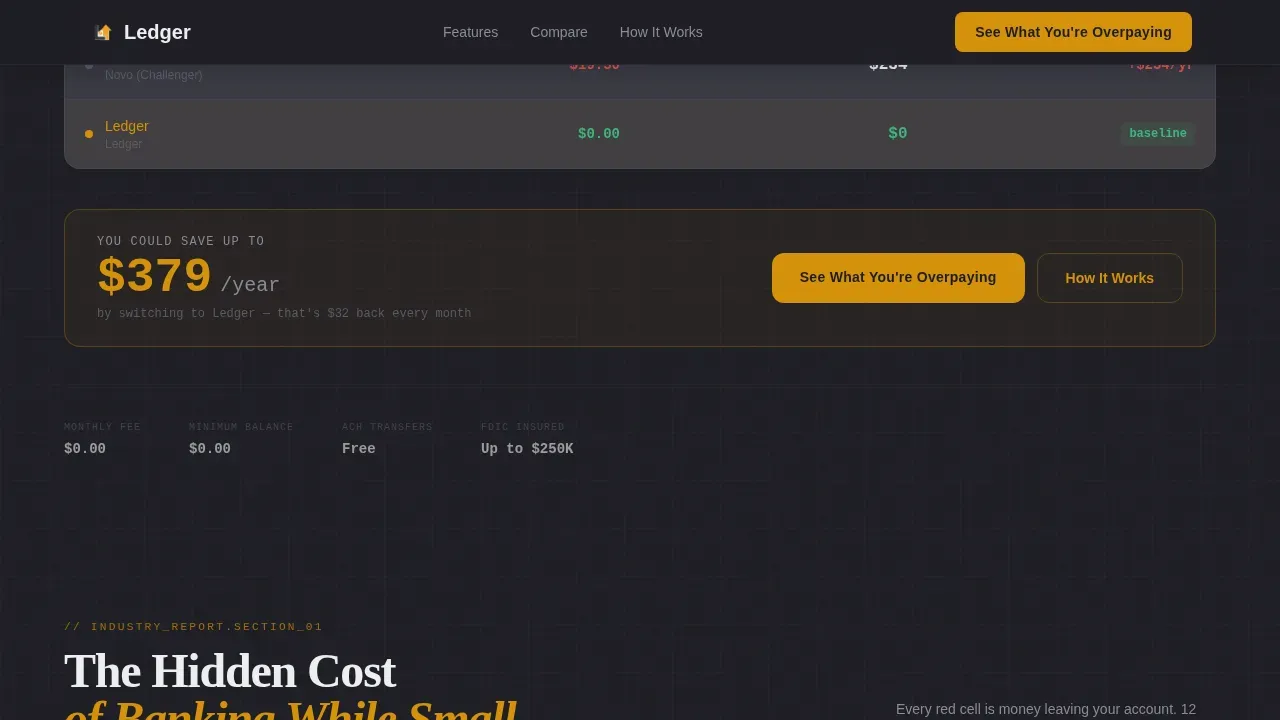
The header is a working calculator pre-loaded with a $2,200 monthly deposit scenario. It displays three columns side by side: a traditional bank, a challenger bank, and this account at $0.00. Visitors drag a revenue slider to adjust their figures, and the total annual savings automatically calculates and pulses in amber when the value updates. Keeping track of your savings has never felt this immediate.
Color-Coded Bank Fee Grid
Section one of the scroll experience is a data grid mapping the twelve most common small-business checking fees across five major banks. Each cell is color-coded red for a charge and green for zero. This gives visitors a comprehensive list of exactly where their cash is going, displayed as financial data they can scan in seconds.
FDIC Data Line Chart
Section two visualizes account closure data among businesses under $50,000 in annual revenue. A single rising line draws on scroll, turning an industry-wide pattern into a clear visual argument. This framing makes the problem feel systemic rather than personal, which reduces shame and increases motivation to act.
Feature Dashboard Cards
Section three presents account features as individual dashboard cards. Each card carries an icon, a one-line explanation of the feature, and a comparative stat. Features covered include no minimum balance, no monthly maintenance fee, free ACH transfers, and mobile deposit. The grid-based layout with icons makes the zero-fee value visible at a glance.
Personalized Savings Quiz
The primary call to action leads into a five-question assessment. Questions cover current bank name, average monthly deposits, number of monthly transactions, cash acceptance, and biggest banking frustration. Results generate a personalized savings estimate in amber on charcoal. A secondary call to action, "Open Your Free Account," appears pre-filled with the visitor's quiz answers, reducing friction at the final step.
Page sections overview
| Section | Purpose |
|---|---|
| Hero Calculator | Live fee comparison with revenue slider and amber pulse animation |
| Fee Comparison Grid | Color-coded twelve-fee table across five banks |
| FDIC Data Chart | Rising line chart framing systemic account closure risk |
| Feature Dashboard Cards | Icon-led cards for each zero-fee account feature |
| Quiz Assessment | Five-question savings estimator with personalized results |
| Footer | Linear single-row pattern with trust signals and secondary call to action |
Design & branding system
The visual identity uses a Dashboard Pro theme built around a Charcoal and Amber color system. The palette is deliberately warm and grounded, referencing a financial terminal after hours rather than a generic fintech gradient.
- Deep charcoal (#1E1E24) as the primary background, soft graphite (#3A3A44) for card surfaces, chalk white (#EDEEF0) for all typography and data labels
- Warm amber (#D4920B) on key metrics, interactive highlights, and the pulse animation that fires when the calculator updates
- DM Sans for body and interface text, JetBrains Mono for all numbers and financial data, and Fraunces as the hero serif accent for the opening headline
Mobile & speed optimization
This template is built mobile-first, reflecting the reality that its target users check their finances on a phone, often late at night, between appointments or after a market shift.
- Large, thumb-friendly call-to-action buttons appear at the hero, after the quiz, and in the footer for easy access without pinching
- Scroll-triggered animations including chart draw, staggered card reveals, and the calculator pulse are handled by client components, keeping static sections lean
- The layout removes top navigation menus, keeping every visitor focused on the single conversion path from calculator to quiz to signup
How this template helps you convert
The Ledger template earns trust before it asks for anything. Each section does specific conversion work on the visitor's behalf.
- The fee calculator shows visitors their exact annual savings the moment they land, using their own revenue figure from the slider. Proof arrives before a single word of marketing copy is read.
- The quiz assessment personalizes the savings estimate with the visitor's own bank, deposit volume, and transaction count. Pre-filling the signup form with those answers removes the last point of hesitation before account opening.
Other information about this template
This section covers additional context that supports informed decisions when evaluating the ledger template for your fintech project.
- The ledger template is built around double-entry bookkeeping principles. Every general ledger account must remain in balance between debit and credit amounts, and the template's calculator reflects that discipline visually with total debits and total credits displayed in parallel columns.
- A general ledger is the central record of all financial transactions within a business. This accounting ledger template draws on that structure to present account information in a format visitors already recognize from accounting software and spreadsheet tools.
- The general ledger template uses a chart of accounts approach to organize the fee grid. Each account name and account number maps to a specific account type, whether it belongs to asset accounts, liability accounts, accounts receivable, or accounts payable columns in the comparison data.
- General ledger templates can vary in complexity. Basic general ledger templates suit small businesses with fewer transactions, while advanced versions handle detailed compliance tracking. This ledger template sits at the intersection: simple enough for a sole proprietor, credible enough for a fintech brand.
- Payment ledger templates are useful for managing accounts receivable and accounts payable. Expense tracking ledger templates assist with detailed expense management. The accounting ledger template logic embedded in this page borrows from both to make the fee grid scannable and complete.
- The general ledger must always be in balance between the debit and credit amounts. Maintaining an adjusted trial balance and a clean trial balance across each accounting period is a principle that underpins this template's visual language: every number shown is clear, every column closes at zero balance.
- A general ledger contains a chart of accounts, which is a comprehensive list of all accounts that can be found within the ledger. The fee grid in this template mirrors that structure, mapping each account across different accounts and different banks in one readable view.
- Accounting ledger templates structured for double-entry bookkeeping functionality record each journal entry with a journal reference, an account name, a date, a brief description, and debit and credit columns. This template reflects that language in its data grid to feel familiar to business owners who already use accounting software.
- The trial balance is used to ensure that debits equal credits before financial statements are prepared. The template borrows this logic: the calculator always reconciles to a zero balance on the Ledger side, making the zero-fee promise feel mathematically true, not just rhetorical.
- The ledger zero fee business checking landing page template is designed to meet the trust requirements of a fintech context. FDIC insurance coverage up to $250,000 and security trust signals are positioned near the call to action to reassure visitors at the most sensitive moment of conversion.
- Using a general ledger template can save time by providing a ready-made structure. Here, the quiz and calculator save the visitor's own time by removing manual fee research they would otherwise have to do across multiple bank websites.
- The general ledger serves as the foundation of a business's accounting system. This template positions the Ledger account in the same foundational role: the single place where all the transactions are visible, every cash flow is tracked, and no hidden expenses erode the running balance.
Theme
Dashboard Pro
Creative direction
Industry Report
Color system
Charcoal & Amber
Style
Dashboard/Data Grid
Direction
Quiz/Assessment
Page Sections
Live Fee Comparison Calculator
Color-coded Bank Fee Data Grid
FDIC Data Line Chart
Account Feature Dashboard Cards
Five-question Savings Quiz with Pre-filled Signup
Mobile-first Dashboard Layout
Related questions
Who is this landing page template built for?
What interactive elements are included in the template?
Does the quiz actually generate a personalized result?
What typography and color system does this template use?
Can this template support businesses that handle cash transactions?



