Voter Registration Government Professional Website Template
Ballot is a civic voter registration landing page template built for municipal offices. It pairs a live stats dashboard with a sidebar navigation system, interactive document checklists, ward-level registration trend charts, and a dual-path lead generation form. The result is a government-grade digital experience that turns a bureaucratic process into a clear, trustworthy path to completed voter registration.
by Rocket studio
Quick summary
Ballot is a sidebar-companion civic voter registration landing page template designed for municipal offices. It centers on a Stats/Metrics hero dashboard, animated voter counters, a deadline countdown banner, and a lead generation form that captures registration status checks without requiring documents upfront. The template is built around civic design principles that treat voters with clarity and respect.
Who this template is for
This template serves municipal offices and civic agencies that handle voter registration at a local level. It is built for teams that need a credible, structured digital presence to support residents through the registration process.
- First-time voters, including eighteen-year-olds and recently naturalized citizens, who need step-by-step guidance on eligibility and required documents
- Existing registered voters who have moved and need to update their ward or address before a filing deadline
- Municipal communications teams and election officials who want a polished, print-quality civic page without building from scratch
What problem this template solves
Too many residents miss registration deadlines not because they lack motivation, but because the process is unclear. Confusing instructions, scattered resources, and no visible deadline urgency all push voters toward inaction. This template removes those barriers directly.
- Voters arrive without knowing what documents they need, what their polling place is, or whether their registration is current
- Municipal websites often bury registration pages under outdated navigation, making it hard to find key information quickly
- Without a clear call to action, residents decide to "come back later" and miss the window to vote
What you get with this template
Ballot delivers a complete, section-structured civic registration page with high interactivity and a clear information hierarchy. Every section is designed to support navigation from awareness to completed action.
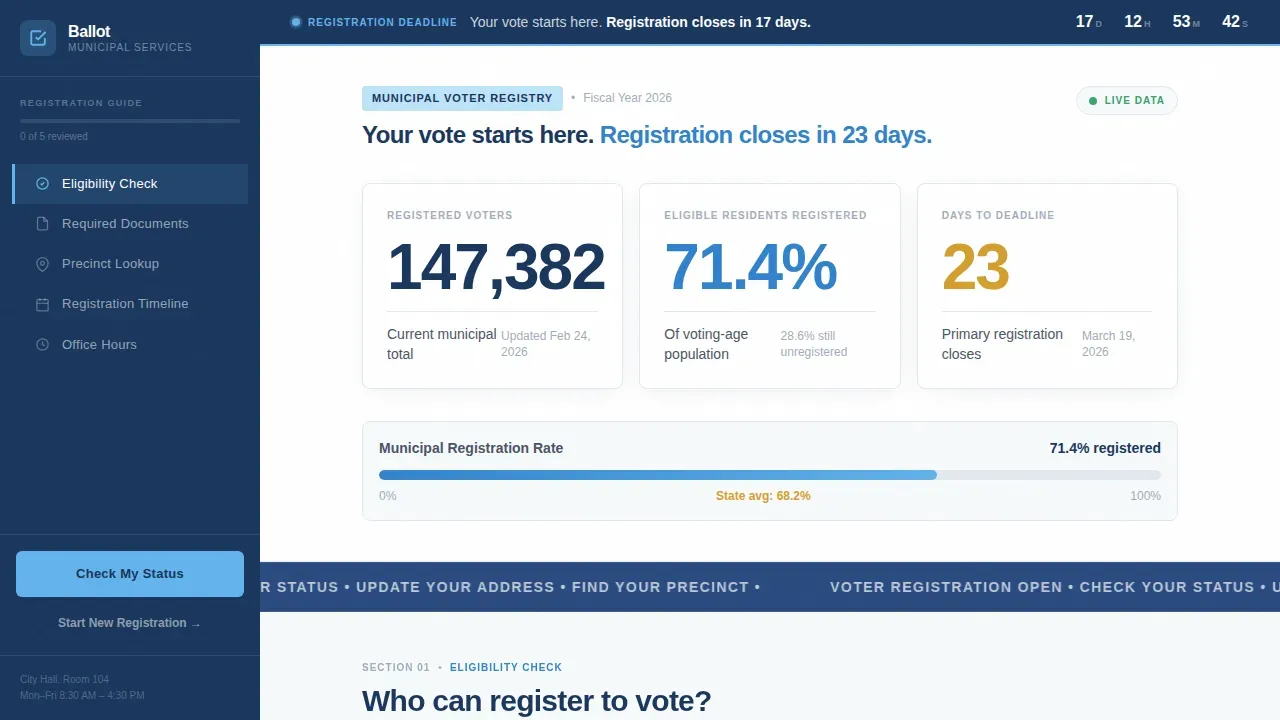
- A hero stats dashboard with animated registration counters, a live deadline countdown, and a single civic headline that explains the urgency using facts, not emotion
- A sticky sidebar that tracks progress through five sections: Eligibility Check, Required Documents, Precinct Lookup, Registration Timeline, and Office Hours
- A dual-path lead generation module with a three-field "Check My Registration Status" form and a multi-step "Start New Registration" guided flow
Feature list
This template packages every component a municipal voter registration page needs, built around civic design standards and tested interaction patterns.
Animated Stats Hero Dashboard
The header displays three oversized counters: total registered voters for the municipality, the percentage of eligible residents registered, and the number of days until the next registration deadline. Counters animate upward to communicate real civic data at a glance. A persistent top banner reinforces the deadline in simple language so voters understand time pressure immediately.
Sticky Sidebar with Progress Tracking
The sidebar anchors the civic navy color and tracks a visitor's scroll position across five named sections. Active states illuminate in open-sky blue so voters always recognize where they are in the process. This sidebar keeps the primary call to action visible at every scroll depth, which is one of the most reliable practices for registration-driven pages.
Interactive Document Checklist
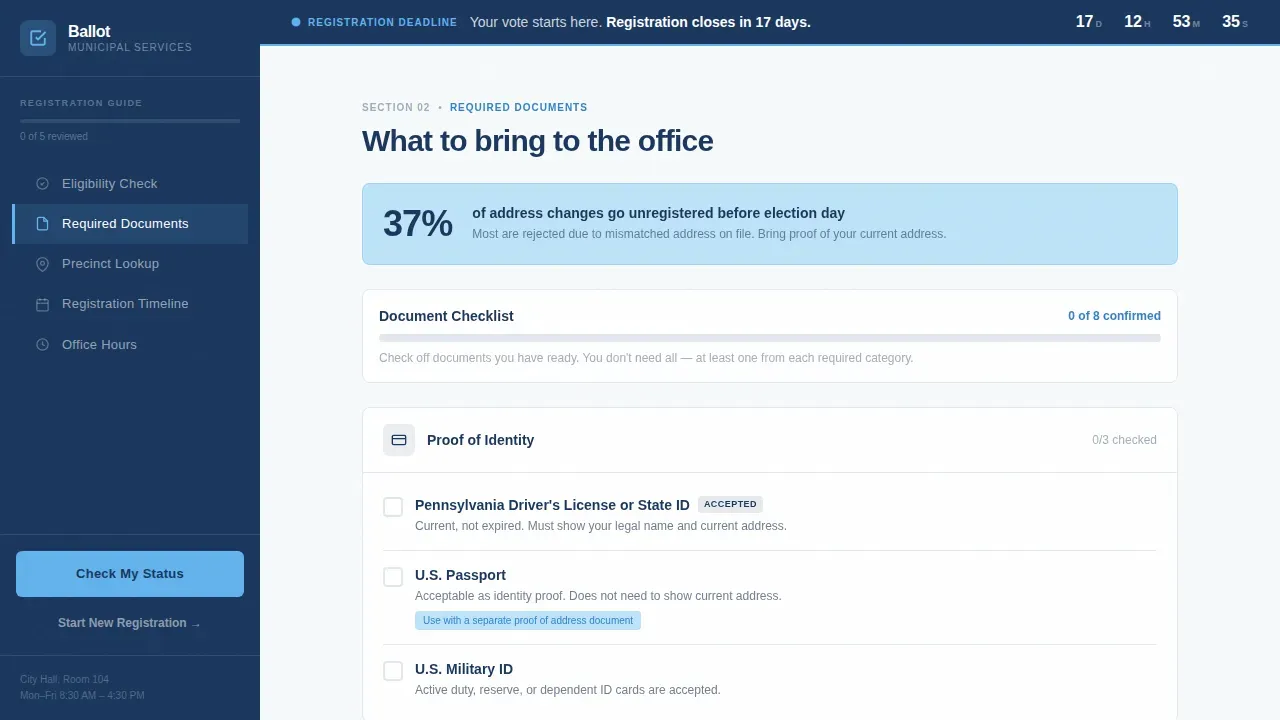
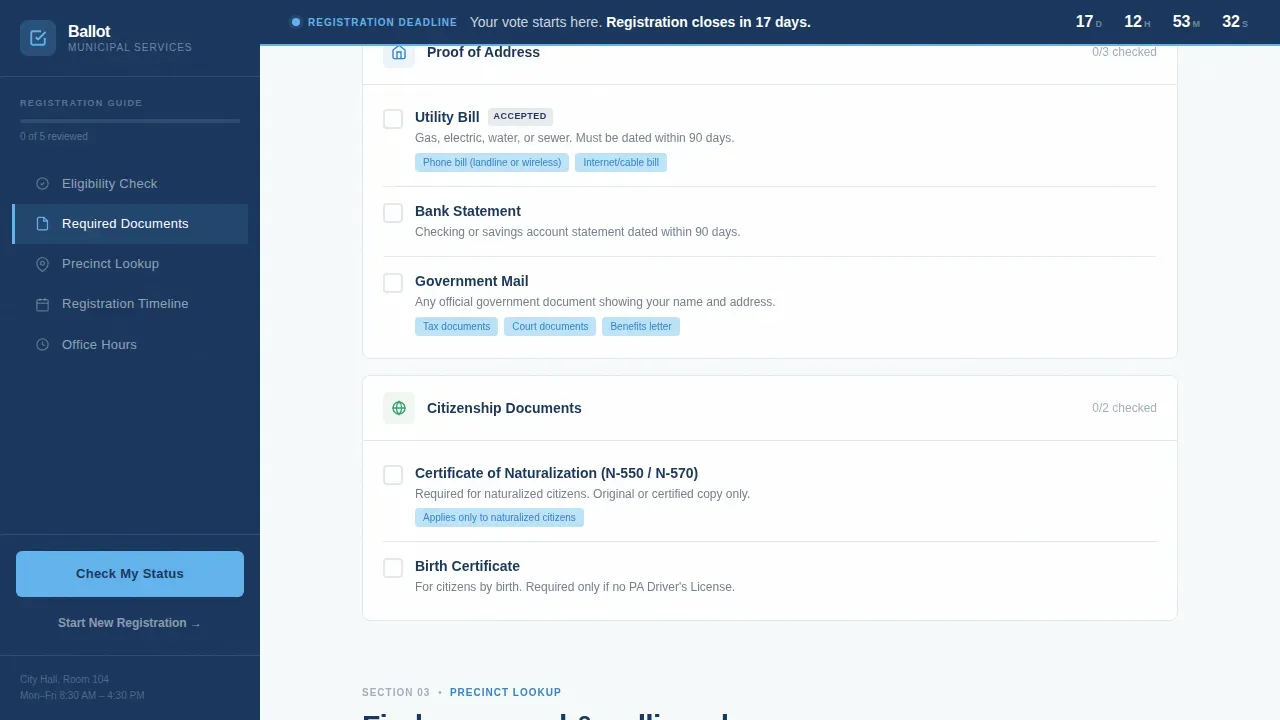
The Required Documents section uses toggleable checklist items so visitors can confirm what they already have. Each toggle represents a document category, allowing voters to work through the list at their own pace. Visual illustrations support low literacy visitors and present instructions accurately so no voter is misled about what they need to bring.
Dual-Path Registration Forms
The primary form captures a voter's full legal name, date of birth, and residential address to check registration status. A secondary "Start New Registration" path opens a guided multi-step form requesting identification type, precinct preference, and preferred contact method. Both forms use simple language and left-aligned fields that support navigation through the process.
Ward-Level Registration Charts and Timeline
The Precinct and Timeline section displays registration trend data by ward using charts. A registration calendar shows upcoming deadlines in required formats. This gives voters accurate, ward-specific context and helps election officials present data in a way that drives action.
Section-Opening Civic Statistics
Each content section opens with a bold statistic pulled from real registration data, for instance "37% of address changes go unregistered before election day." These figures display above the instructional content to frame each barrier clearly. The pattern borrows from industry report practices, making the page read like a municipal transparency document rather than a marketing page.
Page sections overview
| Section | Purpose |
|---|---|
| Hero Stats Dashboard | Display animated voter counters, registration percentage, and deadline countdown |
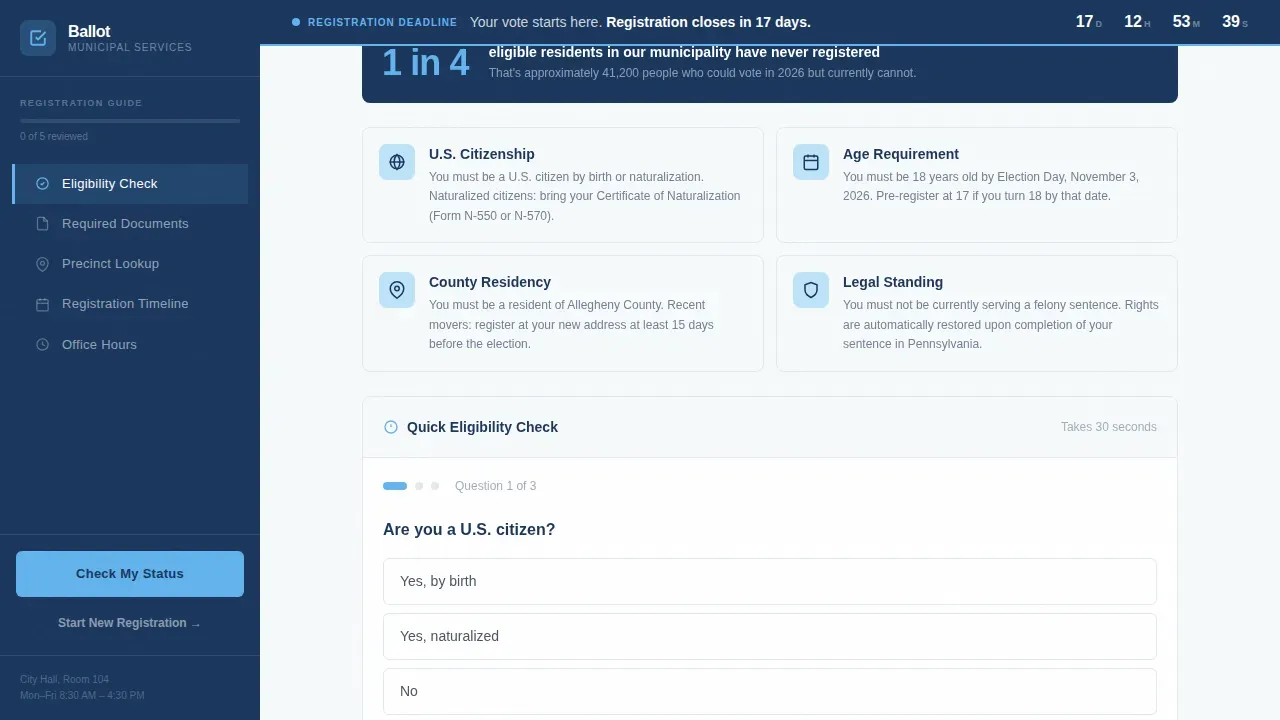
| Eligibility Check | Show criteria cards and an interactive qualifier widget for voters |
| Required Documents | Provide a toggleable document checklist with visual illustrations |
| Precinct and Timeline | Show ward registration trend charts and a deadline calendar |
| Registration Call to Action | Host dual-path forms for status check and new registration |
| Footer | Single-row linear footer with office contact details |
Design & branding system
The visual identity follows a Civic Service theme built around the Slate and Sky color system. The palette is designed to feel like government letterhead you actually trust, carrying the weight and calm of a granite courthouse step.
- Civic navy (#1A365D) anchors headers and the persistent sidebar; institutional slate (#4A5568) handles primary text and navigation; open-sky blue (#63B3ED) marks active states and progress indicators; cloud white (#F7FAFC) fills content panel backgrounds
- Typography uses Plus Jakarta Sans for body copy and user interface elements, with DM Sans reserved for counters and stats displays, creating a clear information hierarchy without relying on centered type or all capital letters
- Civic icons and informational icons support navigation throughout the page; icons use clean strokes and are presented consistently so voters can recognize their meaning at a glance
Mobile & speed optimization
The template is desktop-first to support the sidebar layout, and it stacks responsively for mobile. Interactive components are separated into client-side elements while static sections use server-side rendering to keep the page light.
- Scroll reveals, staggered section entrances, and counter tick-up animations use medium-weight motion that adds purpose without slowing the experience on smaller screens
- The sidebar collapses into a mobile-friendly progress indicator so the active call to action remains reachable on every device
- Text sizing follows civic design best practices: minimum type sizes keep body copy readable for all voters, and sans serif fonts maintain legibility at every screen size
How this template helps you convert
The page is structured so that every section removes one more reason not to complete voter registration. Urgency is factual, not emotional.
- The hero dashboard opens with live voter registration totals and a deadline counter, so visitors understand what is at stake before they read a single instruction. The ballot title headline reinforces the message in plain, civic language.
- The sidebar keeps the "Check My Registration Status" form visible throughout the entire scroll, reducing the distance between intent and action. Voters never have to scroll back to the top to find where to start.
- The interactive document checklist lets voters confirm readiness section by section, so they arrive at the registration form already confident they have what they need. This reduces form abandonment and improves the overall conversion process.
Other information about this template
This template is a worthwhile investment for any municipal program that needs a credible online registration presence. The following details explain additional context about its design approach and practical use.
- The ballot design follows established civic design practices: left-aligned type avoids the readability problems of centered type, where the eye must hunt for the start of the next line; lowercase letters are used instead of all capital letters, since lowercase letterforms are easier to recognize; and bold text is reserved for genuinely critical labels rather than applied as regular text decoration
- Using one sans serif font across the layout creates a unified, readable experience; sans serif fonts are also recommended at polling place signage minimum type sizes because they remain legible under a range of print and display conditions
- Color and shading consistently differentiates sections, instructions, and content areas, helping voters quickly understand the structure of each page without needing to re-read context
- The template can support dual language materials by adapting content blocks for a secondary language alongside the primary language, which is valuable for communities with diverse linguistic backgrounds
- Informational icons and civic icons throughout the layout communicate important information visually, which research confirms helps low literacy visitors and all voters reduce confusion
- Community organizations and poll workers can use the printable companion materials and social media template assets that this civic voter registration page is designed to print and share
- The elections office and election officials who deploy this template can also adapt the contest header pattern and referenda summary blocks to summarize referenda and display candidates names clearly across local contests and ballot measures
- The page is built to provide user feedback at key interaction points: form validation, checklist toggle states, and multi-step form progress indicators all give visitors accurate, real-time confirmation of their inputs
Theme
Civic Service
Creative direction
Industry Report
Color system
Slate & Sky
Style
Sidebar Companion
Direction
Lead Generation
Page Sections
Animated Stats Hero Dashboard
Sticky Sidebar with Progress Tracking
Interactive Document Checklist
Dual-path Registration Forms
Ward-level Charts and Registration Calendar
Section-opening Civic Statistics
Related questions
What sections does this voter registration landing page include?
Can I customize the voter registration form fields?
Is this template suitable for municipal elections offices that serve non-English speakers?
Does the template include print-ready voter registration materials?
How does the sidebar navigation work on mobile devices?



