Studio Rental Landing Page Template for Dance Spaces
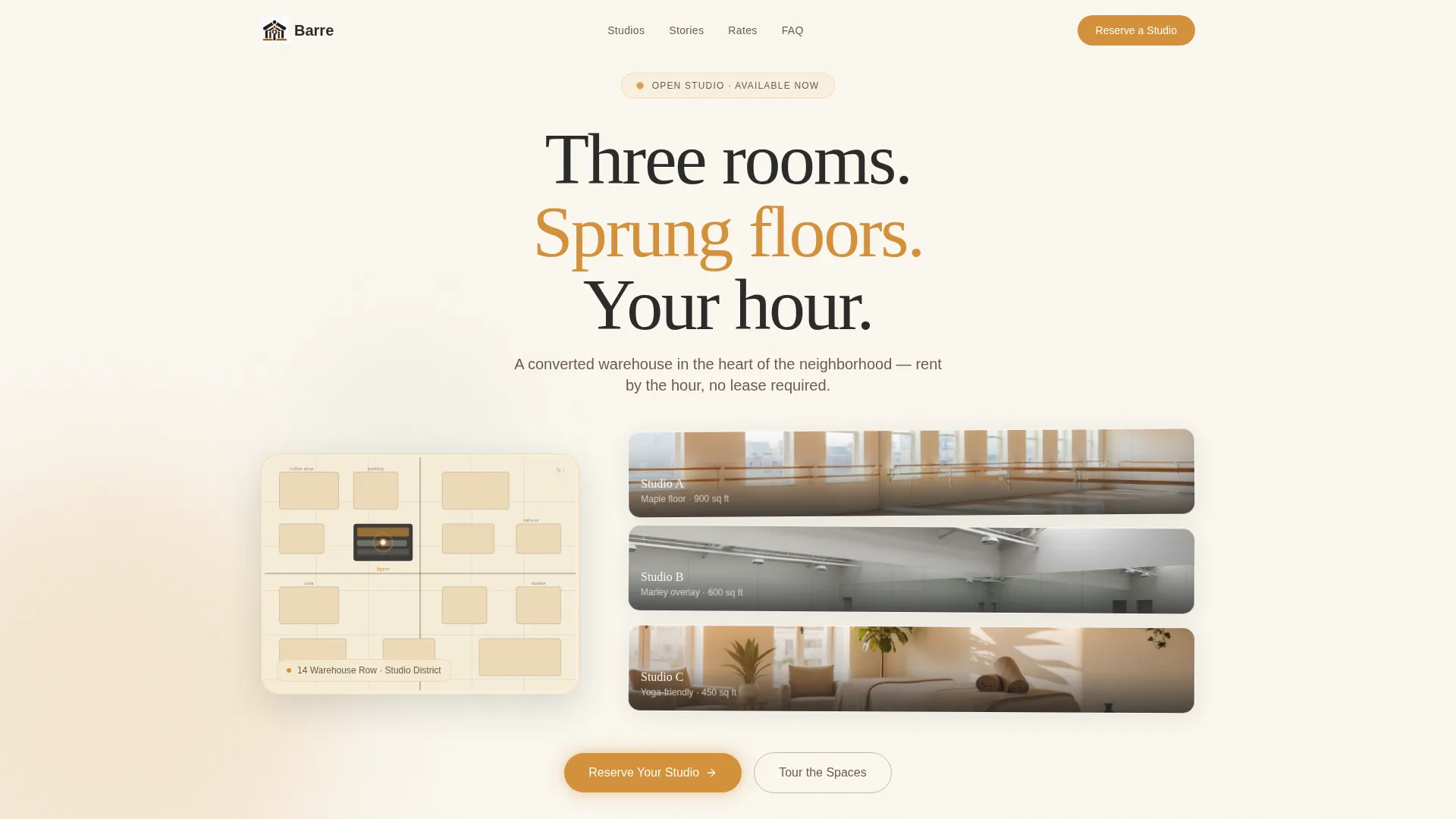
Barre is a full-width immersive landing page template built for dance studio rental spaces. It guides visitors through a neighborhood map entry point, real-booking case studies, and an inline reservation flow. The warm Charcoal and Amber palette creates an inviting atmosphere that mirrors the studio itself, turning browsing into confident booking.
by Rocket studio
Quick summary
Barre is a single-page landing page template designed for rentable studio spaces. It opens with an illustrated map header, moves through story-led case study sections, and closes around an inline booking calendar. Every scroll section is built to build trust and reduce hesitation, making an empty time slot feel like a personal invitation.
Who this template is for
This template speaks directly to studio owners who rent by the hour to a rotating roster of guests. It is equally well-suited for anyone managing a multipurpose creative or movement space that needs to attract bookings without a lengthy sales conversation.
- Independent dance studio owners with two or more rentable rooms
- Movement space operators serving choreographers, yoga groups, and private events
- Small venue managers who want a polished page without a custom build
What problem this template solves
Finding a beautiful rental space online often feels transactional and cold. Visitors land on a page, see a price list, and leave without booking because nothing made the space feel real or welcoming. This template closes that gap by letting the rooms tell their own story.
- Visitors struggle to picture themselves in a space they have never visited
- Generic booking pages fail to communicate the atmosphere, amenities, or community of a studio
- Owners lose warm leads because there is no clear, immediate path from interest to reservation
What you get with this template
This template delivers a complete, scroll-driven landing page experience. Every section is purposefully ordered to move a visitor from curiosity to confirmed booking in a single uninterrupted flow.
- An animated neighborhood map header with an expandable floor plan on hover
- Two real-booking case study sections with pull-quotes, rehearsal imagery, and amenity reveals
- A sticky amber reservation bar, an inline availability calendar, and a photo walkthrough section with room details on hover
Feature list
This landing page is built around six focused components. Each one serves a specific moment in the visitor's decision journey, from first impression to final confirmation.
Illustrated Map Header
The header centers on a softly animated neighborhood map rendered in charcoal line work on a wheat background. Surrounding landmarks are hand-labeled in lowercase serif. The studio pin pulses in amber, and hovering expands the building footprint into a simple floor plan showing all three rentable rooms.
Case Study Narrative Sections
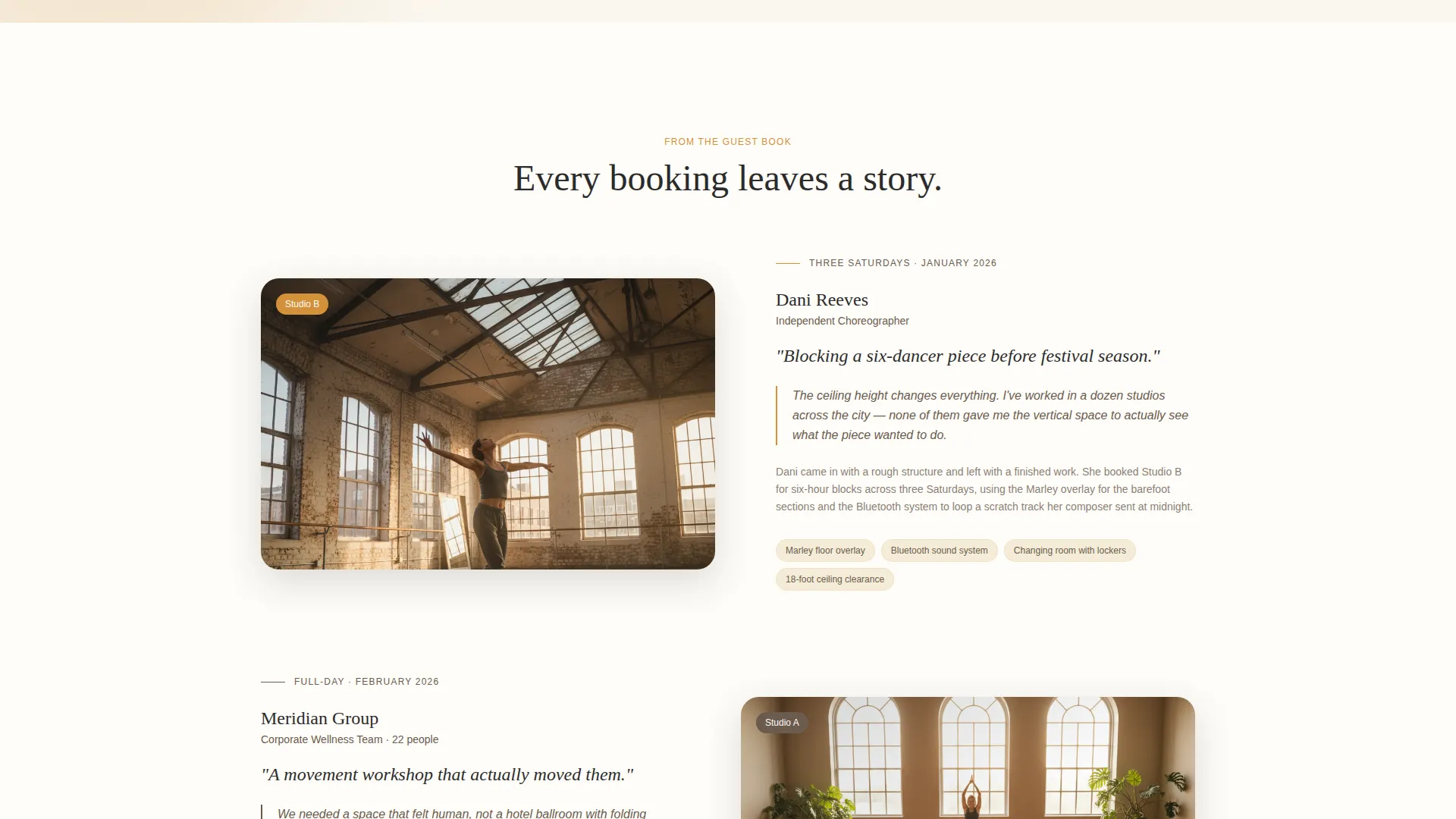
Two scroll sections each tell the story of a real booking. The first follows a choreographer who blocked a six-dancer piece across three Saturdays. The second shows a corporate team using the space for a movement workshop. Each section pairs imagery with a pull-quote and quietly surfaces amenities like the Marley floor overlay and the Bluetooth sound system.
Sticky Reservation Bar
A persistent amber bar appears after the first case study and stays anchored at the top of the viewport throughout the rest of the page. It carries a single call to action: "Reserve Your Studio." This keeps the booking path visible at every moment of consideration.
Inline Availability Calendar
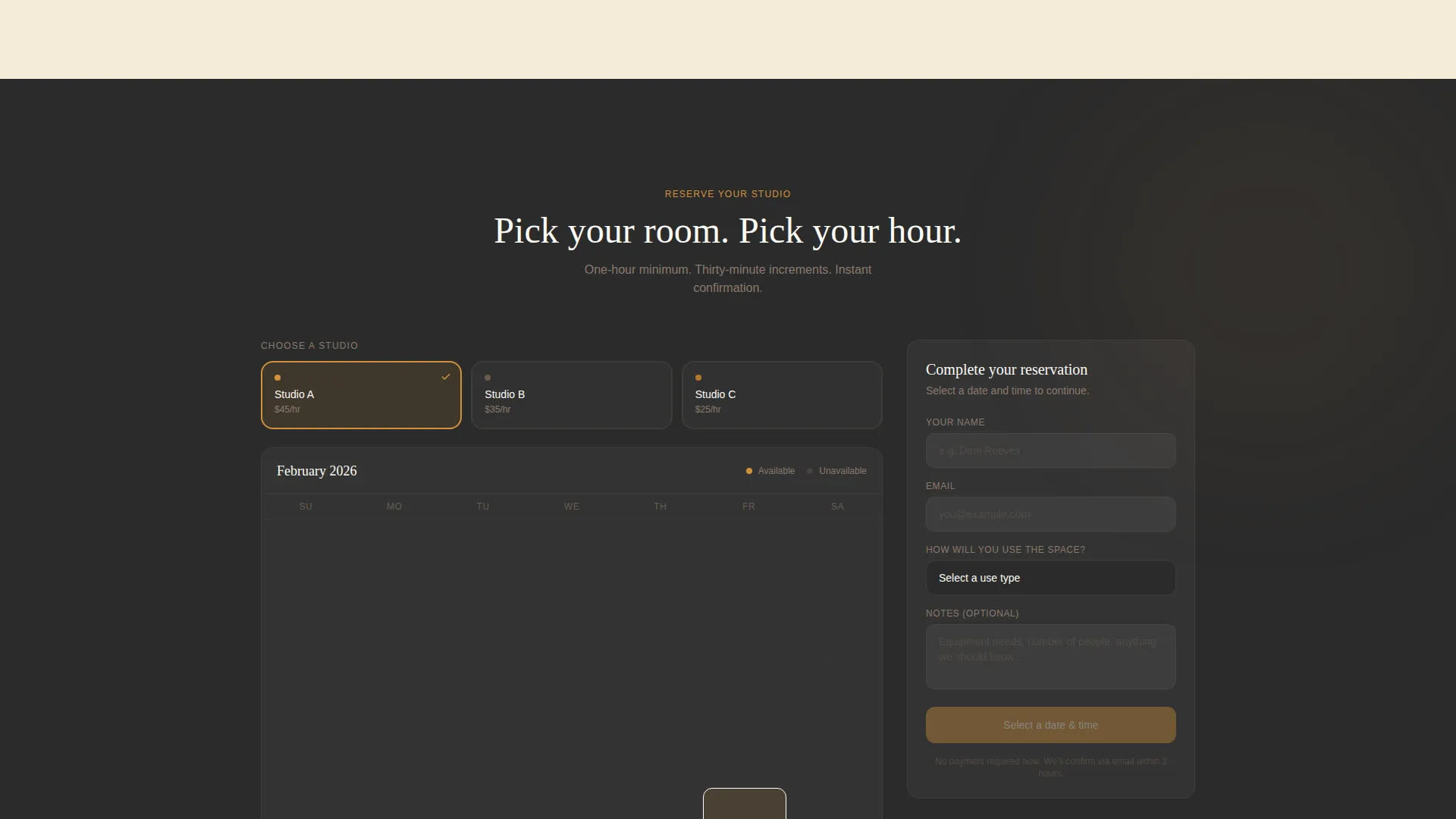
Clicking the reservation bar opens an inline calendar showing real-time availability across all three rooms, color-coded by studio. Visitors select a date, choose a time block in thirty-minute increments (one-hour minimum), and fill in their name, email address, and use type.
Room Walkthrough Section
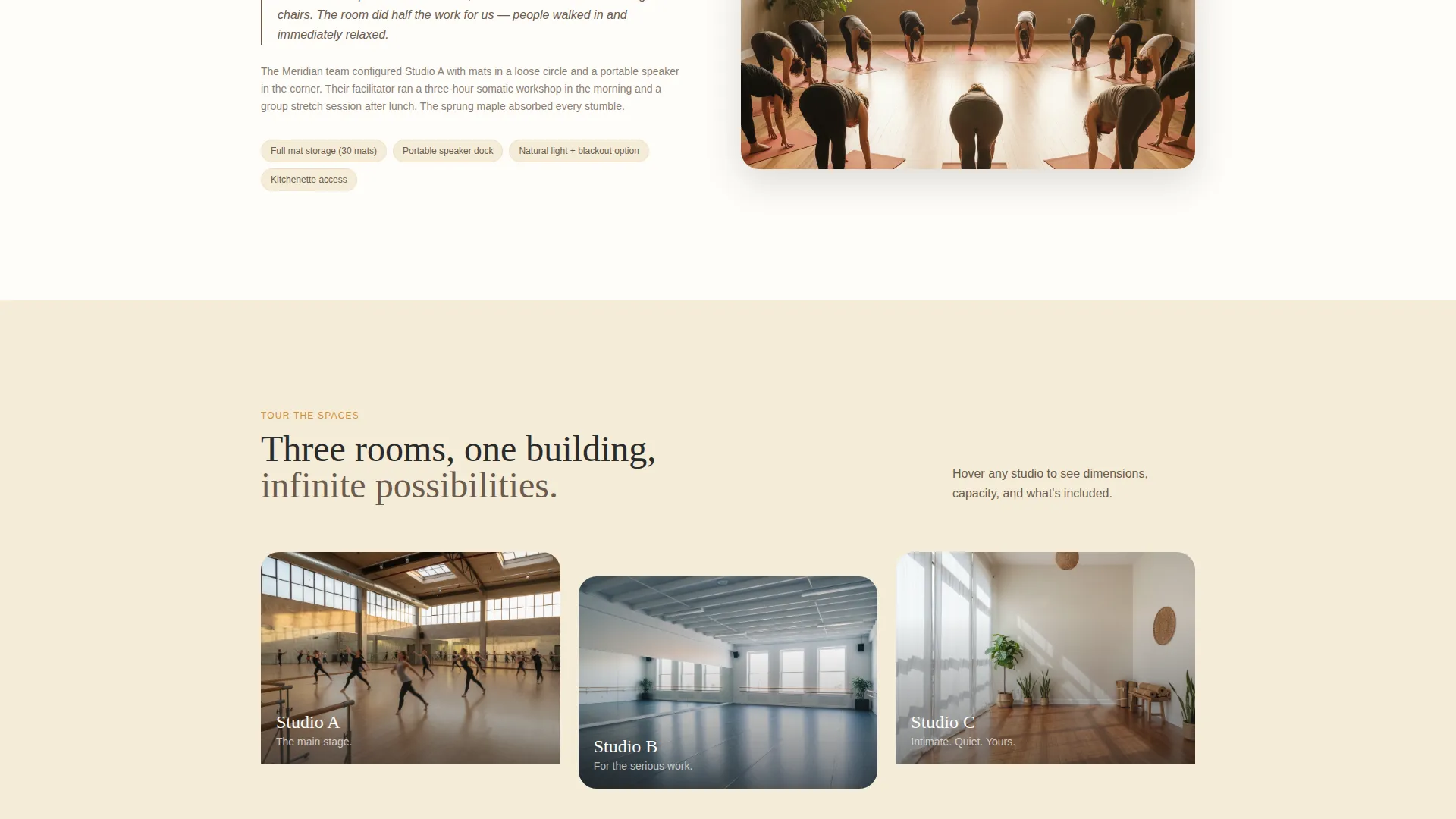
A secondary path labeled "Tour the Spaces" scrolls visitors to a photo walkthrough of each room. Room dimensions, capacity, and hourly rate appear on hover, giving practical detail without cluttering the primary narrative flow.
Pastoral Calm Color System
The Charcoal and Amber palette is applied consistently across every interactive element. Amber highlights booking buttons and available time slots. Soft wheat fills section backgrounds. Smoked oak handles secondary type and divider lines. The result is a visual hierarchy that draws the eye naturally toward every clickable surface.
Page sections overview
| Section | Purpose |
|---|---|
| Animated Map Header | Orient visitors to location and show three rooms |
| Studio Tag Line | Deliver the core value in one short line |
| Choreographer Case Study | Build trust through a real rehearsal story |
| Corporate Booking Story | Show the space in a second real-world context |
| Sticky Reserve Bar | Keep the booking call to action always visible |
| Inline Booking Calendar | Let visitors select date, time, and use type |
| Tour the Spaces | Photo walkthrough with dimensions and rates on hover |
| Changing Room Detail | Surface the locker amenity within the narrative |
Design & branding system
The visual identity follows a Pastoral Calm theme built around warmth, groundedness, and natural light. Every color decision reinforces the feeling of a barn door left open at dusk, with the last warm light catching the edges of a dark, clean floor.
- Deep charcoal (#2B2B2B) for primary text and navigation, soft wheat (#F5ECD7) for section backgrounds, and warm amber (#D4913B) for all booking buttons and highlighted time slots
- Smoked oak (#6B5B4E) handles secondary type and divider lines, keeping supporting text readable without competing with the amber focal points
- Lowercase serif hand-labeling on the map and pull-quote typography throughout give the page a handcrafted, studio-notebook feel
Mobile & speed optimization
The template is structured for clean rendering across screen sizes. The section-by-section scroll narrative translates naturally to a single-column mobile layout without losing the atmospheric quality of the desktop experience.
- The sticky reservation bar remains functional and visible on smaller screens, keeping the booking path accessible at every scroll depth
- Hover-reveal details on the room walkthrough section adapt to tap interactions on touch devices, so no room information is hidden from mobile visitors
How this template helps you convert
Every design and layout decision in this template is aimed at one outcome: turning a curious visitor into a confirmed booking. The page earns that outcome rather than demanding it.
- The case study narrative builds trust before asking for anything, showing the studio already in use by people who match the visitor's profile, which makes the empty calendar slot feel like a natural next step rather than a cold transaction.
- The sticky amber reservation bar and inline calendar compress the gap between decision and action, so a visitor who is ready to book never has to scroll back up or navigate away to complete a reservation.
Other information about this template
This template is part of the Space and Rental Platforms category under Real Estate and Property. It is a strong fit for the artist loft and studio rental niche, where atmosphere and community credibility matter as much as price and availability.
- The template is designed as a single landing page, not a multi-page site, keeping all content and conversion paths within one focused scroll experience
- The Zigzag and Alternating section layout used in the case study area gives the page editorial variety without requiring custom development work
- The template supports an Atelier Studio visual direction, making it adaptable for adjacent creative rental spaces such as photography studios or rehearsal halls
Theme
Atelier Studio
Creative direction
Gallery Walk
Color system
Midnight Blue
Style
Zigzag/Alternating
Direction
Quiz/Assessment
Page Sections
Illustrated Animated Map Header
Real-booking Case Study Sections
Sticky Amber Reservation Bar
Inline Availability Calendar
Room Walkthrough with Hover Details
Pastoral Calm Color System
Related questions
Can I customize the room names and case study content?
Does the booking calendar show live availability?
Can I use this template if my studio has fewer than three rooms?
Is the sticky reservation bar visible throughout the whole page?
What use types can visitors choose when submitting a booking request?



