Advanced Military & Defense Professional Website Template
Sortie is a hub and spoke anchor-nav landing page template built for air force base community portals. It connects active-duty airmen, military spouses, civilian employees, and base contractors to events, family support programs, recreation, volunteer opportunities, and key contacts, all from one organized, conversion-focused page anchored by a bold animated infographic header and warm Community Hearth visual identity.
by Rocket studio
Quick summary
Sortie is a single-page community portal template designed for the full population of an air force base: active-duty personnel, military spouses, civilian employees, retirees, and base contractors. The page leads with an animated overhead base-map infographic and flows into five anchor-nav spoke sections covering events, family support, recreation, volunteer work, and key contacts. Every section closes with a "Reserve Your Spot" call to action and a three-field registration form, so the page earns its conversions by showing real participation data first.
Who this template is for
This template is intended for base community managers, Morale Welfare and Recreation (MWR) coordinators, squadron family readiness officers, and any installation team responsible for keeping a large, mixed population informed and connected. It is equally useful for civilian government web administrators who need a structured, trustworthy portal that serves everyone inside the fence line, from commissioned officers on shift rotation to civilian employees supporting base sustainment.
- Active-duty airmen and military spouses who need quick access to events, schedules, and support programs
- Civilian employees, base contractors, and retirees who need clear guidance on base access, community programs, and volunteer drives
- Installation public affairs and community support teams who need a credible, organized web presence that reflects the discipline and warmth of a base community
What problem this template solves
Most air force base community portals scatter information across multiple sites, outdated PDF bulletins, and fragmented social media posts. Personnel arriving at a new location, spouses coordinating school enrollment during a deployment cycle, or civilian employees navigating base access all face the same problem: too many places to look, not enough time between shifts. The result is low program participation, missed volunteer sign-ups, and community events that go half-attended.
- There is no single hub connecting events, family support, recreation, volunteering, and key contacts for the entire base population
- Participation data sits invisible inside internal reports, so new residents never see how active the community already is
- Registration for base events is buried or requires multiple steps, causing capable, willing people to disengage before they commit
What you get with this template
This template delivers a complete, scroll-driven community landing page with a sticky anchor navigation system and six purpose-built sections. Every section is structured around the Industry Report creative direction: lead with macro data, then move into specific program detail and individual sign-up actions. The page is designed desktop-first for base kiosk and office browsing, with full mobile support for personnel accessing from phones between training sessions or during a deployment prep window.
- An animated SVG infographic header with pulsing stat nodes, count-up numbers, and a stylized overhead base-map composition
- Five spoke sections (Events, Family Support, Recreation, Volunteer, Key Contacts) each anchored in the sticky nav and each closing with a "Reserve Your Spot" primary call to action
- A three-field quick-capture registration form (name, unit or affiliation dropdown, email) and a secondary "Get the Monthly Brief" newsletter capture path
Feature list
The template packages every structural, visual, and interactive element a base community portal needs. Each feature below is built directly from the project brief and serves the page's primary goal: getting the right people to the right event with the least friction.
Animated Base Map Infographic Header
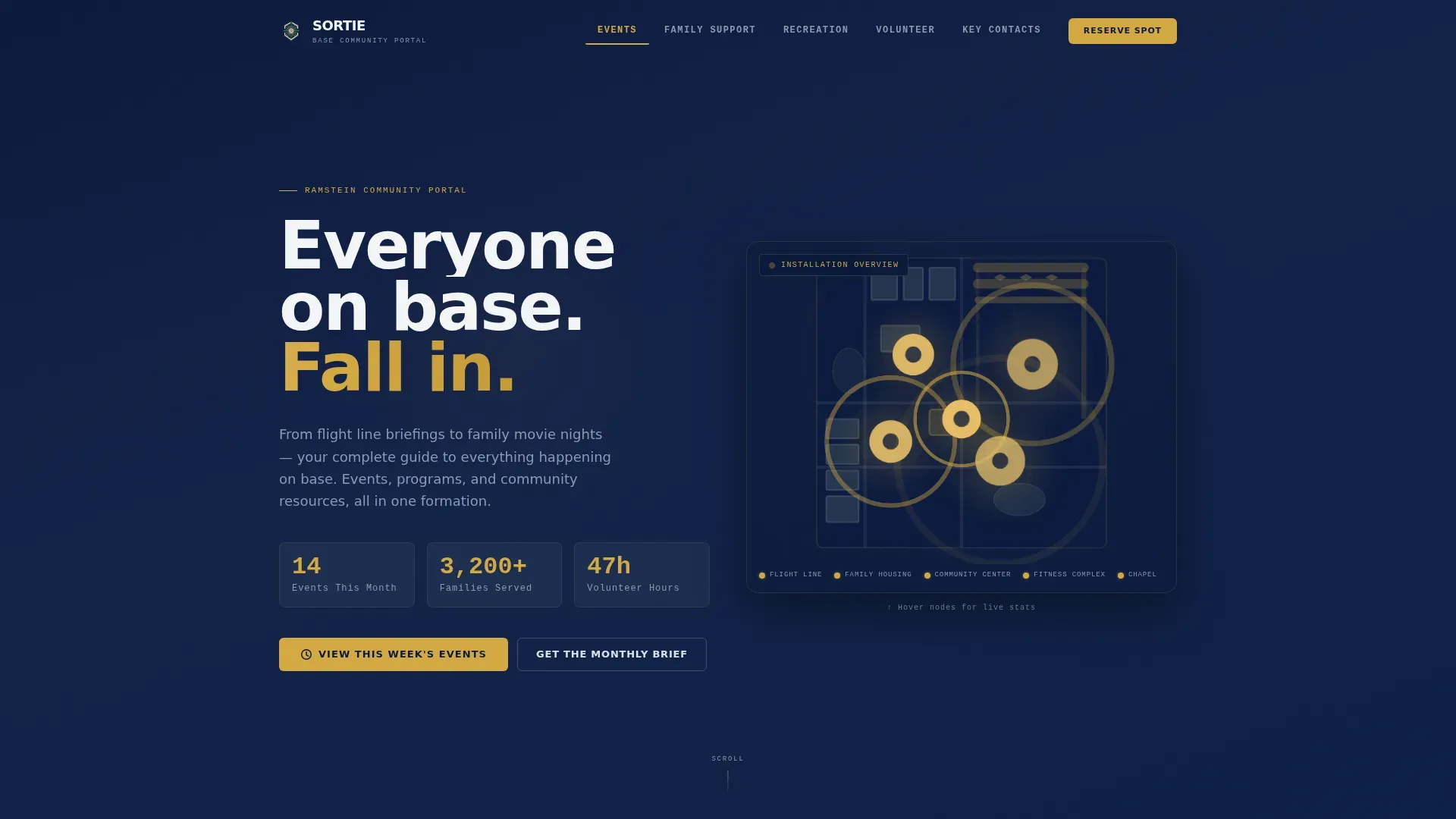
The header renders a stylized overhead silhouette of the base as a living SVG map. Numbered nodes pulse gently at key locations: the flight line, family housing, the community center, the fitness complex, and the chapel. Each node displays a real-time stat, such as "14 Events This Month" or "47 Volunteer Hours This Week," with numbers counting up on page load using GSAP animation. The composition reads like a mission briefing board redesigned for a neighborhood, authoritative and data-dense but scannable at a glance. This hero section communicates scale and activity before a visitor reads a single line of body copy, establishing trust through visible community participation.
Sticky Hub and Spoke Anchor Navigation
The sticky navigation bar anchors five spoke sections: Events, Family Support, Recreation, Volunteer, and Key Contacts. Visitors can jump directly to the section most relevant to their role without scrolling through content that does not apply to their immediate needs. The anchor nav stays fixed at the top as the user scrolls, keeping orientation clear across a long-form page. This structure is especially important for a base community audience where personnel have limited time between shifts and need to access specific resources immediately. The navigation creates a logical command structure for the page, mirroring the organized, mission-oriented environment the community already operates in.
Industry Report Section Flow with Data Callouts
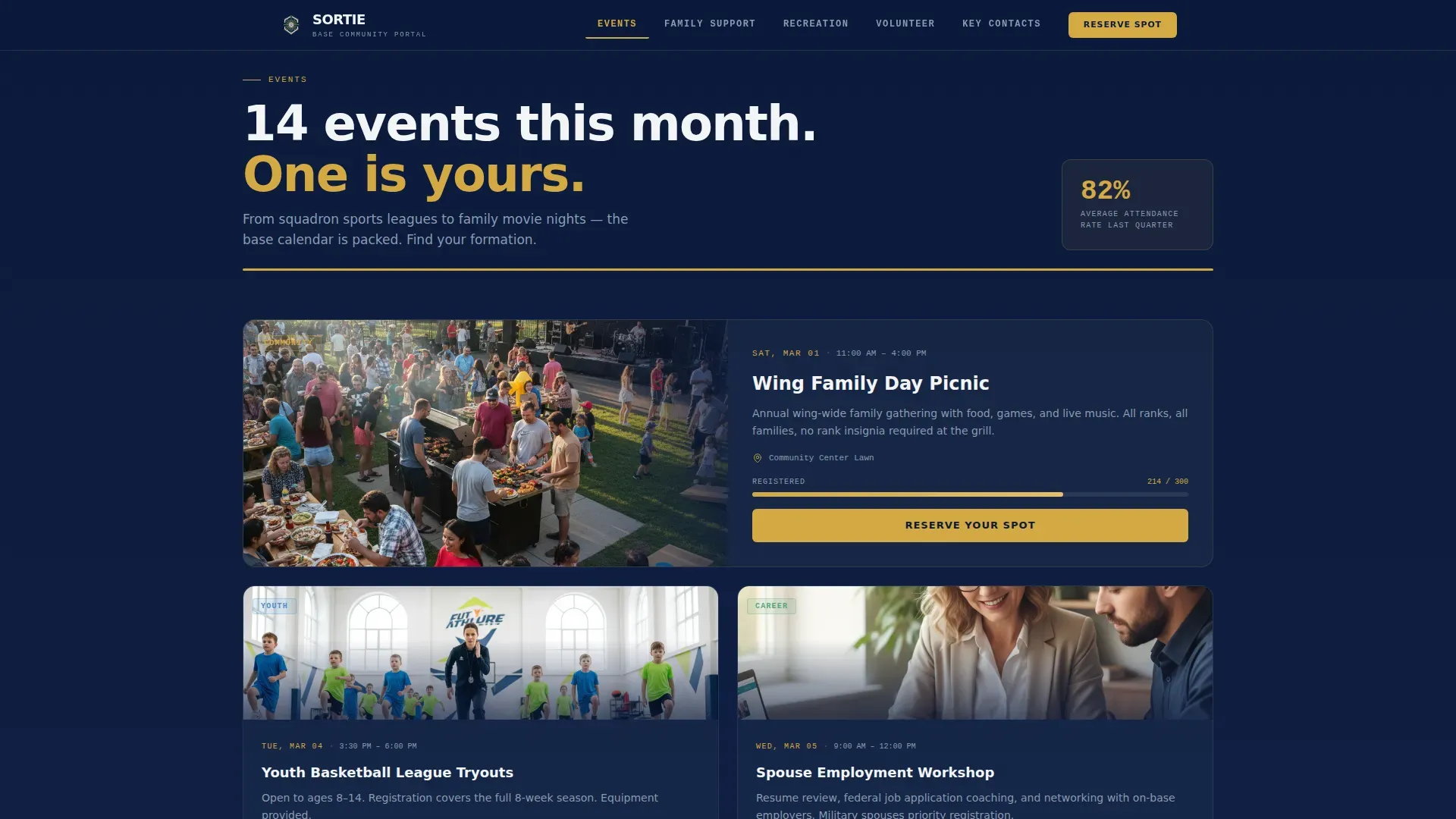
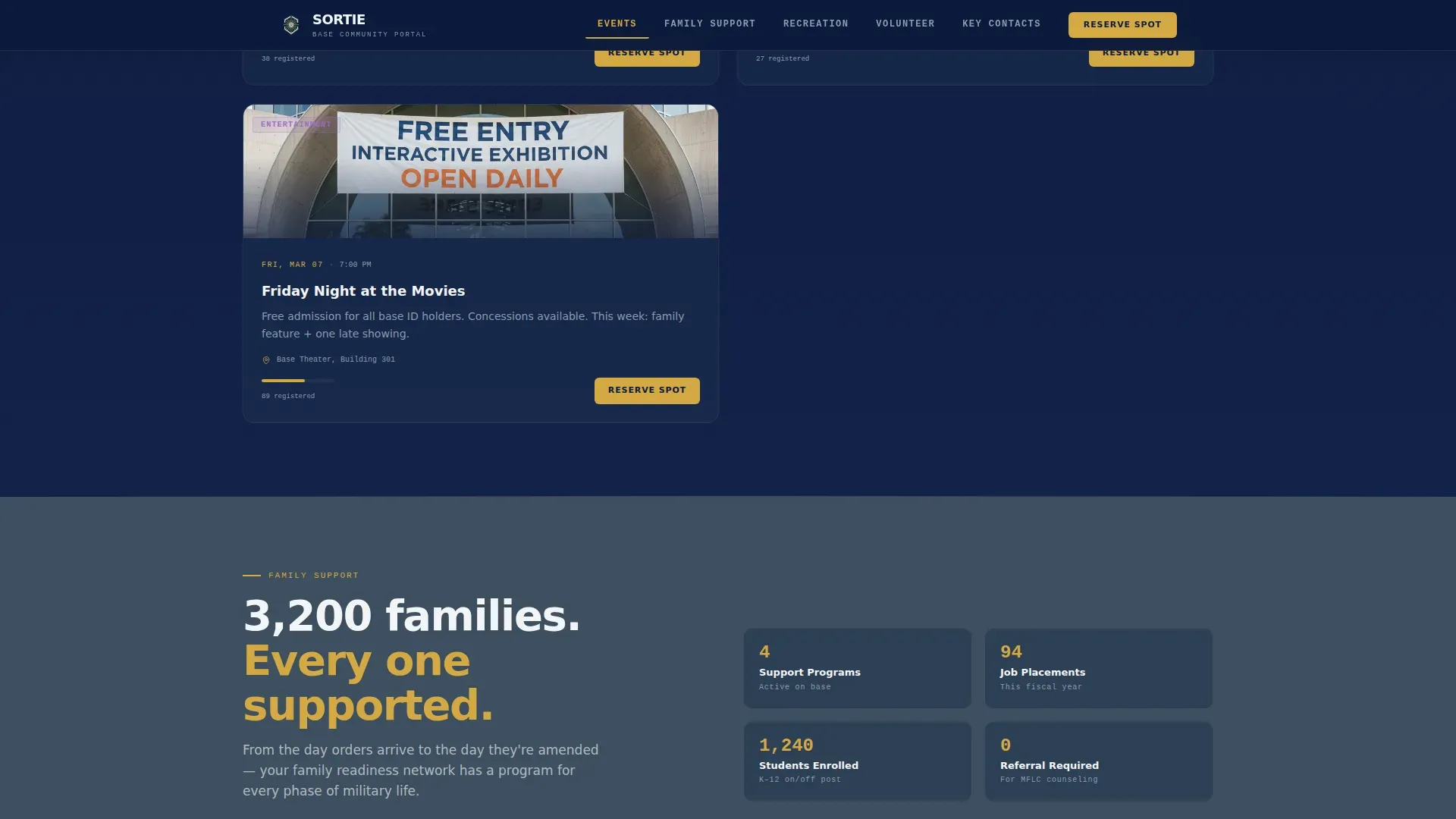
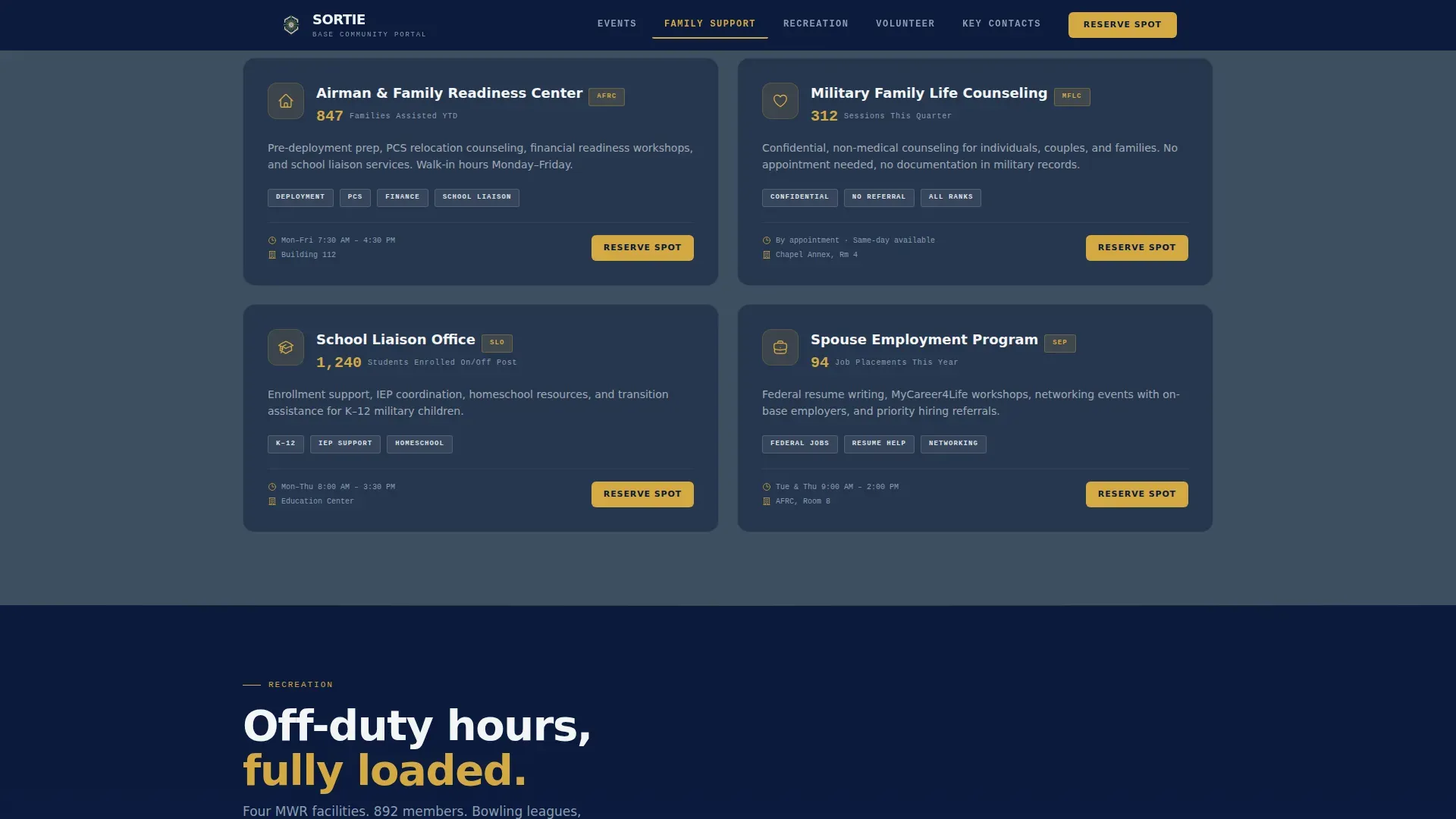
Each spoke section opens with a bold data callout in IBM Plex Mono typography before unfolding into narrative detail and individual event or program cards. The visitor moves from macro to micro: base-wide participation numbers give way to specific event listings, and aggregate family-support statistics dissolve into named program descriptions with sign-up slots visible. This progressive disclosure pattern is intentional. It earns the conversion by showing social proof first, so by the time a visitor reaches the "Reserve Your Spot" button, they are joining a formation already moving rather than stepping into an empty room. The data-first approach is familiar to a military audience trained to assess a briefing before taking action.
Event Registration Modal with Affiliation Dropdown
The primary call to action "Reserve Your Spot" appears in hearth gold at the close of every spoke section. It triggers a three-field quick-capture registration form: name, unit or affiliation (dropdown including Military Spouse, Civilian Employee, Retiree, and DoD Contractor), and email address. The affiliation dropdown is critical for a base community audience because it lets the organizing team understand who is registering and tailor follow-up communications accordingly. The form is intentionally brief to maximize completion rates among busy personnel who have limited time to fill out lengthy sign-up flows. Every section has its own relevant registration entry point, so conversion opportunities are distributed across the entire page rather than concentrated at the bottom.
Secondary Newsletter Capture Path
Visitors who are not ready to commit to a specific event can subscribe via the "Get the Monthly Brief" newsletter capture. This secondary path targets the portion of the base population, including new arrivals, retirees checking in remotely, or families mid-deployment cycle, who want to stay informed without locking into a single event date. The newsletter path keeps these visitors connected to the community and creates a warm re-engagement channel for future events and program updates. It also serves as a lower-friction introduction to the portal for civilian employees and base contractors who may be less familiar with the full range of programs on offer.
Key Contacts Directory and Footer
The Key Contacts spoke section presents directory cards with contact information organized by function, including emergency contacts and essential base services. This section ensures that regardless of why a visitor arrived on the page, they can find the right phone number, office, or resource without navigating away. The footer follows Pattern 1 (Linear Single-Row) and provides quick baseline access to the most commonly needed links. Together, the Key Contacts section and footer create a safety net for visitors who have a specific, urgent need rather than a browsing intent.
Page sections overview
| Section | Purpose |
|---|---|
| Animated Hero Map | Establish community scale with pulsing stat nodes and count-up participation numbers |
| Events Spoke | Display upcoming event cards with individual "Reserve Your Spot" registration actions |
| Family Support Spoke | Present aggregate program stats and specific family support service descriptions |
| Recreation Spoke | Highlight MWR facilities and schedule links with visual facility cards |
| Volunteer Spoke | Show volunteer impact data and active drives with sign-up entry points |
| Key Contacts Spoke | Provide directory cards, emergency info, and essential base service contacts |
| Linear Footer | Deliver single-row baseline navigation and quick-access links |
Design & branding system
The visual identity follows the Community Hearth theme expressed through the Navy Authority color system. The palette is built to feel like a pressed uniform hung beside a kitchen apron: disciplined structure softened by the warmth of the people who make a base a hometown. Typography combines DM Sans for headers and navigation with IBM Plex Mono for statistics and data callouts, creating a clear visual hierarchy between institutional authority and human detail.
- Deep service dress blue (#0B1A3B) anchors headers and navigation; steel fuselage gray (#3D4F5F) fills section backgrounds; hearth gold (#D4A843) marks buttons and highlight bars; dress white (#F4F5F7) backgrounds content panels
- Gold appears sparingly, the way rank insignia catches light, enough to guide the eye toward key actions without overwhelming the composition
- GSAP-powered scroll-triggered reveals, pulsing SVG node animations, and count-up stat counters create a living, responsive feel that matches the energy of an active installation
Mobile & speed optimization
The template is designed desktop-first to serve base kiosk browsers and office desktops between shifts, with full mobile responsiveness built in for personnel accessing from personal phones. The page architecture separates static content rendered via Server Components from animation-heavy elements handled on the client side, keeping the initial load lean while preserving the full interactive experience on capable devices.
- Sticky anchor navigation collapses cleanly for mobile viewports, keeping spoke-section access fast on small screens
- Count-up animations and GSAP reveal sequences are scoped to client-side rendering so they do not block the display of critical text content on slower connections
How this template helps you convert
The page is engineered around a single conversion goal: event registration. Every design and content decision serves that goal by building trust through data before asking for a commitment. The result is a page where signing up feels less like filling out a form and more like falling in with a group already assembled and ready to move.
- The animated infographic header leads with participation numbers (events this month, families served, volunteer hours this week) so visitors see proof of community activity the moment the page loads, establishing credibility before any copy is read
- Each spoke section follows an escalating involvement arc: macro statistics at the top, specific program descriptions in the middle, and a "Reserve Your Spot" button at the close, so the visitor is primed by data and guided naturally toward the registration action
- The secondary "Get the Monthly Brief" newsletter path captures undecided visitors and keeps them in the community communication loop, creating a low-pressure re-engagement channel that can convert to event registration over time
Other information about this template
This template is purpose-built for the specific operational and community reality of an air force base installation, where the population includes active-duty forces, commissioned officers, civilian personnel, retirees, and families all sharing the same physical and social space. The design reflects an understanding that base community life operates on mission-tempo schedules, and that any web resource serving this population must deliver value in seconds, not minutes.
The Sortie community hearth air force base landing page template is particularly well suited to installations that function similarly to a joint base environment, where multiple branches or mission sets share resources and community infrastructure. Air national guard units, reserve components, and total force organizations that co-locate with active-duty wings will find the hub and spoke structure flexible enough to represent a broad population without losing focus.
The template's visual system aligns with established standards for military community web design, including a clear headline structure, trustworthy color authority, and a minimalist layout that keeps high-value information prominent. A landing page for a military-associated community must prioritize trust and quick access to resources, and every design decision here serves that principle. Content on any implementation should adhere to installation security guidelines, particularly regarding imagery and base location details.
Air force civilian employees play a vital role in base community life. Civilians working in hundreds of occupations across air education and training command installations sustain aircraft, facilities, infrastructure, and systems that keep the mission running. These civilian employees share the same responsibility to the nation as the personnel in uniform, and the template's affiliation dropdown specifically includes Civilian Employee as a selectable category, acknowledging their full membership in the base community.
The page structure also reflects the importance of family readiness across all force components. Air national guard families, army reserve families, and active-duty dependents all face the challenges of balancing service commitments with community life. The Family Support spoke section is designed to surface programs that address deployment readiness, education resources for dependents, medical referrals, and housing guidance in one consolidated view.
From a development standpoint, no-code and low-code platforms allow users to build and deploy applications like this template without traditional programming skills. These platforms enable rapid application development that makes them suitable across many industries and community contexts, including government and military installations. AI-powered no-code platforms can generate production-ready applications from natural language prompts, and tools like these can help organizations respond quickly to changing base mission needs and community challenges. Non-technical users, including base community managers with no coding background, can create and maintain a page like Sortie without relying on traditional development resources.
The template is intended to serve installations across the country, from large continental United States bases to remote locations including installations in Alaska and overseas theaters. Whether the installation is established as a major combat operations hub or a training command site supporting air education pipelines, the page structure adapts to the size and focus of the base community it represents. The design system was maintained with sufficient visual flexibility to accommodate a wide range of base identities while keeping the Navy Authority color framework intact.
William-style naming conventions for events (January socials, unit-level team competitions) can be reflected directly in the event cards. The template's event section is equipped to display multiple event cards simultaneously, enabling the community team to create a comprehensive January program calendar or any monthly schedule without losing visual hierarchy.
- The template is designed for government and public sector use, with a visual authority appropriate for military and defense contexts
- The medical spoke can surface essential health and wellness contacts, including referrals to on-base medical facilities, as part of the Key Contacts section
- The volunteer spoke highlights community impact data including hours contributed, creating a compelling argument for participation among personnel and civilians alike
- Civilian contractors and DoD contract personnel are explicitly included in the registration affiliation dropdown, ensuring the full base population can engage with community programs
- The page's economic value to a base community comes from consolidating scattered resources into one trusted, well-maintained site, reducing the administrative burden on community support teams
- The interests of all base residents, including families, single airmen, retirees, and civilian staff, are represented across the five spoke sections, ensuring no major community group is lost or underserved
- The template's focus on social proof and data-led conversion is a proven advantage for community portals that need to demonstrate relevance and participation to installation leadership
- Scientific and technology-driven innovation in community web design is reflected in the GSAP animation stack and SVG node system used in the header
Theme
Community Hearth
Creative direction
Industry Report
Color system
Navy Authority
Style
Hub & Spoke (Anchor Nav)
Direction
Event Registration
Page Sections
Animated SVG Base Map Header
Sticky Hub and Spoke Anchor Navigation
Industry Report Data Callout Section Flow
Event Registration Modal with Affiliation Dropdown
Secondary Newsletter Capture Path
Key Contacts Directory and Linear Footer
Related questions
Who is this landing page template designed for?
Can civilian employees and contractors register through this template?
What sections does this landing page include?
Does this template require coding skills to use?
How does the page handle visitors who are not ready to register for an event?



