Field-Ready Search and Rescue Landing Page Template
Beacon is a field-ready search and rescue landing page template built as a sequential operational knowledge base. It guides aspiring SAR volunteers, team leaders, and families of the missing through five mission phases, from Alert and Dispatch through Recovery and Debrief, with downloadable resources, a functional search filter, and a gated field manual PDF behind a role-selector form.
by Rocket studio
Quick summary
Beacon is an editorial SAR knowledge base landing page structured like a field manual unfolding phase by phase. It pairs narrative explanations with downloadable resources in a zigzag layout, uses a functional dispatch-style search box as the hero, and gates a comprehensive PDF behind a simple role-selector form. The design feels like a topo map in soft rain, muted, readable, and precise.
Who this template is for
This template is purpose-built for organizations and individuals operating in the search and rescue space. It speaks directly to people at every level of readiness, from those just beginning their training to seasoned responders who need a reliable reference point before a difficult deployment.
- Aspiring SAR volunteers studying for their first certification and looking for structured, trustworthy doctrine
- Team leaders who need to refresh procedures and locate downloadable resources prior to storm season
- Families of the missing who want to understand how a real search operation unfolds and what to expect at each phase
What problem this template solves
SAR knowledge is scattered across agency manuals, outdated PDFs, and inconsistent training sites. Visitors arrive with urgent questions and often leave without answers because the page they land on fails to meet them at their level. The wrong layout, a slow load, or a wall of unexplained jargon can cost critical time in a real emergency.
- No single resource mirrors actual operational doctrine from first alert through final debrief, leaving volunteers and families unable to follow the full picture
- Generic pages do not segment content by experience level, so beginners and advanced operators course through the same flat wall of text
- Forms that ask too much up front create friction and delay access to resources people need immediately
What you get with this template
Beacon delivers a fully structured, single-page resource hub organized as five sequential SAR phases. Each phase section alternates left-right in a zigzag layout, with narrative on one side and downloadable assets on the other. The overall plan moves from broad orientation at the top to advanced doctrine deeper in the page.
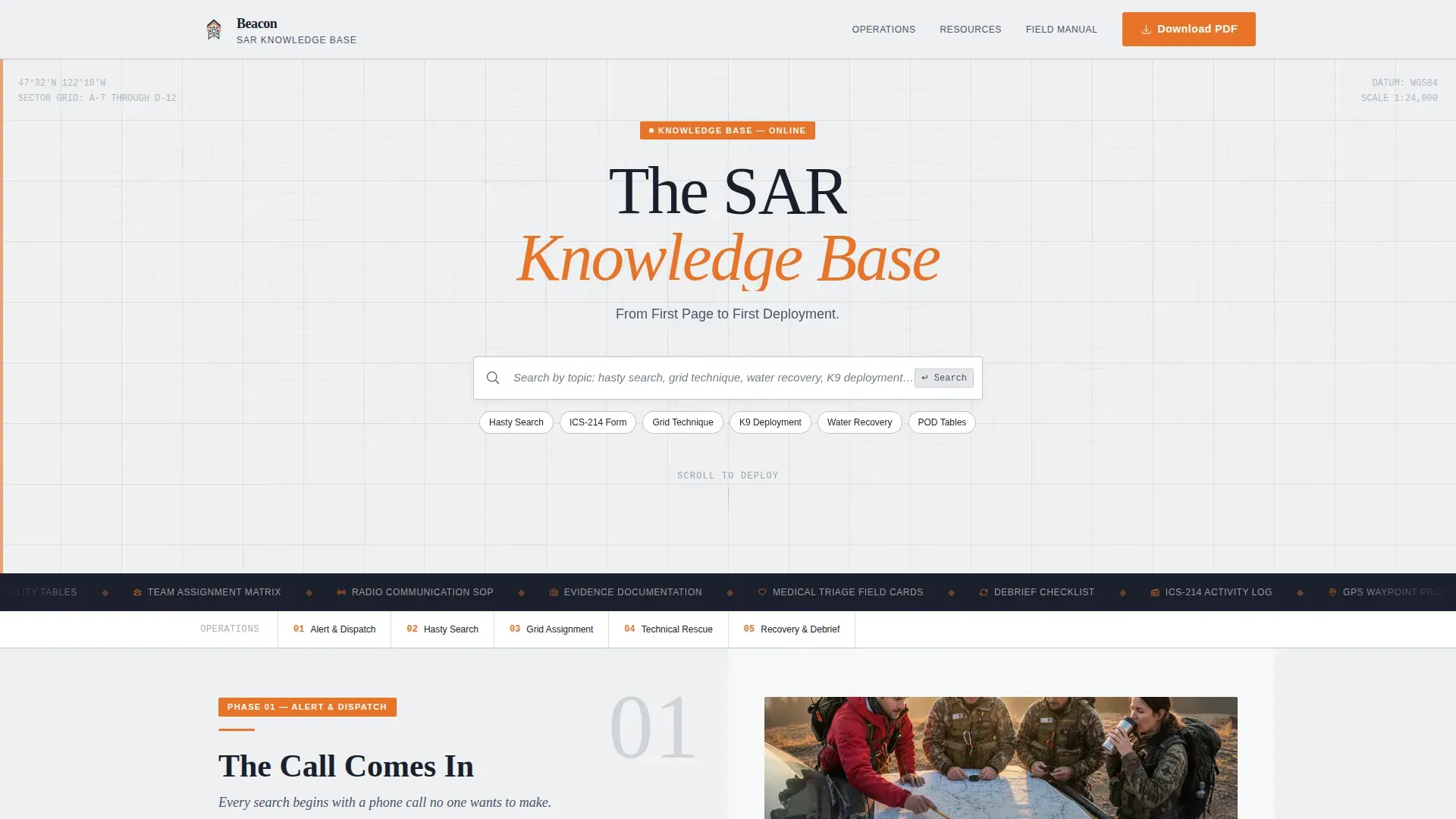
- A functional dispatch-style search box hero with topo watermark background, sticky on scroll, so every visitor can locate their specific topic within seconds
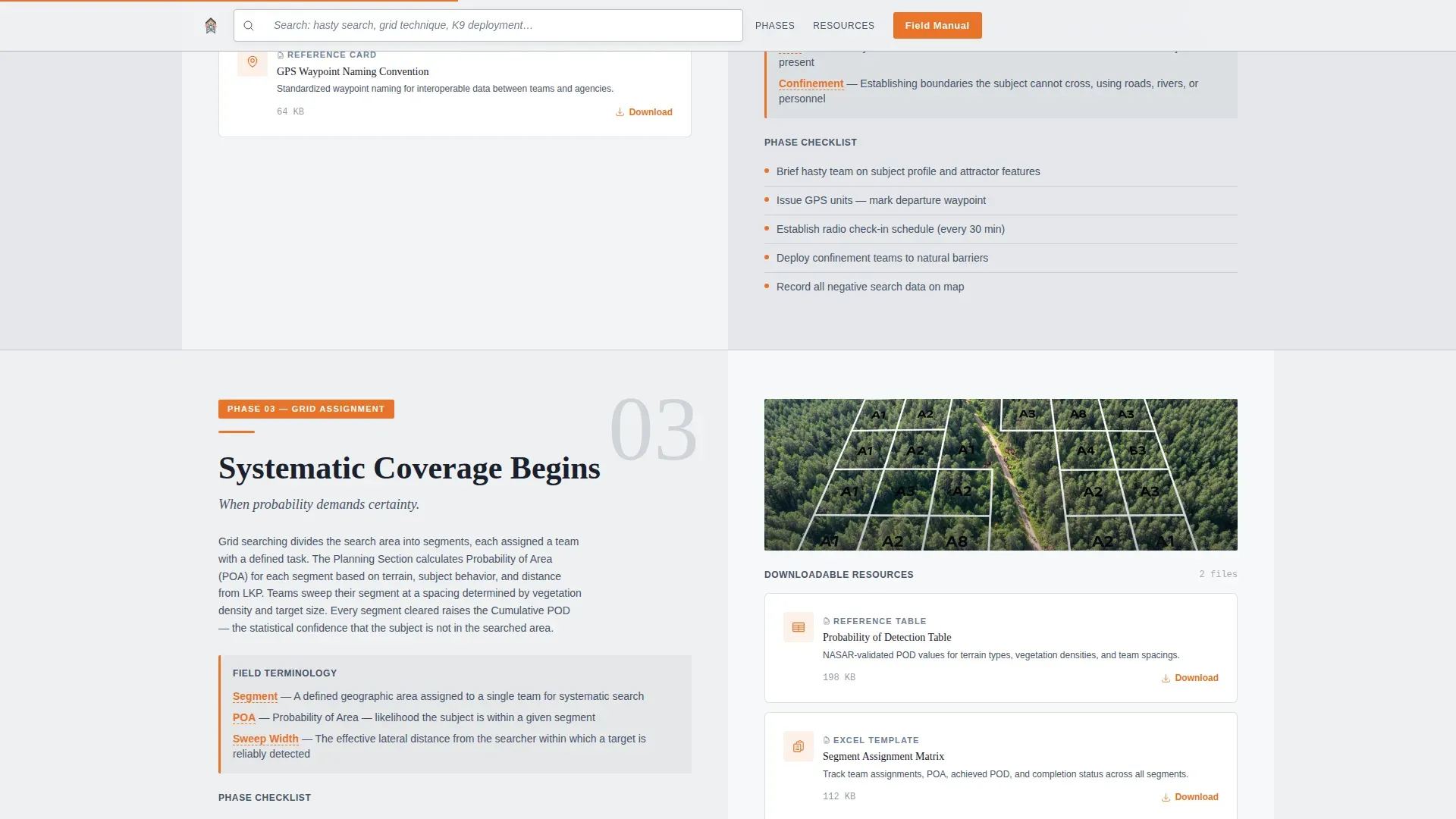
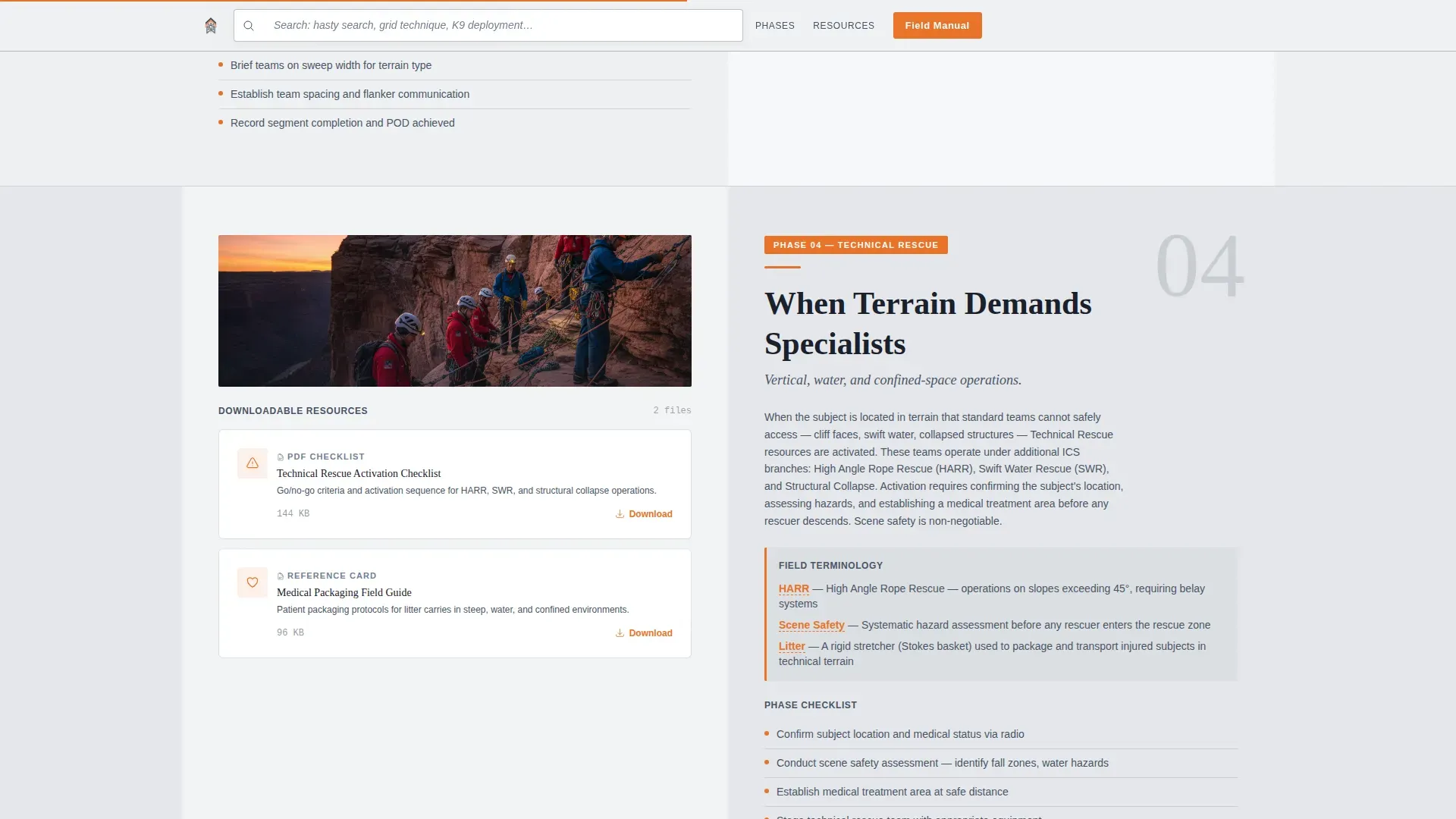
- Five zigzag phase sections covering Alert and Dispatch, Hasty Search, Grid Assignment, Technical Rescue, and Recovery and Debrief, each with inline field terminology and linked resources
- A gated field manual call-to-action with a role selector (volunteer, team leader, instructor, family member), a secondary ungated resource library for trust-first browsing, and a community testimonials section
Feature list
This template ships with purpose-built components tuned to the SAR educational context. Each one is grounded in the operational logic of how a real search unfolds.
Functional Dispatch Search Hero
The hero section centers a styled search input on a cloud-white canvas with faint topo contour lines traced across the background. The placeholder text reads "Search by topic: hasty search, grid technique, water recovery, K9 deployment…" and the field actively filters the resource library below. This makes the hero immediately useful rather than decorative, letting every visitor begin their search the moment they arrive.
Five-Phase Zigzag Layout
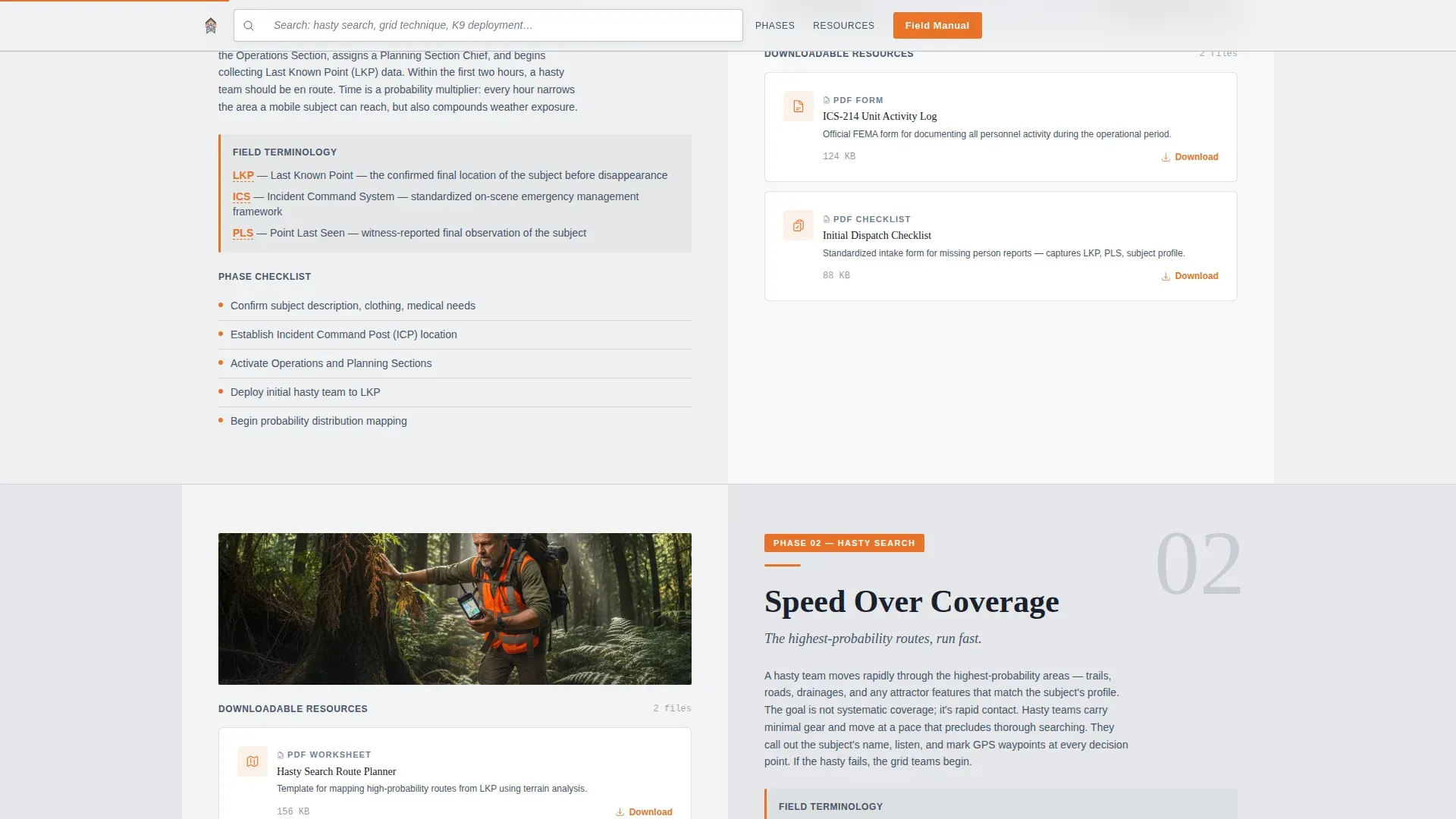
Five alternating sections mirror the course of a real SAR operation: Alert and Dispatch, Hasty Search, Grid Assignment, Technical Rescue, and Recovery and Debrief. Left-side panels carry narrative with field terminology defined inline. Right-side panels hold downloadable resources including ICS-214 form templates, GPS waypoint checklists, and probability-of-detection tables. The layout escalates in technical depth so beginners absorb fundamentals at the top while experienced operators scroll deeper.
Sticky Search Bar on Scroll
As the visitor scrolls past the hero, the search input reappears as a persistent sticky bar at the top of the viewport. This keeps the navigation tool in constant reach across all five phases, reducing the chance that a visitor gets lost or leaves without finding their answer.
Gated Field Manual with Role Selector
The primary call-to-action gates a comprehensive PDF field manual behind a short form. The form asks for an email address and a role selection only, keeping field count below five to avoid friction. This approach collects meaningful data about who is downloading the resource while keeping the barrier low enough that visitors in distress or under time pressure will still complete it.
Ungated Resource Library Card Grid
A secondary section presents individual downloadable assets in a card grid without requiring signup. Visitors can browse and begin downloading prior to committing, which builds trust before the gated ask. This two-path structure respects the different needs of a curious family member versus a team leader who needs a specific checklist right now.
SAR Practitioner Testimonial Section
A community trust section features quotes from SAR practitioners alongside certification body logos and download count indicators. These social proof elements establish authority and reliability, reassuring new volunteers that the doctrine presented here aligns with real field standards.
Page sections overview
| Section | Purpose |
|---|---|
| Hero Search Box | Dispatch-style search input on topo canvas filters the resource library |
| SAR Phases Zigzag | Five alternating phase sections with narrative and downloadable assets |
| Resource Library Grid | Ungated card layout for browsing individual downloadable resources |
| Field Manual Call-to-Action | Gated PDF download with role selector and short email form |
| Community Trust Section | SAR practitioner testimonials, logos, and download metrics |
| Footer | Linear single-row footer with essential links |
Design & branding system
The visual identity follows an Educational Guide theme built on the Cloud Canvas color system. The palette reads like a field manual left open in soft rain, muted and readable for extended sessions, with high-visibility orange pulling attention exactly where action is needed.
- Core colors: overcast white (#EEF0F2) for page canvas, ridgeline slate (#4A5568) for structural elements, trail-marker orange (#E8732A) reserved for download buttons, key terminology, and phase indicators, and compass-needle charcoal (#1A202C) for all body text
- Typography: Fraunces serif for display headings to carry editorial authority, DM Sans for body text and interface elements to keep readability sharp at long reading sessions
- Backgrounds alternate between overcast white and a faint slate wash between sections; orange appears only on actionable elements so visitors never have trouble identifying what to do next
Mobile & speed optimization
The template is designed desktop-first to match the field manual reading context, where team leaders and volunteers are most likely reviewing material on a larger screen prior to deployment. A strong mobile fallback ensures the same structured content remains accessible when responders are in the field with a phone.
- Scroll reveal animations and staggered card appearances are CSS-driven to keep JavaScript load minimal, so the page begins rendering quickly without heavy script dependencies
- The sticky search bar, large touch-friendly call-to-action buttons, and simplified role-selector form are all sized and spaced for easy tapping, accommodating users who may be checking resources under pressure
- Topo contour parallax and phase reveal animations run at medium intensity, giving the page visual depth without creating a delay that would cause a visitor to abandon before the content loads
How this template helps you convert
Beacon is structured to build trust before it asks for anything. The ungated resource library lets visitors see real value immediately, and the gated field manual feels like a natural next step rather than a barrier.
- The functional search box delivers an immediate result in the hero, which signals credibility to every visitor, volunteer or family member, before they read a single word of body copy, making them far more likely to stay on the page and continue through the phases
- The two-path conversion structure (ungated browse plus gated PDF download) meets visitors wherever they are in their decision. Visitors who are not ready to share an email can still carry useful resources away, which increases the chance they return and complete the gated form when a real emergency or an upcoming course makes the full field manual essential
- Social proof from practitioner testimonials and partner logos gives the authority signal that SAR-specific audiences require before they trust doctrine with their lives or the lives of people they are trying to save
Other information about this template
This template is well-suited for any organization that needs to communicate SAR procedures clearly and build credibility with a technically informed audience. The content architecture and design decisions reflect how professional rescue operations actually work.
- In the United States, search and rescue services are organized by the Federal Aviation Administration in collaboration with the U.S. Coast Guard and the U.S. Air Force. This template is designed to align with that multi-agency authority structure, making it appropriate for groups operating within or adjacent to official SAR frameworks.
- SAR operations are coordinated through Rescue Coordination Centers (RCCs) that direct the activities of all involved agencies. Effective landing pages that enhance communication with rescue coordination centers use clear calls-to-action, fast loading, and simplified forms, all of which are core design principles of this template.
- The Cospas-Sarsat satellite system detects activated 406 MHz Emergency Locator Transmitters (ELTs) and relays distress signal data to SAR centers. The Cospas-Sarsat system can decode owner information from a properly registered 406 MHz ELT, which is why beacon registration is highly encouraged for all aircraft operators. Without registration, response time may be delayed in a real emergency.
- 406 MHz ELTs transmit a stronger signal than older 121.5 MHz ELTs. They can be activated via manual activation by the pilot or automatically via a G-switch during a crash. Registration with the National Oceanic and Atmospheric Administration (NOAA) is required for 406 MHz ELTs.
- The Federal Communications Commission (FCC) regulates beacon frequencies in the United States. Pilots, including many pilots flying under visual flight rules without a filed flight plan, are encouraged to carry a registered beacon. Experienced pilots understand that overflying aircraft and ground-based radar coverage both play a role in locating a missing aircraft, but a 406 MHz signal remains the most reliable distress alert when radar coverage is limited or when an aircraft goes down in terrain where overflying aircraft cannot establish visual contact.
- A false alert from an unregistered beacon consumes rescue coordination center resources and may delay response to a real emergency. False alarms from older 121.5 MHz beacons were far more common. Modern 406 MHz beacons significantly reduce the false alert impact on SAR resources.
- SafeSky Search and Rescue is a free emergency beacon feature built into the SafeSky app. It uses a trusted relay path to avoid false alarms and can transmit the last known position of an aircraft for up to 72 hours after a crash. The SafeSky app continues to transmit position as long as the phone remains operational. SafeSky Search and Rescue is designed to complement existing safety equipment, not replace it.
- Personal Locator Beacons (PLBs) are portable units designed for individual use in remote environments. Maritime SAR operations rely on similar beacon and signal technology, and the same registration principles apply in both aviation and maritime contexts.
- Beacon Field Ready is a cloud-based dispatch platform built around the principle that landing pages must be capable of rapidly transmitting critical information between victims, responders, and command centers.
- The life expectancy of an injured survivor decreases significantly during the first 24 hours after an incident. Every minute saved by a clear distress signal, a filed flight plan, and organized SAR resources can directly save lives.
Theme
Educational Guide
Creative direction
Transparent Process
Color system
Cloud Canvas
Style
Zigzag/Alternating
Direction
Content/Resource
Page Sections
Functional Dispatch Search Hero
Five-phase Zigzag SAR Layout
Sticky Search Bar Navigation
Gated Field Manual with Role Selector
Ungated Resource Library Card Grid
Community Trust and Social Proof Section
Related questions
Who is this landing page template designed for?
Can visitors access resources without creating an account?
How does the search functionality work in this template?
What phases of a SAR operation does this template cover?
Is this template suitable for aviation-focused SAR programs?



