Home Health & Hospice Booking Website Template
Bedside is a private duty nursing landing page template built for home health and hospice services. It uses a zigzag testimonial mosaic layout, a multi-step consultation form, and a warm Medical Clarity design to help anxious families and hospital discharge planners move from first visit to booked care consultation with confidence.
by Rocket studio
Quick summary
Bedside is a single-page template designed for private duty nursing services. It pairs a multi-step intake form with a scroll-driven testimonial mosaic to replace visitor anxiety with clinical evidence. The result is a page that feels unhurried, competent, and already one step ahead of the families who land on it.
Who this template is for
This template is built for private duty nursing providers who serve families in real care situations. It speaks equally to the service operator and to the people they need to reach.
- Adult children coordinating a parent's care remotely, often across time zones
- Spouses managing post-surgical recovery at home after a hospital discharge
- Hospital discharge planners who need a trusted private duty nursing name to pass to families in crisis
What problem this template solves
Families searching for home nursing care are rarely calm. They are often in the middle of a discharge conversation, a sleepless night, or a long-distance phone call. A generic healthcare page does not meet that moment. Bedside solves the gap between clinical credibility and emotional accessibility.
- Visitors arrive anxious and leave with a booked consultation, not a contact form submission with no next step
- The page proves competence through clinical detail before it ever asks for a commitment
- Discharge planners get a page they can confidently hand off to families without explanation
What you get with this template
This template delivers a fully structured, single-page layout with every section mapped to a specific conversion role. Nothing is decorative without purpose.
- A multi-step header form that begins mid-conversation and ends at a scheduled care consultation
- A zigzag testimonial mosaic with seven to eight family story sections, each paired with a clinical protocol card
- Stat bands, an availability check module, a persistent mobile booking bar, and a consultation booking form
Feature list
This template includes six core features that work together to turn a first visit into a scheduled consultation.
Multi-Step Intake Form
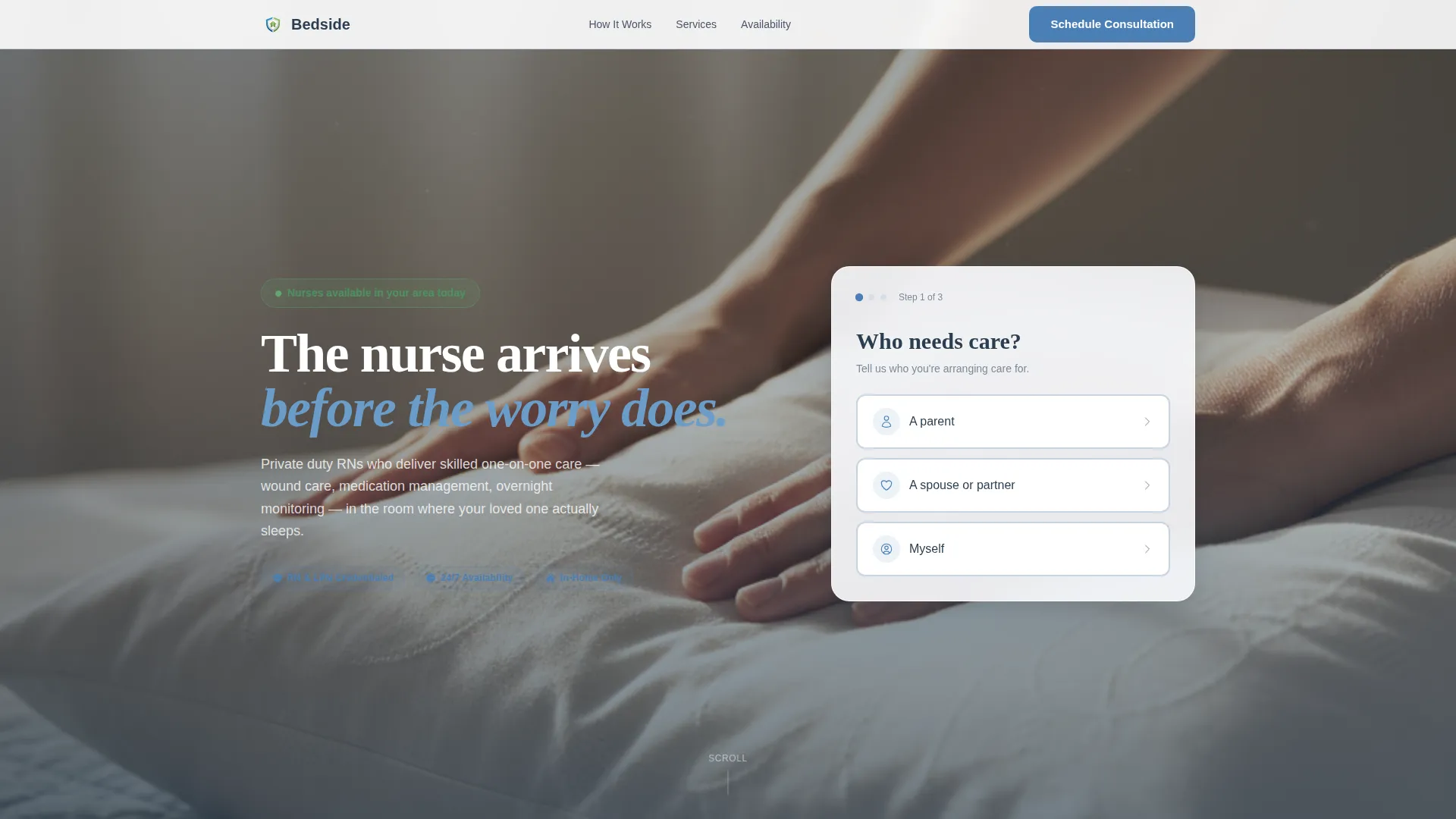
The header form opens with one question in large, unhurried type: "Who needs care?" Visitors choose parent, spouse, or myself. Step two collects zip code and care type from four clear options: post-surgical, chronic condition, end-of-life, or general wellness. The final step delivers the "Schedule a Care Consultation" call to action.
Zigzag Testimonial Mosaic
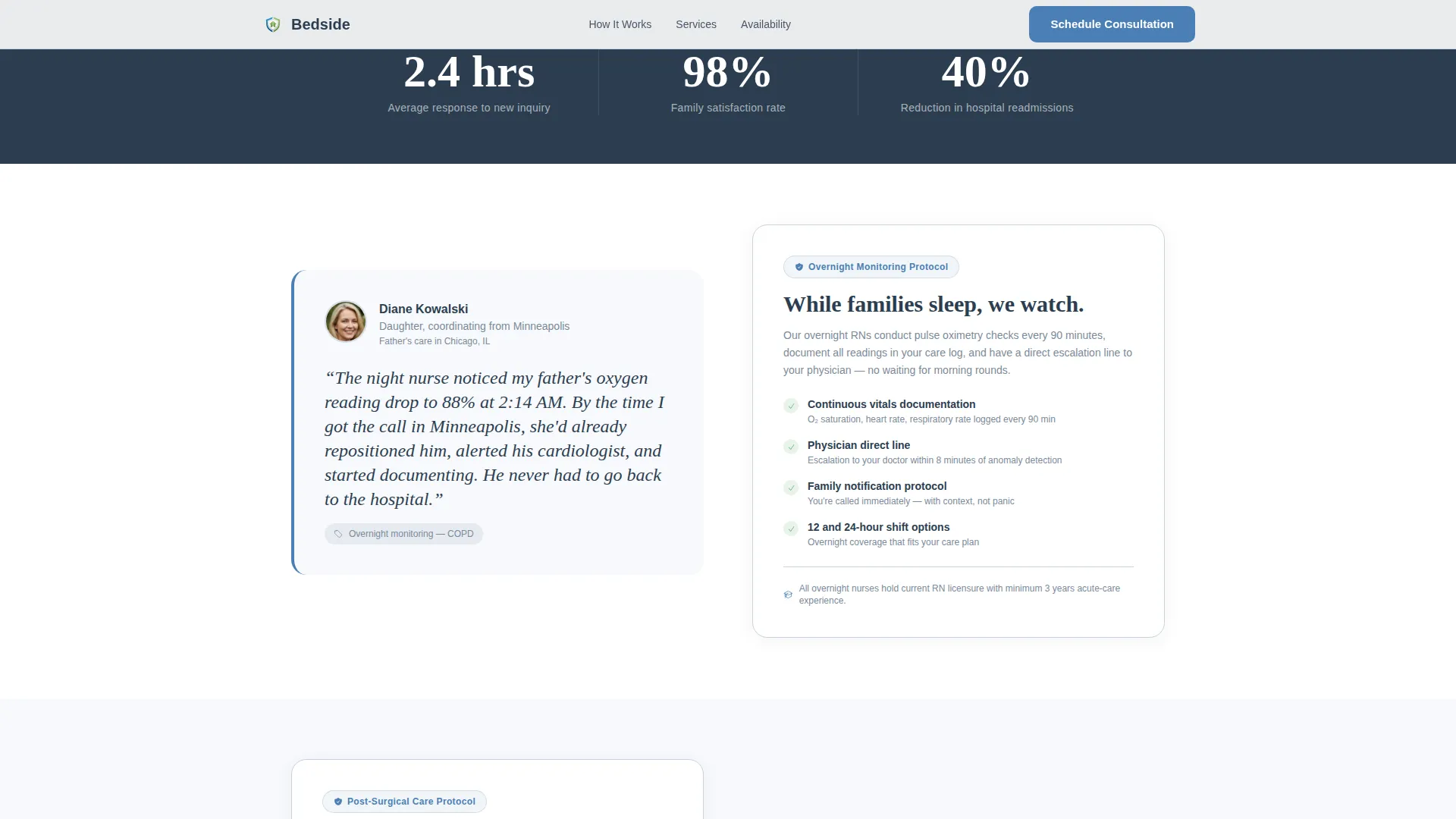
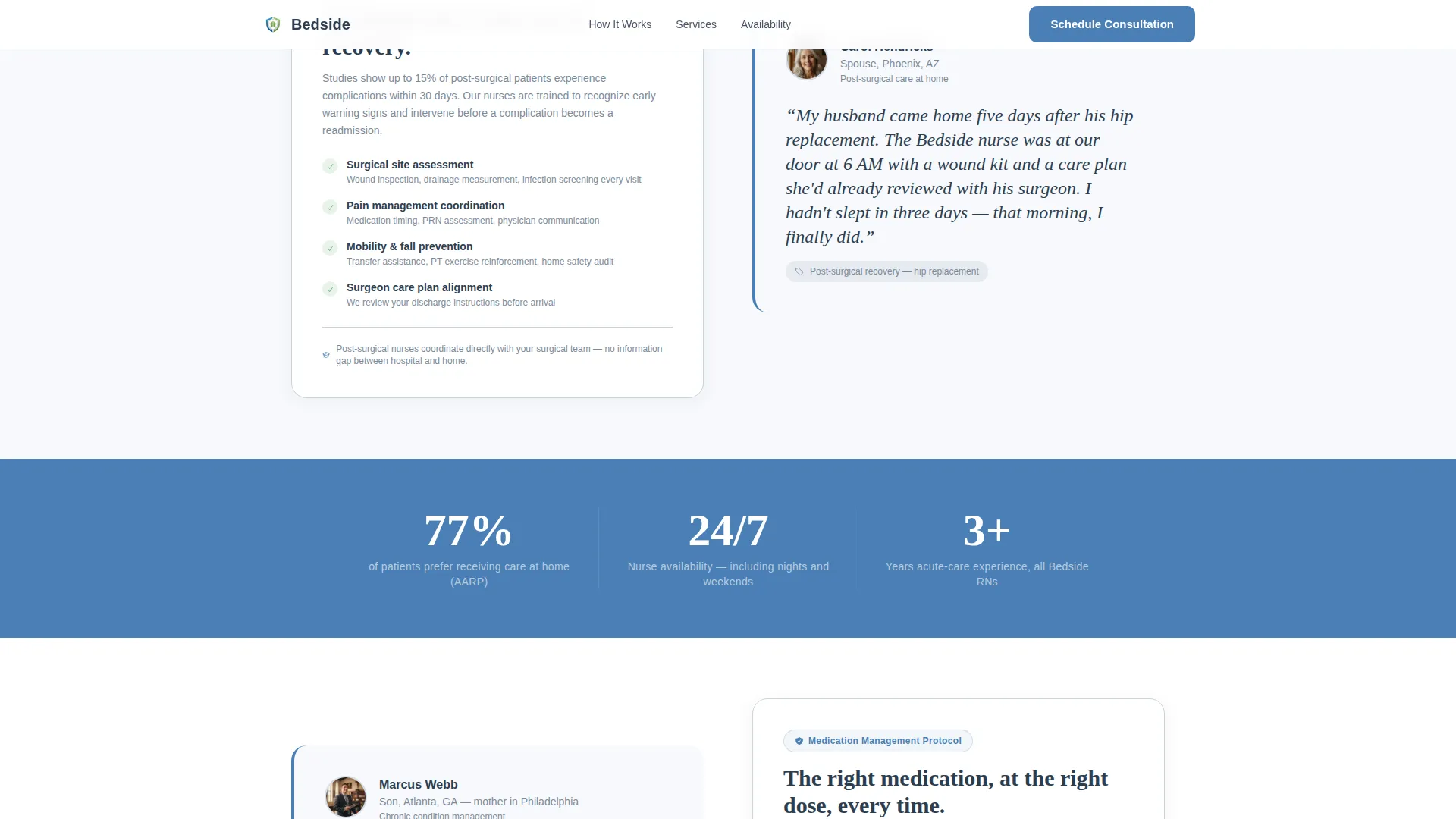
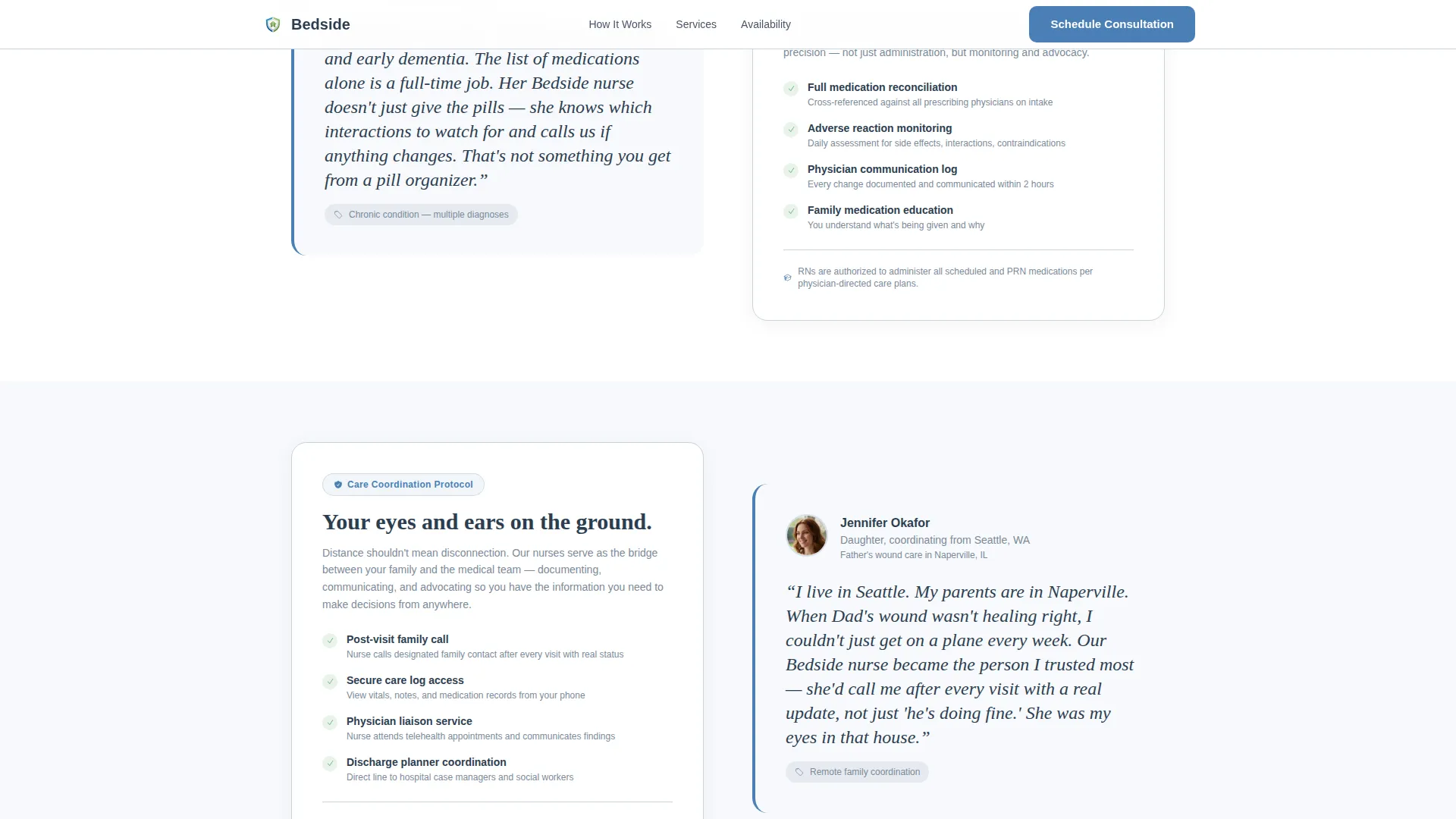
Seven to eight alternating sections pair a real family story on one side with a clinical protocol card on the other. Stories cover night monitoring, post-surgical recovery, chronic condition management, and remote family coordination. The mosaic builds trust through accumulation rather than a single hero claim.
Stat Bands Between Testimonials
Single-stat strips break the scroll rhythm between testimonial pairs. Included stats reference a 2.4-hour average inquiry response time, a 77 percent patient preference for home care, and a 40 percent average reduction in hospital readmissions. Each band reinforces the clinical case without adding new emotional weight.
Availability Check Module
A standalone section lets visitors enter only a zip code to confirm that nurses serve their area. This captures the lead even when the visitor is not yet ready to book a full consultation. The confirmation display uses the reassurance green color to signal a positive result.
Consultation Booking Form
The booking form asks for preferred contact method (phone or video), best time of day, and one open-text field labeled "Tell us what's happening." This framing removes friction and invites the honest detail that helps a care coordinator prepare before the first call.
Persistent Mobile Booking Bar
On mobile devices, the primary call to action stays fixed at the bottom of the screen throughout the entire scroll. Families searching in a crisis moment on their phones always have one tap between them and scheduling a care consultation.
Page sections overview
| Section | Purpose |
|---|---|
| Hero Form | Multi-step intake, care type selection, consultation entry point |
| Trust Stat Band | 2.4-hour response time, builds immediate credibility |
| Testimonial One | Night monitoring story paired with overnight protocol card |
| Stat Band Two | 77% home care preference, reinforces care setting choice |
| Testimonial Two | Post-surgical story paired with wound care protocol card |
| Testimonial Three | Chronic condition story paired with medication management card |
| Stat Band Three | 40% readmission reduction, clinical outcome evidence |
| Testimonial Four | Remote family story paired with care coordination card |
| Availability Check | Zip code lead capture, immediate service area confirmation |
| Consultation Form | Full booking form with contact preference and open-text field |
| Footer | Linear single-row footer with essential links |
Design & branding system
The visual identity follows a Medical Clarity theme built on the Cloud Canvas color system. Every color decision reinforces the same emotional goal: clean without being sterile, warm without being sentimental.
- Colors: soft clinical white (#F7F9FC) and calm sky gray (#D6DDE6) alternate as section backgrounds; steady pulse blue (#4A7FB5) marks every actionable element; reassurance green (#5FAD6E) appears on confirmation states, active buttons, and availability indicators; deep charcoal (#2C3E50) is the primary text color
- Typography: Fraunces is used for display headlines to give a confident, unhurried tone; DM Sans handles all body text for clean clinical readability
- The hero background is a soft-focus photograph of a nurse's hands adjusting a pillow on a home bed, chosen to signal competence in a real domestic setting rather than a hospital environment
Mobile & speed optimization
This template is built mobile-first. Families searching for home nursing care in urgent moments are most often on their phones, and the layout accounts for that reality at every scroll point.
- The persistent bottom booking bar keeps "Schedule a Care Consultation" one tap away throughout the entire mobile experience
- Scroll-triggered reveals and staggered zigzag entries use medium animation levels that feel responsive without slowing the reading flow
- The multi-step form, zip availability check, and persistent mobile call-to-action bar are built as interactive client components, while static sections use a server-component approach for faster initial load
How this template helps you convert
The page is designed so that every section earns the next click rather than demanding it upfront.
- The multi-step form opens in the middle of a familiar question, reducing the barrier to engagement before a visitor has read a single line of body copy
- The testimonial mosaic builds trust through accumulation, replacing emotional overwhelm with clinical specificity across seven to eight real family scenarios
- The availability check module captures leads from visitors who are not yet ready to book, giving the service a second conversion path without adding friction to the primary booking flow
Other information about this template
This template is categorized under Health and Medical, specifically Home Health and Hospice, with a niche focus on private duty nursing services. It is localized for United States audiences with English copy, USD references, and US date format conventions.
- The template is designed for B2C and B2B use, serving both families directly and hospital discharge planners as a secondary referral audience
- Animation is set at a medium level with scroll-triggered section reveals and smooth multi-step form transitions, keeping the page feeling active without being distracting
- The footer uses a linear single-row pattern, keeping the close of the page as clean and uncluttered as the rest of the layout
Theme
Medical Clarity
Creative direction
Testimonial Mosaic
Color system
Cloud Canvas
Style
Zigzag/Alternating
Direction
Booking/Scheduling
Page Sections
Multi-step Consultation Form
Zigzag Testimonial Mosaic
Clinical Stat Bands
Zip Code Availability Check
Persistent Mobile Booking Bar
Open-text Consultation Form
Related questions
Who is the Bedside template built for?
Can I use this template if my service covers only certain zip codes?
How does the multi-step form in the header work?
How does the testimonial mosaic build trust without feeling repetitive?
Is this a one-page layout or a multi-page site?



