Patient Portal Landing Page Template for Pathologists
The Biopsy landing page template is a warm, FAQ-driven patient portal designed for people awaiting biopsy results. It features an interactive specimen tracker, plain-language comparison tables, and a guided booking form for results-review consultations. Built on an Organic Flow design with a Soft Mist color palette, it turns anxious waiting into informed, supported action.
by Rocket studio
Quick summary
This single-page template helps pathology practices meet patients where they are: scared, awake at 2 a.m., and refreshing their phones. An interactive "Where Is My Sample?" tracker anchors the hero. FAQ-shaped sections scroll through the questions patients actually ask, supported by comparison tables. The page closes with a booking form that earns the click before asking for it.
Who this template is for
This template is built for pathology practices and diagnostic labs that want to reduce patient anxiety and support clearer communication during the biopsy process. It suits teams replacing phone-heavy workflows with a digital patient experience.
- Pathologists and lab coordinators launching a patient-facing portal
- Healthcare practices looking to offer plain-language result communication
- Clinics converting anxious, mobile-first patients into scheduled consultations
What problem this template solves
Patients waiting on biopsy results face a gap between what they feel and what they know. They call the front desk, get voicemail, search medical terms they don't understand, and spiral. This template closes that gap by giving patients a real-time status view and answering their hardest questions before they have to ask.
- Replaces phone tag with a trackable, visual specimen timeline
- Replaces medical jargon with short, plain-language explanations
- Replaces passive waiting with a clear next step: scheduling a guided results review
What you get with this template
You get a complete, single-page landing page built around patient trust and guided action. Every section is designed to lower anxiety incrementally, from the first tracker interaction to the final booking form submission.
- An interactive specimen ID tracker with a pulsing, four-node timeline
- Three FAQ-driven content sections, each paired with a comparison table
- A booking form with callback time, consultation format, and a free-text question field
Feature list
This template is structured around high-interactivity components and emotionally calibrated design. Here is what each major feature delivers.
Interactive Specimen Tracker
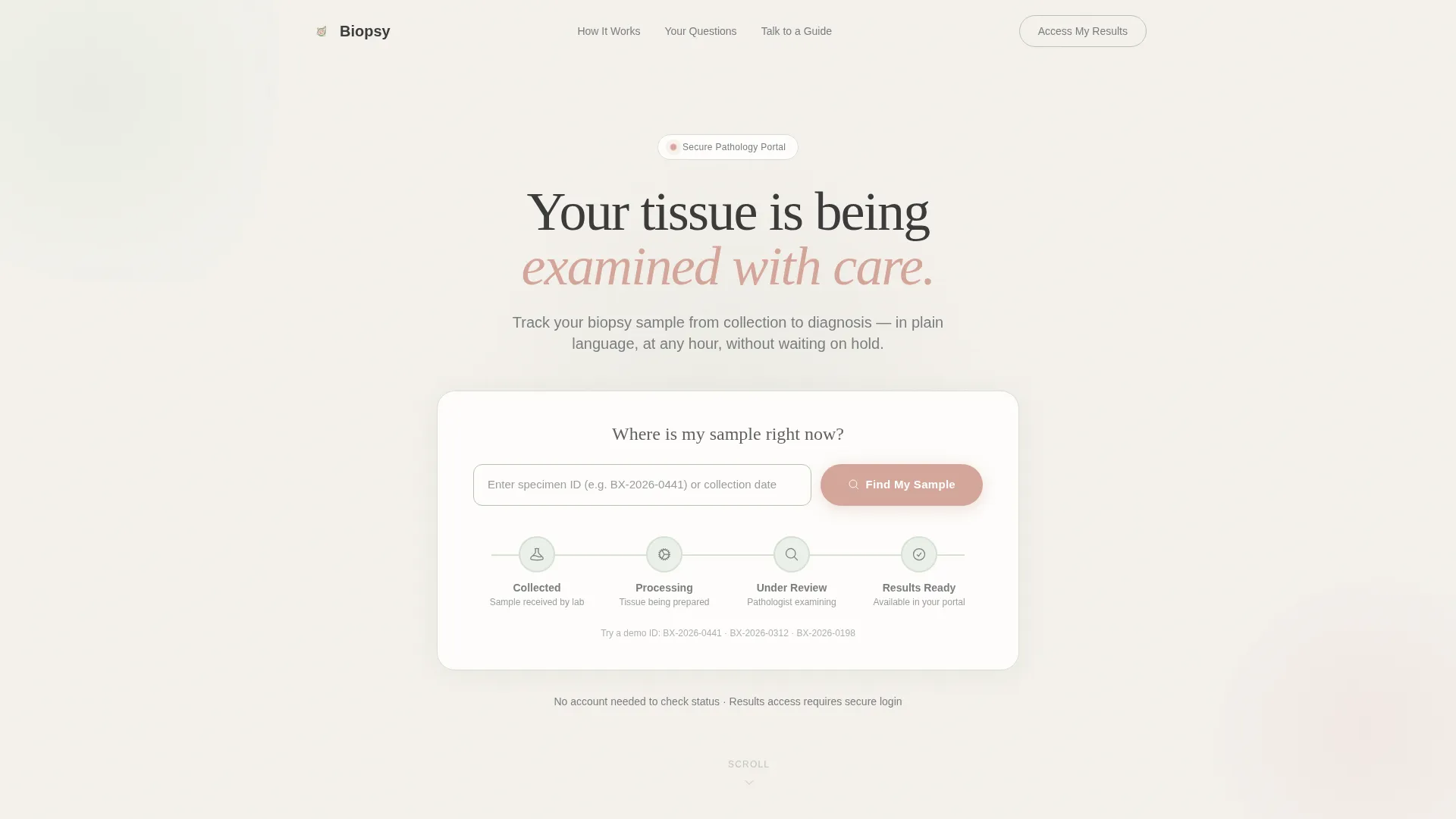
The hero section opens with a "Where Is My Sample?" input form. Patients enter their specimen ID or collection date and see a soft horizontal timeline with four status nodes: collected, processing, under review, and results ready. Each node pulses gently, giving a sense of active progress rather than silence.
FAQ-Driven Section Flow
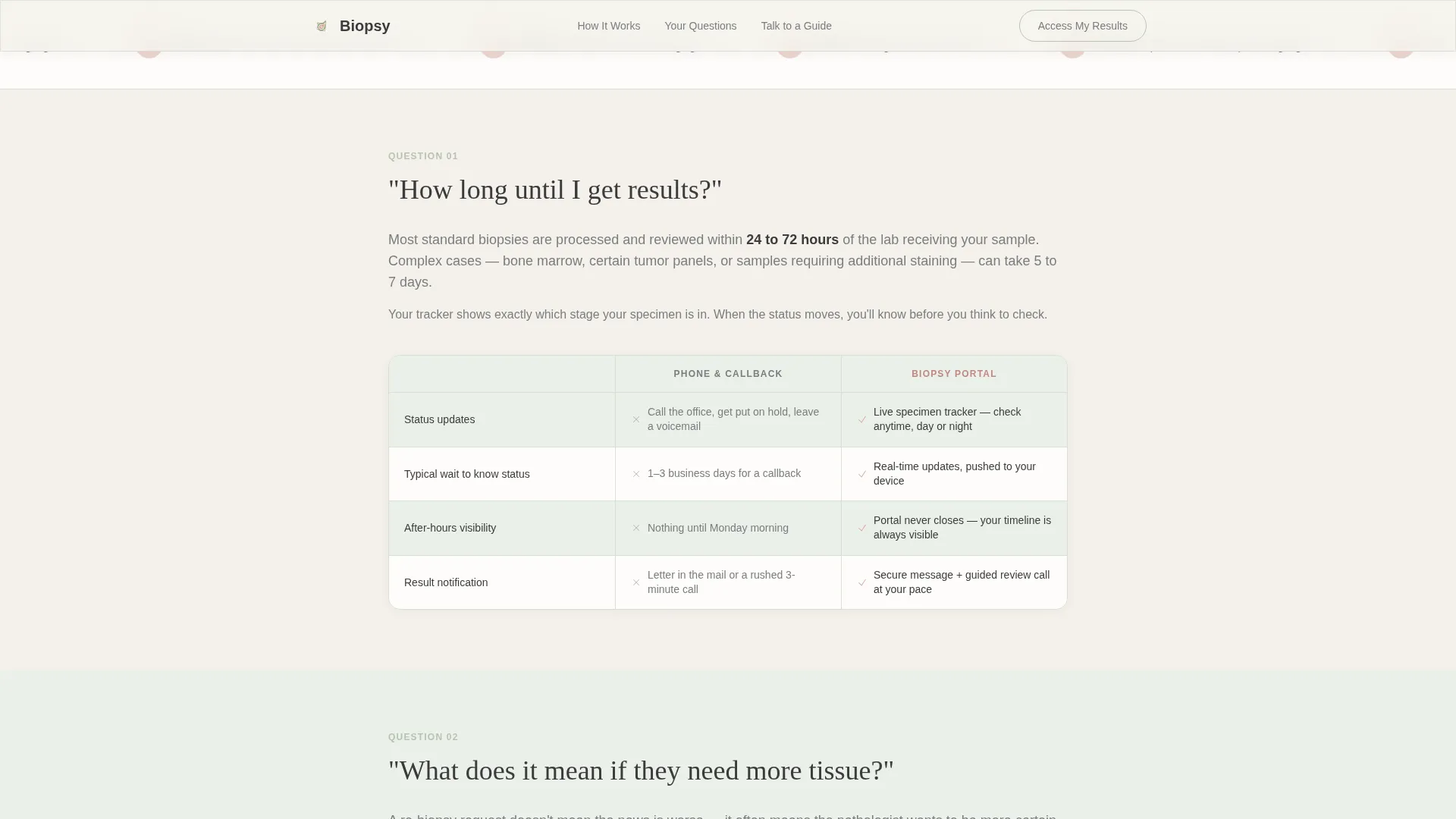
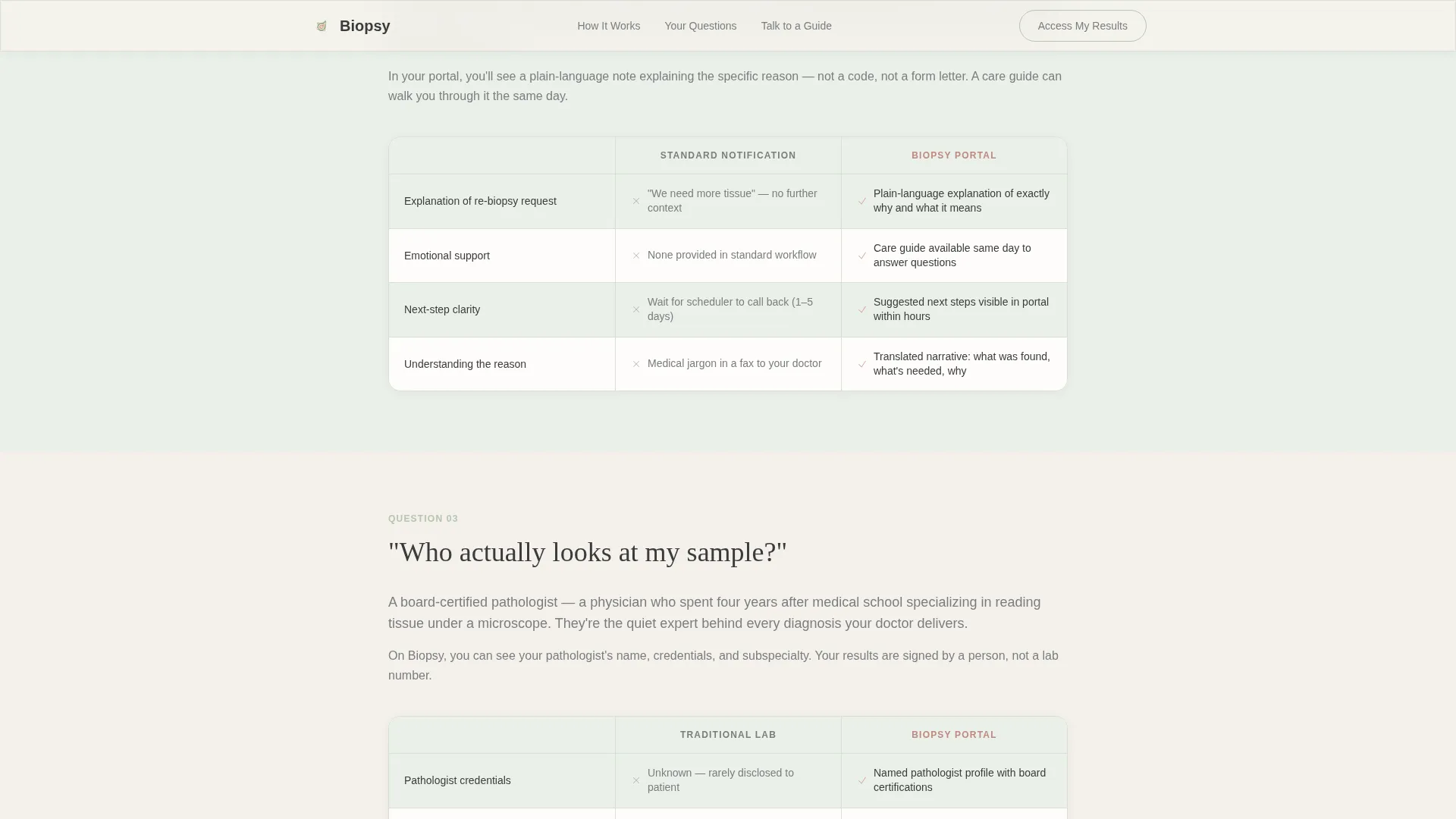
Three major FAQ sections shape the scroll. Each opens with a real patient question set in handwritten-style type. The answer follows in short, human paragraphs. This structure moves from logistics ("How long until I get results?") through process ("What does it mean if they need more tissue?") to trust ("Who actually looks at my sample?").
Comparison Tables
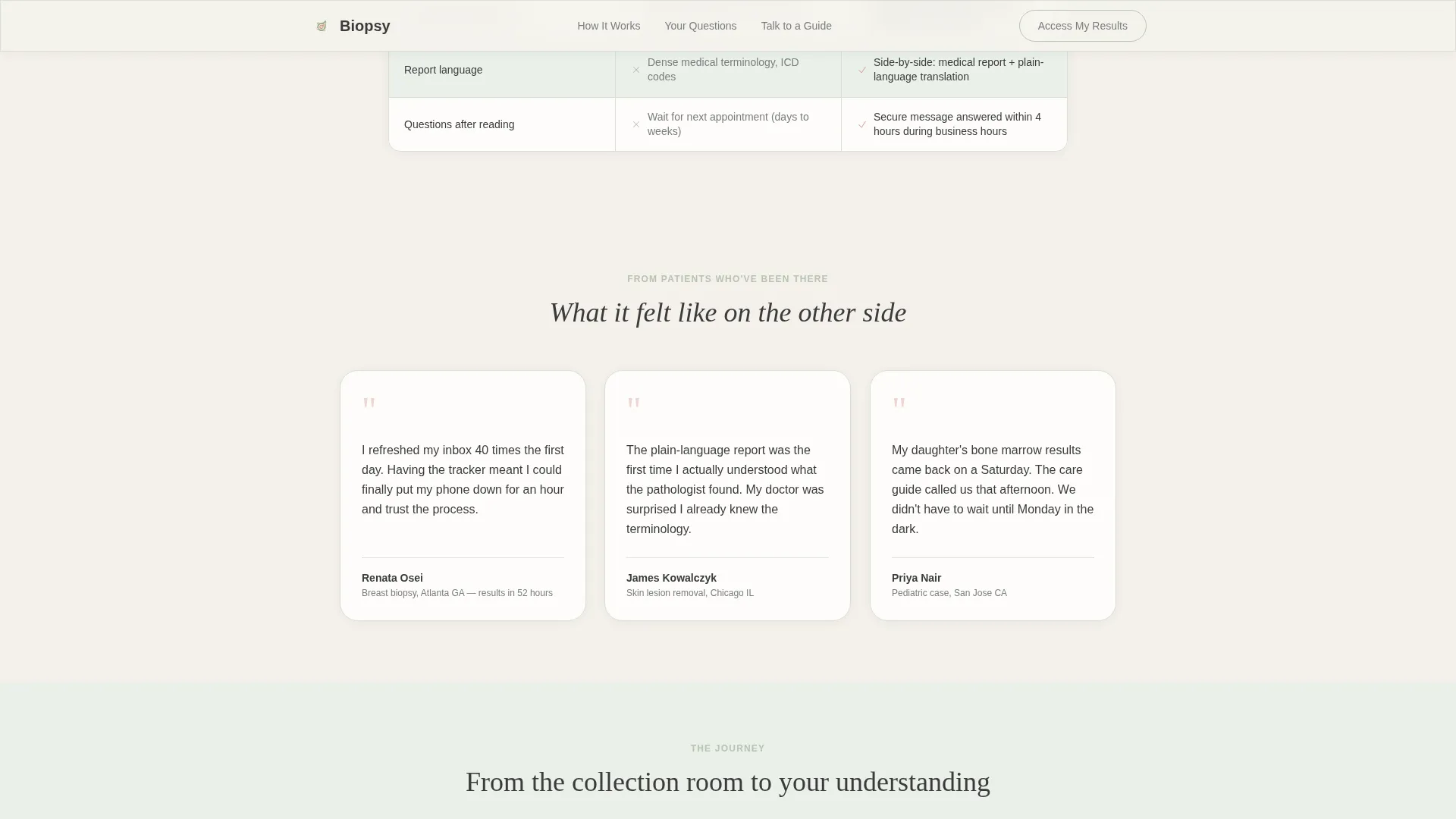
Each FAQ section is paired with a comparison table contrasting the portal experience against the traditional approach. Tables compare real-time status against phone tag, plain-language reports against medical code, and secure messaging against days-long callbacks. Rows use soft mist backgrounds with sage striping, not clinical grid lines.
Results Review Booking Form
The primary call to action, "Schedule Your Results Review," appears after the comparison tables have built full trust. The form collects preferred callback window (morning, afternoon, or evening), consultation format (phone or video), and one optional free-text field: "What question matters most to you?"
Persistent Secondary Access Button
A quiet "Access My Results Now" button floats in river stone gray at the top right of the page. It serves returning patients who already have a portal login and do not need the full guided flow before acting.
Soft Mist Visual System
The Organic Flow theme uses fog white, washed sage, river stone gray, and a single reassuring blush reserved only for active buttons and progress indicators. Typography pairs Fraunces serif for headlines with DM Sans for body copy. The result feels warm and clinical at the same time.
Page sections overview
| Section | Purpose |
|---|---|
| Hero Tracker | Interactive specimen timeline with ID input and pulsing status nodes |
| FAQ Section One | "How long until I get results?" with timeline comparison table |
| FAQ Section Two | "What does it mean if they need more tissue?" with process comparison table |
| FAQ Section Three | "Who actually looks at my sample?" with trust and credibility content |
| Booking Form | "Schedule Your Results Review" with callback and format preferences |
| Footer | Linear single-row footer with minimal navigation and contact links |
Design & branding system
The design language is Organic Flow: soft, unhurried, and grounded. It avoids the sterile coldness of typical clinical interfaces without sacrificing credibility. Every visual choice is intentional in reducing the patient's felt stress level.
- Color palette: fog white (#F4F1EC) backgrounds, washed sage (#B7C4B1) accents, river stone gray (#7A7D7E) secondary text, reassuring blush (#D4A59A) for calls to action and progress indicators, charcoal (#3B3B3B) for headlines
- Typography: Fraunces serif for headlines and handwritten-style question headers, DM Sans for body paragraphs and form labels
- Motion: medium-level animations including pulsing timeline nodes, scroll-triggered section reveals, staggered FAQ reveals, and subtle parallax on background layers
Mobile & speed optimization
The template is designed mobile-first, reflecting how patients actually use it: on a phone, in a waiting room, or at night when sleep will not come. Layout decisions prioritize vertical legibility and tap-friendly interaction targets.
- Tracker input and booking form are sized for single-thumb use on small screens
- Static sections use server-rendered components; the interactive tracker and booking form use client-side rendering to keep load fast
- Scroll animations are calibrated to feel smooth rather than distracting on mobile viewports
How this template helps you convert
Every section of this page is sequenced to move a frightened, skeptical visitor toward a confident booking decision. The conversion path is built on trust, not pressure.
- The tracker answers the first and loudest question immediately, giving the visitor a reason to stay and a feeling of being seen rather than ignored.
- The comparison tables show, not tell, why the portal experience is different from what patients have experienced before, making the value self-evident before any ask is made.
- The booking form appears only after every major fear has been addressed, so "Schedule Your Results Review" feels like a natural next breath rather than a cold sales ask.
Other information about this template
This template is built for the Health and Medical category, specifically the Pathologist Website subcategory and the Pathologist Patient Portal niche. It is localized for English-language use in the United States, using 12-hour time format and MM/DD/YYYY date formatting throughout the booking form and tracker display.
- The page is designed to support patient-voice testimonials and named pathologist credentials as social proof elements
- Intersection match context: Organic Flow theme, Soft Mist color system, FAQ-Driven creative direction, Calculator/Estimator header concept, Comparison Table template style, and Booking/Scheduling landing-page direction
- The page excludes stock photography of smiling doctors, relying on the interactive tool and open space to build emotional trust
Theme
Organic Flow
Creative direction
FAQ-Driven
Color system
Soft Mist
Style
Comparison Table
Direction
Booking/Scheduling
Page Sections
Interactive Where Is My Sample Tracker
Faq-driven Scrolling Structure
Plain-language Comparison Tables
Results Review Booking Form
Persistent Portal Access Button
Organic Flow Visual and Motion System
Related questions
What kind of practice is this template designed for?
What does the booking form collect from patients?
How do the comparison tables work within the page?
Is this landing page designed for mobile users?
Does the page support patients who already have a portal login?



