Fresh Florals Landing Page Template for Flower Shops
Bloom is a single-page landing page template built for full-service flower shops. It pairs a warm sunset gradient palette with a scroll-driven unboxing layout that guides visitors from browsing to buying. Every section reveals the ordering journey step by step, making it easy for same-day buyers to find an arrangement, choose a size, and check out with confidence.
by Rocket studio
Quick summary
Bloom is a fresh florals landing page template designed for full-service flower shops ready to sell directly online. Its layered scroll layout walks visitors through the ordering experience the way you'd open a delivered bouquet. Warm sunset tones, floating product cards, and a pinned call-to-action button keep every visitor moving toward purchase.
Who this template is for
This template is built for flower shop owners who need a polished, sales-ready landing page without starting from scratch. It serves shops that handle same-day delivery, custom arrangements, and phone orders for sensitive occasions.
- Retail florists offering same-day local delivery to walk-in and online customers
- Event florists sourcing centerpieces and rehearsal dinner arrangements at volume
- Full-service shops taking orders for sympathy, anniversary, and celebration flowers
What problem this template solves
Many flower shop pages lose buyers before checkout because visitors cannot see what they are actually getting. Mystery bouquets, hidden pricing, and unclear delivery windows create doubt at the worst moment. Bloom removes that friction by showing every stem, every price, and every add-on before a card number is ever requested.
- Buyers discover arrangements filtered by same-day delivery eligibility upfront
- Size variants and prices appear on every product card before the visitor taps through
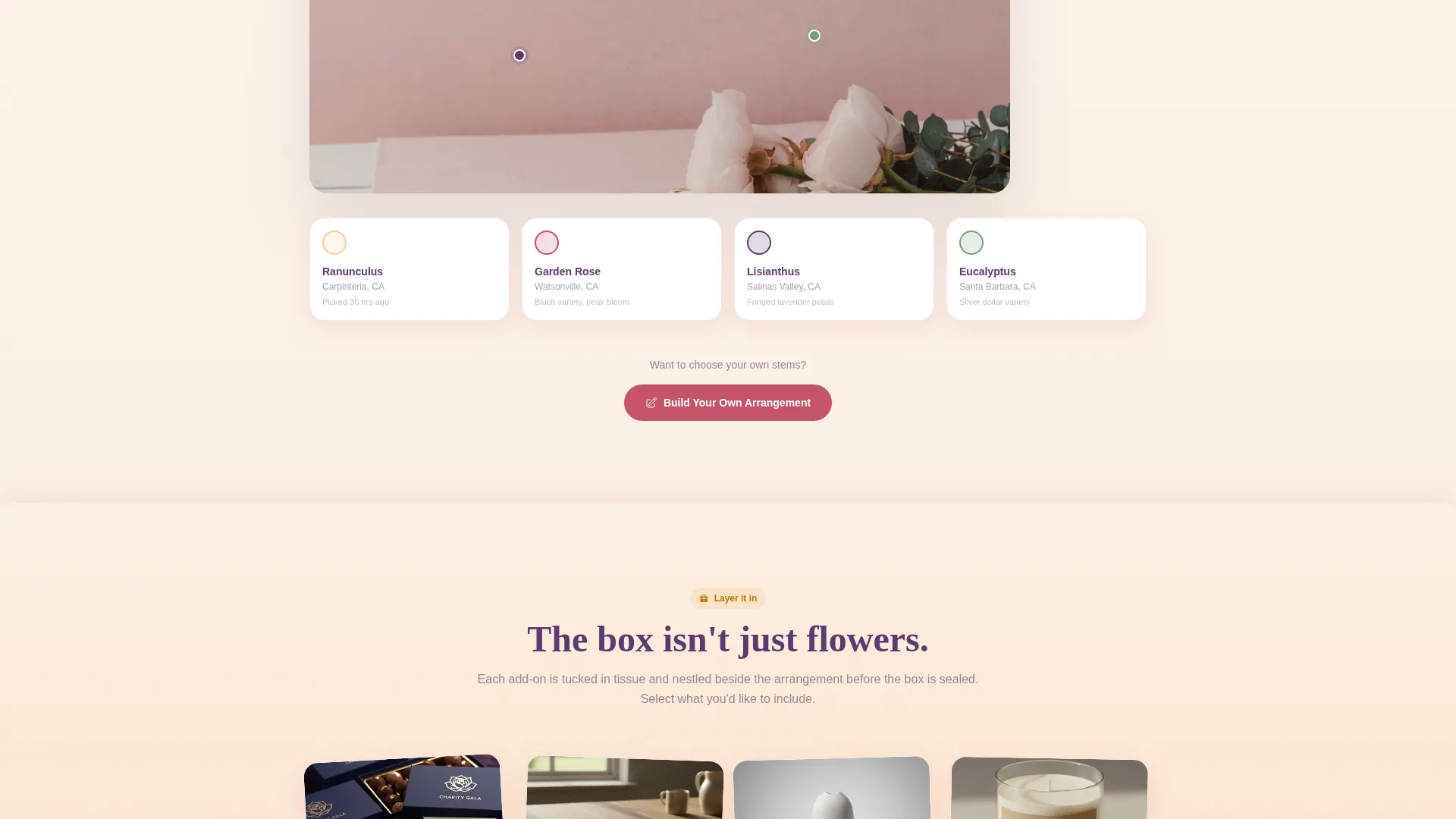
- Add-on items like chocolates, handwritten cards, and ceramic vases are presented clearly alongside the arrangement
What you get with this template
Bloom delivers a complete, single-page ordering experience laid out as a progressive scroll. Each section of the page overlaps the last by a few pixels, creating a layered depth that feels physical, like peeling back petals one by one.
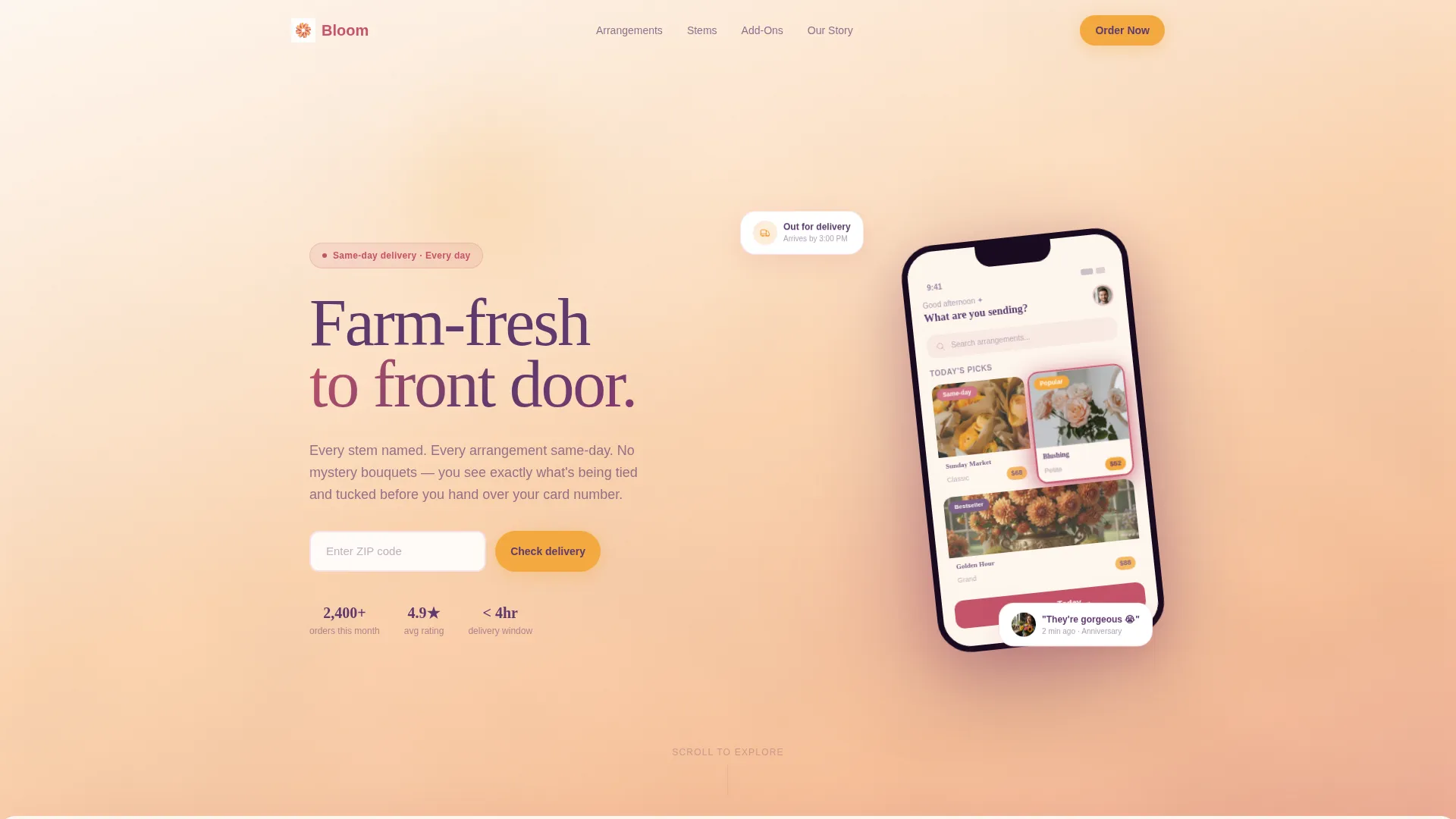
- A lifestyle header with an angled device mockup showing a curated arrangement grid
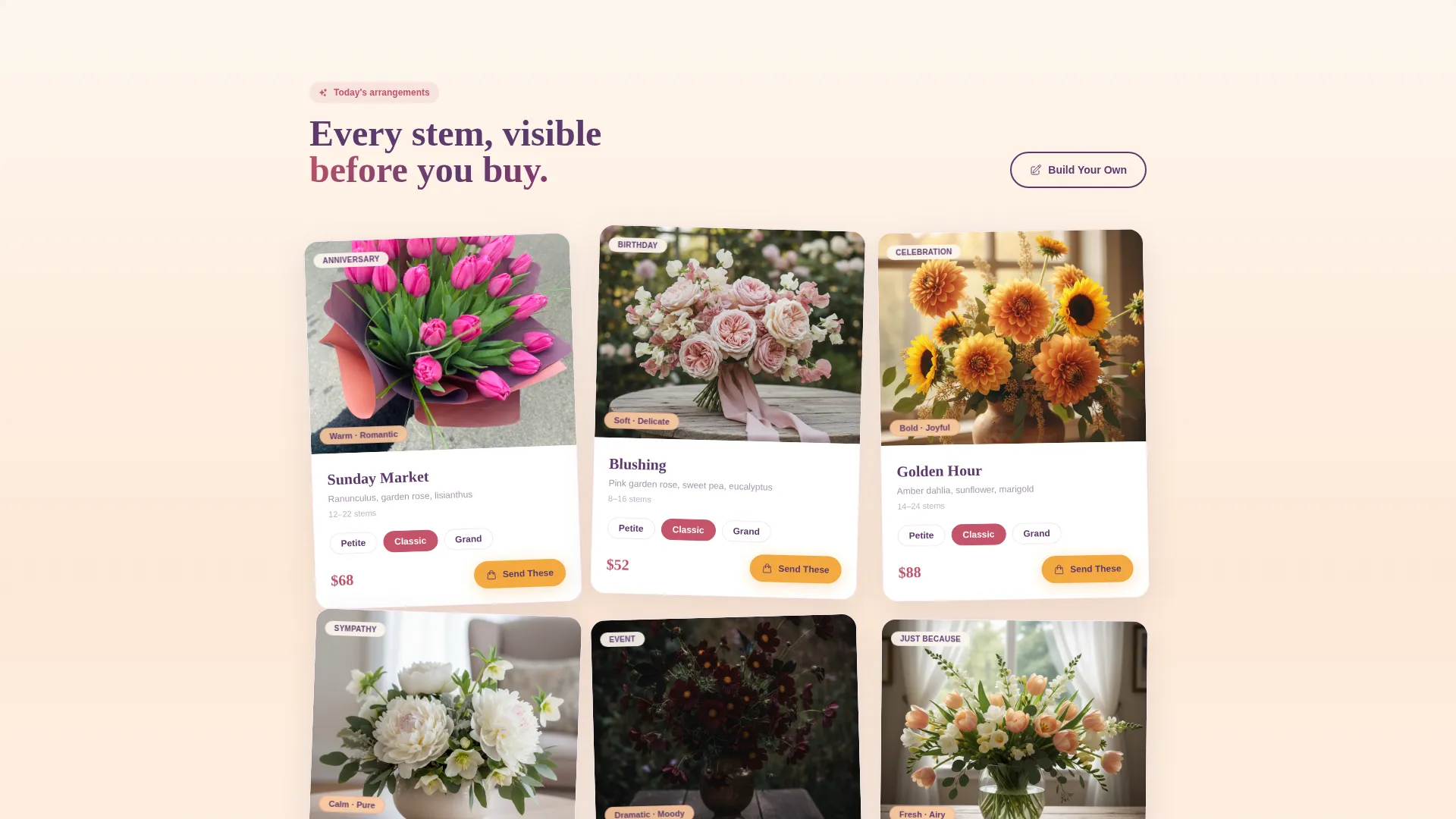
- A full bouquet grid with size variants, price badges, and a pinned floating purchase button
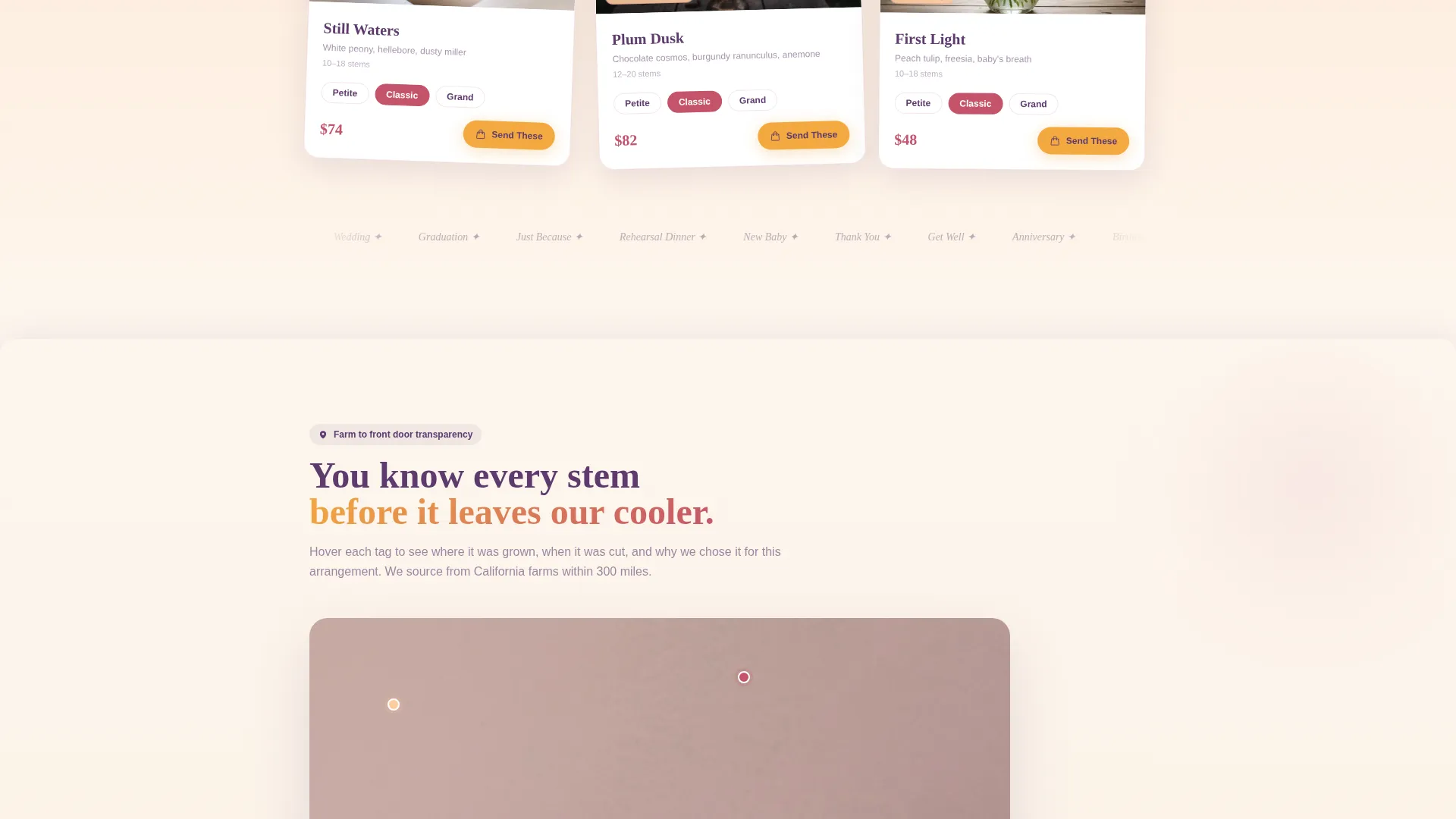
- An unboxing scroll flow covering stem details, add-ons, a ribbon-tying video section, and delivery confirmation
Feature list
A paragraph introducing this section: Every feature below is drawn directly from the template brief. Together they give a full-service flower shop a landing page that earns the sale before asking for payment.
Layered Scroll Unboxing Layout
Each scroll section peels back one layer of the ordering journey. The bouquet grid fans out first, then a flat-lay stem detail zooms in, then tissue paper textures slide in carrying add-on items, and finally a short looping video shows the box being closed and handed to a courier.
Angled App Store Preview Header
The header presents a lifestyle device mockup tilted at a slight angle over a blurred background of wrapped bouquets on a delivery van seat. The screen shows a curated arrangement grid with names and one-tap price badges. A headline fades in below the device.
Floating "Send These Today" Button
Once a visitor selects any arrangement, a saffron-colored call-to-action button pins itself to the viewport. It stays visible while the visitor scrolls, removing the need to search for a checkout path.
Delivery Zip Code Filter
The first field in the ordering flow asks for the visitor's delivery zip code. The page then filters available arrangements to show only those eligible for same-day delivery, so visitors never fall in love with a bouquet they cannot receive today.
Size Variant Product Cards
Every arrangement card displays three size options: petite, classic, and grand. Prices are visible before the visitor taps into a detail view. This removes the most common hesitation point in online flower purchases.
Build Your Own Stem Picker
A secondary path labeled "Build Your Own" leads visitors into a step-by-step stem selection flow. It serves buyers who want control over their arrangement and supports higher-value custom orders.
Page sections overview
| Section | Purpose |
|---|---|
| Header device mockup | Introduce the shop and create instant visual appetite for ordering |
| Arrangement bouquet grid | Display the full product catalog with size variants and price badges |
| Stem flat-lay detail | Show every ingredient in a chosen bouquet, labeled by name and origin |
| Add-on layer | Present chocolates, cards, and vases as visible upsell options |
| Ribbon and box video | Build emotional connection through a looping packing and handoff scene |
| Delivery checkout entry | Capture zip code, filter eligibility, and move visitor toward payment |
Design & branding system
Bloom uses a Sunset Gradient color system that shifts from creamy linen white at the top to soft peach deeper into the scroll. The palette feels like the last forty minutes of golden hour settling over a garden table, warm light pooling on petals with violet shadows at the edges.
- Core tones: soft peach (#FDCB9E), deep rose (#C4536A), warm saffron (#F4A940), and dusky plum (#5E3A6E) over a linen white base (#FDF6EE)
- Plum anchors the typography for weight without stealing warmth; saffron marks every price tag and action button
- Product cards float on layered shadows with rose-colored hover states that respond to cursor movement
Mobile & speed optimization
The template is laid out for a small-screen-first experience. The floating button, zip code field, and product card grid all adapt naturally to portrait phone viewports, which is where most last-minute flower buyers will land.
- The angled device mockup in the header crops naturally to a mobile frame without losing its composition
- Product cards stack cleanly in a single column on narrow screens, keeping size variants and prices readable
- The looping video section in the packing sequence is designed as a short, contained clip that does not interrupt the scroll rhythm
How this template helps you convert
Bloom is built around the principle that a visitor should see everything before being asked to pay. Every design and layout decision supports that goal.
- The zip code filter appears first, which means every arrangement a visitor sees is one they can actually receive today, removing regret before it starts.
- Price and size visibility on every card reduces the number of taps needed to reach a confident purchase decision.
- The pinned floating button keeps the path to checkout one tap away at every point in the scroll, so momentum is never lost.
Other information about this template
Bloom sits within the Retail and E-Commerce category, serving the full-service business subcategory. Its Marketplace Grid theme and scroll-reveal template style make it a strong fit for shops that want a structured, product-forward layout without a complex multi-page build.
- The template follows a direct sales landing page direction, prioritizing immediate purchase over newsletter capture or brand storytelling alone
- The unboxing creative direction is intentional: it mirrors how a physical flower delivery feels, building emotional buy-in before the checkout field appears
- The page type is a single landing page, not a multi-page website, keeping the visitor focused on one decision at a time
- This template is well-suited for florists looking to move beyond basic order-form pages and into a fully designed, conversion-oriented online presence
Theme
Marketplace Grid
Creative direction
Curated Collection
Color system
Citrus Burst
Style
Scroll Reveal (Progressive)
Direction
Upsell/Upgrade
Page Sections
Layered Scroll Unboxing Layout
Angled App Store Preview Header
Floating Purchase Button
Same-day Delivery Zip Filter
Size Variant Product Cards
Build Your Own Stem Picker
Related questions
Is this template suitable for a shop that handles sympathy and event orders, not just everyday bouquets?
Can I show different prices for petite, classic, and grand sizes on the same product card?
How does the delivery zip code filter work in this template?
Does the template include a way for visitors to build a custom arrangement?
What does the visual style of this template look like?



