Auto Body Shop B2B Landing Page Template
Bodywork is a comparison table landing page built for auto body shops targeting fleet managers, insurance adjusters, and dealership service directors. It pairs a bold photo-split header with FAQ-anchored comparison tables that prove cycle time, warranty terms, and certification level. The design follows a Monochrome Steel palette with estimator orange calls to action guiding prospects toward a shop account form.
by Rocket studio
Quick summary
Bodywork is a single-page landing page template for auto body shops pursuing B2B partnerships. It uses a FAQ-driven scroll structure where each industry question anchors a comparison table. Fleet managers, adjusters, and dealership service directors see exactly how your shop stacks up against industry averages, then land on a clear "Set Up a Shop Account" form.
Who this template is for
This template is built for collision repair shops that sell to professional buyers rather than walk-in customers. If your growth depends on contracts and referral relationships, this page was designed for you.
- Fleet managers overseeing 30-plus vehicles cycling through collision repair
- Insurance adjusters looking for a shop they can route claims to without follow-up callbacks
- Dealership service directors farming out body work they cannot handle in-house
What problem this template solves
Professional buyers need evidence before they commit. A generic shop website with a phone number and a gallery does not close a fleet contract or earn a Direct Repair Program enrollment. Prospects arrive with specific questions, and if the answers are not immediate, the claim goes somewhere else.
- No structured way to address cycle time, certification, and parts sourcing side by side
- No clear partnership path for fleet contracts, Direct Repair Program enrollment, or dealership overflow
- No downloadable capability documentation for adjusters who need to present specs internally
What you get with this template
You get a fully structured, single-page landing page that moves a professional buyer from first question to conversion without friction. Every section earns its place by answering a real objection.
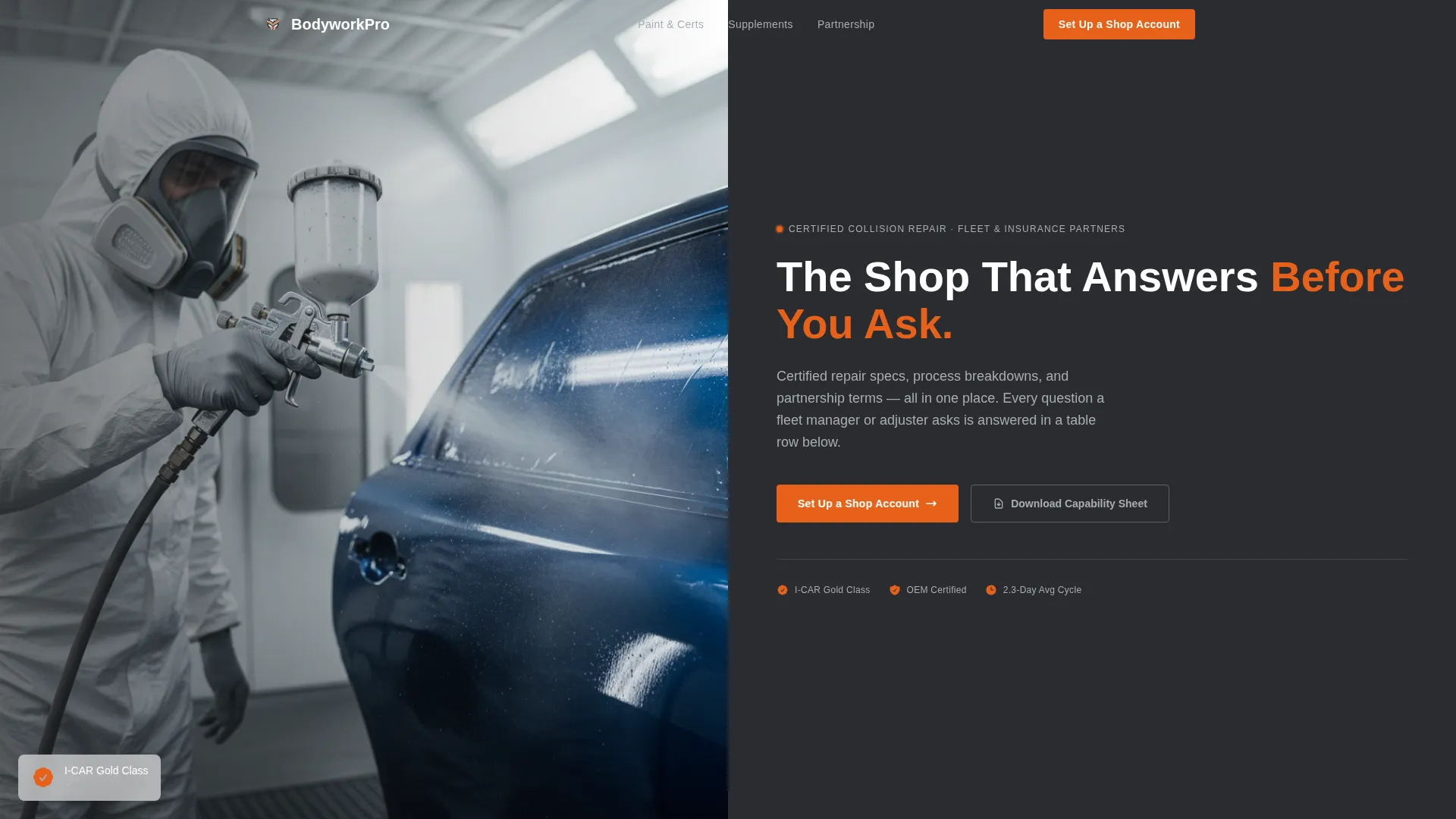
- A half-page photo-and-text split header with a strong B2B headline and subline
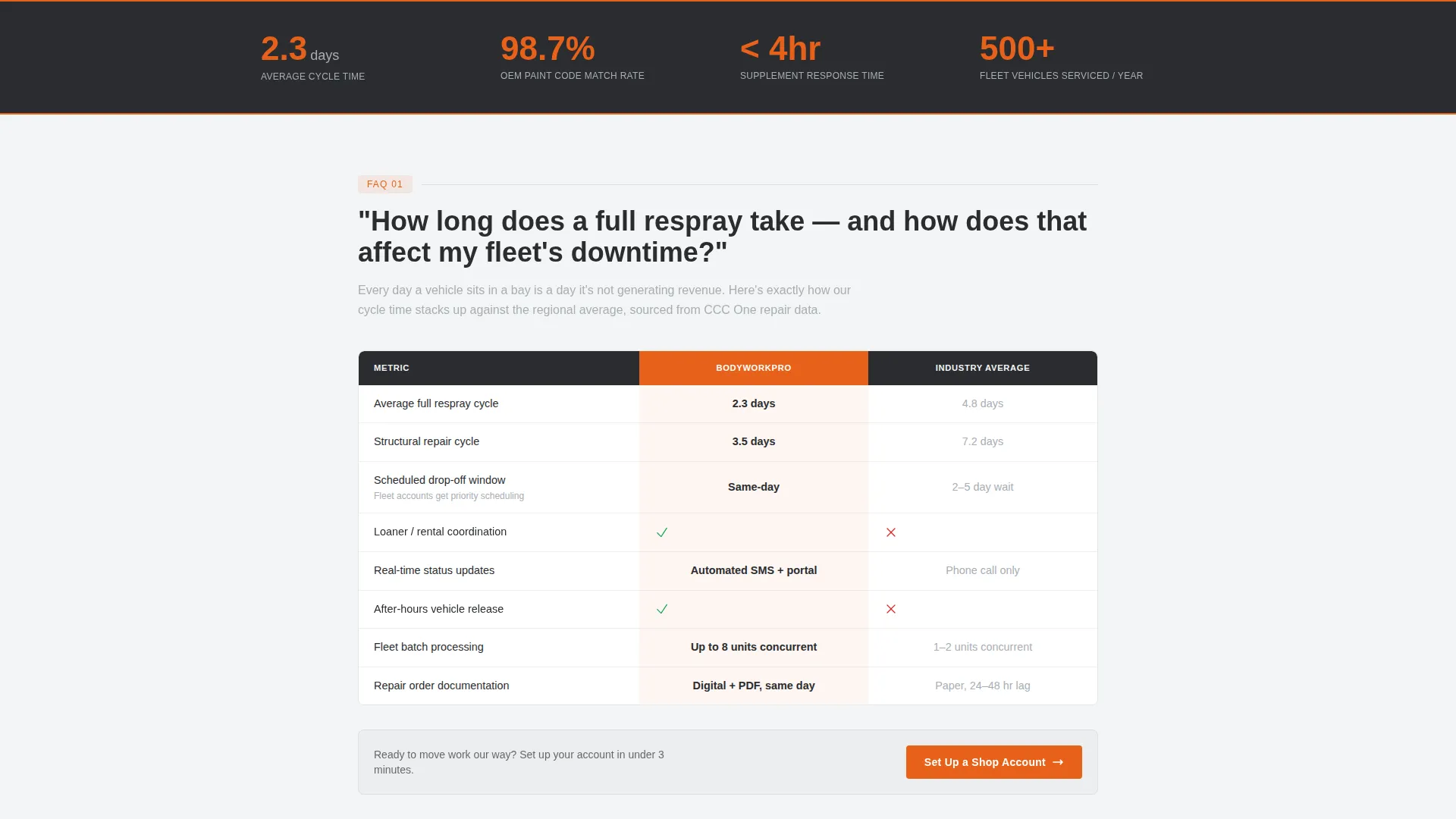
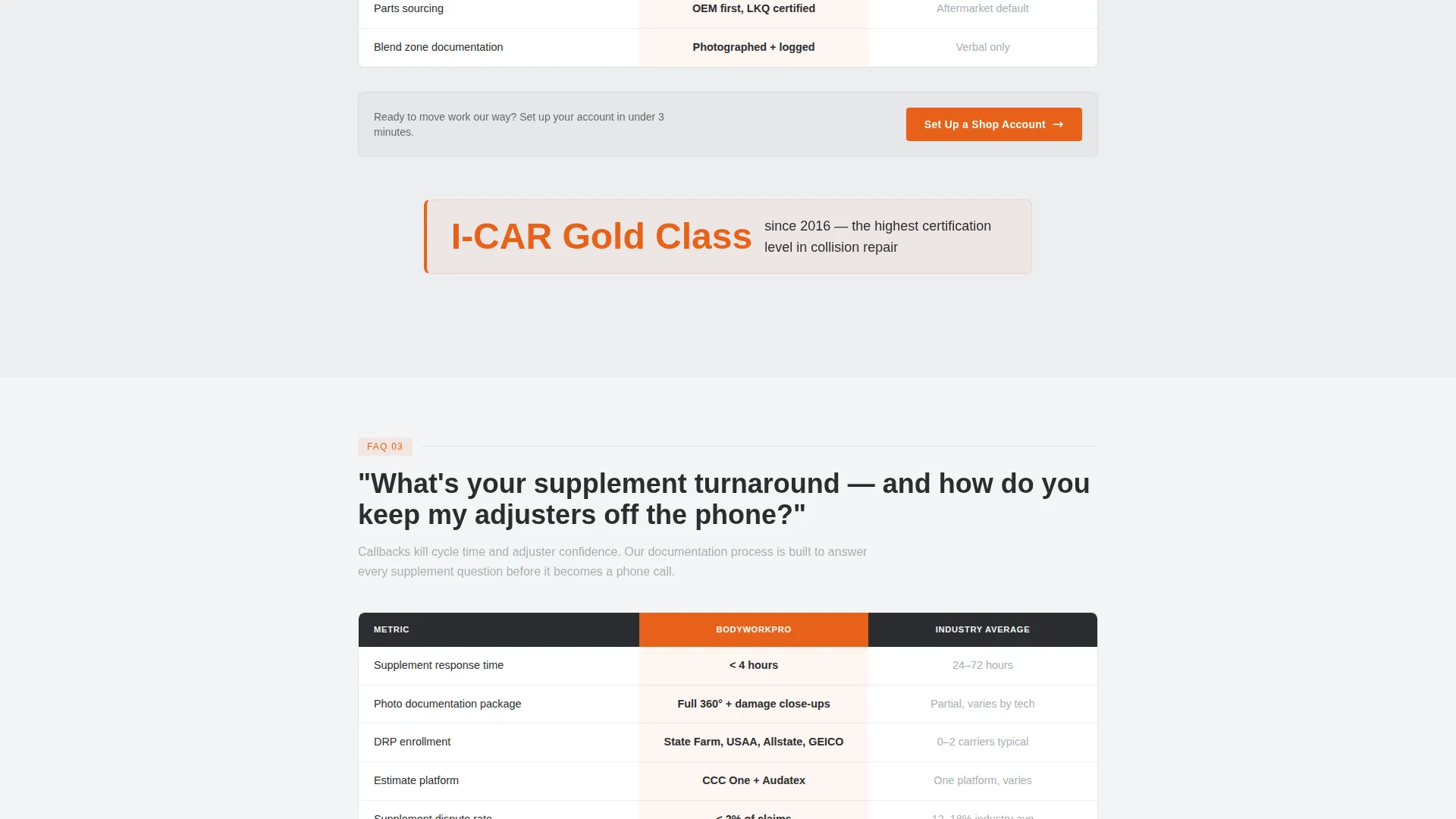
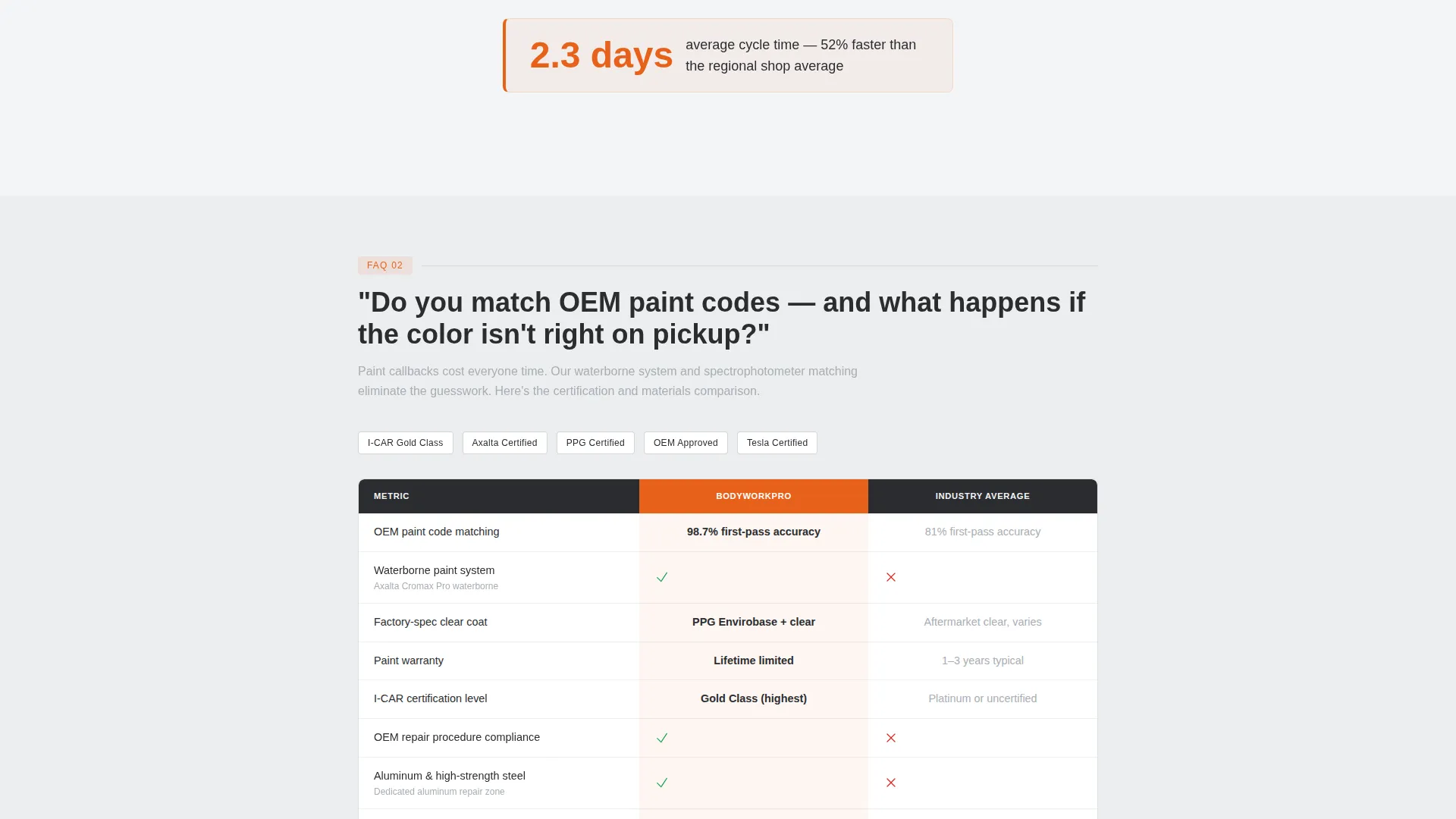
- FAQ-anchored comparison tables covering cycle time, warranty terms, certification, and parts sourcing
- A partnership form collecting company name, fleet size or claim volume, and relationship type
- Single-stat callouts in estimator orange for high-impact proof points between table blocks
- A gated secondary call to action offering a downloadable capability sheet for internal stakeholder review
Feature list
This section outlines the core components built into the Bodywork template.
Half-Page Photo and Text Header
The header splits into two equal halves. The left side holds a high-contrast photograph of a technician mid-clearcoat pass, spray gun in hand, the repaired panel gleaming in booth light. The right side carries a heavy sans-serif headline and a single subline that names the page's purpose immediately.
FAQ-Anchored Comparison Tables
Each major buyer question anchors a dedicated section that opens into a comparison table. Tables run your shop's process against the industry average across cycle time, warranty terms, certification level, and parts sourcing. The structure is ask, prove, ask, prove, repeated down the scroll.
Single-Stat Proof Callouts
Between table blocks, single-stat callouts appear in estimator orange. These short, bold statements such as "2.3-day average cycle time" or "I-CAR Gold Class since 2016" keep the evidence rhythm moving without breaking the reading flow.
Sticky Partnership Conversion Form
A "Set Up a Shop Account" form locks to the bottom of every comparison table. It collects company name, fleet size or monthly claim volume, and a dropdown for relationship type covering fleet contract, Direct Repair Program enrollment, and dealership overflow.
Gated Capability Sheet Download
A secondary conversion path offers a downloadable capability sheet as a gated PDF. This serves adjusters who need to bring shop specs to an internal review before making a commitment.
Monochrome Steel Design System
The entire page uses a four-tone color system: shop-floor charcoal, bare-metal silver, booth-white, and estimator orange reserved for calls to action and table highlights. Typography is heavy sans-serif throughout, consistent with a service utility environment.
Page sections overview
| Section | Purpose |
|---|---|
| Header Split | Establish credibility and state page purpose immediately |
| FAQ Block One | Answer first buyer question with a comparison table |
| Stat Callout One | Reinforce proof with a single bold metric |
| FAQ Block Two | Answer second buyer question with a comparison table |
| Stat Callout Two | Reinforce proof with a second bold metric |
| FAQ Block Three | Answer third buyer question with a comparison table |
| Partnership Form | Capture fleet, adjuster, or dealership account leads |
| Capability Sheet call to action | Offer gated PDF download for internal stakeholder review |
Design & branding system
The visual identity follows a Service Utility theme. Every color choice is functional and deliberate, matching the environment of a professional body shop rather than a consumer-facing showroom.
- Four-tone Monochrome Steel palette: shop-floor charcoal (#2B2D30), bare-metal silver (#A8ADB3), booth-white (#F4F5F6), and estimator orange (#E8611A) for calls to action and table highlights
- Heavy sans-serif typography used for headlines, table headers, and stat callouts to keep the tone direct and authoritative
- Estimator orange appears only on calls to action and comparison table highlights, preventing visual noise while drawing the eye to conversion points
Mobile & speed optimization
The template layout is structured to remain readable and functional on smaller screens. The comparison tables and form inputs are arranged so a fleet manager reviewing on a mobile device can reach the partnership form without difficulty.
- The half-page header photo-and-text split adapts to a stacked vertical layout on mobile screens
- Comparison tables are formatted for horizontal scroll or condensed column display on narrow viewports
- The "Set Up a Shop Account" form remains accessible at the bottom of each table block regardless of screen size
How this template helps you convert
The page earns the click by letting data do the selling. By the time a prospect reaches the form, every common objection has already been answered inside a table row.
- The FAQ structure matches the exact language fleet managers and adjusters use when searching for a repair partner, meeting them at the question they already have.
- Comparison tables present your shop's specs next to industry averages, removing doubt about cycle time, certification, and parts sourcing before it can slow a decision.
- The "Set Up a Shop Account" form and the gated capability sheet offer two commitment levels, so prospects at different stages of the buying decision both have a clear next step.
Other information about this template
This template is part of the Professional Services category under the Auto Body Technician Online Presence subcategory. It is designed specifically for the Auto Body Technician FAQ and Resource Page niche, where search intent is driven by industry professionals with specific technical and commercial questions.
- Template style: Comparison Table with FAQ-Driven creative direction
- Theme: Service Utility
- Header concept: Half-Page Photo and Text split
- Landing page direction: Partnership and B2B conversion
- Color system: Monochrome Steel
- Intersection Match Score: 13, indicating strong alignment between the template style and the target niche
Theme
Service Utility
Creative direction
FAQ-Driven
Color system
Monochrome Steel
Style
Comparison Table
Direction
Partnership/B2B
Page Sections
Half-page Photo and Text Header
Faq-anchored Comparison Tables
Single-stat Proof Callouts
Sticky Partnership Conversion Form
Gated Capability Sheet Download
Monochrome Steel Design System
Related questions
Can I customize the comparison table rows to match my shop's actual specs?
What relationship types does the partnership form support?
How does the gated capability sheet download work?
Is this template suitable for a shop that also serves individual customers?



