Economic Development Landing Page Template
The Ledger institutional authority economic development landing page template is built for county economic development offices that need to convert site-selection consultants and C-suite relocation teams into qualified leads. A modular card grid delivers pre-answered due-diligence data in an audit-checklist format, backed by a Forest Trust color system and evidence-first design that signals institutional authority from the first scroll.
by Rocket studio
Quick summary
Ledger is a single-page, card grid landing page template designed for county economic development offices. It turns a complex RFI process into a clean, tabbed collection of proof points. Six audit-style cards answer every due-diligence question a site selector carries into a meeting. The result is a landing page that feels prepared, not promotional.
Who this template is for
This template serves government economic development offices that need to move fast with high-value prospects. It is structured around the exact workflow a site-selection consultant or corporate relocation team follows when comparing finalist counties.
- Site-selection consultants running large multi-site funnels who need hard data on available sites, permitting timelines, and incentive programs before they pick up the phone.
- C-suite relocation teams comparing two or three finalist counties who need trust signals, specific figures, and a clear path to a custom incentive package.
- Small business owners researching whether the local government actually answers the phone and what services are available to help them get started.
What problem this template solves
Most economic development pages bury their best data. Visitors land on a page full of stock photography and mission statements, then leave without finding a single permit timeline or workforce figure. This template flips that approach entirely.
- Scattered, hard-to-find data gets replaced by a structured audit card grid where every card opens with a verified proof point and two to three supporting figures.
- Low-trust first impressions are addressed by leading with a logo bar of real employer partners and a headline stat block, not generic marketing language.
- Slow lead conversion is corrected by a sticky call-to-action bar and card-level intake links that let prospects submit interest without creating an account.
What you get with this template
This landing page template delivers a fully structured, modular layout that covers every stage of the site-selection due-diligence process. Every section is intentional, and every card links to a next action.
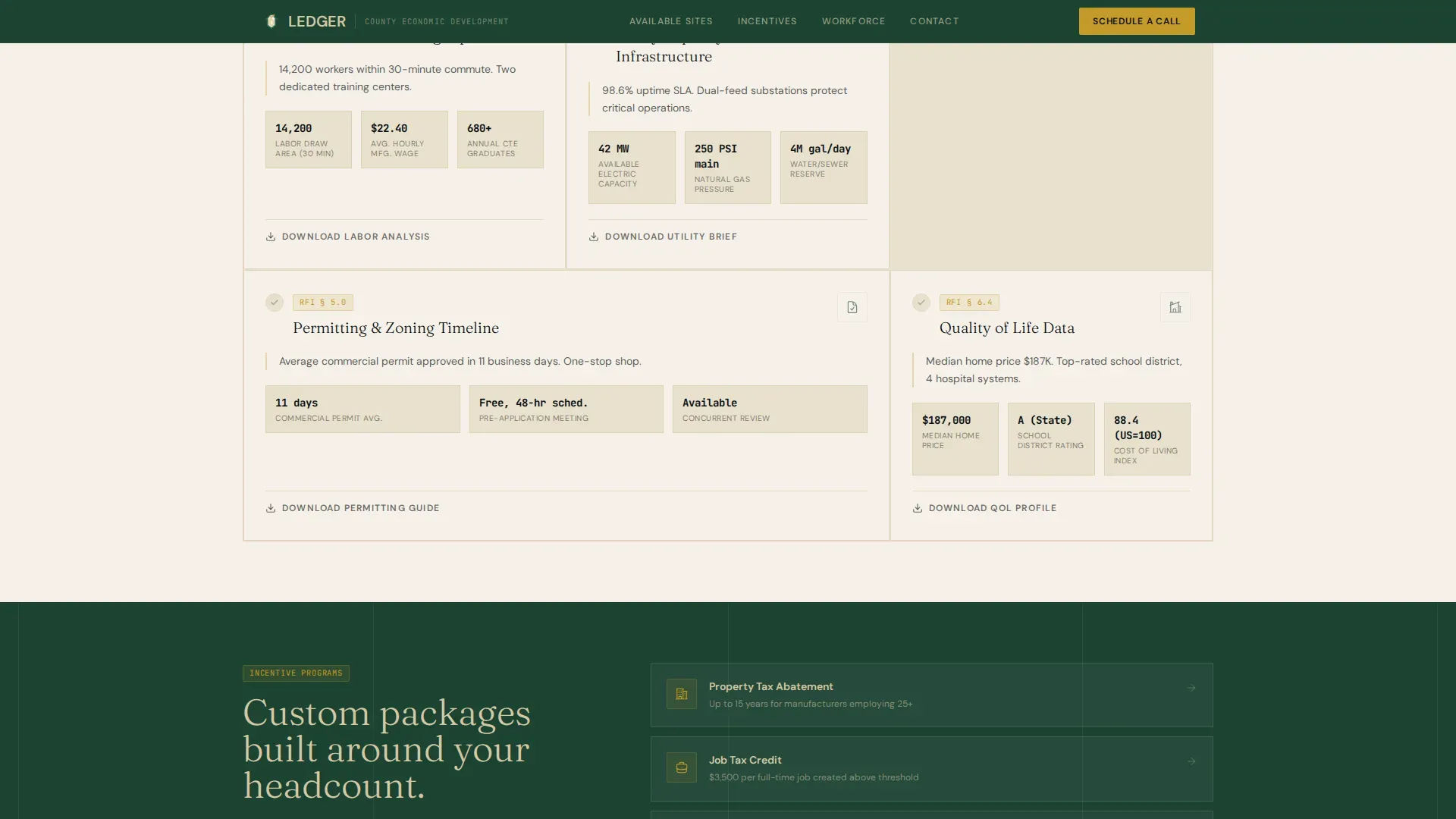
- Six audit checklist cards covering Available Sites and Buildings, Tax Incentive Programs, Workforce and Training Pipeline, Utility Capacity and Infrastructure, Permitting and Zoning Timeline, and Quality of Life Data.
- A sticky gold call-to-action bar that appears after the visitor scrolls past the third card row, linking directly to the Available Properties portal.
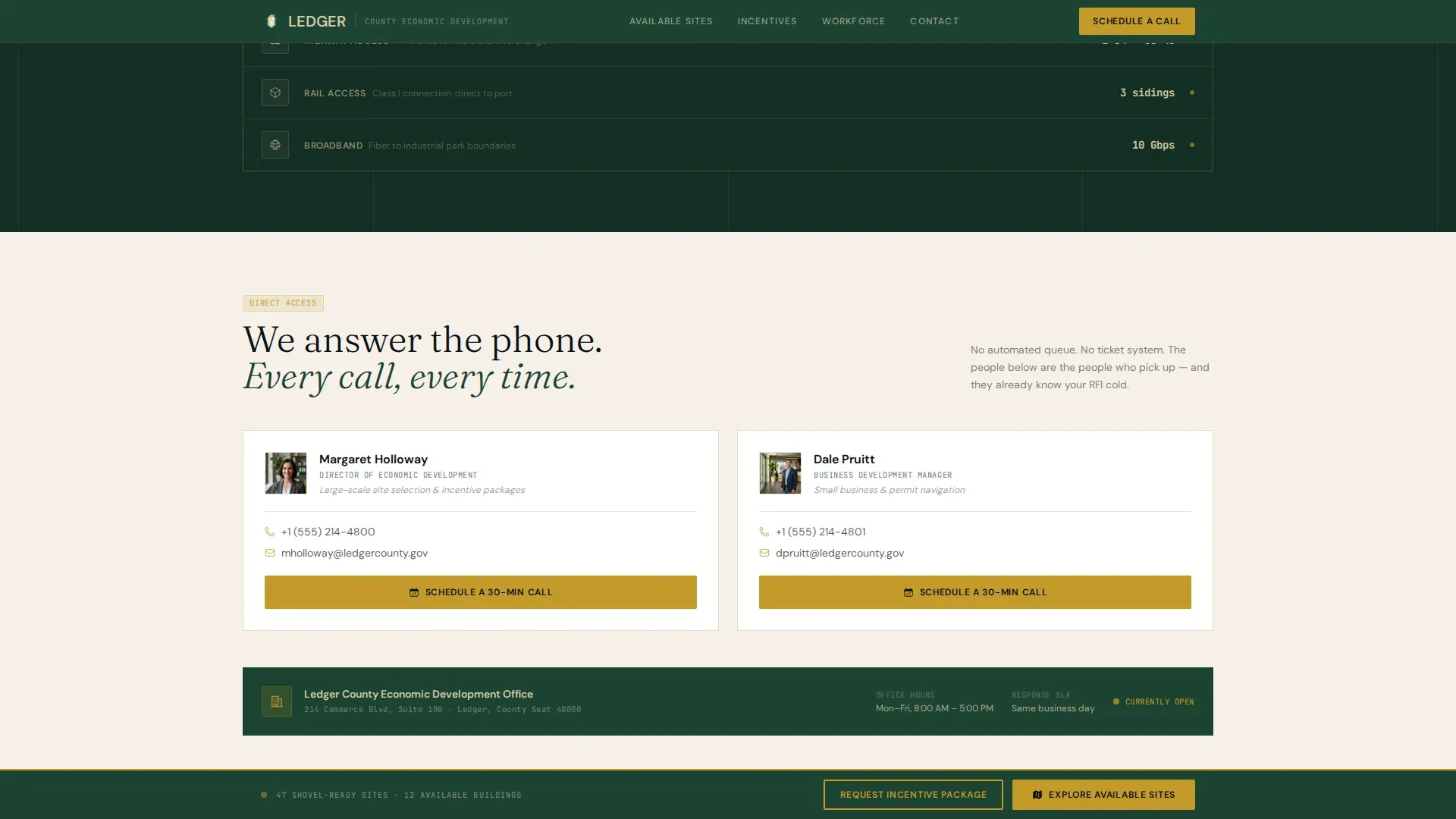
- A direct-contact scheduling section titled "We Answer the Phone," paired with a short intake form that asks only for company name, industry sector, estimated headcount, and preferred timeline.
Feature list
This template includes a focused collection of components, each grounded in how a site-selection project actually moves from research to decision.
Evidence-First Logo Bar Header
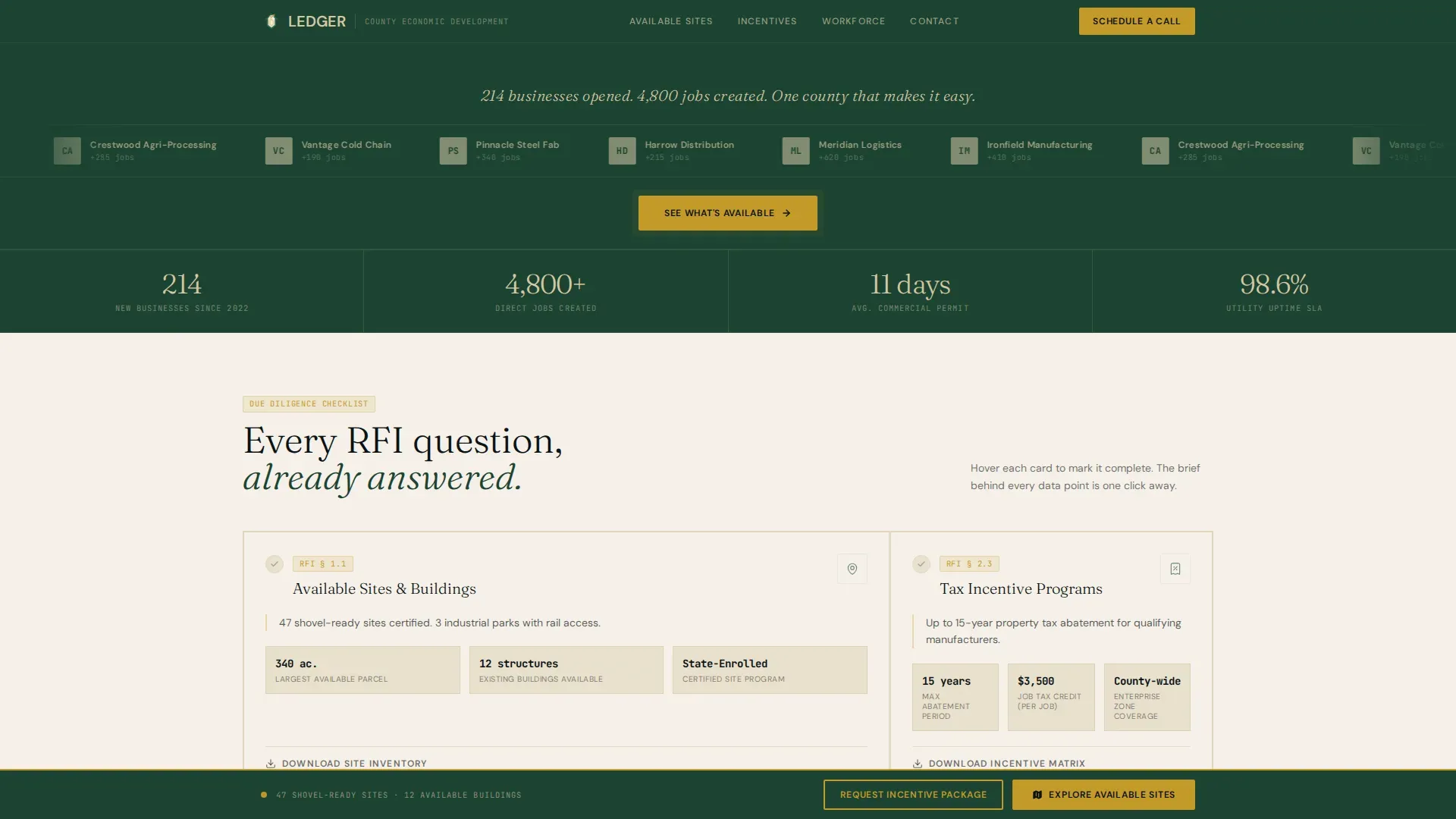
The header is a horizontal band displaying the five largest employers who expanded or relocated into the county in the last three years. Logos display in single-tone limestone against the pine background. Above them, one serifed headline reads: "214 businesses opened. 4,800 jobs created. One county that makes it easy." A single gold-outlined button pulses once below the bar to begin the visitor journey.
Audit Checklist Card Grid
Six modular cards form the primary grid of the landing page. Each card opens with a green checkmark and a one-sentence proof point, followed by two to three supporting data points and a "Download the Full Brief" link. As visitors scroll, the grid functions like a live audit being completed in real time, with each card click triggering a gold check animation. The sequence mirrors a standard RFI structure, moving from hard infrastructure to soft incentives to lifestyle.
Incentive Package Intake Section
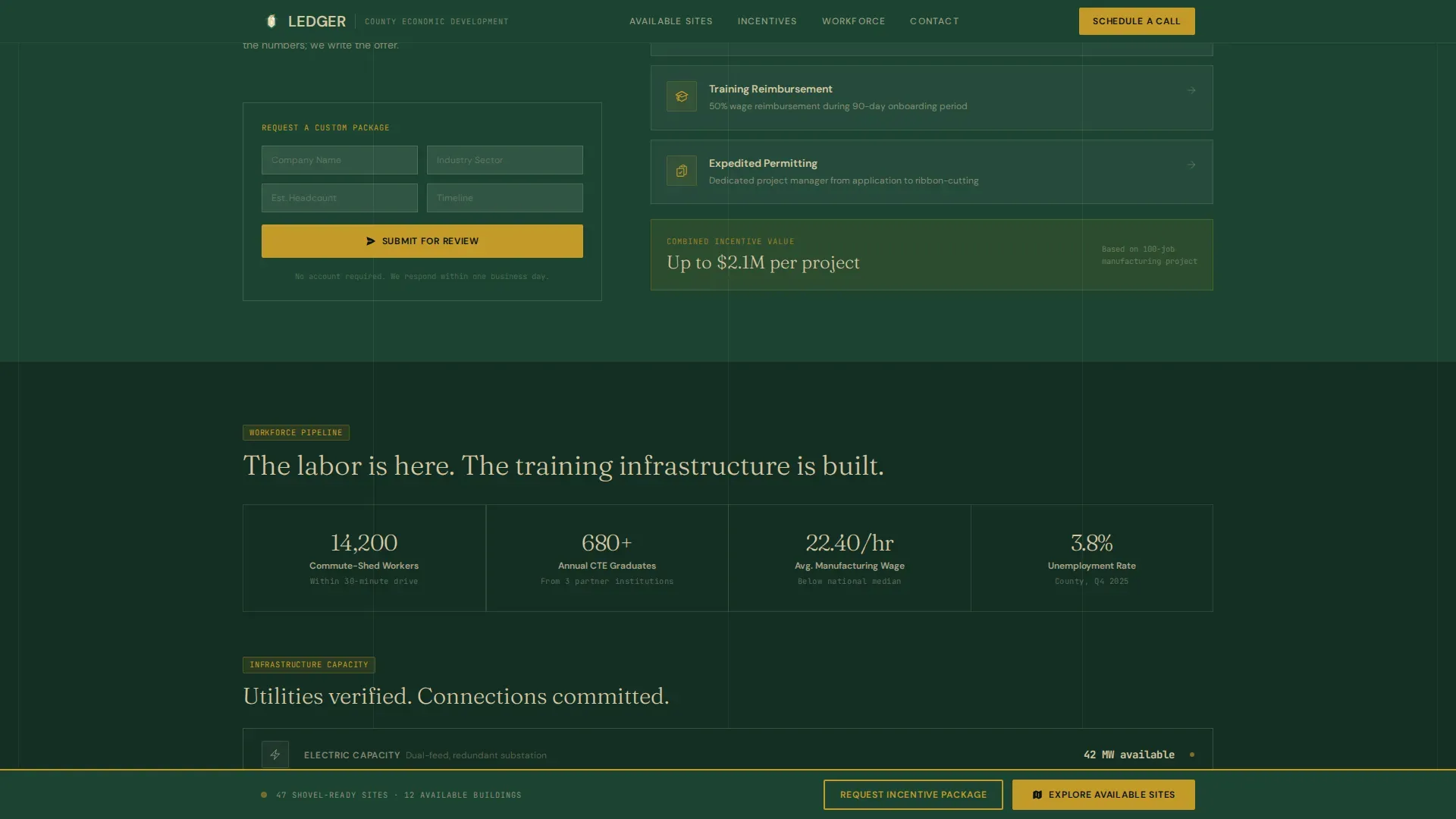
An asymmetric layout section presents the county's incentive program summary alongside a short form. The form collects four fields: company name, industry sector, estimated headcount, and preferred timeline. No account creation is required. This keeps the contract between the county and the prospect clear and friction-free.
Workforce and Infrastructure Proof Section
A split-layout section presents workforce pipeline and infrastructure data using animated counters. This section handles the reporting of figures that site selectors need to verify before advancing a project, including utility capacity, workforce training program enrollment, and infrastructure investment figures for the current fiscal year.
Sticky Call-to-Action Bar
After the visitor scrolls past the third card row, a persistent gold bar appears at the bottom of the page. It carries the primary call to action: "Explore Available Sites." The bar links to the full property database and remains visible for the rest of the session, ensuring that no qualified visitor leaves without a clear next step.
Direct Contact and Scheduling Card
The final section of the landing page is a scheduling card under the headline "We Answer the Phone." Visitors can link directly to a calendar or contact form. This section is the net that catches prospects who have reviewed all the data and are ready to talk. It also provides a reassurance signal to small business owners who want guidance before they commit to anything.
Page sections overview
| Section | Purpose |
|---|---|
| Evidence Logo Bar | Display employer proof and headline stats |
| Audit Card Grid | Answer RFI due-diligence questions in card format |
| Incentive Package Section | Present programs and capture intake form submissions |
| Workforce Infrastructure Split | Show workforce and utility data with animated counters |
| Direct Contact Card | Schedule calls and capture final-stage inquiries |
| Sticky call to action Bar | Persist primary site portal link throughout scroll |
| Footer Pattern | Provide linear single-row navigation and legal links |
Design & branding system
The Forest Trust color system gives this landing page its institutional weight. The palette references land deeds and courthouse stone rather than digital SaaS gradients, which is exactly the background signal a site selector or relocation team needs to feel before they share proprietary project details.
- Color structure: Old-growth pine (#1B4332) dominates section backgrounds. Limestone (#D5C7A3) carries card surfaces and data panels. Surveyor's ink (#0B1215) handles all body text. County-seal gold (#C49A2A) appears only on buttons, badges, and progress indicators, making every interactive element feel stamped and official.
- Typography system: Fraunces serif handles display headings and the evidence bar headline. DM Sans carries body copy across cards and forms. JetBrains Mono displays numeric data points, permit timelines, and fiscal year figures inside each audit card.
- Animation and interaction: Medium animation intensity includes scroll-triggered card reveals, counter animations in the workforce section, a gold check micro-interaction on each card hover or click, a subtle float on the logo bar, and a one-pulse animation on the header call-to-action button.
Mobile & speed optimization
This landing page template is built desktop-first to match how site-selection consultants actually work, with large screens open alongside spreadsheets and reference documents. A solid mobile fallback ensures the pages remain readable and functional for smaller screens.
- Desktop-first grid layout: The card grid is optimized for wide viewports. Cards display their full data collection without truncation on standard desktop and laptop device sizes.
- Minimal JavaScript approach: Static content is handled by server components. Scroll effects, counter animations, and the sticky bar rely on lightweight scripts so the page loads without heavy overhead on any device.
- Responsive card behavior: Cards reflow cleanly on tablet and mobile. The sticky call-to-action bar adapts to smaller screens without obscuring card content, and the intake form remains easy to fill out on any device.
How this template helps you convert
An institutional landing page that simply displays information is not enough. This template is structured to guide visitors from first impression to qualified lead submission, using a deliberate sequence of trust-building and friction-reducing decisions.
- The evidence bar converts skepticism into interest immediately. Visitors see real employer logos and specific job creation figures before they read a single sentence about the county's services. This is the definition of a trust signal that works without explanation.
- The audit card grid converts browsing into commitment. Each card is designed to answer one item on a site-selection spreadsheet. Visitors who work through the grid arrive at the intake form already informed, which means shorter sales cycles and higher-quality leads.
- The sticky call to action bar and scheduling card convert lingering visitors into booked conversations. No matter where a visitor pauses or re-reads, the path to the property portal and the direct contact card are always visible, always one click away.
Other information about this template
This template is built for a specific niche within the government and public sector. It draws from economic development best practices and the broader institutional design tradition to create a landing page that can support the full site-selection journey from initial research to signed contract.
- When building a landing page focused on economic development, the ledger concept prioritizes transparency, authority, and data-driven trust. In the context of economic development, a ledger is used to document and verify the legitimate power and transactions of governing bodies. An institutional ledger serves as the foundation for trust and operational integrity in an economic system.
- The U.S. Standard General Ledger Division (USSGL) serves as a source of guidance and information concerning standard accounting practices. USSGL implementation guidance scenarios have been approved by the Issues Resolution Committee (IRC) and the USSGL Board. The current USSGL TFM should always be referred to for the most up-to-date guidance on accounting transactions.
- Trust and compliance signals include certifications and public, auditable reports to mitigate risk perception. Separate accounting records must be maintained for Community Development Block Grant (CDBG) funds to distinguish them from all other funds. Internal controls ensure that resources are protected from waste and mismanagement. Audits must be completed in accordance with Generally Accepted Government Auditing Standards (GAGAS).
- Treating a website as a public ledger of authority creates a golden record that reduces uncertainty for developers and investors. These ledgers reduce transaction costs and protect property rights, which are essential for sophisticated global markets. In modern economic development, ledgers are envisioned as unified systems that integrate rules, messaging, and transactions.
- This template is offered as a SaaS-accessible marketplace asset. Teams can upload their own logo assets, swap color values, and adjust card content without writing custom code. Designers can save and export assets in standard formats including PNG files for documentation and reference materials.
- Ledgerly is a premium fintech website template designed for modern finance, digital banking, and blockchain-powered platforms. Ledgerly offers a clean, high-trust design and provides structure for building blockchain payments templates, loan management templates, and financial software templates. If your project has fintech or finance requirements, Ledgerly may be a useful reference for that direction.
- This landing page template does not require a gov domain to deploy, but it is structured to match the visual authority and reporting standards that government and institutional organizations expect. Teams can redistribute adapted versions within their organization, and the license terms allow redistribution under standard marketplace conditions.
- Key outlays for deployment include content population (proof point data, employer logos, incentive program details) and any integration work needed to link the card grid to a live properties database. The template itself supplies the layout, components, forms, and interaction patterns. Your team supplies the numbers, and the grid does the rest.
Theme
Institutional Authority
Creative direction
Checklist & Audit
Color system
Forest Trust
Style
Card Grid (Modular)
Direction
Click-Through
Page Sections
Evidence-first Logo Bar Header
Six-card Audit Checklist Grid
Incentive Package Intake Form
Animated Workforce and Infrastructure Section
Sticky Gold Call-to-action Bar
Direct Scheduling and Contact Card
Related questions
Can this template be customized to match a specific county's branding?
Does the intake form connect to an existing CRM or database?
How does the audit card grid handle updates to incentive programs each fiscal year?
Is this template suitable for a small county office with limited staff?
Can the template support multiple pages if the county wants to expand the site?



