Asthma Digital Therapy Landing Page Template
Breathe is a sidebar companion landing page built for asthma digital therapy platforms targeting clinical and enterprise buyers. It combines a diagnostic multi-step form, a Problem-to-Solution scroll arc, and an auto-populated ROI calculator into one high-converting lead generation experience. The Alpine Fresh color system and Corporate Precision design keep every section clinical, trustworthy, and action-ready.
by Rocket studio
Quick summary
Breathe is a sidebar companion landing page designed for a B2B asthma digital therapy application. It opens with a multi-step diagnostic form, guides visitors through a Problem-to-Solution content arc, and closes with a personalized ROI calculator. The layout targets respiratory nurses, health-system technology leaders, and pharma medical-affairs teams looking for a scalable asthma management solution.
Who this template is for
This template serves clinical and enterprise decision-makers who need a landing page that speaks their language before asking for a commitment. It is built for teams that want leads pre-qualified by organization size and role, not raw form submissions.
- Respiratory nurses managing panels of 200 or more patients who need at-a-glance remote triage tools
- Health-system chief technology officers evaluating asthma solutions that connect with Epic via Fast Healthcare Interoperability Resources (FHIR) standards
- Pharma medical-affairs teams running post-market adherence studies and tracking patient outcome data at scale
What problem this template solves
Most health-tech landing pages treat every visitor the same. A respiratory nurse and a chief technology officer have entirely different questions, and a generic form fails both. Breathe solves this by making the page feel like a diagnostic intake, not a sales funnel.
- Visitors self-segment by organization size and role before the page asks for contact details
- Clinical pain points such as medication non-adherence and fragmented data are addressed with matching solution mechanisms
- The ROI calculator auto-populates from the organization size captured in the header, so the value case feels personal and specific
What you get with this template
This template delivers a complete, production-ready landing page layout with high interactivity and a precise clinical visual identity. Every component is designed to support the full buyer journey from first scroll to booked demo.
- A three-step diagnostic form in the header, a sticky sidebar with dot-progress tracking, and a persistent primary call-to-action button
- A Problem-to-Solution content arc with animated counters, a nighttime symptom heatmap, and device-framed application screenshots
- An ROI calculator section, a clinical evidence block with social proof, and a dual-path conversion strategy including a secondary content download gate
Feature list
This template packages several purpose-built components that work together as a coherent clinical sales experience. Each feature below is grounded in the layout and interaction design described in the source brief.
Three-Step Diagnostic Form
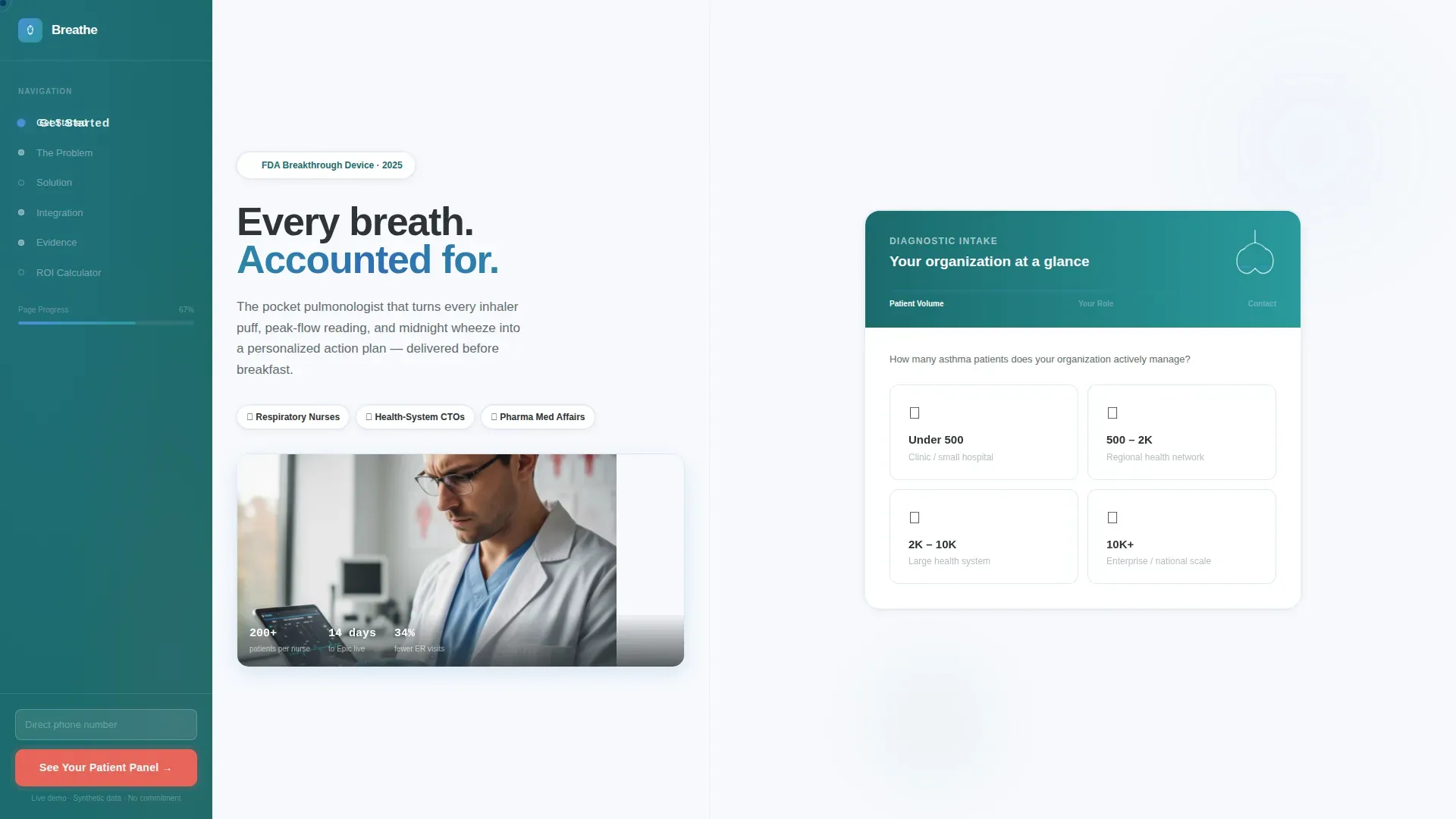
The header form occupies the right two-thirds of the viewport. Step one presents four clickable organization-size range tiles. Step two reveals role selection. Step three captures name and work email. Each step transition triggers a micro-animation where a lung illustration in glacier blue expands smoothly, mirroring the visitor's growing engagement.
Sticky Sidebar with Dot Progress Tracker
The left-column sidebar anchors the visitor throughout the entire scroll. Defined section dots update as the user progresses, providing a clear sense of location within the page. A persistent primary call-to-action button floats at the bottom of the sidebar, always visible without interrupting reading flow.
Animated Problem Section
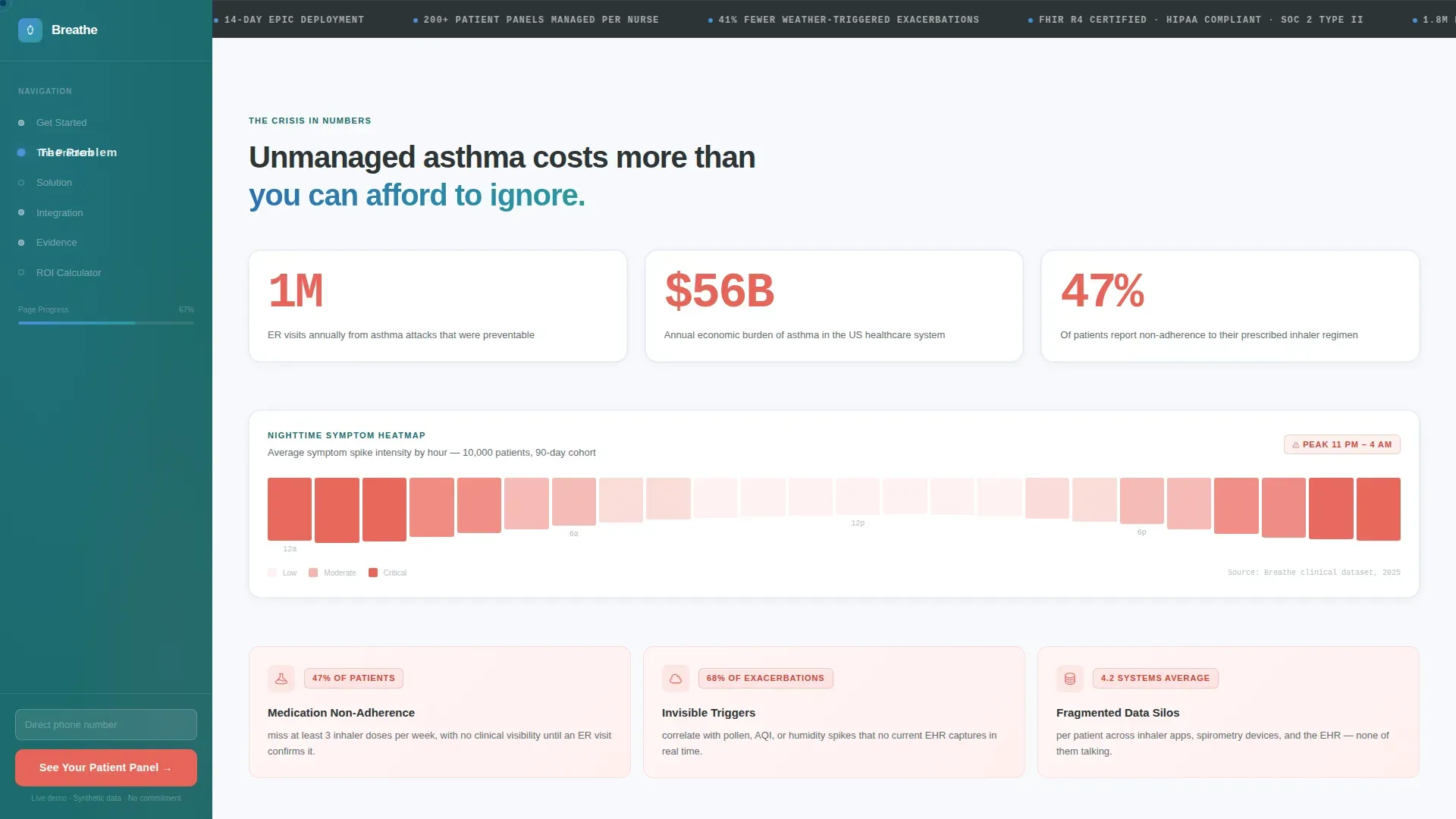
Below the header form, a real-time counter displays average emergency room visits per unmanaged asthma patient per year. A cost ticker climbs in the background. A heatmap rendered in oxygenated coral visualizes nighttime symptom spikes. These elements create urgency without overstating claims.
Pain Point and Solution Pairing
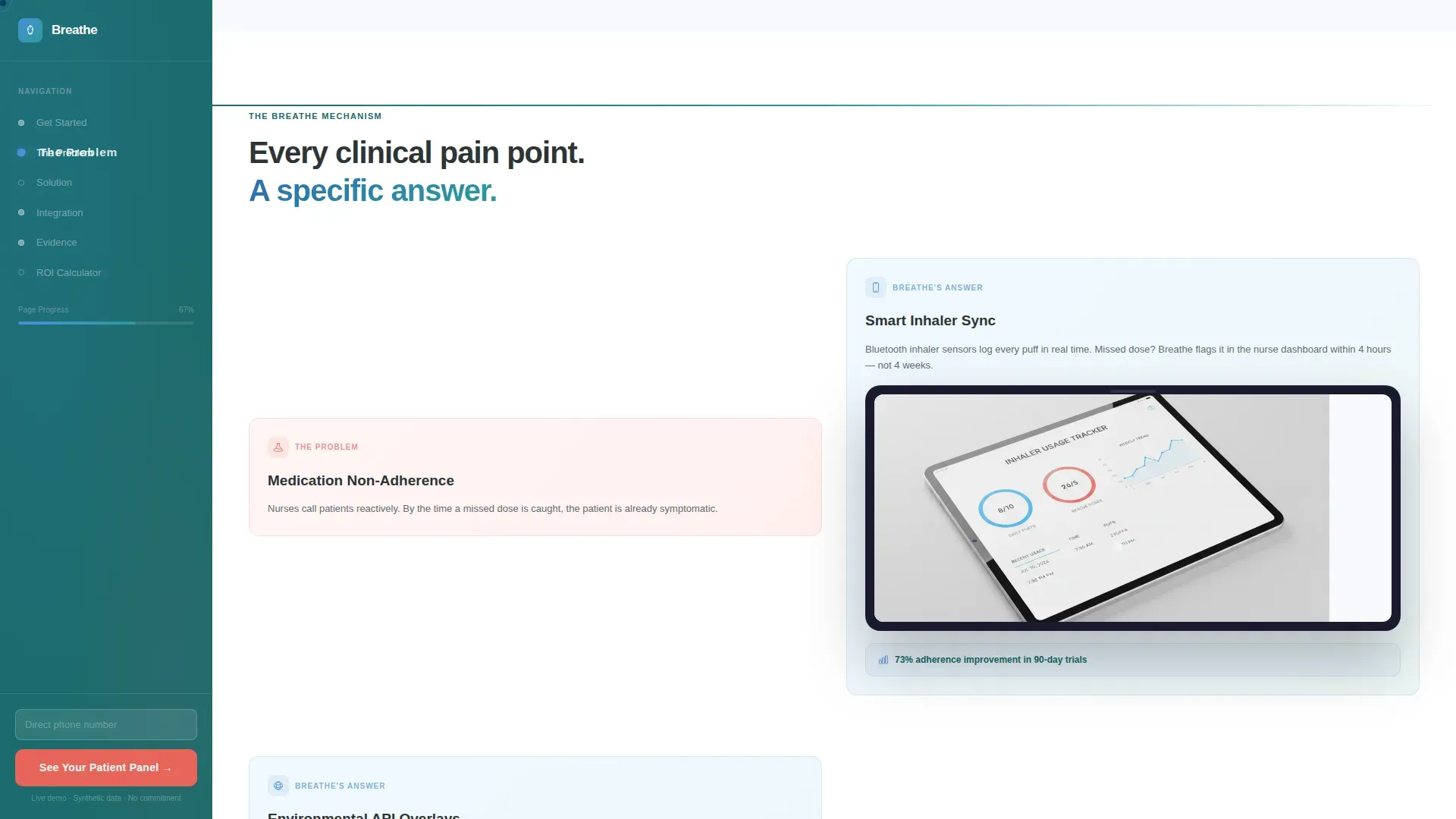
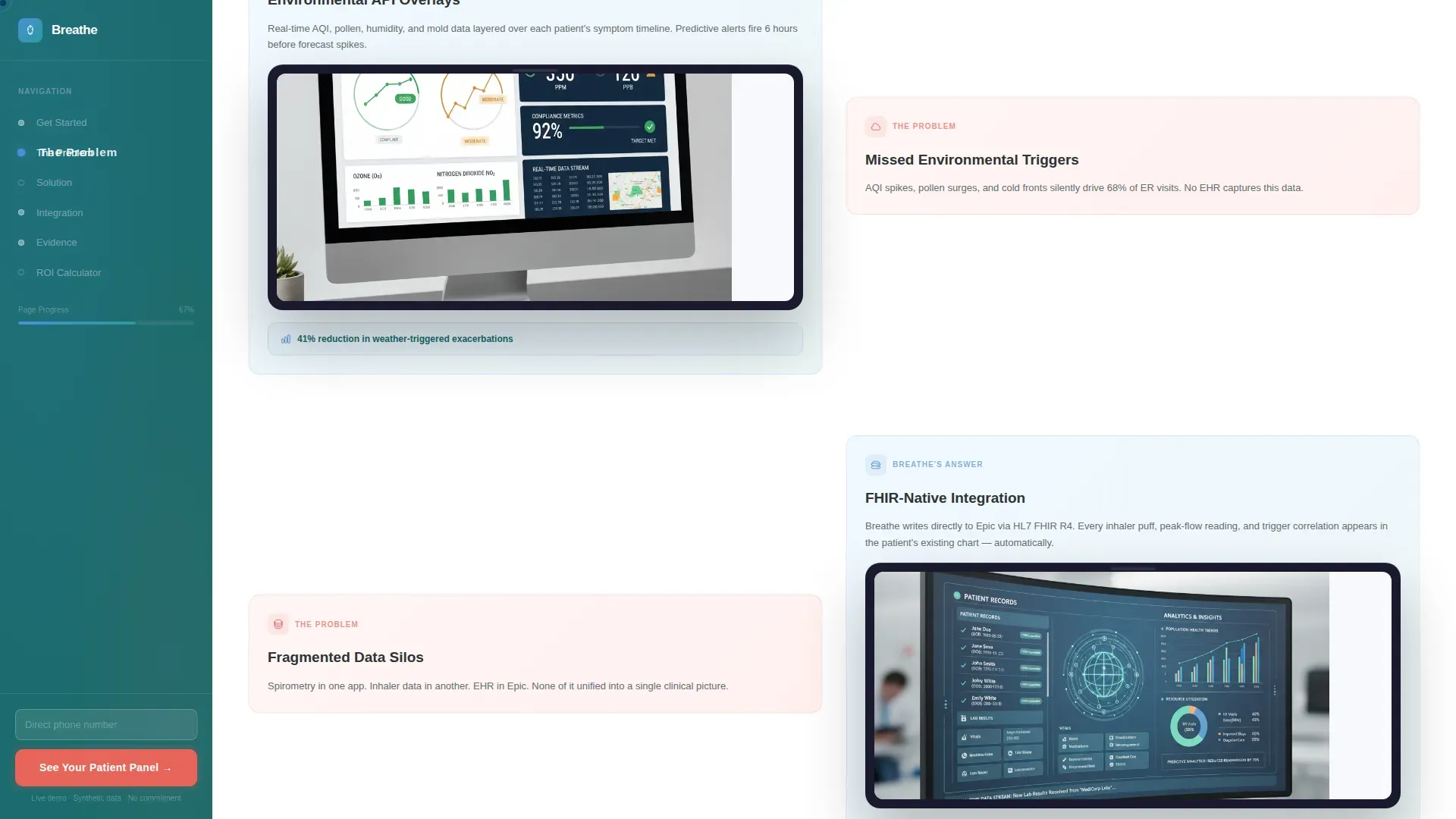
Each clinical pain point, such as medication non-adherence, missed environmental triggers, and fragmented patient data, is paired directly with the application's specific mechanism on the right. Device-framed screenshots show actual user interface views including peak-flow trend lines and patient risk-stratification panels.
Auto-Populated ROI Calculator
The ROI calculator at the base of the Solution arc reads the organization size selected in the header form and pre-fills the calculation. The visitor sees a return-on-investment estimate matched to their scale, making the business case tangible before any sales conversation begins.
Dual-Path Conversion Strategy
The primary call-to-action, "See Your Patient Panel," promises a personalized demo environment pre-loaded with synthetic data. The secondary path below the ROI calculator, "Download the Clinical Evidence Pack," is gated behind work email only. This two-track approach captures both ready buyers and internal champions still building their case.
Page sections overview
| Section | Purpose |
|---|---|
| Header Diagnostic Form | Captures org size, role, and contact details across three animated steps |
| Fixed Sidebar Navigation | Anchors scroll progress with dot indicators and a persistent primary call to action |
| Problem: ER Metrics | Displays animated ER visit counters, cost tickers, and symptom heatmap |
| Problem-to-Solution Divider | A horizontal rule in pine-shadow teal marks the content arc pivot point |
| Solution: Pain Point Pairs | Maps clinical pain points to application mechanisms with device screenshots |
| Integration Evidence Block | Highlights FHIR-native Epic compatibility and 14-day deployment timeline |
| Clinical Evidence Section | Presents study statistics, nurse testimonials, and CTO social proof quotes |
| ROI Calculator | Auto-populates based on org size to show personalized return-on-investment |
| Secondary Download Gate | Offers a Clinical Evidence Pack gated behind work email for warmer leads |
| Footer | Linear single-row footer pattern closes the page cleanly |
Design & branding system
The visual identity follows a Corporate Precision theme built on an Alpine Fresh color system. The palette feels clinical enough to earn institutional trust and warm enough to communicate recovery and optimism. Typography uses DM Sans throughout, keeping every label and body line sharp and readable at clinical workstation scale.
- Snow white (#F7F9FC) fills open backgrounds; charcoal (#2D3436) text sits against it with high contrast; glacier blue (#4A90D9) drives primary buttons and progress indicators
- Pine-shadow teal (#1B6B6D) defines the sidebar navigation and section anchor elements, providing structural clarity without visual noise
- Oxygenated coral (#E8655A) is reserved exclusively for alert states and the primary call-to-action pulse, making high-priority actions instantly recognizable
Mobile & speed optimization
The template is built desktop-first to match the clinical workstation context where most target users engage. The layout still adapts for responsive mobile viewing so that a respiratory nurse reviewing the page on a tablet or phone receives a coherent experience.
- Server Components handle all static sections, keeping initial page load lean while the interactive form, calculator, and animations load as Client Components
- GSAP ScrollTrigger powers the scroll-reveal animations, the lung expansion sequence, and the counter animations without blocking the core content render
- The multi-step form, ROI calculator, and sticky call-to-action are isolated as Client Components so animation-heavy interactivity does not affect static section delivery
How this template helps you convert
The page is structured so that visitors feel understood before they are asked to act. By the time a respiratory nurse or health-system technology leader reaches the call-to-action, they have already seen their problem quantified and the solution demonstrated at their specific organizational scale.
- The diagnostic form pre-qualifies every lead by organization size and role in the first interaction, so sales teams receive context-rich submissions rather than blank contact entries
- The auto-populated ROI calculator personalizes the value case to the visitor's scale, reducing objection friction and giving internal champions a ready-made business argument to share with decision-makers
- The dual-path conversion design ensures that both sales-ready buyers and research-stage visitors leave with a next step, capturing a wider portion of the qualified audience without diluting the primary call-to-action
Other information about this template
This template is category-matched to the Health and Medical vertical with a specific focus on asthma care and asthma digital therapy applications. It is designed for teams building enterprise sales pipelines in the digital health and clinical software-as-a-service space.
- The Sidebar Companion layout style keeps navigation persistent across a long scroll, which suits content-heavy clinical sales pages that need to maintain orientation for busy professional readers
- The Problem-to-Solution Arc creative direction is intentional: it mirrors how clinical professionals assess and respond to a condition, moving from symptom recognition to treatment pathway
- The Multi-Step Form header concept is designed to reduce perceived friction by presenting data capture as a diagnostic rather than a registration gate, which is consistent with the clinical audience's professional frame of reference
Theme
Corporate Precision
Creative direction
Problem→Solution Arc
Color system
Alpine Fresh
Style
Sidebar Companion
Direction
Lead Generation
Page Sections
Three-step Diagnostic Header Form
Sticky Sidebar with Progress Dots
Animated Problem Section
Clinical Pain Point and Solution Pairing
Auto-populated ROI Calculator
Dual-path Conversion Design
Related questions
Who is this landing page template designed for?
What makes the multi-step form different from a standard contact form?
Does the ROI calculator require manual setup for each visitor?
Can this template support two separate conversion paths at once?
What interactivity is built into this template?



