Pulmonology Medicine Booking Website Template
Breathe is a hub-and-spoke anchor-nav landing page template built for a pocket spirometry device. It guides pulmonologists, respiratory therapists, and hospital procurement officers through six FAQ-driven spoke sections, each answering a real objection with clinical evidence. The primary goal is demo bookings, supported by a two-step inline form and a secondary spec-sheet download path.
by Rocket studio
Quick summary
Breathe is a single-page, anchor-nav landing page template designed for a precision pocket spirometry device. Six FAQ-driven spokes answer the questions procurement committees and clinic directors actually ask. Every section builds toward one action: scheduling a live demo. The design follows a Medical Clarity theme with an Alpine Fresh color palette.
Who this template is for
This template is purpose-built for medical device marketers and product teams selling to clinical buyers. It speaks directly to the people who evaluate, approve, and deploy diagnostic hardware in professional healthcare settings.
- Pulmonologists running high-volume pulmonary function testing labs who need proof of clinical accuracy before recommending a device
- Respiratory therapists in community clinics who need portable diagnostic tools and want to understand real-world usability
- Hospital procurement officers comparing per-test cost, regulatory clearance status, and electronic medical record integration against existing cabinet spirometers
What problem this template solves
Selling a medical device to institutional buyers is not a single conversation. Procurement committees, clinical leads, and administrators all have different objections. A generic product page rarely addresses all of them in one sitting.
- There is no structured way to answer six distinct buyer objections, accuracy, replacement value, data connectivity, cost, regulatory status, and deployment speed, without losing the reader
- Visitors who cannot find regulatory or cost information quickly leave before booking a demo
- Standard templates lack the clinical credibility signals and frictionless booking flow that B2B healthcare buyers expect before committing time to a sales call
What you get with this template
You get a fully structured, single-page layout that functions as a self-contained sales presentation for a pulmonology medical device. Every section is designed to answer a specific question and then push the reader one step closer to a demo booking.
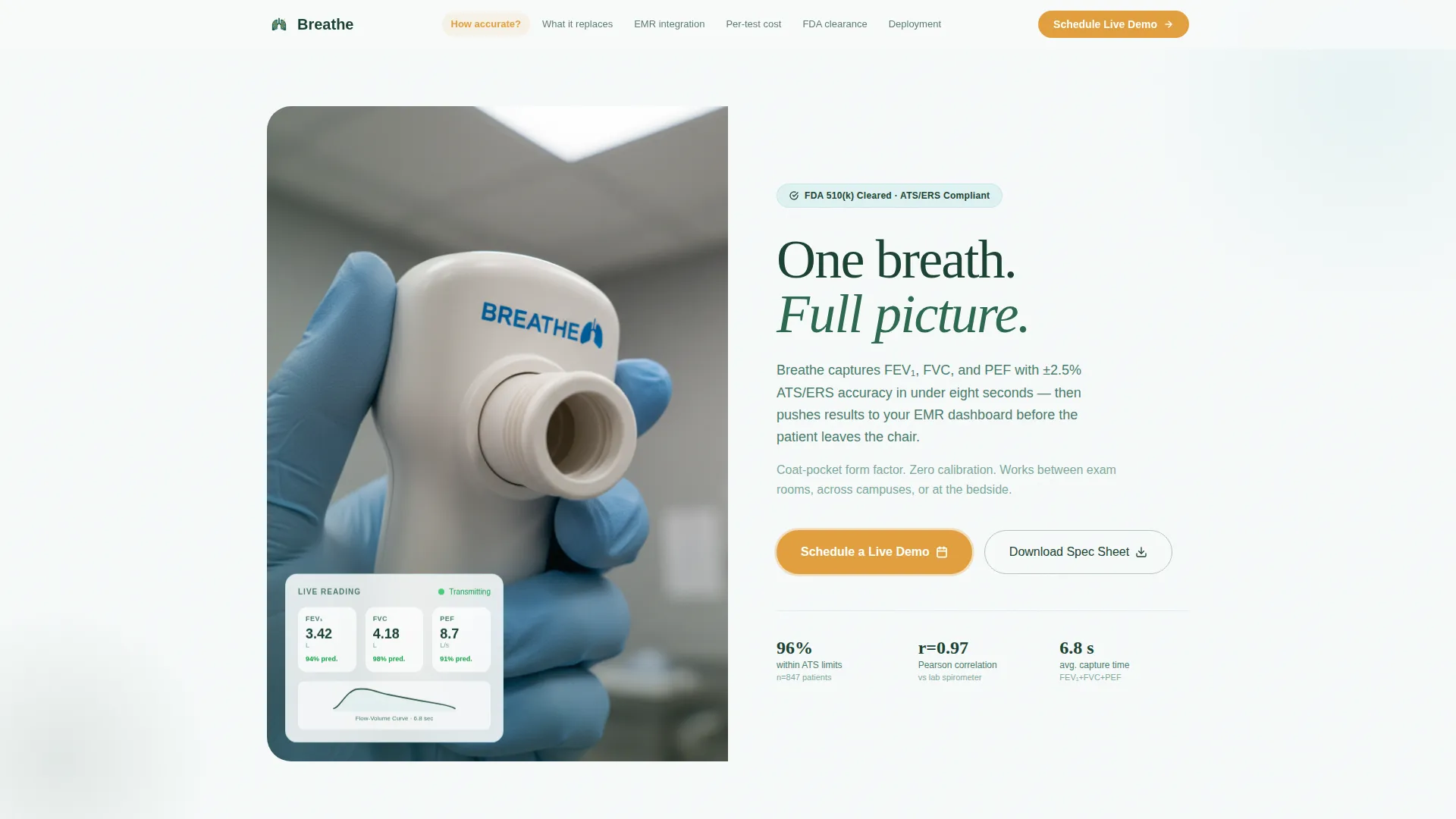
- A hero section with a half-page photo and text split, a headline, a two-sentence subhead, and an amber call-to-action button
- Six spoke sections, each opening with a buyer question as a headline and answering it with two short paragraphs paired with a supporting visual
- A two-step inline demo booking form and a secondary spec-sheet download path with a work-email capture modal
Feature list
This template is built around a small set of high-impact structural and interactive components. Each one serves the conversion objective without adding visual noise.
FAQ-Driven Anchor Navigation
A sticky navigation bar lists the six buyer questions as anchor links. Visitors jump directly to the spoke that answers their most pressing objection. The nav keeps the page organized and reduces bounce from impatient procurement readers.
Two-Step Demo Booking Form
Step one collects name, facility name, and role from a dropdown that includes pulmonologist, respiratory therapist, procurement, and other. Step two presents a calendar widget for selecting a 20-minute virtual demo slot. The two-step format keeps the form approachable without sacrificing lead quality.
Spec Sheet Download Modal
A secondary conversion path sits beneath each spoke section. Visitors who are not yet ready to book a demo can enter a work email and receive the device specification sheet as a downloadable PDF. This captures mid-funnel visitors without pressuring them toward the primary call to action.
Clinical Evidence Visuals
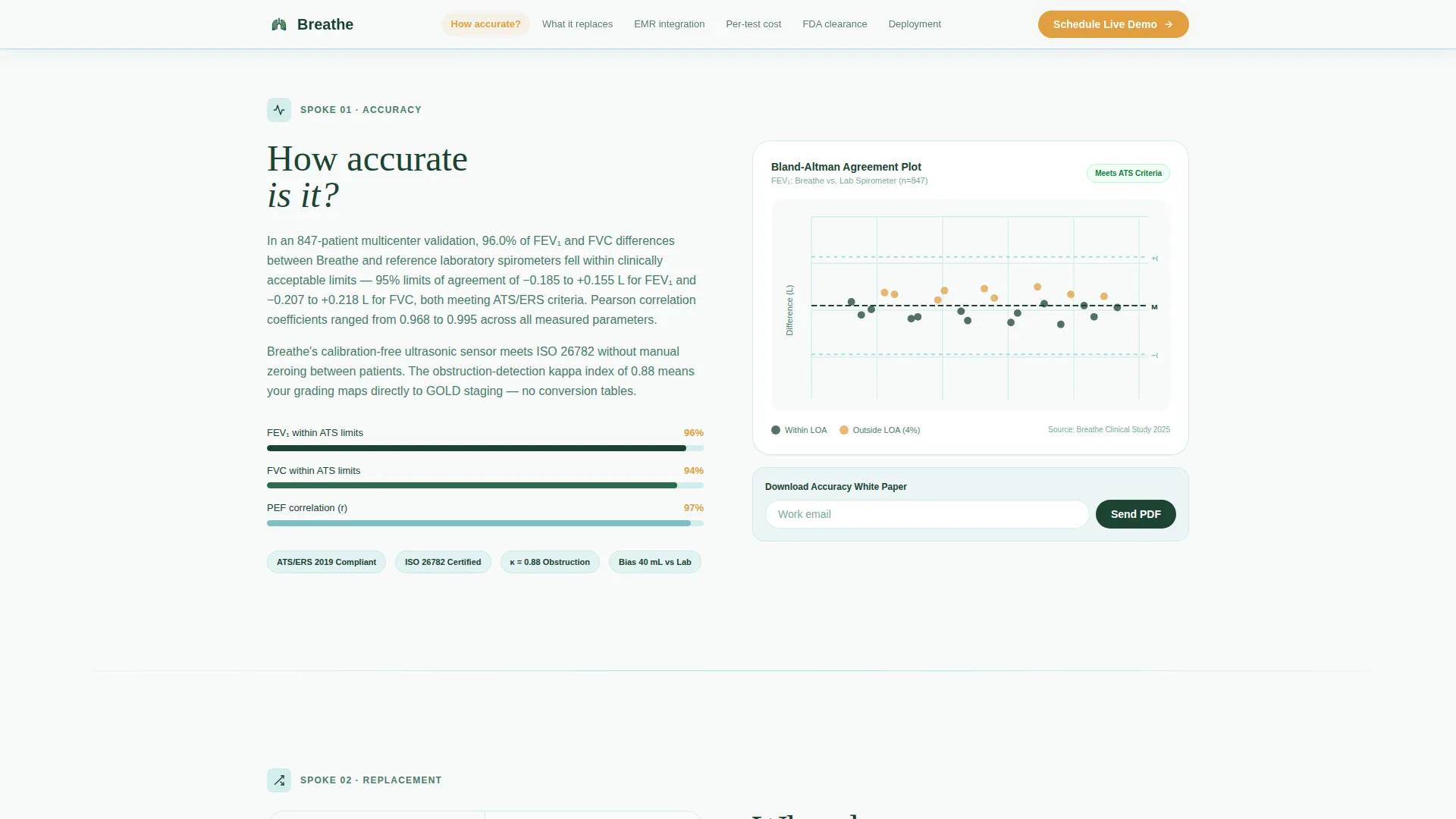
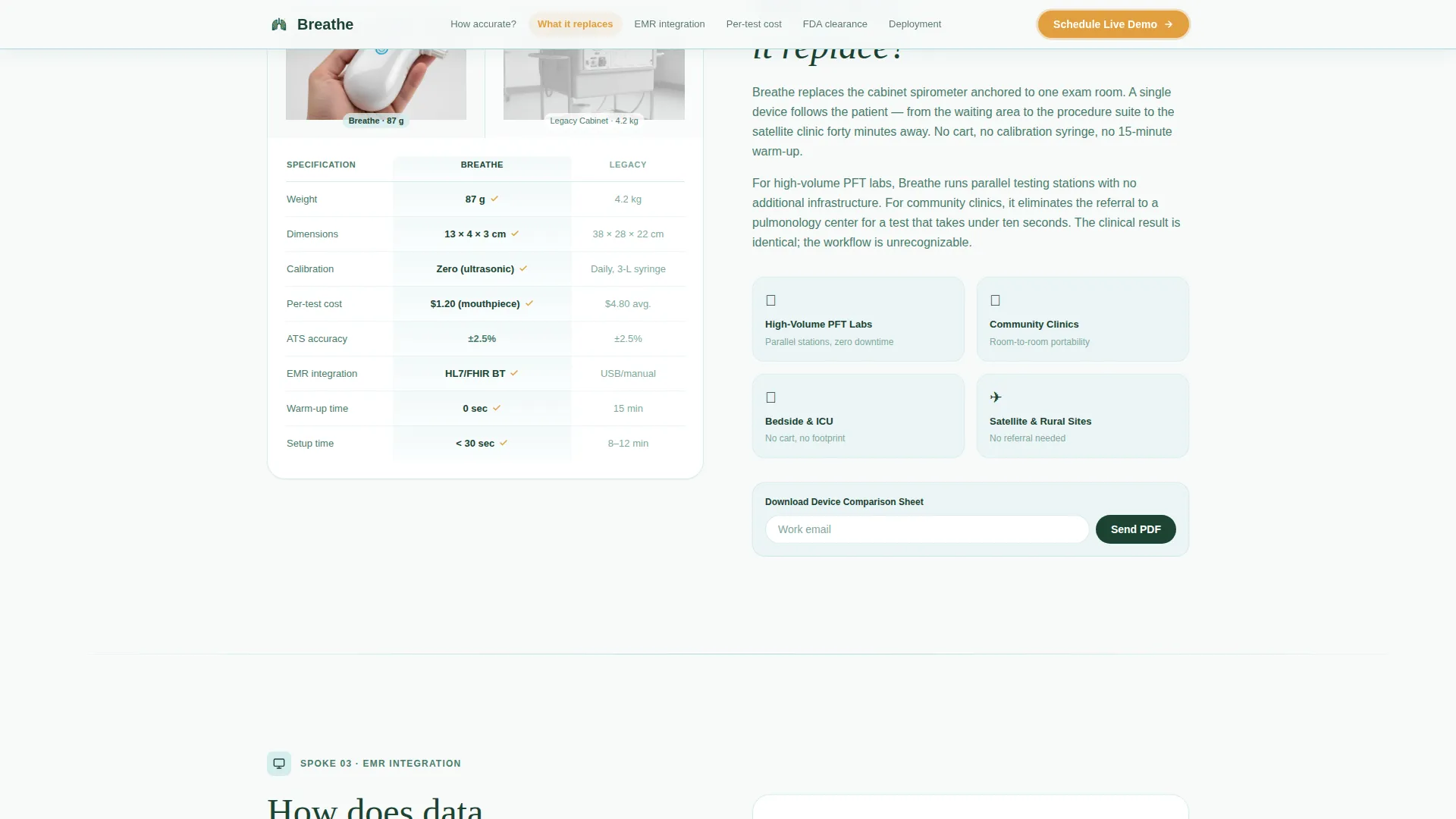
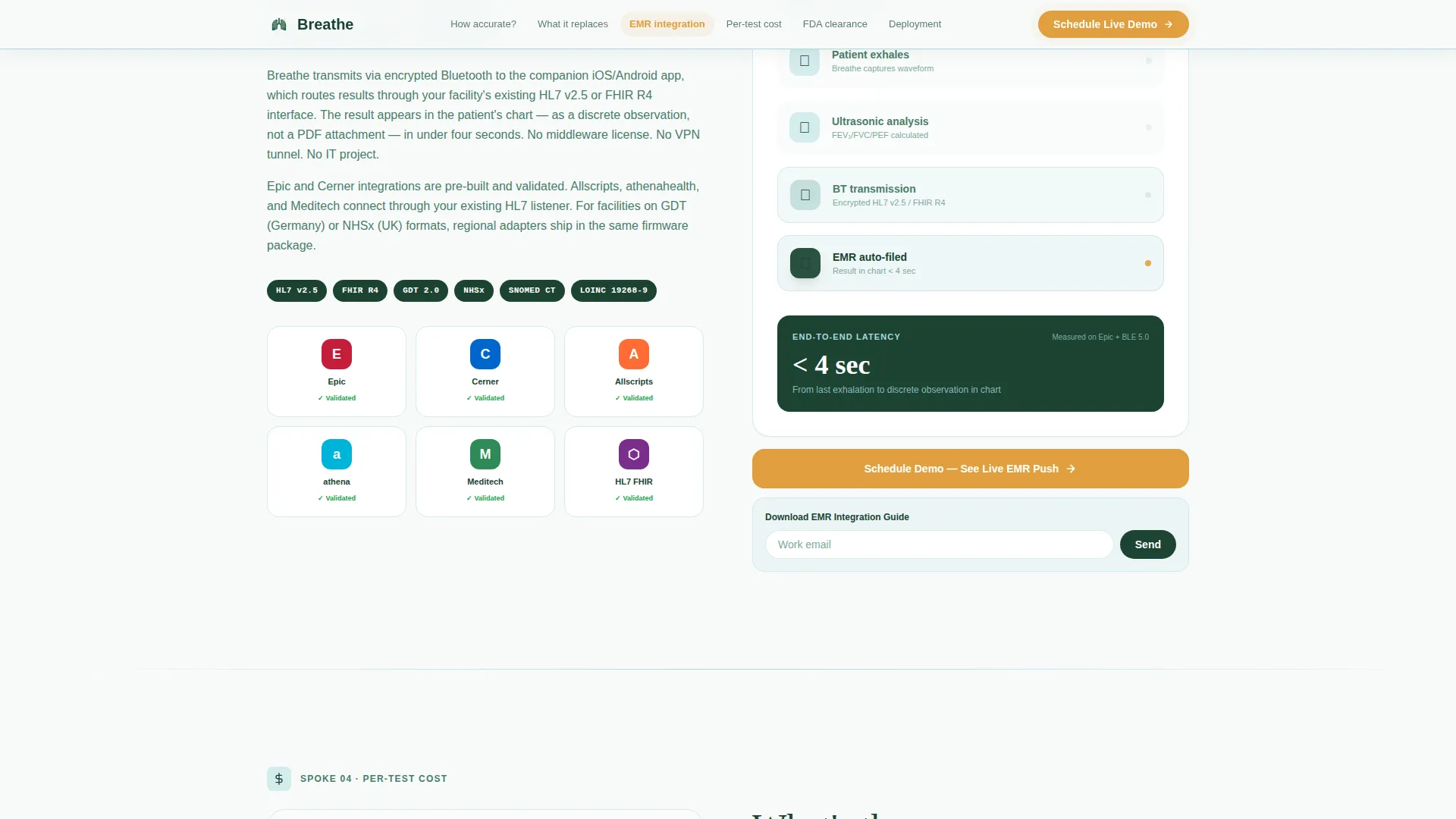
Each spoke pairs its answer with a specific supporting visual. These include a Bland-Altman plot for the accuracy spoke, a side-by-side size comparison for the replacement spoke, an HL7 integration diagram for the electronic medical record spoke, and a unit-economics table for the cost spoke. Visuals are built into the layout as placeholder containers ready for real clinical assets.
Floating Amber Call-to-Action
The "Schedule a Live Demo" call-to-action appears in the header, floats persistently in the anchor nav bar, and repeats after the electronic medical record and deployment spokes. The amber color is reserved exclusively for this button across the entire page, so the eye lands on it naturally at every scroll point.
Hero Photo and Text Split
The header uses a half-page layout. The left side holds a tightly cropped photograph of gloved hands holding the device at a patient's lips. The right side delivers the headline, a two-sentence subhead referencing forced expiratory volume in one second, forced vital capacity, and peak expiratory flow capture in under eight seconds, and the primary call-to-action button.
Page sections overview
| Section | Purpose |
|---|---|
| Hero Split Header | Introduce the device and present the primary demo call-to-action |
| Accuracy Spoke | Answer "How accurate is it?" with a Bland-Altman plot and compliance data |
| Replacement Spoke | Answer "What does it replace?" with a size comparison and legacy specs table |
| EMR Integration Spoke | Answer "How does data reach our EMR?" with an HL7 connectivity diagram |
| Cost Spoke | Answer "What is the per-test cost?" with a unit-economics breakdown table |
| Regulatory and Deployment Spoke | Answer FDA clearance and deployment timeline questions |
| Linear Footer | Close the page with a single-row footer pattern |
Design & branding system
The visual identity follows a Medical Clarity theme using an Alpine Fresh color system. The overall feeling is a Swiss sanatorium at altitude: sterile without being cold, precise without being impersonal.
- Glacier white (#F7FAFA) dominates all backgrounds; evergreen depth (#1B4332) anchors all typography, the sticky nav bar, and primary headings; clinical sky (#A8DADC) washes section dividers and icon containers
- Pulse-ox amber (#E09F3E) appears exclusively on call-to-action buttons and alert states, with a gentle pulse animation that draws the eye without distracting from clinical content
- Display headlines use Fraunces for editorial weight, while body copy and user interface elements use DM Sans for clean legibility at all sizes
Mobile & speed optimization
The template is designed desktop-first to match the workstation workflows of procurement officers reviewing device specs on large screens. Full mobile support is included so respiratory therapists and clinicians can review the page between appointments.
- Scroll-reveal animations, a parallax hero, and a floating card are handled through client-side components, while static sections use server components to keep the page lightweight
- The anchor navigation collapses cleanly for smaller screens, keeping the six spoke links accessible without cluttering the mobile header
How this template helps you convert
Every structural decision in this template is built to reduce friction between a skeptical buyer and a booked demo slot.
- The anchor nav allows procurement committees to jump directly to the spoke answering their specific objection, cost, regulatory clearance, or electronic medical record compatibility, without scrolling through sections they do not need, which keeps attention focused and reduces drop-off
- Repeating the "Schedule a Live Demo" call-to-action after the electronic medical record and deployment spokes catches visitors at the exact moments when objections have just been resolved, making the booking feel like the natural next step rather than a sales push
- The spec-sheet download modal captures work emails from visitors who are not ready to book, creating a secondary conversion path that keeps mid-funnel leads in the pipeline
Other information about this template
This template is categorized under Health and Medical, specifically within the Pulmonology Medicine subcategory, and is optimized for the Pulmonology Medical Device niche. It is built for the United States market with USD pricing context and FDA regulatory framing throughout. A few additional details worth noting:
- The template style is Hub and Spoke with Anchor Navigation, and the creative direction is FAQ-Driven, meaning every major section is structured around a real procurement question rather than a feature list
- The header concept is Half-Page Photo and Text, a layout that gives clinical photography equal weight to the headline copy
- The landing page direction is Booking and Scheduling, with the demo booking form as the primary conversion mechanism
- Social proof elements referenced in the template include clinical validation statistics such as 96% of readings within American Thoracic Society limits, a kappa index of 0.88, and a Pearson correlation coefficient of 0.97, placeholders are structured to receive real data from the device's validation study
- Animation level is set to medium, including scroll reveals, an amber pulse on the call-to-action, a parallax hero, and a floating live-reading card in the hero section
- Interactivity is set to high, covering the anchor nav, the two-step demo booking form, the spec-sheet download modal, and an FAQ accordion component
- The footer uses Pattern 1, a linear single-row layout, keeping the close of the page clean and uncluttered
Theme
Medical Clarity
Creative direction
FAQ-Driven
Color system
Alpine Fresh
Style
Hub & Spoke (Anchor Nav)
Direction
Booking/Scheduling
Page Sections
Faq-driven Anchor Navigation
Two-step Demo Booking Form
Spec Sheet Download Modal
Clinical Evidence Visual Placeholders
Floating Amber Call-to-action
Hero Photo and Text Split
Related questions
What kind of businesses is this template designed for?
Can I adapt this template for a device with different clinical specifications?
How does the two-step demo booking form work?
What does the spec-sheet download modal capture?
Does the template include placeholder content for clinical evidence visuals?



