Respiratory Home Care Landing Page Template
Breathe is a split-screen landing page template built for ventilator and respiratory home care companies. It pairs a live three-step intake calculator with scroll-triggered outcome stats, a clinical-soft color system, and a focused lead generation flow. Discharge planners, pulmonologists, and family caregivers all get a clear path from first visit to referral submission.
by Rocket studio
Quick summary
Breathe is a single-page, split-screen template for home ventilator and respiratory care providers. It leads with an interactive estimation tool, builds trust through outcome-driven statistics, and closes with a referral intake form. The design feels clinical without being cold, precise, calm, and built to move discharge planners and family caregivers toward action.
Who this template is for
This template is built for home health companies that manage medically complex respiratory patients after hospital discharge. It speaks directly to the people who make the referral decision and the people who live with the result.
- Discharge planners and hospital case managers who need fast setup confirmation and payer coverage clarity before approving a home transition
- Pulmonologists and respiratory specialists managing tracheostomy-dependent or BiPAP-dependent patients outside the ICU
- Adult family members navigating Medicaid waivers or Medicare coverage for a parent who cannot safely spend a night without ventilator support
What problem this template solves
Referring a ventilator-dependent patient home is a high-stakes decision. Clinicians and family members need immediate answers: Can you serve my zip code? Will insurance cover this? How fast can equipment arrive? Most home care websites bury these answers in PDF brochures or require a phone call. This template puts the answers front and center.
- Payer coverage and service area uncertainty slow referrals and delay discharges from the ICU
- Clinical visitors distrust home care sites that lead with stock photography instead of outcome data
- Family caregivers feel lost without a guided intake path that confirms eligibility before asking personal questions
What you get with this template
You get a complete, single-page lead generation layout with five structured content modules and a footer. Every section has a clear job, and no section wastes scroll depth.
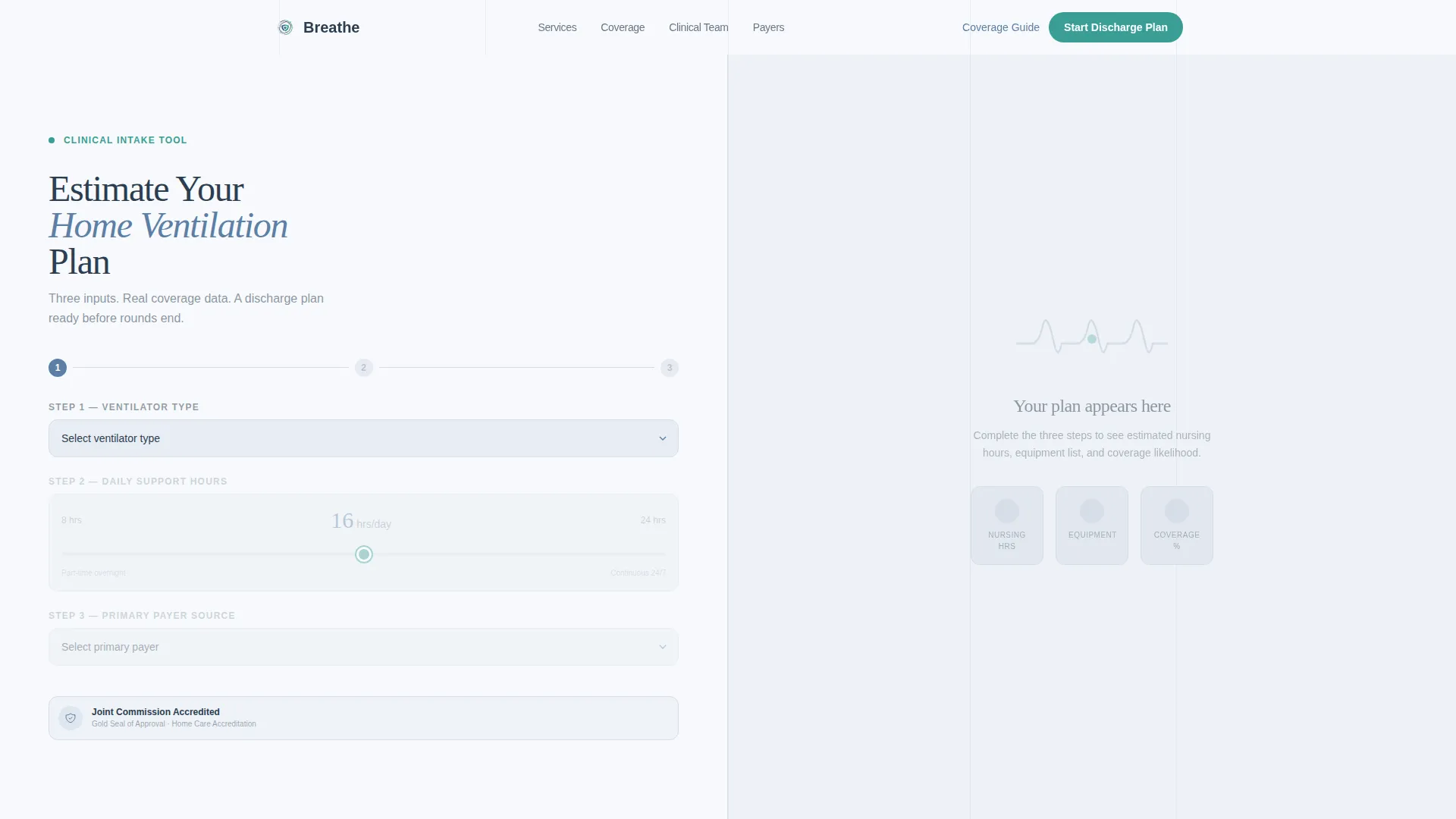
- A three-step hero calculator that estimates ventilator type, daily support hours, and payer coverage likelihood before a visitor ever fills out a form
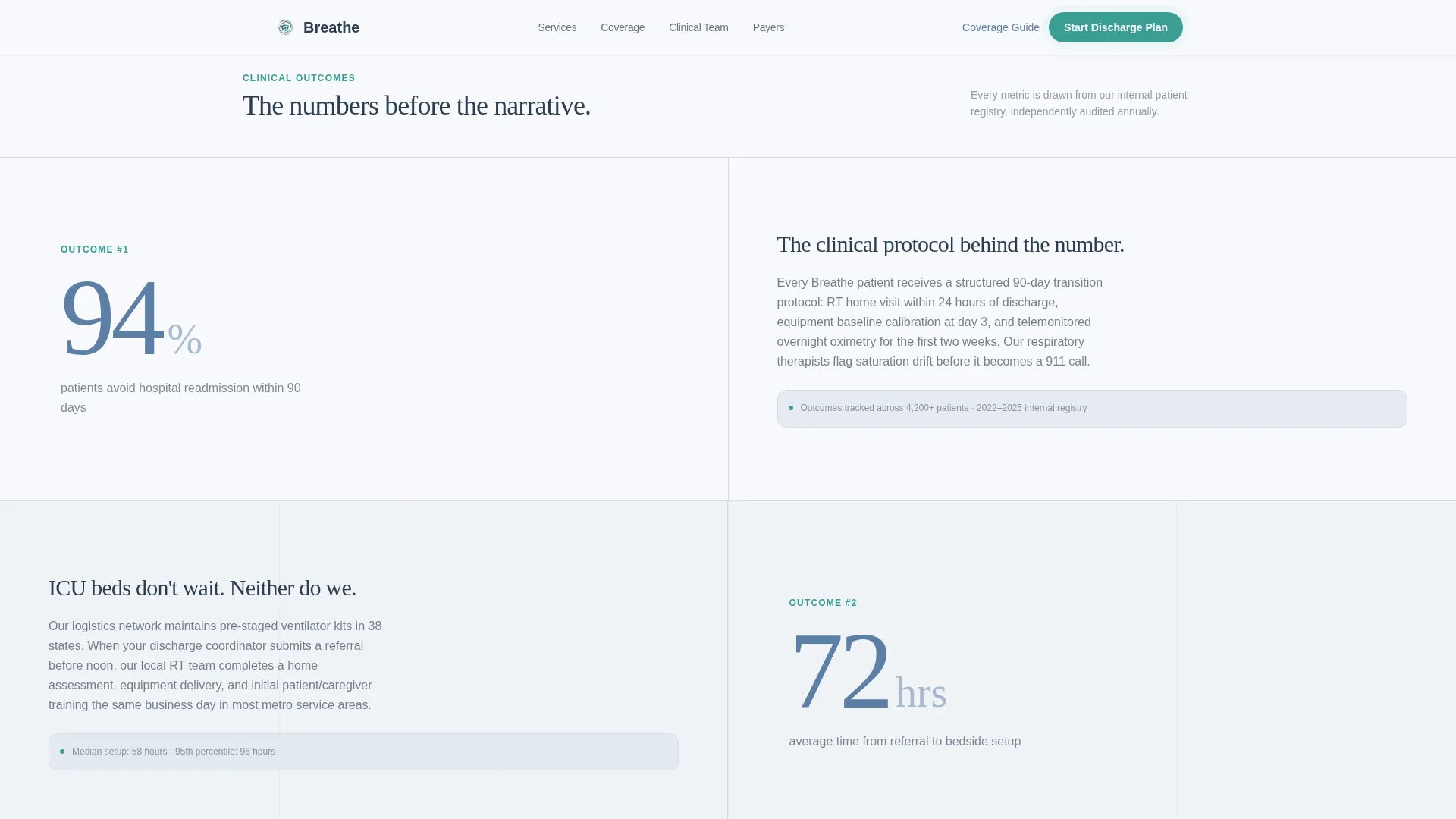
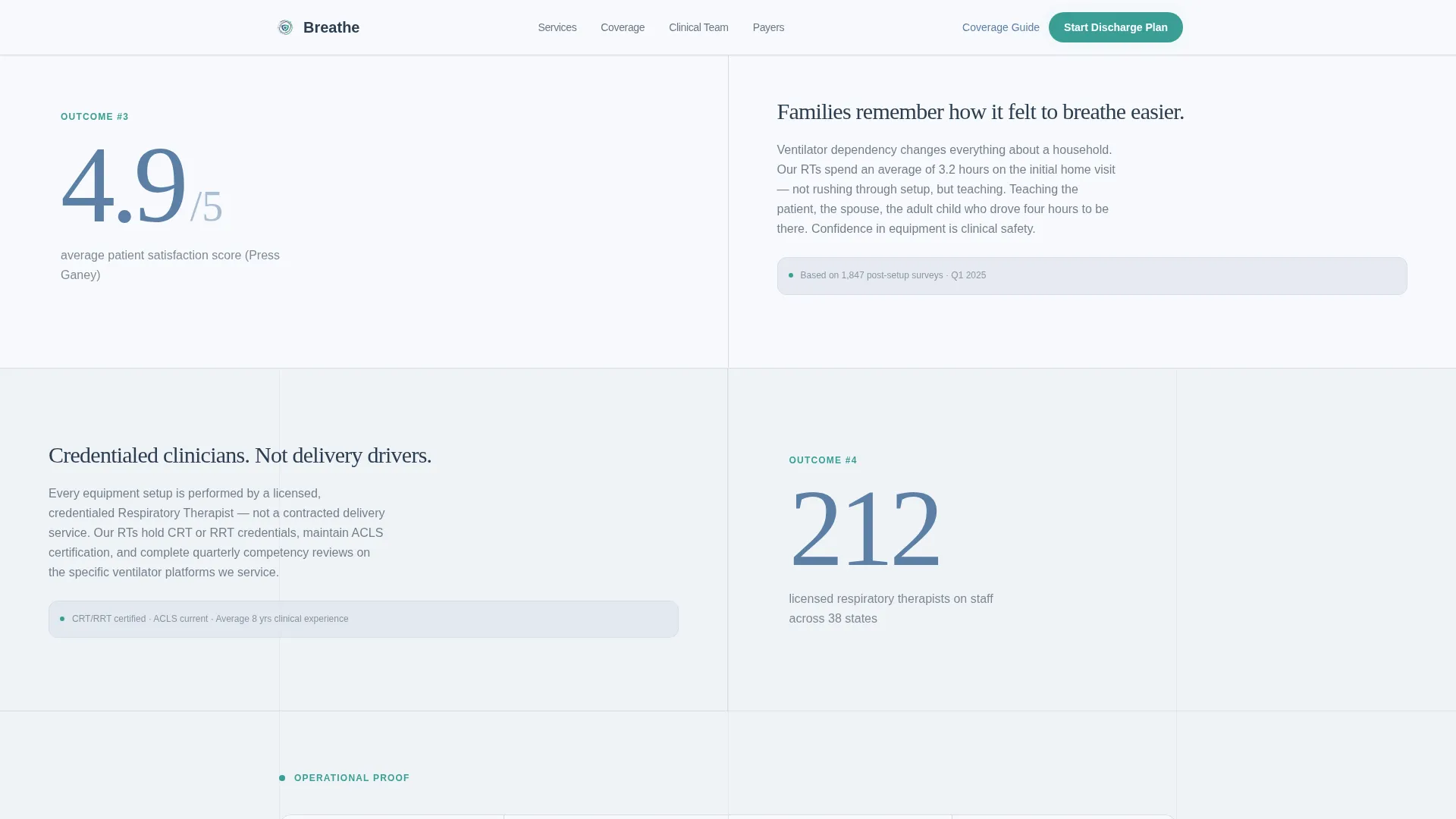
- Three alternating split-screen statistics modules that pair oversized outcome numbers with clinical protocol narratives
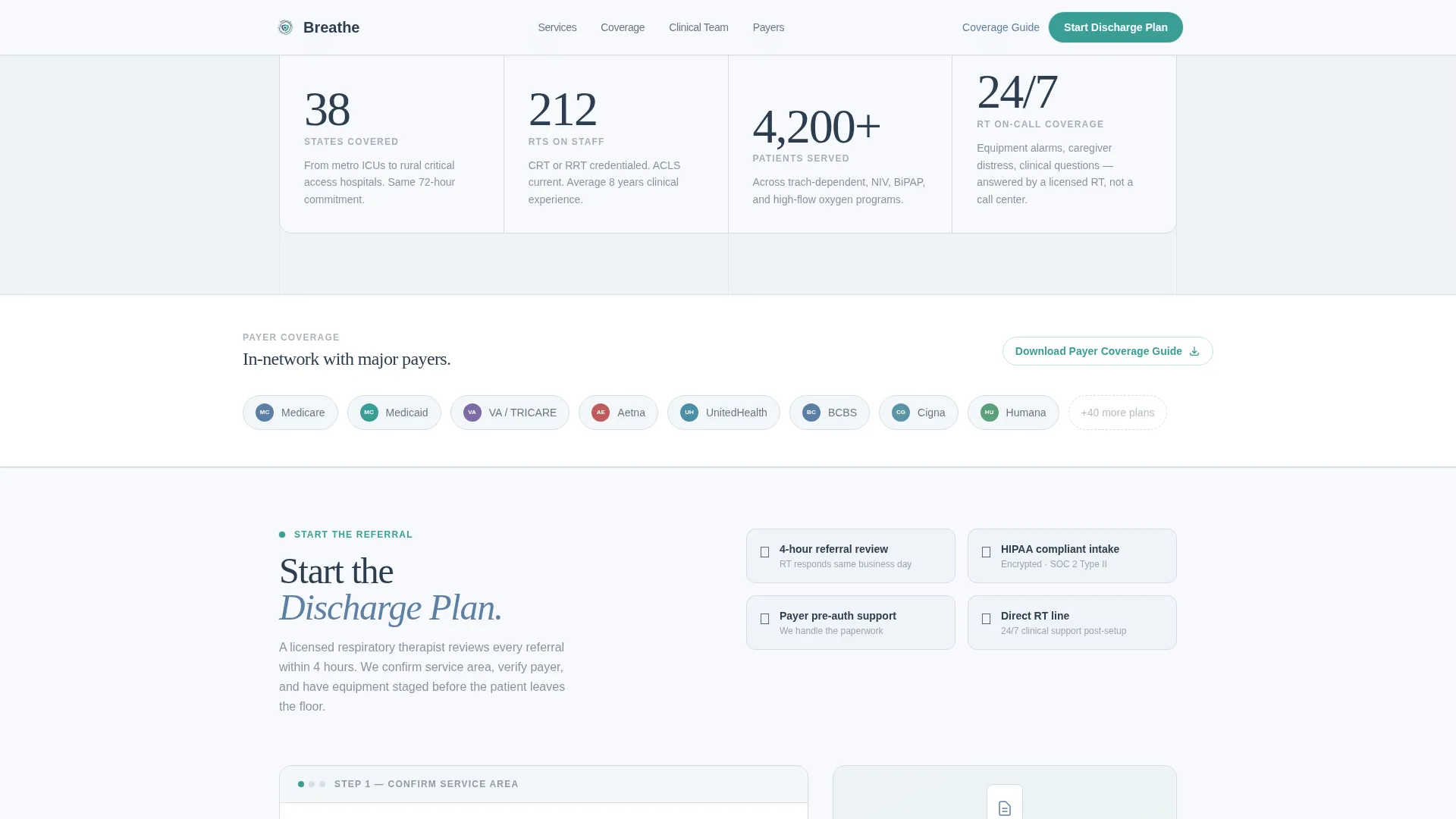
- A dual-path lead capture section offering both a full referral form and a gated PDF download for visitors still in the research phase
Feature list
A short paragraph overview: this template packs six purposeful components into one tightly structured layout. Each feature below reflects a specific capability described in the source brief.
Live Home Ventilation Calculator
The hero section holds a three-step intake tool split across two panels. Visitors select ventilator type (invasive, non-invasive, or BiPAP/CPAP), set daily support hours using a slider from 8 to 24, and choose their primary payer source. The right panel updates in real time with estimated monthly nursing hours, included equipment, and a coverage-likelihood percentage shown as a radial progress ring in oxygen teal.
Scroll-Triggered Statistics Modules
Three alternating split-screen modules reveal outcome data as the visitor scrolls. Each module pairs a large statistic in steady-pulse blue with a right-panel narrative explaining the clinical protocol behind the number. Stats include a 94% hospital readmission prevention rate, a 72-hour average setup time, and operational proof such as staff credentials and states covered.
Dual-Path Lead Capture Form
The lead generation section offers two conversion paths in one view. The primary path collects patient zip code first to confirm service area, then gathers diagnosis category, current care setting, and referral source with a role identifier. The secondary path offers a gated payer coverage guide PDF in exchange for email address and role, capturing visitors who are not yet ready to refer.
Fixed Mobile Call-to-Action Bar
On mobile devices, a persistent bottom bar keeps the primary call to action visible at all times. Visitors never have to scroll back to find the entry point, which is important for family caregivers using a phone in a hospital waiting room.
Clinical Soft Color System
The palette uses four intentional values: clinical white for backgrounds, quiet fog for alternating sections, steady-pulse blue for headline statistics, and oxygen teal reserved strictly for calls to action and live data indicators. Charcoal body text keeps readability high without introducing visual noise.
Corporate Precision Typography
Display numerals use Fraunces, a serif typeface that gives large statistics a grounded, authoritative weight. Body copy uses DM Sans, a geometric sans-serif that reads cleanly at smaller sizes. Together they create a visual rhythm that feels measured and trustworthy.
Page sections overview
| Section | Purpose |
|---|---|
| Hero Calculator | Estimates ventilation plan and coverage likelihood in real time |
| Stats Module One | Pairs 94% readmission stat with clinical protocol explanation |
| Stats Module Two | Pairs 72-hour setup time with operational capacity proof |
| Stats Module Three | Pairs staff credentials with states covered and accreditation |
| Lead Generation Form | Collects referral intake data and offers gated PDF download |
| Footer | Single-row linear footer with contact and navigation links |
Design & branding system
The visual identity follows a Corporate Precision theme built around the Soft Mist color system. Every color has an assigned role, and nothing appears by accident.
- Backgrounds alternate between clinical white (#F7F9FC) and quiet fog (#D6DDE8); steady-pulse blue (#5B7FA5) carries large statistics; oxygen teal (#3A9E95) appears only on calls to action and live calculator outputs
- Deep charcoal (#2C3E50) handles all body text, keeping contrast high without using pure black
- DM Sans handles body copy and form labels; Fraunces handles display numerals in the statistics modules, giving outcome numbers a distinct visual weight
Mobile & speed optimization
The template is designed desktop-first, reflecting that discharge planners and case managers primarily work from workstations. Mobile behavior is carefully handled for the secondary audience of family caregivers.
- The hero calculator and statistics modules are laid out for widescreen split-screen reading, with responsive stacking for smaller screens
- A fixed bottom call-to-action bar appears on mobile so the "Start the Discharge Plan" button is always one tap away
- The static hero layout and client-only interactive components keep the initial load light, with animations and slider interactions loading only where needed
How this template helps you convert
Every design decision in this template is built around one goal: turning a skeptical clinical visitor into a confirmed referral lead.
- The calculator does the persuasion before the form asks for anything. Visitors see their coverage likelihood and equipment estimate first, which reduces hesitation and builds confidence in the provider before personal information is requested.
- The zip code check at the start of the form eliminates a common drop-off point. Confirming service area before asking for patient details prevents visitors from investing time in a form they cannot complete.
- The gated PDF download captures visitors in the research phase. Case managers who are not yet ready to refer still exchange their email and role for the payer coverage guide, entering a nurture path that keeps the provider visible.
Other information about this template
This template is part of a Health and Medical category build, specifically scoped to the Home Health and Hospice subcategory with a focus on the ventilator and respiratory home care niche. A few additional details worth noting:
- The template style is Split Screen (50/50), meaning every primary section divides the viewport into two equal, purposeful panels
- The header concept is a Calculator/Estimator, which means no stock photography appears anywhere in the hero; the tool itself is the visual anchor
- Creative direction follows a Stats-First Impact approach: data appears before its explanation on every scroll, creating a rhythm the brief describes as monitored breathing
- Localization is set for the United States market, using ZIP codes, USD pricing references, and terminology aligned with Medicare, Medicaid, and VA payer categories
- Animation intensity is medium: scroll-linked stat reveals, a radial ring animation in the calculator results panel, and slider interactions are all included in the build scope
- The Joint Commission accreditation seal is referenced as a social proof element in the third statistics module
Theme
Corporate Precision
Creative direction
Stats-First Impact
Color system
Soft Mist
Style
Split Screen (50/50)
Direction
Lead Generation
Page Sections
Live Home Ventilation Calculator
Scroll-triggered Statistics Modules
Dual-path Lead Capture
Fixed Mobile Call-to-action Bar
Clinical Soft Color System
Corporate Precision Typography
Related questions
Who is the primary audience for this template?
Does the calculator process real insurance data?
Can the lead form distinguish between different referral roles?
What makes this template different from a standard home health page?
Is this template suitable for a provider that covers multiple states?



