Asthma Wearable Monitor Landing Page Template
Breathe is a single-column landing page template built for a predictive asthma wearable monitor. It guides visitors through a self-audit checklist, reveals how the device fills each care gap, and closes with a telehealth booking form. The design uses animated line art anatomy, a teal-and-coral color system, and a warm, clinical tone that feels reassuring rather than sterile.
by Rocket studio
Quick summary
Breathe is a single-column, scroll-driven landing page template for an asthma wearable monitor. Visitors move through an honest care checklist, see what the device tracks at each step, and reach a booking form that captures a 20-minute telehealth onboarding slot. The visual identity is organic and clinical, built in deep teal, soft green, and coral.
Who this template is for
This template is designed for digital health brands and medical device teams launching a wearable asthma monitor to a consumer audience. It speaks directly to emotionally motivated buyers who need clarity, not jargon.
- Parents of asthmatic children who want early warning before an attack arrives
- Adult asthmatics including night-shift workers and endurance athletes who struggle to document symptoms during their real routines
- Health product teams that need a conversion-focused booking page rather than a generic product brochure
What problem this template solves
Most asthma management happens reactively. People guess at triggers, log peak-flow readings irregularly, and only learn about nocturnal events after waking in distress. A landing page that just lists device specs does nothing to close that gap.
- Visitors often leave health product pages without understanding how the device fits their specific situation
- Generic layouts fail to create urgency or personal relevance for a high-stakes medical purchase
- Booking friction is high when a page jumps straight to scheduling without first earning trust
What you get with this template
The template delivers a fully structured single-column flow with every section pre-built and purposefully sequenced. Each section connects a real care gap to a specific device capability.
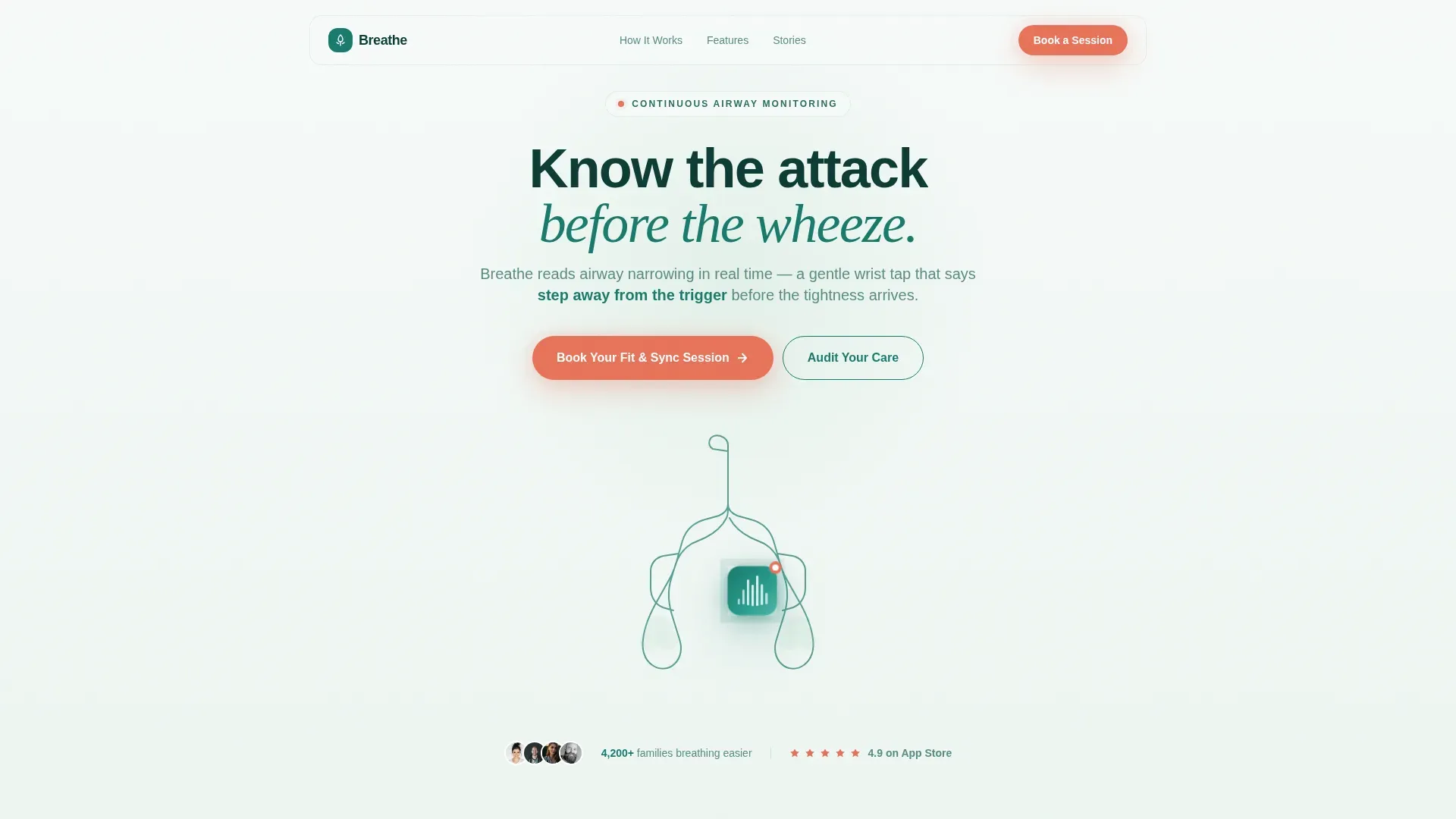
- An animated hero with an SVG lung anatomy line drawing and a dimensionally rendered device pod at the sternum
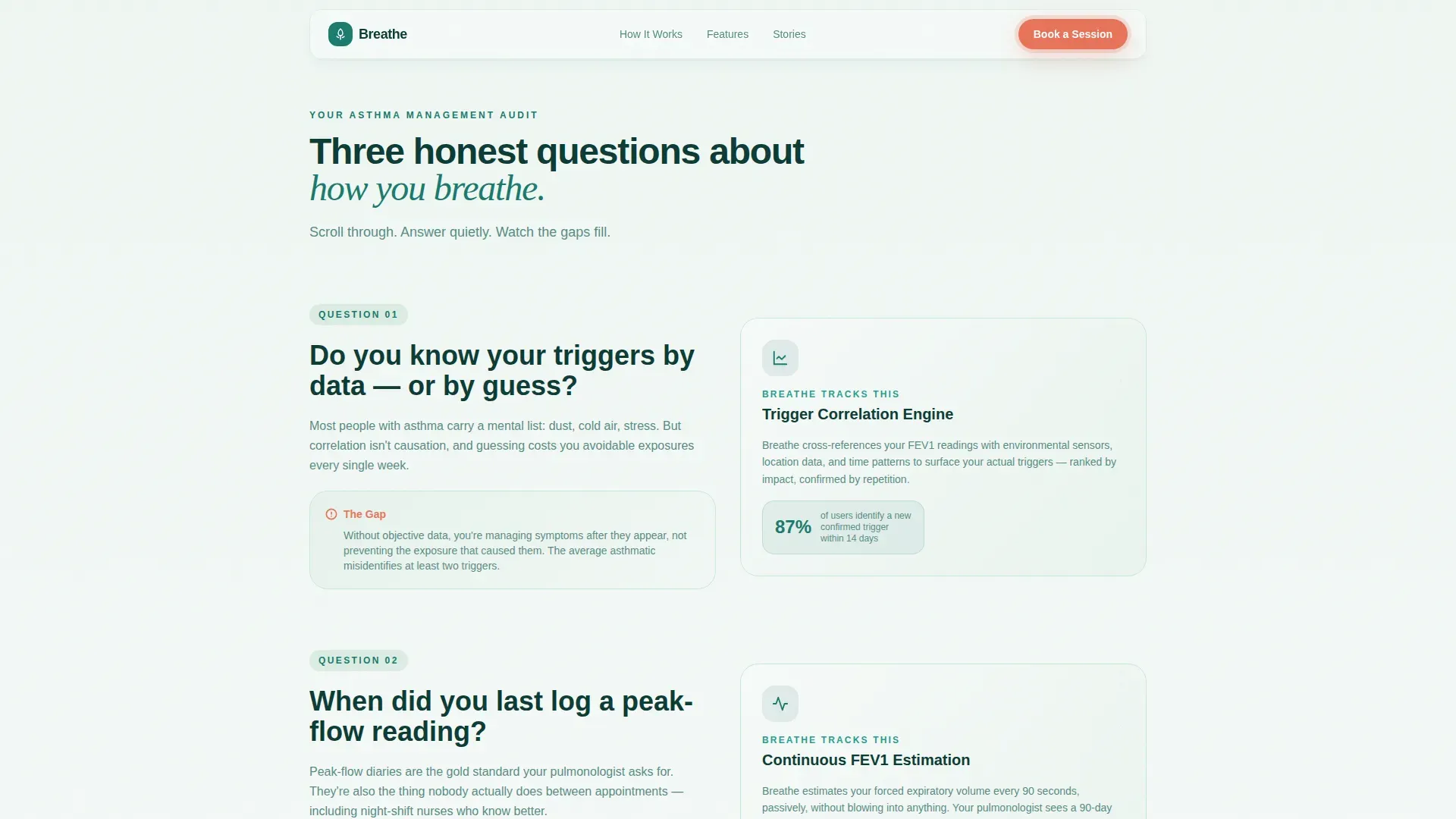
- A three-question checklist scroll that pairs honest self-assessment prompts with matching feature reveals
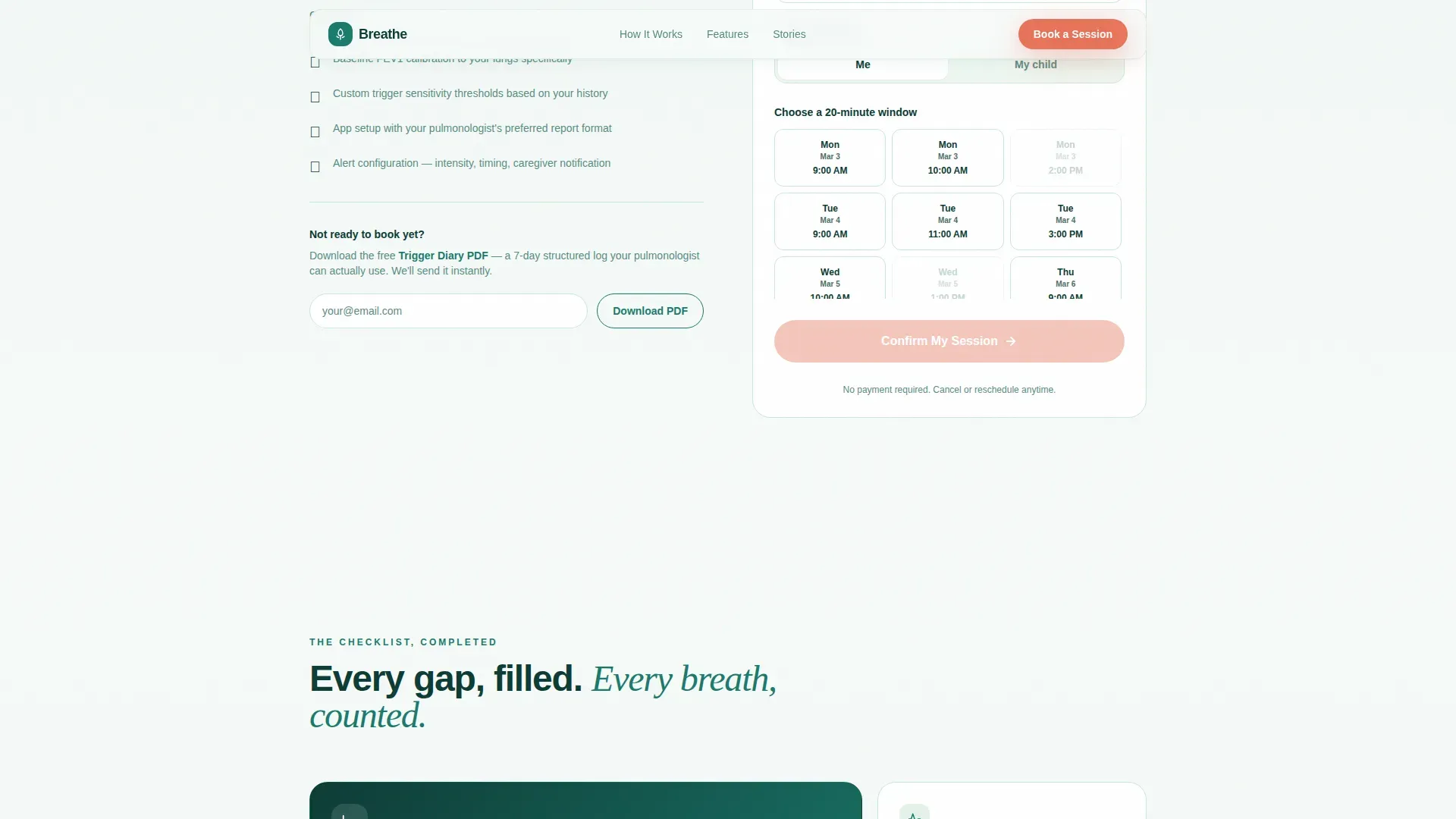
- A telehealth booking form with a name field, a me/my child toggle, and an embedded calendar for 20-minute onboarding slots
- A secondary email capture path offering a downloadable Trigger Diary PDF for visitors not yet ready to book
- A bento feature grid, three archetype testimonials, and a linear single-row footer
Feature list
This template includes six purposefully built components that work together to move a visitor from awareness to a booked session.
Animated SVG Lung Anatomy Hero
The hero opens with a continuous teal line drawing of the human torso in profile, tracing lungs, bronchial tree, and trachea. The stroke animates on load, traveling mouth to bronchioles, with the device pod rendered in full color at the sternum.
Checklist and Audit Scroll Flow
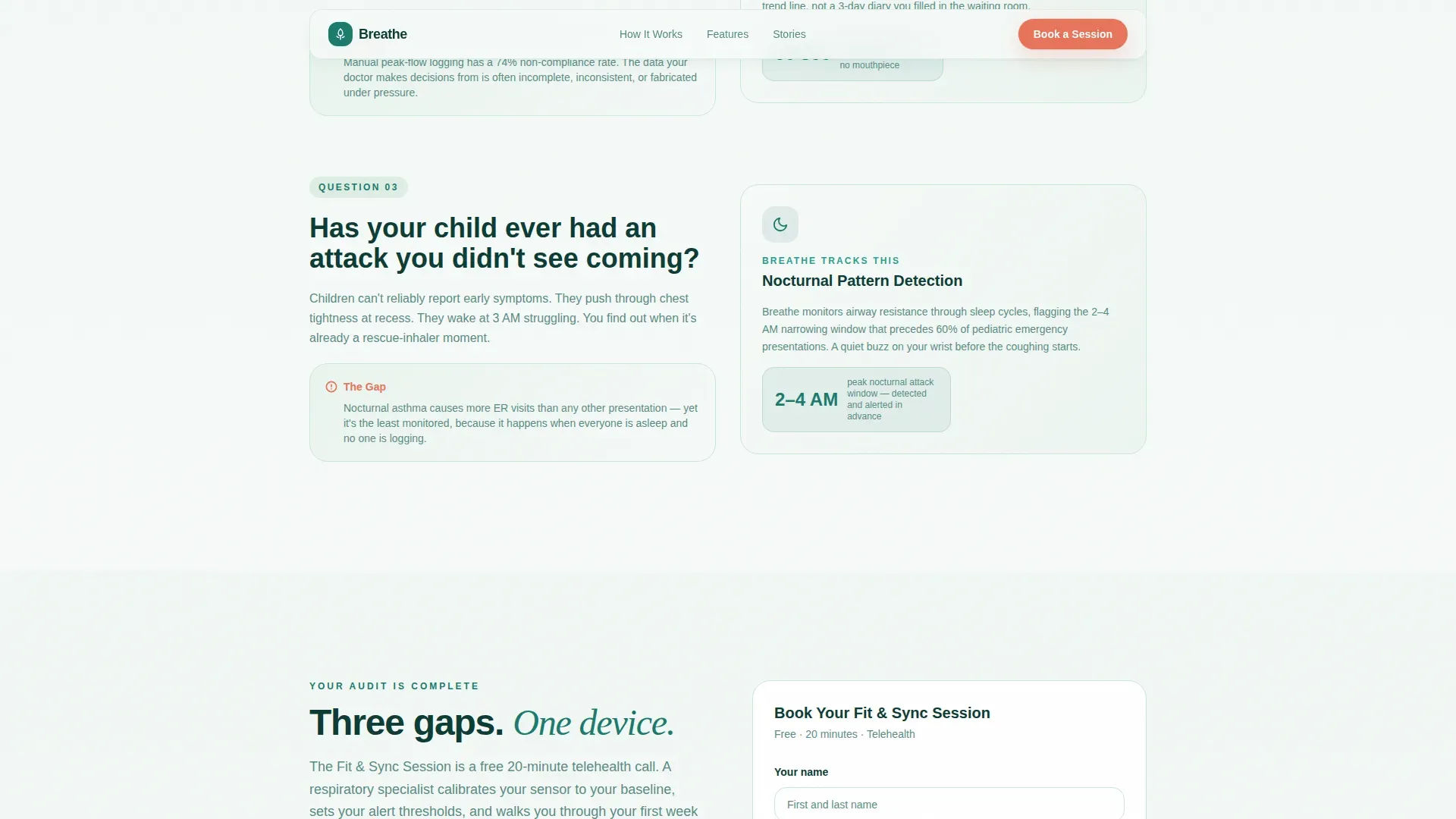
Three sequential checklist questions guide visitors through a self-assessment of their current asthma management. Each question is followed by a feature reveal that shows exactly how the monitor addresses that gap.
Predictive Feature Reveals
Alongside each checklist question, the template surfaces the corresponding device capability: trigger correlation for unknown exposures, continuous forced expiratory volume estimation for missed manual logs, and nocturnal pattern detection for overnight events. Forced expiratory volume in one second (FEV1) is the medical measure of how much air a person can exhale in one second.
Telehealth Booking Form
The booking section presents three inputs in order: visitor name, a toggle selecting whether the device is for the visitor or a dependent, and a calendar slot picker showing available 20-minute telehealth onboarding windows.
Trigger Diary PDF Email Capture
A secondary conversion path lets visitors download a Trigger Diary PDF by entering their email. This gives immediate value and brings them into a nurture sequence without requiring an immediate booking commitment.
Bento Feature Grid with Social Proof
The checklist complete section uses a bento grid to display remaining device capabilities alongside metric callouts. Three testimonial blocks represent the parent, night-shift nurse, and marathon trainer archetypes, grounding the product in real-life use.
Page sections overview
| Section | Purpose |
|---|---|
| Hero with Animation | Introduce device and establish visual tone |
| Checklist Question 1 | Reveal trigger correlation feature |
| Checklist Question 2 | Reveal continuous FEV1 monitoring |
| Checklist Question 3 + call to action | Reveal nocturnal detection and show booking form |
| Bento Feature Grid | Summarize full device capabilities |
| Secondary call to action | Capture emails via Trigger Diary PDF offer |
| Footer | Single-row linear navigation and links |
Design & branding system
The Organic Flow visual style softens clinical precision with natural curves, breathing gradients, and generous white space. The Teal Catalyst color system keeps the page medicinal but alive.
- Colors: deep respiratory teal (#1A7A6D) for primary text and line art, alveolar soft green (#A8D5BA) and pulse-ox white (#F7FAF9) for backgrounds, and alert coral (#E8735A) used exclusively for calls to action and critical data callouts
- Typography: Plus Jakarta Sans for body text and interface elements, paired with Fraunces in display italic for hero and section headings
- No stock photography; the visual language relies entirely on anatomy illustration, airflow abstraction, and the device as the single photorealistic element
Mobile & speed optimization
The template is built mobile-first, prioritizing parents checking on a phone and athletes reviewing data mid-run. Layout decisions reflect small-screen reading patterns throughout.
- Single-column flow eliminates horizontal scrolling and keeps the checklist readable on every screen size
- Animations use GSAP ScrollTrigger reveals and SVG stroke-dashoffset techniques, structured so static content loads via server components while interactive elements like the booking form and animations load client-side
- The booking calendar, toggle, and email capture modal are each designed to work cleanly within a mobile viewport without layout breakage
How this template helps you convert
The conversion architecture is built around earned trust rather than immediate pressure. Every section reduces a specific objection before the booking form appears.
- The checklist scroll creates personal relevance by inviting visitors to audit their own care gaps, making the device feel like a direct response to their situation rather than a product pitch.
- The first booking call to action appears after the third checklist question, when the visitor has already connected three care gaps to three device capabilities, lowering resistance at the moment of highest readiness.
- The Trigger Diary PDF path captures visitors who are not yet ready to book, turning a potential exit into a low-commitment first step that keeps them in the conversation.
Other information about this template
This template is category-matched to the Health and Medical space, specifically within the Asthma Care subcategory and the asthma wearable monitor niche. A few additional details worth noting before you choose or customize it.
- The intersection match score for this template across category, subcategory, niche, creative direction, and layout style is 13, indicating a high-confidence alignment between the template structure and the asthma wearable use case
- The booking form supports both direct-patient and caregiver flows through the me/my child toggle, making the template usable for pediatric asthma products without a separate page variant
- The Trigger Diary PDF secondary path can be adapted for any downloadable lead magnet relevant to asthma care, such as a symptom log, a trigger checklist, or a pre-appointment preparation guide
- The linear single-row footer follows Pattern 1, keeping the bottom of the page clean and uncluttered for a focused conversion environment
- This template is localized for English-language, US-market audiences using USD pricing, US date formats, and US healthcare context throughout
Theme
Organic Flow
Creative direction
Checklist & Audit
Color system
Teal Catalyst
Style
Single Column Flow
Direction
Booking/Scheduling
Page Sections
Animated SVG Lung Anatomy Hero
Checklist and Audit Scroll Flow
Predictive Feature Reveals
Telehealth Booking Form
Trigger Diary PDF Email Capture
Bento Grid with Archetype Testimonials
Related questions
Who is this landing page template built for?
What is the primary call to action on this template?
Can the booking form handle both adult and pediatric users?
What is the Trigger Diary PDF path for?
Does this template use real photography?



