Personal Loan Senior Landing Page Template
The Qualify Trusted Senior Personal Loan Landing Page Template is a sidebar companion landing page built for fixed-rate personal loan services targeting borrowers aged 60 and over. It combines an frequently asked question-driven scroll flow, a soft-pull rate calculator, a guide download form, and an award badge ribbon to build trust, generate qualified leads, and turn cautious senior visitors into confident applicants.
by Rocket studio
Quick summary
This loan landing page template is designed for senior finance companies that want a dignified, evidence-first page experience. It uses a sticky sidebar, frequently asked question-driven content panels, and a low-friction guide download form to move retired borrowers from worry to action. The page earns the click before it asks for anything.
Who this template is for
Any finance company, lending agency, or senior services business offering fixed-rate personal loans to borrowers aged 60 and over will find this template immediately useful. It suits teams who want a professional loan landing page without building every component from scratch.
- Lending companies and finance agencies serving retired adults who rely on Social Security, pension income, or home equity
- Marketing teams and web designers who promote senior personal loan services and need a page that generates qualified leads without overwhelming visitors
- Independent financial advisors or small lending businesses who want a polished, credible loan landing page they can get started with quickly
What problem this template solves
Most senior borrowers have been auto-declined by algorithm-driven lenders that ignore decades of creditworthiness. A generic loan landing page does nothing to address that frustration. This template is built specifically to close that gap. It treats visitors as informed adults who have real questions, not as form fields waiting to be filled.
- Standard loan landing page templates do not speak to seniors who have pension income, home equity, and a 40-year repayment history but still face rejection from chatbot lenders
- Generic finance page layouts bury trust signals in footers and fill the screen with distractions, which reduces conversions and pushes qualified leads away before they even reach the form
- Most loan page templates lack the frequently asked question depth needed to address senior-specific concerns around Social Security income approval, credit dips during medical leave, and fixed-rate protection on a fixed income
What you get with this template
This is a fully structured sidebar companion landing page. Every section is laid out, every content panel is positioned, and every interactive element is defined. Your team gets a complete starting point, not a blank canvas.
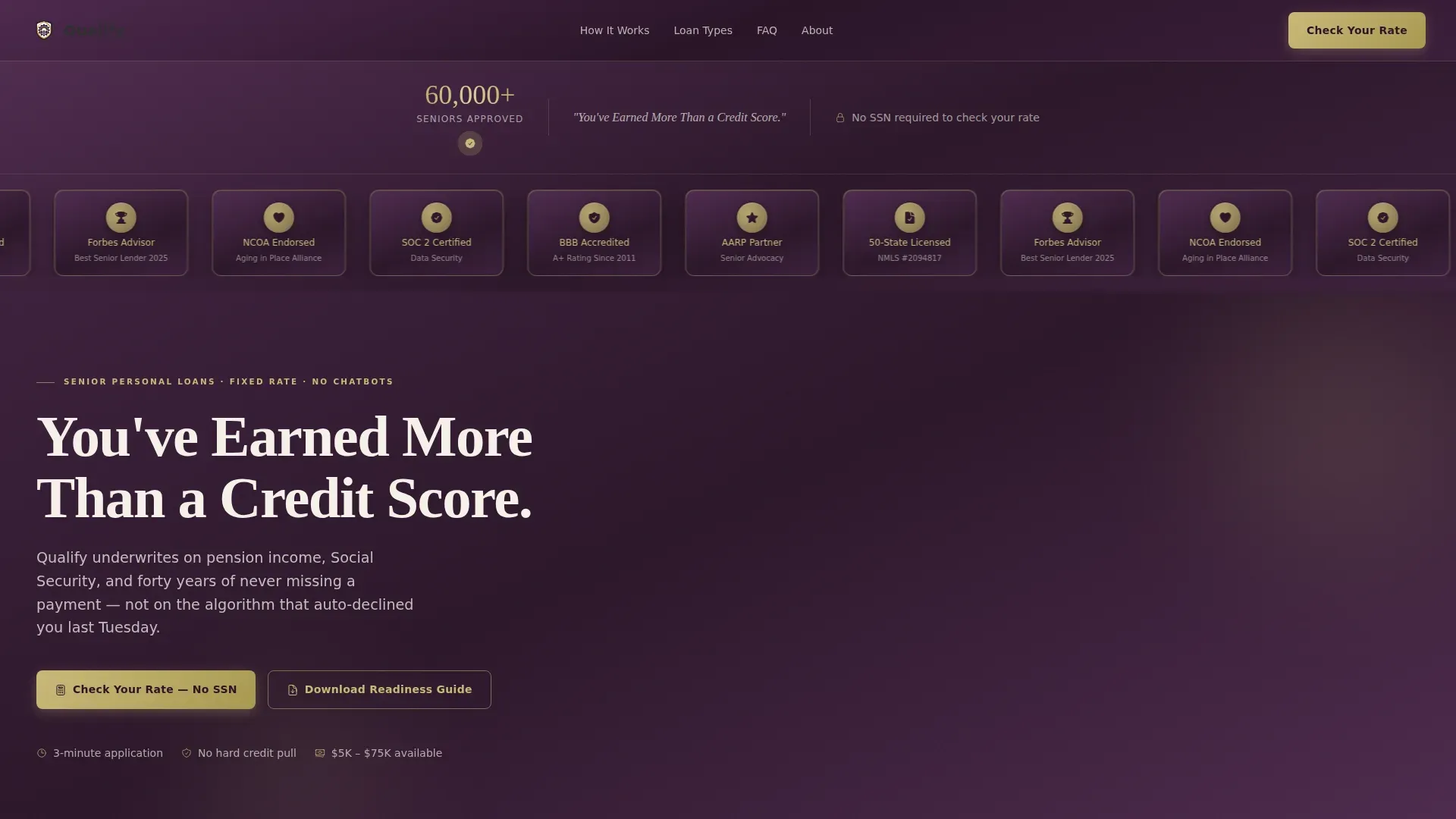
- A hero section with an embossed award badge ribbon, a "60,000+ Seniors Approved" trust counter, and a weighted serif headline that signals credibility from the first scroll
- Three frequently asked question-driven content panels that each open with a question a senior borrower has already Googled, then escalate from reassurance to evidence to a clear call to action
- A sticky sidebar table of contents that tracks scroll progress and lets visitors jump directly to their specific concern, keeping focus sharp and distractions minimal
- A soft-pull rate calculator requiring only four fields, age, income source, desired amount, and state, with no Social Security number required
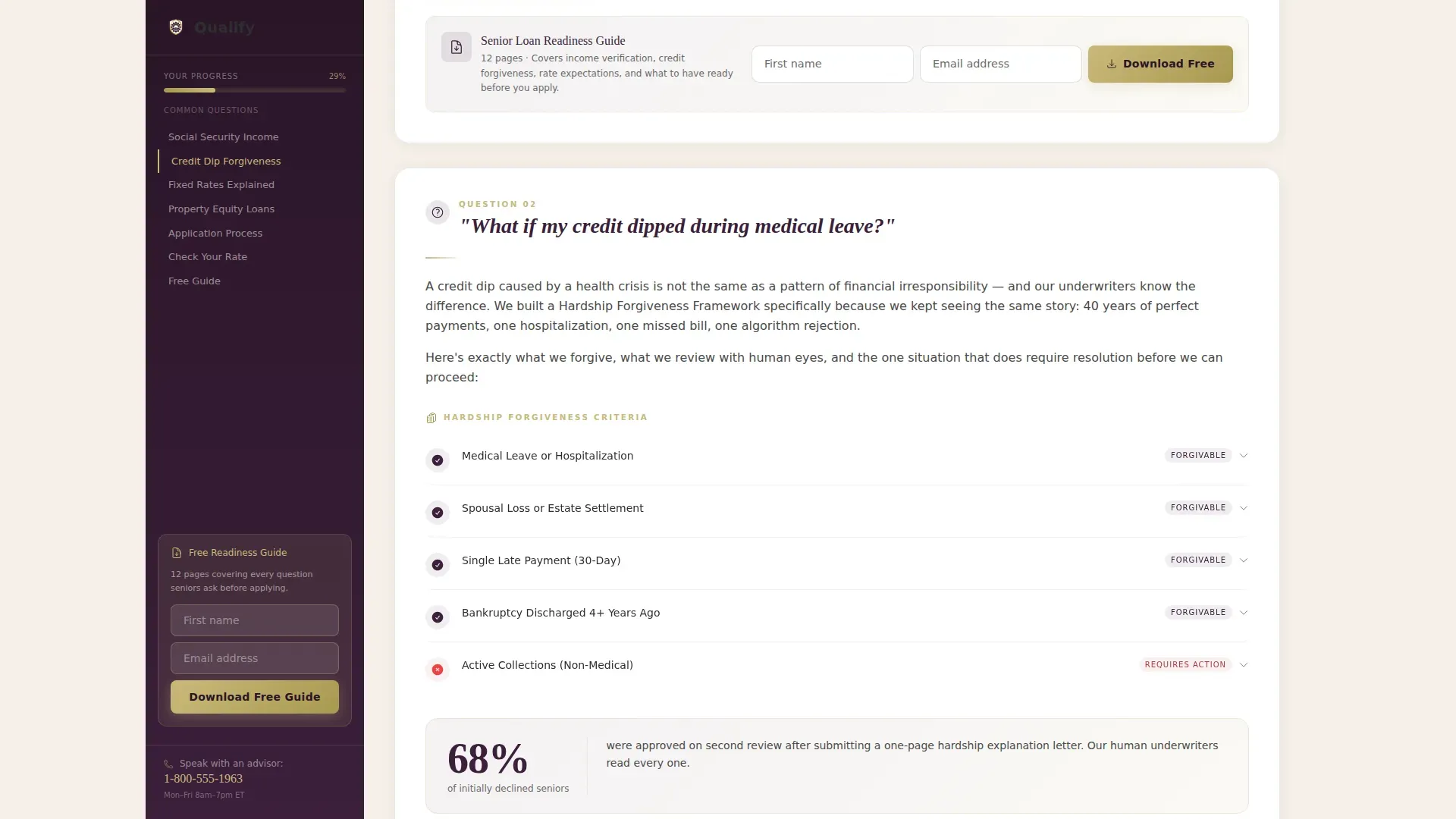
- A "Download Your Senior Loan Readiness Guide" form placed at the sidebar base and repeated after every third frequently asked question, capturing leads with only a first name and email address
Feature list
This template packages several purpose-built features that work together. Each one reflects a deliberate decision about how senior borrowers make financial choices.
frequently asked question-Driven Scroll Panels
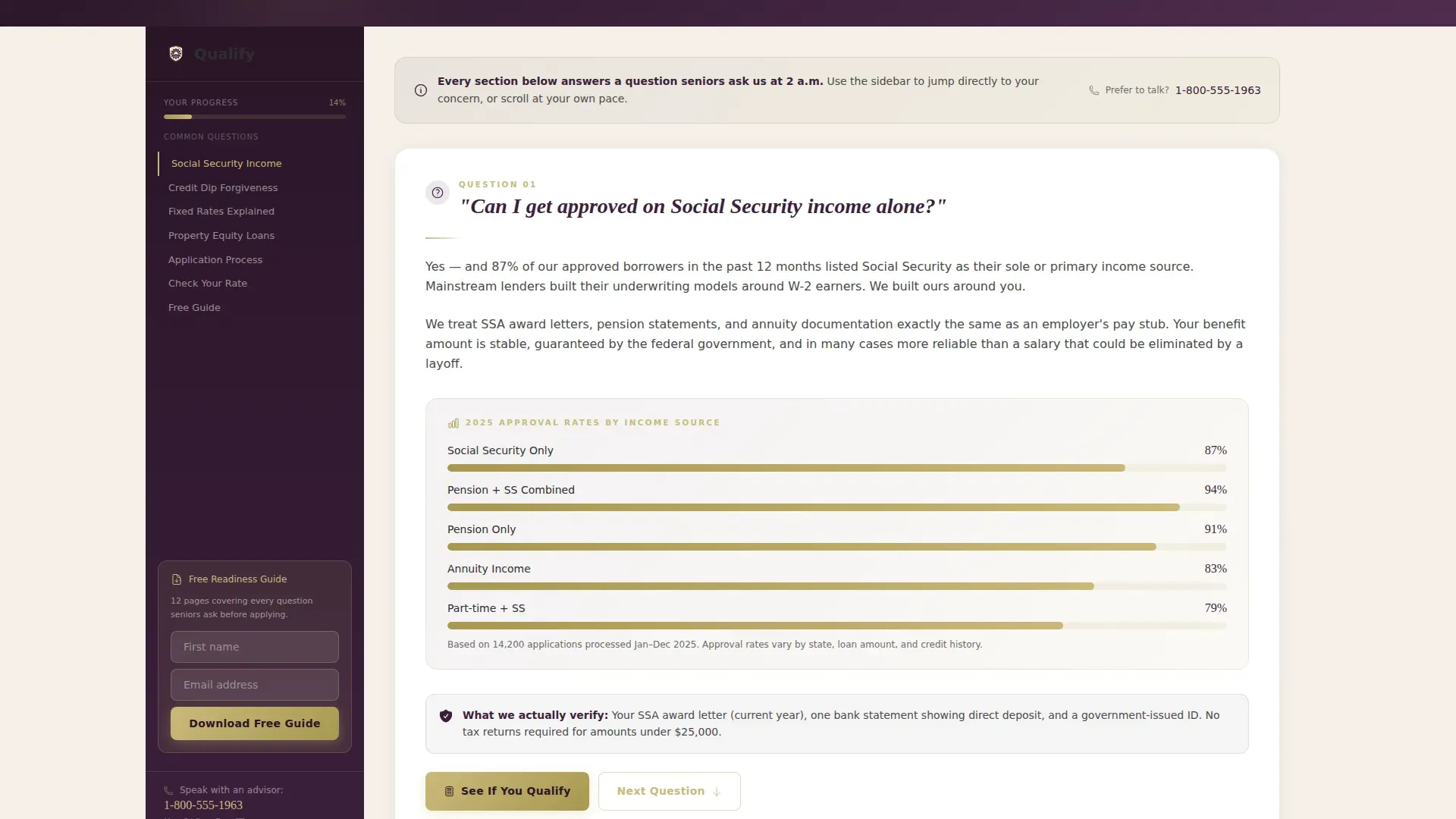
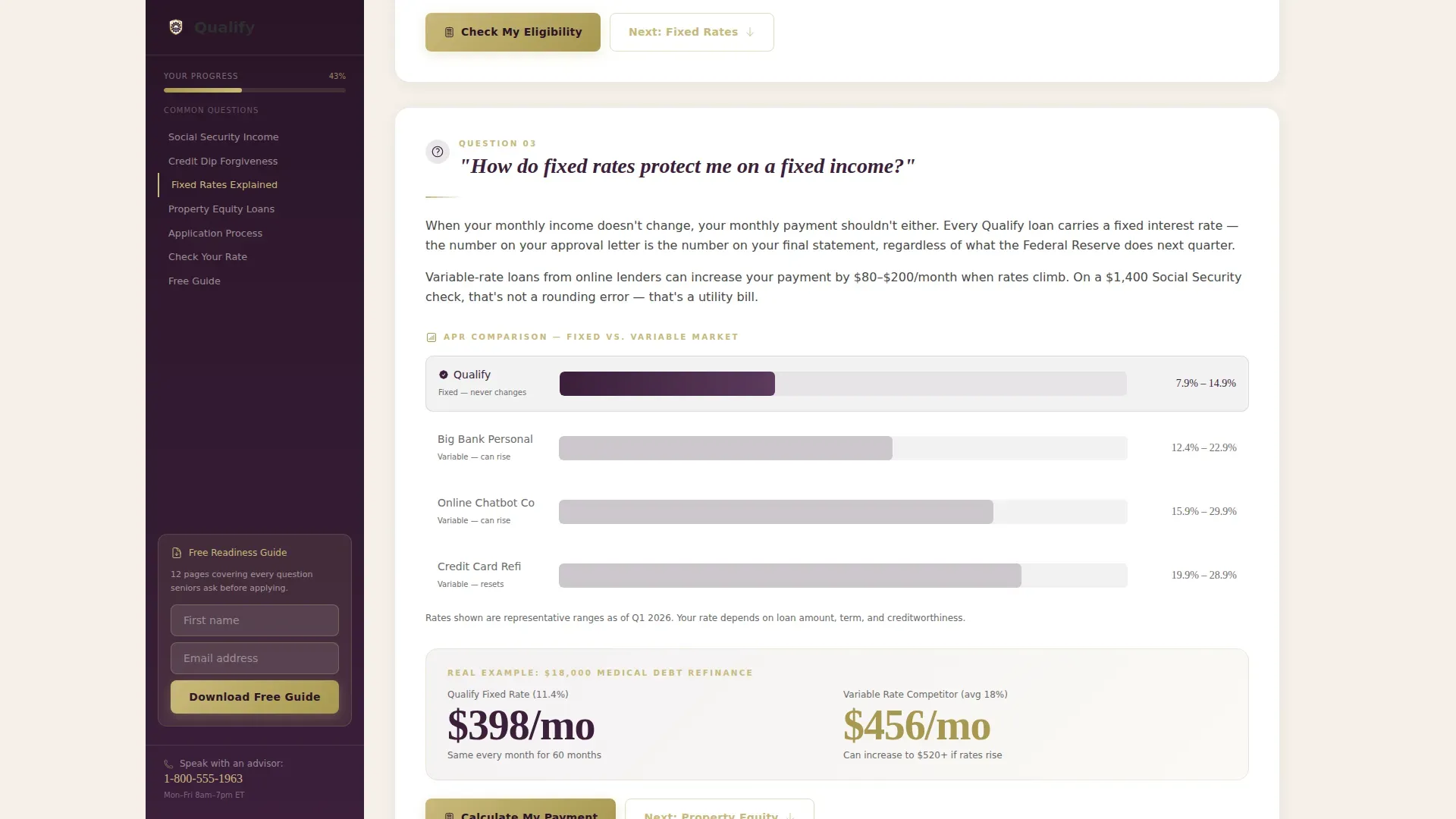
Each major scroll section opens with a real question that senior borrowers search for at 2 a.m. Questions like "Can I get approved on Social Security income alone?" and "What if my credit dipped during medical leave?" each reveal a data panel with approval figures or forgiveness criteria. The structure moves from reassurance to evidence to action, so the page feels like a patient advisor answering hard questions rather than a page promoting a product. An frequently asked question section that proactively addresses common concerns is one of the most effective tools for building trust among seniors on any loan landing page.
Sticky Sidebar Table of Contents
The sidebar companion is the navigational backbone of the page. It stays fixed as the visitor scrolls and highlights the active section in real time. Visitors can click any entry in the sidebar to jump directly to their worry without scrolling through content that does not apply to them. This keeps the page experience focused and prevents the drop-off that typically happens when seniors feel lost on a long finance page. The sidebar base also holds the guide download form, so the primary lead capture point is always one click away.
Award Badge Hero Ribbon
The header presents a horizontal ribbon of embossed metallic shields: Better Business Bureau accreditation, state lending licenses, senior advocacy endorsements, and the trust counter. All badges sit above a single serif headline against the deep aubergine field. No stock photography appears on this page. Instead, the badge wall reads like a diploma display in a trusted advisor's office, immediately signaling that a serious company stands behind these services.
Soft-Pull Rate Calculator
The calculator asks only four fields and requires no Social Security number. Borrowers enter their age, income source, desired loan amount, and state. This low-friction form keeps the barrier to exploration minimal. Including a loan calculator helps users feel informed and in control before they apply, which is especially important for senior clients who are cautious about sharing personal details online. The calculator serves as a secondary conversion path alongside the guide download, giving visitors two ways to move forward.
Guide Download Lead Capture Form
The primary call to action is "Download Your Senior Loan Readiness Guide." It appears at the sidebar base and repeats after every third frequently asked question panel. The form asks only for a first name and email address. Low-friction lead capture forms that ask only for essential information avoid overwhelming users and improve completion rates significantly. This structure lets the page earn the download by answering hard questions first, so signing up feels like the visitor's own decision, not a pressure tactic.
Scroll-Linked Progress Animation
Scroll-linked animations connect the sidebar progress indicator to the visitor's position on the page. frequently asked question panels reveal their data content as the visitor reaches them. The trust counter animates upward as it enters the viewport. These medium-weight animations add visual feedback without slowing the reading experience. They reinforce the sense that the page is responsive and alive, not a static brochure.
Page sections overview
| Section | Purpose |
|---|---|
| Hero Badge Ribbon | Opens with embossed award shields, the trust counter, and the serif headline to establish credibility immediately |
| frequently asked question Panel One | Addresses Social Security income approval with a live data panel showing approval percentages |
| frequently asked question Panel Two | Covers credit dips during medical leave with a forgiveness criteria breakdown |
| frequently asked question Panel Three | Explains fixed-rate protection on a fixed income with a side-by-side rate comparison |
| Rate Calculator Block | Soft-pull calculator with four fields, no Social Security number, for instant rate exploration |
| Guide Download call to action | Lead capture form repeated at sidebar base and after every third frequently asked question for consistent conversion opportunity |
| Footer Pattern | Single-row linear footer with copyright notice, privacy policy links, and compliance details |
Design & branding system
The visual identity follows a Data Command theme using the Plum Executive color system. The palette was chosen to feel like the leather portfolio a private banker opens before speaking, authoritative, warm, and heavy enough to signal that someone important is handling your money. Typography pairs Fraunces serif headlines with DM Sans body text for a tone that is both formal and readable.
- Deep aubergine (#3B1F3B) anchors the sidebar and section backgrounds; champagne gold (#C9B97A) marks data callouts, interactive highlights, and badge details; warm parchment (#F5F0E8) fills content panels; charcoal graphite (#2E2E2E) carries all body text
- The header uses no stock photography; instead, embossed metallic shields against the aubergine field communicate credentials through design rather than imagery, removing visual distractions that typically lower trust on finance pages
- Fraunces weighted serif headlines give the page gravitas and a private-banking aesthetic; DM Sans body text keeps every paragraph easy to read at senior-friendly type sizes
Mobile & speed optimization
This template is desktop-first by deliberate design, reflecting that the senior demographic skews toward desktop browsing. Full mobile support is included, and every interactive component adapts cleanly across screen sizes. Senior personal loan landing pages should remove standard menus to keep the user focused on completing a quote, and this template does exactly that.
- The sticky sidebar collapses gracefully on mobile, preserving navigation without cluttering the smaller screen; buttons and form fields are sized for easy tapping and clicking on any device
- The template is built with server-side rendering for static sections and client-side handling only for the calculator, guide download form, and sidebar progress, keeping the page responsive without unnecessary overhead
- The layout supports zoom scaling so that seniors who need larger text can increase their view without breaking the page structure, which is important for any audience with varying visual needs
How this template helps you convert
A polished, professional loan landing page can improve your conversion rates by removing the friction and skepticism that stops senior borrowers from taking the next step. This template is structured around the insight that understanding why visitors arrive at your landing page gives you a better sense of their needs and how to serve them. Every design choice here reflects that principle.
- The frequently asked question-first content flow answers hard questions before asking for any information, so visitors who reach the guide download form or the rate calculator are already informed and motivated. Matching the page's tone and content to the borrower's actual concern, fixed income, medical history, home equity, provides a seamless transition from their search query to the page's call to action. Effective loan landing page templates that frame loan benefits in terms of personal outcomes improve user engagement and lift conversions.
- The two-path conversion model gives visitors a choice between the soft-pull calculator and the guide download form. Offering different products through a single page without creating confusion is a proven way to capture leads at different stages of readiness. Visitors who are not ready to share their income details can still sign up for the guide, staying in the company's orbit until they are ready to move forward.
- Authentic testimonials from real people humanize the brand and reduce anxiety for seniors who are cautious about finance decisions. The social proof layer, badges, endorsements, testimonials, and the trust counter, works alongside transparent terms and accessible frequently asked question panels to build trust incrementally as the visitor scrolls, rather than demanding it upfront.
Other information about this template
This template is part of a broader library of finance and insurance landing page templates designed for specific audience segments. It is well-suited for any lending company, marketing agency, or independent finance business that wants to promote senior loan services with a page that feels earned rather than rushed.
- The page is localized for United States audiences: English language, USD currency, and MM/DD/YYYY date format throughout; all pricing displays, loan amount fields, and state selectors follow US conventions
- Teams who want to promote their senior loan services across paid ads, email campaigns, or social channels will find the template easy to adapt; matching the primary headline to the ad or call-to-action copy in your email provides a seamless transition for the visitor and improves campaign consistency
- Landing pages with video can increase conversions by 86%, and this template's section layout includes space for optional explainer videos within the frequently asked question panels; adding short videos or animated data visualizations in those panels can further lift engagement without requiring a redesign
- The template supports A/B testing by keeping each section modular; teams can swap headlines, adjust the guide download offer, or test different frequently asked question orderings to discover what resonates best with their specific audience
- No-code landing page builders allow users to create web pages without needing to write code, and this template is built to work within those environments; drag-and-drop functionality makes it easier for non-technical users to customize the page visually without touching a single line of code
- Many no-code landing page builders offer integrations with other tools to streamline marketing efforts; while this template does not prescribe a specific platform, it is structured to drop into any modern no-code builder that supports component-based layouts
- The copyright notice, privacy policy link, and terms and conditions link appear in the single-row linear footer, giving the company a clear and compliant way to share legal details with every visitor
- Loan landing page templates that display recognizable security logos and clear privacy statements near data-entry points build trust with users who are cautious about sharing their personal details, and this template positions those elements close to both the calculator and the guide download form
- The page earns its leads by answering questions first; this approach is especially effective for senior finance clients who have been burned by pushy sales tactics and respond better to patience and evidence than to urgency and pressure
Theme
Data Command
Creative direction
FAQ-Driven
Color system
Plum Executive
Style
Sidebar Companion
Direction
Content/Resource
Page Sections
Faq-driven Content Panels
Sticky Sidebar Navigation
Award Badge Hero Ribbon
Soft-pull Rate Calculator
Guide Download Lead Capture Form
Scroll-linked Progress Animation
Related questions
Who is this loan landing page template designed for?
Can I customize the frequently asked question questions and data panels?
Does this page work for a finance company running paid ads?
Is the soft-pull rate calculator connected to a live system?
Can this template support a senior finance agency with multiple loan products?



