Restaurant Team & Staff Showcase Website Template
Brigade is a bento grid restaurant team landing page template built on a Tech Glass visual theme. It uses frosted glass staff cards, live-updating service stats, and a side-by-side comparison layout to show exactly why a dynamic team roster outperforms a static bio page. The design is sharp, data-forward, and built to convert restaurant owners and hospitality marketers.
by Rocket studio
Quick summary
Brigade is a single-page bento grid template for showcasing restaurant teams. It opens with an interactive dashboard of staff cards, each showing real service data behind a frosted glass overlay. The layout uses a Stats-First approach and a Comparison/Versus structure to make a static team page feel outdated before visitors reach the call to action.
Who this template is for
This template is built for people who manage restaurant brand presence and need to present their team in a more compelling, credible way.
- Restaurant owners who want their staff page to feel as polished as their menu
- Food group marketing directors evaluating team page platforms across multiple locations
- Hospitality consultants pitching a brand refresh to multi-unit restaurant operators
What problem this template solves
Most restaurant team pages show a group photo, first names, and a short paragraph. That format does not reflect the depth, tenure, or skill of the people behind the pass. Brigade replaces that static experience with a data-layered staff roster that feels alive.
- Visitors cannot filter staff by role, location, or specialty on a standard team page
- Generic bios hide the service stats and years of experience that actually build trust
- A flat, identical layout makes every team member look interchangeable
What you get with this template
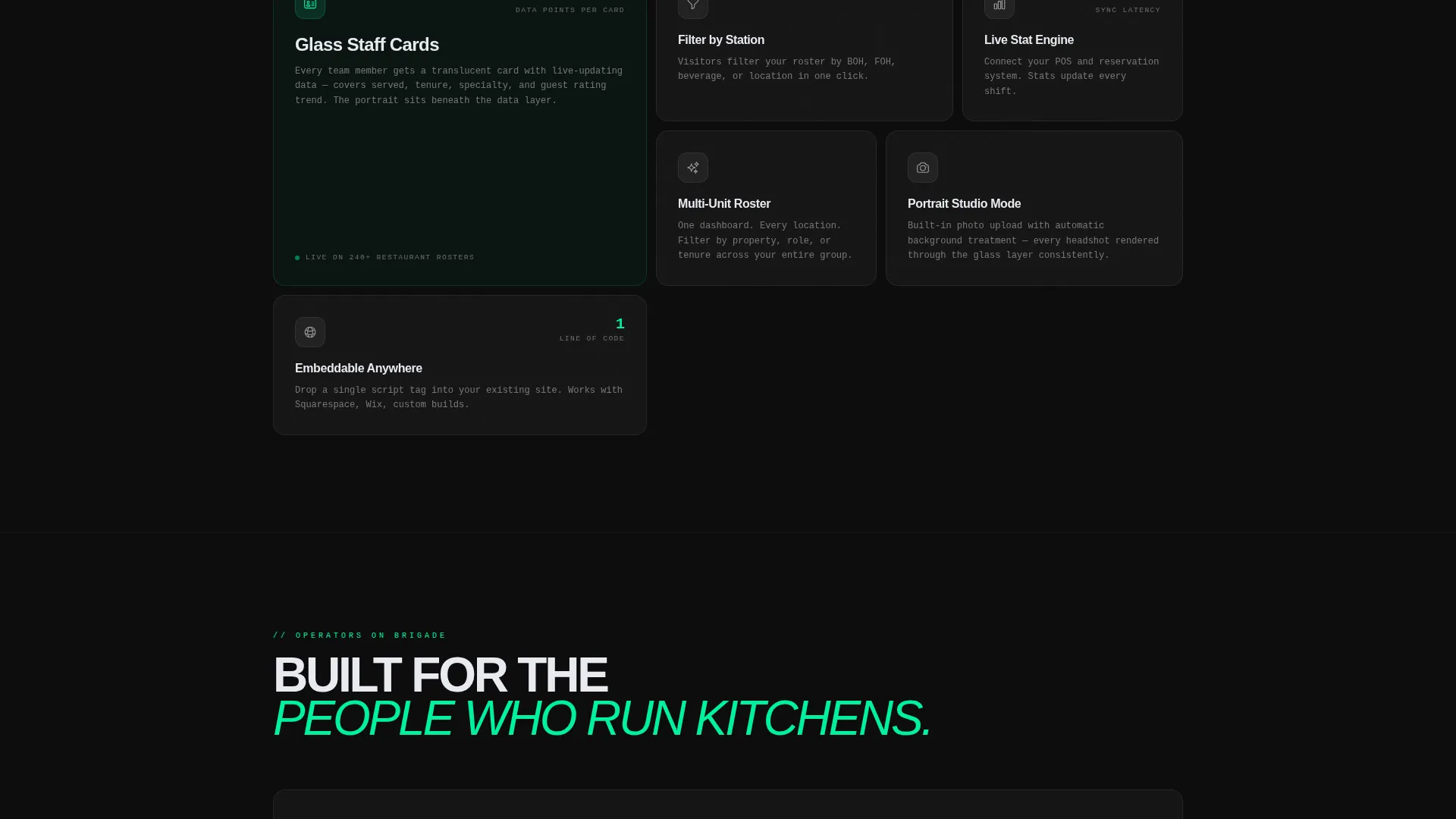
Brigade delivers a fully structured, single-page layout with interactive glass card components and a clear visual hierarchy built around staff data. Every section is designed to move a visitor from skepticism to action.
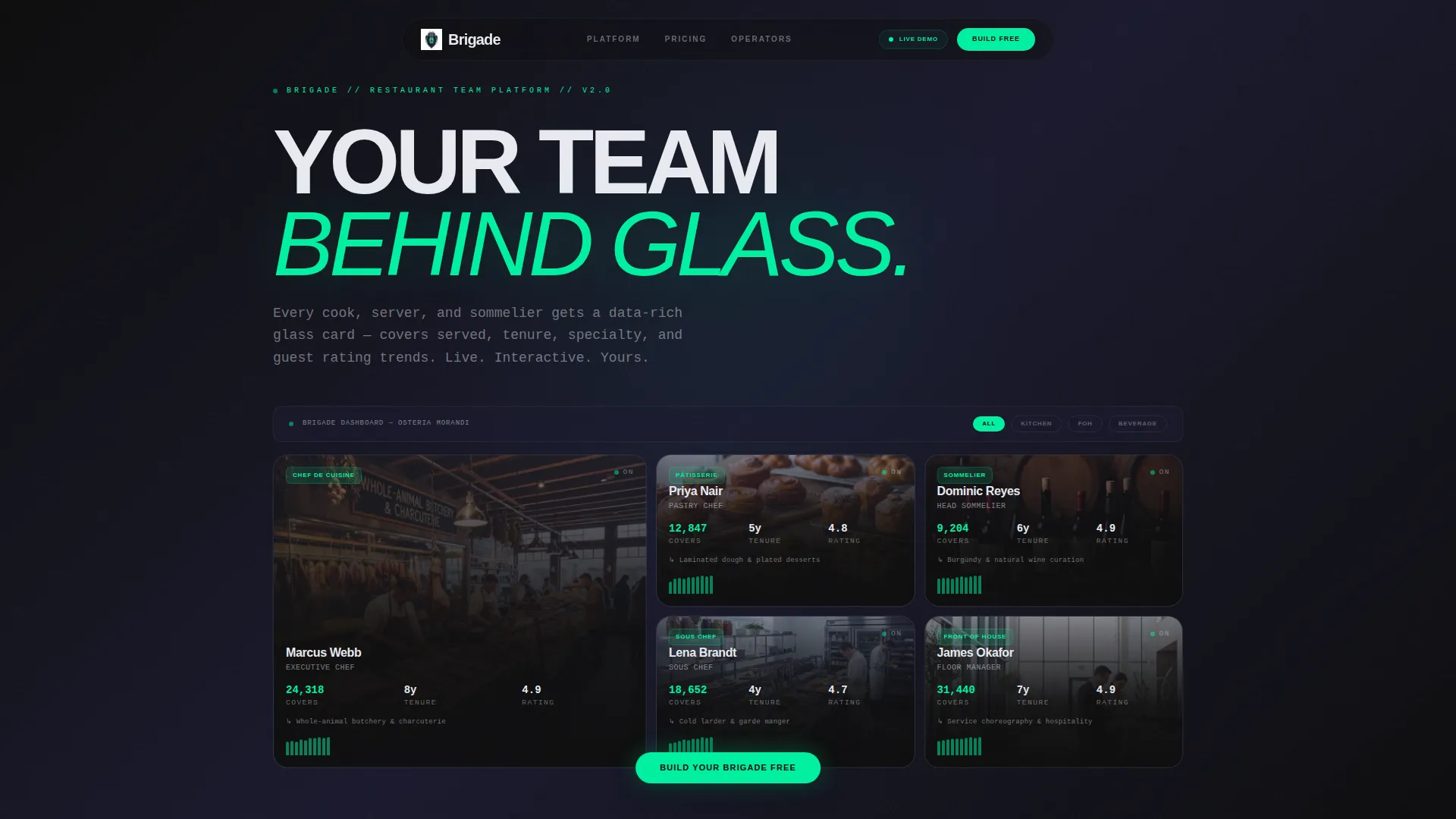
- An interactive bento grid header that visitors can mouseover before reading any copy
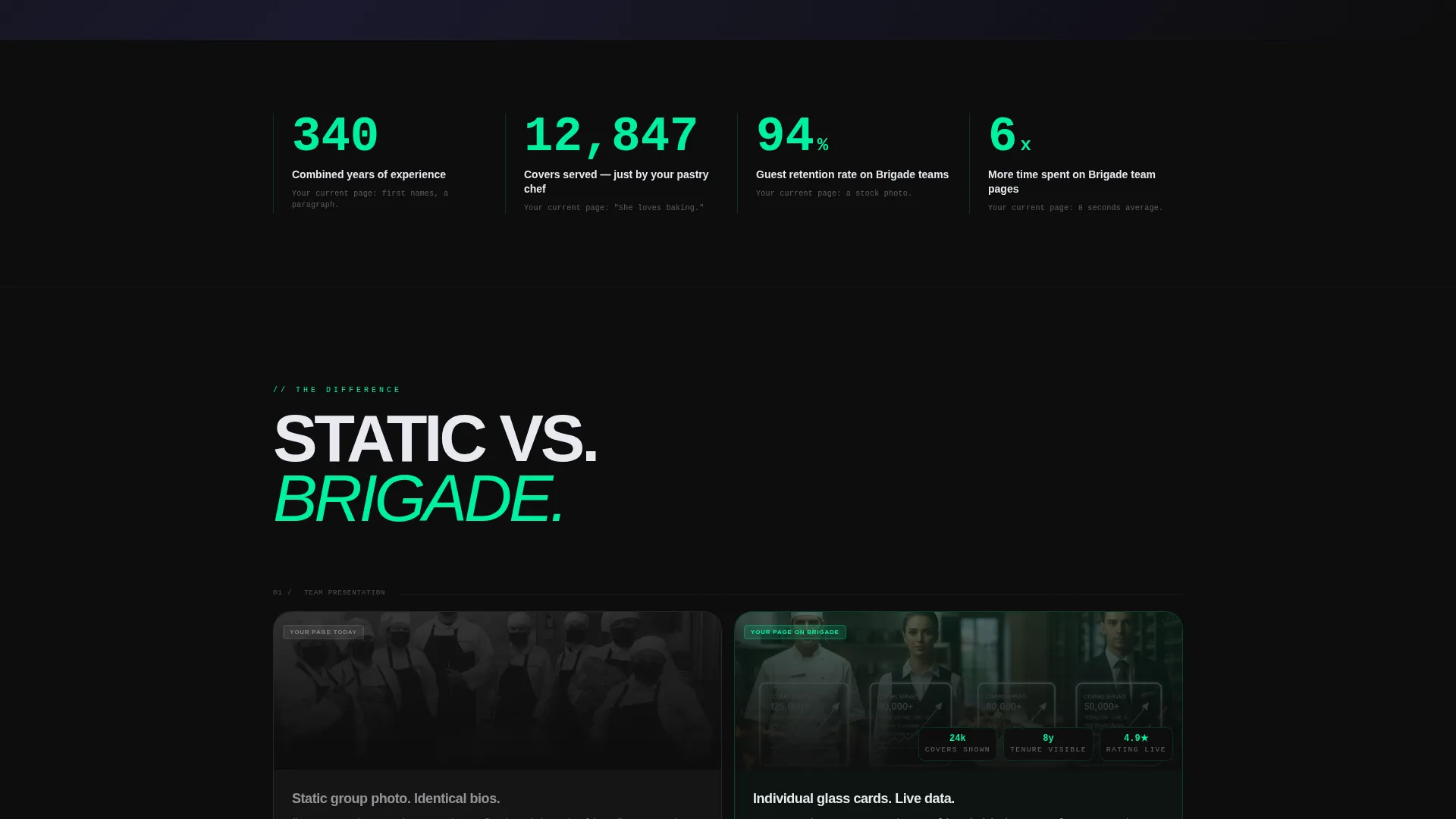
- Side-by-side versus cells that compare a static team page to the Brigade format
- A floating primary call-to-action button and a secondary team page audit input field
Feature list
Brigade is built around six core features, each directly tied to the template brief.
Interactive Dashboard Header
The header renders a live team grid in frosted glass tiles of varying sizes. Each card shows a staff member's photo behind a translucent overlay with service data including covers served, years at the restaurant, specialty, and a micro-bar chart of guest rating trends. Cards shift opacity on hover, revealing the portrait beneath the data layer.
Bento Grid Layout
The page is structured as a bento grid where tiles shift in size and density as the visitor scrolls. The grid tightens progressively, mimicking the feeling of zooming into a system that holds more information the deeper you explore. This layout keeps the page visually dynamic without requiring additional sections.
Stats-First Counter Row
A bold counter row opens the scroll with a direct comparison: combined team experience versus what a typical team page actually communicates. This section is designed to land a number in the visitor's mind before any narrative copy appears, creating immediate contrast and relevance.
Comparison/Versus Section Cells
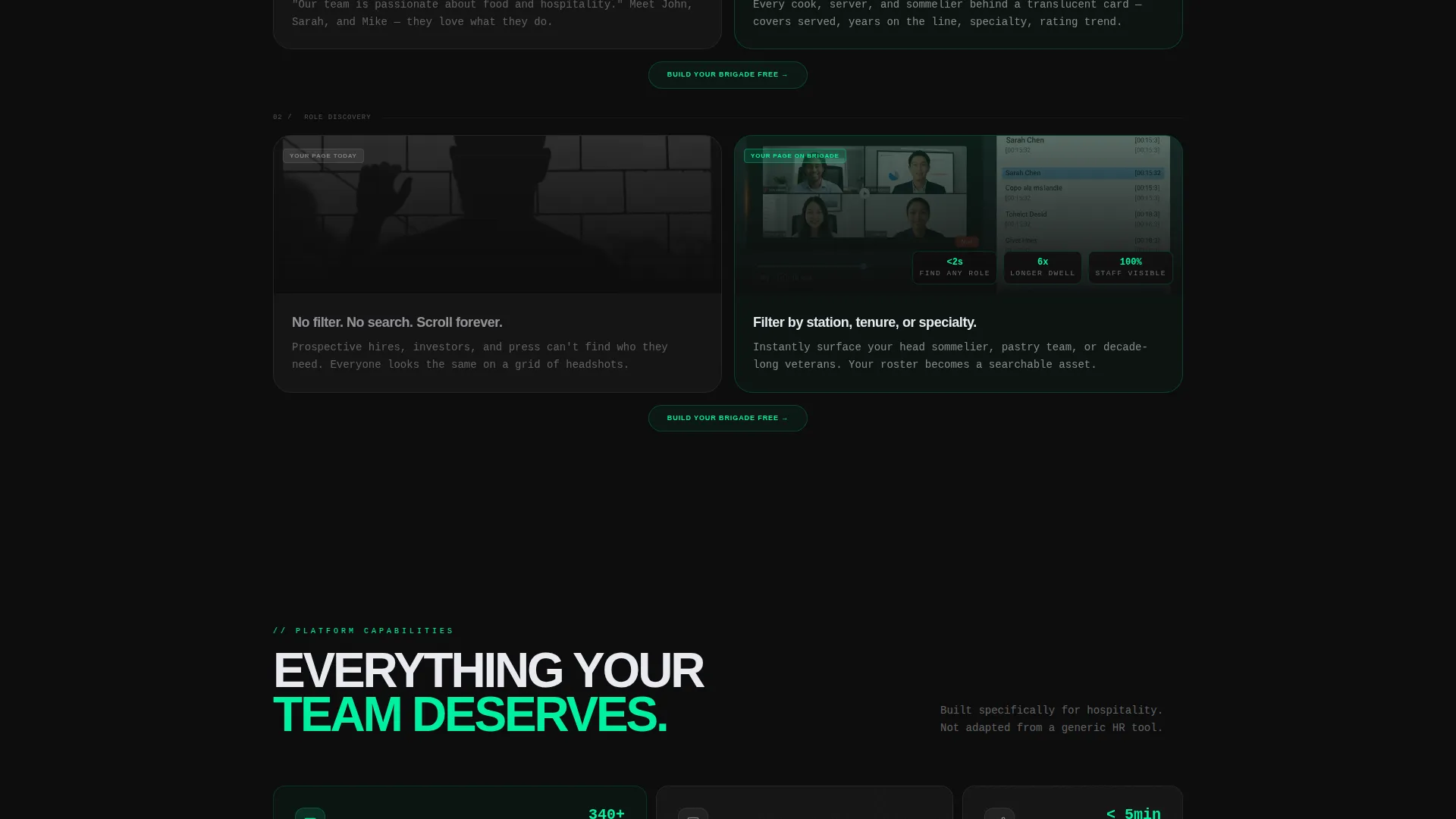
Each bento section pairs a left tile showing a generic static team page with a right tile showing the same team rebuilt in the Brigade format. The left tile uses a static group photo and identical bios. The right tile uses individual glass cards with dynamic stats and role filters.
Floating Call-to-Action System
The primary call-to-action button, labeled "Build Your Brigade Free," appears first inside the dashboard preview as a floating glass button and repeats after every versus pair. This placement ensures the action step is always visible at the moment of highest engagement.
Team Page Audit Input
A secondary conversion path lets visitors paste their current team page URL into a single input field. The field is labeled "Drop your team page link, we'll show you the difference in 60 seconds," offering an automated audit that makes the value proposition immediate and personal.
Page sections overview
| Section | Purpose |
|---|---|
| Dashboard Preview Header | Shows an interactive staff grid with live card data |
| Stats Counter Row | Opens scroll with a bold combined-experience comparison |
| Versus Cell: Static versus. Brigade | Contrasts a flat team page with the glass card format |
| Role Filter Showcase | Demonstrates filterable cards by role and location |
| Versus Cell: Bio versus. Data | Shows identical bios against stat-layered individual cards |
| Floating call to action Block | Repeats the primary call-to-action after each versus pair |
| Team Page Audit Form | Captures URL input for an automated page comparison |
Design & branding system
The visual identity follows a Tech Glass theme built on a Carbon Fiber color system. The palette is clinical and reflective, designed to feel like looking at a chef's jacket through a heads-up display.
- Core colors: deep cockpit black (#0D0D0D), woven carbon gray (#1A1A2E), frosted glass panel (#E8EAF0 at 60% opacity), and electric mise-en-place green (#00F0A0) for live stats and hover states
- Typography and card treatment reinforce the backlit screen aesthetic, with translucent overlays, etched name treatments, and accent color pulsing on interactive elements
- The single accent color, electric green (#00F0A0), is reserved for live data, hover states, and call-to-action elements to keep the eye moving through the data layer
Mobile & speed optimization
The bento grid layout is designed to reflow gracefully at smaller viewports, keeping the staff card data readable without losing the glass-panel aesthetic.
- Frosted glass tiles stack vertically on mobile while preserving the translucent overlay and stat layout inside each card
- The counter row and versus cells remain full-width at all breakpoints, keeping the comparison impact intact on smaller screens
How this template helps you convert
Brigade earns the click by making a visitor's current team page feel outdated before the form appears. The conversion path is layered and intentional.
- The interactive dashboard header lets visitors feel the product immediately, creating product familiarity before any copy is read
- The versus cells build a direct contrast between what a visitor currently has and what Brigade delivers, generating urgency through comparison rather than claims
- The team page audit input provides a low-friction secondary entry point for visitors who are not yet ready to commit, capturing intent at a research stage
Other information about this template
Brigade is categorized under Technology and Restaurant Website Templates, sitting at the intersection of hospitality marketing and modern team page design. It is a strong fit for restaurant groups that have outgrown standard website builder team pages.
- The template style is Bento Grid, a layout format that has become a recognized standard for data-rich, card-based interfaces
- The Tech Glass theme and Carbon Fiber color system make Brigade visually distinct from typical food and beverage website templates, which tend toward warm or neutral palettes
- This template is well suited for use alongside platforms such as Webflow, Framer, or similar no-code tools that support interactive component embedding and hover states
Theme
Tech Glass
Creative direction
Stats-First Impact
Color system
Carbon Fiber
Style
Bento Grid
Direction
Comparison/Versus
Page Sections
Interactive Glass Staff Cards
Stats-first Counter Row
Side-by-side Comparison Cells
Bento Grid with Progressive Density
Floating Call to Action and Audit Input
Related questions
Who is Brigade designed for?
Does this template work for a single restaurant or a restaurant group?
Can I replace the placeholder staff data with my own team's information?
What makes Brigade different from a standard team page template?
Is the team page audit feature a live backend tool?