Brownstone & Rowhouse Real Estate Booking Website Template
Brownstone is a gallery and detail landing page built for a solo brownstone and rowhouse inspection practice. It opens with a Before/After slider, guides visitors through annotated inspection zones, and closes with a focused booking form. The design uses deep navy, mortar cream, and gaslight amber to match the unhurried, detail-first tone of the practice.
by Rocket studio
Quick summary
Brownstone is a single-page template designed for an independent brownstone and rowhouse inspection practice. It leads with a draggable Before/After slider, walks visitors through a gallery of annotated inspection zones, and ends with a streamlined scheduling form. The tone is calm, deliberate, and trust-building from the first scroll to the final call to action.
Who this template is for
This template is built for a one-person inspection practice serving urban historic properties. The layout, tone, and booking flow all reflect the needs of a sole practitioner whose work depends on personal credibility and deep fieldwork.
- Solo inspectors specializing in brownstone, limestone, and brick rowhouse structures
- Practitioners whose clients include first-time buyers, estate attorneys, and renovation architects
- Independent professionals who need a visual portfolio to demonstrate what they find, not just what they offer
What problem this template solves
Most inspection websites lead with credentials and generic reassurances. That approach fails buyers who are looking at century-old masonry and need to know the inspector truly understands what they are looking at. This template solves the trust gap by leading with evidence.
- Visitors see real annotated fieldwork before they read a single marketing claim
- The gallery journey earns the booking click rather than asking for it upfront
- The secondary email capture keeps hesitant visitors connected while they continue browsing listings
What you get with this template
You get a full-width immersive landing page built around a Before/After visual narrative. Every section is structured to deepen credibility as the visitor scrolls.
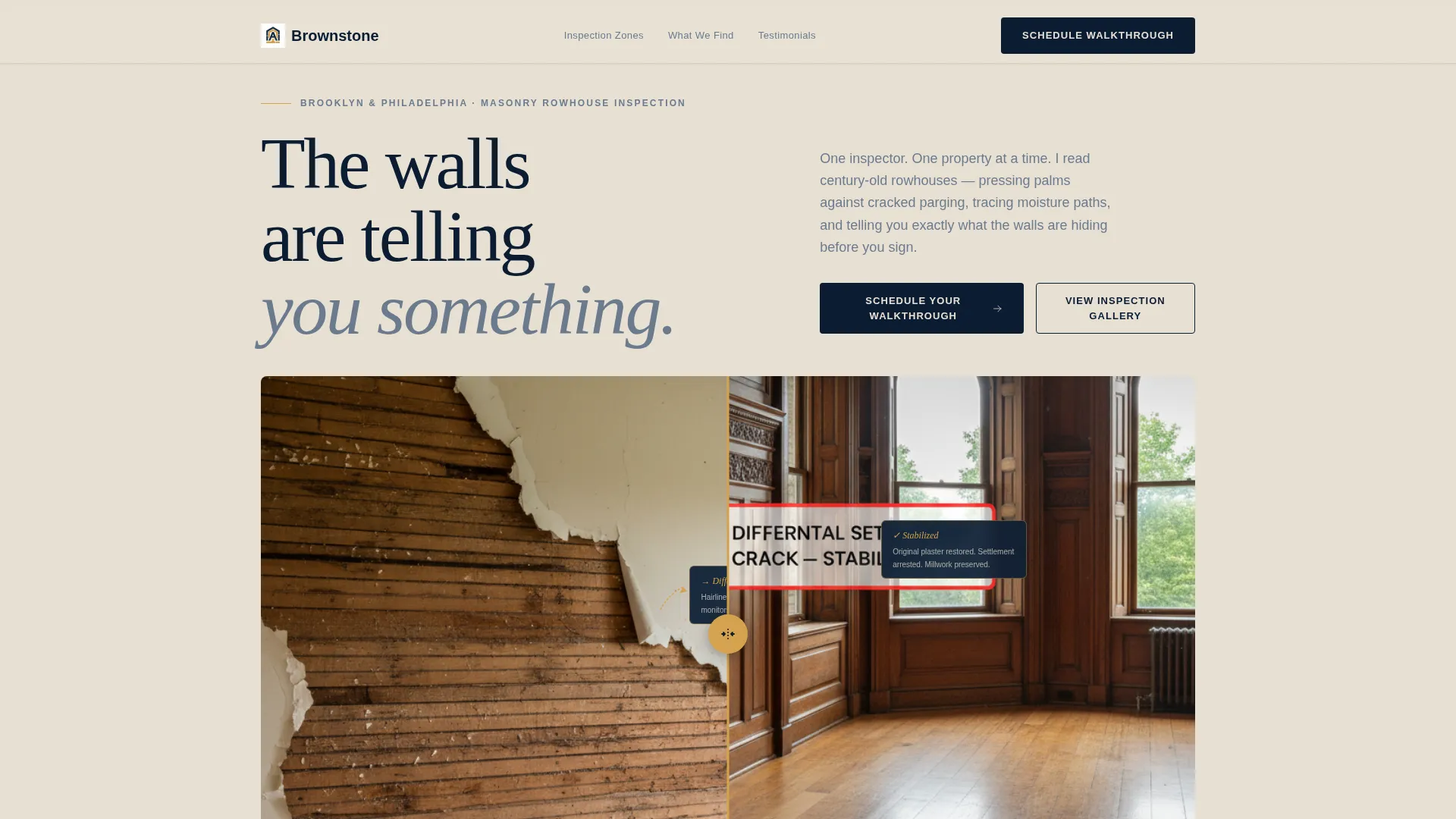
- A draggable Before/After header slider with a gaslight amber handle
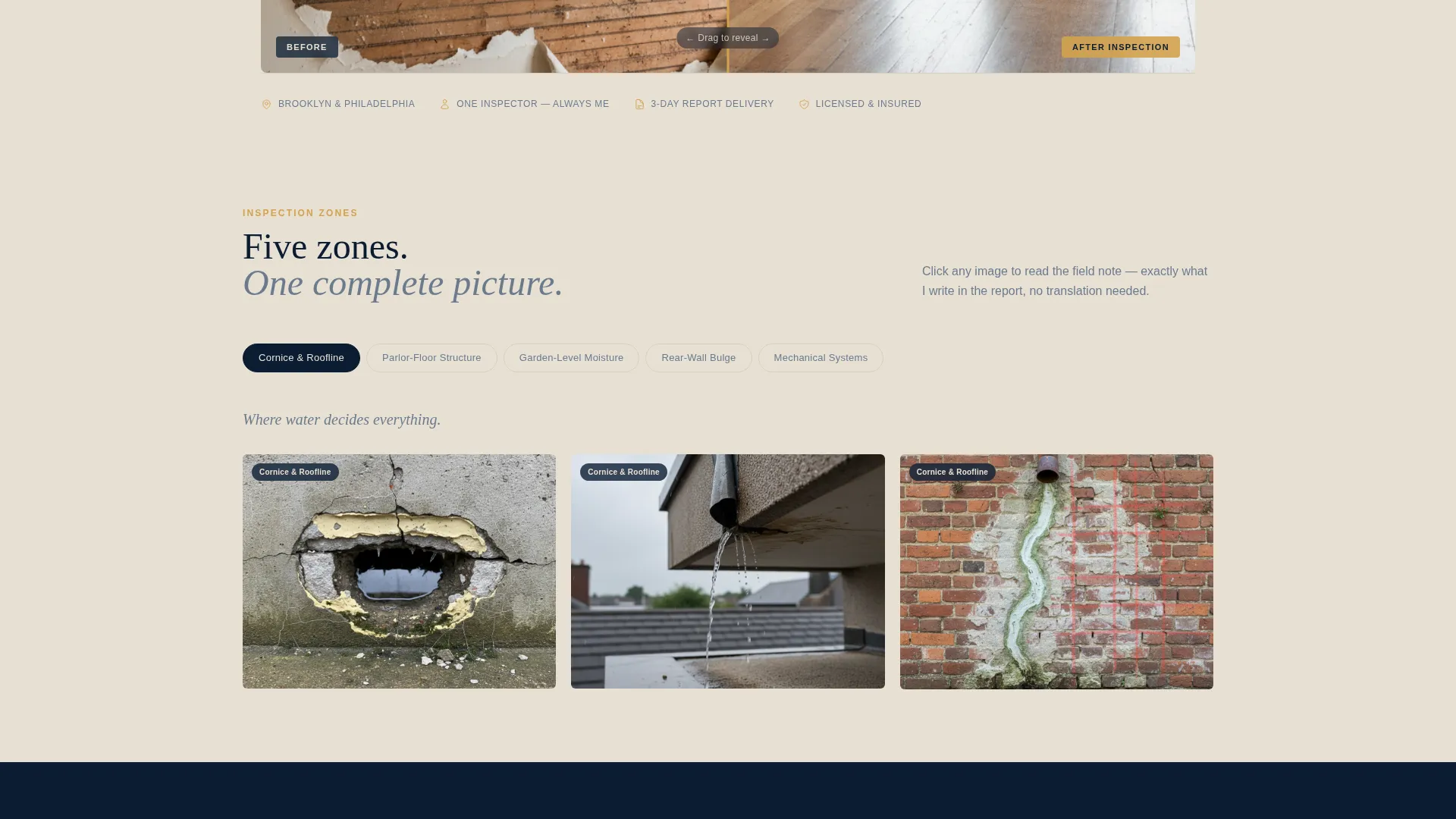
- A multi-zone gallery with expandable annotated detail views and handwritten-style field note overlays
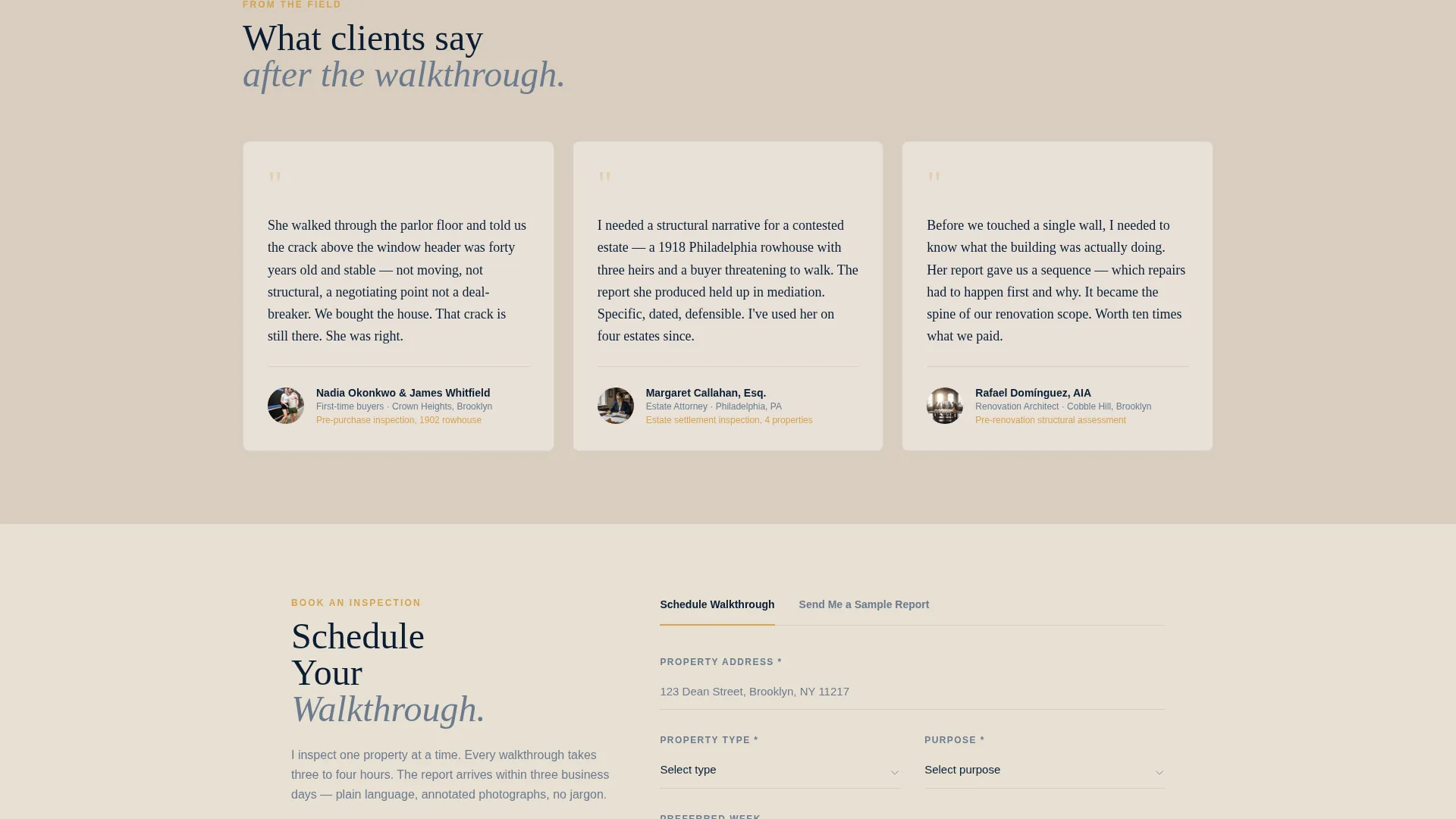
- A two-path conversion layout: a primary scheduling form and a secondary sample report email capture
Feature list
This template is built around six core capabilities derived directly from the inspection practice brief.
Draggable Before/After Header Slider
The header opens with a single parlor-floor interior split by a draggable divider. Left shows peeling plaster, exposed lath, and a hairline crack. Right shows the restored room with an annotated inspection callout explaining differential settlement. The gaslight amber handle makes interaction immediate and satisfying.
Annotated Inspection Gallery
The scroll follows a Before/After Reveal rhythm moving from facade to foundation. Each gallery row covers a distinct inspection zone: cornice and roofline, parlor-floor structure, garden-level moisture, rear-wall bulge, and mechanical systems. Thumbnail grids expand into full annotated detail views.
Field Note Overlay System
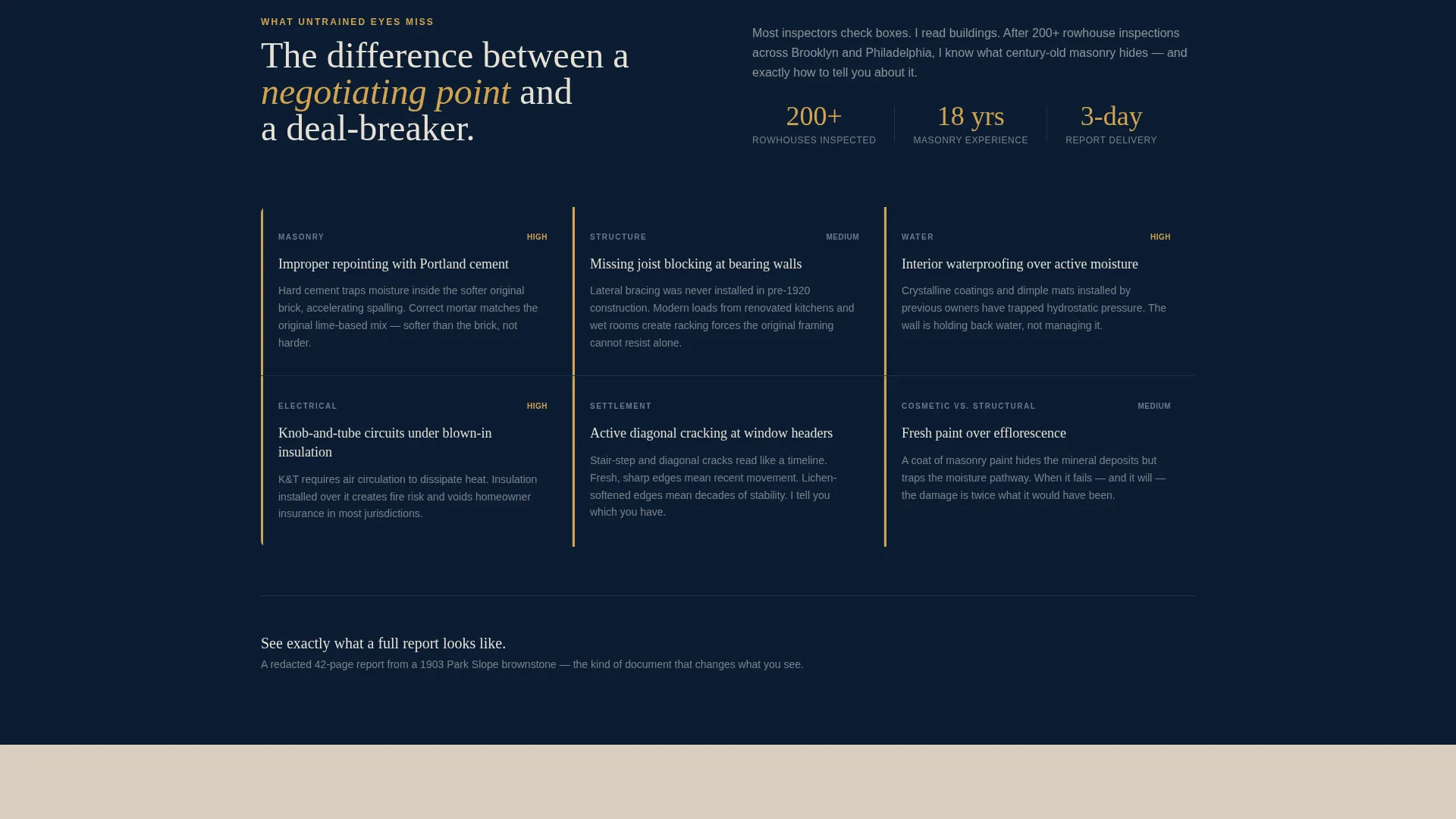
Clicking any gallery image opens the inspector's actual field note overlaid on the photo. Handwritten-style arrows point to spalling, efflorescence, and improper repointing. This system shows what untrained eyes miss without resorting to alarm or jargon.
Primary Booking and Scheduling Form
The scheduling form appears twice: immediately beneath the header slider, and again anchored at the page bottom. It collects property address, property type, inspection purpose, and a preferred week via a calendar picker. The sequence feels logical and quick to complete.
Secondary Sample Report Capture
Visitors not ready to book can request a sample inspection report by entering their email address. This path is designed for people still browsing listings who need more convincing before committing to a walkthrough appointment.
Pastoral Calm Visual System
The full-width layout uses a deliberate color palette and unhurried pacing to communicate the inspector's attentiveness. Every design choice reinforces the feeling that this practice is careful, thorough, and worth waiting for.
Page sections overview
| Section | Purpose |
|---|---|
| Before/After Slider | Opens the page with a parlor-floor inspection reveal |
| Primary call to action Block | Prompts scheduling immediately after the slider |
| Cornice and Roofline | Shows inspection findings for the upper facade zone |
| Parlor-Floor Structure | Covers structural observations at the main living level |
| Garden-Level Moisture | Documents water intrusion paths and moisture findings |
| Rear-Wall Bulge | Highlights outward movement and masonry instability |
| Mechanical Systems | Reviews visible mechanical conditions throughout the building |
| Page Bottom Form | Anchors the scheduling form after the full gallery journey |
| Sample Report Capture | Offers a secondary email path for undecided visitors |
Design & branding system
The visual identity follows a Pastoral Calm theme using a dark, grounded color palette that evokes dusk settling over a tree-lined block of unbroken facades. Every element is chosen to feel unhurried, honest, and deeply attentive.
- Deep brownstone navy (#0B1D33) for primary backgrounds, weathered mortar cream (#E8E0D4) for body text, and gaslight amber (#D4A24E) for accent links, hover states, and the Before/After slider handle
- Soft stoop gray (#6B7B8D) for secondary text and supporting labels
- Full-width immersive layout with symmetrical, straight-on photography and natural window light as the primary visual language
Mobile & speed optimization
The template is structured for clean rendering across devices. The full-width immersive layout and gallery components are designed with a single-column mobile flow in mind.
- The Before/After slider and expandable gallery tiles adapt to touch-based interaction on smaller screens
- The booking form fields stack vertically on mobile for easy completion without horizontal scrolling
- Section-by-section scroll rhythm keeps the page skimmable and focused regardless of screen size
How this template helps you convert
The layout is engineered to build trust progressively and present the booking action only after that trust has been earned.
- The Before/After slider creates immediate credibility by showing real inspection findings before any claims are made, pulling visitors into the inspector's point of view from the first second.
- The annotated gallery journey guides visitors through five distinct inspection zones, each one deepening their understanding of what the inspector sees and why that matters for their specific property.
- The dual conversion path captures both ready-to-book visitors and those still in the research phase, so no motivated visitor leaves without a next step.
Other information about this template
This template is a strong fit for practitioners operating in dense urban historic housing markets where buyer anxiety is high and inspection quality varies widely. It is also well suited for practices that rely on word-of-mouth referrals and need a portfolio-style page to support those recommendations visually.
- The template style is Full-Width Immersive, and the creative direction is Before/After Reveal, making it well matched to practices that have strong photographic documentation of their fieldwork
- The landing page direction is Direct Sales, meaning every design decision is oriented toward generating a scheduled walkthrough or an email lead, with no distraction from that goal
- The layout supports practices serving a range of historic property types including brownstones, limestone-fronted rowhouses, brick rowhouses, and mixed-use buildings with residential upper floors
Theme
Dark Immersive
Creative direction
Before/After Reveal
Color system
Cloud Canvas
Style
Full-Width Immersive
Direction
Direct Sales
Page Sections
Draggable Before/after Header Slider
Annotated Inspection Zone Gallery
Field Note Overlay on Click
Two-stage Booking Form
Sample Report Email Capture
Pastoral Calm Visual Identity
Related questions
Who is this landing page template designed for?
What inspection zones does the gallery section cover?
How does the booking form work?
What is the secondary conversion path for undecided visitors?
Does this template support property types beyond brownstones?



