Stock Simulator Market Landing Page Template
The Ticker landing page template is built for a zero-risk stock market simulator. It uses a dark fintech terminal aesthetic, a persistent sidebar with a scrolling table of contents, and an embedded phantom trade widget that turns the page itself into the demo. Finance students, curious professionals, and active traders can explore every section before they ever create an account.
by Rocket studio
Quick summary
Ticker is a sidebar companion landing page template for a zero-risk stock market simulator. It presents the case for practice trading through an Industry Report creative direction, combining authority-driven copy, hoverable charts, and an inline phantom trade widget. Visitors arrive on a dark terminal canvas and leave with a free account, no deposit required.
Who this template is for
This template speaks directly to people who want to understand the stock market before they put real money on the line. It is built for product teams and founders who need a high-converting landing page that matches the weight of their platform.
- Finance students preparing for licensing exams who need hands-on practice trading stocks without financial exposure
- Curious professionals who follow market news and want to test investing ideas before opening a brokerage account
- Retail traders who want to backtest new strategies against live market data without risking their existing portfolio
What problem this template solves
Most stock market simulator landing pages look like generic software pages. They list features in bullet grids and call it done. The real problem is trust: a first-time visitor needs to feel the product before they sign up, not just read about it.
- The page fails to build authority early, so visitors leave before they reach the call to action
- Interactive elements are absent, which means the platform's core value never becomes tangible on the landing page itself
- The conversion path is unclear, forcing visitors to make a leap of faith rather than a confident, informed decision
What you get with this template
You get a fully structured, single-page layout that walks a visitor from skeptic to signed-up user in one scroll session. Every section earns the next. The design, the data, and the demo all compound into a single rational position: sign up, it's free.
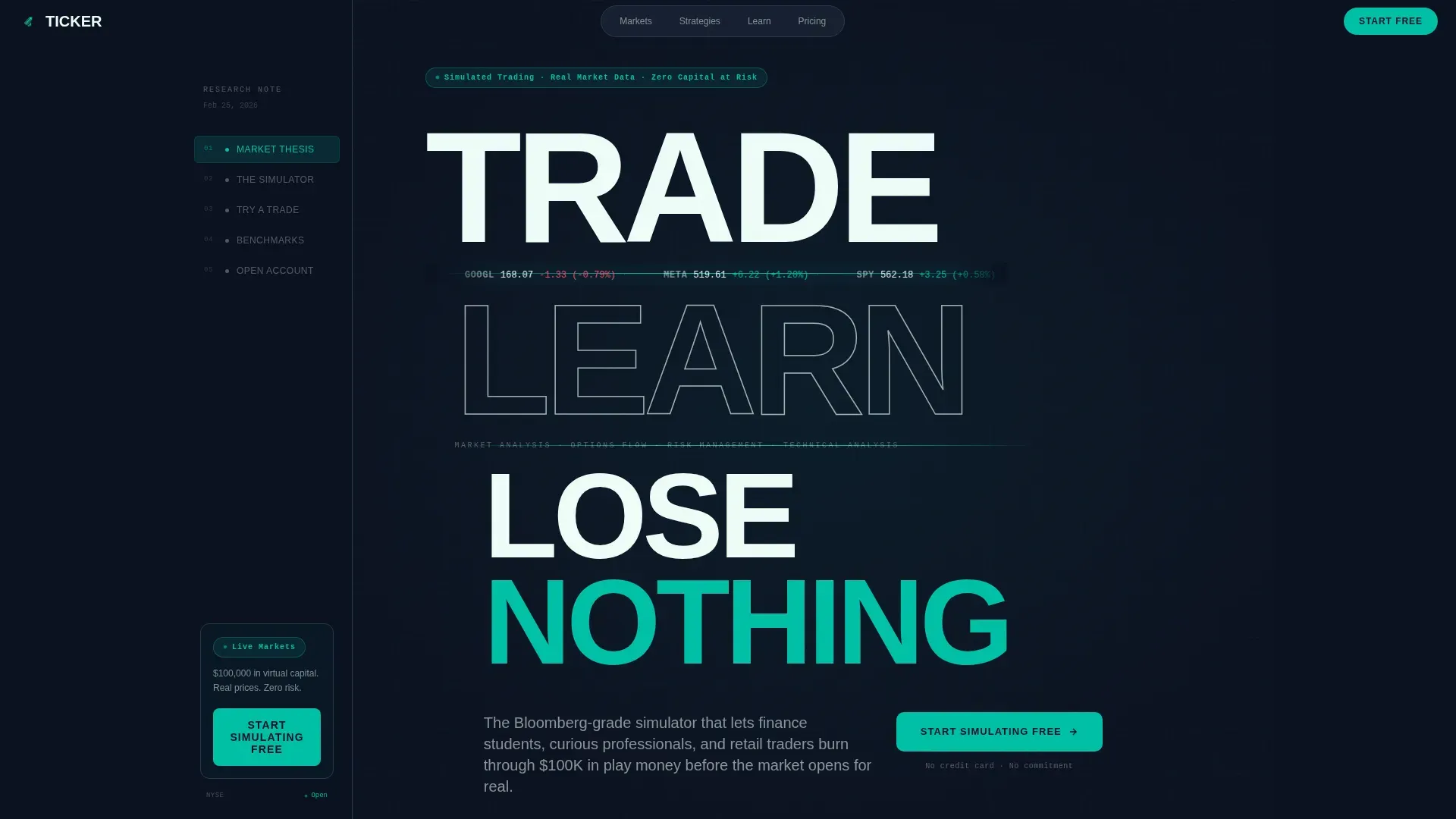
- A Stacked Type Tower hero with scrolling live ticker data, pulsing teal accent lines, and no imagery required
- An Industry Report content flow covering a market thesis, interactive chart modules, an inline phantom trade widget, and a portfolio benchmark comparison section
- A persistent sidebar acting as a table of contents with a pinned "Start Simulating Free" call-to-action button that travels with every scroll
Feature list
This template is built around a specific set of design and interaction decisions. Each one is present because it serves the conversion goal of the page.
Stacked Type Tower Hero
The hero section stacks compressed bold type vertically, reading "TRADE / LEARN / LOSE NOTHING" in signal white against terminal black. Each word sits slightly offset left to right, mimicking a descending order book. Thin horizontal lines of catalyst teal pulse between type blocks, carrying scrolling ticker symbols and simulated live prices. There is no imagery and no illustration: data is the texture.
Persistent Sidebar with Pinned Call to Action
The sidebar acts as a research-note table of contents, anchoring every scroll position. It tracks the visitor's position in the page and highlights the current section. The primary call to action, "Start Simulating Free," is pinned at the bottom of the sidebar and stays visible from the first line to the last. The sign-up form is styled like a brokerage account setup screen, with an email field and a username picker.
Market Thesis Section
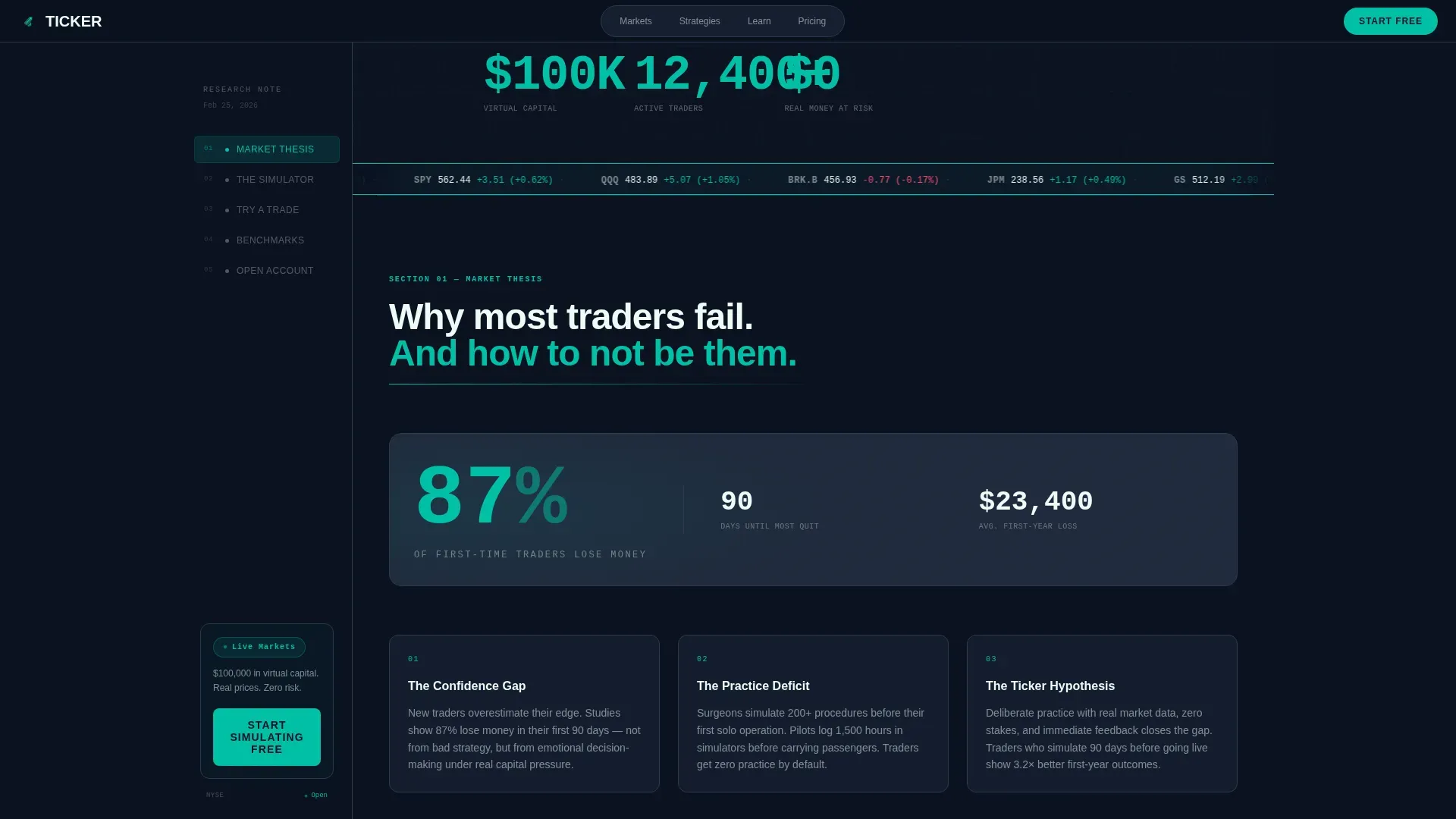
Section one opens with a bold market fact: 87% of first-time traders lose money in their first 90 days. The copy is written in research-note style, presenting the stock market's risk as the problem and the simulator as the evidence-backed countermeasure. This section builds authority before the product is introduced, which is exactly when investors are most receptive.
Interactive Chart Modules and Feature Bento Grid
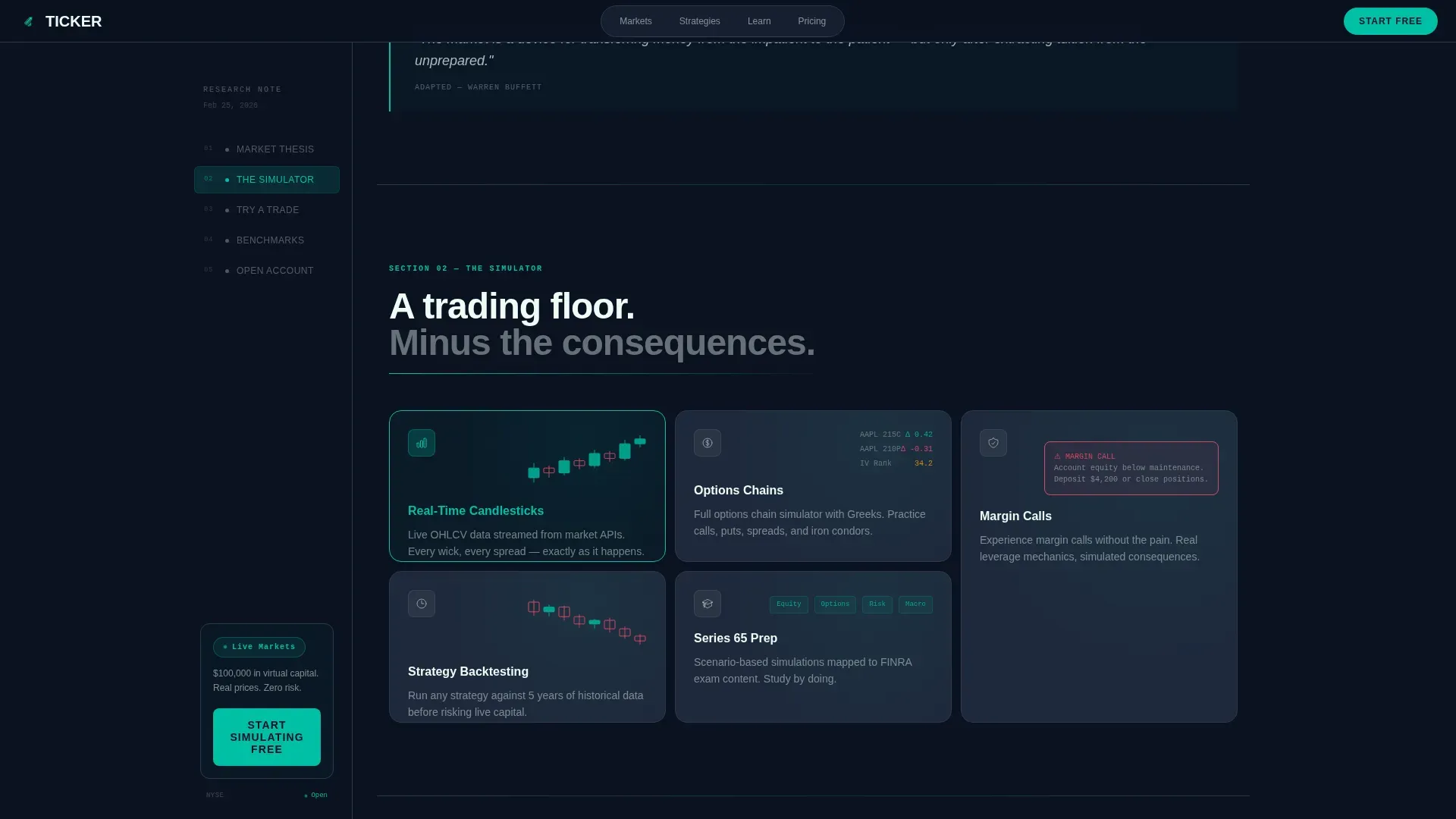
Section two embeds hoverable chart modules that visitors can interact with directly on the landing page. Charts display simulated market data in a format that feels like a real trading dashboard. A feature bento grid sits alongside the charts, letting visitors evaluate the platform's capabilities in a single glance. Advanced charting tools including moving averages and RSI indicators are represented in the visual layout.
Phantom Trade Widget
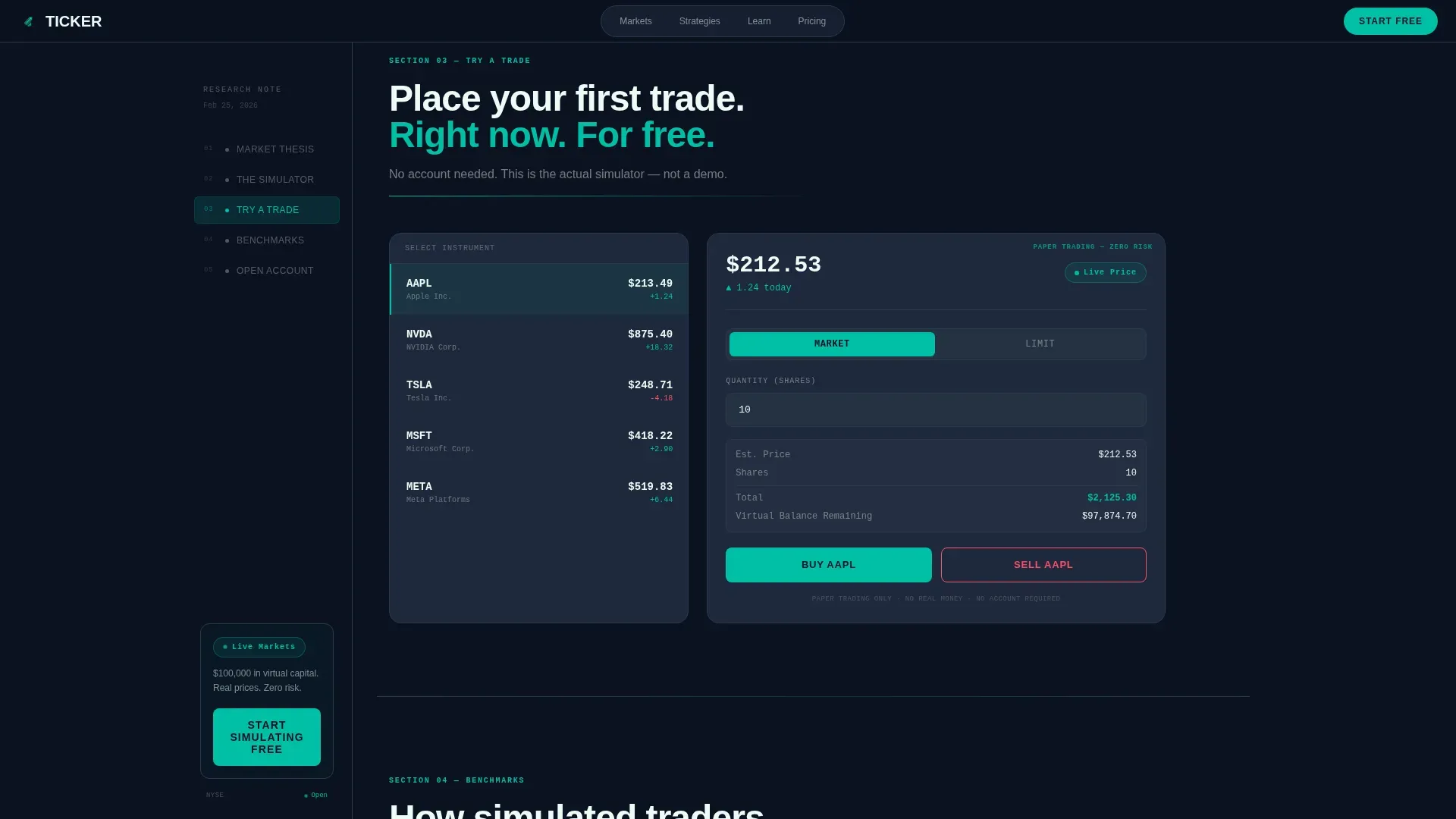
The inline phantom trade widget is the centerpiece of section three. Visitors can place one fake trade on a live stock before they ever create an account. The widget is styled as a mini simulator, complete with buy and sell controls, a position summary, and a simulated profit or loss read-out. By the time a visitor presses submit on their phantom trade, the product has already sold itself.
Portfolio Benchmark Comparison and Call to Action Form
Section four shows simulated portfolio performance plotted against real market indices. The comparison gives the platform credibility by presenting results in the same format institutional research uses. Below the benchmark table, a streamlined call-to-action form invites the visitor to open a free account and deposit their first $100,000 in virtual cash, no real money involved.
Page sections overview
| Section | Purpose |
|---|---|
| Hero: Stacked Type Tower | Grabs attention with bold type, scrolling ticker data, and zero imagery |
| Market Thesis | Establishes stock market risk as the problem with a 87% data point |
| Live Chart Demo | Lets visitors hover interactive charts and evaluate platform features |
| Phantom Trade Widget | Converts visitors by letting them place a fake trade before signing up |
| Performance Benchmarks | Builds credibility by comparing simulated portfolio returns to real indices |
| Call to Action Form | Captures the account sign-up with an email field and username picker |
| Footer: Linear Single Row | Closes the page with a clean, distraction-free single-row footer layout |
Design & branding system
The visual identity runs on the Teal Catalyst color system, which channels Startup Velocity energy across every element of the page. Blue and green tones are a deliberate choice: they are associated with trust, security, and growth in finance, which is exactly what this landing page needs to project.
- Terminal black (#0B1120) as the base canvas, cool slate (#1E293B) for sidebar and card surfaces, catalyst teal (#00BFA6) for live data accents and interactive sparks, and signal white (#EDFCF7) for all typography and chart gridlines
- DM Sans in compressed bold for display type and headlines, paired with JetBrains Mono for all data values, prices, and numeric elements throughout the dashboard
- High-motion animation including scrolling ticker tape, count-up numbers, pulsing teal lines between type blocks, and chart hover effects that make the page feel like a live terminal
Mobile & speed optimization
The template is built desktop-first to match the Bloomberg terminal aesthetic, but it is fully responsive so that visitors on smartphones can access every section without friction. A significant portion of financial and gaming traffic comes from mobile devices, so the layout adapts cleanly at all breakpoints.
- Server components handle all static sections for fast initial load, while client components power the interactive widgets, sidebar scroll tracking, and animated elements
- The persistent sidebar collapses gracefully on smaller screens, keeping the pinned call-to-action button accessible without blocking the main content column
- Animation intensity scales with device capability so that the scrolling ticker tape and pulsing teal lines do not degrade performance on lower-powered devices
How this template helps you convert
The page is not just a landing page. It is a structured argument that builds from evidence to action, giving visitors every reason to start simulating before they have any reason to hesitate.
- The market thesis section opens with a hard statistic about stock market losses, making the visitor feel the problem personally before the solution is introduced, which positions the simulator as protection rather than a product pitch
- The phantom trade widget turns the landing page into an active demo, so the visitor's first experience of the platform happens inside the page itself, removing the uncertainty that normally stops people from creating an account
- The pinned sidebar call to action means the "Start Simulating Free" button is never more than a glance away, and the benchmark comparison section gives investors the final piece of evidence they need to determine that the platform is worth their time
Other information about this template
This template sits in the Finance and Insurance category, specifically within Financial Literacy and Education as a subcategory. It is designed for the stock market simulator niche and carries an Intersection Match Score of 13, which means its creative direction, color system, header concept, and conversion model are tightly aligned.
- The Industry Report creative direction means the page reads like a Goldman research note that became interactive. This is a deliberate match for the target audience of finance students and serious retail traders who trust data over marketing language
- The Teal Catalyst color system and the Startup Velocity theme give the page energy without sacrificing legibility. Every color decision protects readability while keeping the platform feeling fast and modern
- A trading journal is a natural companion to a stock market simulator. A web-based trading journal helps users reflect on past trades, evaluate what is working, and avoid repeating mistakes. Each trade gets its own row for better tracking, and the longer the trading history, the better the conclusions become. Many traders have fallen into the trap of thinking themselves smart when they were just lucky, which highlights why a journal is as important as the simulator itself
- The platform supports a variety of assets including stocks, ETFs, crypto, and options, and the landing page design reflects that breadth without overwhelming the visitor with too many details at once
- Filtered Historical Simulation, or FHS, is a technique that combines model-based volatility treatment with a nonparametric specification of asset return distributions. FHS retains the nonparametric nature of historical simulation by bootstrapping from standardized residuals. Value-at-Risk, or VaR, is assessed over a one-month horizon using this technique. These concepts are relevant context for the benchmark comparison section, where simulated portfolio returns are presented in a format familiar to serious investors and managing editor teams reviewing platform credibility
- The managing editor of a financial education platform can use this template to present the simulator's research credentials without writing a single line of code. The page structure does the editorial work, letting the data and the demo speak for themselves
- You can start customizing this template immediately after download. The color tokens, typography settings, and section layout are all set up to accept your brand values and platform details without restructuring the page
- Icons used throughout the dashboard and bento grid sections are minimal and functional, keeping the page in line with the dark terminal aesthetic rather than softening it with decorative elements
Theme
Startup Velocity
Creative direction
Industry Report
Color system
Teal Catalyst
Style
Sidebar Companion
Direction
Freemium/Trial
Page Sections
Stacked Type Tower Hero with Live Ticker Data
Persistent Sidebar with Scroll-tracking Navigation
Inline Phantom Trade Widget
Interactive Hoverable Chart Modules
Portfolio Benchmark Comparison Section
Freemium Account Sign-up Form
Related questions
What kind of product is this template designed for?
Does the template include the phantom trade widget as a ready-to-use component?
Who manages the content inside this template after setup?
Can I use this template if my simulator offers assets beyond basic stocks?
Is the sidebar navigation included and how does it behave?



