Science Writer Landing Page Template for Bookings
Byline is a single-page landing page template built for freelance science writers who need to convert curious editors and research clients into booked calls. It pairs an editorial magazine visual identity with a comparison-table layout, a FAQ-driven scroll, and an integrated booking flow complete with intake fields, all styled to feel like a university press publication.
by Rocket studio
Quick summary
Byline is a bold, typography-led landing page template for independent science writers. It uses an editorial magazine aesthetic, comparison tables, and a FAQ-driven scroll to demonstrate expertise before a potential client ever reaches the booking calendar. The page earns trust through the quality of its own writing structure, not through testimonials or stock imagery.
Who this template is for
This template is built for one-person science writing practices that serve research-adjacent clients. If your work sits at the intersection of scientific accuracy and narrative writing, Byline is designed around your exact sales context.
- Freelance science writers serving university press offices, biotech startups, and magazine editors
- Independent journalists who cover life sciences, climate, physics, or health research
- Science communicators building a direct-booking professional presence online
What problem this template solves
Science writers face a specific credibility gap. A generic portfolio page cannot show the nuance of subject-matter fluency or the range of deliverable formats a client might need. Byline solves this by letting the page structure itself demonstrate the thinking.
- Potential clients cannot easily compare turnaround times, expertise areas, and deliverable types without clear visual structure
- Editors and press officers arrive with specific objections, and a standard bio page does not address them
- The jump from "reading your page" to "booking a call" is too large without a warm, low-friction intake path
What you get with this template
Byline delivers a fully structured single-page layout that moves a visitor from first impression through demonstrated expertise to a confirmed booking. Every section has a defined role in that journey.
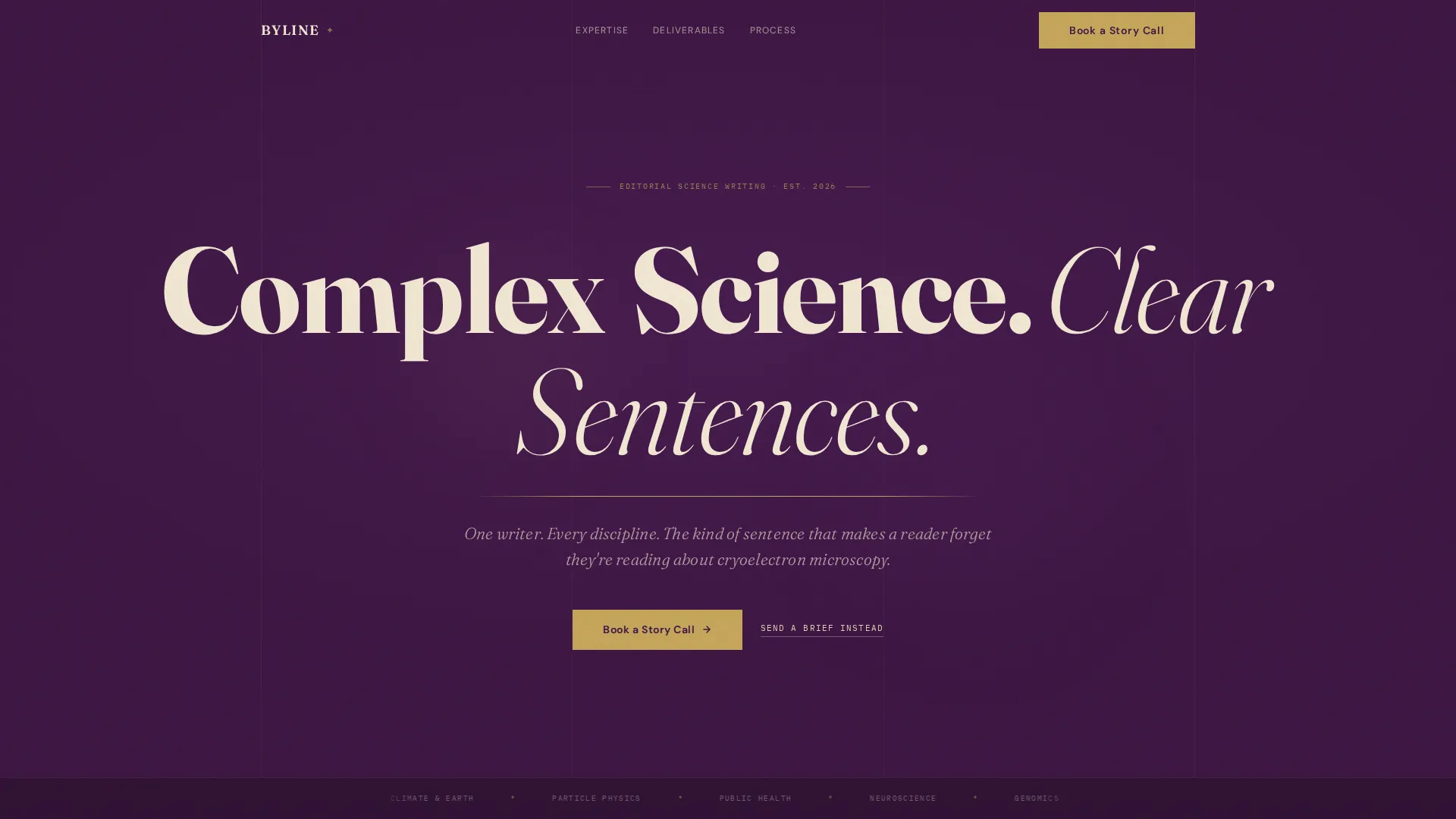
- A giant editorial headline section with a gold-ruled subhead that sets the voice immediately
- Multiple comparison tables covering subject areas, turnaround times, typical deliverables, and content format differences
- An embedded booking calendar with a pre-confirmation intake form and a secondary email contact path
Feature list
This template is built around four core functional capabilities that work together to support a science writer's direct-client pipeline.
Giant Editorial Headline Block
The header fills the viewport with a single provocative headline set in large serif type, tracked wide, in parchment against deep plum. A thin tarnished gold rule sits beneath it, followed by a single italic subhead written in the register of a magazine dek. No imagery is used, the typography alone establishes the credential.
FAQ-Driven Comparison Tables
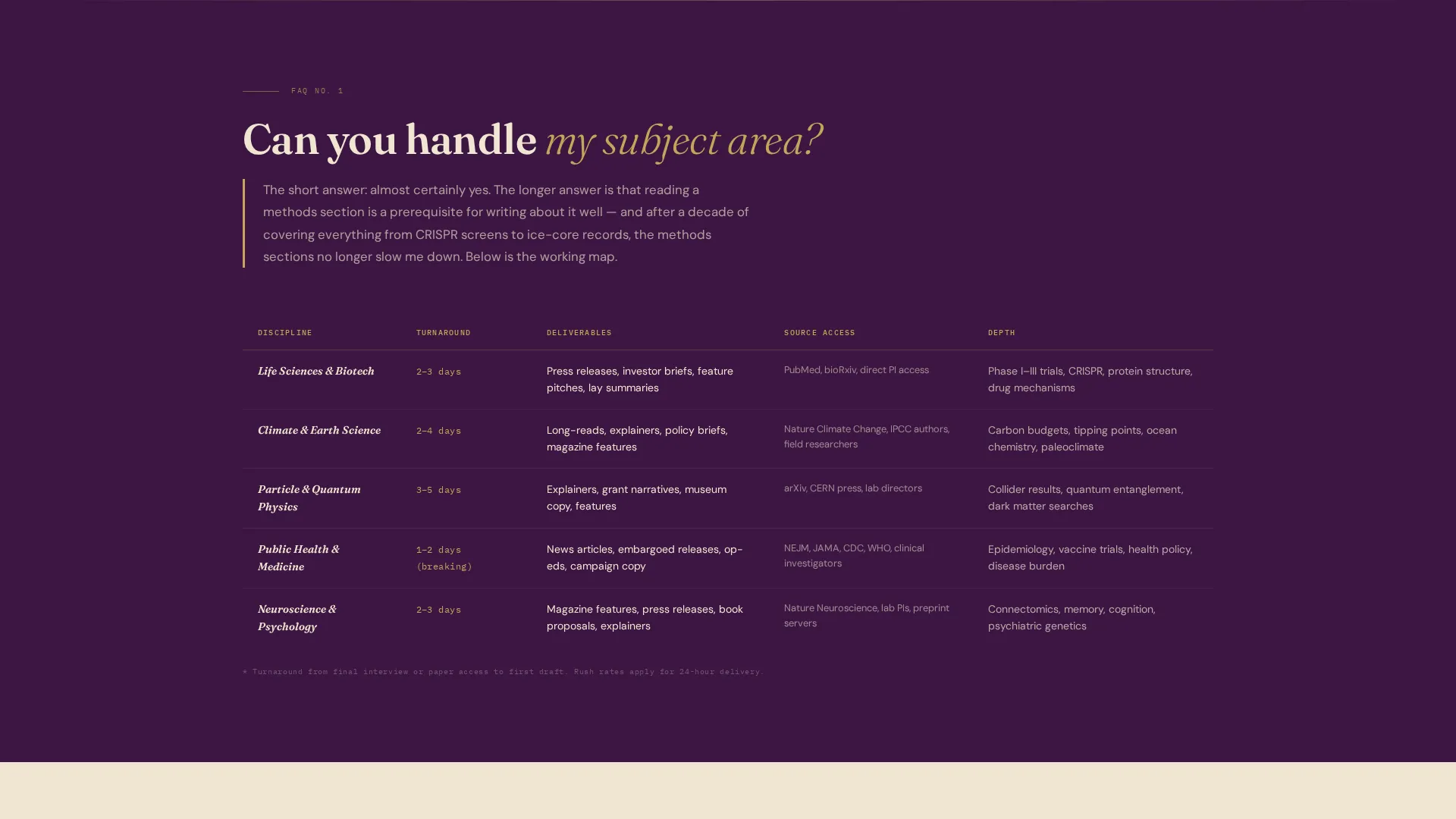
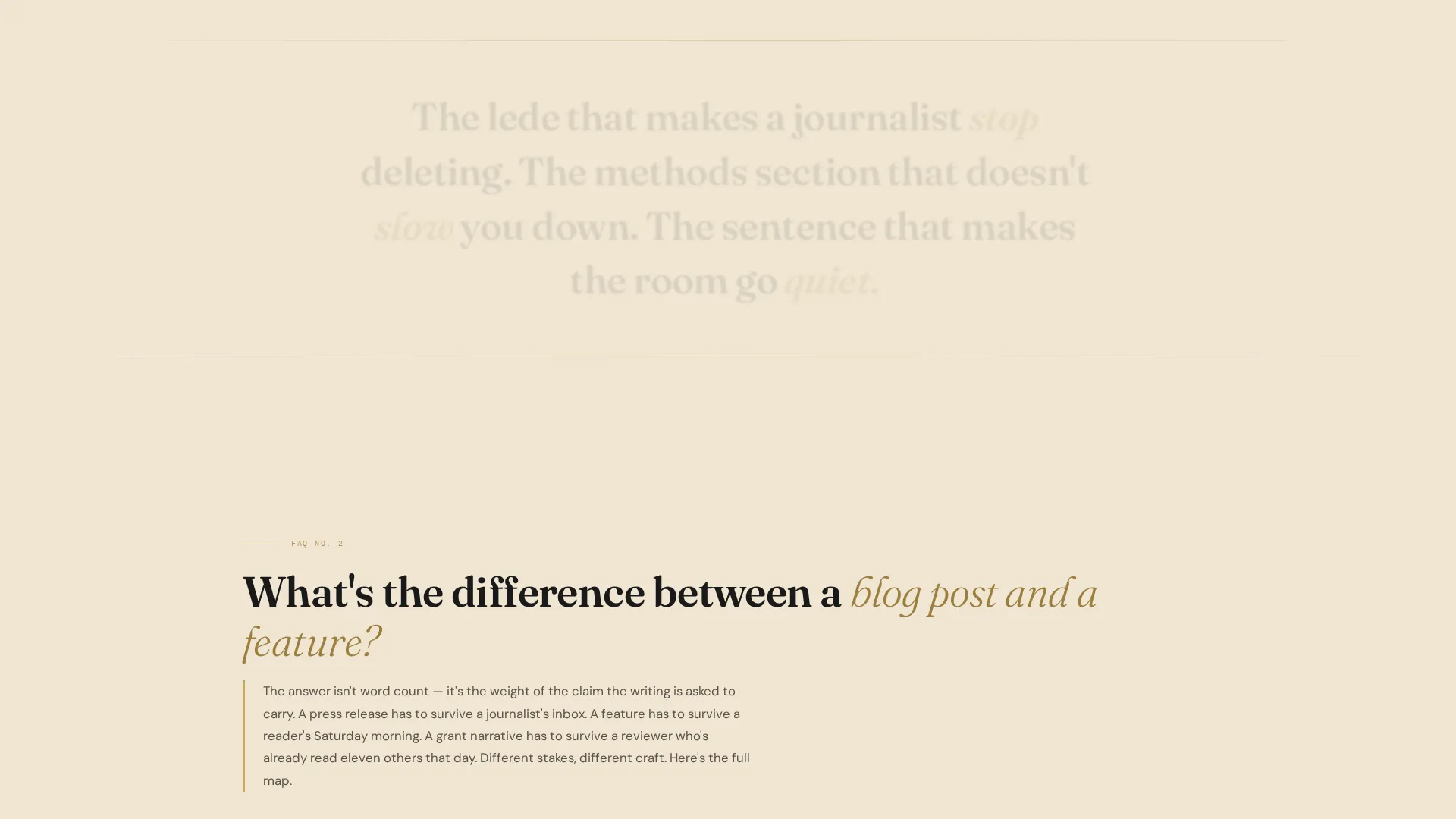
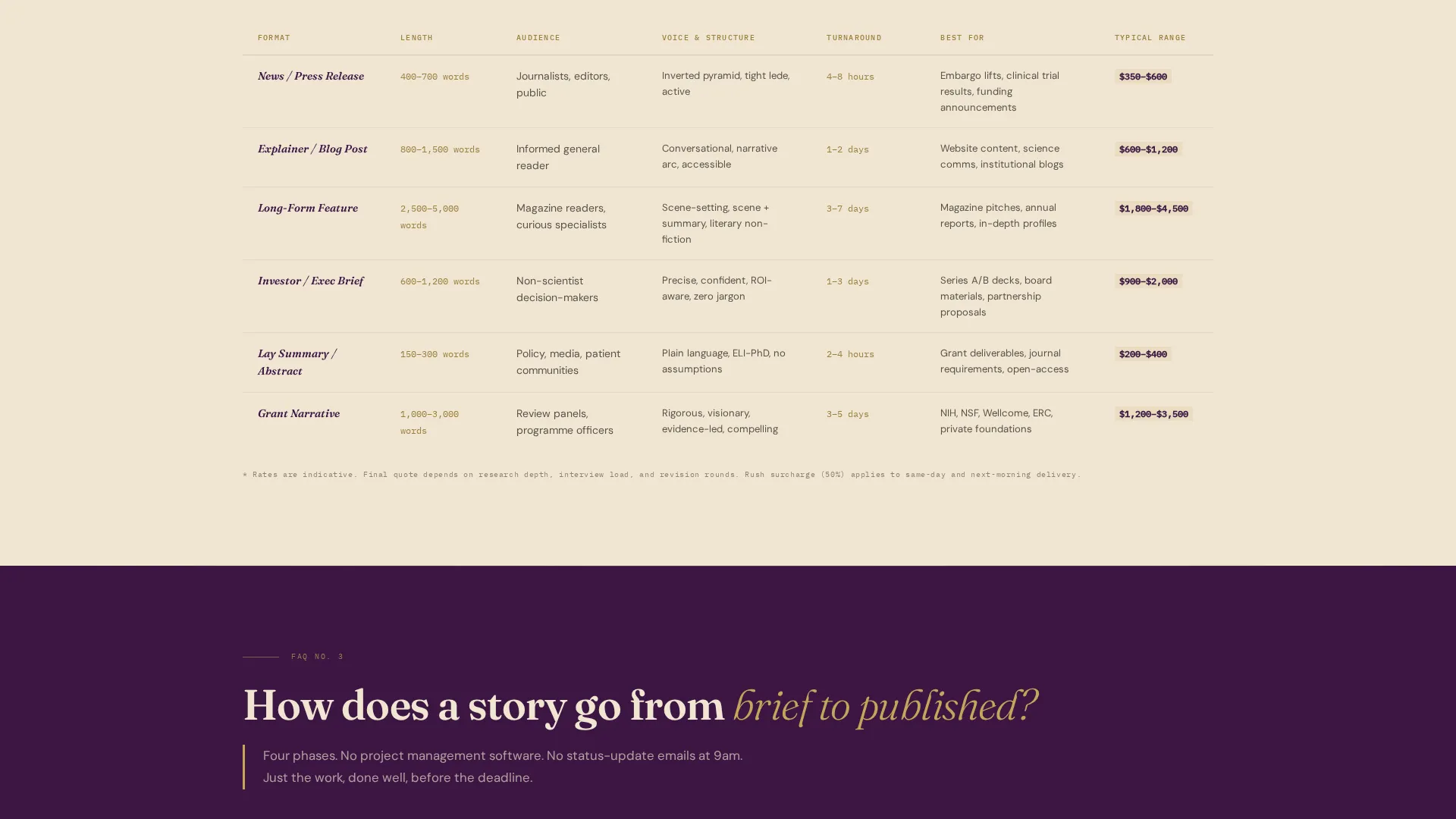
Each major client objection unfolds into its own structured answer. Subject-area expertise is laid out in a comparison table showing coverage across life sciences, climate, physics, and health. A separate table distinguishes blog posts from feature articles by format, depth, and typical use. The FAQ answers read as short essays, demonstrating the writer's voice while answering the question.
Embedded Booking Calendar with Intake Form
The primary call to action is "Book a Story Call," linking to an embedded calendar offering 30-minute slots. Before confirmation, visitors complete a brief intake: a subject area dropdown, a deadline urgency toggle with three settings (standard, tight, and breaking), and a single open text field labeled "What's the story?"
Secondary Email Contact Path
A quieter secondary call to action reads "Send a Brief Instead" and opens a mailto link. This gives editors who prefer a written brief a low-pressure alternative to the calendar, without distracting from the primary booking flow.
Editorial Plum Color System
The full Plum Executive color system is baked into the template. Deep plum functions as the dominant background, parchment defines text columns and breathing space, tarnished gold marks pull-quote rules and hover states, and editorial black anchors all body type. The palette coheres visually without requiring any manual color matching.
Page sections overview
| Section | Purpose |
|---|---|
| Editorial Headline Block | Establishes voice and subject-matter authority immediately |
| Italic Dek Subhead | Frames the writer's positioning in one line |
| Subject Area Table | Compares expertise across life sciences, climate, physics, and health |
| Format Comparison Table | Distinguishes blog posts from features by depth and deliverable type |
| FAQ Essay Blocks | Answers common client objections in demonstrated prose |
| Booking Calendar Section | Hosts the embedded 30-minute slot calendar |
| Intake Form Pre-Confirmation | Collects subject area, urgency, and story context before booking |
| Secondary Contact Path | Offers a mailto "Send a Brief Instead" link for email-first clients |
Design & branding system
The visual identity follows an Editorial Magazine theme that feels like the endpapers of a university press hardcover. Every color, type choice, and spacing decision serves legibility and intellectual weight rather than decoration.
- Deep plum (#3C1642) as the dominant background, parchment (#F0E6D3) for text columns, tarnished gold (#C5A55A) on rules and hover states, and editorial black (#1A1A1A) for body type
- Large tracked serif typography in the header, italic serif for subheads and pull quotes, and clean body type for table and FAQ content
- No photography or illustration, typographic hierarchy alone carries the visual authority throughout the page
Mobile & speed optimization
The template is structured to remain scannable and functional at every viewport size. The editorial column layout adapts to narrower screens without losing the typographic weight that defines the design.
- Comparison tables reflow cleanly at mobile widths so column data stays readable without horizontal scrolling
- The booking calendar and intake form are positioned to remain accessible on touch devices without layout breaks
- The single-page structure keeps the path from headline to booking confirmation short and direct on any screen size
How this template helps you convert
Byline is built around a specific insight: a science writer's best sales tool is proof of thinking, not a list of credentials. The page is structured to build conviction incrementally before it asks for anything.
- The headline and subhead immediately filter for the right client by establishing voice and subject-matter confidence, so only relevant visitors continue reading.
- The comparison tables and FAQ essay blocks remove the most common objections before a client has to voice them, making the booking step feel like a natural next move rather than a leap.
- The intake form before calendar confirmation reduces no-shows and mismatched calls by ensuring both parties arrive with shared context about subject area, urgency, and story scope.
Other information about this template
Byline is a strong fit for science writers building a direct-booking presence without a large team or a complex multi-page site. A few additional details worth knowing before you start customizing.
- The template is designed as a single landing page, not a multi-page website, so navigation is intentionally absent to keep the scroll focused
- All table content, FAQ copy, and intake field labels are fully editable to match your actual subject-matter specializations and preferred intake questions
- The "Book a Story Call" calendar embed and the "Send a Brief Instead" mailto link require your own calendar service and email address to be connected before publishing
- The Plum Executive color system and editorial serif typography can be adjusted in your template editor if your personal brand uses a different palette
- This template suits science communicators at any career stage, from emerging writers building their first professional page to established contributors formalizing their client intake process
Theme
Service Utility
Creative direction
Stats-First Impact
Color system
Plum Executive
Style
Sidebar Companion
Direction
Content/Resource
Page Sections
Giant Editorial Headline Block
Faq-driven Comparison Tables
Booking Calendar with Intake Form
Secondary Email Contact Path
Plum Executive Color System
Related questions
Who is this landing page template designed for?
Do I need to write new content to use this template?
How does the booking intake form work?
Can I adjust the colors and typography?
Is this template suitable if I cover more than one scientific field?



