Byline - Verified Journalist Digital Business Card Landing Page Template
Byline - Verified Journalist Digital Business Card Landing Page Template
Byline is a storybook-style landing page template built for journalists who need one verified link that says everything. It combines a Before/After Slider hero, scroll-triggered case study narrative, and a newsroom partnership form into a single, editorially confident page. The design draws from broadsheet tradition and converts both individual reporters and entire newsrooms.
by Rocket studio
Loading preview…
Quick summary
The Byline template is a single-page, storybook-format landing page designed specifically for journalist digital business card platforms. It tells three escalating case studies, from freelancer to bureau chief to full newsroom, building organizational trust before delivering a "Equip Your Newsroom" partnership form. The visual language is broadsheet editorial: pressroom black, electric indigo, and newsprint warm white printed under fluorescent light.
Who this template is for
This template speaks directly to journalists and the organizations that credential them. It works for individual reporters who need a single, shareable link that proves who they are. It also serves newsroom leaders evaluating a team-wide digital identity solution.
Foreign correspondents and investigative reporters who juggle freelance pitches across multiple publications and need verifiable credentials at a glance
Newsroom editors, managing editors, and operations leads who want every reporter's professional business card to reflect consistent, verified authority
Platform founders and product teams building a journalist-facing digital business card service and targeting enterprise newsroom partnerships
What problem this template solves
Most journalists rely on a cluttered email signature, a broken portfolio link, or a generic social profile to introduce themselves to sources and editors. That scattered approach costs real opportunities. A professionally designed, unified digital business card landing page fixes that problem at the infrastructure level.
Credentials are scattered: beat, masthead affiliations, clip reel, and contact details live in five different places, none of them authoritative
Trust breaks down at the first impression: a source who Googles a journalist and finds nothing cohesive will not make contact
Newsrooms lack a scalable way to credential their teams, making it hard for editors to present a unified, verifiable front to the public
What you get with this template
This template delivers a fully structured, storybook landing page that earns the partnership sale story by story. Every section is purposefully sequenced to move a visitor from skepticism to confidence before the form ever appears.
Theme
Ink & Paper
Creative direction
Case Study Narrative
Color system
Electric Indigo
Style
Storybook/Full-Page
Direction
Partnership/B2B
Page Sections
Before/after Slider Hero
Scroll-triggered Case Study Sections
Interstitial Stat Breaks
Dual Conversion Path Architecture
Editorial Typography and Color System
Section-by-section Animation Choreography
Related questions
Who is this landing page template built for?
Does this template support a free card offer alongside a paid newsroom plan?
What sections are included in this landing page?
Can this template work for a small newsroom or small team?
What makes this different from a generic profile or personal page template?
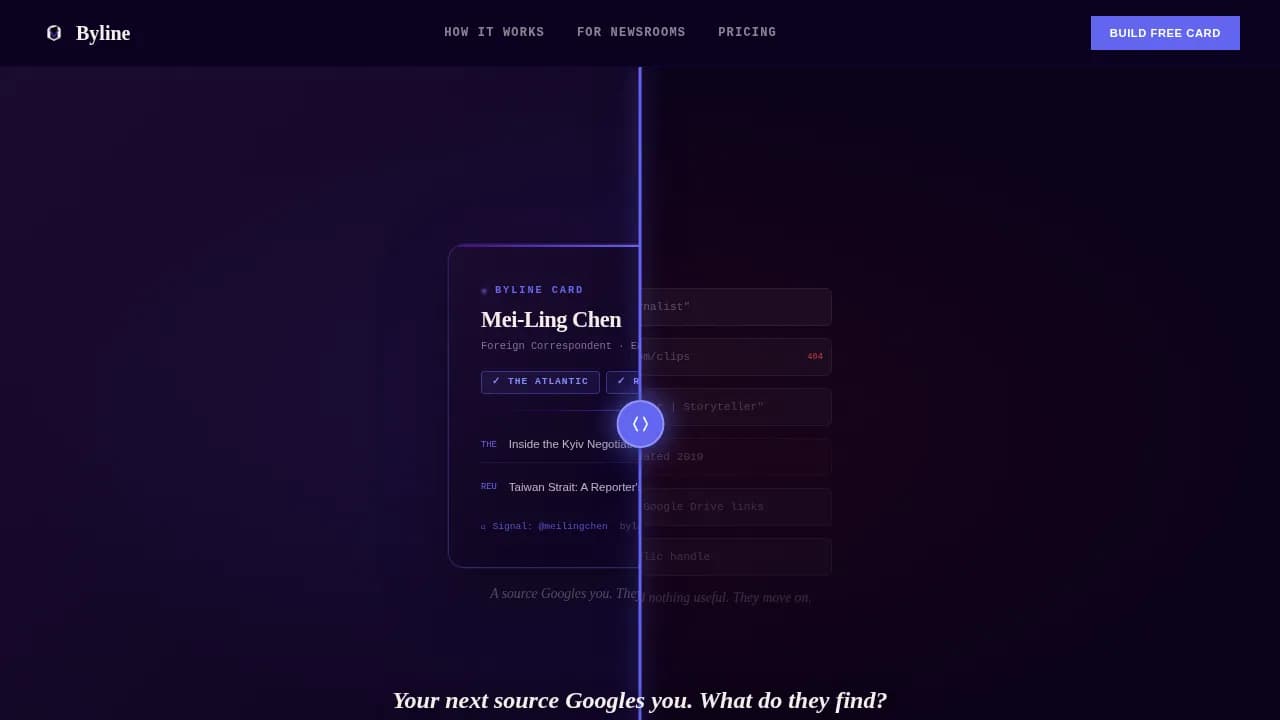
A Before/After Slider hero that splits the viewport between credential chaos and a clean, verified digital business card, with a scroll-triggered headline fading in over the seam
Three full case study sections, each following a Problem, Build, and Result arc with animated module assembly and quantified outcomes
A dual-conversion architecture: a "Build One Free Card" path for individual journalists and an "Equip Your Newsroom" form for organizational leads
Feature list
This template is packed with purposeful components. Every element serves the core promise: credibility is infrastructure, not decoration.
Before/After Slider Hero
The hero splits the full viewport into two states. The left side shows the journalist's current reality: a cluttered go-bag, broken links, and a LinkedIn profile that says nothing about their actual beat. The right side reveals the Byline card in full, with verified masthead badges, a curated clip reel, and encrypted contact. The visitor drags the divider like pulling a page across a lightbox. The headline fades in over the seam: "Your next source Googles you. What do they find?"
Scroll-Triggered Case Study Narrative
Three full-page sections each tell one journalist's story in three beats: the problem, the build, and the result. Each "build" beat is shown as an animated assembly of digital business card modules snapping into place. Results are specific and quantified, from a source making first contact to a fellowship acceptance. The escalating format moves from a solo freelancer to a bureau chief and finally to a full newsroom deployment, making the organizational case feel inevitable rather than forced.
Interstitial Stat Breaks
Between each case study, a single bold statistic hits the screen in electric indigo type on pressroom black. These pull-quote moments are designed to make partnership leads pause and do math. They function like a front-page headline dropped between long reads, giving the eye a break while reinforcing the platform's reach and impact.
Dual Conversion Form Architecture
The template includes two distinct conversion paths working in parallel. Individual journalists see a "Build One Free Card" call to action early in the scroll, letting them experience the product and seeding bottom-up adoption. After the third case study proves organizational scale, a structured "Equip Your Newsroom" form appears, collecting organization name, newsroom size via dropdown, the contact's role, and work email. This sequencing is intentional: the form earns the click before it asks for the information.
Editorial Typography and Color System
Cabinet Grotesk and Fraunces handle editorial headlines, giving every section the weight of a broadsheet front page. JetBrains Mono appears for datelines and metadata, adding pressroom authenticity. The Electric Indigo color system uses pressroom black (#0D0221), electric indigo (#4B0082), newsprint warm white (#F5F0EB), and neon dateline blue (#6366F1). Backgrounds alternate between black and white per full-page section, indigo anchors headlines and transitions, and dateline blue fires on every hover state and call to action.
Section-by-Section Animation Choreography
Every section has its own animation logic. The hero runs a drag-responsive slider. Case study sections trigger scroll-based card assembly. Interstitial stats count up on entry. The partnership form reveals its fields progressively. Together these create a reading rhythm that feels like turning pages, not scrolling a feed, keeping visitors engaged long enough to reach the conversion moment.
Freelancer story: problem, animated card build, quantified result
Interstitial Stat One
Bold pull-quote stat in indigo on black to anchor emotional momentum
Case Study Two
Bureau chief story: escalated stakes, animated build, measurable outcome
Interstitial Stat Two
Second pull-quote stat reinforcing platform scale before org-level story
Case Study Three
Full newsroom deployment story leading directly into partnership form
Partnership Form
"Equip Your Newsroom" form with org name, size dropdown, role, and work email
Free Card call to action
"Build One Free Card" secondary path seeding individual journalist adoption
Footer
Horizontal flow footer with navigation and platform context
Design & branding system
The design language is anchored in broadsheet editorial tradition. Every choice references the physical experience of a newspaper: the weight of ink on newsprint, the urgency of a late-edition print run, and the clarity of a front page that has already decided what matters most.
The Electric Indigo color system pairs pressroom black (#0D0221) and newsprint warm white (#F5F0EB) as section backgrounds, with electric indigo (#4B0082) anchoring headlines and electric dateline blue (#6366F1) activating on every hover state and call to action button
Cabinet Grotesk and Fraunces provide editorial headline authority, while JetBrains Mono handles datelines, metadata labels, and code-style credentialing details, creating a layered typographic hierarchy that reads like a professionally designed front page
The brand logo placement, consistent branding across all section transitions, and alternating background rhythm ensure that every scroll feels intentional and editorially composed, leaving a lasting impression on every visitor
Mobile & speed optimization
The template is desktop-first by design, matching the primary use case of editors reviewing journalist credentials on laptops and newsroom workstations. The Before/After Slider and animated card assembly perform best on wider screens where the full viewport drama is visible. That said, the layout is built to be mobile responsive so that individual journalists sharing their card links on phones or tablets still get a clean, readable experience.
Interactive components such as the hero slider and partnership form are built as client components for smooth interactivity, while static case study and interstitial sections use server-side rendering for reliable load performance
The storybook scroll format naturally segments content into full-page sections, which keeps each viewport clean and avoids the visual noise that degrades mobile reading on dense, multi-column layouts
How this template helps you convert
The conversion strategy in this template is sequential and earned. Every scroll adds proof before asking for anything. The page never leads with a form; it leads with a story. By the time the "Equip Your Newsroom" call to action appears, the visitor has already seen three documented outcomes and two bold statistics.
The Before/After Slider creates immediate, personal recognition: every journalist or editor who drags that divider sees their own problem and the solution in the same gesture, making the value proposition visceral before a single word of copy is read
The three-case-study narrative escalates from individual to organizational stakes, naturally qualifying the audience as the page progresses, so that by the third case study the "Equip Your Newsroom" form feels like the logical next step rather than an interruption
The dual-path architecture captures both audiences in one scroll: individual journalists convert on the free card offer early, seeding bottom-up product adoption that warms the enterprise sale waiting at the bottom of the page
Other information about this template
This template sits at the intersection of personal resume pages and journalist profile tools, built specifically for the journalist digital business card niche. Understanding how the broader digital business card landscape works helps buyers see exactly what this template is designed to achieve.
Over eight billion business cards are thrown out every year, making the shift to a digital business card both cost effective and eco-friendly; digital business cards can be updated anytime, shared in seconds, and never end up in a go-bag trash pile
The digital business card market is projected to grow at a compound annual growth rate of 7.5 percent and reach six billion dollars by 2030, making this niche a serious business opportunity for platform founders
A professional journalist's digital business card should function as a digital press kit or mini-portfolio, prioritizing credibility, a clean aesthetic, and easy access to a portfolio of clips alongside secure contact options
The Byline/Headline Integration design approach used in this template allows for a distinct, bold headline displayed below the journalist's name, reinforcing the editorial identity of each card
Templates like "Profile" or "Personal" can work for basic journalist pages, but a purpose-built business card template with verified masthead modules and encrypted contact goes further in establishing source trust
Tools such as a free business card maker, an intuitive drag and drop editor, or a business card maker with customizable templates let individual journalists create their first digital business card quickly on any free plan or free version before upgrading to a paid plan
Features common across professional digital business card platforms include qr code generation via a built-in qr code generator, qr code sharing, nfc cards for physical tap-to-share moments, google wallet and apple wallet integration, an apple watch widget for quick sharing, and a business card scanner for capturing contacts at events
Many platforms also offer video support and video embeds, unlimited contacts, unlimited storage, built in analytics to track engagement, an analytics dashboard, deep analytics for enterprise teams, crm integration, lead capture forms, and lead generation tools that connect to a sales team's workflow
Platforms like Wave Connect offer a user friendly interface and a generous free plan, making them accessible to solo professionals and small teams without any additional cost; most users can get started on a free version and upgrade to a paid subscription or paid plan as their needs grow
Other platforms such as Blinq, Popl, HiHello, and Mobilo each take different approaches: Blinq is recommended for journalists who want a clean, modern landing page; Popl is known for its extensive customization options and video embeds; HiHello focuses on contact details and social verification; Mobilo is a strong choice for a sales team that needs unlimited contacts and contact management
QR TIGER is widely recognized as a leading qr code generator for dynamic, customizable qr codes used in digital business card design
Canva is not just for social posts; it also provides professionally designed business card templates with custom fonts and brand colors, and lets you download your finished design as a png file or other formats; you can also order high quality prints through Canva or use high quality prints from other platforms for printed cards that complement your digital card
Taplink allows anyone to create a digital business card in under five minutes using one of over 200 customizable templates, accessible from any device including those running on Google Play
Adobe Express lets you launch a free virtual business card from any desktop or mobile device, with thousands of professionally designed templates to choose from and the ability to personalize your digital business card design to match your brand image and brand logo
For journalists building a professional image, the best digital business cards combine a clear job title, verified social links, messaging apps integration, and consistent branding with a professional design that leaves every source, editor, or fellowship committee with a lasting impression
Enterprise teams and newsrooms benefit from advanced tools, extensive customization, and contact management features that deliver overall value beyond what a small business owner or solo professional needs from a basic virtual business card
The byline verified journalist digital business card landing page template covered here is purpose-built for this exact use case, combining design quality with a conversion architecture that serves both individual reporters and organizational buyers