Chocolate & Confectionery Appointment Booking Website Template
Cacao is a masonry-style artisan chocolate tasting booking landing page template built for small-batch chocolate makers. It blends a Pastoral Calm visual identity with a Gallery Walk creative direction, guiding visitors through origin farms, roasting close-ups, and finished bars before presenting a frictionless booking form for Discovery Tastings, Bean-to-Bar Workshops, and Private Events.
by Rocket studio
Quick summary
Cacao is a single-page chocolate landing template designed around immersive storytelling and booking conversion. A Warm Stone color palette, loose watercolor mascot illustration, and a Pinterest-style masonry grid set the scene. Visitors walk a visual gallery of the chocolate-making journey before reaching a clear booking prompt, making the decision to reserve feel natural rather than forced.
Who this template is for
This template is a strong choice for artisan chocolate makers who host tastings, workshops, or private events. It speaks directly to makers who want their craft to do the selling before any call-to-action appears.
- Artisan chocolate producers running Saturday tastings or bean-to-bar workshops
- Boutique hotel concierges and wedding planners sourcing bespoke chocolate experiences
- Small-batch makers who want to find new guests and sell tasting vouchers online
What problem this template solves
Most chocolate websites struggle to convey sensory richness through a screen. Generic layouts flatten the story of single-origin beans, careful fermentation, and hand-tempered bars into forgettable product pages. A dedicated chocolate landing page built around editorial photography and hover-reveal stories changes that.
- Visitors leave generic pages quickly; this design lowers bounce rate by earning attention through gallery immersion first
- Standard booking websites bury the scheduling form; here the booking prompt arrives only after the gallery walk sets context
- Makers lack a dedicated space to communicate their unique value proposition around single-origin, handcrafted chocolate
What you get with this template
You get a fully structured chocolate landing page with five purpose-built sections, a mascot character, and a booking module that keeps the reservation process simple. Every design decision serves the artisan positioning and the tasting conversion goal.
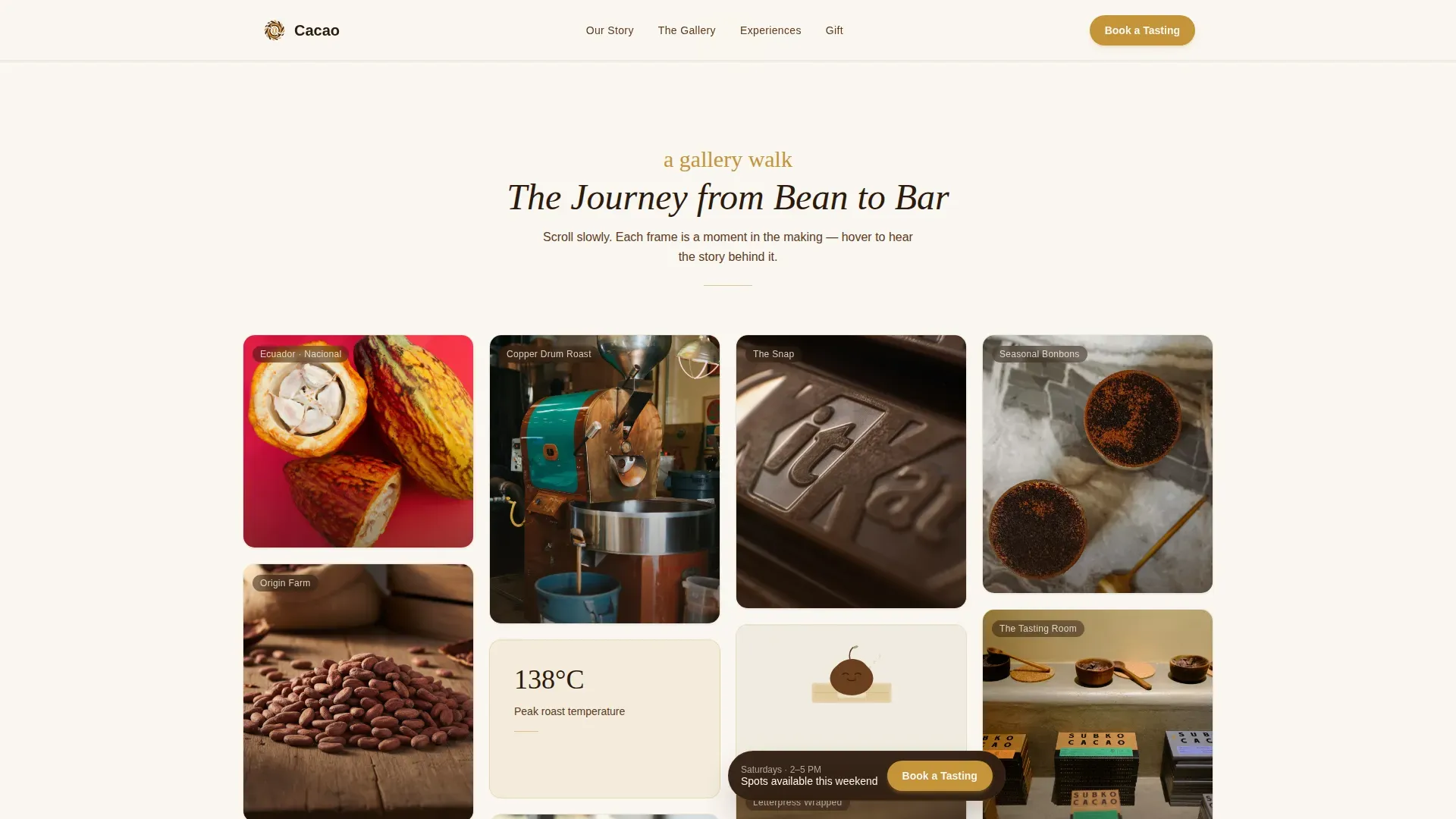
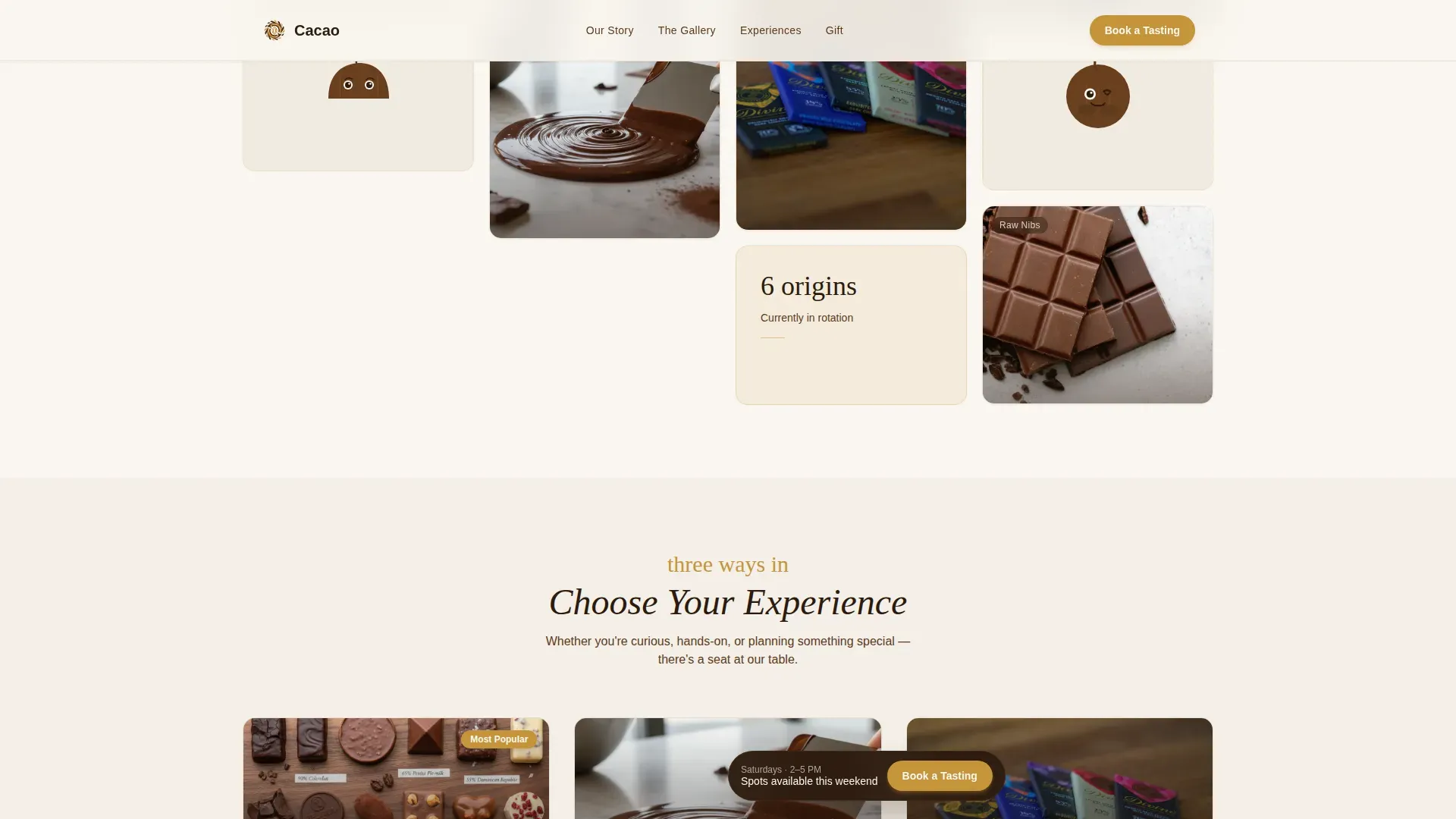
- A masonry gallery with staggered card reveals, hover story overlays, and mascot vignettes interspersed throughout
- An inline booking form requesting only date preference, group size, and experience type, plus a "Send as a Gift" toggle
- A social proof strip featuring origin farm details, fermentation stats, and process metrics to build trust before the booking step
Feature list
This template ships with a tightly considered set of features. Each one earns its place by serving either the gallery experience, the booking flow, or the artisan brand design.
Masonry Gallery with Hover Story Reveals
Cards vary in height and width organically, creating a curated exhibition feel. Each card carries a single-line story revealed on hover, such as origin farm details or fermentation notes. The scroll rewards visitors who linger, encouraging deeper engagement with the chocolate-making narrative.
Illustrated Mascot and Watercolor Hero
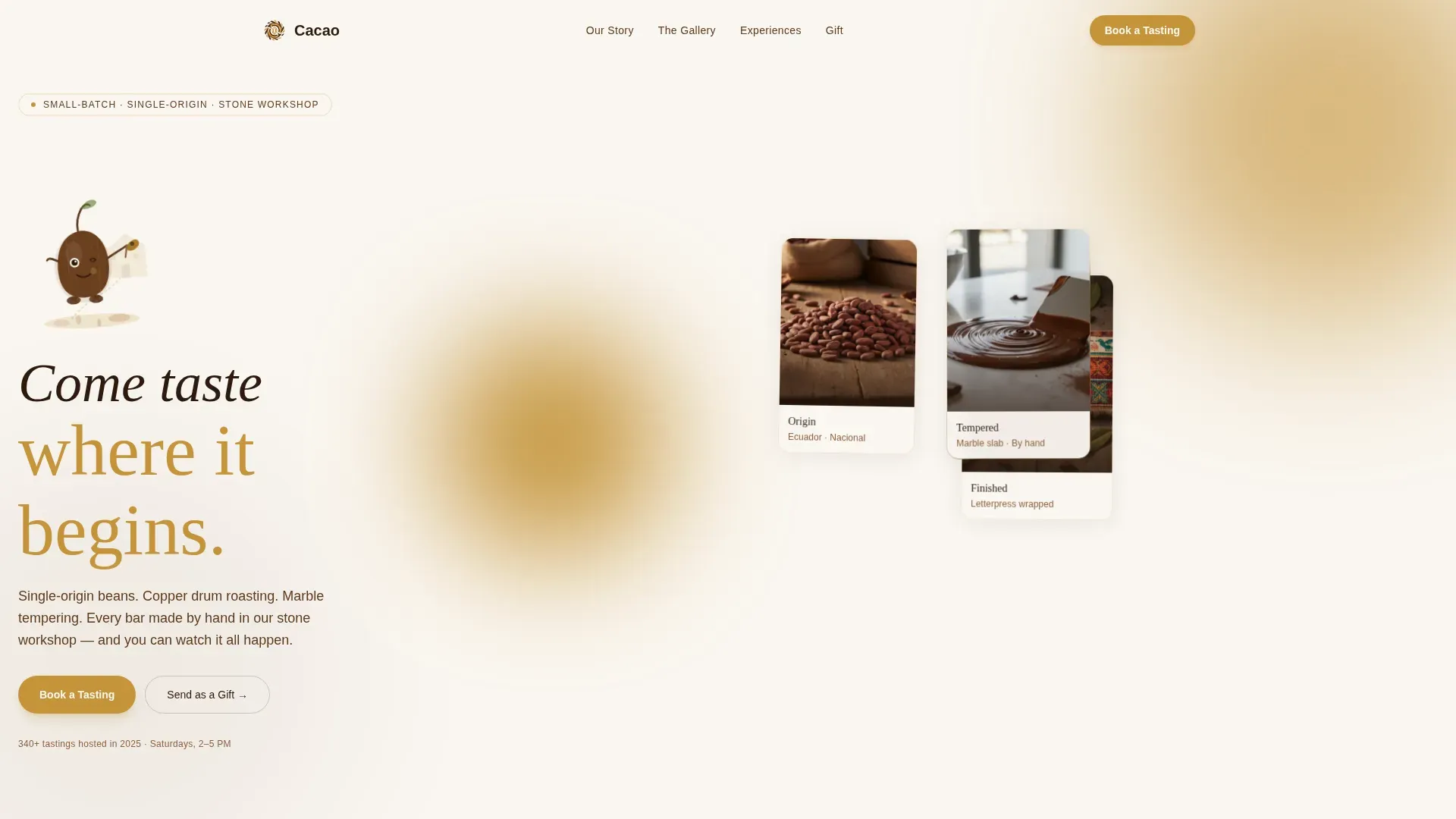
The header features a hand-illustrated cacao pod character rendered in loose ink and muted watercolor wash. The mascot appears again in small vignettes within the gallery, peeking from behind molds or resting on a wrapped bar. This illustration style brings warm personality to the design without veering into cartoonish territory.
Inline Booking Module with Gift Toggle
The booking form keeps friction low by asking for three things: a date preference, group size (one to twelve guests), and experience type. Visitors can choose Discovery Tasting, Bean-to-Bar Workshop, or Private Event. A secondary path lets visitors purchase a tasting voucher as a gift without committing to a date.
Sticky Booking Call-to-Action
A "Book a Tasting" button in honeycomb amber pins gently to the bottom of the viewport after the first scroll. This keeps the primary conversion action visible at all times without interrupting the gallery experience. It is effective at capturing visitors who are ready to act at any point in their scroll.
Social Proof Strip
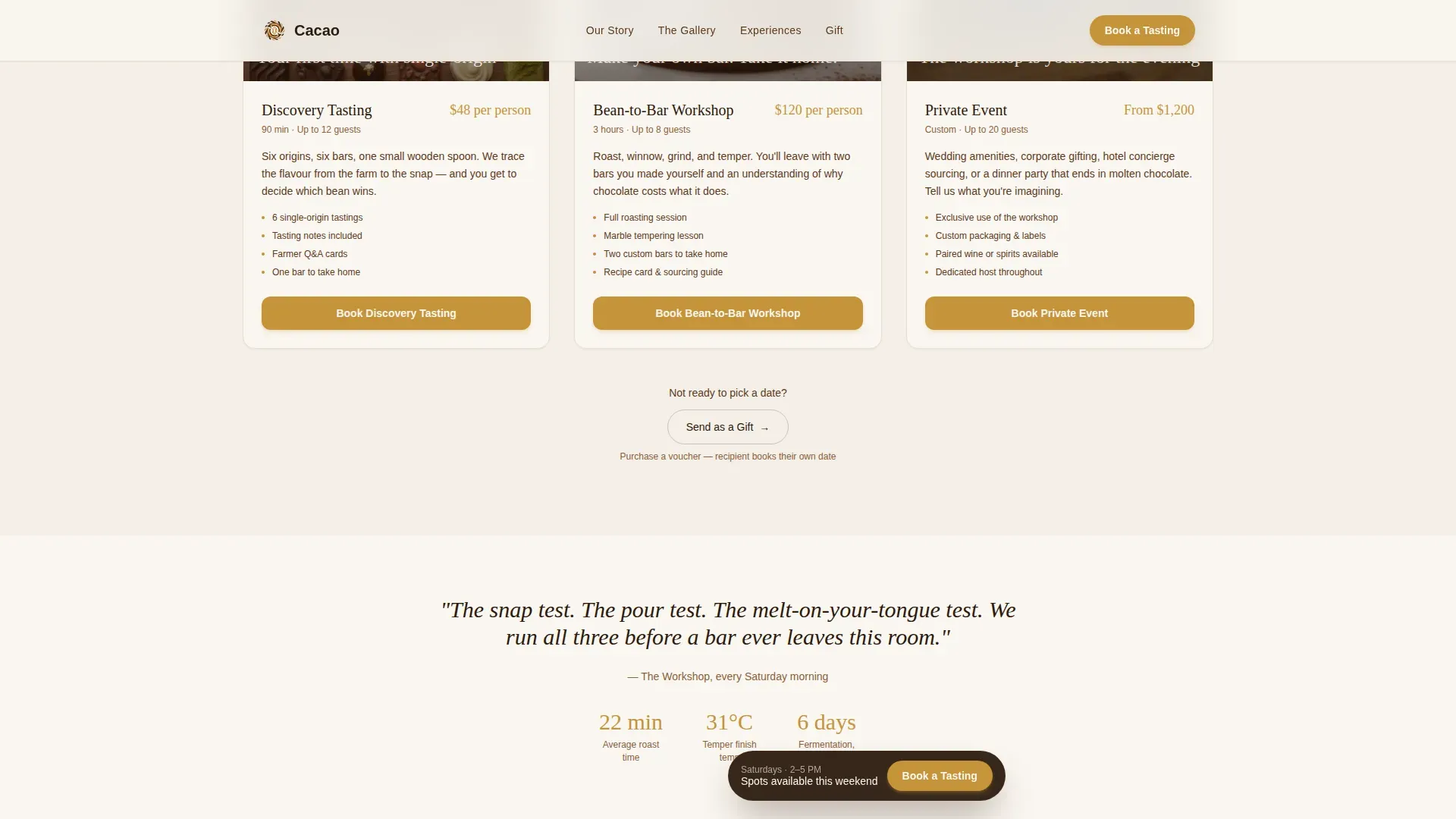
A dedicated strip presents origin quotes, process stats, and guest milestones. These details, such as fermentation days and roasting temperatures, give visitors factual context for the craft. Credibility markers help visitors understand the quality behind every bar before they commit to a booking.
Three Experience Type Cards
The Experience Types section presents Discovery Tasting, Bean-to-Bar Workshop, and Private Event as distinct cards, each with its own booking call-to-action. This layout helps visitors self-select the right format. It also makes it easy to read pricing information and session details at a glance.
Page sections overview
| Section | Purpose |
|---|---|
| Hero with Mascot | Introduces the brand voice and headline with floating image cards and mascot illustration |
| Masonry Gallery | Guides visitors through the chocolate-making journey via varied editorial cards with hover reveals |
| Experience Types | Presents the three tasting formats with individual booking calls-to-action |
| Booking Module | Hosts the inline scheduling form with experience toggle and gift voucher path |
| Social Proof Strip | Displays origin quotes, process stats, and credibility markers |
| Footer | Centers social icons and copyright in a clean, minimal layout |
Design & branding system
The design follows a Pastoral Calm theme built on the Warm Stone color system. Every color choice references the physical environment of an artisan workshop, from dusted cocoa powder on sandstone to a copper bowl catching afternoon light.
- Palette: sun-bleached limestone (#E8DFD0) for card backgrounds, dark cacao husk (#2C1A0E) for all body text, raw honeycomb amber (#C4943A) for buttons and hover states, and fresh cream (#FAF6F0) as the dominant background
- Typography: Fraunces warm serif for headlines, DM Sans for body text, creating an editorial contrast that feels considered and unhurried
- Illustration style: loose ink and muted watercolor wash, closer to a Beatrix Potter frontispiece than a commercial illustration, keeping the design vibrant yet refined
Mobile & speed optimization
The masonry layout is designed desktop-first and collapses gracefully on smaller screens. Card reveals use Intersection Observer and CSS transforms only, keeping motion smooth across every device.
- The masonry grid reflows cleanly on tablet and mobile without losing the gallery pacing
- Staggered card animations use CSS transforms to keep rendering efficient on any device
- The sticky booking call-to-action remains accessible and well-positioned on smaller screens throughout the scroll
How this template helps you convert
A chocolate landing page is essential for converting visitors into customers or booking confirmed guests. This template earns the conversion by building desire before presenting the ask.
- The gallery walk lets visitors experience the craft visually first. By the time they find the booking prompt, they have already walked the full chocolate-making journey and met the mascot character twice, making the booking feel like a natural next step from the beginning.
- The booking form requests only essential details, keeping friction low and results strong. Visitors can also choose the "Send as a Gift" path to open a voucher purchase without selecting a date, which broadens the set of conversions the page can capture.
Other information about this template
This template is built for makers who want effective results from a single-page design without needing to write code. It is easy to customize colors, swap photography, and make content changes without technical skills. The layout is set up for straightforward edits so you can open any section, update copy, and view the results immediately.
- You can utilize the booking form to capture email addresses and connect them to an email marketing list, helping you build contact with past and future guests
- The design supports promotions and seasonal offers by making changes to the Experience Types cards or adding a banner above the hero
- Monitoring key metrics, such as bounce rate and booking form completions, helps you determine which content changes produce the best results
- The template works well for Google visibility when paired with a clear page title and descriptive meta content; search results improve when the page loads quickly and the content is specific to your location and offering
- Cookies and site analytics tools can be connected at the platform level to track how visitors interact with the page and inform future promotions
- Checking your email list regularly allows you to view new sign-ups, send follow-up information about upcoming tastings, and re-engage guests who have not yet confirmed orders
- Unicorn Platform offers a drag-and-drop builder for creating landing pages like this one, and provides templates suitable for any brand image or target audience
- Users can press enter or select options in the booking module without friction; the form is designed so visitors can open it, complete their choice, and sign up in under a minute
- A/B testing tools allow you to create variations of the chocolate landing page and determine which set of changes produces the best conversion results across different devices
Theme
Pastoral Calm
Creative direction
Gallery Walk
Color system
Warm Stone
Style
Masonry/Pinterest
Direction
Booking/Scheduling
Page Sections
Masonry Gallery with Hover Story Reveals
Illustrated Mascot and Watercolor Hero
Inline Booking Module with Gift Toggle
Sticky Booking Call-to-action
Social Proof Strip
Three Experience Type Cards
Related questions
Can I customize the colors and fonts in this template?
How does the booking form work?
Is this template suitable for private and corporate chocolate tasting events?
Do I need coding skills to use this template?
How can I capture email addresses from this landing page?