Military & Defense Professional Website Template
Cadence is a single-column military academy landing page template built for admissions teams that need to earn family trust before asking for a commitment. It guides prospective parents through a four-step journey from program exploration to open house registration, using a warm Community Hearth design, a centered search hero, amber-accented progress cues, and a sticky event registration form that converts at the right time.
by Rocket studio
Quick summary
Cadence is a focused, single-column landing page template designed for military boarding academies. It walks families through a structured admissions journey: Explore, Visit, Apply, and Arrive. Every design decision, from the evergreen hero to the lantern amber progress bar, is built to earn trust one section at a time and convert that trust into open house registrations.
Who this template is for
This template is a good match for admissions teams and enrollment directors who need a professional, conversion-focused page that speaks directly to families. It is built for people who understand that parents comparing academies at midnight need clarity, warmth, and a clear next step, not a wall of text or a confusing navigation menu.
- Military boarding academies recruiting teenage cadets aged 13 to 18
- Enrollment teams targeting parents of students who need structure, academic focus, and character development
- Admissions offices running open house events and needing a reliable way to capture registrations
What problem this template solves
Most military academy pages get things wrong in one critical way: they lead with spectacle and skip the relationship. Parents arrive with real questions about cost, curriculum, daily routines, and what life actually looks like on campus. They want information that is honest and easy to find. A generic page that buries the admissions process, hides tuition data, or forgets to show social proof will lose those families before they ever hit the registration form.
- Families leave pages that feel cold, confusing, or unresponsive to their specific questions
- Admissions teams lose leads when there is no clear, low-pressure path from curiosity to commitment
- Open house seats go unfilled when the registration process requires too much effort before trust is established
What you get with this template
This template delivers a complete, ready-to-customize single-column landing page with high interactivity and a clear mission: move families from first visit to registered open house attendees. Every section has a job to do, and every design element earns its place on the page.
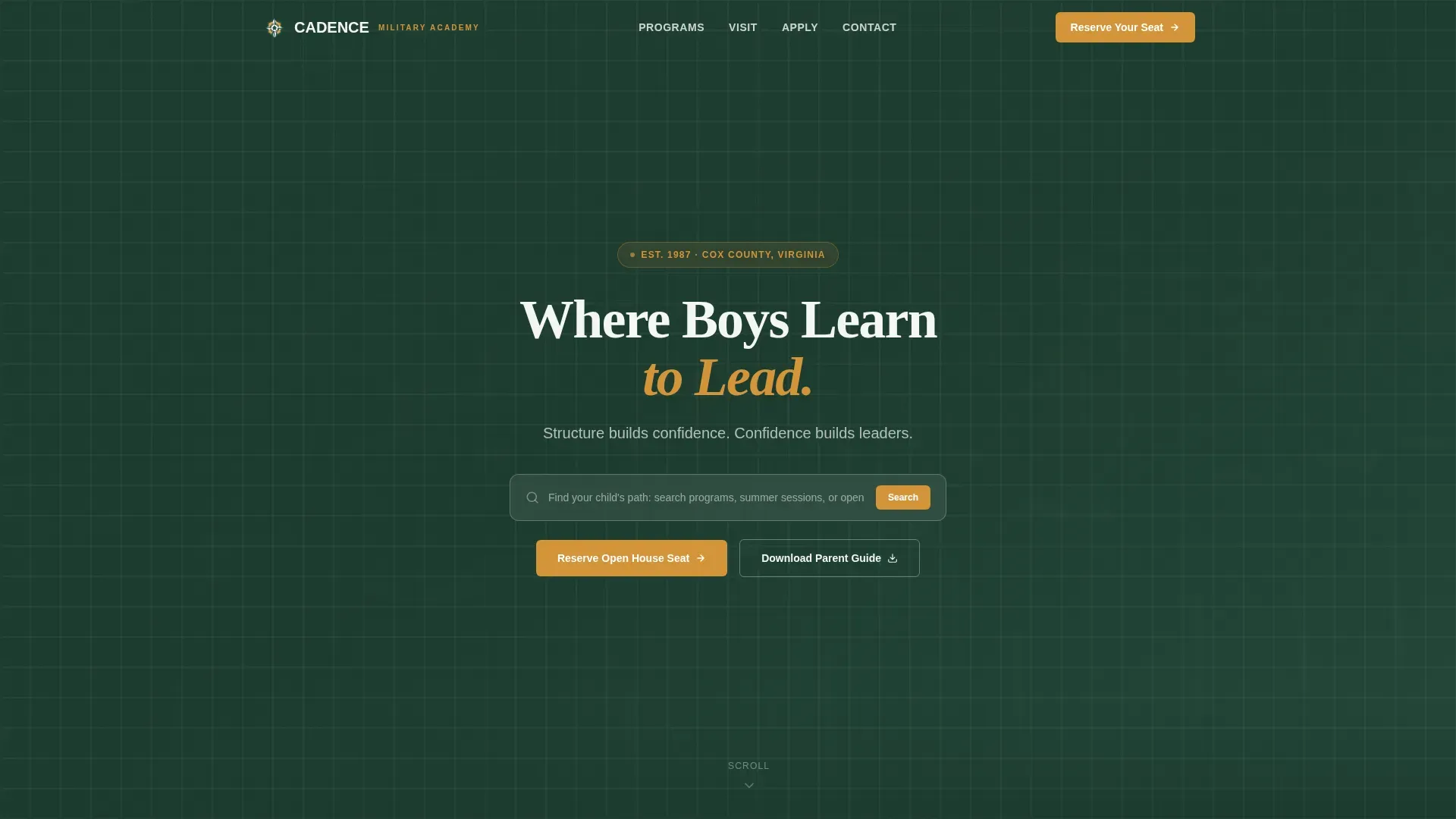
- A cinematic hero section with a centered search box, evergreen background, and a grounding tagline
- A four-step admissions journey with program cards, an open house calendar, a requirements checklist, and an induction day photo sequence
- A sticky event registration form with a warm, qualifying question that makes parents feel heard before they arrive on campus
Feature list
This template ships as a carefully designed, fully structured version of a high-performing military academy landing page. The features below reflect what is built into the template as described in the source brief.
Centered Search Hero
The above-the-fold section opens with a centered search box set against a deep evergreen field. The placeholder text reads "Find your child's path: search programs, summer sessions, or open house dates." A single tagline in granite gray sits below it. This design communicates utility immediately, signaling to parents that this page is built to serve their questions, not shout over them. It is the kind of above-the-fold experience that conveys prestige without noise.
Four-Step Admissions Journey
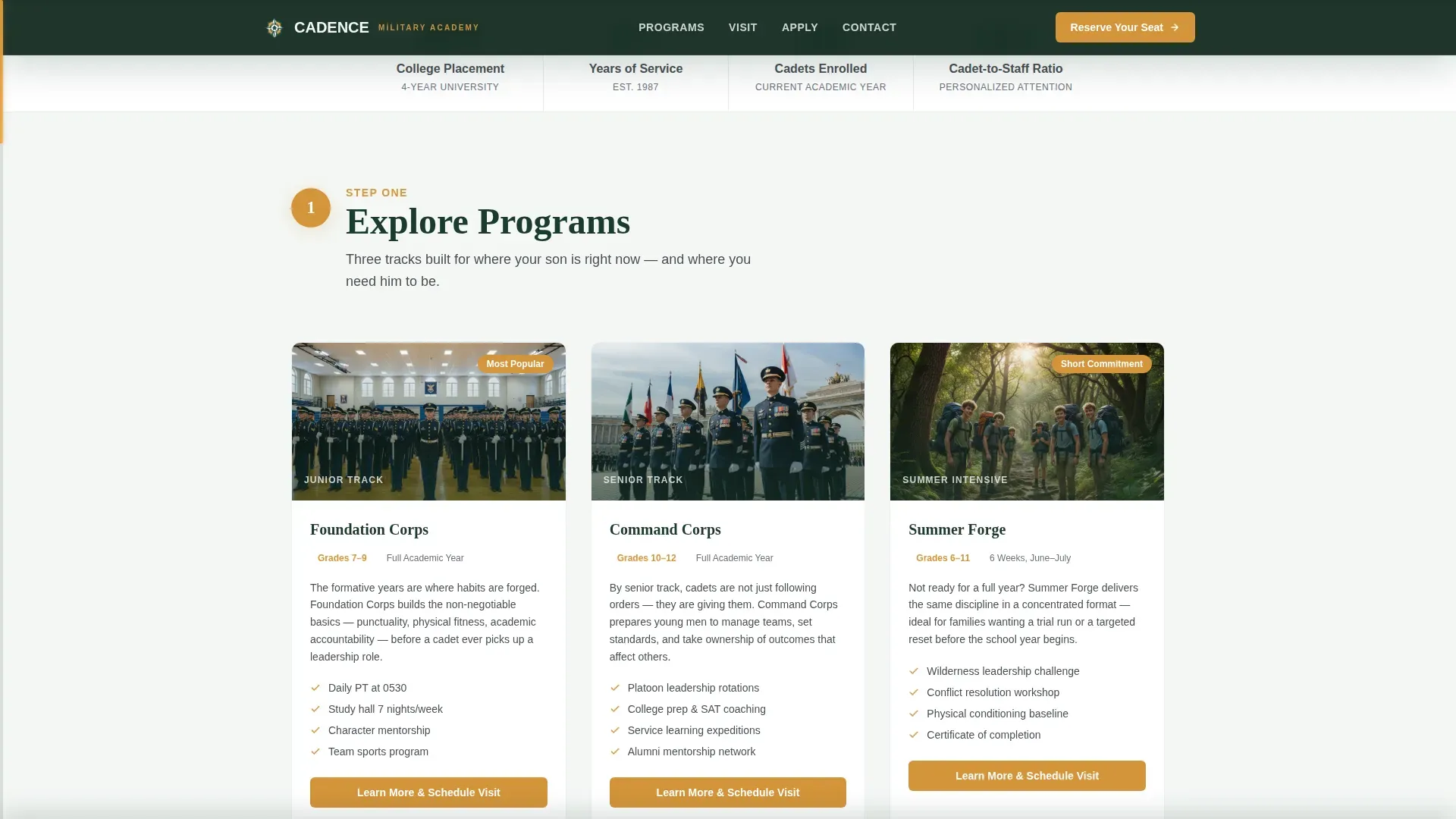
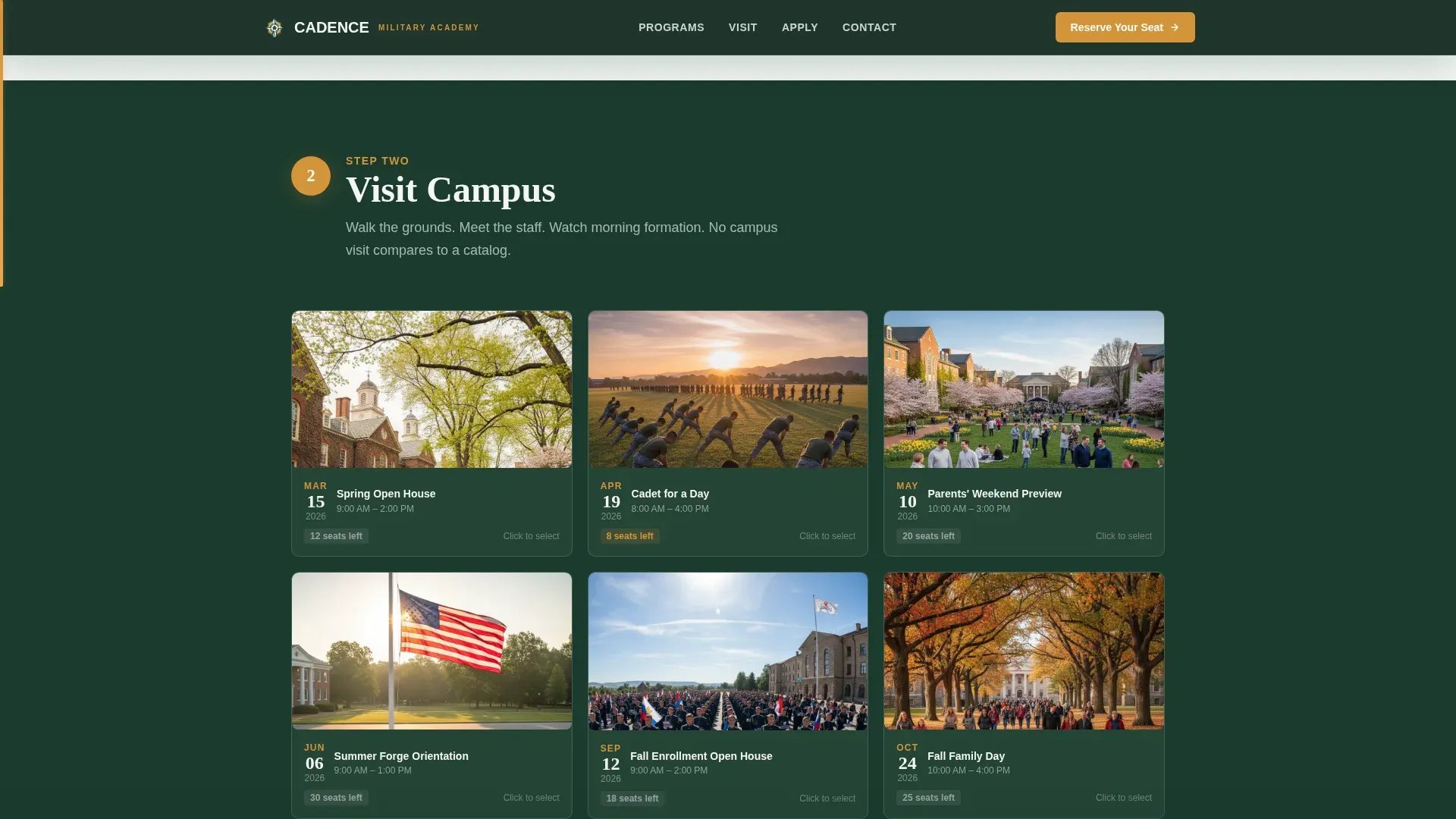
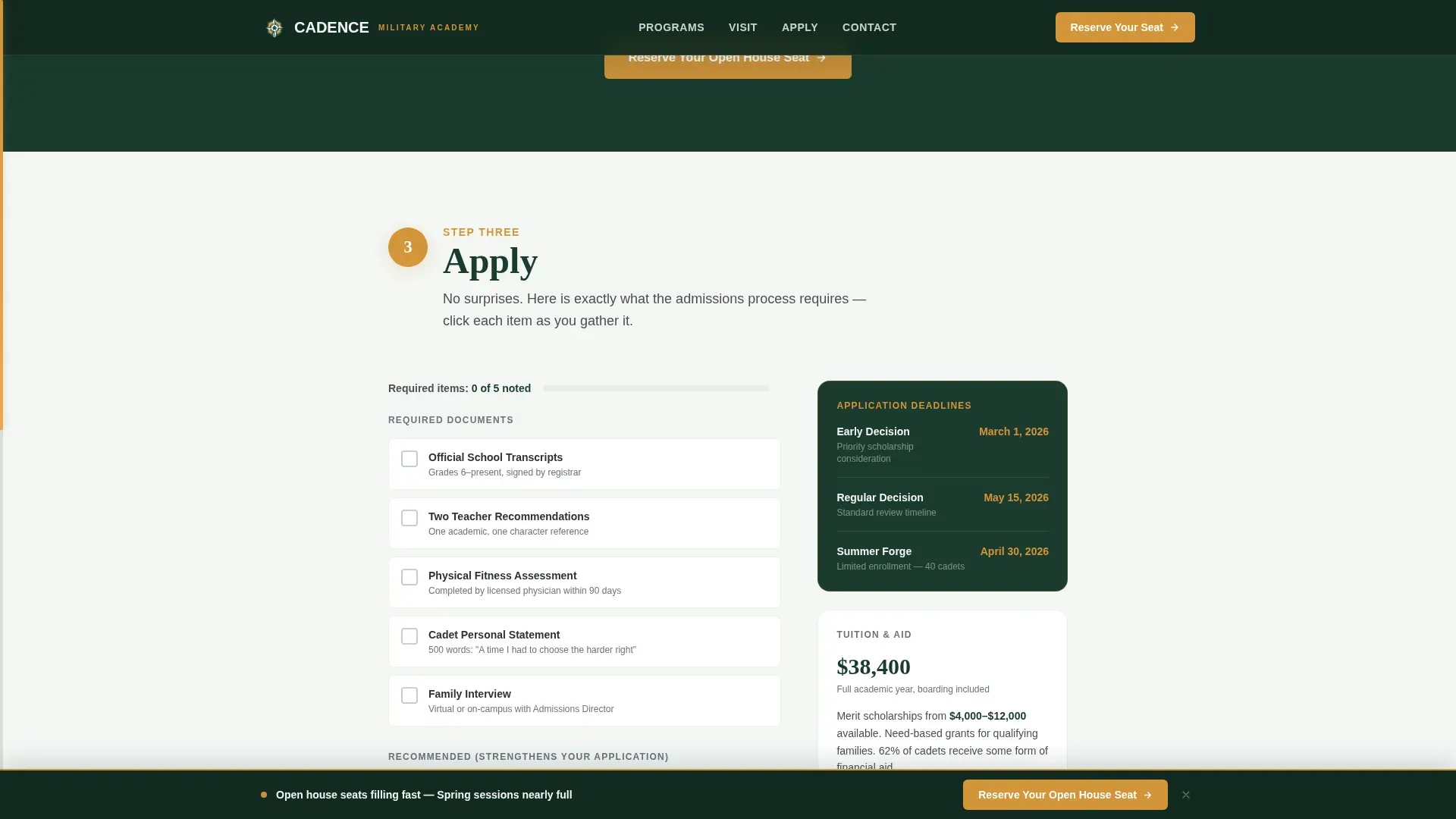
The page is structured as a step-by-step guide that mirrors how good admissions conversations actually work. Step One presents program cards for junior, senior, and summer tracks. Step Two shows an interactive open house calendar with campus photo thumbnails. Step Three offers a requirements checklist that grays out mentally noted items. Step Four delivers a warm induction day photo sequence. Each step deepens family understanding and commitment before asking for the next action.
Lantern Amber Progress Bar
A thin progress bar runs along the left margin of the page, filling with lantern amber as the parent scrolls. This gives families a visible sense of forward motion through the admissions process. It is a small design detail with real power: it keeps people moving and reduces the chance that a good session gets skipped halfway through.
Sticky Open House Registration Form
The primary call to action, "Reserve Your Open House Seat," first appears after Step Two and remains pinned to the bottom of the viewport from that point forward. The form collects parent name, the cadet's grade level, preferred open house date via dropdown, and one optional open-ended question: "What's the one thing you most want for your child?" That last field does important work by qualifying intent and making parents feel genuinely heard.
Social Proof Stats Bar
A dedicated stats bar displays enrollment numbers, graduation rate, and college placement data. Outcome statistics are prominently featured so families can do the math themselves. Showcasing hard data like graduation rates and college placement figures reinforces the quality of education in a way that words alone cannot. Photo testimonials from families run alongside this data to add warmth and relatability.
Secondary Email Capture Path
Not every family is ready to reserve a seat on their first visit. The secondary path, "Download the Parent Guide," captures email addresses from folks who need more time. This broadens the top of the funnel and ensures that good leads are not lost simply because a family needs another week before committing.
Page sections overview
| Section | Purpose |
|---|---|
| Cinematic Hero | Search box, tagline, first impression |
| Step 1: Explore | Program cards for all tracks |
| Step 2: Visit | Open house calendar with thumbnails |
| Step 3: Apply | Requirements checklist interaction |
| Step 4: Arrive | Induction day photo sequence |
| Stats and Social Proof | Data bar and family testimonials |
| Sticky Registration Form | Primary open house conversion form |
| Secondary Email Capture | Parent Guide download and lead path |
| Footer | Logo, tagline, and navigation links |
Design & branding system
The design follows a Community Hearth theme using the Alpine Fresh color system. The visual identity is deliberately warm and grounded, like a lodge common room at the edge of a mountain trail. Typography pairs Fraunces, a serif display face, for headlines with Manrope, a clean sans-serif, for body text. This combination conveys professionalism, tradition, and strength without feeling institutional or cold. Visual elements use authoritative tones and recognizable font weights to encapsulate the academy's brand and ethos.
- Deep evergreen (#1B3A2D) for primary backgrounds, granite summit gray (#4A4F54) for body text, morning frost white (#F4F7F5) for open space, and warm lantern amber (#D4943A) for buttons, highlights, and progress cues
- A consistent color scheme that signals military discipline while keeping the emotional register warm enough to welcome suburban and international families
- Authentic imagery of cadets in action, designed to avoid the generic stock-photo feel that undermines trust on academy pages
Mobile & speed optimization
The template is built desktop-first, reflecting the reality that parents comparing academies tend to do their most serious research on a laptop late at night. That said, the layout is fully responsive so the experience does not break on tablets or phones. A responsive design is essential for any military institution page, and this template is structured to hold up across devices without sacrificing the visual weight of the hero or the usability of the calendar and checklist.
- Single-column flow that adapts cleanly from widescreen desktop down to mobile viewports
- Interactive components including the calendar date picker, checklist, and sticky form are built for usability on all screen sizes
- Server components handle static sections for reliable delivery; client components manage interactive elements
How this template helps you convert
This template treats conversion as a process, not a moment. It never asks for action before it has earned the next inch of trust. The design, copy structure, and interactive components all work together with one goal: move a family from curious visitor to confirmed open house attendee.
- The search hero qualifies intent from the very first second, so families who start typing are already engaged and ready to learn more about programs, sessions, and dates
- The four-step admissions journey builds commitment gradually, with each section earning the right to ask for the next level of information before the registration form ever appears
- The sticky call-to-action form, the optional qualifying question, and the secondary email capture path together ensure that families at different stages of readiness all find a next step that fits where they are
Other information about this template
This section covers additional context that is good to understand before you start working with the template. There are a number of practical things worth knowing about how this template is positioned, what version it ships as, and how it fits into a broader set of design decisions for military institution pages.
The Cadence trusted military academy landing page template is one of the more focused military academy templates available. It is built specifically for event registration, which makes it a different kind of tool than general institution templates that try to do every job at once. Most templates of this class attempt to serve too many missions on a single page, and the result is a design that serves none of them well. Cadence avoids that trap by committing fully to one mission: get the right family to the right open house at the right time.
The template ships as a single, complete version ready for customization. Teams can adjust colors, swap photography, update program card data, and populate the calendar with real open house dates without rebuilding the design from the ground up. Accreditation logos, military association badges, and specific award marks can be displayed in the appropriate sections to reinforce institutional credibility, which is something average visitors notice more than most folks realize.
For admissions teams thinking about marketing this page, the design is built to support a clean, responsible content strategy. The footer follows a split pattern with the logo and tagline on the left and navigation links on the right. There is no standard website header navigation on the page itself, which removes distractions and keeps family attention focused on the primary call to action.
- The template works well alongside a broader digital marketing effort; teams can share the page link in email campaigns, paid search, and social channels
- Cost and tuition information can be added to the requirements checklist section or a dedicated module to reduce uncertainty for applicants and their families
- The design supports accreditation logos and institutional badges in the hero or footer to reinforce credibility at first glance
- Teams looking for a company of templates beyond this one can explore related education and government templates in the same marketplace collection
- The template is built to be customized without needing to learn the hard way how each component is structured; the single-column flow keeps things ordered and approachable
Theme
Community Hearth
Creative direction
Step-by-Step Guide
Color system
Alpine Fresh
Style
Single Column Flow
Direction
Event Registration
Page Sections
Centered Search Hero with Tagline
Four-step Admissions Journey
Lantern Amber Progress Bar
Sticky Open House Registration Form
Social Proof Stats Bar and Testimonials
Secondary Email Capture Path
Related questions
Can I update the open house dates and program information myself?
Is this template suitable for a summer program or junior academy track?
What happens to families who are not ready to register for an open house?
Can I add accreditation logos or institutional badges to the page?
Does the template include testimonials or social proof sections?



