Tree Service Landing Page Template for Lead Gen
Canopy is a split-screen landing page template built for tree service companies that need to turn storm-damage urgency and Google Ads traffic into real booked jobs. It leads with local credibility, introduces the crew by name and trade, and drives conversions through a sticky estimate form and a direct click-to-call button. The design uses an Ink and Paper palette that feels grounded, honest, and built for working professionals.
by Rocket studio
Quick summary
Canopy is a single-page landing page template for tree service companies. It pairs a press-mention header with crew-led storytelling to build trust fast. A sticky lead form qualifies visitors by zip code and service type. The safety-orange call-to-action buttons stand out against a newsprint-white and carbon-black palette, giving the page a confident, no-nonsense working feel.
Who this template is for
This template is built for tree service operators who want their landing page to work as hard as their crew does. It suits businesses running Google Ads and needing a dedicated conversion page that earns trust before asking for contact details.
- Local tree service companies handling trimming, removal, and emergency storm response
- Arborists and certified crew leads who want their expertise front and center
- Property managers and contractors using paid search to reach homeowners quickly
What problem this template solves
Most tree service pages look the same. Stock photos, a phone number, and a generic contact form. That setup fails when someone is standing in their yard after a storm, looking for a crew they can actually trust. Canopy solves the credibility gap by showing real people doing real work before asking for anything.
- Homeowners searching after storm damage need immediate reassurance, not a slideshow
- Generic pages do not differentiate local crews from out-of-area franchise services
- Slow-loading or cluttered forms kill conversions from high-intent paid search traffic
What you get with this template
You get a complete, conversion-focused landing page layout designed around how tree service clients actually decide to call. Every section is structured to move a visitor from first impression to form submission without friction.
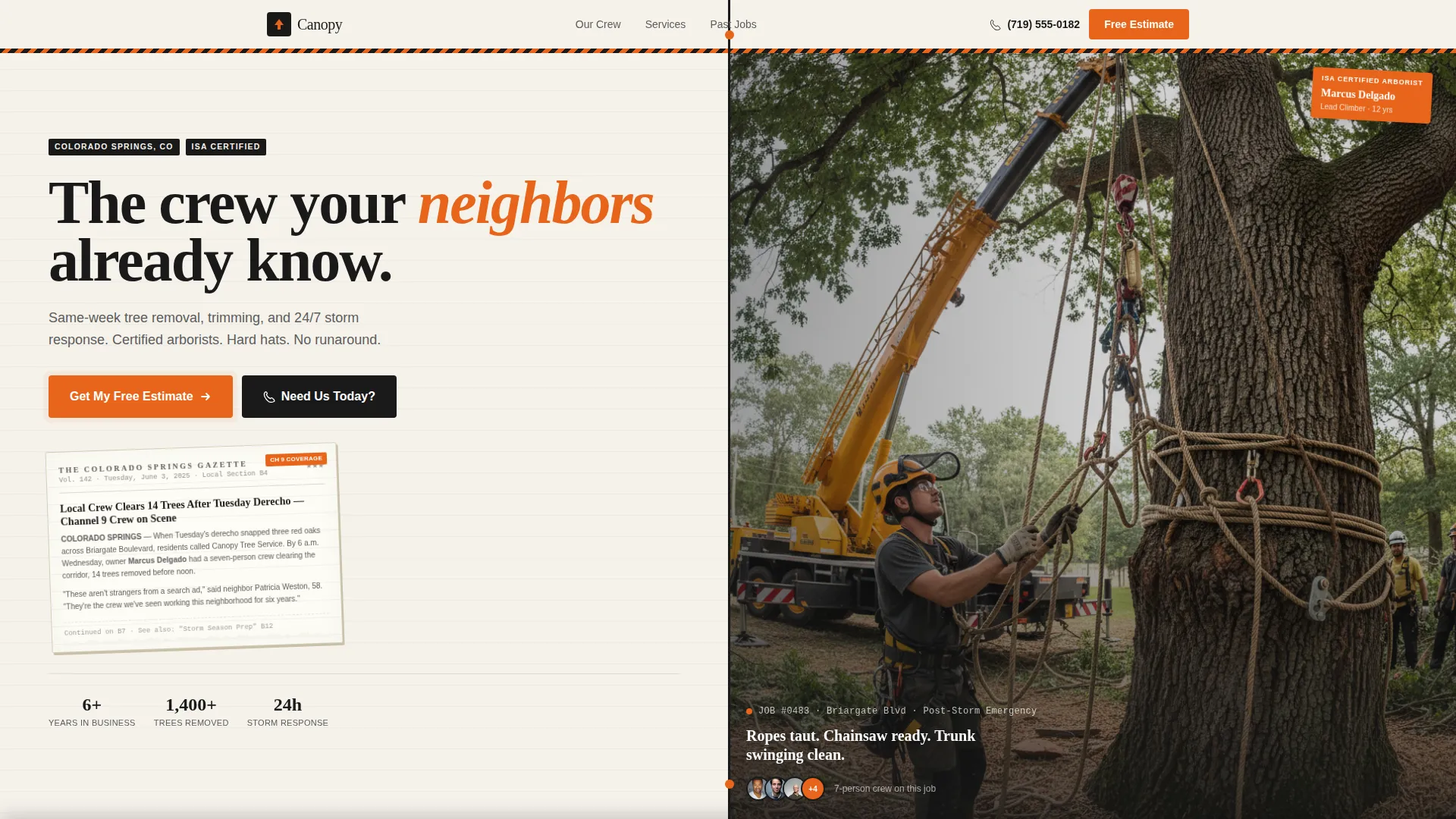
- A 50/50 split-screen header pairing a local press mention with a live crew photo
- A sticky estimate bar with a zip-code-first qualification form and photo upload field
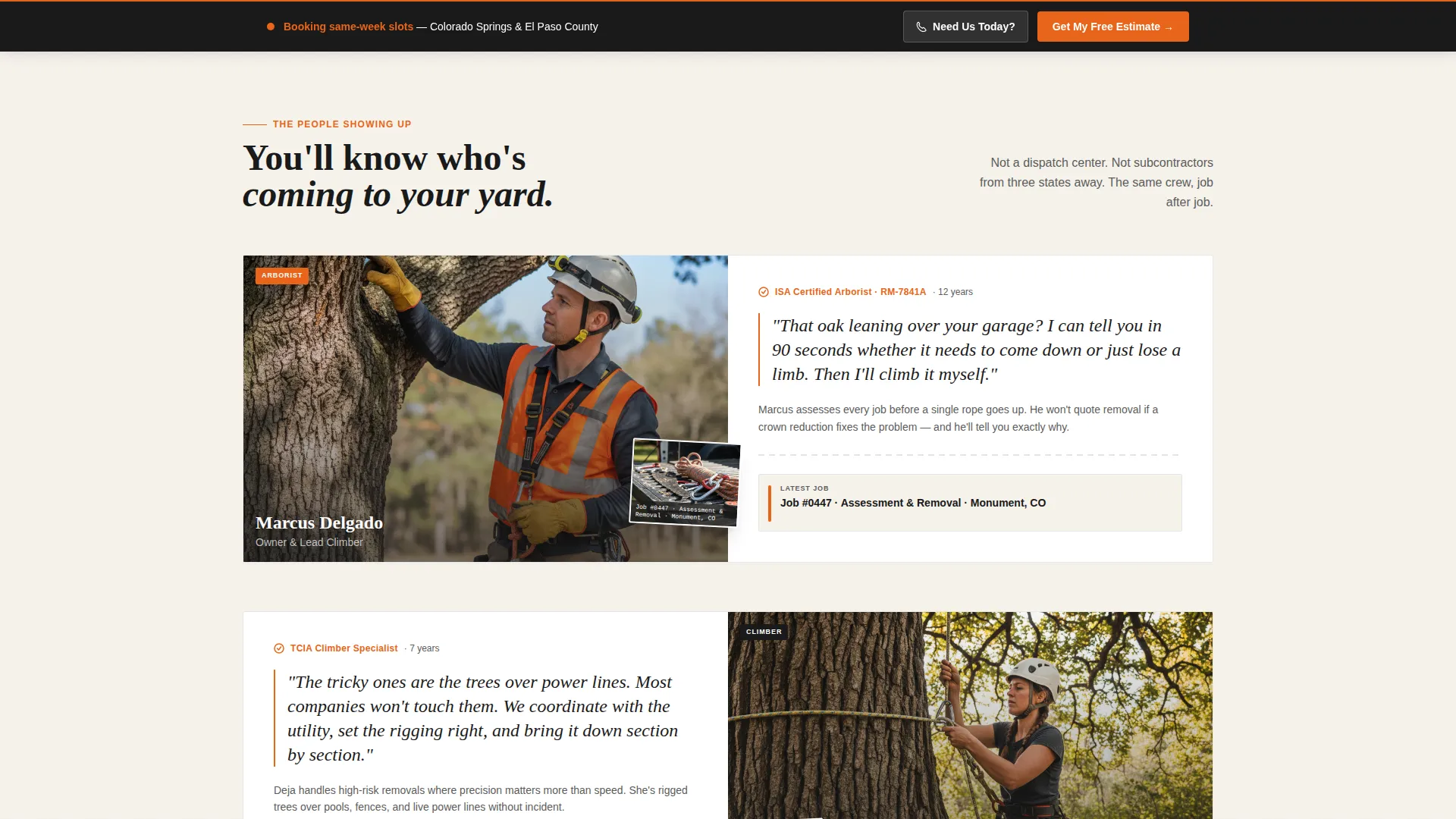
- Crew-profile sections introducing named team members alongside specific jobs they handle
Feature list
This template delivers a focused set of purpose-built sections and design choices grounded in how tree service leads actually convert from paid traffic.
Split-Screen Press Mention Header
The header divides the viewport evenly. The left half displays a local news clipping or broadcast screenshot that names the company. The right half shows the crew mid-job, hard hats on, ropes taut, a section of trunk swinging from a crane. The contrast builds immediate local trust.
Sticky Lead Generation Bar
After the first scroll, a persistent bar activates at the top of the page. It carries the primary call-to-action reading "Get My Free Estimate" and holds the qualification form in place as the visitor reads further down the page.
Zip-Code-First Qualification Form
The estimate form opens with a zip code field to filter service area fit before collecting personal details. It then steps through service type selection, a photo upload field for the tree in question, and finally name and phone number.
Named Crew Profile Sections
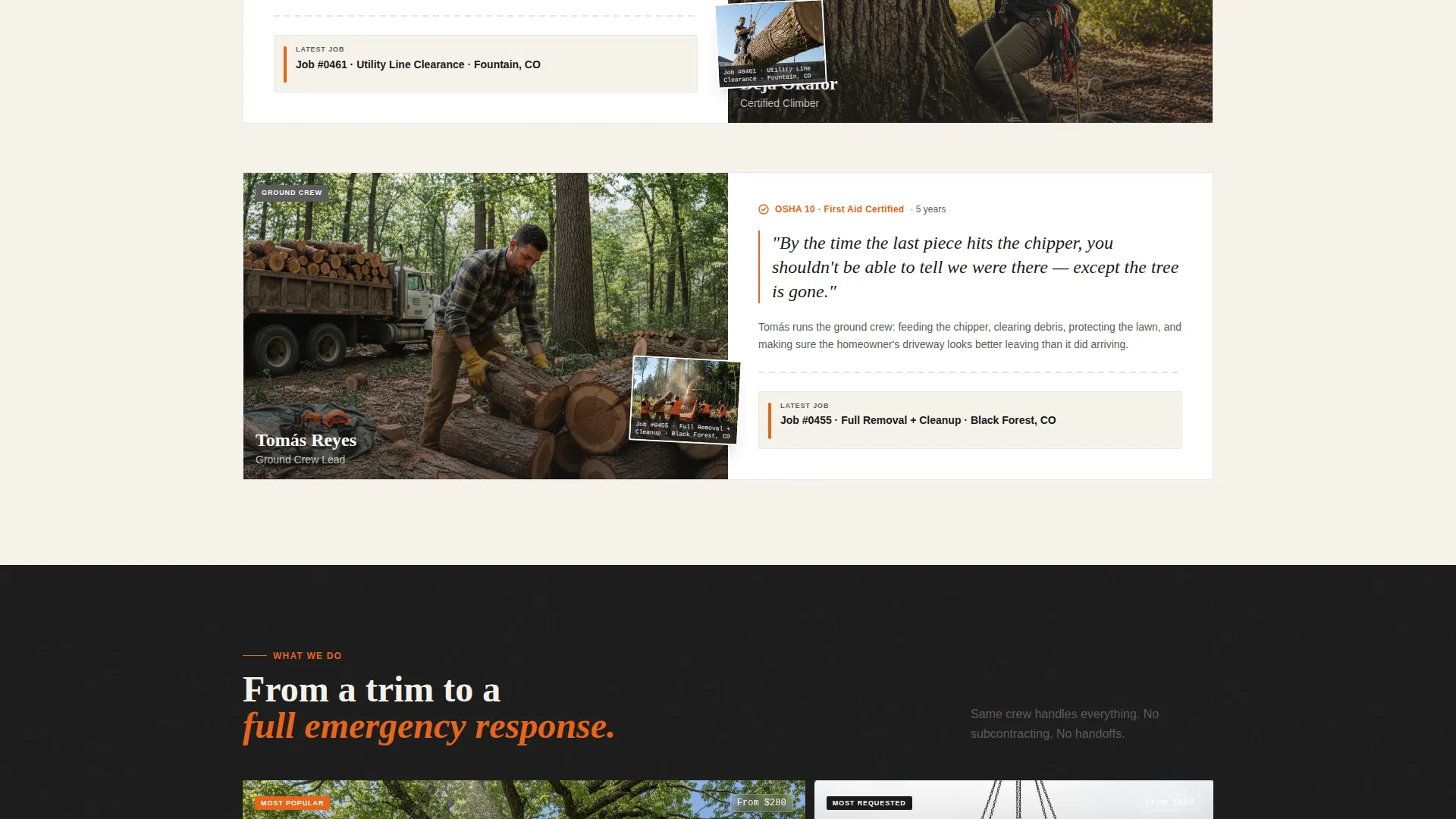
Each scrollable section introduces a real crew member by name and role. A certified arborist explains the removal decision. A climber rigs a trunk over a power line. A ground crew feeds the chipper. Faces and job titles replace generic star ratings.
Click-to-Call Emergency Button
A secondary call-to-action button labeled "Need Us Today?" sits alongside the main form path. It is designed for storm-damage visitors who need an immediate phone connection rather than a scheduled callback.
Escalating Job Showcase Layout
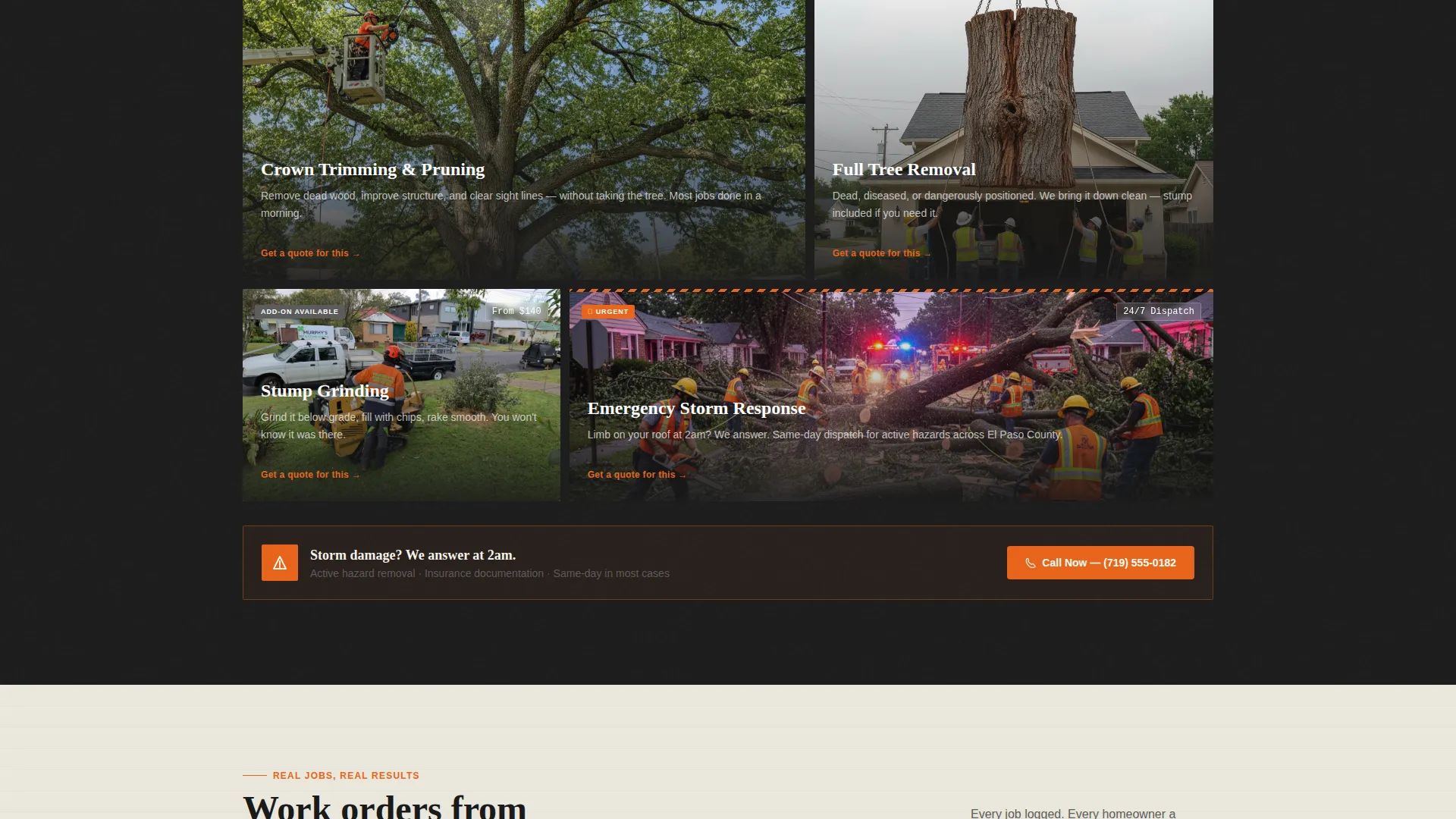
The page sequences jobs from routine to critical. Trimming leads to full removal, which leads to emergency storm response. Each step uses a harder job handled by the same crew, reinforcing that one team covers everything.
Page sections overview
| Section | Purpose |
|---|---|
| Split-screen header | Pair press mention with live crew photo |
| Sticky estimate bar | Keep primary call to action visible while scrolling |
| Arborist intro section | Establish certified expertise and removal rationale |
| Climber profile block | Show technical rigging work over power lines |
| Ground crew segment | Humanize the full team with on-site context |
| Service type showcase | Progress from trimming through emergency response |
| Estimate form panel | Collect zip, service type, photo, name, phone |
| Click-to-call block | Route urgent storm callers to direct phone line |
Design & branding system
The visual identity follows a Service Utility theme built on an Ink and Paper color system. Every color choice references a physical work environment, not a polished corporate aesthetic. The result feels like a well-worn work order clipped to a truck dashboard.
- Newsprint white (#F5F2EB) for backgrounds, carbon black (#1A1A1A) for text, and pencil-lead gray (#5C5C5C) for secondary labels
- Safety orange (#E8651A) reserved strictly for buttons, badges, and crew vest details in photography
- Typography and layout choices reinforce a transparent process tone where function comes before flash
Mobile & speed optimization
The layout is structured for visitors arriving from mobile devices after a storm event or while standing in a yard. The sticky bar, large tap targets, and vertically stacked crew sections all support quick reading on a small screen.
- The split-screen header collapses gracefully to a stacked layout on narrow viewports
- The zip-code-first form keeps the first interaction minimal so mobile users are not overwhelmed
- The click-to-call button stays prominent throughout the mobile scroll for immediate phone access
How this template helps you convert
Canopy earns trust before it asks for anything. The page is structured to move high-intent visitors from local credibility to qualified form submission in as few steps as possible.
- The press-mention header establishes that local media already recognizes this crew, reducing the skepticism a visitor brings from a paid search ad click
- Named crew profiles with specific job descriptions replace anonymous reviews with real accountability, making the estimate request feel safer
- The zip-code-first form step qualifies the lead instantly and reduces abandonment by keeping the initial ask simple
Other information about this template
This template is designed for tree service companies running paid traffic campaigns and needing a dedicated landing page that performs independently from a main website. It works well as a standalone Google Ads destination.
- The page structure supports tree service coupon and discount promotions by leaving clear space in the sticky bar or header badge area for a seasonal offer
- The transparent process creative direction means clients can see exactly how the crew works before committing, which suits markets where trust is the main buying barrier
- The sidebar companion template style means this layout can sit alongside a fuller company website without replacing it
- The Partnership and B2B landing page direction also makes this suitable for property managers and construction site coordinators who need a recurring service relationship, not just a one-time removal
- The template is category-matched to Professional Services and Tree Service Marketing use cases
Theme
Legal Shield
Creative direction
Transparent Process
Color system
Ink & Paper
Style
Sidebar Companion
Direction
Partnership/B2B
Page Sections
Split-screen Press Mention Header
Sticky Lead Generation Bar
Zip-code-first Qualification Form
Named Crew Profile Sections
Click-to-call Emergency Button
Escalating Job Showcase Layout
Related questions
Who is this landing page template designed for?
Can I use this template for emergency storm response marketing?
How does the lead form qualify incoming requests?
What makes this template different from a generic contractor page?
Can this template support a seasonal discount or promotional offer?



