Canopy — Expert Arborist Services Landing Page Template
Canopy is a single-page landing page template built for Amsterdam tree service professionals. It uses a FAQ-driven scroll structure, in-page comparison tables, and a bold Dutch-language headline to build trust fast. The design speaks to housing associations, municipal project managers, and homeowners who need pruning, removal, and permit handling done right.
by Rocket studio
Quick summary
Canopy is a click-through landing page template designed for an Amsterdam-based tree service. It leads with a commanding Dutch headline, then earns visitor trust through a sequence of FAQ blocks and comparison tables. Every scroll section answers a real buyer question. A single amber call-to-action button pushes visitors to a quote request form on a separate page.
Who this template is for
This template is built for tree service companies operating in Amsterdam and its surrounding areas. It speaks directly to the clients those companies serve and the language those clients expect.
- Housing associations managing courtyard gardens and shared green spaces
- Municipal project managers dealing with storm-damaged or permit-controlled street trees
- Homeowners with overgrown or hazardous trees near neighboring properties
What problem this template solves
Tree service businesses often lose leads because their website buries the practical details. Visitors want to know about permits, pricing ranges, and what is actually included before they pick up the phone.
- No clear answer to whether a permit is required before removal can begin
- No visible comparison between service tiers, leaving visitors unsure what they are buying
- No confident signal that the company understands Amsterdam's specific urban tree regulations
What you get with this template
This template delivers a fully structured, single-page layout ready to represent a professional urban tree service. Every section is purposeful and placed to move a visitor toward one action.
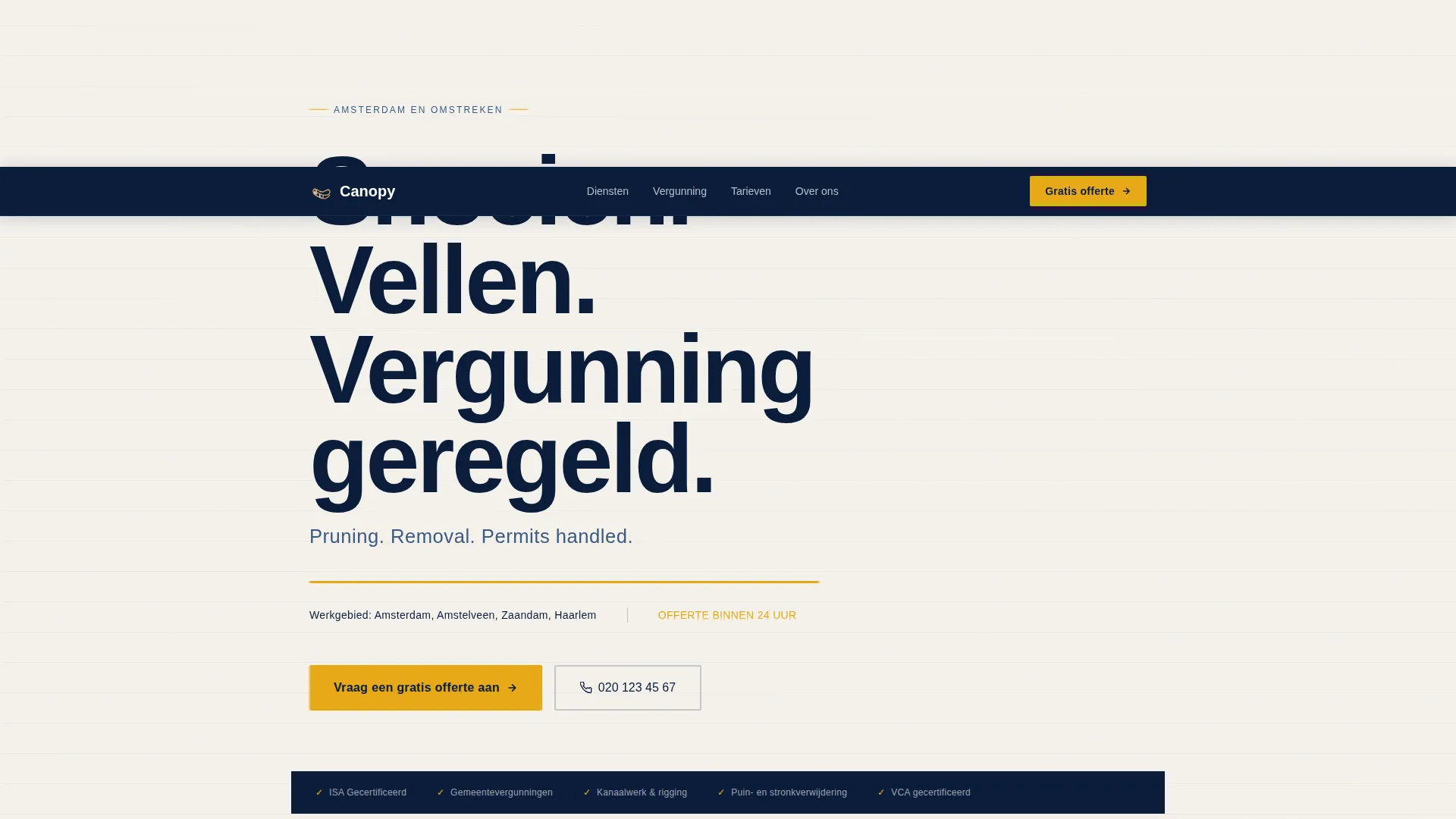
- A viewport-dominating Dutch headline with an English subtitle and a response-time promise
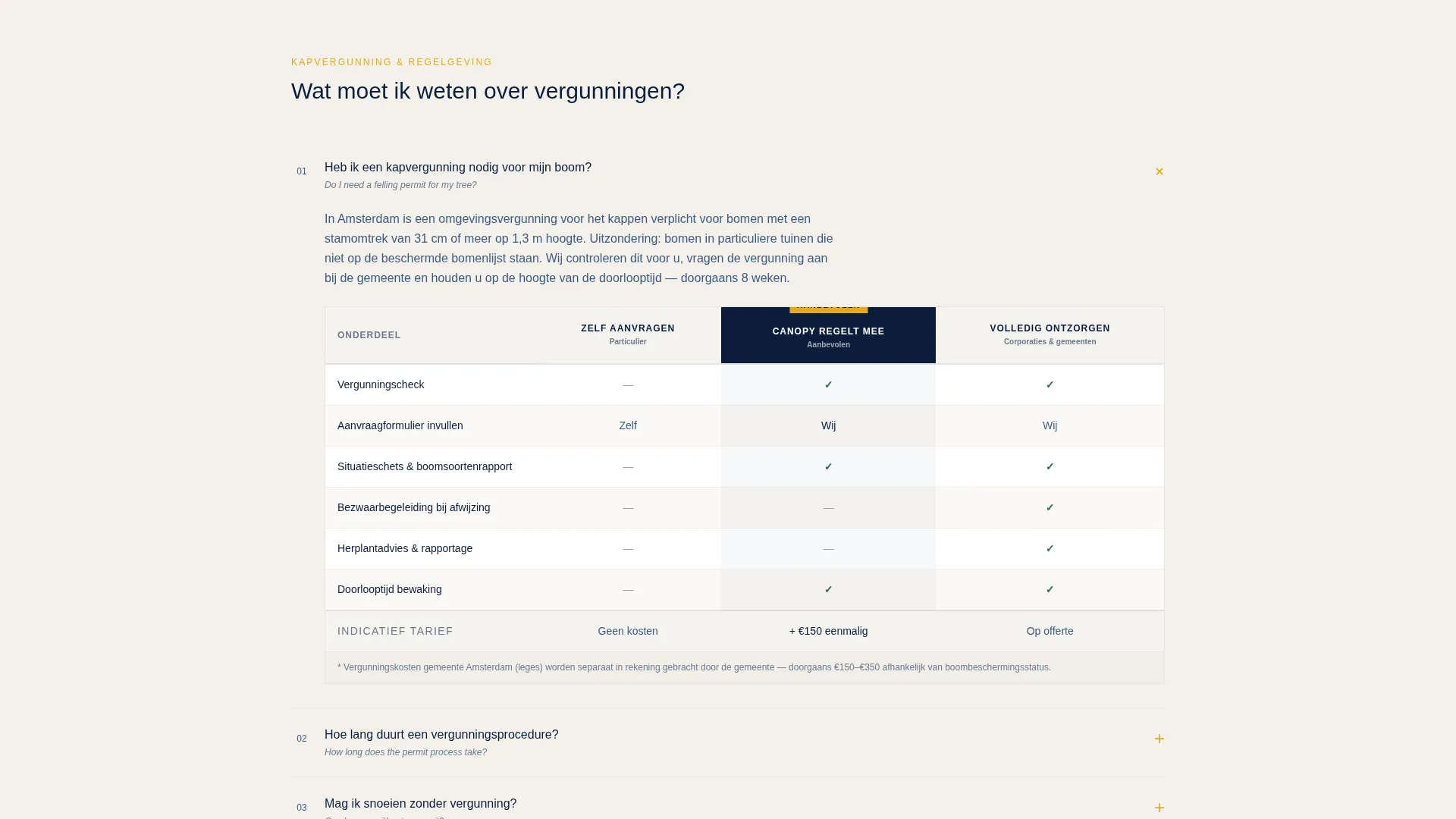
- A scrollable series of FAQ blocks, each paired with a comparison table
- A sticky mobile call-to-action bar and repeated amber call to action buttons throughout the page
Feature list
This template is built around one principle: answer the question before the visitor has to ask it. The features below are all drawn directly from the template brief.
Giant Centered Headline Header
The header opens with a heavy grotesque headline set at viewport scale: "Snoeien. Vellen. Vergunning geregeld." A smaller English subtitle sits beneath it. A thin amber rule and one line of copy state the service area and a 24-hour quote promise. No hero image competes with the text.
FAQ-Driven Scroll Structure
The page is organized as a sequence of real questions Amsterdam property owners search for. Each FAQ block opens into a concise answer. This structure keeps visitors reading because every section feels directly relevant to their situation.
In-Page Comparison Tables
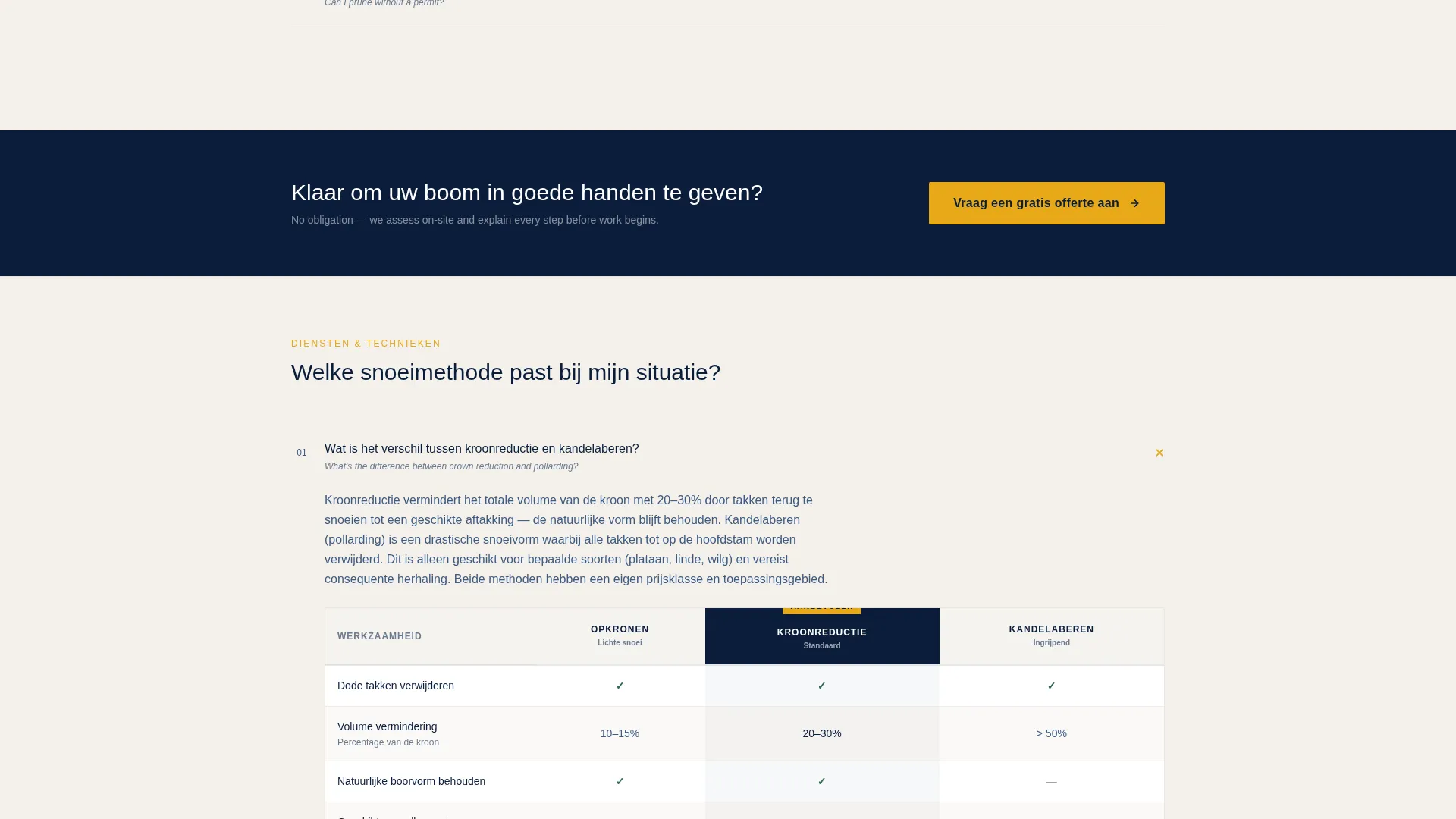
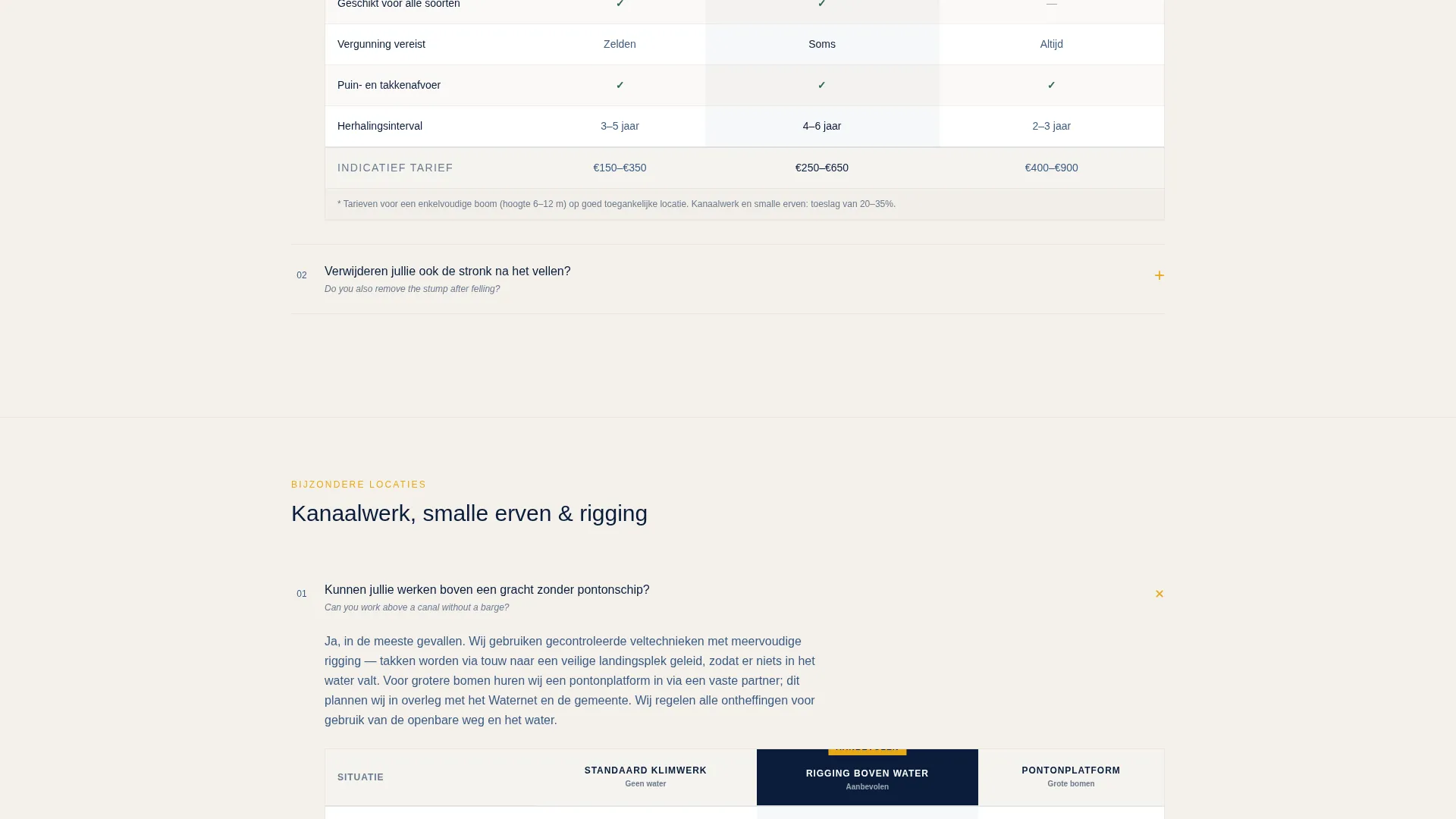
Each FAQ answer is paired with a comparison table. The tables cover service tiers, what is included at each level, and pricing transparency through range estimates. Every row answers an objection and every column makes the premium tier feel like the logical choice.
Click-Through call to action System
The primary call-to-action, "Vraag een gratis offerte aan," appears in amber after every second FAQ block. No form fields appear on this page. The click-through model earns the transition by proving expertise first and reducing commitment to a single tap.
Sticky Mobile call to action Bar
On mobile screens, the primary amber call-to-action locks into a sticky bar at the bottom of the viewport. Visitors never lose sight of the next step, no matter how deep into the FAQ scroll they have traveled.
Navy Authority Color System
The template uses a four-color palette applied with strict discipline. Navy dominates structural elements, slate carries body text, amber marks every action point, and birch-bark white keeps comparison rows easy to scan.
Page sections overview
| Section | Purpose |
|---|---|
| Headline header | Establishes authority and service area instantly |
| Response-time promise | Sets the 24-hour quote expectation |
| FAQ block one | Answers the permit question with a comparison table |
| FAQ block two | Explains pruning versus. pollarding with a service-tier table |
| call to action button one | Pushes click-through to the quote form |
| FAQ block three | Addresses canal-access and site complexity questions |
| FAQ block four | Covers debris removal, stump grinding, and what is included |
| call to action button two | Second amber click-through prompt |
| Sticky mobile bar | Locks the call to action in view during mobile scroll |
Design & branding system
The visual identity follows a Service Utility theme built on a Navy Authority color system. The palette feels like a municipal work order on a steel clipboard: serious, trustworthy, and free of decoration.
- Deep institutional navy (#0B1D3A) dominates the header and footer like a uniform
- Canal-water slate (#3D5A80) carries body text and table borders; safety-vest amber (#E8A817) marks every call to action and accent; birch-bark white (#F4F1EC) gives comparison rows breathing room
- Typography uses a heavy grotesque typeface at large scale for headlines, with functional body text that keeps the reading experience clean and direct
Mobile & speed optimization
The template is structured with mobile visitors in mind. Tree service leads often come from someone standing in their garden looking up at a problem branch.
- The sticky amber call to action bar locks to the bottom of the screen on mobile so the quote action is always one tap away
- Comparison tables are laid out to remain readable on narrow screens without horizontal scrolling
- The header relies on typography rather than large images, keeping the above-the-fold load lean and fast to render
How this template helps you convert
This template converts by reducing friction at every stage of the scroll. It does not ask for commitment before it has earned trust.
- The FAQ structure mirrors the exact questions visitors are already asking, so every section feels personally relevant and keeps them reading further down the page.
- Comparison tables make the value of each service tier visible at a glance, removing price uncertainty and making the decision to request a quote feel straightforward rather than risky.
Other information about this template
This template was designed with the Amsterdam urban tree service context in mind, but the structure translates well to any professional outdoor services company that works with permits and tiered service offerings.
- The bilingual headline approach, Dutch primary with English secondary, reflects the multilingual reality of Amsterdam's property management and housing association sector
- The comparison table format is suited to any service with multiple tiers, such as full removal versus crown reduction versus basic pruning
- The FAQ-first scroll model works well for services where buyers have regulatory questions before they have budget conversations
- This template is built as a click-through landing page; the quote form lives on a separate page, keeping this page focused entirely on building confidence
Theme
Service Utility
Creative direction
FAQ-Driven
Color system
Navy Authority
Style
Comparison Table
Direction
Click-Through
Page Sections
Giant Centered Headline Header
Faq-driven Scroll Structure
In-page Comparison Tables
Click-through Call to Action System
Sticky Mobile Call to Action Bar
Navy Authority Color System
Related questions
Does this template include a contact or quote form?
Can I use this template if my tree service operates outside Amsterdam?
How many comparison tables does this template include?
Is the Dutch-language headline easy to edit?
Who is the target audience for this landing page template?



