Precision Agriculture Technology Professional Website Template
Canopy is a precision crop health detection landing page template built for AgriTech apps that turn a single phone photo into a plain-language leaf diagnosis. The zigzag layout walks visitors through the image-recognition pipeline, a diagnosis report card, and an action plan, then earns their email with a transparent, trust-first lead capture form.
by Rocket studio
Quick summary
Canopy is a single-page lead generation template for a crop health detection app. It uses a warm Agrarian Root visual style and a zigzag layout to walk visitors step by step from raw photo to diagnosis to action plan. By the time visitors reach the form, they have already watched the detection process work.
Who this template is for
This template is built for AgriTech founders and product teams launching a crop disease detection app to farmers and agronomists. It suits anyone who needs to turn skeptical visitors into email leads without relying on abstract promises.
- Smallholder farmers growing soybean, corn, wheat, or cotton who need fast rust and disease detection before a problem spreads
- Agronomists managing multiple client parcels remotely who want a page that speaks to their workflow
- Co-op extension officers and AgriTech marketers who need a credible, conversion-focused landing page up quickly
What problem this template solves
Crop health apps often struggle to earn farmer trust online. Visitors arrive skeptical because most AgriTech pages hide the science behind vague claims and polished mockups. This template solves that credibility gap by showing the detection engine at work before asking for anything.
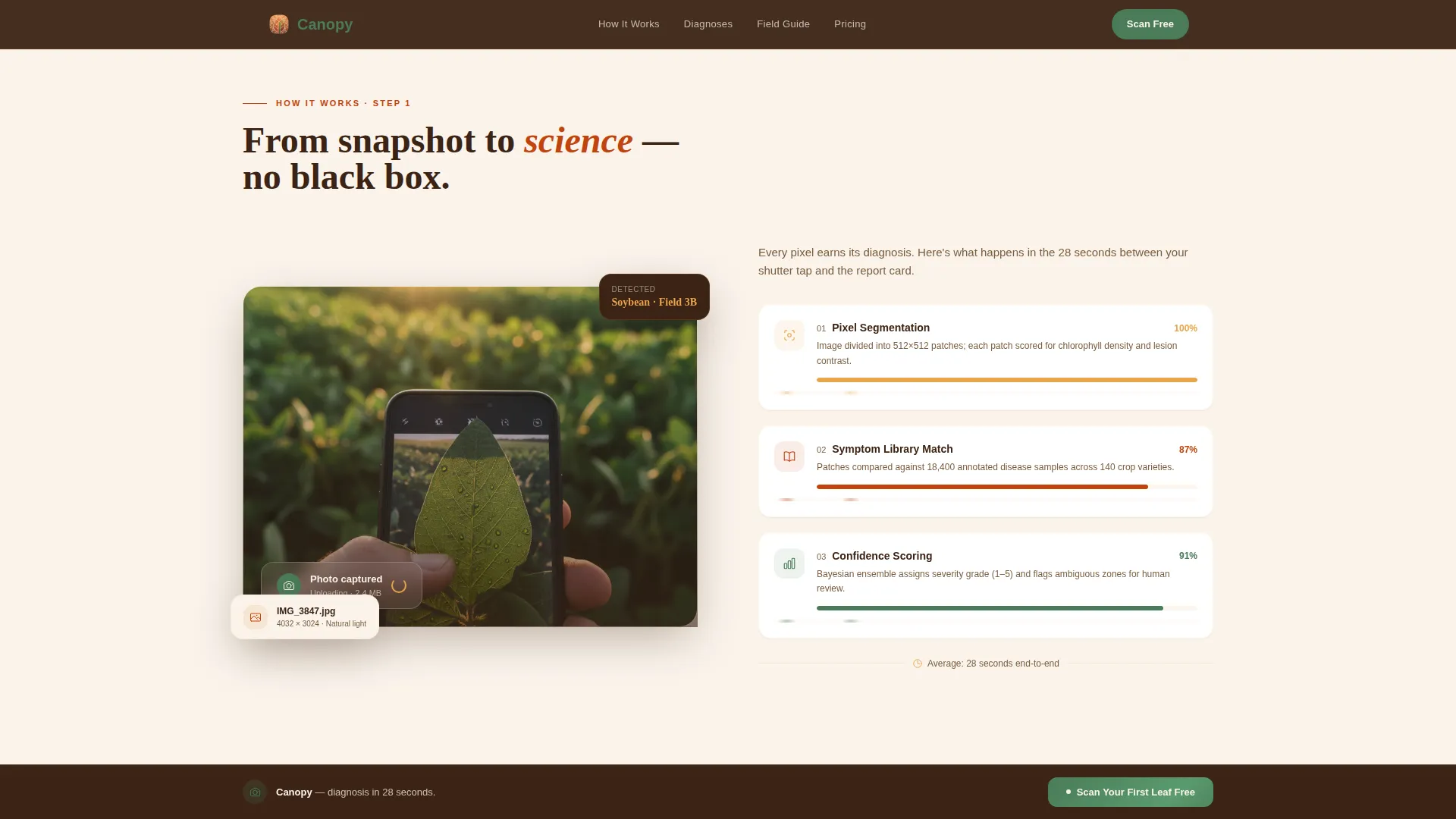
- Farmers distrust black-box software, so the page reveals the full pipeline: pixel segmentation, symptom library matching, and confidence scoring
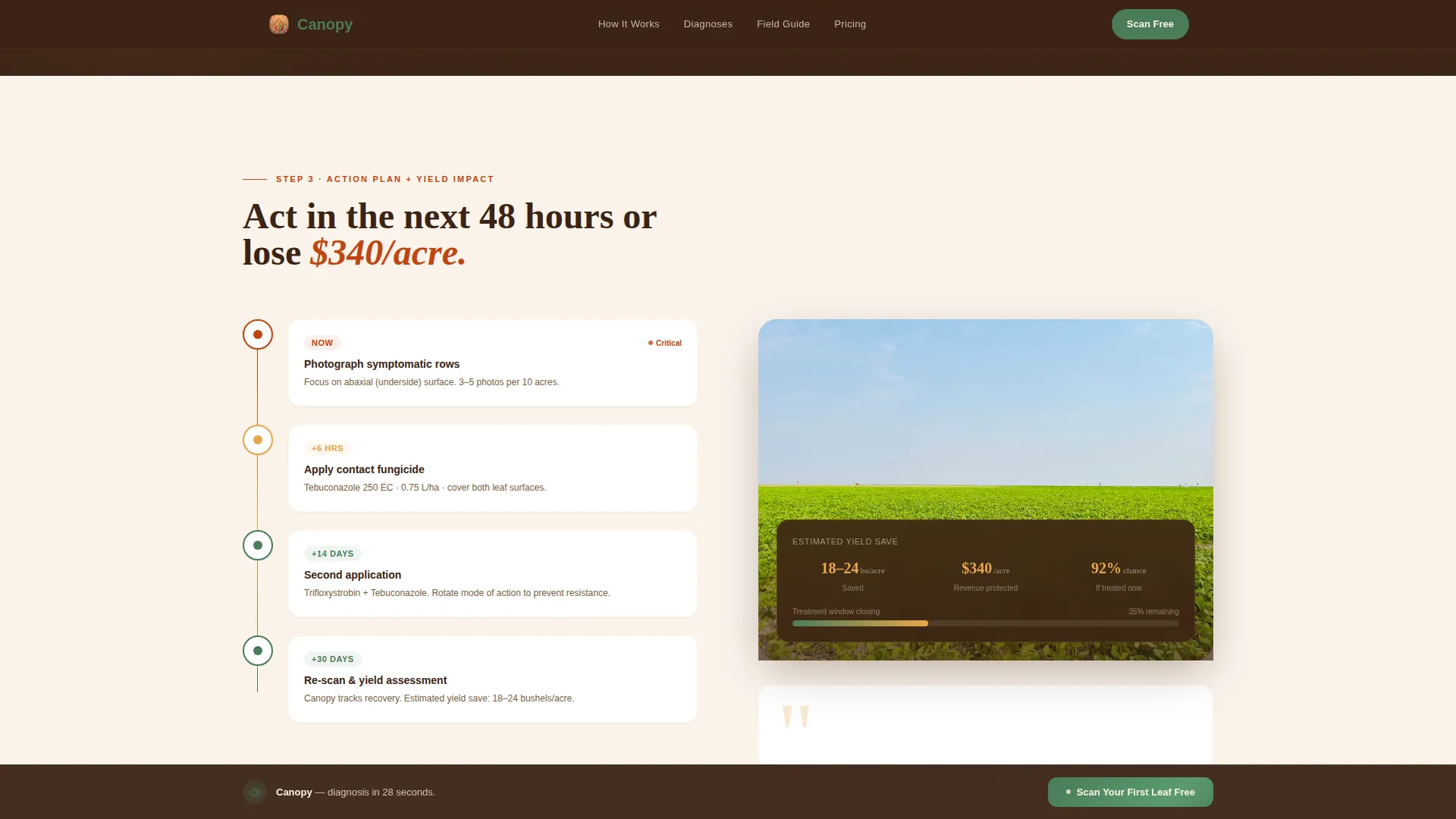
- Disease spreads fast, and the urgency timeline section communicates that speed advantage clearly
- Generic landing page designs fail in an agriculture context, while this template grounds every section in soil-toned visuals and field-ready language
What you get with this template
You get a fully structured, section-by-section landing page designed around one goal: converting field-ready visitors into email leads. Every section is purposeful and follows the Transparent Process creative direction.
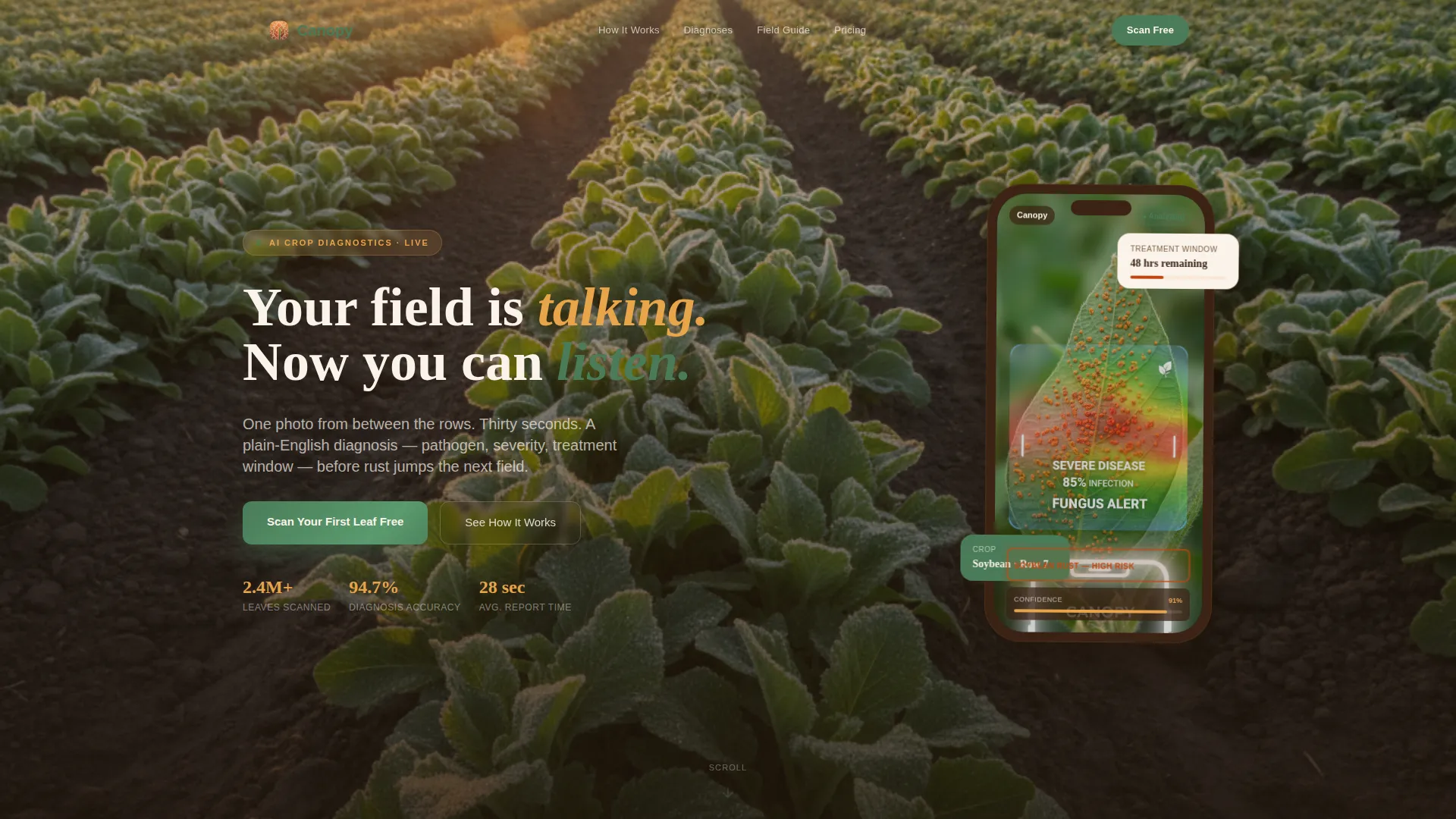
- A full-bleed hero section with a floating phone mockup, a health overlay, and a fade-in headline
- Four zigzag content sections covering the AI pipeline, the diagnosis report card, the action plan, and yield-save context
- A dual-path lead generation form with a primary call to action and a secondary free field guide download
Feature list
The template ships with a set of purpose-built components that support crop health app marketing from first scroll to form submission.
Full-Bleed Hero with Floating Phone Mockup
The hero section uses a knee-height crop row photo as its background. A phone screen floats at center frame showing a color-coded health overlay on a real leaf. The headline fades in after a beat, bridging the field and the app in a single visual.
Zigzag Alternating Section Layout
Four content sections alternate image and copy side by side using GSAP ScrollTrigger reveal animations. Each pair builds on the last, moving from raw photo upload through analysis, diagnosis, action plan, and yield-save estimate.
Animated AI Pipeline Breakdown
The How It Works section places a photo upload visual against an animated breakdown of the image-recognition process. Visitors see pixel segmentation, symptom library matching, and confidence scoring play out step by step.
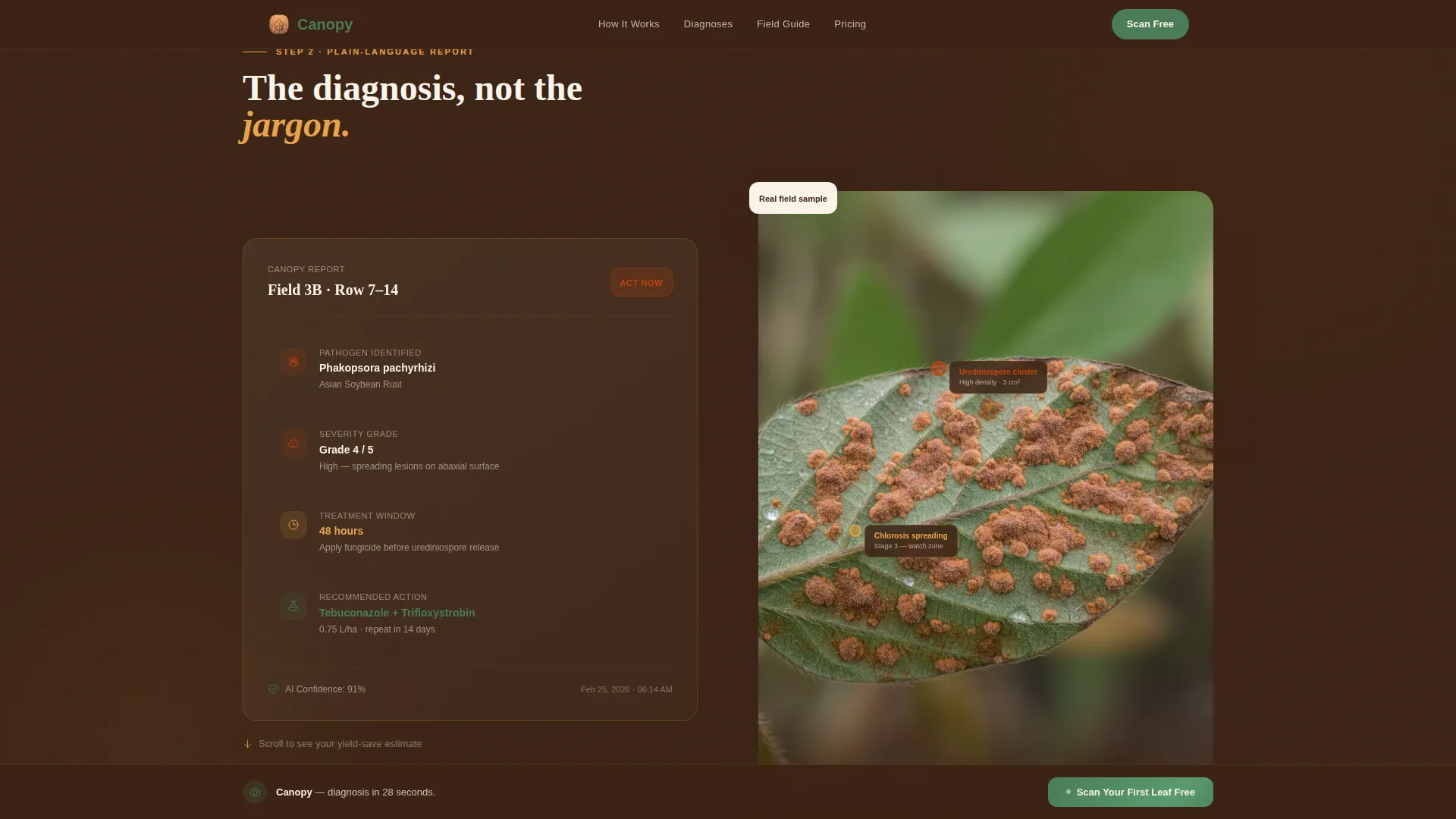
Plain-Language Diagnosis Report Card
The diagnosis section pairs a real diseased leaf image with a structured report card showing pathogen name, severity grade, treatment window, and product suggestions, all in plain English without jargon.
Dual-Path Lead Generation Form
The primary form captures crop type via dropdown, estimated acreage, and email. A secondary path offers a free PDF field guide gated behind email only. Both paths feed the same lead capture goal with minimal friction.
Sticky Call-to-Action Bar
A sticky bar persists on scroll after the process walkthrough, repeating the primary call to action so visitors can convert at any point without scrolling back to the form.
Page sections overview
| Section | Purpose |
|---|---|
| Hero Full-Bleed | Establish visual credibility and introduce the app with a field photo, floating phone mockup, and fade-in headline |
| How It Works | Walk through the image-recognition pipeline using a zigzag photo-versus-animation layout |
| Diagnosis Report | Show a real diseased leaf alongside the plain-language report card output |
| Action Plan | Pair yield-save estimates with an urgency timeline and product suggestions |
| Lead Gen Form | Capture email leads via the primary scan offer and the secondary field guide download |
| Footer | Provide linear single-row navigation and supporting links |
Design & branding system
The visual identity follows an Agrarian Root theme. Every color choice evokes a dirt road at golden hour, grounding the app in the physical world farmers already trust.
- Sunset Mesa color system: sunbaked terracotta (#C1440E), deep furrow brown (#3B2314), dusk-sky amber (#E8A44A), and irrigated field green (#4A7C59) reserved for positive states and calls to action
- Backgrounds alternate between warm off-white (#FAF3EB) and deep furrow brown, keeping text crisp across every section
- Typography pairs Fraunces serif headlines with DM Sans body text, giving the page a grounded, editorial warmth
Mobile & speed optimization
The template is built mobile-first because farmers use phones in the field, not desktop computers. Every layout decision prioritizes thumb-friendly navigation and fast visual loading.
- Zigzag sections reflow to single-column stacks on small screens, keeping the alternating narrative readable without horizontal scrolling
- Server Components handle static sections while Client Components manage animations and the lead form, keeping the interactive layer lean
- GSAP ScrollTrigger animations are scoped to Client Components so they do not block the initial page render
How this template helps you convert
The page earns trust before it asks for anything. The Transparent Process direction means every scroll step removes a reason to doubt, so the form feels like unlocking a tool rather than responding to a sales pitch.
- The process walkthrough reveals the detection engine in full, covering pixel segmentation, symptom matching, and confidence scoring before any call to action appears
- The sticky call-to-action bar keeps the primary offer visible throughout the scroll journey so motivated visitors can convert at any point
- The three-field form and the single-field field guide download set a low commitment threshold, making the first step easy for both farmers and agronomists
Other information about this template
This template is part of a focused set of AgriTech landing page designs built for the precision agriculture technology category. A few additional details worth noting:
- The social proof layer includes a scan count metric, an acreage covered statistic, an accuracy percentage, and one featured testimonial block
- The FAQ section uses an accordion interaction, letting visitors answer their own remaining questions without leaving the page
- The page is localized for English-language audiences in a Midwest and Southern US farming context, using USD currency and US date format
- The form dropdown covers five crop types: corn, soy, wheat, cotton, and other, keeping the lead data useful without adding form friction
- Animation intensity is set to high, with GSAP ScrollTrigger controlling zigzag section reveals, the floating phone mockup, the pipeline animation, and the hero fade-in
Theme
Agrarian Root
Creative direction
Transparent Process
Color system
Sunset Mesa
Style
Zigzag/Alternating
Direction
Lead Generation
Page Sections
Full-bleed Hero with Phone Mockup
Zigzag Alternating Layout with GSAP Animations
Animated AI Pipeline Breakdown
Plain-language Diagnosis Report Card
Dual-path Lead Generation Form
Sticky Call-to-action Bar
Related questions
Who is this landing page template designed for?
What sections are included in this template?
Can I customize the crop types in the lead form dropdown?
Does the template include social proof elements?
What animations does this template use?