Sports Facility Roofing Contractor Landing Page
Canopy is a single-column landing page template built for sports facility roofing contractors. It guides visitors through a structured scroll from problem to solution, anchored by a full-bleed interior roof photo and a five-step facility assessment quiz. The design uses a navy, gray, white, and amber palette that feels institutional, load-bearing, and built to earn trust from facilities directors and athletic administrators.
by Rocket studio
Quick summary
Canopy is a precision-built landing page for roofing contractors who specialize in sports facilities. The page opens with a dramatic upward-angle photo of a completed arena roof, then walks visitors through a spatial construction sequence before inviting them to complete a five-step diagnostic quiz. Every design choice reflects structural confidence and deep sector expertise.
Who this template is for
This template is designed for roofing contractors whose work happens at an institutional scale. If your projects involve clear-span enclosures over courts, pools, or training halls, Canopy speaks directly to your buyers.
- Roofing contractors serving stadiums, natatoriums, fieldhouses, and tennis centers
- Firms targeting facilities directors, athletic directors, and municipal parks departments
- Contractors who want to lead with expertise before they ever lead with a price
What problem this template solves
Generic contractor pages fail sports facility clients. Decision-makers managing capital improvement bonds or aging fieldhouse budgets need to see that a contractor understands the structural, environmental, and operational complexity of their building. A standard homepage does not communicate that.
- Visitors arrive skeptical and leave without requesting a consultation
- The roofing scope feels like a commodity instead of an engineered system
- No existing page positions the contractor as a diagnostician before a vendor
What you get with this template
Canopy gives you a fully structured single-column landing page designed around the facility roofing buyer journey. The layout moves visitors from pain recognition to solution understanding to quiz completion in one focused scroll.
- A full-bleed header with a fade-in headline over an upward-angle facility photo
- A five-step interactive assessment quiz with micro-insights at each step
- A floating amber call-to-action button that stays visible as visitors scroll
Feature list
This template's features are drawn directly from the brief and reflect the needs of a high-stakes, institutional roofing audience.
Full-Bleed Header with Fade-In Headline
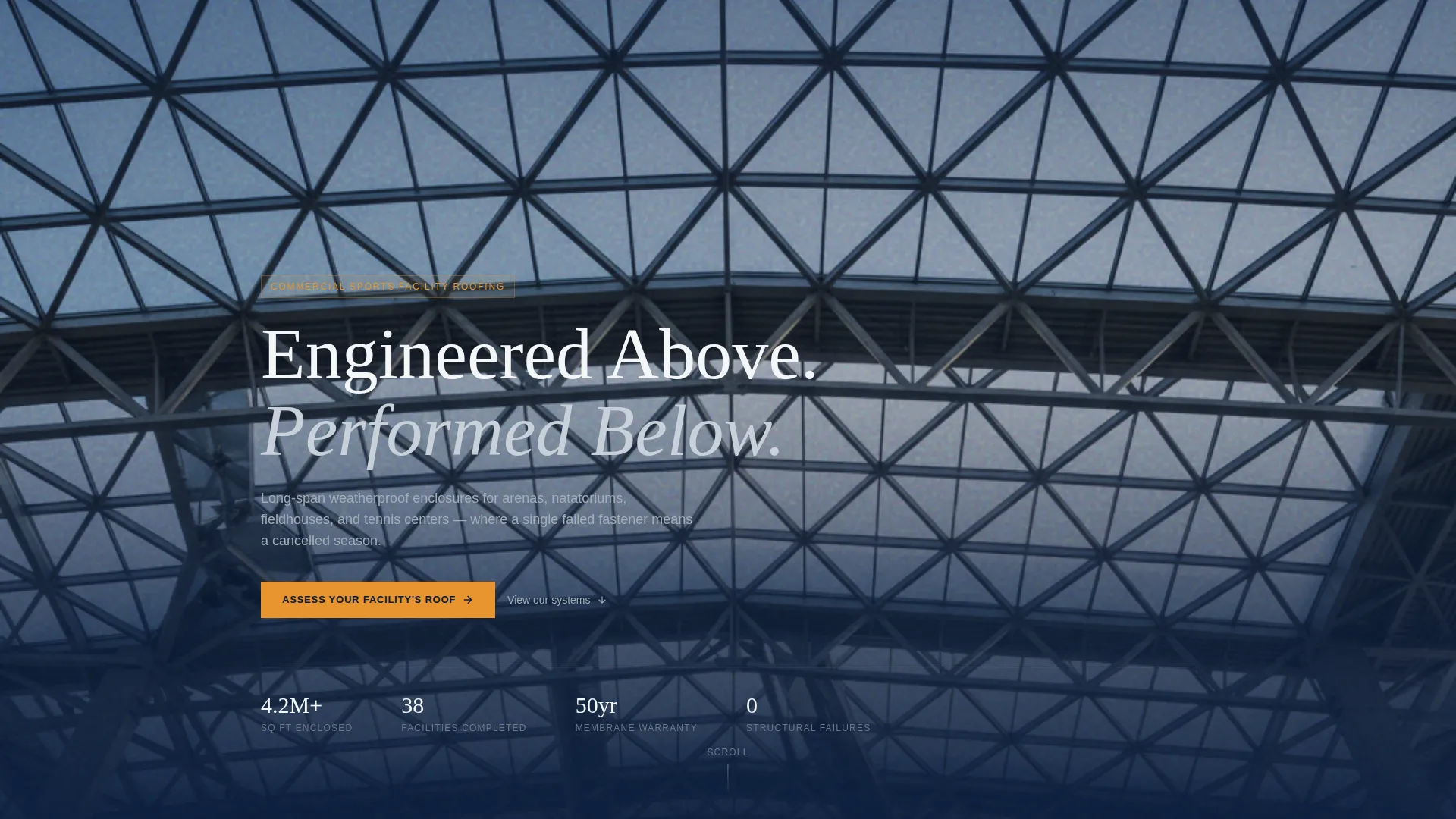
The header fills the entire viewport with a photo taken from inside a completed sports facility, camera tilted upward at roughly 70 degrees. The geometric lattice of purlins and translucent ridge skylights is visible. A single headline, "Engineered Above. Performed Below.", fades in over the image. No navigation is visible until the visitor begins to scroll.
Five-Step Facility Assessment Quiz
The primary call-to-action launches a five-step diagnostic sequence. Visitors select facility type, set approximate square footage via a slider, choose roof age in decade ranges, identify their primary concern, and submit their contact details. Each step surfaces a contextual micro-insight, such as the fact that natatorium roofs fail 40% faster due to chloramine vapor, rewarding progress and building trust.
Floating Amber Call-to-Action Button
The "Assess Your Facility's Roof" button appears first beneath the header and remains pinned as a floating element throughout the scroll. This ensures the primary conversion action is always within reach without interrupting the content experience.
Spatial Scroll Sequence
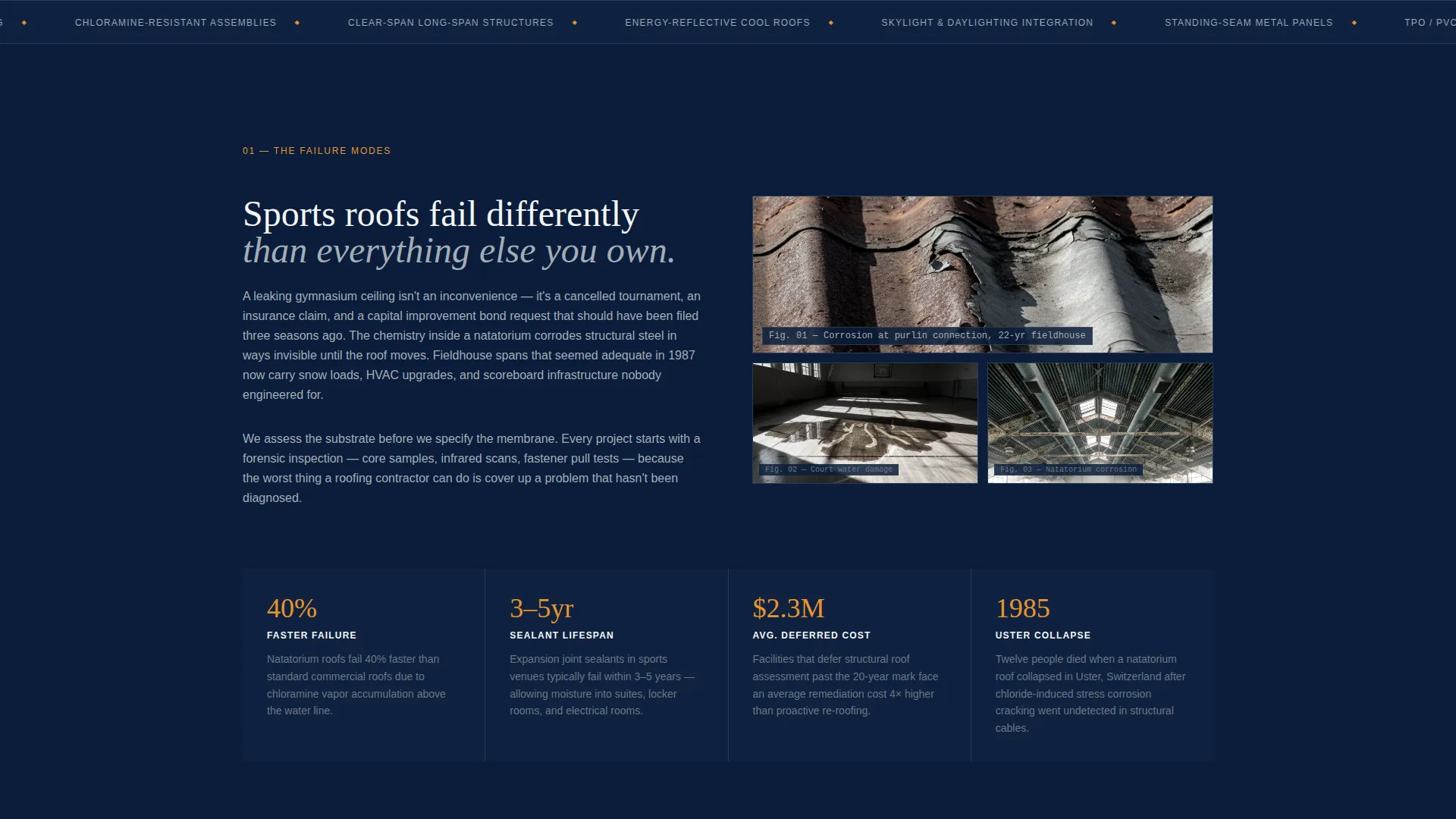
The page is structured as an upward construction sequence. Visitors begin at ground level with the problem, represented by water-stained floors and corroded deck imagery, and move section by section through structural assessment, substrate engineering, membrane selection, and completed enclosure. The scroll feels like watching a roof get built from the inside out.
Architectural Cross-Section Diagrams
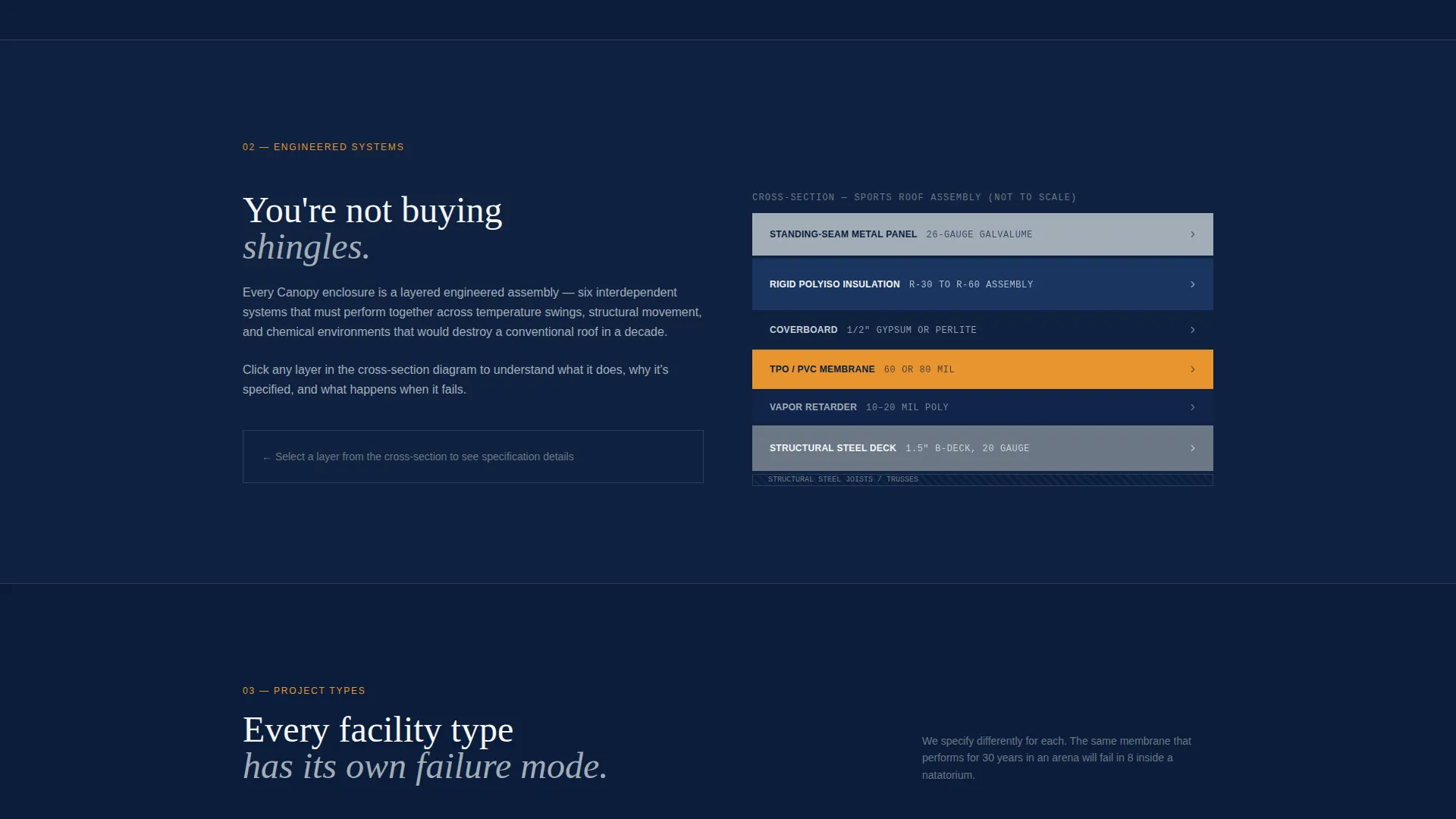
Each content section uses architectural cross-section diagrams that peel back the layers of a sports roof assembly. Vapor barrier, insulation, coverboard, and membrane are shown as distinct system components. This visual language helps buyers understand they are purchasing an engineered system, not a surface replacement.
Navy Authority Color System
The palette pairs deep command navy as the primary background with brushed aluminum gray for secondary surfaces and divider lines. Sideline white handles text and open space. Safety signal amber is reserved exclusively for calls-to-action and interactive highlights. Every color plays a structural role in the visual hierarchy.
Page sections overview
| Section | Purpose |
|---|---|
| Full-Bleed Header | Opens with an upward interior facility photo and fade-in headline |
| Floating Quiz call to action | Pins the assessment button in view throughout the scroll |
| Problem Introduction | Shows water damage, corroded decking, and insurance claim imagery |
| Structural Assessment | Explains how the contractor evaluates an existing facility roof |
| Substrate Engineering | Details the technical layers beneath the finished membrane |
| Membrane Selection | Presents roof system options suited to sports facility environments |
| Completed Enclosure | Shows the finished result and the performance it delivers |
| Five-Step Quiz | Walks visitors through a facility diagnostic and collects contact info |
Design & branding system
The visual identity follows a Corporate Precision theme that feels institutional without feeling cold. Every element is weighted intentionally, the way every beam in a clear-span roof is calculated before it is placed.
- Deep command navy (#0B1D3A) as the primary background, brushed aluminum gray (#A3ADB8) for dividers and secondary surfaces, and sideline white (#F4F6F8) for text and breathing space
- Safety signal amber (#E8952F) used exclusively for calls-to-action and interactive highlights, never decorative
- Generous white space between sections that echoes the clear-span openness the roofs themselves create
Mobile & speed optimization
The single-column layout is inherently well-suited to mobile viewing. The scroll sequence, quiz steps, and floating button all translate cleanly to smaller screens without requiring horizontal scrolling or zoomed-out viewing.
- Single-column flow keeps the reading experience intact on any screen width
- The five-step quiz uses sliders and selection steps that are touch-friendly by design
- Section spacing and typographic hierarchy remain readable at mobile scale
How this template helps you convert
Canopy is built around the insight that institutional buyers trust diagnosticians more than salespeople. Every structural choice in this template moves a skeptical facilities director closer to submitting a consultation request.
- The upward-angle header photograph immediately signals that this contractor understands sports facilities from the inside, not just the outside, establishing credibility before a single word is read.
- The scroll sequence builds understanding layer by layer, so by the time a visitor reaches the quiz, they already feel informed rather than sold to.
- The floating amber button and the quiz micro-insights work together to reduce friction and reward engagement, making the conversion step feel like a natural next action rather than a cold form submission.
Other information about this template
Canopy is a strong fit for roofing firms that operate in a highly specific niche where the wrong roof system can cancel a season or compromise a building envelope for decades. The template's language and layout are calibrated for buyers who read specifications before they read testimonials.
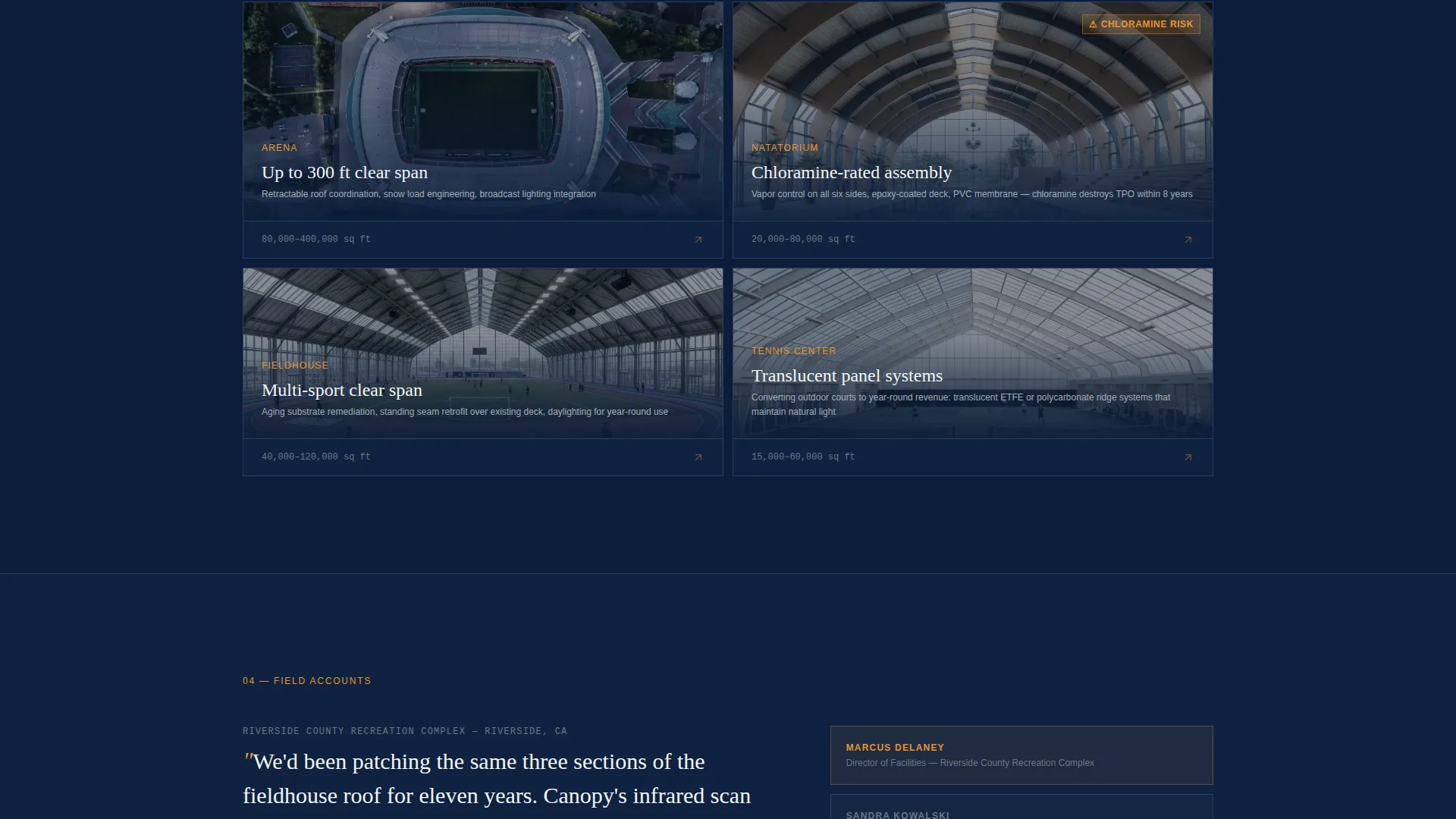
- The template supports sports facility roofing contractor use cases including arenas, natatoriums, indoor fieldhouses, and municipal recreation centers
- The quiz collects facility type, square footage, roof age, primary concern, and contact details, giving the contractor qualified lead data from the first interaction
- The Spatial and Architectural creative direction is intentional: cross-section diagrams and a problem-to-solution scroll sequence communicate technical authority without requiring paragraphs of explanation
- This template is built as a single-column flow landing page and is not configured as a multi-page website
Theme
Corporate Precision
Creative direction
Spatial & Architectural
Color system
Navy Authority
Style
Single Column Flow
Direction
Quiz/Assessment
Page Sections
Full-bleed Upward-angle Header
Five-step Facility Diagnostic Quiz
Floating Amber Call to Action Button
Spatial Construction Scroll Sequence
Architectural Cross-section Diagrams
Navy Authority Color System
Related questions
Who is the ideal contractor to use this template?
What does the five-step quiz collect from visitors?
Can I customize the color palette and headline copy?
Does the floating quiz button appear on mobile as well?
Why does the header hide the navigation on first load?



