Kids Horseback Riding Academy Landing Page Template
Canter is a single-column landing page template built for kids horseback riding academies. It guides parents through a four-station curriculum journey before inviting them to book. An isometric illustrated academy map, a three-step inline scheduler, and a downloadable Parent Guide work together to turn a first visit into a confirmed Discovery Ride.
by Rocket studio
Quick summary
Canter is a warm, scroll-led landing page template designed for a kids horseback riding academy. It walks curious parents through a structured curriculum, from grooming basics to cantering confidence, then converts that trust into a booked session. The layout blends illustrated wonder with practical detail so every family feels ready before they ever arrive at the barn.
Who this template is for
This template is built for equestrian educators and stable owners who want a landing page that does the selling without feeling pushy. It speaks directly to the adults holding the phone on a Saturday morning.
- Suburban parents in their 30s and 40s searching for structured, screen-free weekend activities for children ages 4 to 14
- Homeschool co-ops looking for an outdoor curriculum program with a clear skill progression
- Cautious first-time families whose child fell in love with horses at a county fair and now needs a trustworthy next step
What problem this template solves
Most riding academy pages show a few photos and a phone number. Parents arrive with real questions and leave without answers. Canter solves that gap by teaching as it sells, giving families the context they need before asking for a commitment.
- Parents cannot picture what their child will actually do during a lesson, so they hesitate to book
- Academies lose warm leads when there is no low-friction alternative to an immediate booking, such as a downloadable guide
- Mobile visitors abandon forms that ask too much too soon, especially multi-step account-creation flows
What you get with this template
You get a fully structured single-column landing page with every section a booking-focused equestrian academy needs. The layout is opinionated and ready to customize, not a blank canvas.
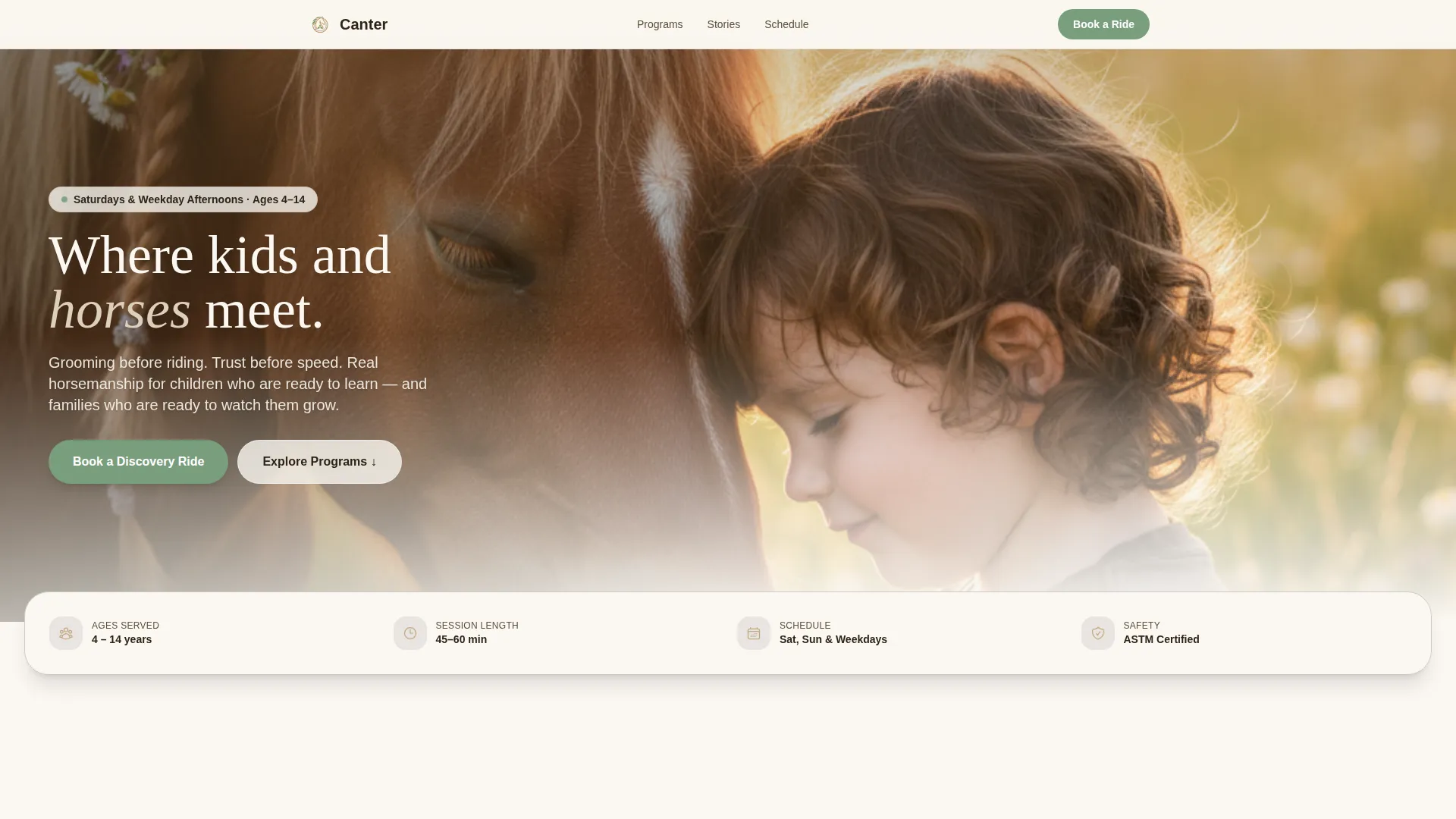
- A hero section with an isometric illustrated academy map featuring clickable buildings, animated details, and a floating stats strip
- Four progressive curriculum stations, each with a skill checklist, a looping illustration, and an expandable accordion revealing real pedagogical depth
- A three-step inline booking scheduler, a social proof section with parent testimonials and trust metrics, and an email-capture Parent Guide section
Feature list
This template packages a specific set of interactive and visual components. Each one is designed to serve a parent who is deciding, not just browsing.
Isometric Illustrated Academy Map
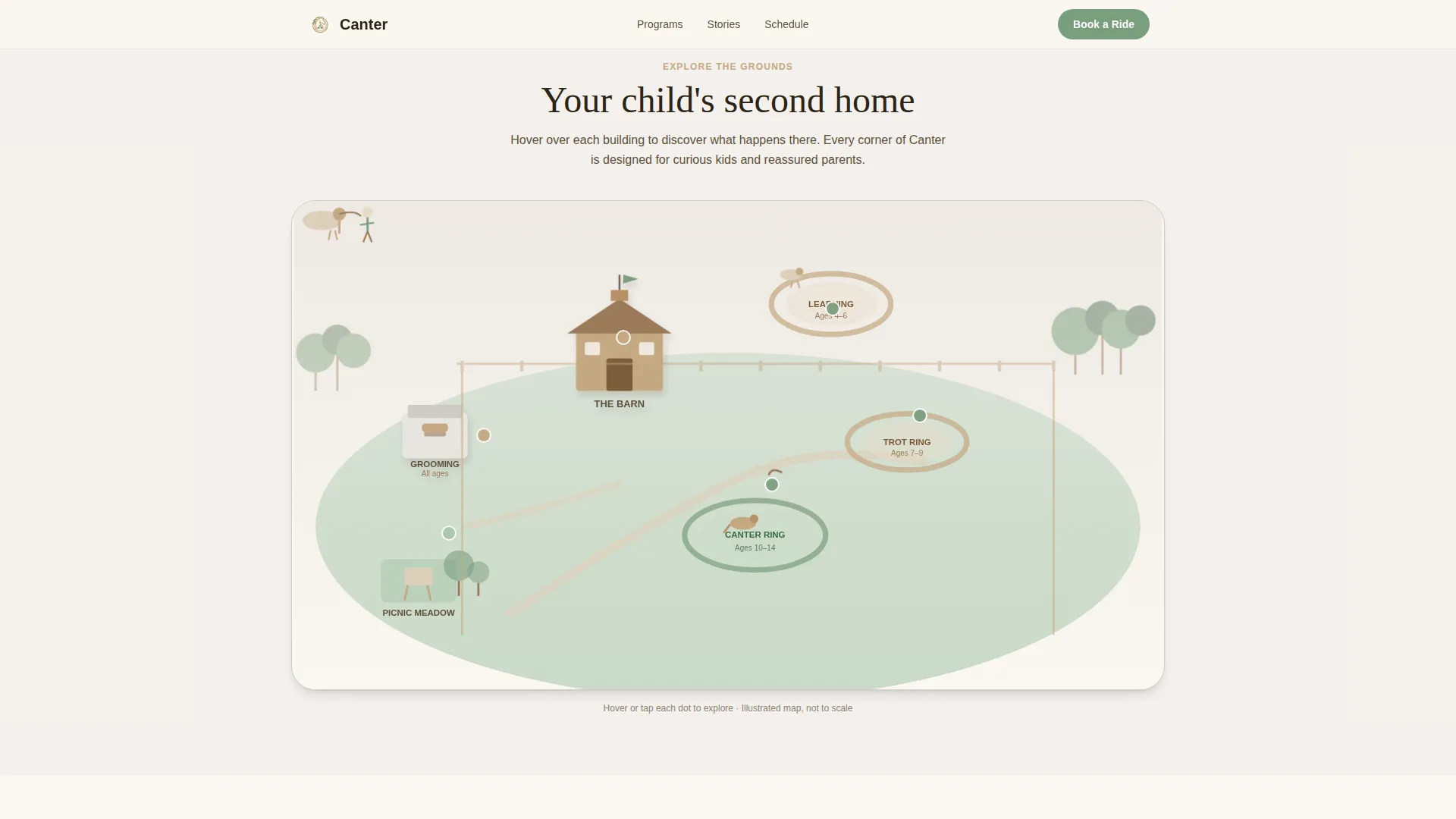
The hero header renders the academy grounds as an isometric illustrated map. The barn, three riding rings, a grooming station, a picnic area, and tree-lined trails are all visible. Tiny animated details include a horse flicking its tail and a flag rippling on the barn cupola. Each building is clickable and reveals a tooltip showing a program name and age range.
Four-Station Curriculum Explorer
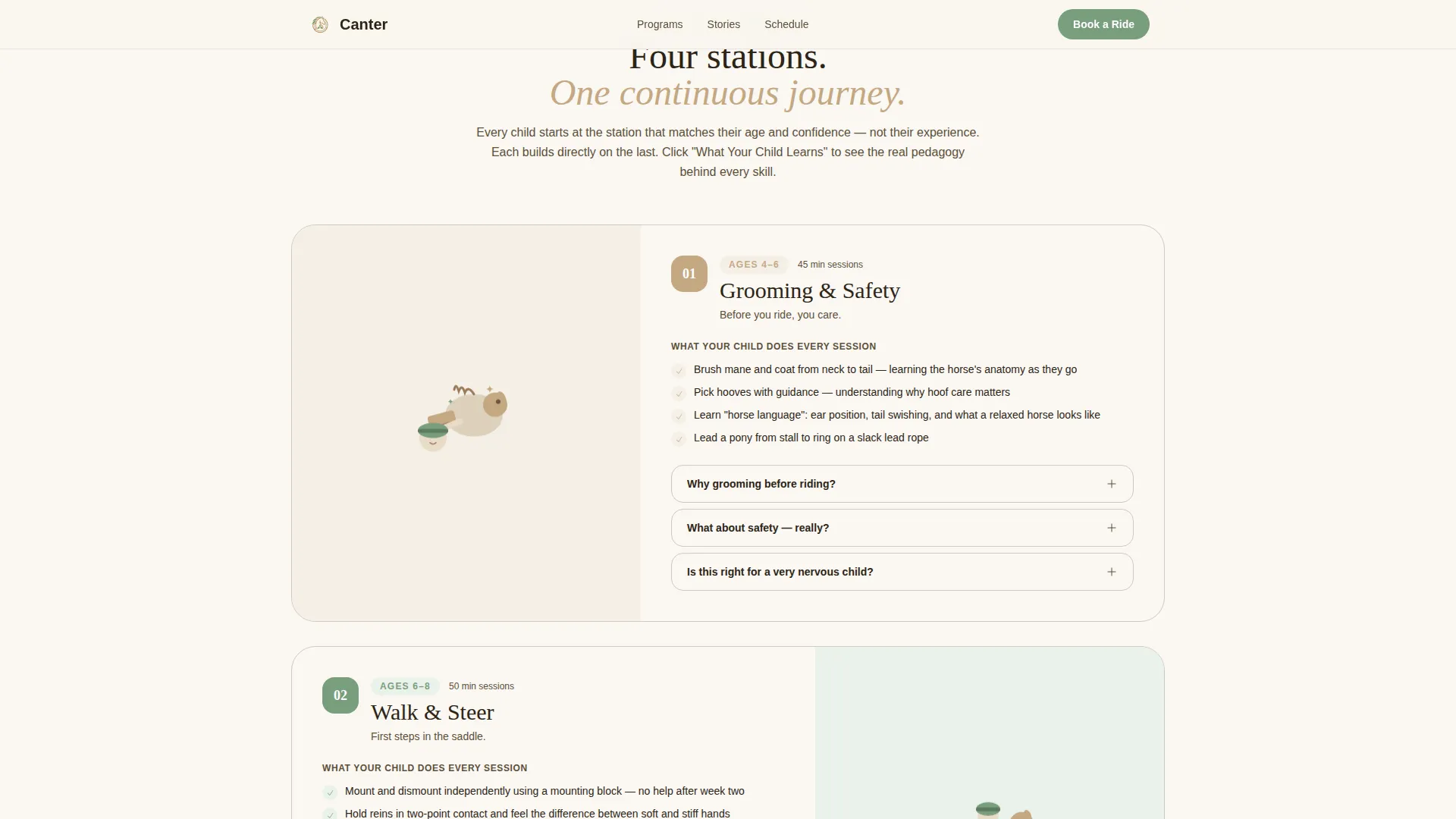
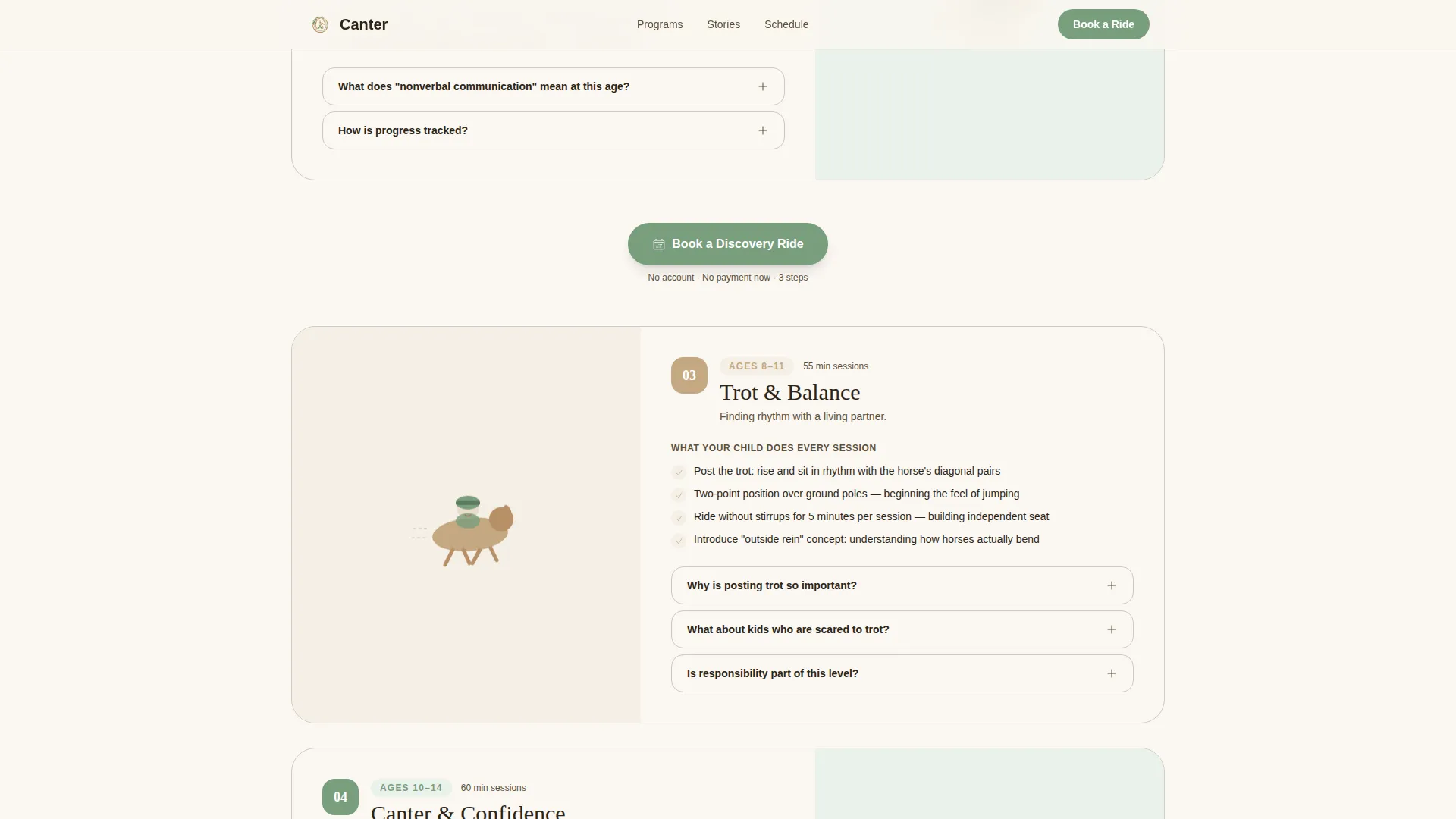
The page scrolls like a trail ride through four learning stations: Grooming and Safety, Walk and Steer, Trot and Balance, and Canter and Confidence. Each station includes a short looping illustration, a plain-language skill checklist, and an expandable accordion with real pedagogical detail covering proprioception, responsibility, and nonverbal communication with animals.
Three-Step Inline Booking Scheduler
The primary call to action opens a lightweight inline scheduler directly on the page. Step one is an age slider from 4 to 14. Step two is a day picker with Saturday and Sunday toggles plus weekday afternoon options. Step three collects a parent name and phone number. No account creation is required.
Sticky Mobile Booking Button
On mobile, the "Book a Discovery Ride" button stays anchored at the bottom of the screen throughout the scroll. It also reappears inline after every second curriculum station, so the prompt to book is always within one tap regardless of where a parent pauses.
Parent Guide Email Capture
A dedicated section offers a downloadable PDF called the Parent Guide. It covers what to wear, what to expect on arrival, and how horses are matched to beginners. Families who are not yet ready to book can leave their email here, giving the academy a secondary conversion path.
Scroll-Reveal Animations and Accordion Interactions
Sections animate into view as the visitor scrolls, keeping the pace unhurried and engaging. The curriculum station accordions expand smoothly to reveal deeper learning content. The isometric map tooltips appear on tap or click without navigating away from the page.
Page sections overview
| Section | Purpose |
|---|---|
| Hero map header | Introduce the academy through an interactive isometric illustrated map with animated details and clickable building tooltips |
| Floating stats strip | Display aggregate trust metrics such as kids served and years of operation directly below the hero |
| Curriculum station one | Present Grooming and Safety with a skill checklist and expandable learning accordion |
| Curriculum station two | Present Walk and Steer with a skill checklist, looping illustration, and accordion detail |
| Booking call to action repeat | Prompt parents to book after the second curriculum station with an inline scheduler trigger |
| Curriculum station three | Present Trot and Balance with a skill checklist and pedagogical accordion |
| Curriculum station four | Present Canter and Confidence with a skill checklist and expandable accordion |
| Social proof section | Show parent testimonials with child ages and aggregate trust metrics |
| Inline booking scheduler | Guide parents through a three-step session booking flow without leaving the page |
| Parent Guide capture | Offer a downloadable PDF in exchange for an email address for families not ready to book |
| Footer | Display a linear single-row footer with key links and contact information |
Design & branding system
Canter uses the Soft Mist color system to create an atmosphere that feels like an early countryside morning before the dew burns off. The palette is gentle and purposeful, with each color assigned a specific role across the layout.
- Paddock fence cream (#FAF7F2) dominates backgrounds, fog gray (#E8E4E1) frames section dividers and card containers, and worn saddle tan (#C4A882) warms headlines and icon strokes
- Clover green (#7A9E7E) draws attention to every interactive element including buttons, progress indicators, and calls to action
- Typography pairs DM Sans for body text with Fraunces, a serif display face, for headings, giving the page an educational warmth that feels neither clinical nor childish
Mobile & speed optimization
The template is built mobile-first because parents are most likely to discover and book on a phone during a Saturday morning. Every interactive component is designed to work cleanly on a small screen.
- The booking scheduler, accordion stations, and isometric map tooltips all function as touch interactions without requiring a desktop to complete
- The sticky "Book a Discovery Ride" button remains visible at the bottom of the mobile screen throughout the entire scroll journey
- The layout uses static site generation with client-side components only for interactive booking elements, keeping the page lean and fast to load on a mobile connection
How this template helps you convert
Canter earns the booking before it asks for one. The page is structured as a trust-building journey rather than a brochure with a button at the end.
- The isometric academy map orients parents visually before they read a word, building familiarity and reducing anxiety about an unfamiliar environment
- The four progressive curriculum stations show exactly what a child will learn at each stage, giving parents the confidence that the program is structured and real
- The two-path conversion design lets ready parents book in three steps while hesitant families capture value through the Parent Guide, so no warm lead leaves empty-handed
Other information about this template
Canter is categorized under Kids and Family, with a specific focus on the kids horseback riding niche. The template is part of a broader Educational Guide theme collection that pairs illustrated, interactive designs with booking-focused layouts for local children's services.
- The template style is a single-column flow, making it straightforward to adapt for any riding academy regardless of size or location
- The design direction is Interactive Explorer, meaning the scroll experience is structured as a discovery journey rather than a static information dump
- The header concept is Isometric, a specific illustrated header format that creates a miniature wayfinding map experience unique to this template
- Localization defaults are set for the United States, using USD currency formatting and MM/DD/YYYY date display in the booking scheduler
Theme
Educational Guide
Creative direction
Interactive Explorer
Color system
Soft Mist
Style
Single Column Flow
Direction
Booking/Scheduling
Page Sections
Isometric Illustrated Academy Map
Four-station Curriculum Explorer
Three-step Inline Booking Scheduler
Sticky Mobile Booking Button
Parent Guide Email Capture
Scroll-reveal Animations and Accordion Interactions
Related questions
Does this template require any coding knowledge to set up?
Can I change the age range shown in the booking scheduler?
What is the Parent Guide section and how does it work?
Is the template suitable for a riding school that runs weekday classes only?
How many curriculum stations does the template include?



